
Browser and build tools
- Lesson 4
- 55 min
- Module 1: Web foundations bridge
Lesson 4 of 19 · Frontend Architecture and Performance for AI AppsBrowser and build tools
1. Web foundations bridge
2. Components and application structure
3. Data fetching and state management
4. AI-specific interaction states
5. Performance and scalability
6. Security, accessibility and handoff
What you will be able to do
Move the first page into the tools of a real project. They are npm for packages, a development server, TypeScript for checks before the code runs, tests and a production build. And know where each piece of code runs, because the browser and the server have different rules.
Before you startWhat to know and to have ready
What you need to know
- The first page and its script,
bridge/, from HTML and CSS essentials and JavaScript essentials. - CORS and the same-origin rule, from Browser access and CORS. This lesson uses them from the other side: the page’s side.
What you need on your computer
~/projects/ticket-deskwithbridge/, and the mock API running in terminal 1.- A connection:
npm installdownloads about 64 MB of packages.
At the end, your folder is the snapshot end-of-m01.
The page in the browser’s tools
Section titled “The page in the browser’s tools”You wrote bridge/index.html with one list item, “Loading…”. The page now shows ten items. So where are they? Not in the file: the file did not change. They are in the DOM, the browser’s live tree of the page’s elements, which app.js changed.
The browser’s developer tools show that tree. Open http://127.0.0.1:8100/, open the developer tools, and select the Elements tab:
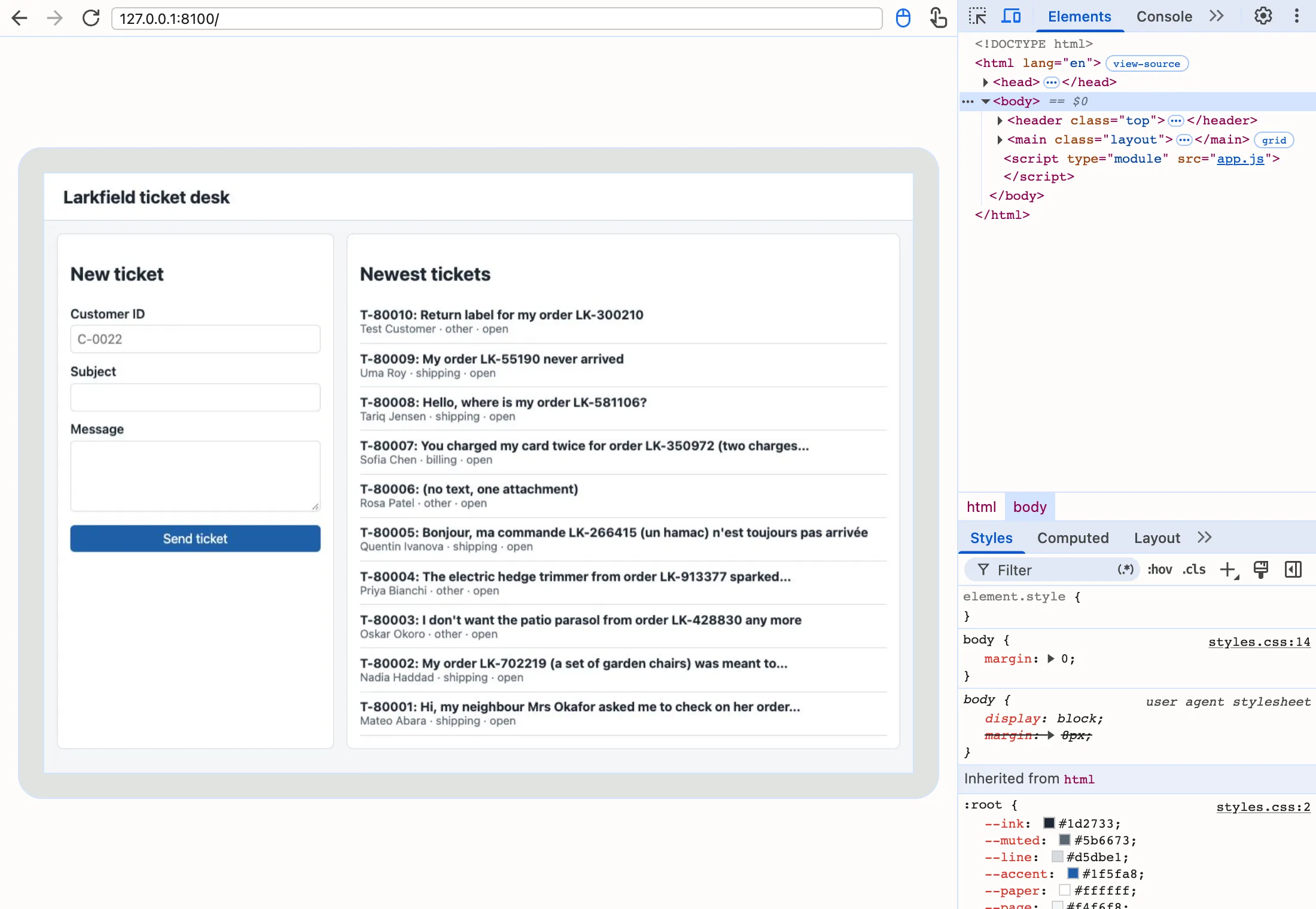
Open <main>, then the second <section>, then <ul>, with the small triangles: the list holds ten <li> elements. The Elements panel is the DOM as it is now. View page source (right-click on the page) shows the file as the server sent it, with “Loading…”. In the Console tab, you can ask the DOM questions with JavaScript. Type this, and press Enter:
document.querySelectorAll('#tickets li').lengthIt answers 10. When a page shows something unexpected, look at the DOM first, then at the Network tab for the requests. The DOM tells you what the page has; the Network tab tells you what the server sent.
The problem: one folder of files does not scale
Section titled “The problem: one folder of files does not scale”The first page works with three files and no tools. Grace’s real screen needs much more: a list of thousands of tickets, a ticket view, a streamed draft, tests. Sam lists what goes wrong if they continue in the same way:
- Mistakes appear only when the code runs. Write
ticket.subjetinstead ofticket.subject, and the list showsundefinedinstead of a subject. No message, no warning: the agent finds the mistake. - Other people’s code. Module 2 uses React, a library of about 64 kB (compressed) that Sam will not write. It must be downloaded, in an exact version, on every computer of the team.
- Production is different. The real screen should be small files that load fast, not the files as Sam types them.
A cook in a busy kitchen has the same problems. She writes her recipes with exact brands and amounts, so another cook can make the same dish. She tastes while she cooks, and she plates the final dish differently from the pan. The tools of this lesson do these three jobs: npm keeps the exact list of ingredients, the development server lets you taste while you work, and the build plates the dish.
npm: the packages and their exact versions
Section titled “npm: the packages and their exact versions”A package is code that someone published for others to use, such as Vite or React. npm (it came from “Node Package Manager”) downloads packages from the npm registry, a public store, into the folder node_modules. It reads the list of packages from package.json, the project’s description.
Copy these files from the snapshot end-of-m01 into your ticket-desk folder: package.json, package-lock.json, .env.example, index.html, tsconfig.json, vite.config.ts, README.md (it now describes the page too), and the folder src. In terminal 2, in the ticket-desk folder:
S=../nextia-learning-labs/C22/snapshots/end-of-m01cp $S/package.json $S/package-lock.json $S/.env.example $S/index.html $S/tsconfig.json $S/vite.config.ts $S/README.md .cp -R $S/src .$S = "..\nextia-learning-labs\C22\snapshots\end-of-m01"Copy-Item "$S\package.json", "$S\package-lock.json", "$S\.env.example", "$S\index.html", "$S\tsconfig.json", "$S\vite.config.ts", "$S\README.md" .Copy-Item -Recurse "$S\src" .The commands expect the labs repository next to ticket-desk, in ~/projects. Then read package.json:
{ "name": "ticket-desk", "version": "0.1.0", "private": true, "description": "Larkfield's help-desk interface: the running project of the frontend course of Nextia Learning.", "license": "MIT", "type": "module", "engines": { "node": "^22.22.2 || >=24.15.0" }, "scripts": { "api": "node mock-api/server.mjs", "dev": "vite", "build": "tsc --noEmit && vite build", "preview": "vite preview", "typecheck": "tsc --noEmit", "test": "node --test \"mock-api/*.test.mjs\" && vitest run" }, "devDependencies": { "typescript": "7.0.2", "vite": "8.3.4", "vitest": "5.0.3" }}Three parts matter:
scriptsare short names for commands.npm run devrunsvite;npm testruns both sets of tests.npm run apirunsnode mock-api/server.mjs: from now on, you can start the mock API with it. A new person does not need to know the long commands.devDependenciesare the packages that the project needs while you build it: TypeScript, Vite and Vitest. Each has an exact version, such as8.3.4, so every computer gets the same code."type": "module"says that the.jsfiles are modules, as in the last lesson.
Each of the three packages needs other packages, which need others again. package-lock.json records the exact version of every one of them. Commit both files; never edit the lock file by hand.
Install them, in terminal 2:
npm installThe author’s run printed this. The course team’s computer had the packages in npm’s cache, so it took less than a second. Your first install downloads them and takes longer:
added 38 packages, and audited 39 packages in 422ms
12 packages are looking for funding  run `npm fund` for details
found 0 vulnerabilitiesnpm warn allow-scripts 1 package has install scripts not yet covered by allowScripts:npm warn allow-scripts   fsevents@2.3.3 (install: (install scripts present))npm warn allow-scriptsnpm warn allow-scripts Run `npm approve-scripts --allow-scripts-pending` to review, or `npm approve-scripts <pkg>` to allow.
You asked for three packages, and npm added 38. That is normal: Vite and Vitest bring their helpers. The warning appears on macOS only. fsevents is a macOS helper that tells Vite when a file changes. npm did not run its install script, because nobody approved it. Vite works without it: every command in this course ran with this warning. You can ignore it.
node_modules is now 64 MB. It grows as the course adds packages, and it is never committed: .gitignore lists it, and npm install makes it again from the lock file.
Text description of the chart
A column chart of the size of node_modules at the end of each module. It is 64 MB after Module 1, 107 after Module 2, 114 after Modules 3, 4 and 5, and 135 after Module 6. The biggest steps are React and its testing tools in Module 2, and the end-to-end test tool in Module 6. None of these megabytes goes to the browser as they are: the build takes only the code that the page uses.
A development server: Vite
Section titled “A development server: Vite”Why not open index.html as a file, by double-clicking it? Because a browser loads modules only from a server, and it does not understand TypeScript. A development server is a small server for your own computer while you work. It sends the project’s files to the browser, and turns each file into what the browser understands on the way. It also reloads the page when you save a file. This course uses Vite.
Start it in a third terminal, terminal 3. Terminal 1 keeps the mock API running.
npm run dev VITE v8.3.4 ready in 100 ms
➜ Local: http://localhost:5173/ ➜ Network: use --host to exposeOpen http://localhost:5173/. You see the same page as before, now built from index.html and src/main.ts, with the shared styles of the course. src/main.ts is bridge/app.js again, in TypeScript: it loads the ten newest tickets and sends the form with FormData and fetch. Its requests live in src/api.ts, and the next section looks at its types.
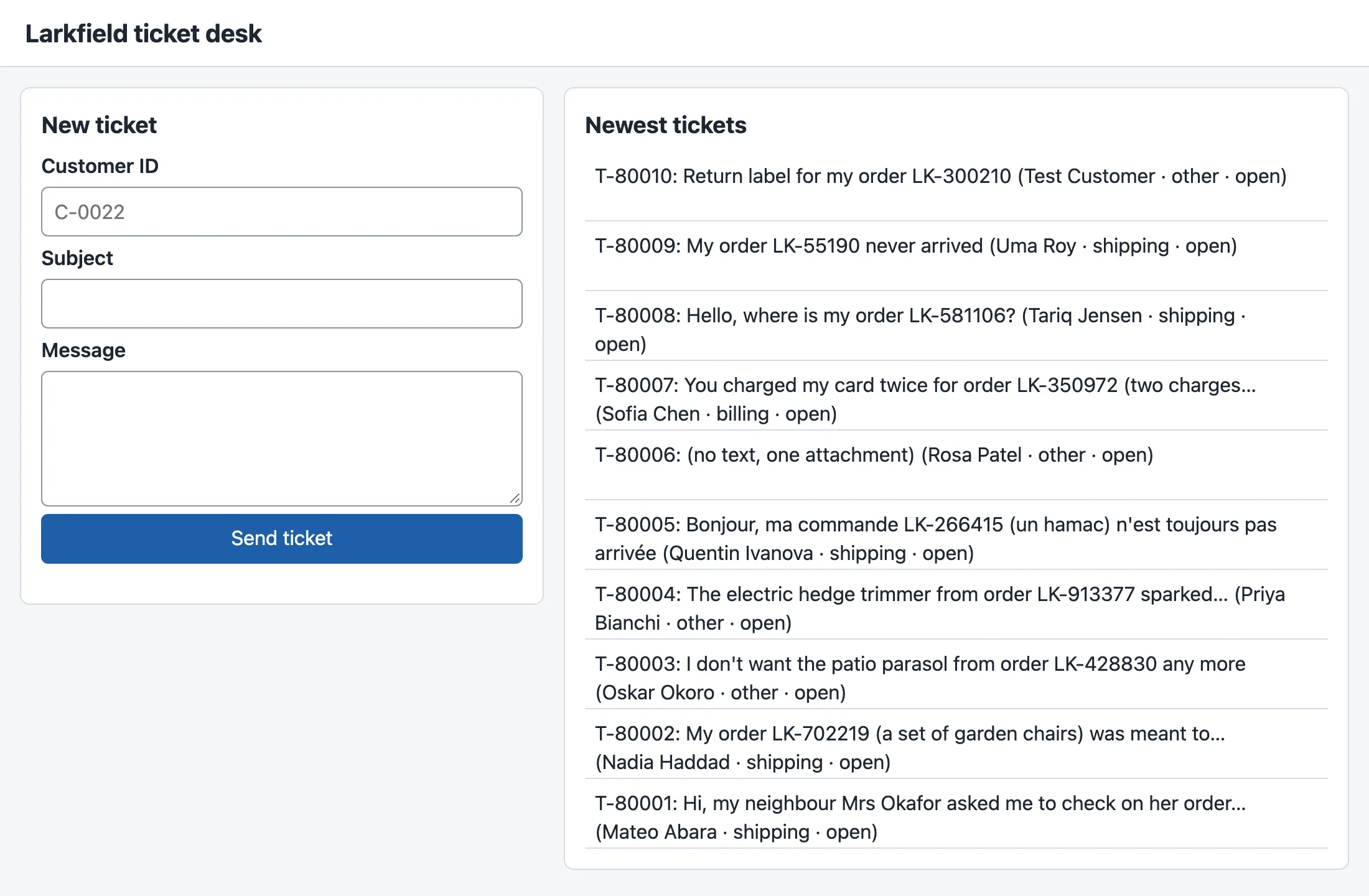
Two servers now run on your computer, with different jobs. Vite sends the page’s files. The mock API sends the data. In production, Vite does not run at all: the build makes plain files that any web server can send.
TypeScript: mistakes found before the code runs
Section titled “TypeScript: mistakes found before the code runs”Remember the ticket.subjet mistake: JavaScript gives undefined and continues. TypeScript is JavaScript with types: notes that say what shape each value has. A tool reads the notes and checks the code before it runs. The types of the API’s data are in src/types.ts:
export interface TicketSummary { ticket_id: string; customer_id: string; customer_name: string; subject: string; team: string; priority: number; status: string; created_at: string;}An interface names the fields of an object and the type of each one: string for text, number for numbers. src/api.ts uses it: function ticketLine(ticket: TicketSummary): string says “this function takes a ticket summary and gives back text”.
Now make the mistake on purpose. In src/api.ts, change ticket.subject to ticket.subjet in ticketLine, save, and run the type check:
npx tsc --noEmitsrc/api.ts(33,41): error TS2551: Property 'subjet' does not exist on type 'TicketSummary'. Did you mean 'subject'?The checker gives the file, the line (33), the column (41) and even the fix. npx runs a program from node_modules; tsc is the TypeScript checker, and --noEmit means “check only”. Change the word back, and the check prints nothing: no errors.
The types exist only for the check. The browser never sees them: Vite removes them when it sends a file. So TypeScript costs no time in the browser. It costs some time at your desk: you write the types, and you keep them the same as the API’s contract.
Tests and the production build
Section titled “Tests and the production build”The project has two kinds of tests. The mock API’s 21 checks run with Node.js. src/api.test.ts checks the page’s code with Vitest, a test runner for Vite projects. One of its tests:
test('loadTickets fails with the status when the API answers an error', async () => { vi.stubGlobal('fetch', async () => new Response('{}', { status: 503 })); await expect(loadTickets(10)).rejects.toThrow('The API answered 503');});vi.stubGlobal replaces fetch with a fake that answers 503 at once, so the test needs no API. Run all the tests:
npm testThe output lists the 21 checks of the mock API, then Vitest’s summary:
ℹ tests 21ℹ pass 21... Test Files 1 passed (1) Tests 4 passed (4)Then build the files for production:
npm run buildvite v8.3.4 building client environment for production...transforming...✓ 6 modules transformed.rendering chunks...computing gzip size...dist/index.html 1.38 kB │ gzip: 0.62 kBdist/assets/index-Cq7Ckq9E.css 4.20 kB │ gzip: 1.48 kBdist/assets/index-jgaqHoif.js 1.91 kB │ gzip: 0.98 kB
✓ built in 206ms
Text description of the diagram
npm run build runs two programs. First, tsc --noEmit checks the types of all the files in src/; it writes nothing. If it finds an error, the build stops, and you fix the code. If not, vite build removes the types, joins the modules into one JavaScript file and makes it smaller. It writes the result to dist/: an HTML file of 1.38 kB, a JavaScript file of 1.91 kB and a CSS file of 4.20 kB.
dist/ is what a real web server would send. The JavaScript is 1.91 kB, and 0.98 kB after gzip, the compression that servers use on the way. The file names have a hash, a code made from the content, such as index-jgaqHoif.js. When the content changes, the name changes, so a browser never uses an old copy. Module 5 measures these files when the app is much bigger.
Two addresses: where the CORS check happens
Section titled “Two addresses: where the CORS check happens”Look at the first lines of src/api.ts:
export const API_URL: string = import.meta.env.VITE_API_URL ?? 'http://127.0.0.1:8100';The page comes from http://localhost:5173, and the data from http://127.0.0.1:8100. These are two origins: an origin is the scheme, the host and the port together. So the paths cannot start with / any more, as in bridge/app.js: the page uses the API’s full address. import.meta.env.VITE_API_URL reads a setting from a file .env, if you make one from .env.example; ?? gives the default when there is none.
A browser does not let a page read an answer from another origin, unless the server allows it. That is the same-origin rule and CORS (Cross-Origin Resource Sharing), from Browser access and CORS. The mock API allows http://localhost:5173 and http://localhost:4173. See it from the terminal, as the browser sends it, with an Origin header:
curl -i -X POST http://127.0.0.1:8100/v1/tickets -H "Content-Type: application/json" -H "Origin: http://localhost:5173" -d '{"customer_id": "C-0022", "subject": "Parcel lost", "body": "It did not arrive."}'HTTP/1.1 202 AcceptedX-Request-ID: 2a596651-427e-45a5-b167-c14804cfbfb1Access-Control-Allow-Origin: http://localhost:5173Vary: OriginAccess-Control-Expose-Headers: Location, Retry-After, X-Request-ID, Idempotent-ReplayedContent-Type: application/jsonLocation: /v1/jobs/1...
{"ticket_id":"T-500001","job_id":1,"state":"queued","status_url":"/v1/jobs/1","queued_ahead":0,"estimated_wait_seconds":3.7}On Windows PowerShell, use curl.exe, and put the JSON in a file as Inspect a request shows; the quotes work differently there. Now ask from an origin that the API does not allow:
curl -i "http://127.0.0.1:8100/v1/tickets?limit=1" -H "Origin: http://evil.example"HTTP/1.1 200 OKX-Request-ID: f87a16c3-f5bc-4254-885b-b61d37c128c7Content-Type: application/json...The API answered 200 with the data, but with no Access-Control-Allow-Origin header. curl shows the data anyway; a browser would hide it from the page. So the check happens in the browser, to protect the user, not in the API. The diagram puts all the pieces of this module in their places.

Text description of the diagram
The left area is the browser, and everything in it is public: the HTML, the CSS, the JavaScript and the DOM. It talks to two servers. Vite sends the page’s files (in production, any web server sends dist/). The mock API sends the data. The browser gives an API answer to the page only if the Access-Control-Allow-Origin header names the page’s origin: that is the CORS check. The API answers anyway, so it must check every request itself.
The same picture answers the module’s main question: which code runs where? HTML, CSS and JavaScript run in the browser. The person at the browser can read every line, every VITE_ setting, and every request in the Network tab. So a key, a password or any rule that must be enforced belongs on a server, never in the page. .env.example says so in its first lines: Vite puts each VITE_ value into the JavaScript that the browser downloads. A later lesson on browser security shows this with a fake key.
When to use the tools, and what they cost
Section titled “When to use the tools, and what they cost”Use npm, a development server and TypeScript for any page that grows beyond a few files, or that a team shares. The lock file gives everyone the same packages, and the type check finds a class of mistakes before any agent does.
They are not free. node_modules takes 64 MB now and 135 MB at the end of the course. Every package is code from other people that you trust; npm install reports known vulnerabilities, here found 0. And the build is one more step that can fail. For one page with a short script, the bridge/ way, with no tools, is fine.
Common mistakes
Section titled “Common mistakes”Common mistake
The page runs on another port, and the list fails: a CORS error
Symptom: port 5173 is busy, so Sam starts Vite on another one: npm run dev -- --port 5174. The page opens at http://localhost:5174/, but the list says:
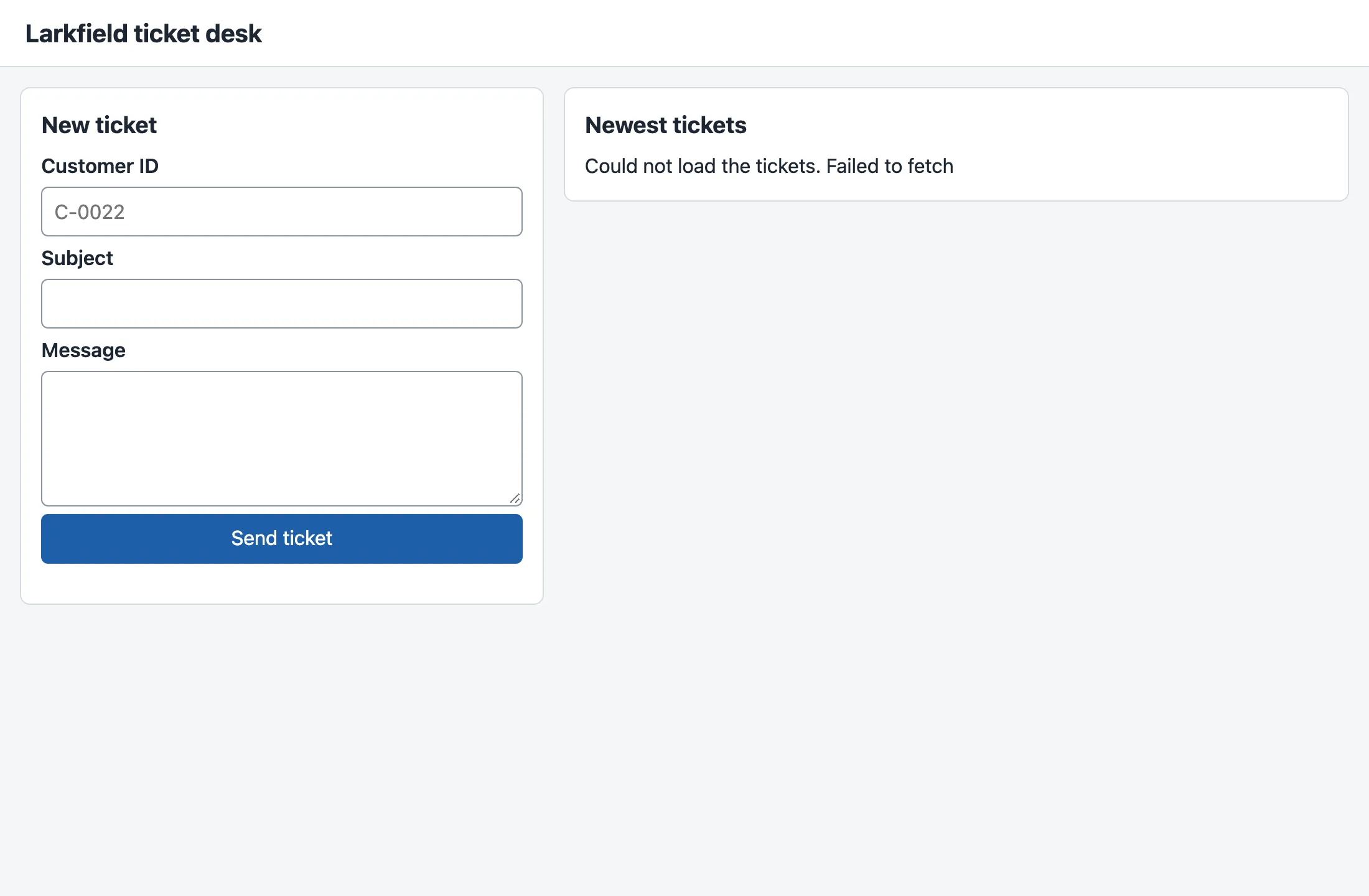
The developer tools’ Console tab says why:
Access to fetch at 'http://127.0.0.1:8100/v1/tickets?limit=10' from origin 'http://localhost:5174' has been blocked by CORS policy: No 'Access-Control-Allow-Origin' header is present on the requested resource.Failed to load resource: net::ERR_FAILEDCause: the mock API allows only http://localhost:5173 and http://localhost:4173. A different port is a different origin, so the answer has no Access-Control-Allow-Origin header for it, and the browser does not give it to the page. For the page’s code, this looks exactly like a network failure: fetch rejects with Failed to fetch.
Fix: use port 5173, or allow the new origin. The mock API reads the allowed origins from the setting CORS_ORIGINS when it starts. Stop it in terminal 1, and start it again with both origins:
CORS_ORIGINS=http://localhost:5173,http://localhost:5174 node mock-api/server.mjs$env:CORS_ORIGINS = "http://localhost:5173,http://localhost:5174"node mock-api/server.mjsReload the page: the ten tickets appear. Allow only the origins that you use. A real API keeps this list short, as the API course explains.
Guided practice: a form that calls the API
Section titled “Guided practice: a form that calls the API”This is the module’s worked example: a small page with a form that calls the mock API and shows its answer. Follow it with every intermediate value visible. It reads one ticket by its ID.
-
Make
bridge/find.html, a page with one form. It uses the samestyles.css:bridge/find.html (the body) <main class="layout"><section aria-labelledby="find-heading" class="card"><h2 id="find-heading">Find a ticket</h2><form id="find"><label for="ticket-id">Ticket ID</label><input id="ticket-id" name="ticket_id" required pattern="T-[0-9]+" placeholder="T-80008" /><button type="submit">Find</button></form><p id="result" role="status"></p></section></main><script type="module" src="find.js"></script>The
<head>is the same as inindex.html, with the titleFind a ticket. -
Make
bridge/find.js. Eachconsole.logshows one step:bridge/find.js // Guided practice of Module 1: read one ticket by its ID and show it, or the API's error.const form = document.querySelector('#find');const result = document.querySelector('#result');form.addEventListener('submit', async (event) => {event.preventDefault();const id = new FormData(form).get('ticket_id');const url = `/v1/tickets/${encodeURIComponent(id)}`;console.log('1. request', url);result.textContent = 'Looking…';try {const response = await fetch(url);console.log('2. status', response.status);const body = await response.json();console.log('3. body', JSON.stringify(body).slice(0, 70) + '…');result.textContent = response.ok? `${body.ticket_id}: ${body.subject} (${body.status}, ${body.messages.length} messages)`: `Not found: ${body.error.message}`;} catch (error) {result.textContent = `The API did not answer. Is it running? (${error.message})`;}});encodeURIComponentmakes the typed text safe to put in an address. -
Open
http://127.0.0.1:8100/find.html, open the Console tab, typeT-80008, and select Find. -
Read the three lines in the Console, then the page.
The course team’s run printed these lines in the Console:
1. request /v1/tickets/T-800082. status 2003. body {"ticket_id":"T-80008","customer_id":"C-81265","customer_name":"Tariq …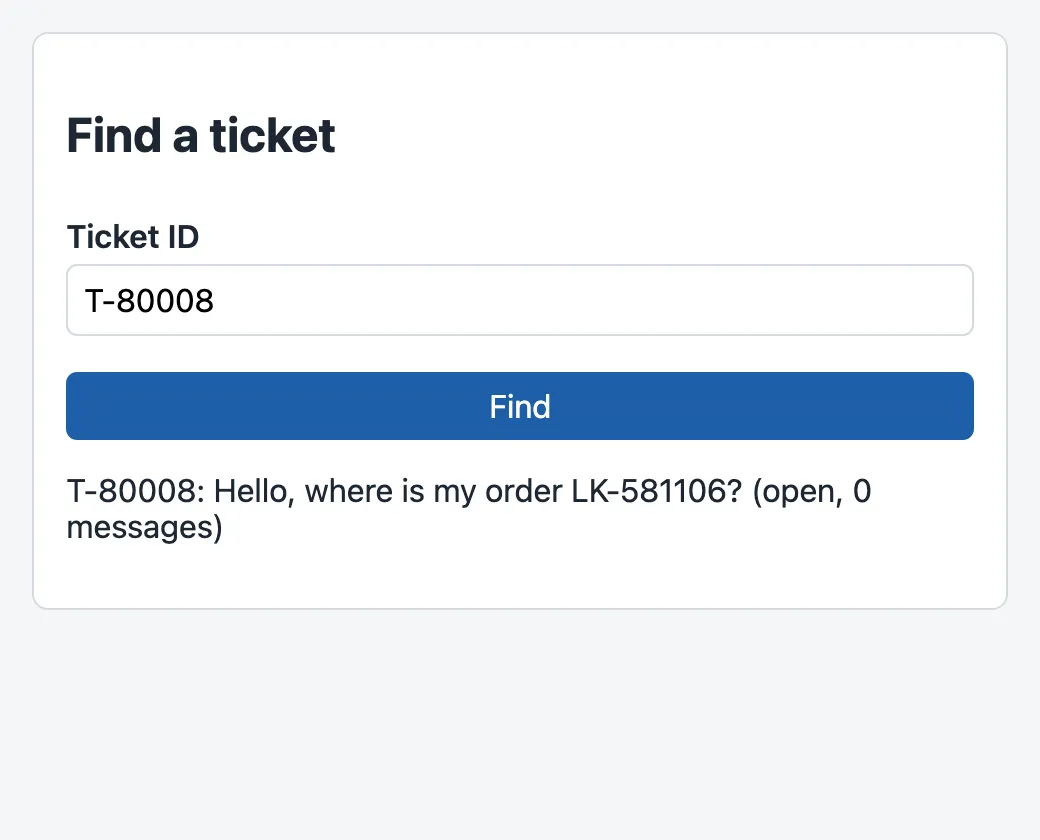
Step by step: the form’s value became the address /v1/tickets/T-80008. The API answered 200. The body is one ticket, with messages as an array, so body.messages.length is 0. Now type T-99999. The status is 404, response.ok is false, and the page shows Not found: There is no ticket T-99999., the API’s own message. The snapshot end-of-m01 does not have find.html and find.js: delete them, or keep them out of the way, when you are done.
Your turn: reply to a ticket
Section titled “Your turn: reply to a ticket”Build a second page, bridge/reply.html with bridge/reply.js. Its form has a ticket ID and a reply text. It sends POST /v1/tickets/{id}/messages with the JSON body {"author": "agent", "body": "…"}. On success (201), it shows the new message’s message_id. On an error, it shows the API’s message and the wrong fields. If the API does not answer, it says so. Test three cases, and predict each answer first: a real reply to T-80008, a reply of three spaces, and a reply to T-99999.
Show a solution
bridge/reply.html is find.html with a second field: <label for="reply-body">Reply</label> and <textarea id="reply-body" name="body" required rows="3" maxlength="5000"></textarea>, a button Send reply, and the script reply.js:
const form = document.querySelector('#reply');const result = document.querySelector('#result');
form.addEventListener('submit', async (event) => {  event.preventDefault();  const data = new FormData(form);  const id = data.get('ticket_id');  result.textContent = 'Sending…';  try {    const response = await fetch(`/v1/tickets/${encodeURIComponent(id)}/messages`, {      method: 'POST',      headers: { 'Content-Type': 'application/json' },      body: JSON.stringify({ author: 'agent', body: data.get('body') }),    });    const body = await response.json();    if (response.ok) {      result.textContent = `Saved as message ${body.message_id} on ${id}.`;      form.reset();    } else {      result.textContent = `Not saved: ${body.error.message} ${body.error.fields.length ? `Fields: ${body.error.fields.join(', ')}` : ''}`.trim();    }  } catch (error) {    result.textContent = `The API did not answer. Is it running? (${error.message})`;  }});
The course team’s run showed these answers:
| Ticket and reply | The page says |
|---|---|
T-80008, We are checking with the courier. |
Saved as message 332 on T-80008. |
T-80008, three spaces |
Not saved: The request is not valid. Fields: body |
T-99999, Hello |
Not saved: There is no ticket T-99999. |
Your message number can differ if you sent other messages before: the mock counts on from the highest number in its data. After the first reply, find.html shows T-80008 with 1 messages. Restart the API to reset it. Check your own solution against the same three cases, and also with the API stopped. The pages in this practice are not in the snapshot.
Knowledge check
Section titled “Knowledge check”Check your understanding
The Elements panel shows ten list items, but View page source shows one item, Loading…. Explain the difference.
Show the answer
View page source shows the file index.html as the server sent it, with one item. The Elements panel shows the DOM: the browser’s live tree of the page, as it is now. app.js replaced the “Loading…” item with ten new elements in the DOM; the file never changed. When a page looks wrong, the DOM is what the user sees.
Does your answer have the main points of ours?
Sign in and enroll in the course to save your answers. Every check counts toward the certificate.
Check your understanding
Predict: you run npm run build after a typing mistake in src/api.ts (ticket.subjet). What happens, and does dist/ change?
Show the answer
The build stops at its first step. npm run build runs tsc --noEmit && vite build, and tsc fails with error TS2551: Property 'subjet' does not exist on type 'TicketSummary'. Did you mean 'subject'?. The && runs vite build only when the first command succeeds, so dist/ is not written again: it keeps the files of the last good build, or stays missing.
Does your answer have the main points of ours?
Sign in and enroll in the course to save your answers. Every check counts toward the certificate.
Check your understanding
curl gets the tickets from the mock API with Origin: http://evil.example. Is that a security hole in the API's CORS setting? Explain.
Show the answer
No. CORS is a rule that the browser follows to protect its user: it hides the answer from a page whose origin the API did not name. The API still answers every request. curl does not follow the rule, so it shows the data. CORS never protects the data from a client outside a browser. If the data must be protected, the API must check who is asking, with authentication and authorization, on the server.
Does your answer have the main points of ours?
Sign in and enroll in the course to save your answers. Every check counts toward the certificate.
Check your understanding
Module completion check: explain which code of the ticket desk runs in the browser, and which code must run on a server. Give one example of something that must never be in the browser, and say why.
Show the answer
In the browser: bridge/index.html, styles.css and app.js, and the TypeScript page after Vite’s build (dist/). The browser downloads them, builds the DOM, and runs the JavaScript on the user’s computer. On a server: the mock API (mock-api/server.mjs, with Node.js). It keeps the tickets, checks every request again and decides the answer. A web server sends the files (Vite while you work). The user controls the browser: they can read every line of the script, every VITE_ value and every request in the Network tab, and they can change or skip any check. So an API key or a password must never be in the browser. A rule that must hold, such as who may read a ticket, belongs on the server, even if the page checks it too.
Does your answer have the main points of ours?
Sign in and enroll in the course to save your answers. Every check counts toward the certificate.
Recap
- The DOM is the browser’s live tree of the page; the Elements panel shows it, and the Network panel shows the requests.
- npm installs the packages of
package.json(TypeScript 7.0.2, Vite 8.3.4, Vitest 5.0.3) at the exact versions ofpackage-lock.json. That is 38 packages and 64 MB, never committed. - Vite serves the page while you work (
npm run dev,http://localhost:5173) and builds it for production (npm run build: 1.91 kB of JavaScript, 0.98 kB gzip). - TypeScript adds types that
tsc --noEmitchecks before the code runs:ticket.subjetbecameerror TS2551. The browser never sees the types. - The page and the API have different origins, so the browser’s CORS check decides whether the page may read an answer. The API answers anyway: CORS protects the user, not the data.
Module 1 in one paragraph. You ran the mock ticket API on your computer with Node.js. You asked it for tickets with curl and the browser. You wrote the first page with semantic HTML, labelled fields and a responsive CSS grid. You made it work with JavaScript: objects and arrays, functions, modules, a submit event, and fetch with await. The page loads ten tickets and sends a new one (202, T-500001). Then you moved it to npm, Vite and TypeScript, with 25 passing tests and a 1.91 kB build. And you can say where each piece runs: the page in the browser, in public; the data and every rule that must hold, on the server.
Next, Module 2 builds the interface from React components.
Next: React basics