
Test and deliver
- Lesson 19
- 55 min
- Module 6: Security, accessibility and handoff
Lesson 19 of 19 · Frontend Architecture and Performance for AI AppsTest and deliver
1. Web foundations bridge
2. Components and application structure
3. Data fetching and state management
4. AI-specific interaction states
5. Performance and scalability
6. Security, accessibility and handoff
What you will be able to do
Prove that the desk works before you hand it over. You test each part with a fake API and run one end-to-end flow in a real browser, on a desktop and a phone screen. Then you check the production build and write down what the next developer needs.
Before you startWhat to know and to have ready
What you need to know
- Component tests with Testing Library and the fake API in
src/test/fakeApi.ts, from React basics and Query lifecycle. - The secret check and the focus rules, from Browser security boundaries and Accessible interaction.
- The measurements of Measure the browser and Load less work.
What you need on your computer
- The project after Accessible interaction:
npm testends withℹ pass 27andTests 48 passed (48). - About 200 MB of free disk space for the browser that Playwright downloads, and a network connection for that download.
- Stop
npm run apiandnpm run devbefore the end-to-end steps: the flow starts its own servers on ports 8100 and 4173.
Tested on macOS (Apple silicon) with Node.js 24 in Chromium. The commands are the same on Windows and Linux, but there they are not tested. Firefox, Safari and real phones are not tested.
Selling a car
Section titled “Selling a car”A car factory tests every part on a bench: the brakes, the lights, the engine, each one alone and many times. Then one driver takes the finished car for a drive on a real road. Before the sale, an inspector checks the papers, and the buyer gets a manual. No single check is enough. A perfect brake on the bench says nothing about a brake cable that was never connected.
The problem: 75 checks pass, and the desk shows nothing
Section titled “The problem: 75 checks pass, and the desk shows nothing”Tomás wants the API’s logs to show which version of the desk sent each request. He adds one header in src/api/client.ts (a constructed change; do not keep it):
headers: { 'X-Desk-Version': '1.0.0', ...(init.body ? { 'Content-Type': 'application/json' } : {}), ...init.headers },He runs npm test: ℹ pass 27 and Tests 48 passed (48). Every check is green. Then he opens the desk:
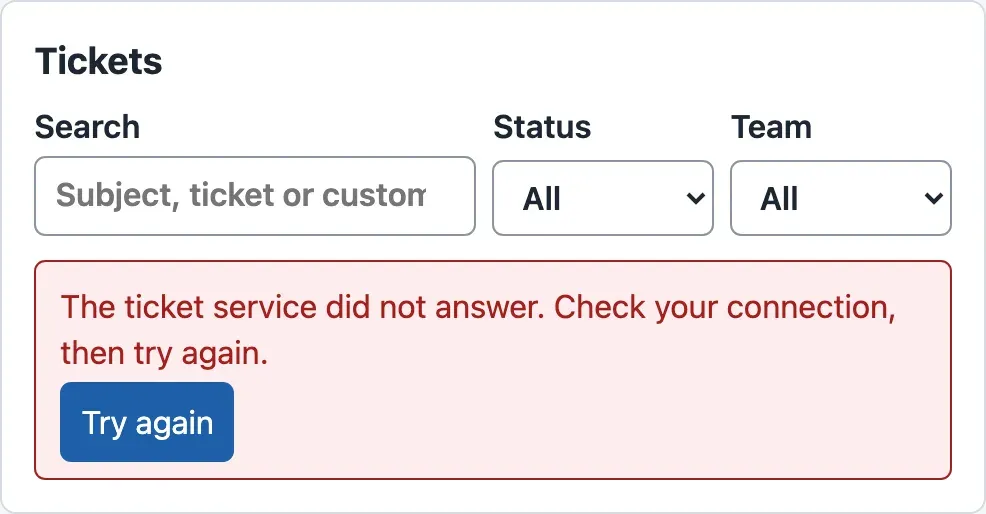
The browser’s console explains it:
Access to fetch at 'http://127.0.0.1:8396/v1/tickets?limit=50' from origin 'http://localhost:4396' has been blocked by CORS policy: Request header field x-desk-version is not allowed by Access-Control-Allow-Headers in preflight response.(The course team ran the desk on other ports; yours are 8100 and 5173.) A request with a header of its own makes the browser ask the API first, with an OPTIONS request called a preflight. The mock API allows only three headers:
curl -i -X OPTIONS http://127.0.0.1:8100/v1/tickets -H "Origin: http://localhost:5173" -H "Access-Control-Request-Method: GET" -H "Access-Control-Request-Headers: x-desk-version"HTTP/1.1 204 No ContentAccess-Control-Allow-Origin: http://localhost:5173Access-Control-Allow-Methods: GET, POST, PATCHAccess-Control-Allow-Headers: Content-Type, Idempotency-Key, X-Request-IDSo why did 48 component tests pass? Because they never use a browser’s network. installFakeApi replaces fetch with a function that gives each test the answer it asks for. There is no API, no origin and no preflight. The fake tested every part on the bench, and the cable between the parts was never connected.
The idea: layers of checks
Section titled “The idea: layers of checks”Each kind of check proves something that the others cannot:
- A component test renders one part, such as the draft panel, in a simulated page (jsdom). It replaces the API with a fake: a stand-in that returns fixed answers. It is fast and can create any situation: a 404, a stream that breaks after two pieces, a slow answer. It cannot see the real API, the browser or the built files.
- An end-to-end test (E2E) runs the real, built desk in a real browser against the running mock API. It does what a user does, by keyboard. It sees CORS, the lazy files, the real stream timing and a phone-sized screen. It is slow, so you keep only a few, for the main tasks.
- Build checks look at what you deliver: the types, the production build, the secret check and the size report. They say nothing about behaviour, but a delivery without them is a guess.

Text description of the diagram
The diagram has four layers, stacked from narrow at the top to wide at the bottom. The top layer is the check before every delivery, npm run check: the type check and the production build take 0.6 seconds, the secret check and the size report 0.1 seconds. It proves that the files build, that no secret is in dist, and what the size is, but it cannot see whether the screens work. The second layer is the end-to-end flow with Playwright: 3 flows on 2 screens, 6 tests in about 27 seconds, with the production build, the mock API and Chromium, by keyboard. It proves that the parts work together, with real requests, CORS and a phone screen, but it cannot see Firefox, Safari or a real screen reader. The third layer is the component tests with Vitest and Testing Library: 48 tests in about 5 seconds, each part with a fake API. They prove every state of each part: loading, error, stop, interrupted, refused. They cannot see the real API, the browser or the build. The bottom layer is the mock API and script checks with node:test: 27 tests in 0.2 seconds, which prove that the practice API behaves as the contract says. A note under the layers says that once per delivery, a person checks the real screens by hand, with the keyboard and a screen reader.
- No browser
- A real browser
Text description of the chart
A column chart of the time that one run of each check takes, in seconds. The 27 mock API and script checks take 0.2 seconds. The 48 component tests take 4.8 seconds. The build checks (type check, production build, secret check and size report) take 0.7 seconds. The 6 end-to-end tests take 26.9 seconds, more than all the other checks together. Your times will differ; the shape lasts.
The chart is the reason for the shape: a check that takes 27 seconds is run less often than one that takes 5. So you test every state with fast component tests, and you keep the end-to-end flow for what only a real browser can show.
A tiny example: one component test, line by line
Section titled “A tiny example: one component test, line by line”Here is a test of the draft panel from Accessible interaction. Read every value:
test('a ticket without a draft says so', async () => { installFakeApi(() => apiError(404, 'no_draft', 'No AI draft exists for this ticket.')); render(<DraftPanel ticketId="T-30001" onUse={() => {}} />); await userEvent.click(screen.getByRole('button', { name: 'Write a draft' })); expect(await screen.findByRole('status')).toHaveTextContent('Write the reply yourself');});installFakeApi(…)replacesfetch. Every request now gets the answer404with the contract’s error shape: codeno_draft.render(…)draws the panel forT-30001in jsdom.getByRole('button', { name: 'Write a draft' })finds the button the way a screen reader does: by role and name, from the accessibility tree. If the button lost its name, the test would fail.- The test clicks it, then waits for the status, which must contain “Write the reply yourself”: the words that
src/lib/errors.tsgives forno_draft.
The test proves that the panel turns a no_draft answer into the right words. It does not prove that the real API sends no_draft. That is the job of the mock API’s own check, “a ticket without a recorded draft gives 404 no_draft”. So the fake and the contract are tested on both sides of the cable, and the end-to-end flow checks the cable itself.
Larkfield: one end-to-end flow
Section titled “Larkfield: one end-to-end flow”-
Install Playwright’s test runner at an exact version:
Terminal window npm install --save-dev --save-exact @playwright/test@1.64.0npm prints
added 3 packagesandfound 0 vulnerabilities. -
Download the browser that Playwright drives:
Terminal window npx playwright install chromiumOn the course team’s Mac, it printed
Downloading Chrome for Testing 156.0.8078.4 (playwright chromium v1248)and downloaded 185.8 MiB. If the browser is already on your computer, the command finishes at once. -
Create
playwright.config.tsin the project folder. It starts the mock API with the small data, and it builds and serves the production files. Then it runs every test on a desktop screen and a phone screen (Pixel 7 size):playwright.config.ts // One end-to-end flow in a real browser, against the production build and the mock API.// npx playwright install chromium (once: downloads the browser)// npm run test:e2e// Ports: E2E_API_PORT (8100) and E2E_WEB_PORT (4173), if those are busy on your computer.import { defineConfig, devices } from '@playwright/test';const apiPort = Number(process.env.E2E_API_PORT ?? 8100);const webPort = Number(process.env.E2E_WEB_PORT ?? 4173);const web = `http://localhost:${webPort}`;export default defineConfig({testDir: 'e2e',timeout: 60_000,workers: 1,retries: 0,reporter: [['list']],use: { baseURL: web, trace: 'retain-on-failure' },projects: [{ name: 'desktop', use: { ...devices['Desktop Chrome'] } },{ name: 'phone', use: { ...devices['Pixel 7'] } },],webServer: [{command: `node mock-api/server.mjs --size small --port ${apiPort}`,url: `http://127.0.0.1:${apiPort}/health`,env: { CORS_ORIGINS: web, MOCK_LOG: '0' },reuseExistingServer: false,},{command: `npx vite build && npx vite preview --port ${webPort} --strictPort`,url: web,env: { VITE_API_URL: `http://127.0.0.1:${apiPort}` },reuseExistingServer: false,timeout: 120_000,},],}); -
Create the folder
e2eand the filee2e/desk.spec.ts. Its three tests are the main task by keyboard, a new ticket with its job, and a failing list that recovers:e2e/desk.spec.ts // The main task, by keyboard only: find a ticket, write a draft, use it, send the reply; then a// new ticket and its background job. Runs on a desktop screen and on a phone screen.import { expect, test } from '@playwright/test';test.beforeEach(async ({ request }) => {const api = `http://127.0.0.1:${process.env.E2E_API_PORT ?? 8100}`;await request.post(`${api}/admin/reset`);});test('answer a ticket with the AI draft, by keyboard only', async ({ page }) => {await page.goto('/');await expect(page.getByText(/Showing \d+ tickets/)).toBeVisible();// Skip link, then the search box: Tab moves the focus, the keyboard types.await page.keyboard.press('Tab');await expect(page.getByRole('link', { name: 'Skip to the main content' })).toBeFocused();await page.getByRole('searchbox', { name: 'Search' }).focus();await page.keyboard.type('garden shed');const row = page.getByRole('link', { name: /T-80008/ });await expect(row).toBeVisible();await row.focus();await page.keyboard.press('Enter');// The focus moves to the ticket's heading.await expect(page.getByRole('heading', { level: 2, name: /where is my order LK-581106/i })).toBeFocused();// Write a draft with the keyboard; the focus stays on the same button.const write = page.getByRole('button', { name: 'Write a draft' });await write.focus();await page.keyboard.press('Enter');const status = page.locator('.draft [role="status"]');await expect(status).toHaveText('Draft finished. No sources.', { timeout: 15_000 });await expect(page.getByRole('button', { name: 'Write a new draft' })).toBeFocused();// The accessibility tree of the draft: what a screen reader user gets.await expect(page.locator('.draft')).toMatchAriaSnapshot(`- heading "AI draft" [level=3]- status: Draft finished. No sources.- button "Write a new draft"- button "Use this draft"- button "Discard"`);await page.getByRole('button', { name: 'Use this draft' }).focus();await page.keyboard.press('Enter');const reply = page.getByLabel('Reply to the customer');await expect(reply).toHaveValue(/garden shed/);await page.getByRole('button', { name: 'Send reply' }).focus();await page.keyboard.press('Enter');await expect(page.getByText('Sent.')).toBeVisible();await expect(page.locator('.message-agent').last()).toContainText('garden shed');});test('send a new ticket and follow its background job', async ({ page }) => {await page.goto('/#/new');await page.getByLabel('Customer ID').focus();await page.keyboard.type('C-0022');await page.keyboard.press('Tab');await page.keyboard.type('Parcel lost');await page.keyboard.press('Tab');await page.keyboard.type('My parcel did not arrive.');await page.keyboard.press('Tab');await page.keyboard.press('Enter');await expect(page.getByText(/Saved as T-500001/)).toBeFocused();await expect(page.getByText('The AI work is done.')).toBeVisible({ timeout: 20_000 });await expect(page.getByText(/Team: shipping/)).toBeVisible();});test('a slow, failing list says so in words and recovers', async ({ page, request }) => {const api = `http://127.0.0.1:${process.env.E2E_API_PORT ?? 8100}`;await request.post(`${api}/admin/mode`, { data: { list: 'fail' } });await page.goto('/');await expect(page.getByRole('alert')).toContainText('The ticket service is busy', { timeout: 15_000 });await request.post(`${api}/admin/mode`, { data: { list: 'normal' } });await page.getByRole('button', { name: 'Try again' }).click();await expect(page.getByText(/Showing \d+ tickets/)).toBeVisible();});toMatchAriaSnapshotcompares the draft panel’s accessibility tree with the one that Camille needs.admin/resetgives every test the same starting data, andadmin/modemakes the list fail on purpose (a simulated failure). -
In
package.json, replace the wholescriptsblock. It addstest:e2eandcheck, and putsbuild:profilenext tobuild:package.json (scripts) "scripts": {"api": "node mock-api/server.mjs","dev": "vite","build": "tsc --noEmit && vite build","build:profile": "tsc --noEmit && vite build --mode profile","preview": "vite preview","typecheck": "tsc --noEmit","test": "node --test \"mock-api/*.test.mjs\" \"scripts/*.test.mjs\" && vitest run","test:e2e": "playwright test","size": "node scripts/bundle-report.mjs","check:bundle": "node scripts/check-bundle.mjs","check": "npm test && npm run build && npm run check:bundle && npm run size"} -
Run the flow:
Terminal window npm run test:e2eRunning 6 tests using 1 worker✓ 1 [desktop] › e2e/desk.spec.ts:10:1 › answer a ticket with the AI draft, by keyboard only (2.9s)✓ 2 [desktop] › e2e/desk.spec.ts:54:1 › send a new ticket and follow its background job (5.2s)✓ 3 [desktop] › e2e/desk.spec.ts:69:1 › a slow, failing list says so in words and recovers (4.5s)✓ 4 [phone] › e2e/desk.spec.ts:10:1 › answer a ticket with the AI draft, by keyboard only (2.9s)✓ 5 [phone] › e2e/desk.spec.ts:54:1 › send a new ticket and follow its background job (5.2s)✓ 6 [phone] › e2e/desk.spec.ts:69:1 › a slow, failing list says so in words and recovers (4.5s)6 passed (26.9s)Each test ran twice, on the desktop and on the phone screen. Playwright started and stopped both servers itself.
The phone screen showed the same panel in one narrow column, and the same keyboard steps worked there:
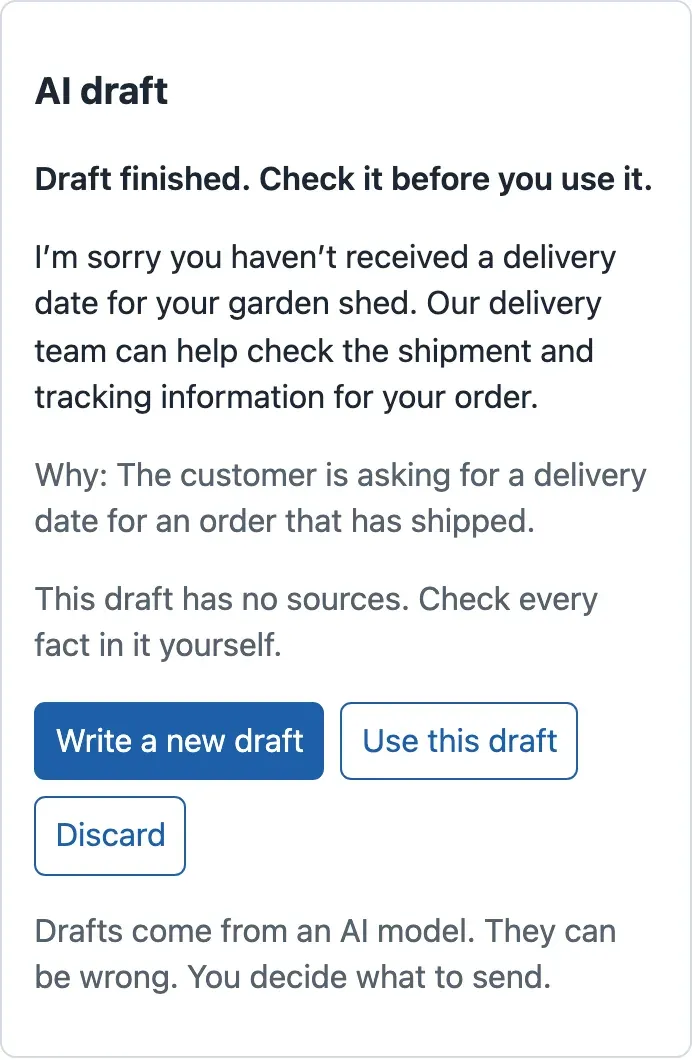
Now put Tomás’s header back into client.ts for a moment, and run only the desktop tests: npx playwright test --project=desktop. All three fail. The first one stops where the list should appear:
  ✘  1 [desktop] › e2e/desk.spec.ts:10:1 › answer a ticket with the AI draft, by keyboard only (5.1s)  ✘  2 [desktop] › e2e/desk.spec.ts:54:1 › send a new ticket and follow its background job (6.0s)  ✘  3 [desktop] › e2e/desk.spec.ts:69:1 › a slow, failing list says so in words and recovers (15.1s)
    Error: expect(locator).toBeVisible() failed
    Locator: getByText(/Showing \d+ tickets/)    Expected: visible    Timeout: 5000ms    Error: element(s) not found
The flow caught what 75 tests missed. Remove the header again. If the API really needs a new header, Amira adds it to the API’s Access-Control-Allow-Headers first.
When to use an end-to-end test, and what it costs. Write one for each task that the users cannot do without: here, answering a ticket and creating one. Do not write one for every state; the component tests cover those in seconds. An end-to-end test costs a browser download and about 27 seconds per run here. It also needs care: tests must start from known data (admin/reset), or they pass and fail by chance.
Check the delivery: npm run check
Section titled “Check the delivery: npm run check”The last check before a delivery runs everything that needs no browser. First change two lines in scripts/bundle-report.mjs, so that its numbers agree with Vite’s. Then 1 kB is 1,000 bytes, as Vite prints, and gzip uses Node’s default level.
return { file: p.slice(dir.length + 1), kb: data.length / 1000, gzipKb: gzipSync(data).length / 1000 };Change KB to kB in the two console.log lines too, and add a comment line under the first line of the file: // 1 kB = 1,000 bytes, as Vite prints. Vite compresses a little differently: its gzip numbers differ by about 1%. Then run:
npm run checkThe end of the output, after the tests and the build:
No secret found in 7 files of dist/.File Size Gzipassets/index-OCjOMpom.js 303.3 kB 92.4 kBassets/DraftText-DPqcJ_ju.js 73.5 kB 24.6 kBassets/LabsPage-n9IhhFGN.js 11.7 kB 3.8 kBassets/NewTicketForm-C6gr9o0Z.js 4.2 kB 1.8 kBassets/index-Cq7Ckq9E.css 4.2 kB 1.5 kBassets/useJob-D5nSjGXD.js 0.9 kB 0.5 kBindex.html 0.4 kB 0.3 kBJavaScript: 5 files, 123.1 kB gzip in allCompare it with Load less work: the first screen still downloads one main file of about 92 kB. The new file DraftText (24.6 kB) arrives only with a finished draft.
Hand it over
Section titled “Hand it over”Grace’s team will run the desk, and another developer will change it. They need two short documents, both in docs/. Write them as claims with evidence: each sentence says what is true and which check or measurement shows it.
-
Create
docs/handoff.md: how to run the desk, the checks before every delivery, what the screens promise, and the known limits:docs/handoff.md # Handoff: the ticket deskWhat the next developer needs to run, check and change the ticket desk. A worked example for the lesson *Test and deliver*.## Run it1. `npm ci` (the exact versions of `package-lock.json`).2. `npm run api` in one terminal (the mock API, http://127.0.0.1:8100). In production, the real ticket API takes its place: set `VITE_API_URL` before the build.3. `npm run dev` in a second terminal (http://localhost:5173), or `npm run build` and `npm run preview` for the production files.## Check it before every delivery| Check | Command | What it proves ||---|---|---|| Types | `npm run typecheck` | the code uses the API's data as the types say || Component tests | `npm test` | each screen part does the right thing for a good answer, an error, a slow answer, a stop || End to end | `npm run test:e2e` | one real flow by keyboard in a real browser, on a desktop and a phone screen || Production build | `npm run build` | the code builds without errors || No secret in the browser | `npm run check:bundle` | no server secret and no key-like text is in `dist/` || Size | `npm run size` | the files that a browser downloads (compare with the last delivery) |`npm run check` runs the four commands that do not need a browser.## What the screens promise- The list loads one server page (50 tickets) at a time and draws only the rows in view.- An old search answer never replaces a newer one (the cache key is the search).- A draft is shown as it is written; Stop, an interrupted connection, a failure and a finished draft look different and sound different to a screen reader. The finished draft is checked before it is trusted.- A status change shows at once and goes back if the server refuses it. A message to a customer is never shown as sent before the server says so.- The Markdown of a draft is shown without any HTML that can run code.## Known limits- The keyboard can reach only the ticket rows that are drawn. The list box itself takes the focus and scrolls with the arrow keys; search is the fast way to a ticket.- After **Send reply**, the keyboard focus falls to the page: the button is disabled while the reply is sent, and nothing takes the focus back. A screen reader still hears "Sent." (a status). Fix it as the new-ticket form does: move the focus to the result.- The mock API has no sign-in. The authentication course adds sessions; the desk must then send its cookie with `credentials: 'include'`, and the API must allow it.- Tested in Chromium (desktop and a phone screen size). Not tested here: Firefox, Safari, real phones, Windows high-contrast mode.The known limits are as important as the promises. “Not tested here: Firefox, Safari, real phones” tells the next team where to look first. The limit about Send reply comes from the course team’s own keyboard run: it is a real gap, written down instead of hidden.
-
Create
docs/performance-note.md. It records what was measured, on which computer, what changed because of it, and what did not change:docs/performance-note.md # Performance note: the ticket deskA worked example for the lesson *Test and deliver*. It says what we measured, on which computer, what we changed because of it, and what we did not change. The numbers come from the course team's measurements in Chromium (from Playwright) on one laptop (Apple M4, 16 GB). Other computers give other numbers; the differences between the rows are what matter.## What we measured and what we changed| Question | Before | After | What we changed ||---|---|---|---|| How much JavaScript does the first screen download? (gzip) | 123.2 kB in one file | 92.4 kB, then the rest only when it is needed | code splitting: the Markdown tools of the draft, the new-ticket form and the labs load later || When do the first ticket rows appear on a phone-like connection? (150 ms round trip, 1.6 Mbit/s, CPU 4 times slower) | 1,257 ms | 1,113 ms | the same code splitting (on a fast connection: 98 ms and 97 ms, no real difference) || How long does it take to draw 10,000 rows? | 274 ms, 60,002 elements in the page | 30 ms, 110 elements | the list draws only the rows in view (virtualization) || Does an old search answer replace a newer one? | yes: 10 of 10 tries showed the results for "p" after we typed "parcel" | no: 0 of 10 | the query key is the search, and old requests are cancelled || How late does the screen show that a background job is done? | 403 ms (polling every second, 5 requests) | 29 ms (server-sent events, 1 connection) | the job lab compares both; the new-ticket form polls, because it is simpler and its delay is small |## What we did not change, and why- **Rows in `memo`.** Typing a note above 50 rows drew the rows 1,000 times, but that cost 2.4 ms for 20 key presses. Moving the note's state down to the note removed the extra drawing without `memo`. We keep the simple version.- **Drawing the draft once per frame.** Drawing every piece of a recorded draft took 30 commits; once per frame took 11. Both cost less than 0.01 ms of React work per draft on this computer. We keep one commit per piece, and we do not announce every piece to screen readers.- **Downloading every ticket.** The list asks the server for one page of 50 tickets at a time. Downloading all 10,000 took 6.5 s and 100 requests (about 2.4 MB of JSON) before the first row could be drawn.## Check it again before a delivery`npm run build` and `npm run size` show the files and their sizes. Compare them with this note. Measure in the browser's Performance panel with the same throttling before you change a number here.The second table is the honest part: three ideas that sounded good and did not pay, with the numbers that showed it.
-
In
README.md, in the table of commands, change thenpm testrow and add three rows afternpm run build:profile:README.md (the commands table) | `npm test` | runs the checks of the mock API, of the scripts and of the interface (Vitest and Testing Library) || `npm run check:bundle` | after a build: fails if a secret is in the files that the browser downloads || `npm run check` | everything before a delivery: tests, build, secret check, size report || `npm run test:e2e` | one end-to-end flow by keyboard, in a real browser, on a desktop and a phone screen (first: `npx playwright install chromium`) |In the table of folders, replace the
scripts/row with these two rows:README.md (the folders table) | `e2e/` | the end-to-end flow (Playwright) || `scripts/`, `docs/` | the size report and the secret check; written decisions, the handoff notes and the performance note (`docs/`) | -
Give the delivery its version number. This changes
package.jsonandpackage-lock.jsontogether:Terminal window npm version 1.0.0 --no-git-tag-versionnpm prints
v1.0.0.
Your project now equals the snapshot end-of-m06, the end of the course’s project. If something differs, compare your files with it.
Common mistakes
Section titled “Common mistakes”Common mistake
Executable doesn't exist
Symptom: npm run test:e2e fails at once, in 16 ms:
Error: browserType.launch: Executable doesn't exist at …/chromium_headless_shell-1248/chrome-headless-shell-mac-arm64/chrome-headless-shell╔════════════════════════════════════════════════════════════╗║ Looks like Playwright was just installed or updated. ║║ Please run the following command to download new browsers: ║║ ║║ npx playwright install ║╚════════════════════════════════════════════════════════════╝Cause: npm installs Playwright’s code, not its browsers. Each Playwright version needs its own browser build.
Fix: run npx playwright install chromium, then run the tests again. Do it again after every update of @playwright/test.
Common mistake
http://localhost:4173 is already used
Symptom: the flow stops before any test runs: Error: http://localhost:4173 is already used, make sure that nothing is running on the port/url or set reuseExistingServer:true in config.webServer.
Cause: another program listens on the port, often an npm run preview that you forgot, or the mock API on 8100.
Fix: stop that program (Ctrl+C in its terminal). Or choose other ports for the flow: E2E_API_PORT=8200 E2E_WEB_PORT=4280 npm run test:e2e on macOS and Linux. In PowerShell: $env:E2E_API_PORT=8200; $env:E2E_WEB_PORT=4280; npm run test:e2e. The configuration passes the API’s address to the build and allows that origin in the mock API.
Guided practice: deliver the desk
Section titled “Guided practice: deliver the desk”This is the module’s worked example. Do each step and compare your result with the one shown. It is the same sequence that a delivery follows every time.
- Start from a clean state: delete
dist/, and delete.envif it still has a test value from the first lesson. - Run
npm run check. Expectℹ pass 27,Tests 48 passed (48), the build,No secret found in 7 files of dist/.andJavaScript: 5 files, 123.1 kB gzip in all. - Run
npm run test:e2e. Expect6 passed: three flows on the desktop and on the phone screen. - Run the main task by hand, by keyboard only, as in Accessible interaction: skip link, search, ticket, draft, use, send. Expect the focus on the heading, then on the same draft button, and “Sent.” at the end.
- Open
docs/performance-note.md. Check that each number in it has its computer and its conditions.
Your task: a new flow and your own note
Section titled “Your task: a new flow and your own note”Grace’s agents often stop a draft that goes in the wrong direction. Deliver that task with evidence:
- A flow. Add
e2e/stop.spec.ts: by keyboard, openT-80008, start a draft, stop it, and check the focus and the status. Use the simulated slow stream (admin/modewith{ stream: 'slow' }), so that there is time to press Stop. It must pass on the desktop and on the phone screen. - A measurement. Choose one number of the desk to measure in Chrome’s Performance panel, before and after one change of your own. Or measure the phone-like first rows again with throttling, as in Measure the browser. Add one row to
docs/performance-note.md, with your computer and the conditions. - The delivery. Run
npm run checkandnpm run test:e2e, and add their last lines todocs/handoff.mdunder a heading “Delivered”.
Show a worked answer for the flow
import { expect, test } from '@playwright/test';
const api = `http://127.0.0.1:${process.env.E2E_API_PORT ?? 8100}`;
test.beforeEach(async ({ request }) => {  await request.post(`${api}/admin/reset`);});
test('stop a draft by keyboard, and hear that it stopped', async ({ page, request }) => {  // The slow stream (simulated: 60 ms per piece) leaves time to press Stop.  await request.post(`${api}/admin/mode`, { data: { stream: 'slow' } });  await page.goto('/#/tickets/T-80008');  await expect(page.getByRole('heading', { level: 2, name: /LK-581106/ })).toBeFocused();  await page.getByRole('button', { name: 'Write a draft' }).focus();  await page.keyboard.press('Enter');  const status = page.locator('.draft [role="status"]');  await expect(status).toHaveText('Writing the draft…');  await expect(page.getByRole('button', { name: 'Stop' })).toBeFocused();  await page.keyboard.press('Enter');  await expect(status).toHaveText('You stopped the draft. The text below is not complete.');  await expect(page.getByRole('button', { name: 'Write a new draft' })).toBeFocused();  await expect(page.getByRole('button', { name: 'Use this draft' })).toHaveCount(0);});
The course team’s run:
  ✓  4 [desktop] › e2e/stop.spec.ts:10:1 › stop a draft by keyboard, and hear that it stopped (896ms)  ✓  8 [phone] › e2e/stop.spec.ts:10:1 › stop a draft by keyboard, and hear that it stopped (880ms)
  8 passed (29.6s)
The last check matters most: a stopped draft must not offer Use this draft, so an agent cannot send half a sentence. For the measurement, a good row names the question, the conditions (“Chrome 156, Slow 4G and CPU 4 times slower, empty cache”), the number before and after, and the change. A row that says only “faster” is not evidence.
Knowledge check
Section titled “Knowledge check”Check your understanding
Tomás's extra header passed all 75 checks of npm test, but the desk showed no ticket. Why did the component tests miss it, and which check caught it?
Show the answer
The component tests replace fetch with a fake that returns fixed answers. No real request is sent, so there is no origin, no preflight and no CORS. The browser sent a preflight OPTIONS request because of the new header, and the mock API allows only Content-Type, Idempotency-Key and X-Request-ID. So the browser blocked every request. The end-to-end flow, with a real browser, the built files and the running mock API, failed at once: getByText(/Showing \d+ tickets/) was not found.
Does your answer have the main points of ours?
Sign in and enroll in the course to save your answers. Every check counts toward the certificate.
Check your understanding
Why does the desk have 48 component tests but only 3 end-to-end flows? Use the course team's times.
Show the answer
On the course team’s laptop, the 48 component tests took about 4.8 seconds. The 6 end-to-end tests (3 flows on 2 screens) took about 27 seconds. Component tests can create every state cheaply: a 404, a broken stream, a refused draft. So they test each state of each part. End-to-end tests are slow and need known data. So they cover only the main tasks, and what only a real browser shows: CORS, the built files, the real stream and a phone screen.
Does your answer have the main points of ours?
Sign in and enroll in the course to save your answers. Every check counts toward the certificate.
Check your understanding
Module check (completion): which commands show that the desk can be delivered, and what must each print? How do you show that the main task works by keyboard and that no secret is in the bundle?
Show the answer
npm run check must end with ℹ pass 27, Tests 48 passed (48), a build without errors, No secret found in 7 files of dist/. and JavaScript: 5 files, 123.1 kB gzip in all. npm run test:e2e must print 6 passed: its first flow does the main task by keyboard only, on a desktop and a phone screen, and checks the focus and the status at each step. By hand, do the same task by keyboard: the skip link first, the focus on the ticket’s heading, the same draft button, “Sent.” at the end. For secrets, also try the first lesson’s test: a VITE_ variable named like a key makes npm run check:bundle fail, and removing it makes it pass.
Does your answer have the main points of ours?
Sign in and enroll in the course to save your answers. Every check counts toward the certificate.
Recap
- Component tests with a fake API test every state of every part in seconds. They cannot see the real API, the browser or the build: one extra header passed all 75 checks and blocked every request.
- One end-to-end flow per main task, in a real browser, on the built files, on a desktop and a phone screen:
6 passedin about 27 seconds. It caught the header at once. npm run checkbefore every delivery: tests, build, secret check, size report.- The handoff is claims with evidence: how to run and check the desk, what the screens promise, the known limits, and a performance note with the computer, the conditions and the numbers, including the changes that did not pay.
Module recap. The desk now shows the model’s Markdown without running its code, and it keeps every secret out of the browser. It works by keyboard, tells a screen reader each change once, and is tested from its parts to one full flow. Your project equals end-of-m06.
Course recap. You built Larkfield’s ticket desk from a first HTML page to a delivered React application. It loads one page of tickets at a time and never shows an old search. It streams AI drafts with a Stop button and follows slow jobs. It shows sources and errors in words, and every speed-up has a measurement behind it. Next, choose a case study: at least one is required for the certificate.