
Make an AI chat interface accessible
- Case study 2
- 120 min
- Optional · 1 case study needed for the certificate
Case study 2 of 2 · Frontend Architecture and Performance for AI AppsMake an AI chat interface accessible
1. Web foundations bridge
2. Components and application structure
3. Data fetching and state management
4. AI-specific interaction states
5. Performance and scalability
6. Security, accessibility and handoff
What you will be able to do
Take a small AI chat that works with a mouse, and make it work by keyboard and with a screen reader. Find each problem with the browser’s accessibility tree and automatic checks, fix it, and prove the fix. The hardest part is the streamed answer: a screen reader must hear each reply once, when it is finished, never piece by piece.
The starter is a small chat, written for this case study. It is not the ticket desk: it is a second, simpler interface, so that you see each problem on its own. The finished project is the result, for when you are stuck. The code is under the MIT licence.
Before you startWhat to know and to have ready
What you need to know
This case study uses the whole course, and most of all Accessible interaction: the five checks, live regions and the accessibility tree. It also uses Streaming interfaces (a reply read with fetch and a stream reader, and Stop) and Test and deliver (Playwright).
What you need on your computer
- Node.js 24 (LTS) and VS Code, as in Set up the ticket desk.
- About 300 MB of free disk space: the packages (125 MB) and Chromium for Playwright.
- Optional: a screen reader. macOS has VoiceOver (Cmd+F5); on Windows, NVDA is free.
Tested on macOS (Apple M4, 16 GB, Node.js 24.18.0, Chromium 156 through Playwright 1.64.0). The Windows and Linux commands are written, not tested. The course team did not test the chat with a real screen reader.
The situation
Section titled “The situation”Grace’s agents like the policy assistant from the RAG course. They ask it questions such as “How quickly do we refund a double charge?” and get a short answer with its sources. Sam built a chat window for it in an afternoon. It streams each answer as it is written, and it has a Stop button. With a mouse, it works well.
Camille, the agent in Montréal who uses a keyboard and a screen reader for parts of the day, tried it on Monday. Their report was short: “I could type one question. Then I was lost. The screen reader read the answer in small bits, word by word. I could not find Stop. And I could not ask a second question without the mouse.”
Grace’s rule: “Every agent must be able to use the chat. Find every problem, fix it, and show me that it stays fixed.”
The objective. By keyboard alone, Camille can ask a question, stop a reply, and ask the next one. Every control has a name. The text has a contrast of at least 4.5:1. A screen reader hears each reply once, when it is finished, with the number of sources, never piece by piece. Six automatic checks prove it on 12 questions, and then on 10 questions that you did not use while you built it.
What you will build
Section titled “What you will build”| Part | What you do | Measured after it |
|---|---|---|
| 1 | Look at the chat as Camille’s tools see it: by keyboard, and in the accessibility tree | – |
| 2 | Run the six checks on the starter: the baseline | 5 of 6 checks fail |
| 3 | Fix names, focus and Stop | – |
| 4 | Compare four ways to announce a reply, under one measure, and choose | changes per reply |
| 5 | Fix the contrast | all 6 checks pass |
| 6 | End to end: the checks on 10 new questions | one new problem, fixed |
The data
Section titled “The data”The chat does not call a model. A mock API in the project (mock/server.mjs, port 8200) replays the 67 recorded answers of the RAG course’s policy assistant. A hosted model (chat-small) wrote them; the course recorded each one once, with the time the call took (978 to 5,342 ms, median 1,458 ms). Each answer has one to three sentences and its sources. 13 answers say that the documents do not answer the question. 9 questions and their answers are in French: Larkfield has agents and customers in Québec.
The mock cuts each answer into pieces: a word with its space, or a punctuation mark. It sends the first piece after most of the recorded time, then one piece every few milliseconds, as real streams do (see Streaming interfaces). It chooses the recorded question that shares the most words with yours. The questions, documents and answers are under CC0 1.0. The file is mock/data/replies.json (34,467 bytes), with its SHA-256 in mock/data/SHA256SUMS and in the dataset card.
Set up the project
Section titled “Set up the project”-
Download the starter project from the box at the top of this page. Unzip it into your projects folder. You get the folder
policy-chat. -
In VS Code, choose File > Open Folder and open
policy-chat. Open a terminal: Terminal > New Terminal. -
Install the packages, and check the data file:
Terminal window npm installcd mock/data && shasum -a 256 -c SHA256SUMS && cd ../..Terminal window npm install(Get-FileHash mock\data\replies.json -Algorithm SHA256).Hash.ToLower()Compare the result with the value in
mock\data\SHA256SUMS.Terminal window npm installcd mock/data && sha256sum -c SHA256SUMS && cd ../..The check prints
replies.json: OK. -
Run the tests. The output ends with
ℹ pass 4(the mock) andTests 2 passed (2)(the components):Terminal window npm test -
Start the mock in this terminal with
npm run mock. It prints:Mock chat API on http://127.0.0.1:8200 (67 recorded answers; stream=recorded)The answers were recorded from a real model in an earlier course; the streaming is simulated. -
Open a second terminal (Terminal > New Terminal) and run
npm run dev. Open http://localhost:5173/ in Chrome.
Ask “How many Rewards points does a customer need for a 10-dollar reward?” with the mouse. After about a second, the answer appears, a few words at a time. With a mouse, the chat works.
Part 1: look at the chat as Camille’s tools do
Section titled “Part 1: look at the chat as Camille’s tools do”By keyboard
Section titled “By keyboard”Reload the page. Do not touch the mouse. Press Tab once: the focus goes to the message box. Type a question and press Enter. Now press Tab to reach Stop.
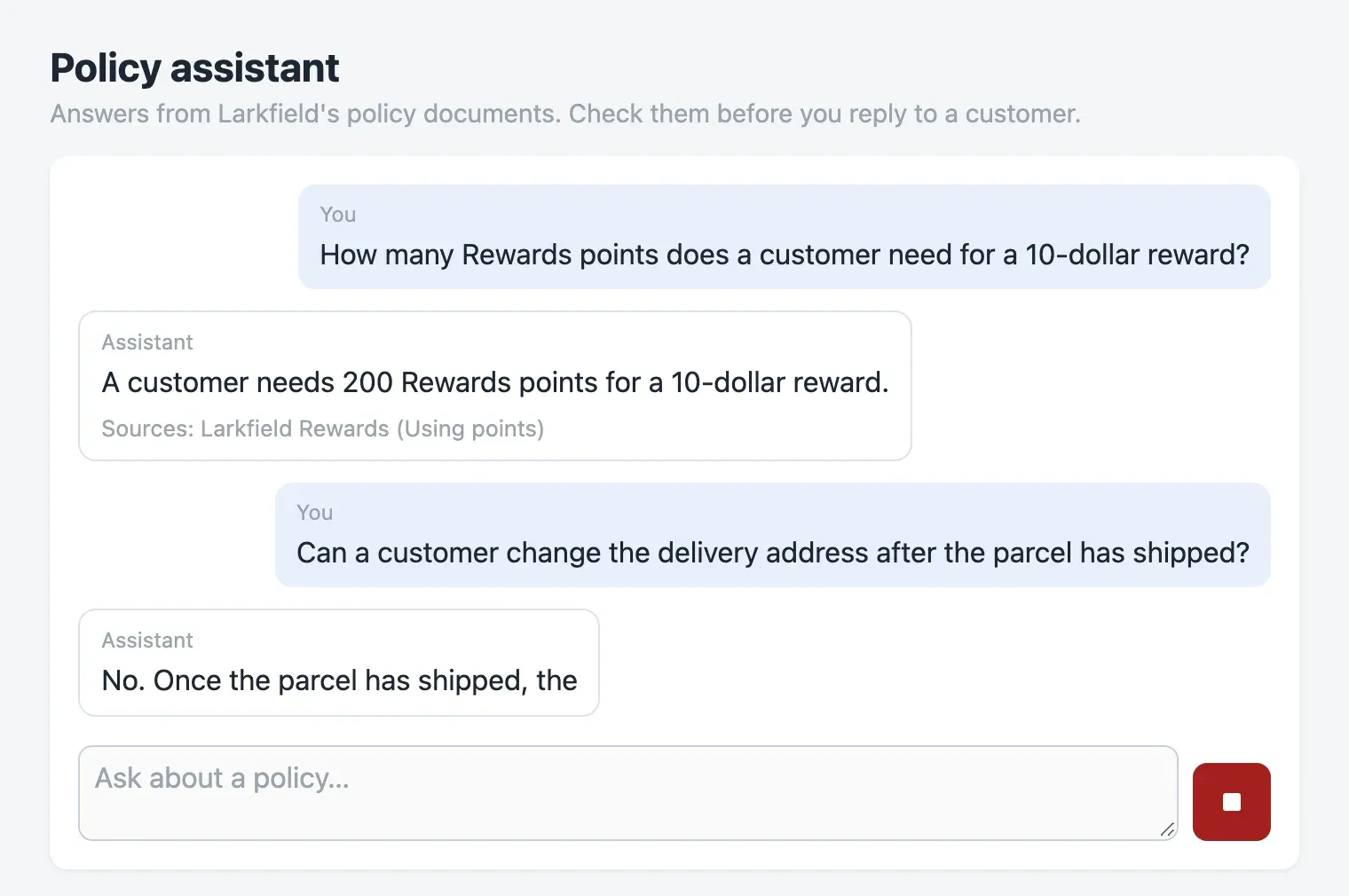
Nothing has the focus. The message box is disabled while the reply streams, and a disabled element loses the focus. The focus fell back to the page itself, as it did for the new-ticket form in Accessible interaction. Each Tab now starts again from the top, and the red square is never reached.
In the accessibility tree
Section titled “In the accessibility tree”A screen reader reads the accessibility tree, not the pixels. npm run tree prints it with Playwright’s ariaSnapshot(), once while a reply is written and once after it. Stop the dev server first (Ctrl+C), and run npx playwright install chromium once to download the browser. Then:
npm run treeThe output, shortened in the middle:
--- while the reply is written ---- banner: - heading "Policy assistant" [level=1] - paragraph: Answers from Larkfield's policy documents. Check them before you reply to a customer.- main: - text: You A customer was charged twice for the same order. How quickly do we refund the extra charge? Assistant Writing… - textbox "Ask about a policy…" [disabled] - img--- after the reply ---- main: - text: "You A customer was charged twice … Assistant We refund the extra charge within 3 business days after confirming the double charge. Sources: Refunds and payments policy (Double charges); Manual refunds and goodwill credits (Rules)" - textbox "Ask about a policy…" - button: - imgRead it as Camille’s screen reader does. The message box is named “Ask about a policy…”: that is its placeholder, which disappears when they type. While the reply is written, Stop is only an img: a picture, not a control. After the reply, the send button is a button with no name, so a screen reader says “button” and nothing more.
Part 2: the baseline, six automatic checks
Section titled “Part 2: the baseline, six automatic checks”The idea: a checker reads what assistive tools read
Section titled “The idea: a checker reads what assistive tools read”A spelling checker finds most typing errors in seconds, but it cannot tell you if a letter is kind. Automatic accessibility checks are the same. They read what assistive tools read, and they find the mechanical problems fast: a button without a name, grey text that is too light. They cannot tell you if the chat is pleasant to use with a screen reader.
The best-known checker is axe-core. Its licence is MPL-2.0, which is not one of the permissive licences that this course uses, and it checks a page at one moment. A chat’s problems happen over time: after Enter, during a stream. So the project has its own six checks, in e2e/checks.ts (about 150 lines). Each check reads one thing from Chromium:

Text description of the diagram
The diagram is a table with six rows and three columns: what the check reads, when it passes, and the starter’s result. Names reads the accessibility tree, with the role, the name and where the name comes from. Focus reads the element that has the keyboard focus after Enter. Keyboard reads the focus after each Tab, and the tree. Announcements reads each new text of a live region, and waits while a region is aria-busy. Contrast reads the computed colours of each text and its background. Language reads the lang attribute around each reply. The starter fails the first five and passes the sixth, because the 12 questions are all in English. A red line at the bottom says that no check hears what a real screen reader says.
The names check asks the browser for the whole tree through the Chrome DevTools Protocol, and looks at where each name comes from:
const { nodes } = await cdp.send('Accessibility.getFullAXTree');for (const n of nodes) { const role = String(n.role?.value ?? ''); if (n.ignored || !CONTROLS.has(role)) continue; const name = String(n.name?.value ?? '').trim(); const used = n.name?.sources?.find((s) => s.value && !s.superseded && String(s.value.value ?? '').trim() === name); if (!name) problems.push(`${role} with no name`); else if (used?.attribute === 'placeholder') problems.push(`${role} "${name}" is named only by its placeholder`);}The announcements check counts the changes of every live region during one reply, as the course team did for the desk. Each new text is one request to the screen reader to speak.
Run them
Section titled “Run them”npm run check:a11yThe checks build the app, start the mock and the built app on their own ports, and drive Chromium. The run took 33 seconds on the course team’s laptop:
✘ 1 e2e/a11y.spec.ts:12:1 › names: every control has a name, and not only a placeholder (1.7s) ✘ 2 e2e/a11y.spec.ts:17:1 › focus: after sending, the focus stays in the message box (1.3s) ✘ 3 e2e/a11y.spec.ts:27:1 › keyboard: Tab reaches Stop while a reply is written, and Enter stops it (107ms) ✘ 4 e2e/a11y.spec.ts:43:1 › announcements: one per finished reply, never one per piece (4.8s) ✘ 5 e2e/a11y.spec.ts:55:1 › contrast: all text has at least 4.5:1 (3:1 when large) (1.6s) ✓ 6 e2e/a11y.spec.ts:60:1 › language: each reply is marked with its language (21.3s)Each failure lists every problem. These are the lines that matter, from the same run:
    +   "textbox \"Ask about a policy…\" is named only by its placeholder",    +   "button with no name",
    Received string:  "body (nothing)"
    Error: where each Tab went: body (nothing) → body (nothing) → body (nothing) → body (nothing)
    +   "Q01: 17 changes, last one complete: true",    +   "Q02: 21 changes, last one complete: true",    +   "Q04: 13 changes, last one complete: true",
    +   "\"Answers from Larkfield's polic\": #9aa4ae on #f4f6f8 is 2.34:1, needs 4.5:1",    +   "\"You\": #9aa4ae on #e8f0fa is 2.20:1, needs 4.5:1",    +   "\"Assistant\": #9aa4ae on #ffffff is 2.53:1, needs 4.5:1",    +   "\"Sources: Refunds and payments \": #9aa4ae on #ffffff is 2.53:1, needs 4.5:1",    +   "\"placeholder Ask about a policy\": #9aa4ae on #ffffff is 2.53:1, needs 4.5:1",
This is the baseline: 5 of 6 checks fail. Q01’s answer has 16 pieces. Its 17 changes are the question, then one change per piece. Camille heard “We”, “We refund”, “We refund the”, and so on, as they said.
Part 3: names, focus and Stop
Section titled “Part 3: names, focus and Stop”These three fixes use what Accessible interaction taught. Open src/App.tsx.
-
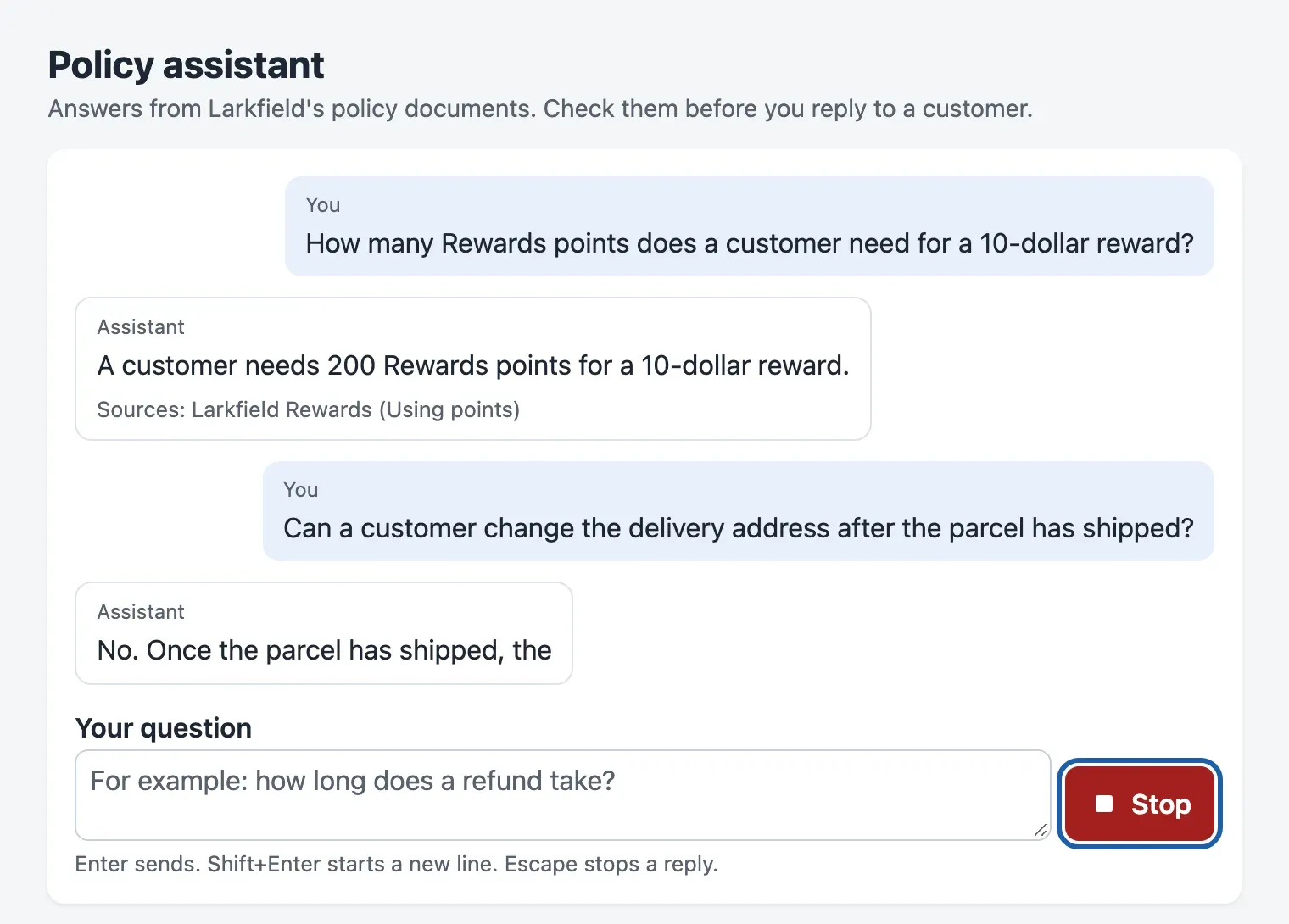
Names. Give the message box a visible label, and the button visible text. Hide the icons from the tree with
aria-hidden="true"on each<svg>: they only repeat the text.src/App.tsx (the form) <label htmlFor="question">Your question</label><div className="ask-row"><textarea id="question" value={question} onChange={(e) => setQuestion(e.target.value)}onKeyDown={onKey} placeholder="For example: how long does a refund take?"aria-describedby="question-help" rows={2} />{/* The button comes in step 3. */}</div><p id="question-help" className="help">Enter sends. Shift+Enter starts a new line. Escape stops a reply.</p>The placeholder is now an example, not the name.
aria-describedbygives the screen reader the keys, after the name. -
Focus. Remove
disabled={busy}from the<textarea>. The box keeps the focus, andsubmitalready refuses a second question while a reply is written (if (!question.trim() || busy) return;). Let Escape stop a reply from the box too:src/App.tsx (onKey) if (e.key === 'Enter' && !e.shiftKey) {e.preventDefault();submit();} else if (e.key === 'Escape' && busy) {stop();} -
Stop. Replace the
<div className="stop" onClick={stop}>and the send button with one real<button>whose label changes:src/App.tsx (after the textarea) {/* One real button whose label changes: Tab reaches it, Enter and Space press it. */}<button className={busy ? 'stop' : 'send'} type={busy ? 'button' : 'submit'} onClick={busy ? stop : undefined}>{busy ? <StopIcon /> : <SendIcon />}<span>{busy ? 'Stop' : 'Send'}</span></button>A
<div>withonClickgets clicks, but not the keyboard: it is not in the Tab order, and Enter does nothing on it. A<button>has all of this for free. One button, not two, keeps the focus when the label changes, as in the desk’s draft panel. -
In
src/styles.css, give the button room for its text, and the controls a visible focus outline. Replace the rules.askand.send, .stopwith the rules.ask label,.ask-row,.help,.send, .stopandbutton:focus-visible, textarea:focus-visibleof the finished project.
Part 4: one announcement per reply
Section titled “Part 4: one announcement per reply”The problem, and four candidate fixes
Section titled “The problem, and four candidate fixes”The starter’s conversation has aria-live="polite", so each piece of text is a change that a screen reader may speak. If you remove it, the chat is silent: Camille must search the page for the answer after each question. There are four common designs. The finished project has all four in src/chat/announce.ts, chosen by the address, for example http://localhost:5173/?announce=pieces:
| Way | What it does |
|---|---|
pieces |
The starter’s way: the conversation is the live region; each piece changes it. |
busy |
The same, plus aria-busy="true" on the conversation while a reply is written. The ARIA specification lets assistive tools wait while a region is busy, and read it when it is done. It does not require them to wait. |
sentences |
The conversation is not live. A separate status region gets each sentence when it is complete. |
reply |
The conversation is not live. A separate status region gets one message when the reply ends: “Assistant:”, the whole reply, and the number of sources. |
The status region is the desk’s LiveRegion: a visually hidden element with role="status" and aria-atomic="true", always in the page. One trap: do not give the conversation role="log" to make it look tidy in the tree. A log is a live region by definition, so it brings the pieces problem back.
The function that chooses the message is short:
export function announcement(way: Way, reply: Message | undefined): string { if (!reply || reply.role !== 'assistant') return ''; if (way === 'pieces' || way === 'busy') return ''; // the conversation itself is the live region if (reply.status === 'stopped') return 'You stopped the reply. The text is not complete.'; if (reply.status === 'failed') return `No reply. ${reply.problem ?? ''}`.trim(); if (way === 'sentences') { const all = sentences(reply.text); if (reply.status === 'streaming') return all.length > 1 ? all[all.length - 2] : ''; return reply.status === 'done' ? (all.at(-1) ?? '') : ''; } if (reply.status !== 'done') return ''; const n = reply.sources?.length ?? 0; return `Assistant: ${reply.text} ${n ? `${n} ${n === 1 ? 'source' : 'sources'}.` : 'No sources.'}`;}Copy src/chat/announce.ts, src/ui/LiveRegion.tsx and the .visually-hidden rule of src/styles.css from the finished project; e2e/compare.spec.ts is already in yours. In App.tsx, read the way once with wayFromAddress(window.location.search), put data-announce={way} on the outer <div>, and change the conversation and the status region:
<section className="log" aria-label="Conversation" {...live} aria-busy={way === 'busy' ? busy : undefined}> {/* the messages, as before */}</section><LiveRegion message={announcement(way, messages.at(-1))} />Here live is { 'aria-live': 'polite' } for the first two ways, and nothing for the others.
A fair comparison under one measure
Section titled “A fair comparison under one measure”Predict first. For the 12 questions, how many changes per reply will each way make?
The measure is the number of live-region changes per reply: each change is one request to speak. A good design has one change, and that change holds the whole reply. To be fair, every way gets the same 12 questions, the same recorded timing, the same build and the same browser:
npm run compareThe run took 1.4 minutes on the course team’s laptop. It prints:
way median min max last change = whole replypieces 16.5 10 72 12 of 12busy 1 1 1 12 of 12sentences 1 1 2 12 of 12reply 1 1 1 12 of 12The last column says whether the last change ends with the last words of the reply.
- a change per piece
- fewer changes
- the chosen way
Text description of the chart
A column chart with four columns: the median number of live-region changes per reply over 12 questions. pieces: 16.5. busy: 1. sentences: 1. reply: 1.
The pieces way made one change per piece of text. That was 10 for the shortest answer (Q34, “A garden sprinkler has a 1-year warranty.”), and 72 for the longest (Q45, 64 words). The other three ways made one or two changes per reply. By this measure, busy, sentences and reply are equal. The measure removes the worst design, but it cannot choose among the other three. For that, look at what each way asks the screen reader to say, for the same reply:

Text description of the diagram
For Q01, the first piece arrives after 1,092 ms, and the 16 pieces follow 5 ms apart. With pieces, the screen reader gets 17 changes: the question, then a longer text after each piece. With busy, it gets nothing while the conversation is busy, then the new text. That works only if the screen reader respects aria-busy, and the words depend on the screen reader. With sentences, it gets the one sentence of Q01 when the sentence is complete. With reply, it gets one message at the end: Assistant, the whole reply, and 2 sources.
The recommendation
Section titled “The recommendation”Choose reply, for three reasons that the count cannot show:
busydepends on the screen reader. The check counts what the ARIA specification allows, not what NVDA or VoiceOver do. The specification lets them wait; it does not make them wait. A screen reader that ignoresaria-busybrings back all 17 changes. And when the region stops being busy, each screen reader decides which part of the conversation to read.sentencesinterrupts and says less. These answers are short, so it made one or two changes. A longer answer is one interruption per sentence while Camille types their next question. And no message says where the reply ends or how many sources it has.replysays the same words in every screen reader. You choose them: “Assistant:”, the whole reply, the number of sources. Stopped and failed replies get their own sentence, as the desk’s draft panel does.
What it costs. Camille hears nothing until the reply ends. In the recordings, that is a median of 1,458 ms after Enter and at most 5,342 ms. Most of that wait comes before the first piece anyway, as Streaming interfaces showed, so the stream gives them little that they lose. A long reply is read in one go. They can stop the speech with Ctrl and read the conversation themselves. When not to use it: for answers of several paragraphs. Then announce a short status, such as “Reply finished, 3 paragraphs, 2 sources.”, and let them read the reply in the page.
Part 5: contrast
Section titled “Part 5: contrast”The grey #9aa4ae is Tomás’s “calmer” grey from Accessible interaction: 2.53:1 on white, 2.20:1 on the blue of your own messages. In src/styles.css, change one token:
--soft: #56616d;That is the desk’s grey: 6.31:1 on a card. The labels, the sources line, the hint and the placeholder all use the token, so one line fixes five kinds of text. Now run the checks again:
npm run check:a11y ✓ 1 e2e/a11y.spec.ts:12:1 › names: every control has a name, and not only a placeholder (1.6s) ✓ 2 e2e/a11y.spec.ts:17:1 › focus: after sending, the focus stays in the message box (1.3s) ✓ 3 e2e/a11y.spec.ts:27:1 › keyboard: Tab reaches Stop while a reply is written, and Enter stops it (85ms) ✓ 4 e2e/a11y.spec.ts:43:1 › announcements: one per finished reply, never one per piece (4.7s) ✓ 5 e2e/a11y.spec.ts:55:1 › contrast: all text has at least 4.5:1 (3:1 when large) (1.6s) ✓ 6 e2e/a11y.spec.ts:60:1 › language: each reply is marked with its language (21.3s)
6 passed (33.0s)All six checks pass. npm run tree now shows a textbox "Your question", and a button "Stop" while the reply is written. After the reply, it shows the status: "Assistant: We refund the extra charge within 3 business days after confirming the double charge. 2 sources.".
Part 6: end to end, on new questions
Section titled “Part 6: end to end, on new questions”You built and checked the chat with 12 questions. Do the fixes hold for questions that you did not look at? e2e/questions.ts keeps 10 other recorded questions aside. They have longer answers (up to 70 words), a slow one (5,342 ms), one that the documents cannot answer, and 4 in French.
QUESTIONS=new npm run check:a11y$env:QUESTIONS="new"; npm run check:a11y; Remove-Item Env:QUESTIONSQUESTIONS=new npm run check:a11y ✓ 1 e2e/a11y.spec.ts:12:1 › names: every control has a name, and not only a placeholder (2.8s) ✓ 2 e2e/a11y.spec.ts:17:1 › focus: after sending, the focus stays in the message box (2.4s) ✓ 3 e2e/a11y.spec.ts:27:1 › keyboard: Tab reaches Stop while a reply is written, and Enter stops it (81ms) ✓ 4 e2e/a11y.spec.ts:43:1 › announcements: one per finished reply, never one per piece (8.2s) ✓ 5 e2e/a11y.spec.ts:55:1 › contrast: all text has at least 4.5:1 (3:1 when large) (2.7s) ✘ 6 e2e/a11y.spec.ts:60:1 › language: each reply is marked with its language (30.4s)
+ "Q21: reply in \"fr\", marked \"en\"", + "Q37: reply in \"fr\", marked \"en\"", + "Q47: reply in \"fr\", marked \"en\"", + "Q59: reply in \"fr\", marked \"en\"",
1 failed 5 passed (47.9s)Five checks hold on new questions. The longest answers still gave one announcement each. The sixth check fails, and it could not fail before: the 12 questions of the build were all in English. Here, all 4 French replies are marked as English.
The idea: the language of each part
Section titled “The idea: the language of each part”Think of a radio host who reads a French name with English sounds: the listener may not recognise it. A screen reader chooses its voice from the lang attribute. The page says <html lang="en">, so a screen reader reads a French answer with English sounds, and Camille hears something close to nonsense. The Web Content Accessibility Guidelines call this language of parts: text in another language must be marked with its language. The mock already sends the language of each answer ("language": "fr", at the start of the stream). In src/App.tsx, add one attribute to each message:
<div key={m.id} className={`msg ${m.role}`} data-status={m.status} lang={m.language}>Your own messages have no language, so they keep the page’s English. Run the new questions again:
  ✓  6 e2e/a11y.spec.ts:60:1 › language: each reply is marked with its language (30.4s)
  6 passed (47.9s)
All six checks pass on the new questions, and npm run check:a11y still passes on the first 12.
Finally, add the component tests of the finished project (src/App.test.tsx, src/chat/announce.test.ts): focus after Enter, Stop by Tab and Enter, one status message, and lang="fr". npm test ends with ℹ pass 4 and Tests 9 passed (9). They run in about a second, so they guard the fixes on every change. The browser checks guard what only a browser can see.
Insights and limits
Section titled “Insights and limits”- Each fix was small; finding the problems was the work. A label, a removed
disabled, a<button>instead of a<div>, one colour token, one live region, onelangattribute. The accessibility tree and the checks showed each problem in seconds. - A measure can remove a bad design without choosing a good one. The count separated
pieces(median 16.5 changes) from the rest (1), but three ways tied. The choice came from what the count cannot see: who decides the words. Say so when you report a comparison. - Keep questions aside. The language problem was in the data from the start (9 French answers of 67), but the 12 build questions could not show it.
- Limits. No real screen reader was used: the announcement count is a proxy, from the changes of the live regions. The course team tested only Chromium on macOS, at a desktop size. The 67 answers are short (at most 70 words), and the mock replays them. Real models stream smaller pieces: 87 to 106 in the course’s recorded streams, against 9 to 71 here. So
pieceswould be even worse. The checks see only the paths that they drive: the unit tests cover a failed reply, the browser checks do not. The times are from the course team’s laptop, with other work running; yours will differ.
Responsible use
Section titled “Responsible use”- Automatic checks are a floor, not a certificate. Six green checks mean that six known problems are absent. They do not mean that the chat is accessible. Before agents depend on it, ask a daily screen reader user to try the main tasks, with VoiceOver and NVDA at least.
- Do not make a disabled colleague your test suite. Camille’s report started this work, and they should test the result. But first fix what the checks and the keyboard can find, so that their time goes to what only they can judge.
- An announcement repeats the model’s words. If the answer is wrong, the screen reader says the wrong answer as confidently as the screen shows it. Keep the sources in the message (“2 sources”, “No sources”), so that Camille knows when to check, as sighted agents do.
- Do not hide the stream to fix the announcements. Sighted agents still see the text arrive, and Stop still works at any time.
Make it a portfolio piece
Section titled “Make it a portfolio piece”This project shows what employers look for in a frontend developer. You find accessibility problems with tools and fix them in a real interface. You prove each fix with tests, and you compare designs with a measure, not opinions.
What to put in the repository:
policy-chat/ README.md what it is, how to run and check it, the results table, the limits DATASET.md the recorded answers: source, licence, checksum, changes LICENSE MIT, for the code src/ the chat, announce.ts and LiveRegion.tsx mock/ the mock API and its 4 checks e2e/ the six checks, the tree, the comparison results/ compare.json from your own run- Make a new Git repository from your project folder and push it to GitHub.
.gitignorealready keeps outnode_modules/,dist/and the test results. Removeresults/from.gitignoreif you want to publish your comparison. - In the README, add a table: the six checks before and after, and the four ways with your own median changes per reply. Add one sentence on the end-to-end run.
- Add a short screen recording of the keyboard flow: Tab to the box, a question, Tab to Stop, Enter. If you have a screen reader, record its speech too.
- Say what you did not test: real screen readers, Firefox and Safari, phones.
In an interview, in two sentences: “I made a streaming AI chat usable by keyboard and screen reader, and proved it with six browser checks. I compared four ways to announce a streamed answer, and held-out questions found French answers without a language mark.”
Go further: announce “The assistant is writing” once when a reply starts, and decide if it helps or adds noise. Add a shortcut that reads the last reply again. Run the checks in Firefox with Playwright, and find what changes. Test with VoiceOver and NVDA, and write down what each one says.
Knowledge check
Section titled “Knowledge check”Check your understanding
The message box has the placeholder "Ask about a policy…", and Chrome's accessibility tree shows it as its name. Why does the names check still fail, and what is the fix?
Show the answer
The placeholder is the name only because nothing better exists: the tree’s name sources say that it came from the placeholder attribute. A placeholder disappears when you type, so the field loses its visible meaning, and placeholder text is often too light. The fix is a real <label htmlFor="question">Your question</label>. The placeholder may stay as an example.
Does your answer have the main points of ours?
Sign in and enroll in the course to save your answers. Every check counts toward the certificate.
Check your understanding
The busy way made one change per reply, as the reply way did. Why does the case study still choose the reply way?
Show the answer
The count is a proxy: it counts what the ARIA specification allows when a region is busy. The specification lets screen readers wait, but it does not make them wait, so a screen reader that ignores aria-busy would speak every piece again. When the region stops being busy, each screen reader also decides which text to read. The reply way puts one message in a status region, in words that the team chose: “Assistant:”, the reply and the number of sources. It works the same in every screen reader. Its cost is silence until the reply ends: a median of 1,458 ms in the recordings.
Does your answer have the main points of ours?
Sign in and enroll in the course to save your answers. Every check counts toward the certificate.
Check your understanding
All six checks passed on the 12 questions used while building, but the language check failed on the new questions. What does this teach about test data, and what was the fix?
Show the answer
The 12 questions were all in English, so the language check could not fail: it tested nothing. The held-out set had 4 French answers, and the page marked each one as English. Test data must hold the cases that the users really have. Part of it must stay aside until the end, so that you do not shape the fixes around it. The fix was one attribute: lang={m.language} on each message, from the language that the API sends.
Does your answer have the main points of ours?
Sign in and enroll in the course to save your answers. Every check counts toward the certificate.
Recap
- You looked at the chat as Camille’s tools do: by keyboard, and in the accessibility tree. Six automatic checks found five problems. The controls had no names, and the focus was lost after Enter. The keyboard could not reach Stop, a reply made 10 to 72 announcements, and grey text had 2.20:1 to 2.53:1.
- A label, a field that is never disabled, one real
<button>and one colour token fixed four of them. - You compared four ways to announce a reply on the same 12 questions, under one measure.
piecesmade a median of 16.5 changes per reply; the others made one. The chat says each reply once, when it ends, with the number of sources, in words that do not depend on the screen reader. - Ten held-out questions found one more problem: French answers were marked as English. One
langattribute fixed it. - The checks are a floor. A real screen reader test, with a person who uses one every day, is still needed.
Next, the final assignment: the ticket assistant’s interface, built and measured with everything in this course.
Next: Final assignment