
Local versus server state
- Lesson 8
- 50 min
- Module 3: Data fetching and state management
Lesson 8 of 19 · Frontend Architecture and Performance for AI AppsLocal versus server state
1. Web foundations bridge
2. Components and application structure
3. Data fetching and state management
4. AI-specific interaction states
5. Performance and scalability
6. Security, accessibility and handoff
What you will be able to do
Some values on the screen belong to the agent, and some belong to the ticket API. Keep them apart, so the agent’s choices stay simple and the API’s data is fetched once, shared, and refreshed when it gets old.
Before you startWhat to know and to have ready
What you need to know
- React state, props and controlled inputs, from React basics.
- Effects, their cleanup and our hook
useApi, from Rendering and effects. - The folders
api/,ui/,features/andlib/, from Organize by responsibility. - How to start the mock ticket API, from Set up the ticket desk.
What you need on your computer
- Node.js 24 (LTS), VS Code, a terminal and Chrome, Edge or Firefox.
- Your
ticket-deskfolder at the end of Module 2. Itsnpm testends withTests 14 passed (14), after the 21 checks of the mock API. - An internet connection for one
npm installin this lesson.
If your project does not work, start again from the snapshot end-of-m02 of the labs repository. Copy the folder nextia-learning-labs/C22/snapshots/end-of-m02 to ticket-desk, then run npm install in it.
Tested with Node.js 24.18.0 and npm 11.16.0 on macOS (Apple silicon), in Chromium. The Windows and Linux commands are written but not tested.
Your notebook and the noticeboard
Section titled “Your notebook and the noticeboard”Think of an office with a noticeboard in the hall. The board shows the opening hours, the phone list and the holiday plan. Everybody reads it, and the office manager changes it when something changes.
You also have your own notebook. In it, you write which page you are reading, a few notes and a list of things to do. Nobody else can change your notebook, so it is always right about your own work.
When you need the phone list at your desk, you copy it from the board into your notebook. The copy saves you a walk to the hall each time. But the copy has an age. If the manager adds a new number tomorrow, your copy does not change. A careful person writes the date next to the copy, and walks to the board again when the copy is old.
The problem: the desk forgets what it fetched
Section titled “The problem: the desk forgets what it fetched”The ticket desk has the same two kinds of information, but at the end of Module 2 it keeps them in the same way. Every value lives in React state. The search text is state in TicketList. The ticket that the agent opened is in the address, #/tickets/T-80008. And the ticket’s data from the API is state too, inside our hook useApi.
useApi treats the ticket like the search text: as the component’s own information. When the component shows another ticket, useApi throws the old data away. When the agent goes back, it asks the API again. The course team counted the requests in a real browser, with the production build of the desk:
| What the agent does | Ticket requests so far |
|---|---|
| Opens the desk on T-80008 | 1 |
| Opens T-80007 | 2 |
| Goes back to T-80008, a few seconds later | 3 |
On your computer, the mock API answers in about a millisecond, so you do not see the wait. On a phone network, every request is a wait. The course team also simulated a phone network, with 150 ms for each trip to the server. There, the desk showed “Loading T-80008…” for 158 ms when the agent went back. It had shown that ticket a few seconds before.
The second problem is worse. Suppose another agent changes the status of T-80008 to pending while you read it. Your screen still says Open. useApi fetched the ticket once, when you opened it, and it never asks again. Nothing on the screen says how old the data is. You can try this yourself in the failure case at the end of this lesson.
Both problems have the same cause. The ticket is not the component’s own information. It is a copy of something that the ticket API owns.
The idea: two kinds of state
Section titled “The idea: two kinds of state”React developers give the two kinds of information two names.
Local state is the agent’s own choices on the screen: the search text, the status filter, the ticket that is open, the reply that the agent is typing. This browser tab is its only owner. It is always right, because nobody else can change it. It is the notebook.
Server state is the data that the ticket API keeps: the tickets, their messages, their status. The API is its owner, and other agents change it at any time. The browser only ever has a copy. The copy takes time to get, the request can fail, and the copy gets old. It is the noticeboard. The name says where the true value lives: on the server.
A cache is a store of such copies. Each copy has a name, called its key, and the time when it was fetched. The screen asks the cache for a copy by its key. If the cache has a copy that is young enough, the screen gets it at once, with no request. If not, the cache fetches it from the API, keeps it, and gives it to every component that asks for the same key.

Text description of the diagram
The diagram has three panels and a box for the screen. The green panel is local state, owned by this browser tab: the search text “parcel”, the status filter, the open ticket T-80008 (in the address) and a reply that the agent is typing. Nobody else can change it. The blue panel is server state, owned by the ticket API: the tickets, their messages and the status of T-80008. Other agents change it at any time. Between them, the yellow panel is the cache: copies of server data, each with a name and an age. The ticket T-80008 was fetched 4 seconds ago and is fresh; the list for “parcel” was fetched 40 seconds ago and is stale. An arrow from the server to the cache says that a GET takes time and can fail. The screen reads local state with useState and the address, and the cache with useQuery. A dashed arrow from the screen to the server is a change: a PATCH or a POST.
A tiny example: sort the values of one screen
Section titled “A tiny example: sort the values of one screen”Look at the desk with T-80008 open, and ask one question about each value: could another person change it? If yes, it is server state.
| Value on the screen | Where its true value lives | Kind |
|---|---|---|
| The text in the search box, “parcel” | this tab | local |
| The status filter, “All” | this tab | local |
| Which ticket is open, T-80008 | the address of this tab | local |
| The text of a reply that the agent has not sent yet | this tab | local |
| The subject of T-80008, “Hello, where is my order LK-581106?” | the ticket API | server |
| The status of T-80008, “Open” | the ticket API | server |
| The 50 tickets of the list | the ticket API | server |
| “Loading T-80008…” | nowhere: it comes from the request | derived |
Two rows need a second look. The reply is local while the agent types it. When the agent sends it, it becomes a message on the server, and from then on it is server state. The words “Loading T-80008…” are not stored at all. They follow from the state of a request, as a derived value follows from other values in Rendering and effects.
A cache for the desk: TanStack Query
Section titled “A cache for the desk: TanStack Query”You could write the cache yourself. Our useApi already cancels an old request in its cleanup. But a cache needs much more: a key for every copy, the age of every copy, one request for two components that ask for the same key, a refresh when the copy is old, and a way to mark copies as old after a change. That is a lot of careful code.
TanStack Query is a free library that does this work (MIT licence). The course uses version 5.104.1. The course team measured what it adds to the desk, compared with useApi:
- The cache: going back to a ticket within 30 seconds sends no request.
- Marking copies as old after a change, so the screen shows the new data. You add this in Query lifecycle.
- Cancellation: while an agent typed “parcel”, 5 of the 6 list requests were closed early.
- Retries that wait as long as the API’s
Retry-Afterheader says.
It costs 13.6 kB of JavaScript after gzip compression: 9.5 kB for its core and 4.1 kB for its React part. For comparison, React’s react-dom is 64.1 kB.
You need four names from TanStack Query in this lesson:
- The query client is the cache. The app has one.
useQueryasks the cache for one copy. It takes a key and a function.- The query key is the name of the copy: an array such as
['tickets', 'detail', 'T-80008']. Two components that use the same key share one copy. - The query function says how to fetch the copy when the cache has none: here,
getTicket('T-80008').
The cache also needs a rule for the age of a copy. The desk says: a copy counts as fresh for 30 seconds. In that time, the cache gives it to the screen with no request. After 30 seconds, the copy is stale, and the cache fetches it again the next time a screen needs it. The next lesson follows a copy through its whole life.
Add TanStack Query to the desk
Section titled “Add TanStack Query to the desk”You change four files. The list stays as it is in this lesson; you move it to the cache in the next one.
-
Open a terminal in your
ticket-deskfolder. Ifnpm run devruns there, stop it with Ctrl+C. Then install the library, with the exact version:Terminal window npm install @tanstack/react-query@5.104.1 --save-exactThe output on the course team’s laptop:
added 2 packages, and audited 107 packages in 1s23 packages are looking for fundingrun `npm fund` for detailsfound 0 vulnerabilitiesnpm 11 can also print four lines that start with
npm warn allow-scriptsand namefsevents. That package is an optional file watcher for macOS, which Vite uses. This course does not ask you to approve it, so you can ignore the warning.package.jsonnow lists"@tanstack/react-query": "5.104.1"underdependencies. Change its"version"to"0.3.0": this module is a new stage of the project. -
Create the file
src/api/queryClient.ts. It makes the cache and holds its rules. It goes inapi/, because the rules of the cache are part of how the desk talks to the API.src/api/queryClient.ts // The cache of server data (TanStack Query) and its rules for this app.import { QueryClient } from '@tanstack/react-query';export function makeQueryClient(): QueryClient {return new QueryClient({defaultOptions: {queries: {staleTime: 30_000, // an answer counts as fresh for 30 s: no new request in that timegcTime: 5 * 60_000, // an answer that no screen uses stays in the cache for 5 minutes},},});}staleTimeis the 30 seconds of freshness, in milliseconds.gcTimesays how long the cache keeps a copy that no screen shows. “gc” stands for garbage collection: removing what nobody uses. -
Give the whole app one cache. In
src/main.tsx, wrap<App />in aQueryClientProvider. A provider is a component that makes a value available to every component inside it.src/main.tsx import { StrictMode } from 'react';import { createRoot } from 'react-dom/client';import { QueryClientProvider } from '@tanstack/react-query';import { App } from './App';import { makeQueryClient } from './api/queryClient';import './styles.css';const queryClient = makeQueryClient();createRoot(document.getElementById('root')!).render(<StrictMode><App /><QueryClientProvider client={queryClient}><App /></QueryClientProvider></StrictMode>,);The cache is made once, outside the components. If you made it inside
App, React could make a new, empty cache each time it drawsAppagain. -
Create
src/features/tickets/queries.ts. It holds the server state of the tickets: the keys and the hooks that read them.src/features/tickets/queries.ts // Server state of the tickets: the cache keys and the queries.import { useQuery } from '@tanstack/react-query';import { getTicket } from '../../api/tickets';/** One place for the cache keys: every key of the tickets starts with 'tickets'. */export const ticketKeys = {all: ['tickets'] as const,detail: (id: string) => [...ticketKeys.all, 'detail', id] as const,};export function useTicket(id: string) {return useQuery({ queryKey: ticketKeys.detail(id), queryFn: ({ signal }) => getTicket(id, signal) });}The keys are made in one place, so a typing mistake cannot create a second name for the same copy.
signalis the same kind ofAbortSignalthatuseApiused. TanStack Query cancels the request when nobody needs its answer any more. -
In
src/features/tickets/TicketView.tsx, read the ticket from the cache instead ofuseApi:src/features/tickets/TicketView.tsx import { getTicket } from '../../api/tickets';import { useApi } from '../../lib/useApi';import { ErrorMessage } from '../../ui/ErrorMessage';import { StatusBadge } from '../../ui/StatusBadge';import { useTicket } from './queries';/** One ticket: the customer's message and the conversation. */export function TicketView({ ticketId }: { ticketId: string }) {const ticket = useApi((signal) => getTicket(ticketId, signal), [ticketId]);const ticket = useTicket(ticketId);if (ticket.status === 'loading') return <p className="muted">Loading {ticketId}…</p>;if (ticket.status === 'error') return <ErrorMessage error={ticket.error} />;if (ticket.isPending) return <p className="muted">Loading {ticketId}…</p>;if (ticket.isError) return <ErrorMessage error={ticket.error} onRetry={() => ticket.refetch()} />;const t = ticket.data;isPendingis true while the cache has no copy yet.refetch()fetches the copy again, so the error message can now offer Try again. The rest of the component does not change. -
Run the checks:
Terminal window npm testThe mock API’s 21 checks pass first. Then Vitest prints:
Test Files 6 passed (6)Tests 14 passed (14)These are the same 14 tests as before: the screen behaves as it did. Only the place where the data comes from has changed.
See the cache work
Section titled “See the cache work”- In the first terminal, start the mock API:
npm run api. - In a second terminal, start the desk:
npm run dev. Open http://localhost:5173/#/tickets/T-80008. - Open the browser’s developer tools (F12, or Cmd+Option+I on a Mac), and choose the Network panel. Type
v1/tickets/Tin its filter box, so that it shows only the ticket requests. - Click T-80007 in the list, then T-80008 again.
The Network panel shows two answered ticket requests: one for T-80008 and one for T-80007. Going back to T-80008 sent nothing, because the copy was less than 30 seconds old. At the very start, you also see one request for T-80008 marked as cancelled. In development, React’s StrictMode shows each component twice when it first appears, to find mistakes; the production build does not. The screen looks the same as before:
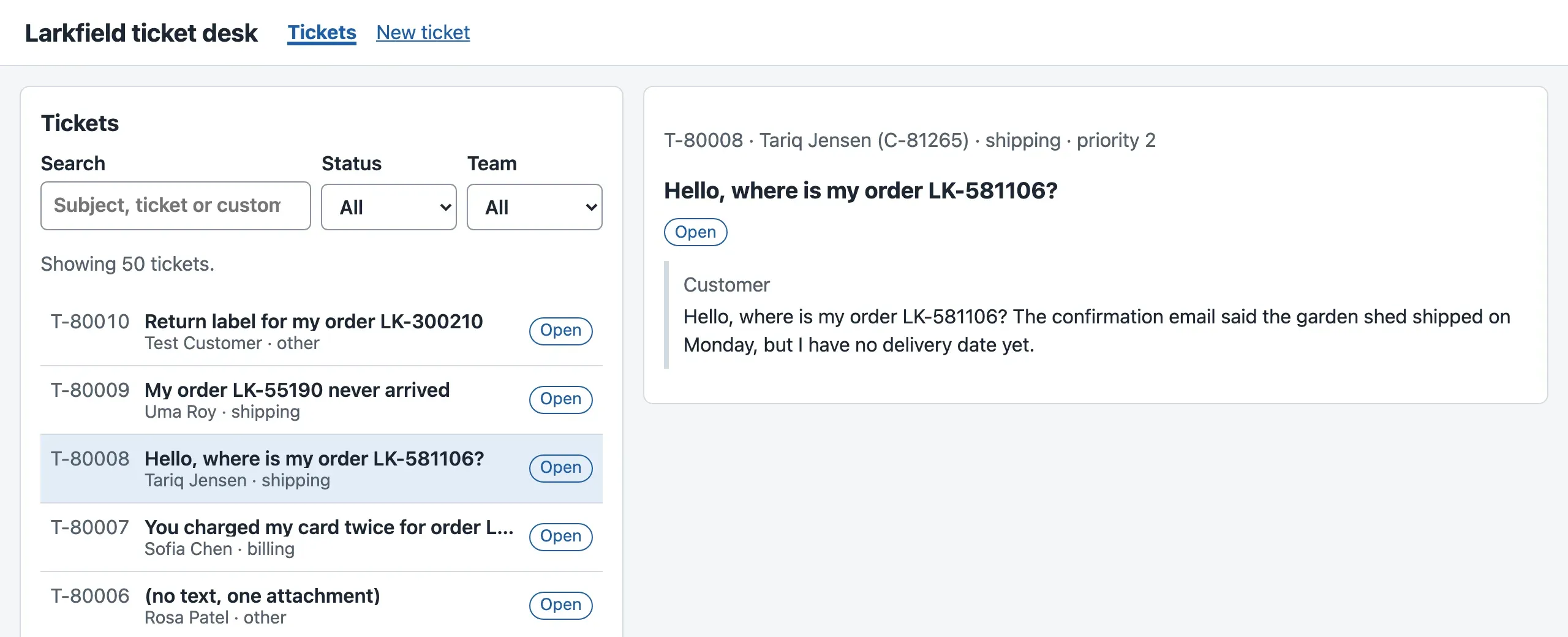
The course team counted the requests in both versions of the desk, in Chromium, on a fast and on a simulated phone network:
- Our hook useApi
- The cache (TanStack Query)
Text description of the chart
A column chart with four columns. On a fast connection, our hook useApi sent 3 ticket requests for the three steps, and the cache sent 2. On a simulated phone network (150 ms for each trip), the counts are 3 and 2. The difference is the third step, going back to T-80008: the cache had a fresh copy. With useApi, the agent saw “Loading T-80008…” for 158 ms on the phone-like network.
What stays local
Section titled “What stays local”Not everything moves to the cache. Three things stay where they are, and each one has a reason.
- The search text and the filters stay
useStateinTicketList. They are the agent’s choices, and no server knows them. - The open ticket stays in the address. The address is local state that the browser keeps for you: it survives a reload, and the agent can share the link with a colleague.
- The reply that the agent is typing will be
useStatein a form. It becomes server state only when the API saves it, in Pagination and forms.
Tomás, the AI engineer, has a shortcut: “Let’s put everything in one big store for the whole app: the tickets, the search, the open menus. Then every component can read everything.” Sam asks what it would cost. A store does not know which values are copies, so it cannot know when one is old. You would write the age, the refresh and the cancellation by hand, for every copy. Amira, who owns the ticket API, puts it in one sentence: “Keep your own choices simple, and keep my data in a cache that knows it is a copy.”
When to use a cache, and what it costs
Section titled “When to use a cache, and what it costs”Use a server-state cache when the screen shows data that a server owns, and when several screens or several visits need the same data. The desk is a good case. Agents move between tickets all day, and the list and the ticket show the same tickets.
You do not need one for a small page that fetches one thing once, such as the first page of Module 1. And never put local state in the cache: a search text has no server to refresh it from.
The cache has costs:
- 13.6 kB of JavaScript after gzip, and one more library to keep up to date.
- New words to learn: keys, fresh, stale, invalidation.
- A copy can be old on purpose. For 30 seconds, the desk can show a status that another agent has already changed. You choose that time for each kind of data. For a ticket list, 30 seconds is acceptable. For a payment, it would not be.
Your turn: no time to be fresh
Section titled “Your turn: no time to be fresh”Change one setting. In src/api/queryClient.ts, set staleTime: 0. Every copy is then stale as soon as it arrives. Before you try it, predict: when you go back to T-80008, does the screen show “Loading T-80008…”? How many ticket requests does the Network panel show for the three steps?
Show the answer
The course team’s run with staleTime: 0 sent 3 ticket requests, as many as useApi. But on the simulated phone network, “Loading T-80008…” showed for 0 ms when the agent went back, against 158 ms with useApi.
So the cache still helps. A stale copy is not thrown away. The cache shows it at once and fetches a new copy in the background. When the new copy arrives, the screen draws again. This behaviour is called stale-while-revalidate: show the stale copy while you check it again. staleTime decides when the cache asks the server again, not whether the agent waits.
Set staleTime back to 30_000 before you go on.
Common mistake
The status changed, and the screen did not
Symptom: you read T-80008 on the desk. Another agent sets it to pending. Your screen keeps showing Open, and nothing tells you that the data is old.
Try it with the Module 2 version of the desk (the end-of-m02 snapshot), which uses useApi. Open http://localhost:5173/#/tickets/T-80008. In a terminal, play the other agent:
curl -X PATCH http://127.0.0.1:8100/v1/tickets/T-80008 -H "Content-Type: application/json" -d '{"status": "pending"}'curl.exe -X PATCH http://127.0.0.1:8100/v1/tickets/T-80008 -H "Content-Type: application/json" -d '{\"status\": \"pending\"}'The course team did this in both versions of the desk, and read the label of the open ticket. “Comes back” means that the agent switches to another window and back to the browser:
| After the change | useApi (Module 2) |
The cache (this lesson) |
|---|---|---|
| 0.2 s: the API has the new status | Open | Open |
| 0.7 s: the agent comes back at once | Open | Open |
| 31.8 s: the agent comes back after more than 30 s | Open | Pending |
Cause: useApi treats the ticket as the component’s own state. It fetches once, when the ticket opens, and it does not know that the copy gets old.
Fix: keep server state in the cache. When the browser window gets the focus again, TanStack Query fetches every stale copy that a screen shows. Within the 30 seconds, the copy counts as fresh, so the label stays Open: that is the price of staleTime. The next lesson adds the other fix: after the desk itself changes a ticket, it marks the copies as old at once.
Consequence in AI work: an AI draft, a job status or a “needs a human” flag is server state too. It changes while the agent looks at the screen. A copy that never refreshes can make an agent send a reply that a colleague already sent.
Knowledge check
Section titled “Knowledge check”Check your understanding
Sort these values of the new-ticket screen into local state and server state, and give a reason for each: the customer ID that the agent is typing, the list of teams in the Team filter, the ticket ID that the API gives back after the agent sends the form, the words 'Sending…' on the button.
Show the answer
- The customer ID being typed: local. Only this tab knows it until the form is sent.
- The list of teams: neither, today. The desk has it as a fixed list in
api/types.ts(TEAMS), from the API’s contract. If the API could add teams, the list would be server state, fetched and cached like the tickets. - The ticket ID from the API: server state. The API made it and owns the ticket. The screen shows a copy of the answer.
- “Sending…”: derived. It follows from the state of the request; it is not stored as its own value.
The test for each value: could another person, or the server, change it? If yes, it is server state.
Does your answer have the main points of ours?
Sign in and enroll in the course to save your answers. Every check counts toward the certificate.
Check your understanding
Predict: with staleTime 30 s, an agent opens T-80008, then T-80007, then T-80008 again after 10 seconds, then T-80007 again after 2 minutes. How many ticket requests does the desk send? Does the agent ever see 'Loading…' for a ticket that was open before?
Show the answer
Three requests. T-80008 and T-80007 are fetched once each. Going back to T-80008 after 10 seconds uses the fresh copy: no request. After 2 minutes, the copy of T-80007 is stale, so the cache fetches it again: the third request.
The agent never sees “Loading…” for a ticket that was open before. The cache keeps an unused copy for 5 minutes (gcTime), and it shows a stale copy at once while the new one loads. Only a ticket that was never open, or not open for more than 5 minutes, shows “Loading…”.
Does your answer have the main points of ours?
Sign in and enroll in the course to save your answers. Every check counts toward the certificate.
Recap
- Local state is the agent’s own choices: search text, filters, the open ticket, a reply being typed. This tab owns it, and it is always right.
- Server state is the API’s data: tickets, messages, status. The browser has only a copy, which takes time to get, can fail, and gets old. Ask of each value: could someone else change it?
- A cache keeps copies under a key, with their age. The desk uses TanStack Query (13.6 kB gzip): one query client in
main.tsx, the keys inqueries.ts, anduseTicketinTicketView. - With
useApi, going back to a ticket sent a third request. With the cache, a copy younger than 30 seconds (staleTime) is shown with no request, and an older copy is shown at once while a new one loads. - A copy that never refreshes shows an old status. The cache fetches stale copies again when the window gets the focus.
Next, you follow one copy through its whole life: fresh, stale, fetched again, marked old after a change, cancelled and retried. You also move the list to the cache.
Next: Query lifecycle