
Load less work
- Lesson 15
- 55 min
- Module 5: Performance and scalability
Lesson 15 of 19 · Frontend Architecture and Performance for AI AppsLoad less work
1. Web foundations bridge
2. Components and application structure
3. Data fetching and state management
4. AI-specific interaction states
5. Performance and scalability
6. Security, accessibility and handoff
What you will be able to do
The agent’s screen shows about ten ticket rows and one page of the desk. Load and draw only that: one page of data, the rows in view, and the code of the screen that is open. Then measure what each change saved, and what it costs.
Before you startWhat to know and to have ready
What you need to know
- The three kinds of wait, the size report, the first-rows mark and the labs, from Measure the browser.
- Server pages of 50 tickets with a cursor, from Pagination and forms.
- Promises and
import, from JavaScript essentials.
What you need on your computer
- Your project after the last lesson:
npm testprintspass 21andTests 42 passed (42), andnpm run sizeworks. - The mock API running in a first terminal (
npm run api), with its large data of 10,000 tickets (the default). - An internet connection for one
npm install.
Tested with Node.js 24.18.0 and npm 11.16.0 on macOS (Apple silicon), in Chromium 156. Windows (PowerShell) and Linux commands are written out but were not run.
Only what fits through the window
Section titled “Only what fits through the window”Think of a very long paper scroll with a list of names: ten thousand of them. You read it through a small window frame that shows ten names at a time. To read further, you roll the paper. Nobody needs to unroll the whole scroll on the floor to read ten names.
A plumber works the same way with tools. The van holds every tool, but the plumber carries only the toolbox for today’s job into the house. If a rare tool is needed, the plumber fetches it from the van then.
This lesson applies both ideas to the desk. Show only the rows that fit in the window, and send only the code that the open screen needs. The rest stays “in the van” until the agent asks for it.
Do not download what nobody will see
Section titled “Do not download what nobody will see”The first and largest saving is in the data. It is the course’s seeded mistake: fetching the entire dataset to display one page. The list lab has a button that does it on purpose. It asks the mock API for every ticket, 100 at a time. On the course team’s laptop, it took 6,502.5 ms, 100 requests and about 2,372 KB of JSON. Only then could the first row be drawn. The desk asks for one page of 50 tickets instead, and draws them after one request. You built that in Pagination and forms; this lesson keeps it.
The mock API’s list time is simulated (60 ms plus a little for each match of a search), so your times will differ. The shape will not: 100 requests always wait longer than one.
The problem: thousands of rows on the screen
Section titled “The problem: thousands of rows on the screen”Pages of 50 solve the download. But an agent who scrolls keeps loading pages, and Grace’s agents scroll a lot. After 200 pages, the list holds 10,000 tickets. If React draws every one of them, the browser holds a row for each ticket, even though the screen shows about ten.
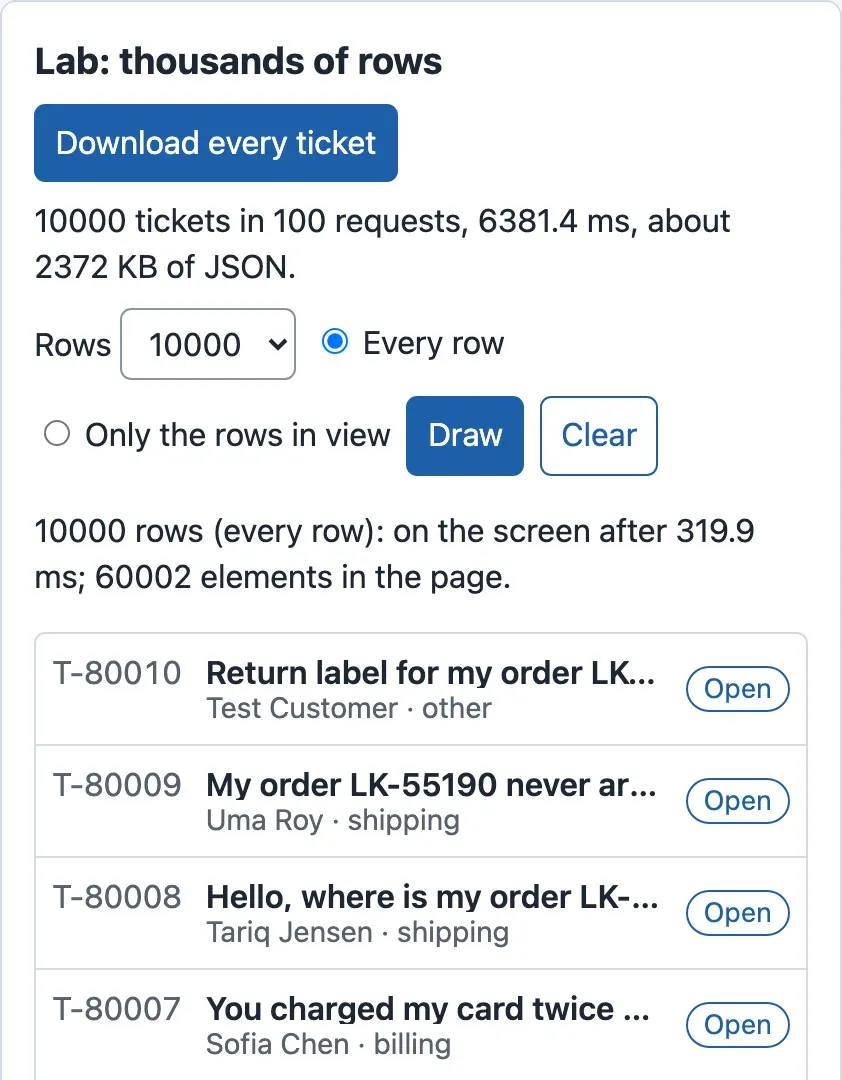
The list lab measures this. It draws the same tickets in two ways: every row, or only the rows in view. It times the click on Draw until the next paint, and counts the elements in the page. At 10,000 rows, drawing every row took 274.3 ms and put 60,002 elements in the page. During those 274 ms, the page cannot answer a click or a key press.
The idea: draw only the rows in view
Section titled “The idea: draw only the rows in view”The window frame of the scroll is the answer. The list keeps all 10,000 tickets in memory, which is cheap: it is data. But it puts in the page only the rows that the scroll box shows, and a few more above and below. When the agent scrolls, the same few row elements get new tickets.
This is called virtualization, or a virtual list. “Virtual” means that the list looks complete: the scroll bar has the length of 10,000 rows. But most of the rows do not exist in the page. They are made when they come into view.
A tiny example: which rows exist?
Section titled “A tiny example: which rows exist?”The desk’s scroll box is 60% of the window’s height. In a window 900 px high, that is 540 px. Each row is 56 px high.
- Rows in view: 540 ÷ 56 = 9.6, so 10 rows show, the last one partly.
- The list adds 8 extra rows below and above (the overscan), so a fast scroll never shows an empty gap. At the top of the list, there is nothing above, so it draws rows 0 to 17: 18 rows.
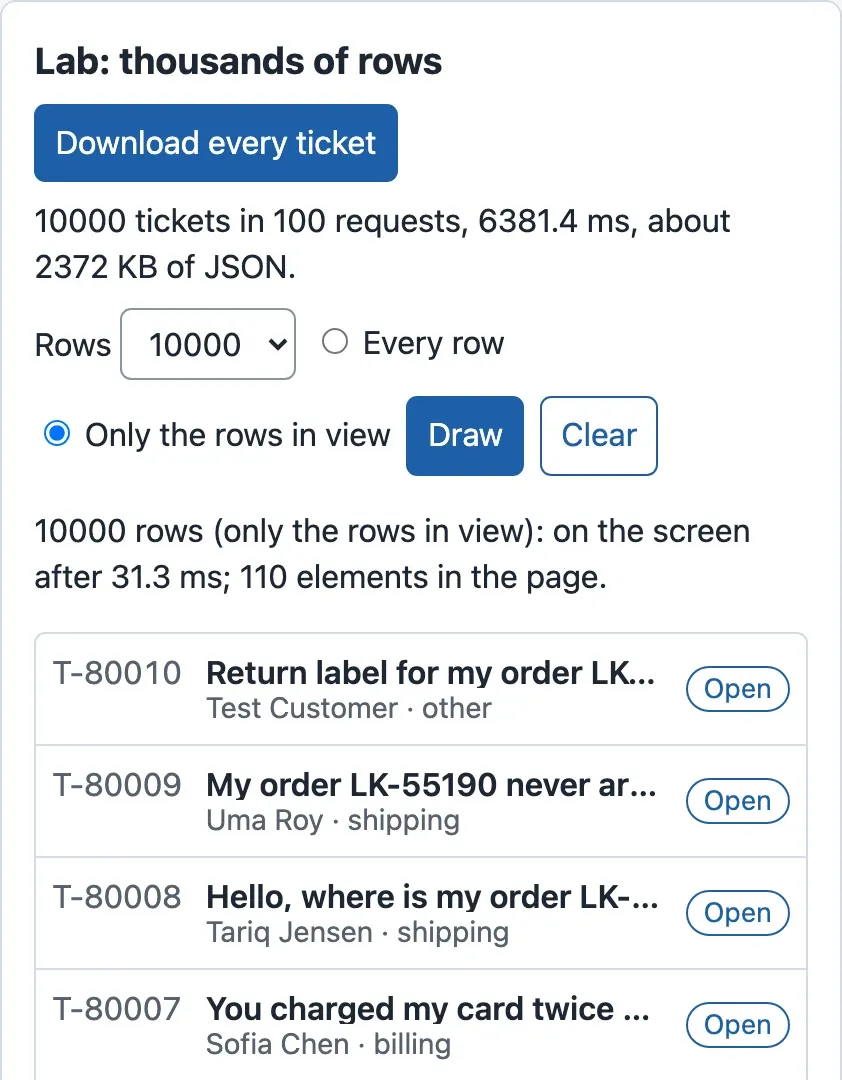
- Each row is 6 elements: the list item, the link, three texts and the badge. So 18 rows are 18 × 6 = 108 elements, plus the list and the scroll box: 110 elements. That is the number that the lab counted, for 100 rows or for 10,000.
- To keep the scroll bar honest, the list is as tall as all the rows: 10,000 × 56 = 560,000 px. Each drawn row is moved to its place: row 35 starts at 35 × 56 = 1,960 px.
When the agent scrolls down 2,000 px, rows 35 to 45 are in view: 2,000 ÷ 56 = 35.7, and (2,000 + 540) ÷ 56 = 45.4. With 8 rows of overscan on each side, the page holds rows 27 to 53. The other 9,973 tickets are only data.
Explore: when does it matter?
Section titled “Explore: when does it matter?”Explore
Every row, or only the rows in view?
Predict first: At how many rows does drawing every row become slow: 100, 1,000, 5,000 or 10,000?
- Every row: time, elements
- 34.5 ms, 6,002
- Rows in view: time, elements
- 29.7 ms, 110
- Every row ÷ rows in view
- 1.2 × the time, 55 × the elements
At 1,000 rows, the two ways are close: 34.5 ms against 29.7 ms. Both are near the shortest time this measure can show. Virtualization buys almost nothing here.
Time from the click to the screen
about 29 ms: the shortest time this measure can show (it waits for two frames)
100 ms: below this, a click feels instant
Elements in the page
The list lab of ticket-desk in Chromium, window 1280 × 900. Median of 5 runs on the course team’s laptop; your times will differ, the shape stays.
Text description of the explorer
The explorer has one control: the number of rows, 100, 1,000, 5,000 or 10,000. For each number, it shows two pairs of bars. The first pair is the time from the click on Draw to the screen: drawing every row took 30.4 ms for 100 rows, 34.5 ms for 1,000, 138.7 ms for 5,000 and 274.3 ms for 10,000. Drawing only the rows in view took between 29.1 and 30.1 ms at every size. About 29 ms is the shortest time this measure can show, because it waits for two screen frames. A dashed line marks 100 ms, below which a click feels instant. The second pair is the elements in the page: 602, 6,002, 30,002 and 60,002 for every row, and 110 at every size for the rows in view.
Up to 1,000 rows, the two ways are almost the same: 34.5 ms against 29.7 ms. At 5,000 rows, drawing every row passes 100 ms, the time under which a click feels instant to most people. At 10,000, it is ten times slower than the virtual list. Virtualize because of thousands of rows, not hundreds.
The desk: a virtual ticket list
Section titled “The desk: a virtual ticket list”The desk uses TanStack Virtual, a small library of the same family as TanStack Query. Its useVirtualizer hook does the arithmetic of the tiny example. You give it the number of rows, the scroll box and the height of one row. It gives back the rows to draw and where each one goes. These are the important lines of the new TicketList.tsx:
const ROW_HEIGHT = 56; // px, the height of .row in styles.css (3.5rem)
const scroller = useRef<HTMLDivElement>(null);const rows = useVirtualizer({  count: tickets.length,  getScrollElement: () => scroller.current,  estimateSize: () => ROW_HEIGHT,  overscan: 8,});const visible = rows.getVirtualItems();
// Near the end of what is loaded: ask the server for the next page.const last = visible.at(-1)?.index ?? 0;const { hasNextPage, isFetchingNextPage, fetchNextPage } = list;useEffect(() => {  if (hasNextPage && !isFetchingNextPage && last >= tickets.length - 10) void fetchNextPage();}, [last, tickets.length, hasNextPage, isFetchingNextPage, fetchNextPage]);
And the list draws only visible, each row moved to its place:
<div ref={scroller} className="scroller" tabIndex={0} role="region" aria-label="Ticket list"> <ul className="rows" style={{ height: rows.getTotalSize(), position: 'relative' }}> {visible.map((v) => { const t = tickets[v.index]; return ( <li key={t.ticket_id} style={{ position: 'absolute', top: 0, left: 0, right: 0, transform: `translateY(${v.start}px)` }}> <TicketRow ticket={t} selected={t.ticket_id === selectedId} /> </li> ); })} </ul></div>Two things changed together. The list draws only the rows in view. And it asks for the next page by itself when the agent scrolls near the end. The agent never has to press Load 50 more. The button stays for keyboard users who prefer it. The scroll box has tabIndex={0}, so a keyboard user can reach it with Tab and scroll it with the arrow keys.
When to virtualize, and what it costs
Section titled “When to virtualize, and what it costs”- Use it when a list can hold thousands of rows, as the desk can after a long scroll, or a log, or a table of search results.
- Do not use it for a list of tens or a few hundred rows. The measurements show no gain up to 1,000 rows, and the library costs 9.1 kB of JavaScript (gzip) on the first download.
- What it costs beyond bytes. Rows need a known height, or the library must measure each one. The browser’s own search (Ctrl+F or Cmd+F) finds only the rows that exist in the page. A screen reader announces a list of about 18 items, not 10,000. A row with keyboard focus disappears when it scrolls out of view. Each of these needs care; the desk’s list keeps the server’s search box for finding tickets, and Accessible interaction checks the keyboard flow.
Send only the code of the open screen
Section titled “Send only the code of the open screen”The second saving is in the code. In the last lesson, the desk was one JavaScript file. Every agent downloads all of it before the first rows: the list and the ticket, but also the new-ticket form and the labs, which most agents never open.
Code splitting cuts the code into several files. The first file holds what the first screen needs. Each other file holds one screen, and the browser downloads it when the agent opens that screen. Like the plumber’s van, the other files wait until someone needs them.
JavaScript has a built-in way to load code later: import() with brackets, a dynamic import. It returns a promise that resolves when the file has arrived. Vite sees each dynamic import and makes a separate file for it. React wraps this in lazy(), and <Suspense> says what to show while the file is on its way:
import { lazy, Suspense } from 'react';
// Loaded only when the agent opens them (code splitting): the ticket list does not wait for them.const NewTicketForm = lazy(() => import('./features/jobs/NewTicketForm').then((m) => ({ default: m.NewTicketForm })));const LabsPage = lazy(() => import('./labs/LabsPage').then((m) => ({ default: m.LabsPage })));<Suspense fallback={<p className="muted">Loading the page…</p>}> {route.page === 'new' && <NewTicketForm />} {route.page === 'labs' && <LabsPage lab={route.lab} />}</Suspense>lazy() expects a module with a default export. The desk’s components are named exports, so .then((m) => ({ default: m.NewTicketForm })) gives it that shape.

Text description of the diagram
Before code splitting, the desk is one JavaScript file of 96.78 kB on the network, and every agent downloads all of it before the first rows. After splitting, the first file holds the first screen: 93.02 kB. Three other files are downloaded only when the agent opens that page: LabsPage.js (3.77 kB, the labs); NewTicketForm.js (1.74 kB, a new ticket); useJob.js (0.51 kB, a new ticket or the job lab).
How much did it save? Measure it
Section titled “How much did it save? Measure it”At your stage, splitting saves 3.76 kB of the first download: 96.78 kB before, 93.02 kB after. That is about 4%. The new-ticket form and the labs are small, and React, which the first screen needs, is most of the file. On the phone-like profile, the course team measured first rows at 1117.2 ms with one file and 1102.1 ms split (median of 5 runs). That is 15.1 ms sooner, but the runs spread from 1,094.4 to 1,127.1 ms and from 1,094.4 to 1,123.5 ms: the difference is smaller than the spread, so it is not a real change.
Splitting matters when a large part of the code is used by only one screen. In Browser security boundaries, the draft gets two libraries that turn the model’s Markdown into safe HTML. They are 24.6 kB on the network, used only when an agent opens a draft. The course team measured the finished desk both ways:
Text description of the chart
First rows of the finished desk. On a fast network: 98.2 ms with one file and 97.2 ms split, no real difference. On the phone-like profile: 1,256.5 ms with one file and 1,113 ms split. The split first file is 92.4 kB instead of 123.2 kB on the network: 30.8 kB less.
On a fast network, the saving of 30.8 kB changes nothing that anyone can see: 98 ms against 97 ms. On the phone-like profile, first rows come 144 ms sooner (1,256.5 against 1,113 ms). So code splitting is not a rule to apply everywhere. It pays when the code that you move out is large, and when your users have slow networks.
What it costs. Each split file is one more request when the agent opens that screen, so the first visit to the labs waits for its file. A <Suspense> fallback shows during that wait. Too many small files can be slower than one larger file, because each request has a round trip. Split along screens and large libraries, not along every component.
Images and fonts: send the size that is shown
Section titled “Images and fonts: send the size that is shown”The desk has no images and uses the computer’s own fonts, so it has nothing to fix here. Most products do, and the idea is the same: do not send more than the screen shows.
Take a photo from a phone camera: 4,000 × 3,000 pixels, often 3 to 5 MB. A help page shows it 400 × 300 pixels wide. The file has 4,000 × 3,000 = 12,000,000 pixels, and the screen shows 400 × 300 = 120,000. So 99% of the pixels are downloaded for nothing. On a 1.6 Mbit/s phone network, 3 MB is 24,000 kilobits, about 15 seconds.
- Make each image the size that is shown, or a little larger for sharp screens. The
srcsetattribute of<img>lets the browser choose between sizes. - Use a compressed format: WebP or AVIF for photos, SVG for icons and diagrams.
- Give every image its
widthandheight, so the page keeps the space and does not jump when it arrives. - Add
loading="lazy"to images below the first screen: the browser loads them when they come near. - Fonts: use the system fonts, as the desk does, or one font file in a modern format (WOFF2) with only the weights that you use.
Guided practice: a virtual list and two lazy screens
Section titled “Guided practice: a virtual list and two lazy screens”Work in ~/projects/ticket-desk, with the mock API running in a first terminal.
-
Add TanStack Virtual, at the course’s exact version:
Terminal window npm install @tanstack/react-virtual@3.14.15 --save-exact -
Copy the new ticket list, its test and the list lab from the snapshot:
Terminal window S=../nextia-learning-labs/C22/snapshots/end-of-m05cp $S/src/features/tickets/TicketList.tsx $S/src/features/tickets/TicketList.test.tsx src/features/tickets/cp $S/src/labs/ListLab.tsx src/labs/Terminal window $S = "..\nextia-learning-labs\C22\snapshots\end-of-m05"Copy-Item "$S\src\features\tickets\TicketList.tsx", "$S\src\features\tickets\TicketList.test.tsx" src\features\tickets\Copy-Item "$S\src\labs\ListLab.tsx" src\labs\Open
TicketList.tsxand find the parts shown above:useVirtualizer, the effect that loads the next page, and theulwith its total height. The new test checks that 50 loaded tickets give fewer than 25 rows in the page. -
In
src/labs/LabsPage.tsx, import the list lab and add it toLABS, before thererenderline:import { ListLab } from './ListLab';list: { title: 'Thousands of rows', Lab: ListLab }, -
Run
npm test, thennpm run buildandnpm run size. Write down the size of the one JavaScript file. -
In
src/App.tsx, delete the two import lines ofNewTicketFormandLabsPage. Addimport { lazy, Suspense } from 'react';as the first line. Add the twolazy()lines above after the last import line. -
In the same file, put the two lines
route.page === 'new'androute.page === 'labs'inside the<Suspense>element shown above. -
Run
npm run buildandnpm run sizeagain. Compare the first file with step 4. -
Run
npm run previewand open http://localhost:4173/#/labs/list. Press Download every ticket. Then draw 10,000 rows, first with Every row, then with Only the rows in view. -
Open http://localhost:4173/ and scroll the ticket list down quickly. Watch the line “Showing … tickets” above the list.
Show the expected result
Step 1, the course team’s run (npm may print other lines about funding or install scripts):
added 2 packages, and audited 109 packages in 471mspackage.json now has "@tanstack/react-virtual": "3.14.15" in "dependencies". npm also added @tanstack/virtual-core, the part that does not depend on React.
Step 4: Tests 43 passed (43) after pass 21. The build makes one JavaScript file:
dist/assets/index-B1ei4yzs.js 316.47 kB │ gzip: 96.78 kBIt grew by about 9 kB since the last lesson: that is TanStack Virtual and the list lab.
Step 7:
dist/index.html 0.39 kB │ gzip: 0.26 kBdist/assets/index-Cq7Ckq9E.css 4.20 kB │ gzip: 1.48 kBdist/assets/useJob-Lm28qjUm.js 0.89 kB │ gzip: 0.51 kBdist/assets/NewTicketForm-PDD-uc_E.js 4.14 kB │ gzip: 1.74 kBdist/assets/LabsPage-tEFacUpU.js 11.67 kB │ gzip: 3.77 kBdist/assets/index-DnbxJFGT.js 302.28 kB │ gzip: 93.02 kBJavaScript: 4 files, 95.6 KB gzip in allFour files now. useJob.js is shared by the new-ticket form and the job lab, so Vite put it in a file of its own. All the files together are a little larger than the one file, because each file has a little code to load the others. That is fine: the first screen downloads only index.js.
Step 8, on the course team’s laptop (one run of the profiling build, so the times differ a little from the medians above):
10000 tickets in 100 requests, 6381.4 ms, about 2372 KB of JSON.10000 rows (every row): on the screen after 319.9 ms; 60002 elements in the page.10000 rows (only the rows in view): on the screen after 31.3 ms; 110 elements in the page.Step 9: the line grows by 50 each time you come near the end: Showing 100 tickets (more on the server)., then 150, and so on. In the Network panel, a new tickets?limit=50&after=… request appears each time.
Your turn: split the ticket view too?
Section titled “Your turn: split the ticket view too?”Tomás likes the result: “Let’s make TicketView lazy as well. It is a whole screen.” Predict first. The desk often opens on a ticket, from a link such as http://localhost:4173/#/tickets/T-80008. Will that ticket appear sooner or later on a phone?
Try it: make TicketView lazy in App.tsx in the same way, and wrap its line in a second <Suspense>. Build, run the size report, and load the link above with Slow 4G and 4× CPU three times. Use the Performance panel or watch the screen.
Show the answer
It appears later. On the course team’s laptop, with the phone-like profile (median of 5 runs), the ticket was on the screen after 1,304.1 ms with a lazy TicketView, against 1,039.7 ms without: 264 ms later. The ranges do not overlap (1,287.9 to 1,305.6 ms, against 1,038 to 1,055.8 ms).
The waterfall shows why. index.js got 2.5 kB smaller (90.54 kB instead of 93.02 kB gzip), so it arrived a few milliseconds sooner. But the browser can ask for TicketView.js only after index.js has arrived and run, and React has found that it needs the ticket view. The new file was asked for at 812 ms and arrived at 987 ms: one more round trip of the phone network, in a chain. Lazy loading turns parallel work into a chain. That costs nothing for a screen that the agent opens later, and a lot for a screen that the agent opens first.
So the answer is no. A screen that is often the first screen must stay in the first file. Undo the change: git checkout src/App.tsx, or copy App.tsx from the snapshot end-of-m05.
Common mistake
A virtual list that draws every row
Symptom: a teammate changes the CSS of the ticket list and removes the height of .scroller, so that the list “uses the whole page”. The list still works and the tests in jsdom still pass. But in the list lab, “Only the rows in view” with 1,000 rows now puts 6,002 elements in the page instead of 110. That is exactly as many as drawing every row. On the course team’s laptop, the time stayed about 32 ms, because 1,000 rows are still cheap; at 10,000 rows, it would be as slow as every row.
Cause: the virtualizer draws the rows that fit in the scroll box. Without a fixed height, the box grows as tall as the list, 1,000 × 56 = 56,000 px, so every row is “in view”. Nothing fails, so nothing warns you.
Fix: give the scroll element a fixed height (the desk uses height: 60vh) and overflow: auto. Check the elements in the page after any change to the list’s CSS: in the Console, document.querySelectorAll('.scroller li').length should be about 18, not 1,000.
Consequence in AI work: long lists are common in AI interfaces: a chat history, search results from a retrieval system, a log of model calls. A virtual list that silently draws everything passes every functional test and fails only when a real user has a long history.
Knowledge check
Section titled “Knowledge check”Check your understanding
A teammate wants to virtualize the 'Recent tickets' box, which always shows the 20 newest tickets. What do you answer, with numbers?
Show the answer
Do not virtualize it. Up to 1,000 rows, drawing every row was about as fast as the virtual list: 34.5 against 29.7 ms. At 100 rows, it was 30.4 against 29.1 ms. For 20 rows, the gain is nothing you can measure. The library would add 9.1 kB to the first download, and the box would lose the browser’s search and a simple list for screen readers. Virtualize because of thousands of rows, not tens.
Does your answer have the main points of ours?
Sign in and enroll in the course to save your answers. Every check counts toward the certificate.
Check your understanding
Predict: you split out a screen whose file is 2 kB. On a fast office network, how much sooner will the first screen appear? And on a phone-like network?
Show the answer
On a fast network, nothing that you can see: even 30.8 kB less changed first rows from 98.2 to 97.2 ms. On the phone-like profile, 2 kB is about 10 ms of download at 1.6 Mbit/s (2 × 8 = 16 kilobits, about 0.01 s). That is smaller than the difference between two runs. Splitting pays for large parts of the code that one screen uses. On the finished desk, the split files hold 30.8 kB, most of it the draft’s Markdown libraries (24.6 kB), and first rows came 144 ms sooner on the phone-like profile.
Does your answer have the main points of ours?
Sign in and enroll in the course to save your answers. Every check counts toward the certificate.
Check your understanding
Why does the desk's scroll box need a height for the virtual list to work?
Show the answer
The virtualizer draws the rows that fit in the scroll box’s height: 540 px ÷ 56 px = 10 rows, plus the overscan. Without a fixed height, the box grows as tall as the whole list, every row is “in view”, and the virtualizer draws them all. The list then works, but it is as slow as a plain list.
Does your answer have the main points of ours?
Sign in and enroll in the course to save your answers. Every check counts toward the certificate.
Recap
- Data: ask for one page, never every ticket. Downloading all 10,000 tickets took 100 requests, about 2,372 KB and 6,502.5 ms before the first row.
- Drawing: a virtual list puts only the rows in view in the page: 110 elements and about 30 ms at any size, against 60,002 elements and 274.3 ms for 10,000 rows. Up to 1,000 rows, there is no real gain; virtualize because of thousands.
- Code:
lazy()and<Suspense>split the code by screen. At this stage, it saved 3.76 kB of the first download. On the finished desk, with the Markdown libraries of the draft, splitting saved 30.8 kB: first rows 144 ms sooner on the phone-like profile, no change on a fast network. - Keep the first screen in the first file: a lazy
TicketViewmade a deep link to a ticket slower. - Images and fonts: send the size that is shown, in a compressed format, with
widthandheight.
Next, you step back from single changes to the architecture: should the desk be drawn in the browser at all, or on a server?
Next: Architecture decisions