
Organize by responsibility
- Lesson 6
- 50 min
- Module 2: Components and application structure
Lesson 6 of 19 · Frontend Architecture and Performance for AI AppsOrganize by responsibility
1. Web foundations bridge
2. Components and application structure
3. Data fetching and state management
4. AI-specific interaction states
5. Performance and scalability
6. Security, accessibility and handoff
What you will be able to do
Give every piece of the desk’s code one clear home. Reusable pieces of the screen, feature screens, the API client and the API’s types each get a folder. Then a change to how the API answers is one change in one file.
Before you startWhat to know and to have ready
What you need to know
- Components, props, state and lifting state up, from React basics.
- The ticket API’s error shape,
{"error": {"code", "message", "request_id", "fields"}}, from Validation and error responses and Set up the ticket desk. importandexportbetween files, from JavaScript essentials.
What you need on your computer
- The desk at the end of React basics:
npm testshowsTests 8 passed (8). - The mock API in the first terminal (
npm run api), andnpm run devin the second.
Tested on macOS (Apple silicon) with Node.js 24.18.0. The Windows (PowerShell) file commands are written, not run.
One person phones the suppliers
Section titled “One person phones the suppliers”Think of a restaurant kitchen. The cooks make the dishes, the waiters serve them, and one person, the buyer, orders from the suppliers. When a supplier changes its order form, only the buyer must learn it. When a delivery is late, the buyer tells the cooks in the same plain words every time: “No fish until Thursday.”
Now imagine that every cook phones the suppliers. Each one asks in a different way and understands the answer in a different way. When the fish does not come, one cook hears “error 503”, another hears nothing, and a third writes the wrong date on the board.
The problem: two components, two ways to read an error
Section titled “The problem: two components, two ways to read an error”The desk of React basics is the kitchen where every cook phones. TicketList and NewTicketForm both call functions in src/api.ts, but those functions handle errors in two different ways. loadTickets throws an Error with the status code. sendTicket gives back a string instead of the ticket. The components then turn these into two different texts.
Make the list fail on purpose and look. Stop the mock API with Ctrl+C, and start it in a mode that makes every list request fail:
npm run api -- --list failThe -- passes --list fail on to the mock API. Now ask the API what it says, in the second terminal (Windows: curl.exe instead of curl):
curl -i "http://127.0.0.1:8100/v1/tickets?limit=50"HTTP/1.1 503 Service UnavailableX-Request-ID: c80237ea-ca11-4e3f-a2c9-2702868cb8cbContent-Type: application/jsonRetry-After: 2…
{"error":{"code":"unavailable","message":"The ticket service is not available. Try again in a few seconds.","request_id":"c80237ea-ca11-4e3f-a2c9-2702868cb8cb","fields":[]}}The API says exactly what happened, in a sentence that an agent understands, and it says when to try again. The header Retry-After: 2 means “try again in 2 seconds”. Now press Search in the desk:
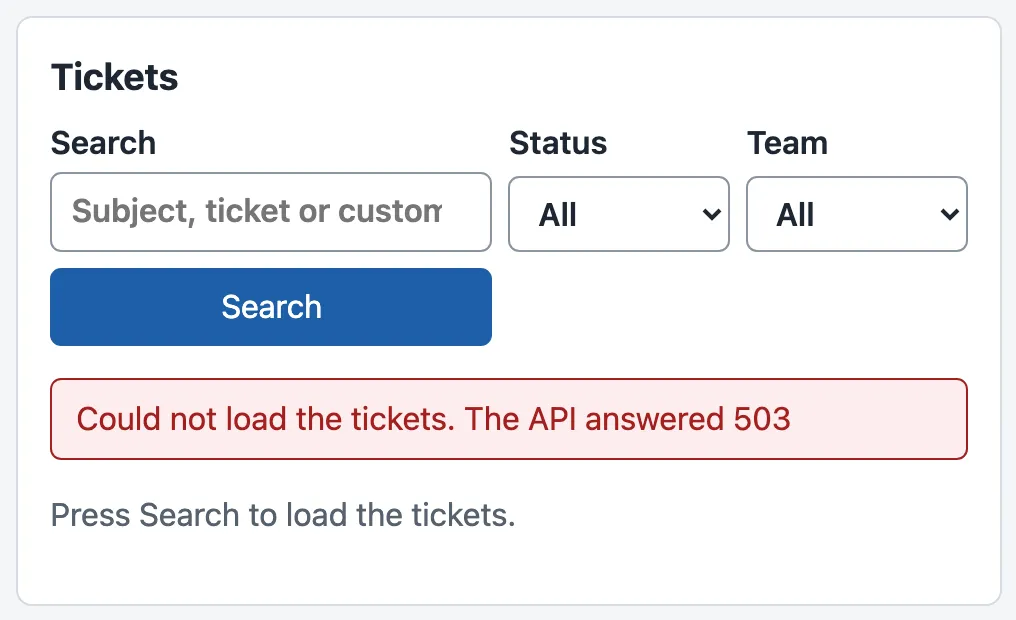
Grace’s agents do not know what 503 means. The API’s sentence, its code unavailable and the Retry-After header are all lost in loadTickets. You could fix loadTickets. But sendTicket has its own copy of the same work, and every request that later lessons add (a ticket, a reply, a draft, a job) would need one more copy. Each copy is a new chance to read the error differently.
There is a second, quieter problem. All the files sit side by side in src/. Today there are 13, plus the test/ folder. At the end of this course the project has 60 files in src/. In one flat folder, nobody can see which file talks to the API and which files draw the screen.
The idea: one home for each responsibility
Section titled “The idea: one home for each responsibility”A responsibility is one job that one part of the code does, and that only that part does. The desk has four kinds of job, and each gets its own folder:
| Folder | Its job | Knows about | In the desk now |
|---|---|---|---|
api/ |
Talk HTTP to the ticket API: the address, JSON, the error shape. Also the shared types of the API’s data. | The API’s contract. Nothing about the screen. | client.ts, tickets.ts, types.ts |
ui/ |
Reusable UI: small pieces of the screen that any feature can use. | Only their props. | StatusBadge.tsx, ErrorMessage.tsx |
features/ |
Feature logic: the screens that do one thing for the user, with their state. One folder per feature. | Tickets, filters, forms; uses api/, ui/, lib/. |
tickets/, jobs/ |
lib/ |
Small tools that know nothing about tickets. | Only React and the browser. | empty until the next lesson |
Then add one rule, the direction of imports: a file may import from a folder lower in the picture, never from a higher one. features/ uses api/, ui/ and lib/. ui/ uses only types from api/. api/ uses nothing in the app. The API client is the buyer: the only code that phones the ticket API.

Text description of the diagram
At the top is the app frame: main.tsx starts React and App.tsx lays out the page. It uses features/, which holds the ticket screens and the new-ticket form. The features use three lower folders: ui/ for reusable pieces such as StatusBadge and ErrorMessage, lib/ for general tools, and api/ for the client, the requests and the types. ui/ uses only the types from api/. Only api/ calls the ticket API, with fetch. Imports never go up: api/, ui/ and lib/ do not import anything from features/.
Why this direction? A lower folder must not depend on a higher one, so that you can change a screen without breaking the API client. You can also test api/ without React, and use StatusBadge on a page that does not exist yet. The rule also makes cycles impossible: if ui/ imported from features/ and features/ from ui/, a change in either could break the other.
A tiny example: one failed request through the client
Section titled “A tiny example: one failed request through the client”The new client has one function that every request uses, apiFetch, and one error class, ApiError. Here is the part that reads an error answer:
const body = await response.json().catch(() => null);if (!response.ok) { const e = body?.error; const retry = response.headers.get('Retry-After'); throw new ApiError( response.status, e?.code ?? 'unknown_error', e?.message ?? `The ticket service answered ${response.status}.`, e?.fields ?? [], retry ? Number(retry) : null, );}Follow the 503 above through it, with every value visible:
| Step | Value |
|---|---|
response.ok |
false (status 503) |
e |
{ code: "unavailable", message: "The ticket service is not available. Try again in a few seconds.", request_id: "c80237ea-…", fields: [] } |
retry |
"2" |
The error that apiFetch throws |
ApiError with status 503, code "unavailable", message the API’s sentence, fields [], retryAfter 2 |
What TicketList does |
stores the error in state and shows <ErrorMessage error={error} onRetry={search} /> |
| What the agent sees | the API’s sentence and a Try again button |
?. and ?? keep the client safe when the answer is not the API’s error shape, for example when a proxy answers with an HTML page. body?.error gives undefined instead of a crash, and ?? then picks the fallback text. If the server does not answer at all, fetch itself fails; the client turns that into an ApiError with the code network_error and a sentence for the agent. Every feature now gets the same kind of error, whatever went wrong.
Sort the desk
Section titled “Sort the desk”-
Stop
npm run devwith Ctrl+C. Keep the mock API in its--list failmode. -
Make the folders and move the files. The moves do not change the files; the imports break until step 6.
Terminal window mkdir -p src/api src/ui src/features/tickets src/features/jobsmv src/types.ts src/api/types.tsmv src/StatusBadge.tsx src/ui/mv src/TicketList.tsx src/TicketList.test.tsx src/TicketRow.tsx src/TicketFilters.tsx src/features/tickets/mv src/NewTicketForm.tsx src/NewTicketForm.test.tsx src/features/jobs/rm src/api.ts src/api.test.tsTerminal window New-Item -ItemType Directory -Force src/api, src/ui, src/features/tickets, src/features/jobsMove-Item src/types.ts src/api/types.tsMove-Item src/StatusBadge.tsx src/ui/Move-Item src/TicketList.tsx, src/TicketList.test.tsx, src/TicketRow.tsx, src/TicketFilters.tsx src/features/tickets/Move-Item src/NewTicketForm.tsx, src/NewTicketForm.test.tsx src/features/jobs/Remove-Item src/api.ts, src/api.test.ts -
Create the API client
src/api/client.tsand its testssrc/api/client.test.ts: the files of the snapshotend-of-m02. The client is shown in the box below. -
Create
src/api/tickets.tsandsrc/api/tickets.test.tsfrom the snapshot.tickets.tshas one function for each request that the desk uses. There are five: the list, one ticket, a new ticket, a reply and a status change. The screens use the last three in Module 3. -
Create
src/ui/ErrorMessage.tsxfrom the snapshot: an error in words, with an optional Try again button. -
Change the imports. In
src/ui/StatusBadge.tsx, import from'../api/types'. Insrc/test/fakeApi.ts, import from'../api/types'. Insrc/App.tsx, import from'./features/jobs/NewTicketForm'and'./features/tickets/TicketList'. Insrc/features/tickets/TicketFilters.tsx, import from'../../api/types'. -
Replace
src/features/jobs/NewTicketForm.tsxand its test with the snapshot’s files. The form now callscreateTicketand shows theApiError’s message. -
Replace
src/features/tickets/TicketRow.tsx,TicketList.tsxandTicketList.test.tsxwith the versions in the box below. -
Check the types:
npx tsc --noEmit. It prints nothing when every import is right. A wrong path printserror TS2307: Cannot find module, with the file and the line. -
Run the tests:
npm test. The end showsTest Files 4 passed (4)andTests 9 passed (9). -
Start
npm run devagain and press Search.
The client and the list after this lesson
// The one place that talks HTTP to the ticket API: the address, JSON, and the error shape.
export const API_URL: string = import.meta.env.VITE_API_URL ?? 'http://127.0.0.1:8100';
/** An error answer of the API, with its stable code (the contract's error shape). */export class ApiError extends Error {  constructor(    readonly status: number,    readonly code: string,    message: string,    readonly fields: string[] = [],    readonly retryAfter: number | null = null,  ) {    super(message);    this.name = 'ApiError';  }}
/** Sends a request and gives back the JSON answer, or throws an ApiError. */export async function apiFetch<T>(path: string, init: RequestInit = {}): Promise<T> { let response: Response; try { response = await fetch(`${API_URL}${path}`, { ...init, headers: { ...(init.body ? { 'Content-Type': 'application/json' } : {}), ...init.headers }, }); } catch (error) { if ((error as Error).name === 'AbortError') throw error; throw new ApiError(0, 'network_error', 'The ticket service did not answer. Check your connection.'); } const body = await response.json().catch(() => null); if (!response.ok) { const e = body?.error; const retry = response.headers.get('Retry-After'); throw new ApiError( response.status, e?.code ?? 'unknown_error', e?.message ?? `The ticket service answered ${response.status}.`, e?.fields ?? [], retry ? Number(retry) : null, ); } return body as T;}import type { TicketSummary } from '../../api/types';import { StatusBadge } from '../../ui/StatusBadge';
/** One ticket in the list. */export function TicketRow({ ticket }: { ticket: TicketSummary }) { return ( <div className="row"> <span className="row-id">{ticket.ticket_id}</span> <span className="row-subject">{ticket.subject}</span> <span className="row-meta"> {ticket.customer_name} · {ticket.team} </span> <StatusBadge status={ticket.status} /> </div> );}import { useState } from 'react';import { listTickets } from '../../api/tickets';import type { TicketFilter, TicketPage } from '../../api/types';import { ErrorMessage } from '../../ui/ErrorMessage';import { TicketFilters } from './TicketFilters';import { TicketRow } from './TicketRow';
export const NO_FILTER: TicketFilter = { status: '', team: '', q: '' };
/** The first 50 tickets that match the filters. For now, it loads them when you press Search. */export function TicketList() { const [filter, setFilter] = useState<TicketFilter>(NO_FILTER); const [page, setPage] = useState<TicketPage | null>(null); const [error, setError] = useState<Error | null>(null);
async function search() { setError(null); try { setPage(await listTickets(filter, 50)); } catch (e) { setError(e as Error); } }
return ( <section className="list" aria-labelledby="list-heading"> <h2 id="list-heading">Tickets</h2> <TicketFilters value={filter} onChange={setFilter} onSearch={search} /> {error && <ErrorMessage error={error} onRetry={search} />} {page === null ? ( <p className="muted">Press Search to load the tickets.</p> ) : ( <> <p className="muted">{page.items.length === 0 ? 'No ticket matches.' : `Showing ${page.items.length} tickets.`}</p> <ul className="rows"> {page.items.map((t) => ( <li key={t.ticket_id}> <TicketRow ticket={t} /> </li> ))} </ul> </> )} </section> );}import { render, screen } from '@testing-library/react';import userEvent from '@testing-library/user-event';import { expect, test } from 'vitest';import { apiError, installFakeApi, json, ticket } from '../../test/fakeApi';import { TicketList } from './TicketList';
test('shows the tickets after Search', async () => { installFakeApi(() => json(200, { items: [ticket(1), ticket(2, { status: 'pending' })], next: null })); render(<TicketList />); await userEvent.click(screen.getByRole('button', { name: 'Search' })); expect(await screen.findByText('Ticket number 1')).toBeInTheDocument(); expect(screen.getByText('Pending')).toBeInTheDocument();});
test('shows the API’s error message', async () => { installFakeApi(() => apiError(503, 'unavailable', 'The ticket service is not available.')); render(<TicketList />); await userEvent.click(screen.getByRole('button', { name: 'Search' })); expect(await screen.findByRole('alert')).toHaveTextContent('The ticket service is not available.');});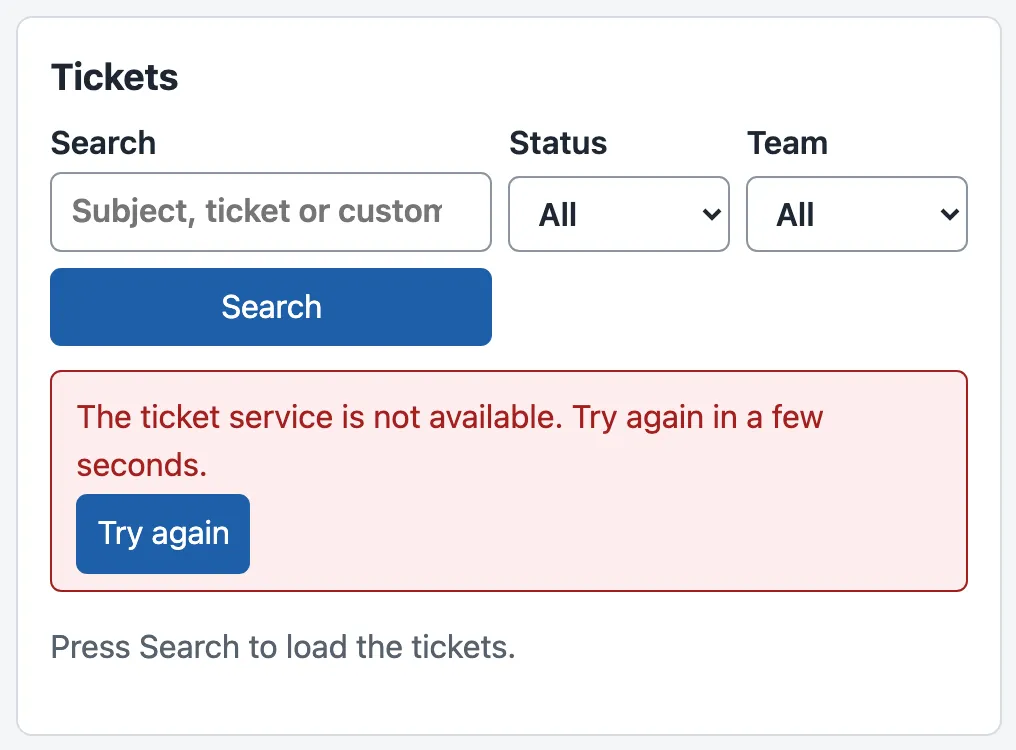
Now the agent reads the API’s sentence. Stop the mock API, start it again with npm run api (normal mode), and press Try again: the list shows Showing 50 tickets. The list component did not learn anything about HTTP to do this. It only shows the error that the client gives it, through a piece of UI that any feature can use.
Larkfield: what each folder means for the team
Section titled “Larkfield: what each folder means for the team”Amira owns the ticket API and its contract. She can now read src/api/ alone and check that the desk follows the contract: the paths, the query parameters, the error shape and Retry-After. When the contract changes, the change goes into api/ first, and TypeScript then shows each feature that must follow.
Sam asks the obvious question: “Why not one folder per kind of file, such as components/, hooks/ and services/?” Many projects do that. But a feature such as the ticket list then lives in four folders, and a change to it touches all four. Feature folders keep together the files that change together. The four folders here also grow well. At the end of this course, src/ holds 60 files: 23 in features/, 12 in api/, 9 in labs/, 4 in lib/, 4 in test/, 3 in ui/ and 5 at the top. Each new file has an obvious home.
When to use it, and what it costs. Separate by responsibility as soon as two parts of the code do the same job, as loadTickets and sendTicket did. Do it also when a new file has no obvious home. For a project of three or four files, one folder is fine: the structure would cost more than it saves. The costs are real. Imports get longer ('../../api/types'), moving a file means changing its imports, and a team must agree on the rules and keep them. The rule of direction only helps when everyone follows it.
Common mistake
A quick fetch inside a component
Symptom: Tomás needs one ticket for a new view. “The client is overkill,” he says, and writes fetch(url).then((r) => r.json()) inside the component. It works for T-80008. For a ticket that does not exist, the view shows an empty heading and no error.
Cause: fetch does not fail on an HTTP error. For T-99999, the API answers 404 with {"error":{"code":"not_found","message":"There is no ticket T-99999.",…}}. The component treats that object as a ticket, and ticket.subject is undefined. The client’s if (!response.ok) check is exactly the line that this shortcut skips.
Fix: every request goes through api/. Add the function there (getTicket already exists in tickets.ts), and let the component show the ApiError with ErrorMessage. A quick search finds shortcuts: in a feature or a ui/ file, fetch( should never appear.
Consequence in AI work: AI endpoints fail more often than ticket lists: a provider times out, a job ends as a dead letter, a stream stops. If each component reads errors its own way, some failures show as empty or half-filled screens. An agent may then send a reply that nobody checked.
Knowledge check
Section titled “Knowledge check”Check your understanding
Where does each of these new files go: (a) a function that turns a date into “2 hours ago”, (b) a Button component with the desk's colours, (c) the request that starts an AI draft for a ticket, (d) the panel that shows the draft with a Stop button?
Show the answer
(a) lib/: it knows nothing about tickets. (b) ui/: a reusable piece of the screen that any feature can use. (c) api/, next to the other requests (later in the course it is api/drafts.ts): it talks HTTP to the ticket API. (d) features/, in a folder for the draft feature (features/draft/): it is a screen with its own state that uses the request from api/ and pieces from ui/.
Does your answer have the main points of ours?
Sign in and enroll in the course to save your answers. Every check counts toward the certificate.
Check your understanding
Explain why ui/ must not import from features/. What would go wrong?
Show the answer
ui/ holds pieces that any feature may use. If StatusBadge imported something from features/tickets/, it would depend on one feature. You could not use it without the ticket list, and a change in the list could break every badge. features/ already imports from ui/, so the two folders would depend on each other, a cycle. Then no part can change or be tested alone. Keeping one direction means that lower folders stay small and stable.
Does your answer have the main points of ours?
Sign in and enroll in the course to save your answers. Every check counts toward the certificate.
Check your understanding
Predict: the mock API runs with --list fail, and the agent presses Search. Which file reads the Retry-After header, which file decides the words on the screen, and which file draws them?
Show the answer
src/api/client.ts reads Retry-After and puts it into the ApiError (retryAfter is 2). The words come from the API itself: the client copies the API’s message into the error, and uses its own fallback text only when the answer has no error shape. TicketList stores the error in state, and src/ui/ErrorMessage.tsx draws the message and the Try again button. No component reads HTTP headers.
Does your answer have the main points of ours?
Sign in and enroll in the course to save your answers. Every check counts toward the certificate.
Recap
- Give each responsibility one home:
api/talks to the ticket API and holds the shared types;ui/holds reusable UI;features/holds the screens and their state;lib/holds general tools. - Imports go one way:
features/usesapi/,ui/andlib/; nothing imports fromfeatures/. - One API client,
apiFetch, turns every error answer into anApiErrorwith the code, the API’s sentence, the fields andRetry-After. The agent now reads “The ticket service is not available. Try again in a few seconds.” instead of “503”. fetchdoes not fail on an HTTP error; the client’sresponse.okcheck does that job, once.- Structure has a cost: longer imports and rules to keep. Use it when code repeats a job or a new file has no obvious home.
The list still waits for a click on Search. Next, it loads by itself and follows the search as the agent types. That brings React’s effects, and a bug in which an old answer replaces a new one.
Next: Rendering and effects