
Background processing
- Lesson 12
- 55 min
- Module 4: AI-specific interaction states
Lesson 12 of 19 · Frontend Architecture and Performance for AI AppsBackground processing
1. Web foundations bridge
2. Components and application structure
3. Data fetching and state management
4. AI-specific interaction states
5. Performance and scalability
6. Security, accessibility and handoff
What you will be able to do
Let the agent follow a new ticket’s AI work while it runs in the background: waiting, working, done or failed, in plain words. First by asking the server every second, then by letting the server send each change.
Before you startWhat to know and to have ready
What you need to know
- The state machine of one draft, and why each ending has its own words and buttons, from Streaming interfaces.
- Queries,
staleTimeand retries in TanStack Query, from Query lifecycle. - The new-ticket form and its
202 Acceptedanswer, from Pagination and forms.
What you need on your computer
- Your
ticket-deskproject after Streaming interfaces:npm testends withTests 35 passed (35). - The snapshot
end-of-m04in~/projects/nextia-learning-labs/C22/snapshots/, to copy this lesson’s files.
Tested with Node.js 24.18 on macOS (Apple silicon) in Chromium. The Windows (PowerShell) and Linux commands are written, but not tested.
A table pager at a busy café
Section titled “A table pager at a busy café”You order lunch at a busy café. The cook needs a few minutes, so the cashier gives you a receipt with a number, and you sit down. Now there are two ways to know when your food is ready.
You can walk to the counter every minute and ask: “Is number 42 ready?” It works, and it needs nothing special. But most walks are wasted, and you learn the news only on your next walk. Or the café gives you a small pager. It buzzes the moment your food is ready, and you never ask at all. Some cafés also have a third way: a waiter who talks with you at the table, both ways, as often as you like.
The ticket desk faces the same choice. This lesson builds the first way, and then compares it with the other two.
The problem: “queued”, and then silence
Section titled “The problem: “queued”, and then silence”When an agent saves a new ticket, the ticket API does not do the AI work at once. It saves the ticket, puts the AI work into a queue, and answers 202 Accepted. Scaling AI Systems moved this work to a queue because it takes seconds. Classifying, drafting a reply and embedding took 913, 1,097 and 198 ms in the recorded calls, about 2.2 s in all. A worker then does the work in the background.
At the end of Module 3, the new-ticket form showed the 202 answer and stopped:
Saved as T-500001. The AI work is queued (job 1).That sentence stays on the screen forever. The agent never learns the team that the AI chose, or that the work failed. “Queued” is only the first state of a job: a piece of work that a server does later, with a state that changes. The agent needs to see the state change.
Look at the job with curl. The mock API simulates the queue: 1.5 s of waiting, plus 2 s for each job ahead. Then it uses the recorded task times. Send a ticket, then ask for its job once a second:
curl -X POST http://127.0.0.1:8100/v1/tickets -H "Content-Type: application/json" \ -d '{"customer_id": "C-0022", "subject": "Parcel lost", "body": "It did not arrive."}'curl http://127.0.0.1:8100/v1/jobs/1$body = '{"customer_id": "C-0022", "subject": "Parcel lost", "body": "It did not arrive."}'Invoke-RestMethod -Method Post -Uri http://127.0.0.1:8100/v1/tickets -ContentType 'application/json' -Body $bodycurl.exe http://127.0.0.1:8100/v1/jobs/1The answer to the POST comes at once, and then the job, asked for each second. These are the course team’s real outputs, with the long lines shortened; the lines --- after … mark the seconds:
{"ticket_id":"T-500001","job_id":1,"state":"queued","status_url":"/v1/jobs/1","queued_ahead":0,"estimated_wait_seconds":3.7}--- after 1 s{"job_id":1,"ticket_id":"T-500001","state":"queued","attempts":0,…,"started_at":null,"finished_at":null,…}--- after 2 s{"job_id":1,"ticket_id":"T-500001","state":"running","attempts":1,…,"started_at":"…",…}--- after 3 s{"job_id":1,"ticket_id":"T-500001","state":"running","attempts":1,…}--- after 4 s{"job_id":1,"ticket_id":"T-500001","state":"succeeded","attempts":1,…,"finished_at":"…","last_error":null,"result":{"team":"shipping","priority":2,"draft_reply":"Thank you for your message. A member of our team will look at your ticket and reply soon.","embedding_version":"embed-small-384-v1"}}Every value that the screen needs is there. The state changed from queued to running to succeeded. attempts counts the tries, and result holds the team and the priority. The desk only has to ask, and to show the answer in words.
The idea: follow the job, and say each state in words
Section titled “The idea: follow the job, and say each state in words”A job can be in six states. The API’s contract defines them, and the scaling course’s Job lifecycle built them on the server. Three of them are normal steps, and three are endings that need the agent’s attention:
| State | What happened | What the desk says | What the agent can do |
|---|---|---|---|
queued |
The job waits for a worker. | The AI work waits in the queue. About 4 seconds. | Cancel the AI work |
running |
A worker is doing the AI work. | The AI is working on the ticket: team, priority and a first draft. | nothing: wait |
succeeded |
The work is finished. | The AI work is done. Team: shipping, priority 2. | nothing to do |
failed |
The AI’s answer was wrong, and another try gives the same answer. | Trying again will not help; a person must sort the ticket. | sort the ticket by hand |
dead_letter |
The provider did not answer, five times. The job stopped trying. | The AI work failed several times and stopped. You can try again later. | Try again |
cancelled |
The agent cancelled it while it was queued. | The ticket is saved without it. | nothing to do |
Look at the two failures. failed and dead_letter both mean “no result”. But the advice is opposite. A failed job got a bad answer, and a retry gives the same bad answer, so the desk offers no Try again button. A dead_letter job failed because the provider was down, and later it may work, so the desk offers Try again. A dead letter is a job that the queue stopped retrying and set aside for a person. The name comes from letters that the post office cannot deliver.

Text description of the diagram
A new job starts in queued. The screen says “Waiting”, estimates the wait, and offers Cancel the AI work. From queued, the job goes to running (“Working”, no button), or to cancelled if the agent cancels it. From running, it ends in one of three states. succeeded shows “Done” with the team and the priority. failed says that trying again will not help, and a person sorts the ticket. dead_letter says that the work failed several times, and it offers Try again, which puts the job back into queued.
Polling: ask every second
Section titled “Polling: ask every second”The simplest way to follow a job is polling. The desk sends the same GET request at a fixed interval, until the job reaches a final state. It is the walk to the café counter every minute. TanStack Query does it for you with one option, refetchInterval. This is useJobPolling in src/features/jobs/useJob.ts:
/** Polling: ask for the job every second until it is final. Simple, and it works everywhere. */export function useJobPolling(id: number, intervalMs = 1000) { return useQuery({ queryKey: jobKey(id), queryFn: ({ signal }) => getJob(id, signal), refetchInterval: (query) => (query.state.data && isFinal(query.state.data.state) ? false : intervalMs), staleTime: 0, });}refetchInterval is a function here, not a number. After each answer, TanStack Query asks it: “When do I ask again?” While the job runs, the answer is 1,000 ms. When the job is final, the answer is false, and the polling stops. isFinal() in src/api/jobs.ts lists the four final states: succeeded, failed, cancelled and dead_letter.
JobStatus.tsx draws the answer: a row of three steps (Waiting, Working, Done), the sentence from the table above, and the one button that fits the state. The new-ticket form now shows JobStatus under “Saved as T-500001.” instead of the old sentence.
Follow the job on the ticket desk
Section titled “Follow the job on the ticket desk”-
In
~/projects/ticket-desk, copy this lesson’s files from the snapshot. Five files are new; the new-ticket form, its test and the labs page change.Terminal window S=../nextia-learning-labs/C22/snapshots/end-of-m04for f in src/api/jobs.ts src/features/jobs/useJob.ts src/features/jobs/JobStatus.tsx \src/features/jobs/JobStatus.test.tsx src/labs/JobLab.tsx \src/features/jobs/NewTicketForm.tsx src/features/jobs/NewTicketForm.test.tsx src/labs/LabsPage.tsx; docp "$S/$f" "$f"doneTerminal window $S = "..\nextia-learning-labs\C22\snapshots\end-of-m04"$files = 'src\api\jobs.ts', 'src\features\jobs\useJob.ts', 'src\features\jobs\JobStatus.tsx','src\features\jobs\JobStatus.test.tsx', 'src\labs\JobLab.tsx','src\features\jobs\NewTicketForm.tsx', 'src\features\jobs\NewTicketForm.test.tsx', 'src\labs\LabsPage.tsx'foreach ($f in $files) { Copy-Item "$S\$f" $f } -
Run the tests:
Terminal window npm testThe output ends with:
Test Files 14 passed (14)Tests 38 passed (38)The three new checks are in
JobStatus.test.tsx. The first one, “polls until the job is done, then stops asking”, takes about 3 seconds. It answersqueued,runningandsucceeded, then waits 1.2 s more and checks that no request came. -
Start the mock API (
npm run api) and the desk (npm run dev) in two terminals. Open http://localhost:5173/#/new. -
Fill in the form: customer
C-0022, subjectParcel lost, messageMy parcel did not arrive.Then click Send ticket. “Saved as …” appears, and the job’s steps start at Waiting.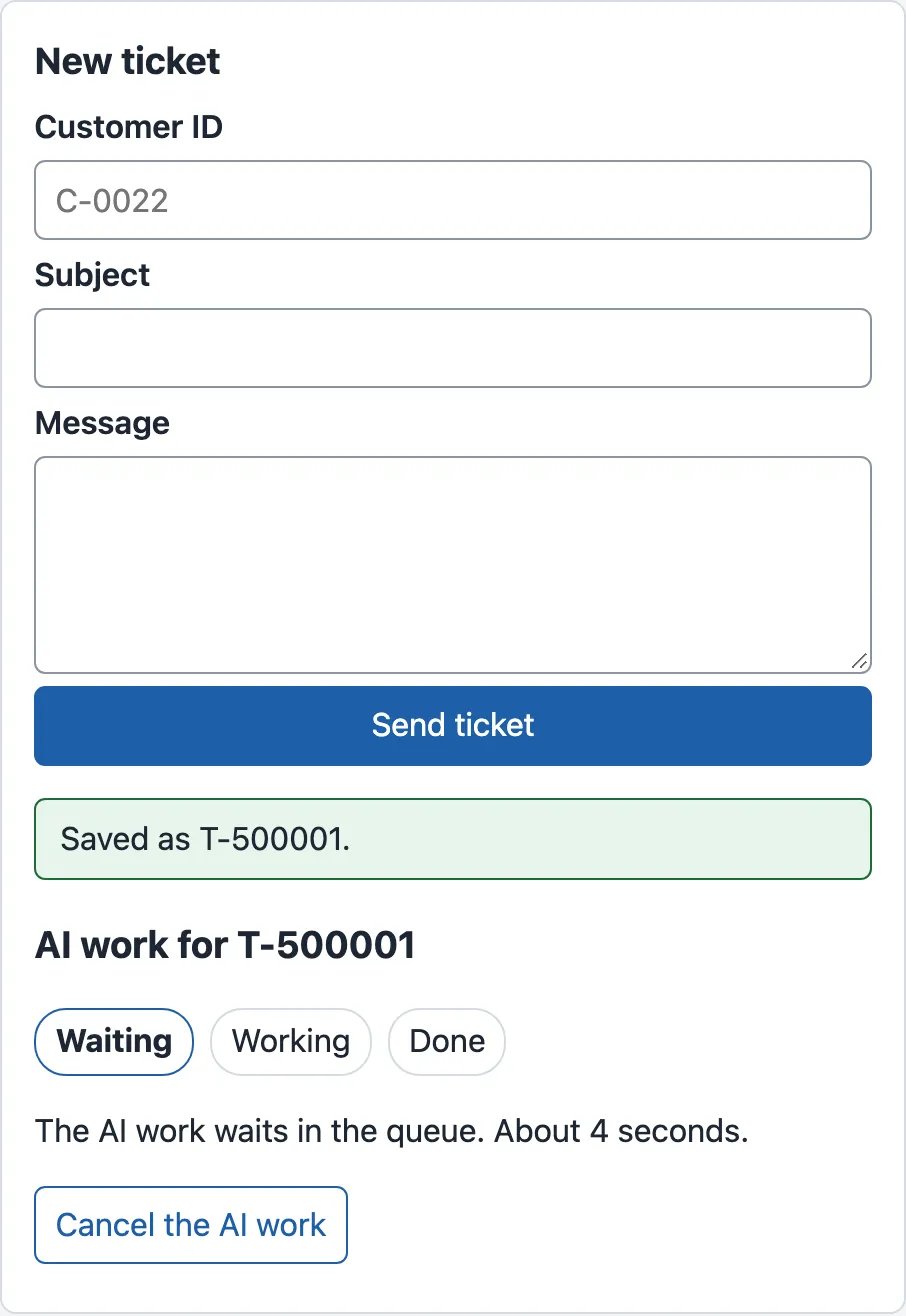
queued: the first answer of the API, now followed by the job's state and the only useful action. -
Watch the steps for about 4 seconds. Working becomes bold, then Done, and the team appears.
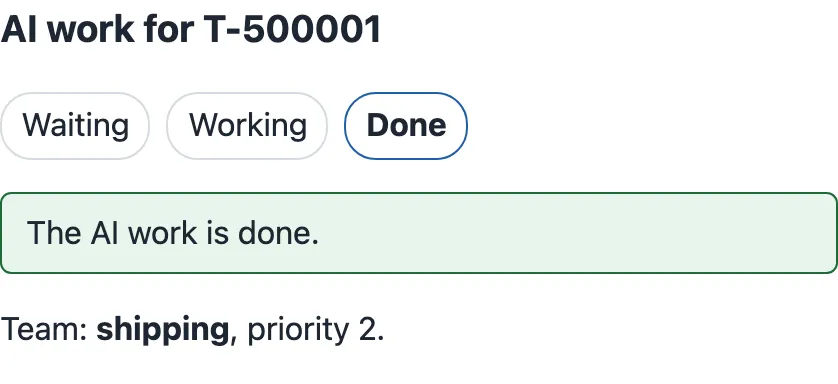
succeeded: the result that the old form never showed. -
Stop the mock API, and start it with
node mock-api/server.mjs --jobs fail. Send another ticket. This failure is simulated: every job ends infailed.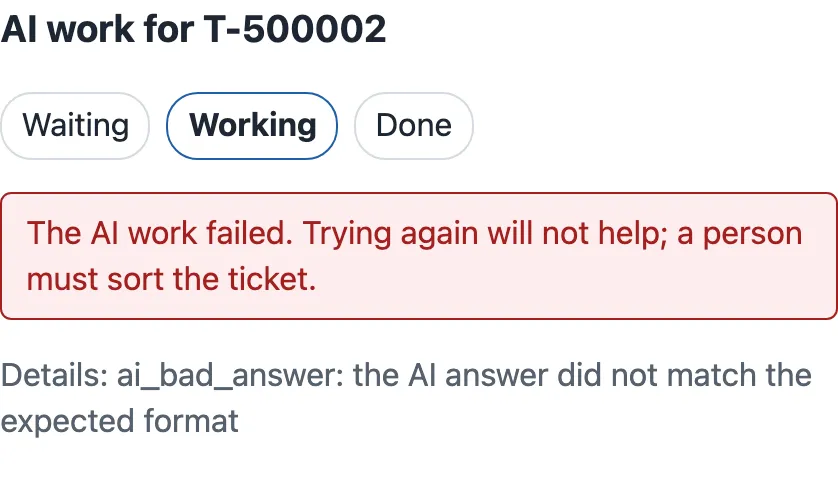
failed: the desk says why a retry is useless, and offers none. -
Stop the mock API, and start it with
--jobs dead_letter. Send another ticket. This job runs about three times longer, then stops after five attempts.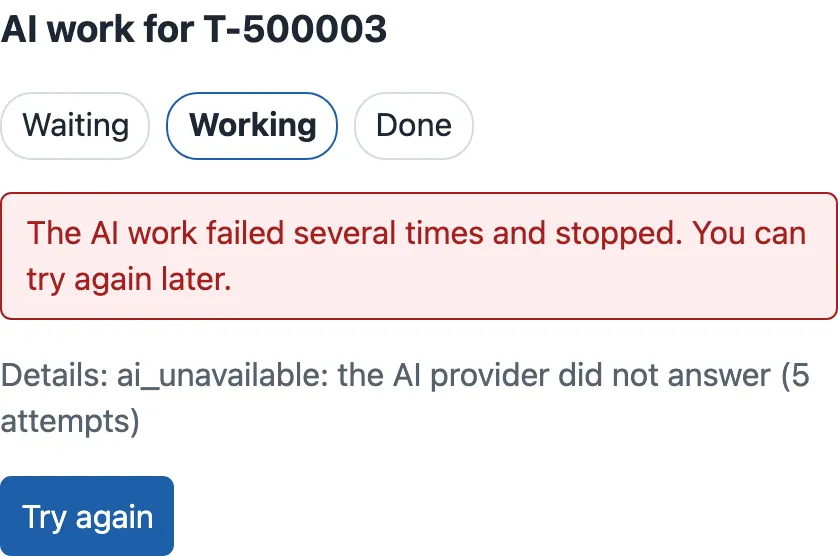
dead_letter: the provider was down, so trying again later can work. Only this state offers Try again. -
Click Try again. The mock API sends the job back to the queue, and this time it succeeds: Waiting, Working, Done.
-
Stop the mock API, and start it with
npm run api. Send one more ticket, and click Cancel the AI work at once, while the job waits. The panel says “You cancelled the AI work. The ticket is saved without it.”
The server could tell us instead
Section titled “The server could tell us instead”Polling has two costs, and the course team measured both in the browser. For one new ticket, the desk sent 5 requests before it saw the end of the job. Most of them only said “still queued” or “still running”. And the desk saw the end late. The job ended between two requests, so the screen showed “done” a median of 403 ms after the job’s finished_at.
The pager of the café is the other way. Server-sent events work for jobs too. The desk opens one GET request, and the server keeps it open and writes an event at each change of state. Here, EventSource is the right tool: the request is a GET, and it needs no headers. With curl, you see the events arrive while the request stays open:
curl -N http://127.0.0.1:8100/v1/jobs/1/eventsevent: statedata: {"job_id":1,"ticket_id":"T-500001","state":"queued","attempts":0,…}
event: statedata: {"job_id":1,"ticket_id":"T-500001","state":"running","attempts":1,…}
event: statedata: {"job_id":1,"ticket_id":"T-500001","state":"succeeded","attempts":1,…,"result":{"team":"shipping",…}}In the course team’s run, the three events came 0, 1.5 and 3.6 seconds after the request. Then the server closed the connection. In the desk, useJobEvents in src/features/jobs/useJob.ts opens the connection and closes it when the job is final:
/** Server-sent events: the server sends each new state; no repeated requests. */export function useJobEvents(id: number): Job | null { const [job, setJob] = useState<Job | null>(null); useEffect(() => { const source = new EventSource(jobEventsUrl(id)); source.addEventListener('state', (e) => { const next = JSON.parse((e as MessageEvent).data) as Job; setJob(next); if (isFinal(next.state)) source.close(); }); return () => source.close(); }, [id]); return job;}Two close() calls, for two reasons. The cleanup closes the connection when the component leaves the screen, as every effect with a connection must. And the close() after a final state matters because EventSource reconnects by itself when a connection ends. That is useful for a stream that should never stop. For a job that is finished, it would open the stream again.

Text description of the diagram
A new ticket’s job waits about 1.5 s and runs about 2 s. The polling desk asks at 0, 1, 2, 3 and 4 seconds and gets queued, queued, running, running and succeeded: five requests. The events desk opens one request, and the server sends three events on it: queued at once, running when the work starts, and succeeded when it ends. In the measured runs, the events desk showed the end 29 ms after the job ended. The polling desk showed it 403 ms after, on its next request.
The job lab of the desk runs both ways side by side, on the same job. It is at http://localhost:5173/#/labs/job. Click Send a test ticket, and watch the two columns:
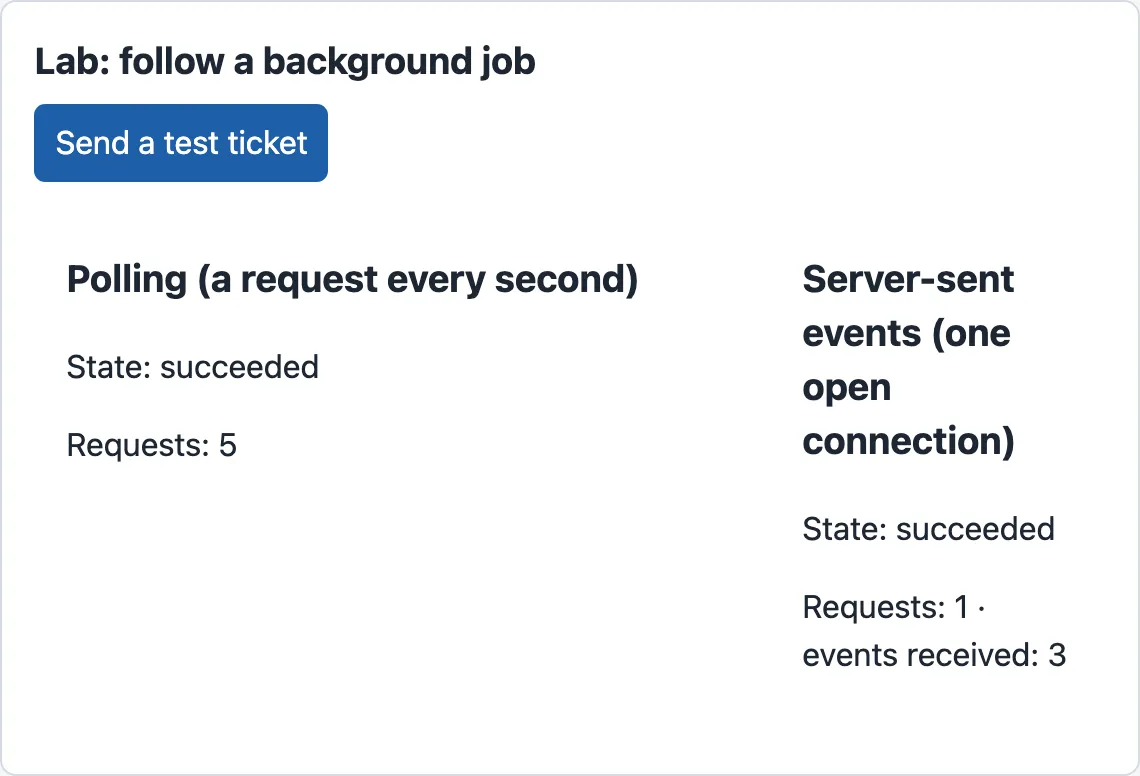
The course team measured the lab with a browser script, three passes. The chart shows the medians with the range of the three passes:
Text description of the chart
Two panels. Requests for one job: polling every second sent 5 requests in each of the 3 passes; server-sent events used 1 request. Time from the end of the job to the screen: polling showed the end after a median of 403 ms, between 198 and 477 ms. Server-sent events showed it after a median of 29 ms, between 4 and 30 ms. The job itself took a median of 3,621 ms from created to finished.
Polling’s delay is not a fixed number. It depends on where the end falls between two requests: anywhere from 0 to one whole interval, about half of it on average. In these passes, it was 198 to 477 ms.
And WebSockets?
Section titled “And WebSockets?”A WebSocket is the waiter who talks with you at the table. It is one connection that stays open, and both sides can send messages on it at any time. The browser starts it with a normal HTTP request, and then both sides switch to the WebSocket protocol. It is the right tool when the browser also sends many messages: a chat where several people type, a shared document, a game.
For a job’s status, the browser sends nothing after the first request. The messages go one way, from the server to the browser. So a WebSocket adds work without a benefit here. It needs a server that speaks the WebSocket protocol, messages that you design, your own reconnection, and proxies that let it through. The ticket desk does not use one, and this course does not build one. The table compares the three ways:
| Polling | Server-sent events | WebSocket | |
|---|---|---|---|
| Who speaks | the browser asks, again and again | the server, over one open GET |
both, over one open connection |
| Requests for one job (measured) | 5 | 1 | 1 connection |
| Delay after a change | up to one interval (403 ms median, measured) | almost none (29 ms median, measured) | almost none |
| What the server needs | a normal GET endpoint |
an endpoint that keeps a response open and writes events | the WebSocket protocol |
| If the connection drops | the next request works | EventSource reconnects by itself |
your own code reconnects |
| Good for | a short wait, few screens, the simplest code | status and progress from the server | two-way, frequent messages |
When to use which, and what it costs
Section titled “When to use which, and what it costs”Start with polling. It works through every proxy and with any server, it needs no open connection, and TanStack Query stops it for you. Its cost is the requests: 5 for each new ticket at one request per second. Grace’s desk has a few agents, each with at most one job on the screen, so that cost is small.
Use server-sent events when the delay matters, or when many screens wait at once. With 200 agents each polling every second, the API answers 200 requests per second that mostly say “nothing changed”. Events have their own cost: each open screen holds one connection to the server for as long as it waits. Browsers also limit the open connections to one host over HTTP/1.1, to about six. So an EventSource that is never closed can block the desk’s other requests.
Kwame asks whether the desk could wait for the AI work inside the POST instead, with no job at all. The scaling course measured why not. The API held a database connection for the whole 2.2 seconds of each ticket, and the provider’s quota refused calls under load. The 202 and the job keep the API fast, and this lesson makes the job visible.
Common mistakes
Section titled “Common mistakes”Common mistake
Polling never stops
Symptom (constructed): the job shows Done, but the browser’s Network panel shows a new GET /v1/jobs/1 every second, for as long as the form stays open. The mock API’s counters at http://127.0.0.1:8100/admin/stats show the job route’s count growing.
Cause: refetchInterval: 1000, a fixed number. TanStack Query then polls forever, also after the job reached a final state.
Fix: give refetchInterval a function that returns false for a final state, as useJobPolling does. The test “polls until the job is done, then stops asking” counts the requests after the end and fails when the number grows.
Consequence in AI work: every forgotten screen sends a request each second. With many agents, the API spends its time on answers that never change.
Common mistake
Try again on a failed job
Symptom (constructed): the desk offers Try again for every failed job. An agent sees a failed job and clicks it again and again, and the ticket waits without a team.
Cause: the desk treated failed and dead_letter as one state. The API accepts a retry of a failed job, so nothing stops the agent. A model that gave a wrong answer to a ticket usually gives a wrong answer again, so each retry costs another call and more waiting. The mock API cannot show this part: in the mock, every retried job succeeds, which is simulated to make the retry path visible.
Fix: show the button only where a retry can help. In JobStatus.tsx, Try again appears only for dead_letter, and the words for failed say that a person must sort the ticket. The test “failed and dead letter look different, and only a dead letter offers Try again” checks it.
Your turn: poll every two seconds
Section titled “Your turn: poll every two seconds”Change one condition: the interval. In JobStatus.tsx, change useJobPolling(jobId) to useJobPolling(jobId, 2000). Before you send a ticket, predict: how many requests will the desk send for one job, and will the end appear later? Then send a ticket and count the jobs requests in the browser’s Network panel.
Show the answer
The desk asks at 0, 2 and 4 seconds: 3 requests instead of 5. The course team measured both intervals with a small script, without a browser (poll_interval.mjs, 5 passes each, the same simulated job of 3,547 ms):
every 1000 ms: requests 5, 5, 5, 5, 5 (median 5); late 471, 466, 468, 465, 467 ms (median 467); job 3547, 3547, 3547, 3547, 3547 msevery 2000 ms: requests 3, 3, 3, 3, 3 (median 3); late 460, 460, 461, 461, 464 ms (median 461); job 3547, 3547, 3547, 3547, 3547 msThe delay did not grow here, and that is a surprise worth understanding. The job ended at 3.55 s. Both intervals have a request at 4 s, so both saw the end about 0.45 s late. Take a job that ends at 2.1 s instead. It shows 0.9 s late with one second, but 1.9 s late with two seconds. A longer interval saves requests, and it makes the worst delay longer. Change the interval back to the default before you go on.
Knowledge check
Section titled “Knowledge check”Check your understanding
A new ticket's job ends in failed for one agent and in dead_letter for another. What does the desk show each of them, and why are the two different?
Show the answer
For failed, the desk says “The AI work failed. Trying again will not help; a person must sort the ticket.”, with the details ai_bad_answer, and no button. The AI answered, but its answer was wrong, and a retry gives the same wrong answer. For dead_letter, it says “The AI work failed several times and stopped. You can try again later.”, with ai_unavailable and 5 attempts, and a Try again button. The provider did not answer, which can change later. Each failure gets the action that can help.
Does your answer have the main points of ours?
Sign in and enroll in the course to save your answers. Every check counts toward the certificate.
Check your understanding
Predict: 200 agents each have one new ticket on the screen, and each job takes about 4 seconds. Compare polling every second with server-sent events: requests, open connections and delay.
Show the answer
With polling, each screen sends about 5 requests per job, so about 1,000 requests, roughly 200 per second while the jobs run. Most of them answer “no change”. No connection stays open, and each screen sees the end up to one second late (403 ms median, measured). With server-sent events, each screen opens 1 request that stays open for about 4 seconds. That is 200 open connections at the same time, and the end shows almost at once (29 ms median, measured). Polling costs requests; events cost open connections.
Does your answer have the main points of ours?
Sign in and enroll in the course to save your answers. Every check counts toward the certificate.
Check your understanding
Tomás wants a WebSocket for the job status, 'because it is the modern way'. What do you answer?
Show the answer
The job status goes one way, from the server to the browser, so a WebSocket’s two-way channel brings no benefit. It costs more: a server that speaks the WebSocket protocol, messages that the team designs, its own reconnection, and proxies that must let it through. Server-sent events give the same quick updates over a normal HTTP GET, with reconnection built into EventSource. Polling is simpler still, and it is enough for a few agents. Choose a WebSocket when the browser also sends frequent messages, as in a chat with several people.
Does your answer have the main points of ours?
Sign in and enroll in the course to save your answers. Every check counts toward the certificate.
Recap
- A job is work that the server does later. The
202answer is only its first state. The desk follows it tosucceeded,failed,dead_letterorcancelled, and says each state in words. - Each state gets the one action that can help: Cancel while
queued, Try again only fordead_letter, and a person forfailed. - Polling asks again at a fixed interval.
refetchIntervalreturnsfalsefor a final state, so it stops. Measured: 5 requests for one job, the end on screen 403 ms late (median). - Server-sent events keep one
GETopen, and the server writes each change. Measured: 1 request, 29 ms. Close theEventSourceat the end, because it reconnects by itself. - A WebSocket is for two-way, frequent messages. A job’s status goes one way, so the desk does not need one.
Next, the draft and the job are finished. Can the agent trust them? The desk shows the draft’s sources, its uncertainty, when a person must decide, and errors in words that say what to do.
Next: Trustworthy feedback