
Pagination and forms
- Lesson 10
- 75 min
- Module 3: Data fetching and state management
Lesson 10 of 19 · Frontend Architecture and Performance for AI AppsPagination and forms
1. Web foundations bridge
2. Components and application structure
3. Data fetching and state management
4. AI-specific interaction states
5. Performance and scalability
6. Security, accessibility and handoff
What you will be able to do
Show thousands of tickets without downloading them all. Change tickets from the desk without saving anything twice, and without showing a change that did not happen.
Before you startWhat to know and to have ready
What you need to know
- The cache, keys, invalidation and retries, from Query lifecycle.
- Controlled inputs and the new-ticket form with its
validatefunction, from React basics. - The list’s
limit, itsnextcursor and the error shape, from Set up the ticket desk. The filtersstatus,teamandqare inlistTicketssince React basics; this lesson addsafter.
What you need on your computer
- Your
ticket-deskat the end of the previous lesson:npm testpasses with 19 Vitest tests. - The labs repository next to it, for one file to compare.
Tested with Node.js 24.18.0 on macOS (Apple silicon), in Chromium. The Windows and Linux commands are written but not tested. The mock API’s failing writes (--writes fail) are simulated.
A catalogue with a bookmark
Section titled “A catalogue with a bookmark”Think of a mail-order catalogue with 10,000 products. Nobody prints all of it for one customer who wants garden hoses. The shop sends the garden section, and when you reach its last page, you ask for the next part. You keep a bookmark, so the shop knows where you stopped.
The ticket list works the same way. Larkfield has 10,000 tickets in the large data of the mock API. An agent looks at the first screen, maybe two. So the desk asks the server for one page of 50 tickets, already filtered and sorted. This is pagination: the server cuts a long result into pages, and the client asks for one page at a time.
The problem: download everything, then look
Section titled “The problem: download everything, then look”Tomás has a simpler idea: “Download all the tickets once, then filter them in the browser. The search is instant after that.” The course team tried it in Chromium, with the large data:
- 10,000 tickets in 100 requests of 100 (the API’s largest page),
- 6,502.5 ms before the first row could be drawn,
- about 2,372 KB of JSON.
One page of 50 is a very different request:
$ curl -s -o /dev/null -w '%{http_code} %{size_download} bytes in %{time_total} s\n' "http://127.0.0.1:8100/v1/tickets?limit=50"200 13249 bytes in 0.062821 sText description of the chart
A column chart with two columns. One page of 50 tickets is 13.2 kB of JSON. It came in one request of 63 ms, with curl on the course team’s laptop. Downloading every ticket is about 2,372 KB. It took 100 requests and 6.5 seconds in the browser before the first row could be drawn. The second column is about 180 times higher than the first.
And the cost grows with every ticket. The search is “instant” only after a long wait, and it searches a copy that gets older every minute.
The idea: filter and page on the server
Section titled “The idea: filter and page on the server”The server already has the tickets, an index and the rules. So the desk sends its filters with the request, and the server answers with the first page that matches. You saw the list’s query string in Module 1. Here it is with filters, curl -s "http://127.0.0.1:8100/v1/tickets?limit=3&status=pending&team=shipping". The answer below is shortened to the ID, status, team and subject of each ticket, and its next:
T-30191 pending shipping watering can not deliveredT-30132 pending shipping Delivery driver left parcel outsideT-30126 pending shipping garden hose (25 m) not deliverednext: MjAyNi0xMC0wM1QwNzoxMjozMFp8VC0zMDEyNgThe answer’s next is the bookmark. It is called a cursor: a short text that marks where this page ended. To get the next page, the desk sends it back as after. Here are two real pages of two tickets each:
$ curl -s "http://127.0.0.1:8100/v1/tickets?limit=2"{"items":[{"ticket_id":"T-80010",…},{"ticket_id":"T-80009",…}],"next":"MjAyNi0xMC0xMFQxNzoyMTowMFp8VC04MDAwOQ"}
$ curl -s "http://127.0.0.1:8100/v1/tickets?limit=2&after=MjAyNi0xMC0xMFQxNzoyMTowMFp8VC04MDAwOQ"{"items":[{"ticket_id":"T-80008",…},{"ticket_id":"T-80007",…}],"next":"MjAyNi0xMC0xMFQxNjo0NzowMFp8VC04MDAwNw"}
The second page starts exactly after T-80009. On the last page, next is null. A cursor is safer than a page number: it says “after this ticket”, so a new ticket at the top of the list does not move the next page.
The server also protects itself. It refuses a page that is too large:
$ curl -s "http://127.0.0.1:8100/v1/tickets?limit=500"{"error":{"code":"invalid_request","message":"The request is not valid.","request_id":"6155a988-6c7d-4e15-b3ef-969a6e85e573","fields":["limit"]}}
Text description of the diagram
The top row shows the desk’s way. The first request, GET /v1/tickets?limit=50, gives the 50 newest tickets and a cursor in next. When the agent presses “Load 50 more”, the desk sends the same request with after set to that cursor. It gets the next 50 and a new cursor. On the last page, next is null, so the desk shows no button. Below, in red, is Tomás’s shortcut: 100 requests of 100 tickets, 6.5 seconds and about 2,372 KB before one row is drawn.
Load more in the desk
Section titled “Load more in the desk”TanStack Query has a hook for a list of pages: useInfiniteQuery. It keeps all the pages of one key together, and it knows how to ask for the next one.
-
In
src/features/tickets/queries.ts, replaceuseTicketList:src/features/tickets/queries.ts import { useQuery } from '@tanstack/react-query';import { useInfiniteQuery, useQuery } from '@tanstack/react-query';import { getTicket, listTickets } from '../../api/tickets';import type { TicketFilter } from '../../api/types';import type { TicketFilter, TicketPage } from '../../api/types';…/** The first page of the list. A new filter is a new key, so it has its own cache entry. *//** The list, page by page from the server. A new filter is a new key, so it has its own cache entry. */export function useTicketList(filter: TicketFilter) {return useQuery({return useInfiniteQuery({queryKey: ticketKeys.list(filter),queryFn: ({ signal }) => listTickets(filter, PAGE_SIZE, null, signal),queryFn: ({ pageParam, signal }) => listTickets(filter, PAGE_SIZE, pageParam, signal),initialPageParam: null as string | null,getNextPageParam: (last: TicketPage) => last.next,placeholderData: (previous) => previous, // keep showing the old results while the new ones load});}pageParamis the cursor of the page to fetch:nullfor the first page.getNextPageParamreads the cursor of the next page from the last answer. When it gives backnull,hasNextPageis false. -
In
src/features/tickets/TicketList.tsx, join the pages into one list and add the button:src/features/tickets/TicketList.tsx /** The first 50 tickets that match the filters. The filters are this component's own state. *//** The tickets that match the filters, one server page (50 tickets) at a time. */export function TicketList({ selectedId }: { selectedId: string | null }) {const [filter, setFilter] = useState<TicketFilter>(NO_FILTER);const list = useTicketList(filter);const tickets = list.data?.items ?? [];const tickets = list.data?.pages.flatMap((p) => p.items) ?? [];…<p className="muted" aria-live="polite">{tickets.length === 0 ? 'No ticket matches.' : `Showing ${tickets.length} tickets.`}{tickets.length === 0? 'No ticket matches.': `Showing ${tickets.length} tickets${list.hasNextPage ? ' (more on the server)' : ''}.`}{list.isPlaceholderData && ' Updating…'}</p><ul className="rows">…</ul>{list.hasNextPage && (<button type="button" className="secondary" onClick={() => list.fetchNextPage()} disabled={list.isFetchingNextPage}>{list.isFetchingNextPage ? 'Loading…' : 'Load 50 more'}</button>)}</>The button is disabled while a page loads, so a double click cannot ask for the same page twice.
-
Add a test before the error test in
src/features/tickets/TicketList.test.tsx. Its fake API answers with a cursorpage-2on the first page:src/features/tickets/TicketList.test.tsx test('loads the next page with the cursor of the last one', async () => {const fake = installFakeApi((url) =>url.searchParams.get('after') === 'page-2'? json(200, { items: [ticket(3)], next: null }): json(200, { items: [ticket(1), ticket(2)], next: 'page-2' }),);renderWithCache(<TicketList selectedId={null} />);await userEvent.click(await screen.findByRole('button', { name: 'Load 50 more' }));expect(await screen.findByText('Ticket number 3')).toBeInTheDocument();expect(screen.getByText(/Showing 3 tickets\./)).toBeInTheDocument();expect(fake).toHaveBeenCalledTimes(2);}); -
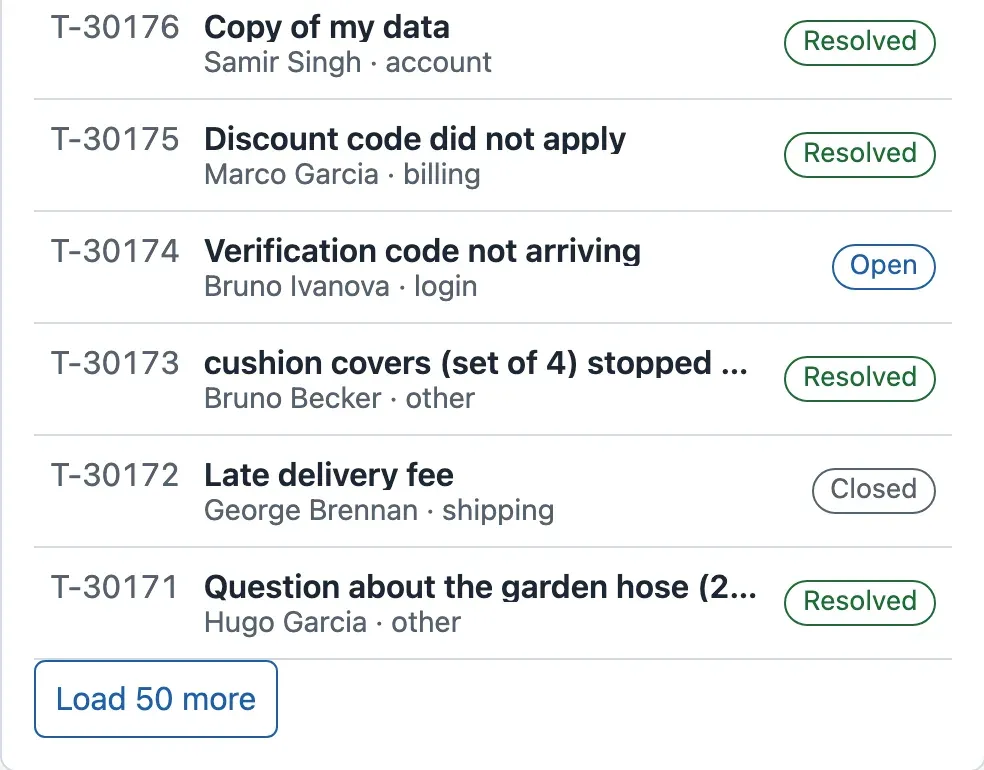
Open the desk and scroll to the end of the list. Press Load 50 more.
In the course team’s run, the press sent 1 request, with after set to the cursor of the 50th ticket. It took 63 ms. The list then said “Showing 100 tickets (more on the server).” and had 100 rows:
Each filter is its own key, so each filter has its own pages. When the agent goes back to a filter within 30 seconds, its pages come from the cache.
When to page on the server, and what it costs
Section titled “When to page on the server, and what it costs”Page on the server whenever the list can grow without a limit: tickets, messages, logs, search results. Download everything only for small lists that cannot grow much, such as the five teams. Server paging costs a request for every page, the search needs the network, and the API must support cursors and filters. Amira’s ticket API does.
Forms that check before they send
Section titled “Forms that check before they send”Think of a bank transfer form. The bank’s page checks the account number before you can press Send: it has the wrong number of digits. That check helps you at once. But the bank checks again on its own server, because a page can be changed, skipped or old. The page’s check is for the person; the server’s check is for the data.
The desk’s forms work the same way. The new-ticket form from Module 2 has a validate function. It runs when the agent presses Send ticket, and it says what to fix next to each field:
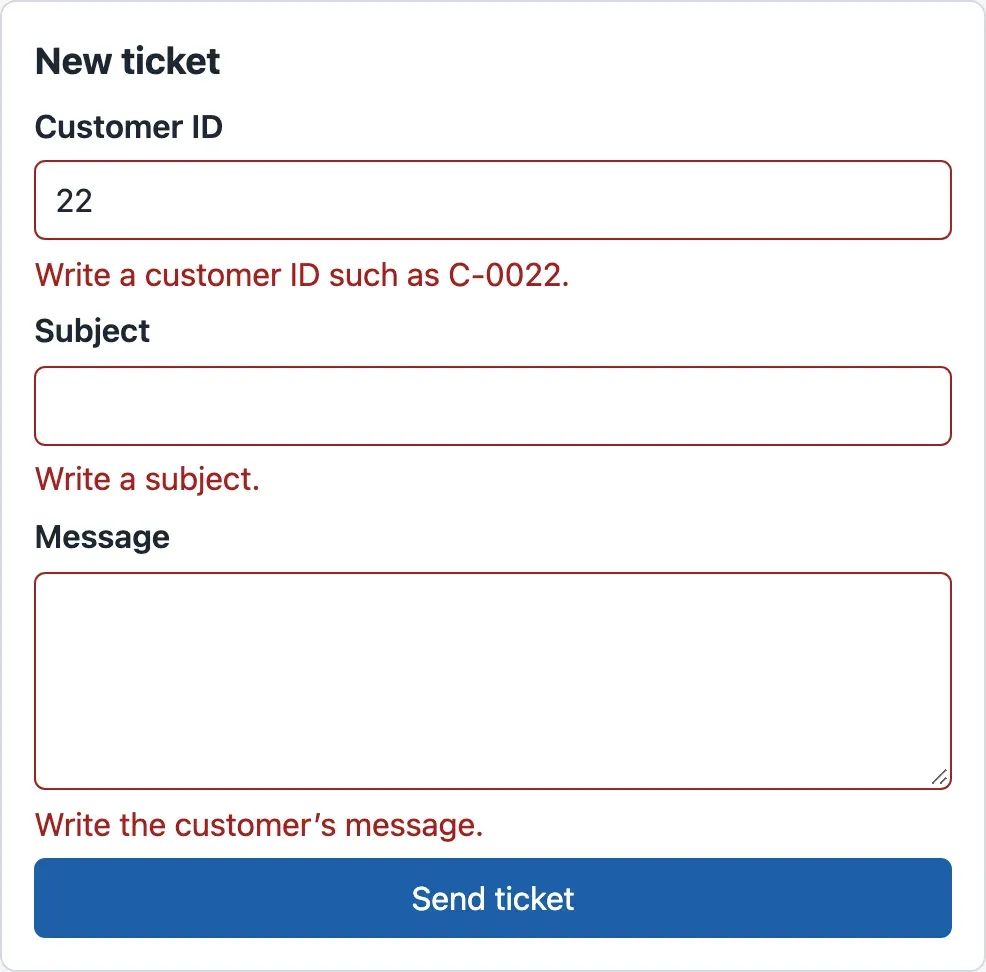
The API checks again, and its answer names the field. Here is an empty reply, sent with curl past every check of the browser:
$ curl -s -X POST http://127.0.0.1:8100/v1/tickets/T-80008/messages -H "Content-Type: application/json" -d '{"author": "agent", "body": ""}'{"error":{"code":"invalid_request","message":"The request is not valid.","request_id":"1a302988-5fee-4632-a6ae-dc1c690715fe","fields":["body"]}}A form that sends a change has three more duties. It must not send twice while the first try runs. It must say clearly whether the change worked. And it must refresh the copies that the change made old. TanStack Query calls a change a mutation, and useMutation gives its state: isPending, isSuccess, isError.
The reply form
Section titled “The reply form”The reply goes to a customer. Once the API has saved it, nobody can take it back. So the reply form waits for the server’s answer, and then it marks the ticket and the lists as stale. It never shows the reply as sent before the server says so.
-
Add the reply to
src/features/tickets/queries.ts. It needsuseMutationanduseQueryClientfrom the library, andaddMessagefromapi/tickets:src/features/tickets/queries.ts (add) /** Adds an agent's message. Not optimistic: a message to a customer cannot be taken back. */export function useAddMessage(id: string) {const client = useQueryClient();return useMutation({mutationFn: (body: string) => addMessage(id, body),onSuccess: () =>Promise.all([client.invalidateQueries({ queryKey: ticketKeys.detail(id) }),client.invalidateQueries({ queryKey: ticketKeys.lists() }),]),});}ticketKeys.lists()is['tickets', 'list']. It matches every list key that starts with it, whatever its filter: the note on every milk carton of that kind. -
Copy
src/features/tickets/MessageForm.tsxfrom the snapshot, innextia-learning-labs/C22/snapshots/end-of-m03/. Its important part:src/features/tickets/MessageForm.tsx (part) function onSubmit(event: FormEvent) {event.preventDefault();if (!text.trim()) return setProblem('Write a message first.');if (text.length > 5000) return setProblem('Use 5,000 characters or fewer.');setProblem(null);send.mutate(text, { onSuccess: () => setText('') });}The two checks match the API’s rules for a message. The text is cleared only after a success, so a failed reply is not lost. The button says Sending… and is disabled while
send.isPending. After the answer, the form showsSent.orNot sent:with the API’s message. -
Show the form under the conversation, in
TicketView.tsx:src/features/tickets/TicketView.tsx import { MessageForm } from './MessageForm';…</section><MessageForm key={t.ticket_id} ticketId={t.ticket_id} initialText="" /></article>key={t.ticket_id}gives each ticket a new form. Without it, React would keep the half-written reply to T-80008 when the agent opens T-80007.
Send a reply in the desk, after you have loaded a second page of the list. The course team’s run recorded these requests:
| Request | Started | Ended | Answer |
|---|---|---|---|
POST /v1/tickets/T-80008/messages |
38 ms | 191 ms | 201 |
GET /v1/tickets/T-80008 |
193 ms | 193 ms | 200 |
GET /v1/tickets?limit=50 (page 1) |
193 ms | 255 ms | 200 |
GET /v1/tickets?limit=50&after=… (page 2) |
256 ms | 321 ms | 200 |
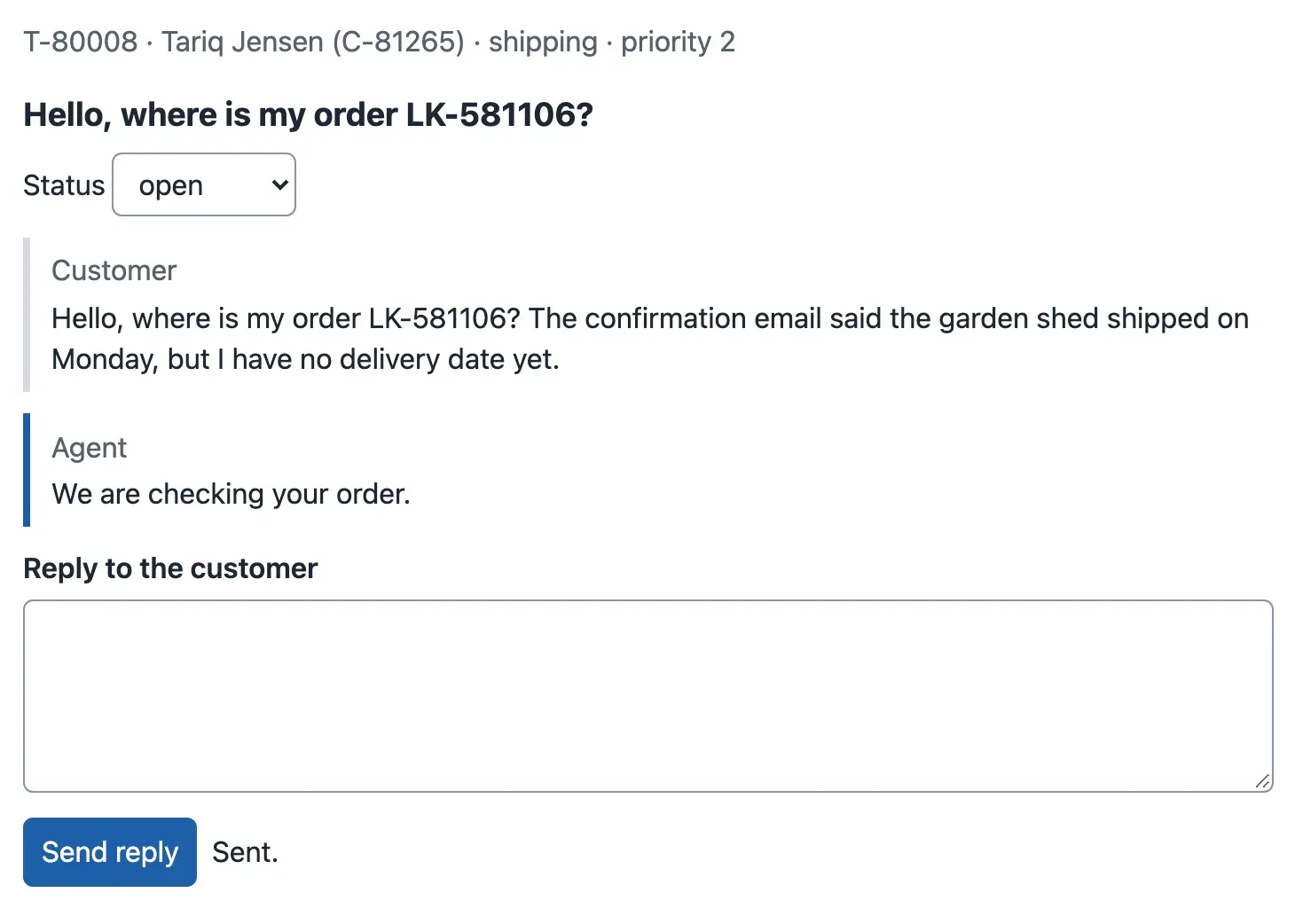
The server saved the message in about 150 ms (the mock waits 150 ms on purpose for every change). Then the invalidation fetched the ticket and both pages of the list again, one after the other, because a list made of pages is fetched again from the first page. The new message is on the screen:
A ticket that is never saved twice
Section titled “A ticket that is never saved twice”The new-ticket form has a harder problem. Suppose the agent presses Send ticket, the API saves the ticket, and then the network drops before the answer arrives. The agent sees “The ticket service did not answer” and presses Send ticket again. Without care, the customer now has two tickets.
Think of a numbered cloakroom ticket. When you hand in your coat twice with the same number, the attendant says “I already have this one” and gives you the same hook. An idempotency key is that number. The form makes one random key for each new ticket and sends it in the header Idempotency-Key. The API remembers the key with the ticket. When the same key comes again with the same content, it gives back the first answer and saves nothing:
$ curl -s -i -X POST http://127.0.0.1:8100/v1/tickets -H "Content-Type: application/json" -H "Idempotency-Key: 7d3c1c9e-1f0b-4c55-9a51-2b8f0e6a4d10" -d '{"customer_id": "C-0022", "subject": "Parcel lost", "body": "It did not arrive."}' | grep -E "^HTTP|^Idempotent|ticket_id"HTTP/1.1 202 Accepted{"ticket_id":"T-500001","job_id":1,"state":"queued","status_url":"/v1/jobs/1","queued_ahead":0,"estimated_wait_seconds":3.7}
$ (the same command again)HTTP/1.1 202 AcceptedIdempotent-Replayed: true{"ticket_id":"T-500001","job_id":1,"state":"queued","status_url":"/v1/jobs/1","queued_ahead":0,"estimated_wait_seconds":3.7}
The same ticket, T-500001, and the header Idempotent-Replayed: true. The same command without the key saved a second ticket, T-500002. And the same key with another text is refused, because it must be another ticket:
{"error":{"code":"idempotency_key_reused","message":"This Idempotency-Key was used for another ticket.","request_id":"819ca47a-1fe6-49cd-8843-57403c268e67","fields":["Idempotency-Key"]}}If you took Scaling AI Systems, you built this on the server side in Delivery and retries. Here you add the browser’s side. createTicket in api/tickets.ts already takes a key.
-
In
src/features/jobs/NewTicketForm.tsx, keep one key per ticket in state:src/features/jobs/NewTicketForm.tsx const [failure, setFailure] = useState<string | null>(null);// One key per ticket: if the agent sends the same form again after a network error, the API// recognizes it and does not save a second ticket.const [idempotencyKey, setIdempotencyKey] = useState(() => crypto.randomUUID());…try {setAnswer(await createTicket({ ...values, customer_id: values.customer_id.trim() }));setAnswer(await createTicket({ ...values, customer_id: values.customer_id.trim() }, idempotencyKey));setValues(EMPTY);setIdempotencyKey(crypto.randomUUID());…onChange: (e: { target: { value: string } }) => setValues({ ...values, [name]: e.target.value }),onChange: (e: { target: { value: string } }) => {setValues({ ...values, [name]: e.target.value });setIdempotencyKey(crypto.randomUUID()); // other content: another ticket},…{answer && (<p role="status"><p className="success" role="status">The key changes in two cases: after a success (the next form is a new ticket), and when the agent edits a field (other content is another ticket). After a failure it stays the same, so Send ticket again is safe.
crypto.randomUUID()is built into the browser. -
In
src/features/jobs/NewTicketForm.test.tsx, userenderWithCache, and check the header in the last test:src/features/jobs/NewTicketForm.test.tsx installFakeApi(() =>const fake = installFakeApi(() =>…expect(await screen.findByRole('status')).toHaveTextContent('Saved as T-500001');expect(await screen.findByRole('status')).toHaveTextContent('Saved as T-500001. The AI work is queued (job 1).');const headers = new Headers(fake.mock.calls[0][1]!.headers);expect(headers.get('Idempotency-Key')).toMatch(/^[0-9a-f-]{36}$/);
Show a change before the server confirms it, only if it can be undone
Section titled “Show a change before the server confirms it, only if it can be undone”Think of moving a card on a shared task board. You drag “Ship order” to Done, and the card moves at once. If the board’s server refuses, the card jumps back with a message. That is fine, because moving a card back undoes the change completely. Nobody outside the team saw it.
A change that is shown before the server confirms it is an optimistic update: the screen is optimistic that the server will agree. It makes the screen feel instant. But it shows, for a moment, something that may not be true. So the desk uses it only where that moment does no harm and the screen can undo it completely:
- The status of a ticket: optimistic. It is reversible: the select can go back. Nobody outside the desk sees it before the server confirms it.
- A reply to a customer: not optimistic. If the screen showed “Sent” and the server refused, the agent would believe that the customer has an answer.
- A new ticket: not optimistic. The ticket ID comes from the server; there is nothing true to show before it.
An optimistic update has four steps, and each one has a reason:
- Stop the running requests for these copies, so an old answer cannot overwrite the optimistic value.
- Save the old copies, to put them back if the server refuses.
- Write the new status into the copies: the ticket and every list that contains it.
- When the server answers: if it refused, put back the saved copies. In both cases, invalidate, so the copies come from the server again.
-
Add
useSetStatustosrc/features/tickets/queries.ts. It needssetStatusfromapi/tickets, the typesStatus,TicketDetailandInfiniteData:src/features/tickets/queries.ts (add) type Lists = InfiniteData<TicketPage, string | null>;/** Changes the status at once on the screen (optimistic), and puts it back if the server says no. */export function useSetStatus(id: string) {const client = useQueryClient();return useMutation({mutationFn: (status: Status) => setStatus(id, status),onMutate: async (status) => {await client.cancelQueries({ queryKey: ticketKeys.all });const detail = client.getQueryData<TicketDetail>(ticketKeys.detail(id));const lists = client.getQueriesData<Lists>({ queryKey: ticketKeys.lists() });client.setQueryData<TicketDetail>(ticketKeys.detail(id), (t) => (t ? { ...t, status } : t));client.setQueriesData<Lists>({ queryKey: ticketKeys.lists() }, (data) =>data && {...data,pages: data.pages.map((p) => ({...p,items: p.items.map((t) => (t.ticket_id === id ? { ...t, status } : t)),})),},);return { detail, lists };},onError: (_error, _status, saved) => {client.setQueryData(ticketKeys.detail(id), saved?.detail);for (const [key, data] of saved?.lists ?? []) client.setQueryData(key, data);},onSettled: () => client.invalidateQueries({ queryKey: ticketKeys.all }),});}onMutateruns before the request: steps 1 to 3. What it returns arrives inonErrorassaved: step 4.onSettledruns after a success and after a failure. The completequeries.tsis in the snapshotend-of-m03; compare yours with it. -
Copy
src/features/tickets/StatusSelect.tsxandsrc/features/tickets/queries.test.tsxfrom the snapshot. The select callschange.mutate(...)when the agent picks a status, and showsThe status was not changed:with the API’s message after a failure. The test file checks both behaviours: the change shows at once and goes back after a refusal; a reply marks the ticket as stale. -
In
TicketView.tsx, show the select instead of the label:src/features/tickets/TicketView.tsx import { StatusBadge } from '../../ui/StatusBadge';import { StatusSelect } from './StatusSelect';…<StatusBadge status={t.status} /><StatusSelect ticketId={t.ticket_id} status={t.status} /> -
Run
npm test. After the mock API’s 21 checks, Vitest prints:Test Files 9 passed (9)Tests 22 passed (22)Copy
README.mdfrom the snapshot: it now describes the cache and the labs. Your project is now the snapshotend-of-m03. Compare a file with the snapshot whenever a test fails.
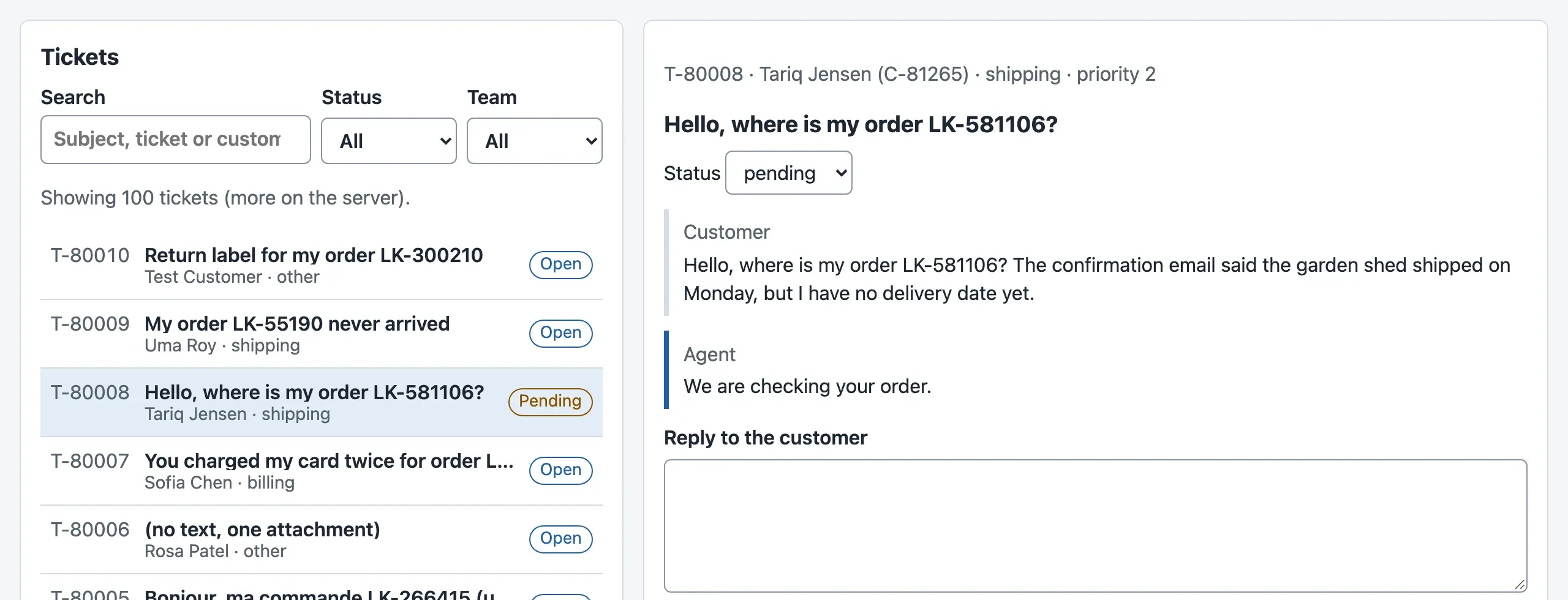
Choose pending for T-80008. The select and the row in the list change at once, before the server has answered:
Now see the refusal. Restart the mock API with failing writes, open T-80008, and choose pending again:
node mock-api/server.mjs --writes failThe course team’s run recorded what the screen showed every 5 ms:

Text description of the diagram
The agent chooses “pending”. Before any request, the desk cancels the running ticket requests, saves the old copies, and writes “pending” into them. At 8 ms, the select and the row say Pending. Then the desk sends the PATCH. At 158 ms, the API answers 503: the change was not saved. The desk puts the saved copies back, and at 163 ms the screen shows Open again. Then the invalidation fetches the ticket and the list from the server, which confirms “open” at 288 ms. At 291 ms, the select shows the error message.
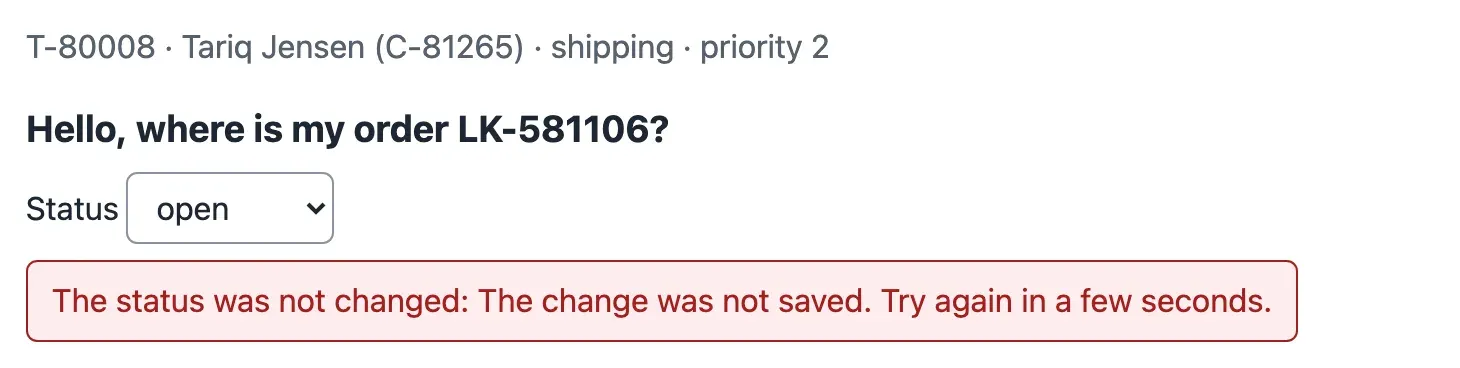
The message comes about 130 ms after the status went back, because the mutation waits for the refetch in onSettled before it reports the error. Start the mock API again without --writes fail before you go on.
When to be optimistic, and what it costs
Section titled “When to be optimistic, and what it costs”Be optimistic only when three things are true: the change is small and fast, the server almost always accepts it, and the screen can undo it completely. A status, a “done” checkbox or a label fit. A message, a payment, a deletion or anything that starts AI work does not: wait for the server, show Sending…, and disable the button.
The cost is code and care. useSetStatus is the longest function of the module: it must find every copy that contains the ticket, in every page of every list. For a moment, the screen shows something that may not be true. Without the invalidation in onSettled, a copy can keep the wrong value.
Your turn: pages of 20
Section titled “Your turn: pages of 20”Change one value: in queries.ts, set PAGE_SIZE = 20. Before you run anything, predict two things. What does the list show after Load 50 more? Does npm test still pass?
Show the answer
The list shows 20 tickets, then 40 after the press, but the button still says Load 50 more. The label was written by hand. And npm test still passes, 22 of 22: the test’s fake API ignores limit, and the test looks for the button by its words, which did not change. The course team ran it:
Test Files 9 passed (9) Tests 22 passed (22)So the tests did not catch the wrong label. Fix the cause: one value in one place. In TicketList.tsx, import PAGE_SIZE from ./queries and write the label from it:
import { useTicketList } from './queries';import { PAGE_SIZE, useTicketList } from './queries';… {list.isFetchingNextPage ? 'Loading…' : 'Load 50 more'} {list.isFetchingNextPage ? 'Loading…' : `Load ${PAGE_SIZE} more`}In the test, find the button with { name: `Load ${PAGE_SIZE} more` } after the same import. With both changes, tsc passes and npm test prints Tests 22 passed (22) again. Set PAGE_SIZE back to 50: the module’s snapshot uses 50.
Common mistake
The list downloads every ticket before it shows one
Symptom: the desk opens on a white list for several seconds. The Network panel shows a long row of requests to /v1/tickets?limit=100&after=…, one after the other. Then everything appears at once, and the search is instant.
Cause: the code fetches every page in a loop before it draws anything, and then filters in the browser. In the course team’s run with the large data, that was 10,000 tickets in 100 requests, 6,502.5 ms and about 2,372 KB before the first row.
Fix: ask the server for one filtered page (limit=50 with status, team and q), show it, and load the next page with the cursor only when the agent asks. Put the filter in the key, so each filter has its own pages in the cache.
Consequence in AI work: AI features often produce long lists: retrieved documents, evaluation results, logs of model calls. A screen that downloads all of them to show ten is slow, and it can show data that the person may not be allowed to see. A server that filters can check permissions for each request.
Module practice: a paginated list that refreshes after a change
Section titled “Module practice: a paginated list that refreshes after a change”Guided practice: follow one change through the cache
Section titled “Guided practice: follow one change through the cache”This worked example uses the desk as it is now. Do each step, and check what you see against the course team’s results.
- Start the mock API and the desk. Open http://localhost:5173/#/tickets/T-80008 and the Network panel, filtered on
v1/tickets. - Press Load 50 more once. One request with
after=appears, and the list says “Showing 100 tickets (more on the server).” - Write
We are checking your order.in the reply field and press Send reply. Four requests appear: the POST (201), the ticket (200), and the two pages of the list (200 each), in that order. - Look at the conversation: your message is there, below the customer’s message. The list row of T-80008 still says Open, because a reply does not change the status.
- Choose pending in the ticket’s Status select. The row in the list changes at once. In the Network panel, a PATCH (200) is followed by the ticket and the two list pages again.
Each change marked the copies it made old, and the agent never saw “Loading…”.
Independent task
Section titled “Independent task”Build a panel Pending for the desk: the tickets with the status pending, filtered on the server, 50 at a time with Load 50 more. When the agent changes the status of a ticket anywhere in the desk, the panel must refresh by itself. Write one test that proves both: the request asks for status=pending, and the panel shows one ticket less after a ticket is set to resolved.
Show a worked solution
The panel needs no new query: useTicketList takes a filter, and the key contains the filter. So the panel has its own pages in the cache, and its key starts with ['tickets', 'list'].
import type { TicketFilter } from '../../api/types';import { ErrorMessage } from '../../ui/ErrorMessage';import { useTicketList } from './queries';import { TicketRow } from './TicketRow';
const PENDING: TicketFilter = { status: 'pending', team: '', q: '' };
/** The tickets that wait for the customer: filtered on the server, one page at a time. */export function PendingList() {  const list = useTicketList(PENDING);  const tickets = list.data?.pages.flatMap((p) => p.items) ?? [];  if (list.isPending) return <p className="muted">Loading pending tickets…</p>;  if (list.isError) return <ErrorMessage error={list.error} onRetry={() => list.refetch()} />;  return (    <section aria-labelledby="pending-heading">      <h2 id="pending-heading">Pending</h2>      <p className="muted">{tickets.length} pending tickets{list.hasNextPage ? ' (more on the server)' : ''}.</p>      <ul className="rows">        {tickets.map((t) => (          <li key={t.ticket_id}>            <TicketRow ticket={t} selected={false} />          </li>        ))}      </ul>      {list.hasNextPage && (        <button type="button" className="secondary" onClick={() => list.fetchNextPage()} disabled={list.isFetchingNextPage}>          {list.isFetchingNextPage ? 'Loading…' : 'Load 50 more'}        </button>      )}    </section>  );}
The refresh needs no new code either. useSetStatus invalidates ticketKeys.all in onSettled, and that prefix matches the panel’s key. The test plays the server: the PATCH removes T-30001 from the pending tickets.
import { act, renderHook, screen, waitFor } from '@testing-library/react';import { QueryClientProvider } from '@tanstack/react-query';import type { ReactNode } from 'react';import { expect, test } from 'vitest';import { installFakeApi, json, ticket } from '../../test/fakeApi';import { renderWithCache } from '../../test/render';import { PendingList } from './PendingList';import { useSetStatus } from './queries';
test('asks the server for pending tickets only, and refreshes after a status change', async () => {  let pending = [ticket(1, { status: 'pending' }), ticket(2, { status: 'pending' })];  const fake = installFakeApi((_url, init) => {    if (init.method === 'PATCH') {      pending = pending.filter((t) => t.ticket_id !== 'T-30001');      return json(200, { ...ticket(1), status: 'resolved' });    }    return json(200, { items: pending, next: null });  });  const { client } = renderWithCache(<PendingList />);  expect(await screen.findByText('2 pending tickets.')).toBeInTheDocument();  expect(new URL(String(fake.mock.calls[0][0])).searchParams.get('status')).toBe('pending');
  const wrapper = ({ children }: { children: ReactNode }) => <QueryClientProvider client={client}>{children}</QueryClientProvider>;  const { result } = renderHook(() => useSetStatus('T-30001'), { wrapper });  await act(() => result.current.mutateAsync('resolved'));  expect(await screen.findByText('1 pending tickets.')).toBeInTheDocument();  await waitFor(() => expect(screen.queryByText('Ticket number 1')).not.toBeInTheDocument());});
The course team’s run, on a copy of the snapshot end-of-m03:
✓ src/features/tickets/PendingList.test.tsx > asks the server for pending tickets only, and refreshes after a status change 31msTo show the panel, put <PendingList /> where you want it, for example in App.tsx. This solution is not part of the snapshot.
Completion check: an old answer never wins
Section titled “Completion check: an old answer never wins”Prove that a slow answer cannot replace a newer one, for the open ticket. Write a test: the agent opens T-80008, then T-80007 before T-80008 has answered. T-80007 answers first, then T-80008. The heading must still show T-80007’s subject. Then show that the test catches the mistake: replace useTicket with an effect without cleanup, and run the test again.
Show a worked solution
deferred from test/fakeApi.ts lets the test decide when each answer arrives:
import { act, screen } from '@testing-library/react';import { QueryClientProvider } from '@tanstack/react-query';import { expect, test } from 'vitest';import type { TicketDetail } from '../../api/types';import { deferred, installFakeApi, json, ticket } from '../../test/fakeApi';import { renderWithCache } from '../../test/render';import { TicketView } from './TicketView';
const detail = (n: number, subject: string): TicketDetail => ({  ...ticket(n, { ticket_id: `T-8000${n}`, subject }), body: '', channel: 'email', updated_at: '', messages: [], has_draft: false,});
test('a slow answer for the ticket before does not replace the ticket the agent opened', async () => {  const answers = { 'T-80008': deferred<Response>(), 'T-80007': deferred<Response>() };  installFakeApi((url) => answers[url.pathname.split('/').pop() as keyof typeof answers].promise);  const view = renderWithCache(<TicketView ticketId="T-80008" />);  view.rerender(<QueryClientProvider client={view.client}><TicketView ticketId="T-80007" /></QueryClientProvider>);  await act(async () => answers['T-80007'].resolve(json(200, detail(7, 'You charged my card twice'))));  expect(await screen.findByRole('heading')).toHaveTextContent('You charged my card twice');  await act(async () => answers['T-80008'].resolve(json(200, detail(8, 'Hello, where is my order LK-581106?'))));  expect(screen.getByRole('heading')).toHaveTextContent('You charged my card twice');});
With the desk’s useTicket, it passes:
✓ src/features/tickets/TicketView.race.test.tsx > a slow answer for the ticket before does not replace the ticket the agent opened 67msWith an effect without cleanup in place of useTicket (getTicket(id).then(setData) in a useEffect), the same test fails on its last line:
Expected element to have text content: You charged my card twiceReceived: Hello, where is my order LK-581106?The fix works because the ticket’s key contains its ID. When the agent opens T-80007, nobody uses the copy of T-80008, so its request is cancelled. The view reads only the copy for T-80007. The answer is complete when the test passes with the fix, fails without it, and the explanation names the key and the cancellation.
Knowledge check
Section titled “Knowledge check”Check your understanding
Why does the desk use a cursor (after=…) and not a page number (page=2)? Describe what an agent would see with page numbers when a new ticket arrives while they read page 1.
Show the answer
The list is sorted newest first. With page numbers, a new ticket at the top pushes every ticket down by one place. Page 2 then starts with the last ticket of the old page 1, so the agent sees one ticket twice. With deletions, a ticket could be skipped. A cursor says “the tickets after this one”, so new tickets at the top do not move the next page. The API gives the cursor in next, and null on the last page.
Does your answer have the main points of ours?
Sign in and enroll in the course to save your answers. Every check counts toward the certificate.
Check your understanding
Which of these changes should be optimistic, and why? (a) set a ticket's status; (b) send a reply to the customer; (c) mark a ticket as read for this agent; (d) start an AI draft for a ticket.
Show the answer
- (a) Yes. It is small, almost always accepted, and the select can go back completely if the server refuses.
- (b) No. It reaches a customer and cannot be taken back. Showing “Sent” before the server confirms it could make an agent believe the customer has an answer.
- (c) Yes. It is reversible and only affects this agent’s view.
- (d) No. It starts slow, paid work on the server, and the server gives back a job or a stream that the screen needs. Show “Starting…” and wait for the answer.
Does your answer have the main points of ours?
Sign in and enroll in the course to save your answers. Every check counts toward the certificate.
Check your understanding
The agent sends the new-ticket form, the API saves T-500001, and the network drops before the answer. The agent presses Send ticket again without changing anything. What does the API do, and what would happen if the form made a new key on every press?
Show the answer
The key did not change, because the form changes it only after a success or an edit. The API finds the key, sees the same content, and answers 202 with the same T-500001 and Idempotent-Replayed: true. Nothing is saved twice. With a new key on every press, the API could not know that it is the same ticket. It would save T-500002, and the customer would have two tickets and two AI jobs.
Does your answer have the main points of ours?
Sign in and enroll in the course to save your answers. Every check counts toward the certificate.
Recap
- Pagination on the server: the desk asks for 50 filtered tickets, 13.2 kB. Downloading every ticket took 100 requests, 6.5 seconds and about 2,372 KB before the first row. A cursor (
next, sent back asafter) marks where a page ended;useInfiniteQuerykeeps the pages of one key. - Forms check twice: in the browser for the person, on the server for the data. A change is a mutation: no second send while it runs, a clear “Sent.” or “Not sent:”, and invalidation of the copies it made old (the ticket and both list pages).
- An idempotency key makes sending a new ticket again safe: the same key gives back T-500001 and saves nothing.
- Optimistic updates only where the screen can undo them: the status (shown at 8 ms, put back at 163 ms after a 503), never a reply or a new ticket.
Module recap. The desk now separates the agent’s choices (local state) from the API’s data (server state, in the cache). Copies are fresh for 30 seconds, fetched again when stale, and invalidated after a change. An old answer can never replace a newer one: each search and each ticket is its own key, and old requests are cancelled. Retries happen only where a second try can help. Lists come one page at a time from the server, and changes are sent once and shown honestly. npm test passes with 22 Vitest tests, after the mock API’s 21: the snapshot end-of-m03.
Next, the desk meets AI work: a draft that appears piece by piece, with a Stop button.
Next: Streaming interfaces