
Browser access and CORS
- Lesson 9
- 40 min
- Module 3: Design a usable contract
Lesson 9 of 21 · Build and Deploy Your First APIBrowser access and CORS
1. Understand the web request
2. Build a small FastAPI service
3. Design a usable contract
4. Document the API with OpenAPI and Swagger UI
5. Explore and test with Postman
6. Test and harden the service
7. Deploy and verify
What you will be able to do
Let a web page on a different address call your API from a browser, as a frontend team’s page will. Allow only the pages that you choose. And know exactly what that setting protects, and what it does not.
Before you startWhat to know and to have ready
What you need to know
- The browser’s developer tools, from Inspect a request: The browser’s developer tools.
- The scheme, host and port of a URL, from Browser-to-server basics: The parts of a URL.
- Request and response headers, from HTTP fundamentals: Headers.
What you need on your computer
- The API with one error shape for every error, from Validation and error responses: Guided practice: one shape. If you added
GET /v1/categories/{name}in that lesson’s “Your turn” task, remove it, as the task says. - The development server runs, as in Environment and first endpoint: Step 3: start the server. In this lesson, you stop it and start it again with a setting.
- A desktop browser, as in Inspect a request. The examples use Chrome.
- Python in a second terminal, to serve the test page with
python -m http.server. - If your project is missing or broken, copy the snapshot
end-of-m02, the project at the end of Module 2, as in Use a snapshot. Then do the guided practice of Resource and endpoint design and of Validation and error responses again.
Tested with Python 3.14.6, FastAPI 0.142.2 and Chrome 141 on macOS.
The same-origin rule
Section titled “The same-origin rule”An origin is the scheme, host and port of a page: http://localhost:5500 and http://127.0.0.1:8000 are two different origins, although both are on your computer.
Browsers have a protection called the same-origin rule: a page’s code can read responses only from its own origin. Without it, any web page that you open could use your open browser to read your email or your bank account in another tab. This is because the browser sends your cookies with each request.
Your API is a different origin from the page that a frontend team builds. So by default, the browser does not let their page read your API’s responses.
CORS (Cross-Origin Resource Sharing) is how a server says to the browser: “pages from these origins may read my responses”. The server says it with response headers, such as Access-Control-Allow-Origin.
See the block
Section titled “See the block”Amira makes a small test page in a folder browser-test in her project. It sends one request to the API with fetch, the browser’s request function:
<!doctype html><html lang="en"><head><meta charset="utf-8"><title>Ticket classifier test</title></head><body> <h1>Ticket classifier test</h1> <button id="send">Classify "Charged twice for March"</button> <pre id="result">No request yet.</pre> <script> document.getElementById("send").addEventListener("click", async () => { const result = document.getElementById("result"); try { const response = await fetch("http://127.0.0.1:8000/v1/classify", { method: "POST", headers: { "Content-Type": "application/json" }, body: JSON.stringify({ subject: "Charged twice for March" }), }); result.textContent = response.status + " " + (await response.text()); } catch (error) { result.textContent = "The request failed: " + error; } }); </script></body></html>She serves the page from a second origin with Python’s built-in web server, in a new terminal:
python -m http.server 5500She opens http://localhost:5500 and selects the button. The page shows The request failed: TypeError: Failed to fetch. The developer tools’ Console tab says why:
Access to fetch at 'http://127.0.0.1:8000/v1/classify' from origin 'http://localhost:5500' has been blocked by CORS policy: Response to preflight request doesn't pass access control check: No 'Access-Control-Allow-Origin' header is present on the requested resource.The API’s terminal shows something surprising:
INFO: 127.0.0.1:59691 - "OPTIONS /v1/classify HTTP/1.1" 405 Method Not AllowedThe browser did not send the POST at all. It sent an OPTIONS request first.
The preflight
Section titled “The preflight”For a request that could change data, such as a POST with JSON, the browser first asks the server for permission. This first request is the preflight: an OPTIONS request with the page’s origin in an Origin header. Only if the server answers with the right Access-Control-Allow-... headers does the browser send the real request.
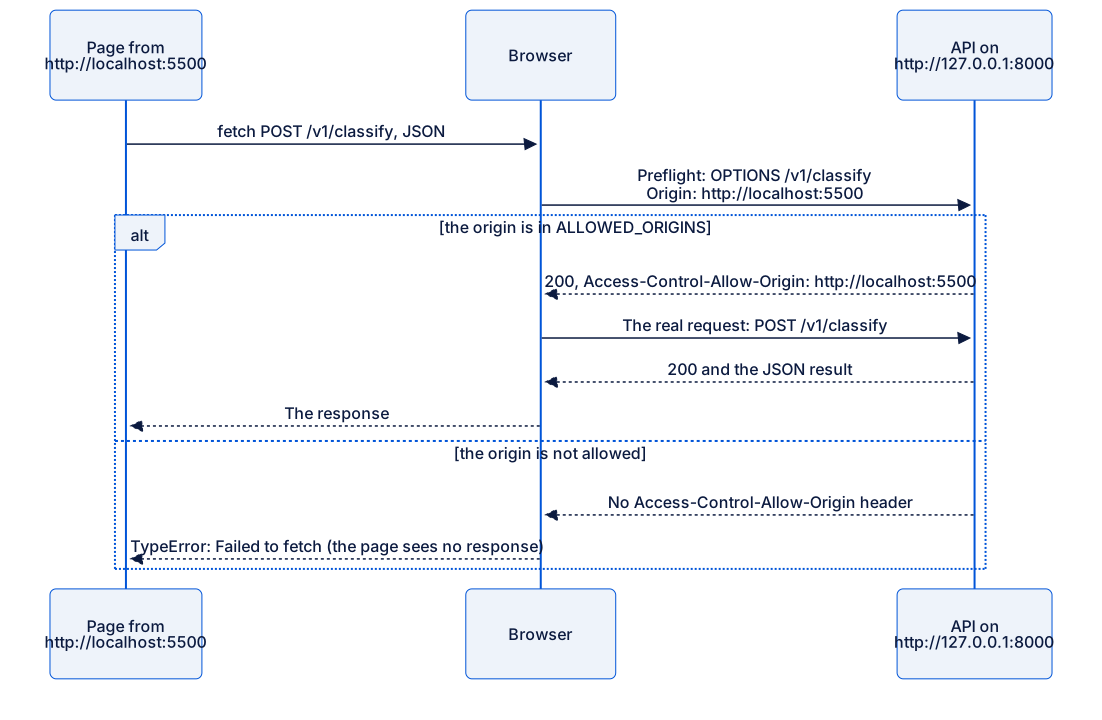
Text description of the diagram
The page calls fetch with a POST. The browser first sends a preflight to the API: OPTIONS /v1/classify, with Origin: http://localhost:5500. If that origin is in the API’s allowed list, the API answers 200 with Access-Control-Allow-Origin: http://localhost:5500. Then the browser sends the real POST, receives 200 and the JSON result, and gives it to the page. If the origin is not allowed, the API’s answer has no Access-Control-Allow-Origin header. Then the browser does not send the real request, and the page only gets TypeError: Failed to fetch.
Worked example: allow one origin
Section titled “Worked example: allow one origin”FastAPI has a ready-made middleware for CORS. A middleware is code that runs around every request: before the route, and after it. The CORS middleware answers preflights, and adds the headers to the real responses.
The list of allowed origins is different for each place where the API runs: http://localhost:5500 on Amira’s computer, the frontend’s real address in production. So it is configuration, and it comes from an environment variable, as in Configuration and secrets:
import os
from fastapi import FastAPIfrom fastapi.middleware.cors import CORSMiddleware
from ticket_api.classifier import KeywordClassifierfrom ticket_api.errors import add_error_handlersfrom ticket_api.routes import router
app = FastAPI(title="Ticket Classifier API")app.state.classifier = KeywordClassifier()add_error_handlers(app)
allowed_origins = [    origin.strip()    for origin in os.environ.get("ALLOWED_ORIGINS", "").split(",")    if origin.strip()]if allowed_origins:    app.add_middleware(        CORSMiddleware,        allow_origins=allowed_origins,        allow_methods=["GET", "POST"],        allow_headers=["Content-Type"],    )app.include_router(router)

@app.get("/health")def health() -> dict[str, str]: return {"status": "ok"}| Part | Why |
|---|---|
ALLOWED_ORIGINS |
A list separated by commas, for example http://localhost:5500,https://help.example.com. Not set means “no browser page may call the API”, which is the safe default. |
allow_origins |
Exact origins, with the scheme and the port. Never ["*"] (every origin) for an API that has keys or private data. |
allow_methods, allow_headers |
Only what the pages need. |
She stops the API with Ctrl+C, and starts it again with the variable:
ALLOWED_ORIGINS=http://localhost:5500 fastapi dev ticket_api/main.py$env:ALLOWED_ORIGINS = "http://localhost:5500"fastapi dev ticket_api/main.pyALLOWED_ORIGINS=http://localhost:5500 fastapi dev ticket_api/main.pyShe selects the button again. The page shows 200 {"category":"billing","priority":1,...}, and the API’s terminal shows both requests:
INFO: 127.0.0.1:59702 - "OPTIONS /v1/classify HTTP/1.1" 200 OKINFO: 127.0.0.1:59703 - "POST /v1/classify HTTP/1.1" 200 OKCORS is not authentication
Section titled “CORS is not authentication”Now Amira pretends to be a page from a different origin, with curl. First the preflight:
curl -i -X OPTIONS http://127.0.0.1:8000/v1/classify -H "Origin: https://evil.example" -H "Access-Control-Request-Method: POST"HTTP/1.1 400 Bad Request
Disallowed CORS originRefused, as expected. Then the real request, from the same “origin”:
curl -X POST http://127.0.0.1:8000/v1/classify -H "Origin: https://evil.example" -H "Content-Type: application/json" --data @requests/billing.json{"category":"billing","priority":1,"confidence":0.9,"model_version":"keywords-1.0"}It works. curl is not a browser: it does not send a preflight, and it does not check the CORS headers. Neither does Postman, a Python script, or a server. CORS only controls what pages in a browser can read. It does not stop anyone from calling the API. To control who can call the API, you need authentication, such as the API key that you add in Module 6.
Guided practice: allow the test page
Section titled “Guided practice: allow the test page”- Make
browser-test/index.htmlwith the code above. - In a new terminal, move into
browser-test, and runpython -m http.server 5500. - Open
http://localhost:5500, open the developer tools’ Console, and select the button. You see the CORS error, and the API’s terminal showsOPTIONS ... 405. - Add the CORS code to
main.py. Stop the API, and start it again withALLOWED_ORIGINS=http://localhost:5500. - Select the button again. The page shows
200and the result. - Send the two curl requests with
Origin: https://evil.example. The preflight is refused, and the real request works. - Stop the test page’s server with Ctrl+C.
Your turn: a second origin
Section titled “Your turn: a second origin”Serve the same page on port 5600 too (python -m http.server 5600 in a third terminal), and open http://localhost:5600. Predict what happens when you select the button. Then change ALLOWED_ORIGINS so that both test pages work, and nothing else.
Show the answer
On port 5600, the request is blocked: http://localhost:5600 is a different origin, and it is not in the list. Start the API with ALLOWED_ORIGINS=http://localhost:5500,http://localhost:5600. Note that http://127.0.0.1:5600 is still blocked: for CORS, localhost and 127.0.0.1 are different hosts, so they are different origins.
Common mistake
Allow every origin to make the error go away
Symptom: a CORS error blocks a page, and a quick search suggests allow_origins=["*"]. The error goes away.
Cause: * lets a page from any website read the API’s responses in a visitor’s browser. For a fully public API with no keys and no private data, that can be acceptable. Some APIs are called by a browser with credentials, or return data about a user. For those APIs, it lets any website read that data through its visitors.
Fix:
- Find the page’s exact origin: in the developer tools’ Network tab, the
Originrequest header of the preflight. - Put exactly that origin in
ALLOWED_ORIGINS, with its scheme and port. - Keep a separate list for each place where the API runs. Production lists only the real frontend’s origin.
Check your understanding
A teammate says: 'Our API is safe from strangers, because CORS only allows our own website.' What is wrong with this?
Show the answer
CORS only tells browsers which pages may read the responses. Anyone can call the API directly with curl, Postman or a script, and get the answer, as the evil.example example showed. To stop strangers, the API needs authentication, for example an API key or user sign-in. CORS and authentication solve different problems.
Does your answer have the main points of ours?
Sign in and enroll in the course to save your answers. Every check counts toward the certificate.
Check your understanding
Module check: in your contract table, call each row for /v1/classify and /v1/categories, and confirm the status code and the body shape. Which row could a browser page not test, and why?
Show the answer
Every row gives the planned status code and, for errors, the shape {"error": {"code", "message", "fields"}}. A page can test them all once its origin is allowed. But a browser cannot send a body that is not valid JSON with fetch and JSON.stringify, and it cannot leave out the Origin header. Test those rows with curl or Postman.
Does your answer have the main points of ours?
Sign in and enroll in the course to save your answers. Every check counts toward the certificate.
Recap
- An origin is a scheme, host and port. Browsers let a page read responses only from its own origin, unless the server allows more with CORS.
- For a
POSTwith JSON, the browser sends anOPTIONSpreflight first. The CORS middleware answers it. - Allow exact origins from configuration (
ALLOWED_ORIGINS). Do not use*for an API with keys or private data. - CORS is not authentication. Clients that are not browsers ignore it.
You have now designed a contract: clear routes, one error shape, and safe browser access. In the next module, you document it with OpenAPI and Swagger UI.
Next: OpenAPI and Swagger UI