
Streaming interfaces
- Lesson 11
- 60 min
- Module 4: AI-specific interaction states
Lesson 11 of 19 · Frontend Architecture and Performance for AI AppsStreaming interfaces
1. Web foundations bridge
2. Components and application structure
3. Data fetching and state management
4. AI-specific interaction states
5. Performance and scalability
6. Security, accessibility and handoff
What you will be able to do
Show Larkfield’s AI draft while the model writes it, with a Stop button. Make sure that the screen never presents a stopped, broken or failed draft as a finished one.
Before you startWhat to know and to have ready
What you need to know
- Components, state and effects with cleanup, from Rendering and effects.
fetch, promises andasync/await, from JavaScript essentials.- How the ticket desk reads server data with TanStack Query, from Query lifecycle. This lesson does not use it for the stream, and it says why.
What you need on your computer
- Your
ticket-deskproject at the end of Pagination and forms.npm testends with 21 passed checks of the mock API andTests 22 passed (22). If your project is broken, copy the snapshotend-of-m03, as the labs README shows. - The labs repository in
~/projects/nextia-learning-labs, from Set up the ticket desk. Rungit -C nextia-learning-labs pullin~/projectsto get the newest files. You copy this lesson’s files from its snapshotend-of-m04. - Node.js 24 (LTS), a terminal, VS Code and a Chromium-based browser.
Tested with Node.js 24.18 on macOS (Apple silicon) in Chromium. The Windows (PowerShell) and Linux commands are written, but not tested.
A long document from the printer
Section titled “A long document from the printer”You print a 20-page document on a slow office printer. The pages come out one at a time. That is useful: you can read page 1 while page 2 prints, and you know that the printer works. If you see a mistake on page 3, you press Cancel.
Now three things can happen. All 20 pages come out, and you check that none is missing. Or you cancel after page 7, and you hold 7 pages of a 20-page document. Or the paper jams after page 11, and the printer stops by itself. In the last two cases, you hold part of a document. It looks like the real thing, page for page. You must not staple it and send it as if it were complete.
An AI draft on a screen behaves like that printer. This lesson is about two ideas: show each piece as soon as it arrives, and always know which of the endings happened.
The problem: a long wait, then a draft you cannot trust
Section titled “The problem: a long wait, then a draft you cannot trust”Grace’s agents open a ticket and want the AI’s suggested reply. The draft of T-80008 was written by a real model in an earlier course, and the mock API replays it with its recorded time. Without streaming, the agent sees nothing for 2 seconds. Other recorded drafts took up to 11.7 seconds (the median of the 69 drafts is 2,774 ms). After a few seconds of a blank panel, agents click again, or think that the desk is frozen.
So the desk should stream the draft: show each piece of text as it arrives. But a naive stream has a worse problem. Here is a first version that Tomás wrote. It keeps the text and one loading flag:
const [text, setText] = useState('');const [loading, setLoading] = useState(false);// … for each piece: setText((t) => t + piece) … when the stream closes: setLoading(false){!loading && text && <button onClick={() => onUse(text)}>Use this draft</button>}Run the mock API in its interrupt mode, which cuts the connection after 40% of the pieces on purpose. This failure is simulated. The stream of T-80008 stops after 11 of its 28 pieces. Tomás’s screen then shows this text, with no spinner and a Use this draft button:
I’m sorry you haven’t received a delivery date for your gardenThe flag says “not loading”, so the screen looks finished. An agent in a hurry clicks Use this draft and sends half a sentence to the customer. Nothing raised an error. A stopped stream and a failed stream look the same too: the text stops growing.
The idea: show early, name every ending, check at the end
Section titled “The idea: show early, name every ending, check at the end”The fix has three parts, and each part answers one problem above:
- Show each piece as it arrives, so the agent sees progress and can stop the draft.
- Give every situation its own name. The desk does not ask “is it loading?”. It asks “which of eight states is the draft in?”. A stopped draft, an interrupted stream and a failure are three different states, with different words and different buttons.
- Check the final result before the desk trusts it. Only a draft that ended normally and passed the checks gets Use this draft.
Three new terms. A stream is an answer that the server sends in parts, over one open connection, while it is still making it. Server-sent events (SSE) are a simple text format for such a stream: each part is a small message with a name and some data. A state machine lists the states that something can be in, and the only events that move it from one state to another.
This course says a piece of text, not a “token”. Models write tokens, often parts of words: the three real streams that the LLM applications course recorded had 87 to 106 pieces each. The mock API cuts each recorded draft into words and punctuation instead, so T-80008 arrives in 28 pieces. The interface does not care about the size of a piece.
A tiny example: what arrives, and when
Section titled “A tiny example: what arrives, and when”Look at the stream itself before any code. With the mock API running (npm run api), send the draft request from a second terminal. -N tells curl to print each part at once:
curl -N -X POST http://127.0.0.1:8100/v1/tickets/T-80008/draft -H "Accept: text/event-stream"curl.exe -N -X POST http://127.0.0.1:8100/v1/tickets/T-80008/draft -H "Accept: text/event-stream"The start and the end of the output. The draft is the real recorded answer of chat-small:
event: startdata: {"ticket_id":"T-80008","model":"chat-small","mode":"recorded"}
event: tokendata: {"text":"I’m"}
event: tokendata: {"text":" sorry"}
…
event: tokendata: {"text":"."}
event: donedata: {"ticket_id":"T-80008","model":"chat-small","language":"en","needs_human":false,"reason":"The customer is asking for a delivery date for an order that has shipped.","confidence":"high","suggested_team":"delivery","reply":"I’m sorry you haven’t received a delivery date for your garden shed. Our delivery team can help check the shipment and tracking information for your order.","citations":[],"policy_answer":null,"recorded_ms":1956}
Each event is two lines, event: and data:, and an empty line ends it. There are four kinds: start, token (one piece), done (the whole draft, with its fields) and error. The name token comes from the API’s contract. The course team timed every event with a small script. The start event came after 2 ms, the first piece after 1,790 ms, and the 28th piece after 1,994 ms. Then done came at 2,002 ms.
So almost all of the wait comes before the first piece. The real recorded streams show the same shape:
- Recorded streams of a real model
- The ticket desk in the browser (mock API)
Text description of the chart
A chart with four rows on a time axis from 0 to 2,600 milliseconds. Each row has a dot at the first piece and a short bar to the end of the stream. T-64704 with chat-small, 106 pieces: first piece at 1,275 ms, end at 1,597 ms. T-64704 with chat-strong, 87 pieces: 1,883 to 2,420 ms. T-80005 with chat-small, 90 pieces: 2,329 to 2,506 ms. T-80008 on the ticket desk, measured in the browser, 28 pieces: the first text at 1,817 ms and done at 2,000 ms. In every row, the empty part before the dot is much longer than the bar.
The models reason first, then write fast: for T-64704 with chat-small, 80% of the time passed before the first piece. So streaming does not make the draft faster. It shows that the request is alive. Most of its value is a clear “Asking for a draft…” and a Stop button during the long wait.
Read a stream in the browser
Section titled “Read a stream in the browser”The browser has a ready-made tool for server-sent events, EventSource. The desk does not use it for the draft, for two reasons. EventSource can only send a GET request, and the draft is a POST, because it asks the server to do work. It also cannot send headers, such as the Accept header above or a sign-in token later. So the desk uses fetch, and it reads the answer’s body piece by piece with a reader.
There is a trap here. The network cuts data into parts of its own size, which have nothing to do with events. One part can end in the middle of an event. So the desk keeps the unfinished text in a buffer until the empty line arrives. This is the parser in src/api/sse.ts:
export class SseParser {  private buffer = '';
  /** Adds the next piece of text; gives back the events that are now complete. */  push(text: string): SseEvent[] {    this.buffer += text.replace(/\r\n?/g, '\n');    const events: SseEvent[] = [];    let end: number;    while ((end = this.buffer.indexOf('\n\n')) !== -1) {      const block = this.buffer.slice(0, end);      this.buffer = this.buffer.slice(end + 2);      let event = 'message';      const data: string[] = [];      for (const line of block.split('\n')) {        if (line.startsWith('event:')) event = line.slice(6).trim();        else if (line.startsWith('data:')) data.push(line.slice(5).replace(/^ /, ''));      }      if (data.length) events.push({ event, data: data.join('\n') });    }    return events;  }}
Its test shows the trap with every value visible. The first push ends in the middle of "Hello", so the parser gives back no event yet. The second push completes it and adds a second event:
const p = new SseParser();expect(p.push('event: token\ndata: {"text":"Hel')).toEqual([]);expect(p.push('lo"}\n\nevent: token\ndata: {"text":" there"}\n\n')).toEqual([ { event: 'token', data: '{"text":"Hello"}' }, { event: 'token', data: '{"text":" there"}' },]);streamDraft() in src/api/drafts.ts sends the POST, reads the body with a reader, and gives every complete event to a function, onEvent. Two endings matter. The body can end before a done event: the connection closed. Or reader.read() throws an error: the network broke. The next section turns both into states.

Text description of the diagram
- The agent clicks Write a draft. The panel sets the state
connecting. - The panel starts
streamDraftwith anAbortController, which can stop the request later. streamDraftsendsPOST /v1/tickets/T-80008/draftto the mock API.- The API sends the
startevent. Then it sends nothing for about 1.8 seconds. - The first
tokenevent, “I’m”, arrives. The panel moves tostreaming, and the text starts to grow. - 27 more
tokenevents follow, a few milliseconds apart, and then thedoneevent with the whole draft. - The panel runs
checkDraft: is the final reply the same text that the agent saw, and are all the fields there? If yes, the state isdone, and Use this draft appears.
A state machine for one draft
Section titled “A state machine for one draft”Back to the printer. Three yes/no flags, “printing?”, “cancelled?” and “jammed?”, could say “printing” and “jammed” at the same time. Tomás’s loading flag had the same weakness: two values for at least five situations.
A state machine avoids this. The draft is always in exactly one of eight states, and each state has a clear name:
| State | What it means | What the agent can do |
|---|---|---|
idle |
No draft was asked for yet. | Write a draft |
connecting |
The request is sent; no text yet. | Stop |
streaming |
Pieces are arriving. | Stop |
done |
The stream ended normally, and the final draft passed the checks. | Use this draft, Write a new draft, Discard |
stopped |
The agent pressed Stop. The text is not complete. | Write a new draft, Discard |
interrupted |
The connection ended before done. The text is not complete. |
Write a new draft, Discard |
failed |
The server sent an error event, or nothing arrived at all. |
Write a new draft, Discard |
invalid |
done came, but the final draft did not pass the checks. |
Write a new draft, Discard |
Only one state, done, offers Use this draft. The diagram shows the events that move the draft from one state to another:

Text description of the diagram
The draft starts in idle. Write a draft moves it to connecting. The first piece of text moves it to streaming, and each next piece keeps it there. From streaming there are five ways out. The done event with a draft that passes the check leads to done. A done event whose draft fails the check leads to invalid. Stop leads to stopped. A connection that ends early leads to interrupted. An error event leads to failed. Before any text, in connecting, Stop, a closed connection and an error lead to the same three states. From each of the five end states, Write a new draft goes back to connecting.
In code, one function decides every change. It is called a reducer: it takes the current state and one event, called an action, and it returns the next state. React’s useReducer hook keeps the state and calls the reducer for you. This is the core of src/features/draft/draftMachine.ts:
const active = (s: DraftStatus) => s === 'connecting' || s === 'streaming';
export function draftReducer(state: DraftState, action: DraftAction): DraftState {  switch (action.type) {    case 'start':      return active(state.status) ? state : { ...initialDraft, status: 'connecting' };    case 'token':      return active(state.status)        ? { ...state, status: 'streaming', text: state.text + action.text, pieces: state.pieces + 1 }        : state;    case 'done':      return active(state.status) ? { ...state, status: 'done', draft: action.draft } : state;    case 'stop':      return active(state.status) ? { ...state, status: 'stopped' } : state;    case 'ended':      return active(state.status) ? { ...state, status: 'interrupted' } : state;    case 'fail':      return active(state.status) ? { ...state, status: 'failed', problem: action.problem } : state;    // 'invalid' and 'reset' follow the same pattern  }}
Read the repeated active(state.status) ? … : state. Every event counts only while a draft is running. A piece that arrives after Stop, or a late done after an interruption, changes nothing. This one rule removes a whole family of bugs.
Now trace three event sequences through the reducer, with every value visible. All three use the pieces of T-80008:
| Events | State | Text on the screen | Pieces |
|---|---|---|---|
start, 28 × token, done |
done |
the whole reply, 155 characters | 28 |
start, 11 × token, the connection ends |
interrupted |
“I’m sorry you haven’t received a delivery date for your garden” | 11 |
start, 8 × token, error |
failed |
“I’m sorry you haven’t received a delivery date” | 8 |
The last two rows are exactly what the mock API sends in its interrupt and error modes. Try the same events, and others, in the explorer.
Explore
One streamed draft: send the next event
Predict first: The connection ends after 11 pieces. What must the panel say, and which buttons may the agent use? Then: what happens if a done event arrives after that?
Start with “Write a draft”. Every other event changes nothing in the state idle.
The eight states
idleconnectingstreaming
donestoppedinterruptedfailedinvalid
- State
idle- Pieces on the screen
- 0 of 28
- The panel says
- No draft yet.
- The text looks like
- no text
- Buttons for the agent
- Write a draft
- A screen reader hears
- (nothing)
The text on the screen
Text description of the explorer
The explorer starts in the state idle, with no text, the words “No draft yet.” and one button, Write a draft. Eight buttons send the next event: Write a draft (start), A piece of text, The agent presses Stop, The connection ends, An error event, done (the final draft), done, with a broken draft, and Discard.
After Write a draft, the state is connecting, and the panel says “Asking for a draft…”, with a Stop button. Each A piece of text adds the next of the 28 pieces, and the state is streaming. The connection ends after 11 pieces gives interrupted: the 11 pieces stay on the screen as grey text, the panel says “The connection ended before the draft was finished. The text below is not complete.”, and the buttons are Write a new draft and Discard. A done event after that changes nothing, because the machine ignores events in an end state. done after all 28 pieces gives done, with Use this draft. done after fewer pieces gives invalid, with “The final draft is not the text that was shown.”. done, with a broken draft gives invalid, with “The draft has no confidence.”. An error event gives failed, with “No draft.” and the error in words. A screen reader hears one sentence when the state changes, never the pieces.
Stop, and what it really stops
Section titled “Stop, and what it really stops”Stop must do more than change the words on the screen. It must close the connection. Otherwise the browser keeps reading a draft that nobody wants, and the server keeps sending it. The desk uses an AbortController, which you met in Rendering and effects. Its abort() cancels the fetch that received its signal. This is the part of src/features/draft/useDraftStream.ts that starts and stops a draft:
const start = useCallback(async () => {  controller.current?.abort();          // a second click stops the first draft  const c = new AbortController();  controller.current = c;  dispatch({ type: 'start' });  let text = '';  let finished = false;  try {    await streamDraft(ticketId, (e) => { /* token → dispatch token; done → checkDraft; error → fail */ }, c.signal);    if (!finished) dispatch({ type: 'ended' }); // the stream closed without "done" or "error"  } catch (error) {    if (c.signal.aborted) return;       // stop() already set the state    // A network error after the first piece is an interruption; before it, a failure.    dispatch(text ? { type: 'ended' } : { type: 'fail', problem: describeError(error as Error).text });  }}, [ticketId]);
const stop = useCallback(() => {  controller.current?.abort();  dispatch({ type: 'stop' });}, []);
Two React hooks in this code are new. controller comes from useRef: a box whose .current value stays between draws, and changing it does not draw again. useCallback keeps the same start and stop functions from one draw to the next, so an effect that depends on them does not run again.
The hook also aborts in an effect’s cleanup, when the agent opens another ticket. In the course team’s run, the mock API counted "stopped_by_client": 1 after one click on Stop: the server saw the connection close.
With a real provider, Stop may not save all the money: a provider can bill the text written before the stop. Stream responses in the LLM applications course shows the server’s side.
Check the final result
Section titled “Check the final result”When done arrives, the panel does not show Use this draft at once. checkDraft() in src/api/drafts.ts checks two things first:
export function checkDraft(value: unknown, streamedText: string) { const d = value as Partial<Draft> | null; if (!d || typeof d.reply !== 'string' || typeof d.needs_human !== 'boolean' || !Array.isArray(d.citations)) { return { ok: false, problem: 'The draft is not complete.' }; } if (!['high', 'medium', 'low'].includes(String(d.confidence))) return { ok: false, problem: 'The draft has no confidence.' }; if (d.reply !== streamedText) return { ok: false, problem: 'The final draft is not the text that was shown.' }; return { ok: true, draft: d as Draft };}The first check is the shape: every field that the panel needs is there, with the right type. The second check compares the final reply with the text that the agent watched. Use this draft copies reply, so if a piece was lost on the way, the agent would approve one text and send another. Either failure leads to invalid: “The draft did not pass the checks. Do not use it.”
Add the draft to the ticket desk
Section titled “Add the draft to the ticket desk”-
In
~/projects/ticket-desk, copy this lesson’s files from the snapshotend-of-m04. Twelve files are new, andTicketView.tsxchanges: it shows the draft panel when a ticket has a draft. Five of the new files are tests and a test helper.Terminal window S=../nextia-learning-labs/C22/snapshots/end-of-m04mkdir -p src/features/draftfor f in src/api/sse.ts src/api/sse.test.ts src/api/drafts.ts src/api/drafts.test.ts \src/test/stream.ts src/features/draft/draftMachine.ts src/features/draft/draftMachine.test.ts \src/features/draft/useDraftStream.ts src/features/draft/DraftPanel.tsx \src/features/draft/DraftPanel.test.tsx src/features/draft/Citations.tsx \src/lib/errors.ts src/features/tickets/TicketView.tsx; docp "$S/$f" "$f"doneTerminal window $S = "..\nextia-learning-labs\C22\snapshots\end-of-m04"New-Item -ItemType Directory -Force src\features\draft | Out-Null$files = 'src\api\sse.ts', 'src\api\sse.test.ts', 'src\api\drafts.ts', 'src\api\drafts.test.ts','src\test\stream.ts', 'src\features\draft\draftMachine.ts', 'src\features\draft\draftMachine.test.ts','src\features\draft\useDraftStream.ts', 'src\features\draft\DraftPanel.tsx','src\features\draft\DraftPanel.test.tsx', 'src\features\draft\Citations.tsx','src\lib\errors.ts', 'src\features\tickets\TicketView.tsx'foreach ($f in $files) { Copy-Item "$S\$f" $f }Two of the files belong to the third lesson of this module.
Citations.tsxshows a draft’s sources, andsrc/lib/errors.tsturns errors into plain words. The panel needs both, so you copy them now. Trustworthy feedback explains them. -
Open
src/features/draft/DraftPanel.tsx. FindSTATUS_TEXT, the words for the eight states, and the buttons at the end. -
Check the types and run the tests:
Terminal window npx tsc --noEmitnpm testtscprints nothing. After the 21 checks of the mock API, the output ends with these lines:Test Files 13 passed (13)Tests 35 passed (35)The 13 new checks are in four files.
DraftPanel.test.tsxstreams fake events into the real panel: one test for each ending, and one for a ticket without a draft. -
Start the mock API in its
slowmode. Slow mode is constructed: one piece every 60 ms, so you have time to watch and to press Stop.Terminal window node mock-api/server.mjs --stream slowMock ticket API on http://127.0.0.1:8100 (large: 10000 tickets; list=normal stream=slow jobs=normal writes=normal)AI drafts are recorded answers from earlier courses; slow and failing answers are simulated. -
In a second terminal, start the desk with
npm run dev. Open http://localhost:5173/#/tickets/T-80008. -
Click Write a draft. “Asking for a draft…” shows for about 0.4 s. Then “Writing the draft…” shows while the text grows. Click Stop after a few words.
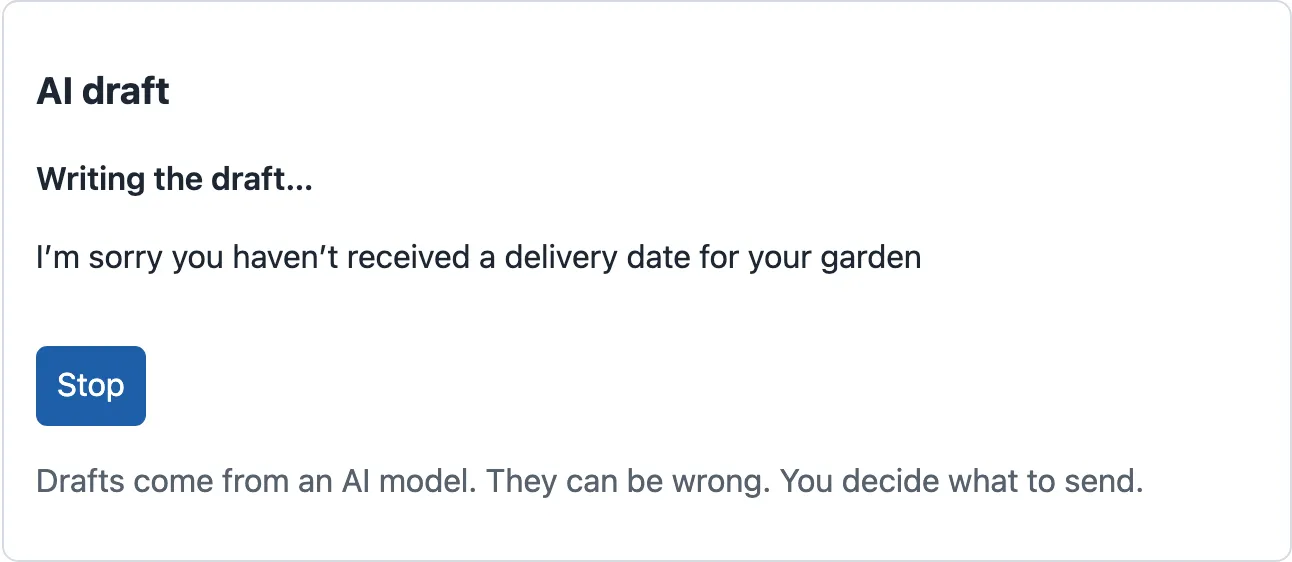
streaming: the text grows, and the only button is Stop (slow mode). 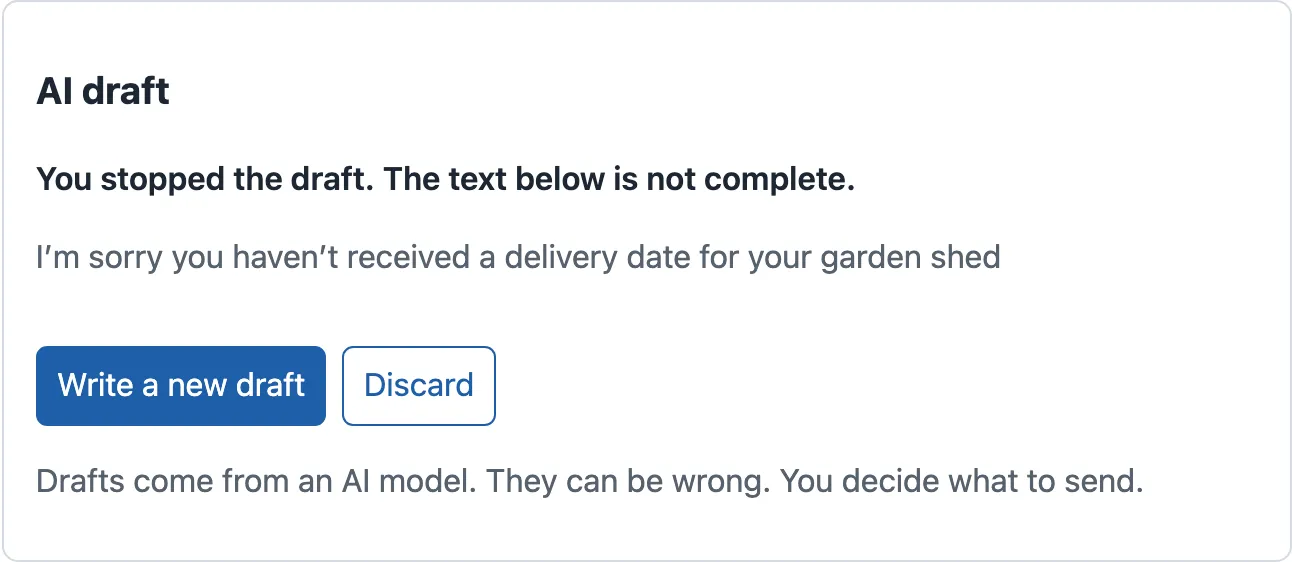
stopped: grey text, words that say it is not complete, and no Use this draft. -
Stop the mock API with Ctrl+C, and start it again without a mode:
npm run api. Click Write a new draft. After about 2 seconds, the whole draft appears.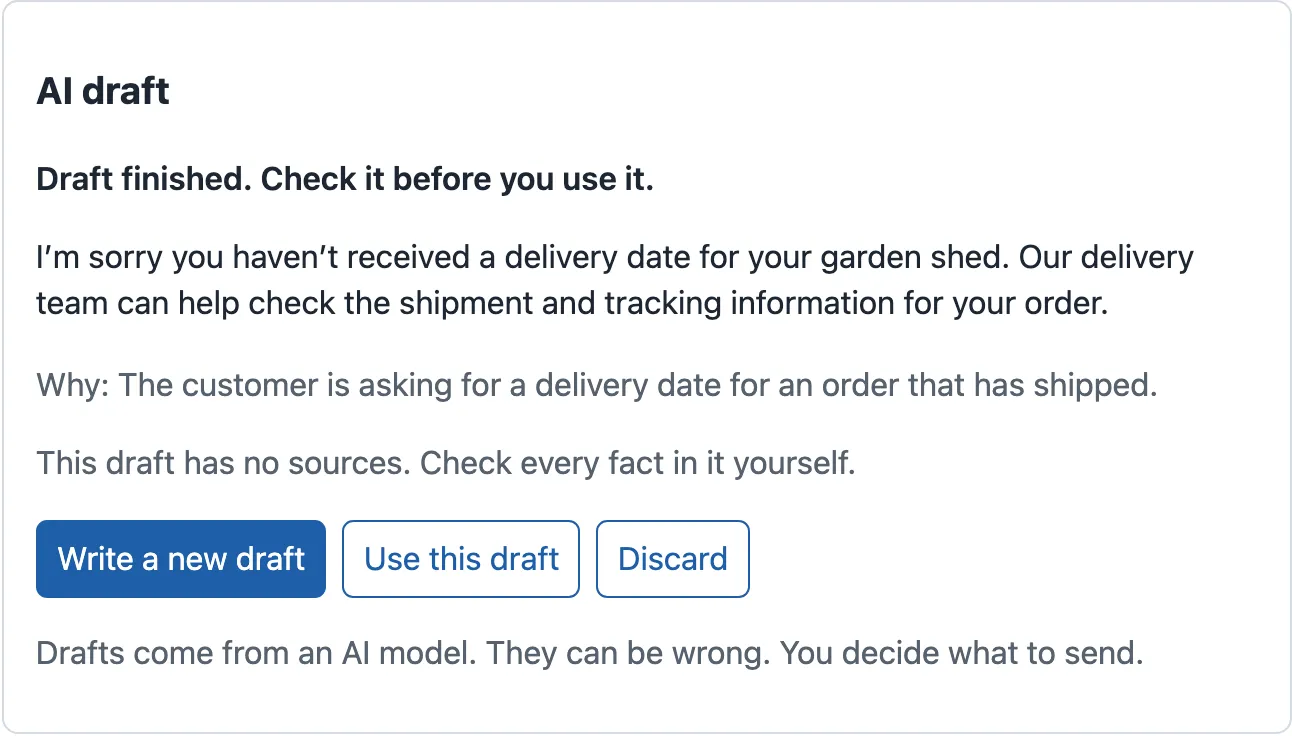
done: the only state with Use this draft. The reason and the sources come with it; the third lesson explains them. -
Stop the mock API, and start it with
node mock-api/server.mjs --stream interrupt. Open T-80008 again, and click Write a draft. The connection ends after 11 pieces.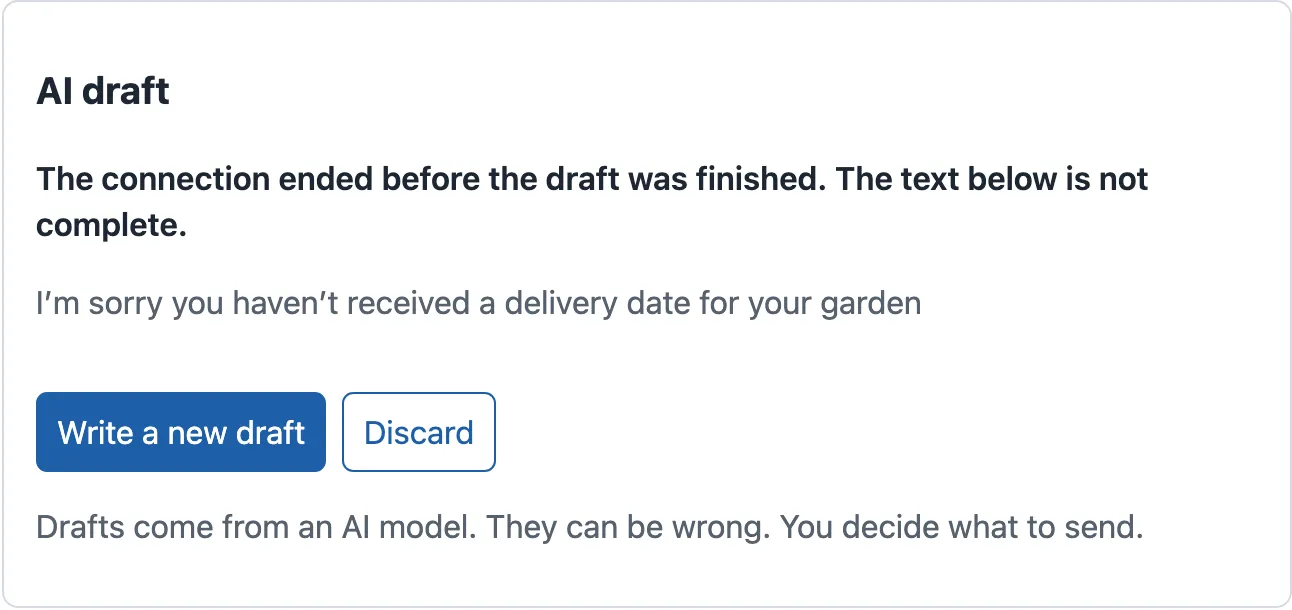
interrupted: the same 11 pieces that Tomás's version offered to send, now marked as not complete. -
Stop the mock API, and start it with
node mock-api/server.mjs --stream error. Click Write a draft once more. The panel says “No draft.” and shows a red message: “The AI service stopped answering. Your work is safe. Try again.”. -
Stop the mock API, and start it with
npm run apifor the next lesson.
When to stream, and what it costs
Section titled “When to stream, and what it costs”Stream when a person waits and watches the answer: a draft on the help-desk screen, or a chat. Do not stream work that nobody watches, such as the background job of the next lesson. There, the agent needs the result, not the pieces.
Streaming has costs:
- Eight states instead of two. Each one needs words, buttons and a test. The panel’s tests have one case for each ending.
- More code. The parser, the reader and the cancellation are code that a plain request does not need.
- The screen is drawn more often. Each piece changes the state, so React draws the panel again: 28 times for T-80008. The course team measured it in Measure the browser, and React’s work for a whole draft was below 0.01 ms. That is not a problem. Reading every piece aloud to a screen reader is a problem, and Accessible interaction solves it.
- A partial answer can still be billed. Stop saves the agent’s time, but not always the provider’s cost.
Kwame asks why the draft does not use TanStack Query, like the rest of the server data. A query caches a finished answer under a key. A stream has no finished answer until the end, and the agent starts and stops it. So the stream has its own hook.
Common mistakes
Section titled “Common mistakes”Common mistake
Stop changes the words, but the draft keeps coming
Symptom (constructed): after Stop, the panel says “You stopped the draft”. But in the Network panel, the draft request stays open until the end. The mock API’s counters at http://127.0.0.1:8100/admin/stats show "completed" going up, and "stopped_by_client" stays at 0.
Cause: stop() dispatched { type: 'stop' }, but it did not call controller.current?.abort(). The reducer ignores the late pieces, so the screen looks right. The browser still downloads the whole draft, and a real provider still writes it and bills it.
Fix: a Stop button must cancel the request (abort()) and set the state. The panel’s test “Stop ends the stream” checks it with openStream(), a fake stream that ends only when the request’s signal aborts.
Consequence in AI work: every stopped draft costs the full answer.
Common mistake
A network error before the first piece shows an empty grey draft
Symptom (constructed): the mock API is not running. The panel says that the connection ended and that “The text below is not complete”, but there is no text.
Cause and fix: an interruption only makes sense when some text arrived. The hook decides by the text: dispatch(text ? { type: 'ended' } : { type: 'fail', problem: … }). With no text, the panel says “No draft.” and “The ticket service did not answer. Check your connection, then try again.”.
Your turn: count the pieces
Section titled “Your turn: count the pieces”Change one thing on the screen. While the draft streams, the panel says only “Writing the draft…”. Make it say how many pieces have arrived, for example “Writing the draft… (12 pieces so far)”. Before you change the code, predict: which value of the state do you need, and must the reducer change? Then start the mock API with --stream slow, and check your change on T-80008.
Show the answer
The reducer already counts the pieces in state.pieces, so it does not change. Only the panel changes. In DraftPanel.tsx, replace the paragraph with the class draft-state:
<p className="draft-state"> {STATUS_TEXT[state.status]} {state.status === 'streaming' && ` (${state.pieces} pieces so far)`}</p>In slow mode, the count rises from 1 to 28, about 16 pieces per second. npx tsc --noEmit prints nothing, and the tests still pass: no test checks the words of the streaming state. The snapshot does not have this change, and the next lessons do not depend on it.
Knowledge check
Section titled “Knowledge check”Check your understanding
In the recorded stream of T-64704 with chat-small, the first piece arrived after 1,275 ms, and the stream ended at 1,597 ms. What does streaming improve for the agent, and what does it not improve?
Show the answer
It improves what the agent sees during the wait. The panel says “Asking for a draft…”, the first text appears at about 1.3 s, and the agent can press Stop at any time. It does not make the draft faster. 80% of the time passed before the first piece, while the model worked, and the whole draft still took about 1.6 s. The draft can be used only after the end, when the final check has passed.
Does your answer have the main points of ours?
Sign in and enroll in the course to save your answers. Every check counts toward the certificate.
Check your understanding
Predict: the mock API is in its interrupt mode, and the stream of T-80008 stops after 11 pieces. Then, because of a slow network, a done event with the full draft arrives. What does the panel show, and why?
Show the answer
The panel shows the state interrupted: the 11 pieces in grey, “The connection ended before the draft was finished. The text below is not complete.”, and the buttons Write a new draft and Discard. The late done changes nothing, because the reducer accepts events only in connecting and streaming. Even if it had accepted the done, the check would fail. The final reply is longer than the 11 pieces that the agent saw, so the result would be invalid.
Does your answer have the main points of ours?
Sign in and enroll in the course to save your answers. Every check counts toward the certificate.
Check your understanding
Tomás proposes to replace the eight states with two flags, loading and error. Give two situations that the flags cannot tell apart, and say what the agent would see wrong.
Show the answer
A draft that the agent stopped and a draft whose connection ended both end as “not loading, no error”. The panel would show both as finished, with Use this draft, and an agent could send half a reply. A draft that arrived complete but failed the final check also looks like “not loading, no error”. The state machine gives each situation its own state, its own words and its own buttons. Only done offers Use this draft, and the tests check every ending.
Does your answer have the main points of ours?
Sign in and enroll in the course to save your answers. Every check counts toward the certificate.
Recap
- A stream sends the draft in pieces over one open connection. The desk reads it with
fetchand a reader, notEventSource, because the draft is aPOST.SseParserkeeps half an event until its end arrives. - Most of the wait comes before the first piece: 1,790 of 2,002 ms for T-80008. A clear “Asking for a draft…” and Stop matter most.
- A state machine gives the draft exactly one of eight states, with different words and buttons. Only
doneoffers Use this draft, and events after the end change nothing. - Stop aborts the request and sets the state. Check the final result: the shape, and the same text that the agent saw.
Next, a new ticket’s AI work runs in the background for a few seconds. The desk follows it, first by asking every second, then with events from the server.
Next: Background processing