
Trustworthy feedback
- Lesson 13
- 50 min
- Module 4: AI-specific interaction states
Lesson 13 of 19 · Frontend Architecture and Performance for AI AppsTrustworthy feedback
1. Web foundations bridge
2. Components and application structure
3. Data fetching and state management
4. AI-specific interaction states
5. Performance and scalability
6. Security, accessibility and handoff
What you will be able to do
Help the agent decide quickly how far to trust an AI draft. Show where its facts come from, when the assistant is unsure, when a person must handle the ticket, and what to do when something fails.
Before you startWhat to know and to have ready
What you need to know
- The draft’s states and the final check, from Streaming interfaces.
- The job’s states and why only a dead letter offers Try again, from Background processing.
- The API’s error shape (
code,message,request_id,fields) andRetry-After, from Validation and error responses in Build and Deploy Your First API.
What you need on your computer
- Your
ticket-deskproject after Background processing:npm testends withTests 38 passed (38). - The snapshot
end-of-m04, to copy this lesson’s files.
Tested with Node.js 24.18 on macOS (Apple silicon) in Chromium. The Windows (PowerShell) and Linux commands are written, but not tested.
A draft letter from a new colleague
Section titled “A draft letter from a new colleague”A new colleague writes a draft letter for you to sign. A good colleague does not hand you only the letter. She adds small notes in the margin. “The refund times are from the refund policy, section 4: here is the sentence.” “I was not sure about the shed’s warranty; please check.” “Do not send this one yourself: the customer threatens to go to court, so the team lead must answer.” You read the notes first, and you know in seconds where to look and what to do.
A weaker colleague hands you the same letter with no notes. It reads just as well. You either check every sentence yourself, or you trust all of it. Both are bad.
The AI draft on the ticket desk is the new colleague’s letter. This lesson adds the notes.
The problem: every draft looks equally sure
Section titled “The problem: every draft looks equally sure”The recorded drafts come with more than the reply. Each one has a reason, a confidence, a needs_human flag and, for policy questions, the passages that support its claims. A desk that shows only the reply throws all of that away. Look at two real recorded drafts.
T-80007: “You charged my card twice for order LK-350972 (two charges of 74.50 on 29 September). I have asked twice already. If both charges are not fixed by Friday, I will take this to small claims court.” The recorded draft says:
I'm sorry you've had to follow up about the two charges. A member of our team will contact you to review this and discuss the next steps.It is polite and correct. But the model also set needs_human: true, with the reason “the small-claims threat requires human handling”. Without that flag on the screen, an agent may send the reply and close the ticket. A legal threat then waits in a closed ticket.
T-64979: a customer asks when the refund for returned cushion covers reaches her card. The draft says “within 5 to 10 business days”. It came with three sources, and they do not agree. The refunds policy gives 5 to 10 business days, but the help centre’s FAQ says 3 business days. Without the sources, the agent cannot see that conflict.
Errors have the same problem. At the end of Module 3, the desk showed the API’s own message and always offered Try again. Open a ticket that does not exist, T-99999, and the desk said “There is no ticket T-99999.” with a Try again button. The ticket will not exist on the second try either.
The idea: four kinds of note
Section titled “The idea: four kinds of note”A trustworthy screen adds four kinds of note to an AI result. Each one answers a question that the agent asks:
- Sources (citations): “Where does this fact come from?” A citation links a claim in the draft to the passage of a document that supports it, with the document’s name, version and section. The agent can check a claim without searching.
- Uncertainty: “Is the assistant sure?” The desk shows it when the assistant is not sure, in words, never as a fake precise number.
- Review actions: “What must I do with it?” A draft never goes to a customer by itself. Use this draft copies it into the reply form, where the agent reads, edits and sends it. When the model sets
needs_human, the desk says plainly that a person must handle the ticket. - Recoverable errors: “What went wrong, and what can I do?” Errors use the agent’s words. Try again appears only when trying again can help.
These notes do not make the model more accurate. They make its mistakes easier to catch.
A tiny example: what the 69 recorded drafts carry
Section titled “A tiny example: what the 69 recorded drafts carry”The mock API replays 69 real drafts of chat-small from the LLM applications course, with the cited answers of the RAG course on some of them. Before you design the screen, count what the notes would say:
| Note | Recorded drafts | What the desk shows |
|---|---|---|
needs_human: true |
11 of 69 | “A person must handle this ticket.” and the reason, in a yellow box |
| Sources | 8 of 69 | the list of claims, each with its quoted passage |
| The documents do not answer | 1 of 69 | “The policy documents do not answer …” in a yellow box |
| No policy question | 60 of 69 | “This draft has no sources. Check every fact in it yourself.” |
Confidence high |
65 of 69 | nothing extra |
Confidence medium or low |
3 and 1 of 69 | “The assistant is not sure about this draft (confidence: …).” |
Two numbers stand out. Most drafts, 60 of 69, have no sources at all. So the desk must say “no sources” clearly, or the agent assumes that a draft without notes is safe. And 65 of 69 drafts say high. The confidence is a label that the model wrote about itself, not a measured probability. A green “high” on almost every draft would teach agents to ignore it. So the desk stays quiet for high, and it speaks only for medium and low.
Show the sources
Section titled “Show the sources”Citations.tsx shows the draft’s sources. It has three cases, and the first two are warnings in words:
const policy = draft.policy_answer;if (!policy) return <p className="muted">This draft has no sources. Check every fact in it yourself.</p>;if (!policy.answerable || draft.citations.length === 0) { return ( <p className="notice"> The policy documents do not answer “{policy.question}”. Do not promise anything about it without checking. </p> );}return ( <section className="citations" aria-label="Sources"> <h4>Sources (policy question: {policy.question})</h4> <ol> {draft.citations.map((c, i) => ( <li key={`${c.id}-${i}`}> <p>{c.claim}</p> <blockquote cite={`#passage-${c.id}`}> {c.quote} <footer>{c.document}, section “{c.section}” ({c.version})</footer> </blockquote> </li> ))} </ol> </section>);Each source shows the claim first, then the exact quote, then where it comes from: the document, the section and the version. The version matters, because policies change; the RAG course’s documents have dates in force. The <blockquote> element tells browsers and screen readers that this is quoted text.
This is T-64979 on the desk:
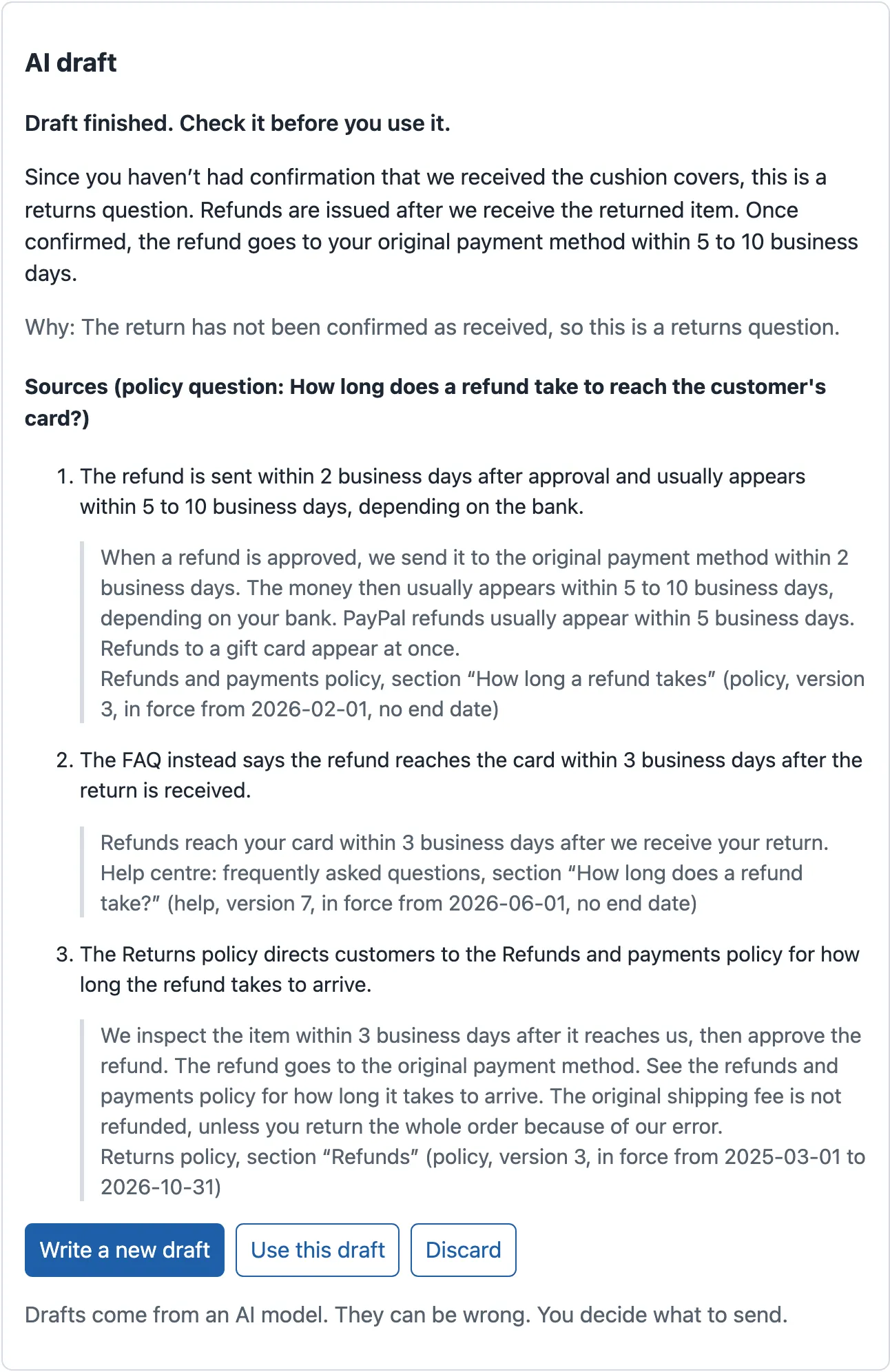
The second source says “3 business days”, the first says “5 to 10”. The reply chose the policy. The agent can now decide whether to mention the FAQ, or ask the team to fix it. Answer and cite in the RAG course shows how these claims and passages are made and checked.
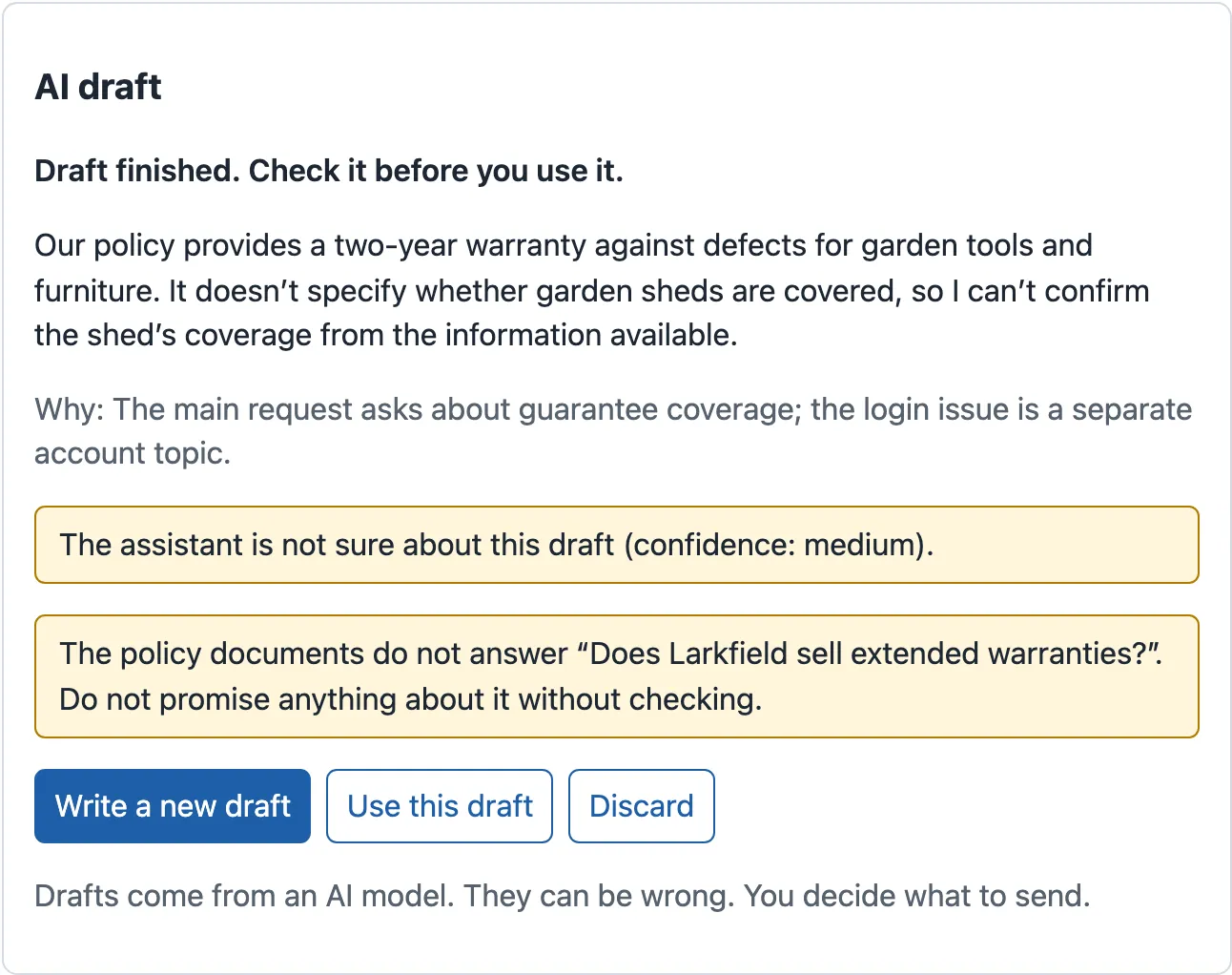
When the documents do not answer, the desk says so. T-64702 asks what the guarantee of a garden shed covers. The policy assistant found no answer to its question, and the model’s confidence was medium:
Say when a person must decide
Section titled “Say when a person must decide”The draft panel puts needs_human first, in a yellow box with the model’s reason:
{state.draft.needs_human ? ( <p className="notice"> <strong>A person must handle this ticket.</strong> {state.draft.reason} </p>) : ( <p className="muted">Why: {state.draft.reason}</p>)}{state.draft.confidence !== 'high' && ( <p className="notice">The assistant is not sure about this draft (confidence: {state.draft.confidence}).</p>)}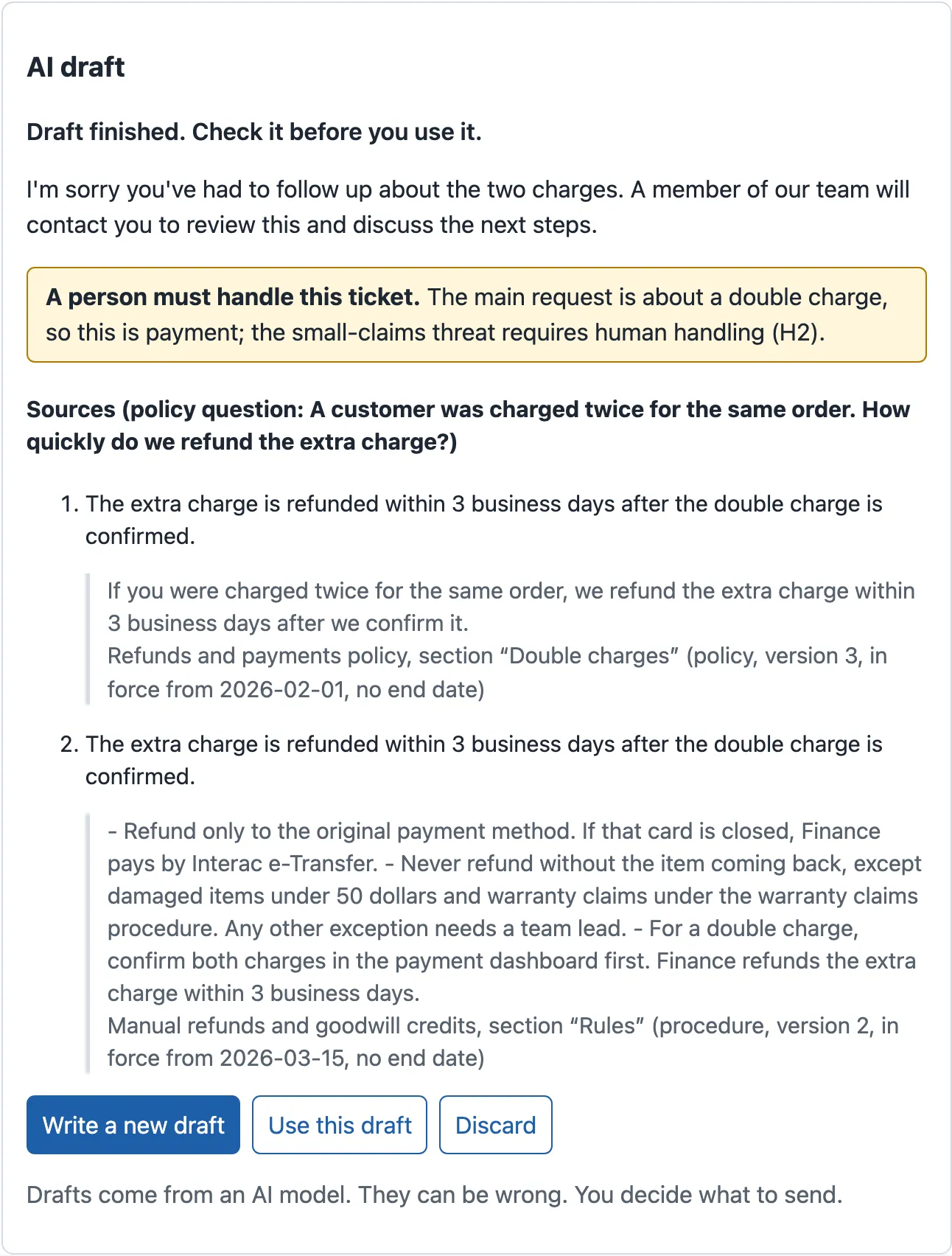
The draft of T-80006 is the one recorded draft with low confidence. The customer sent only an attachment, with no text, so the model had nothing to read:
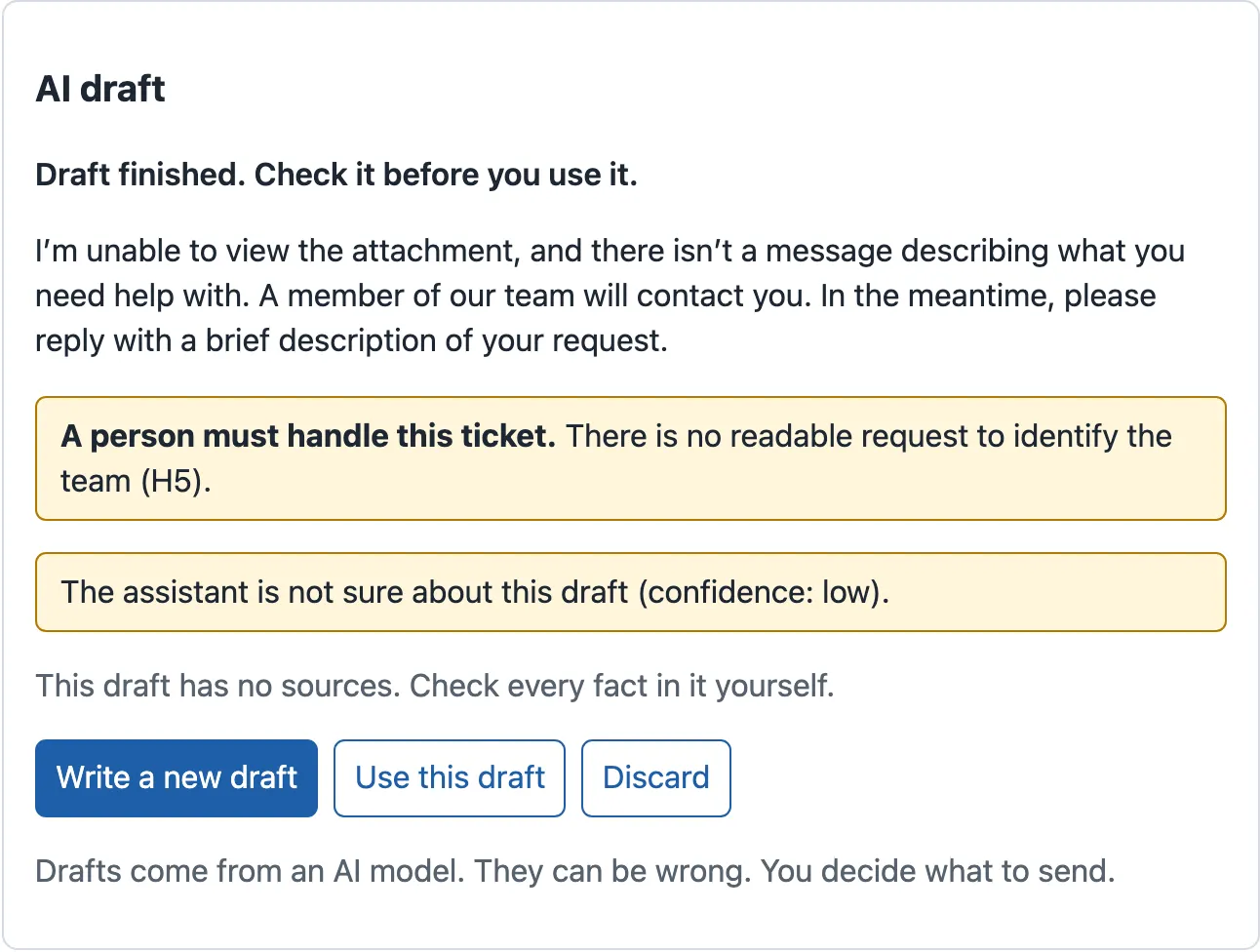
Look at what the desk does not do. It does not hide Use this draft for these tickets. The agent is the person who handles them, and the draft may still be a good start. And it never sends anything. Use this draft copies the reply into the reply form:
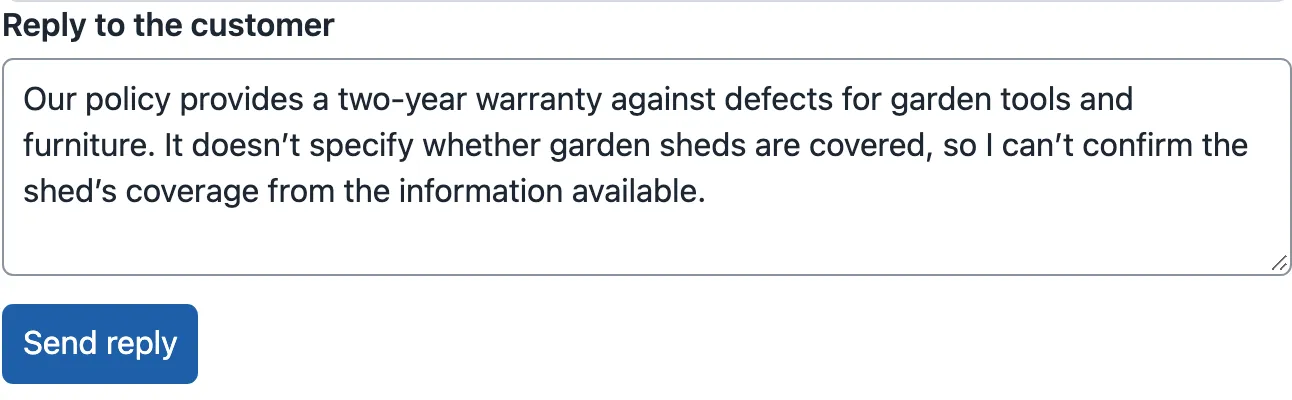
This is the review action: the step where a person accepts, changes or refuses an AI result. The design puts the decision in front of the agent, with the notes next to it.
Errors in words that say what to do
Section titled “Errors in words that say what to do”The last kind of note is for failures. Until now, the desk showed the API’s message, which is written for developers. Now src/lib/errors.ts turns each error code into a sentence for the agent, and says whether trying again can help:
const BY_CODE: Record<string, Described> = {  network_error: { text: 'The ticket service did not answer. Check your connection, then try again.', canRetry: true },  unavailable: { text: 'The ticket service is busy. Try again in a few seconds.', canRetry: true },  ai_unavailable: { text: 'The AI service stopped answering. Your work is safe. Try again.', canRetry: true },  no_draft: { text: 'No AI draft exists for this ticket. Write the reply yourself.', canRetry: false },  not_found: { text: 'This item does not exist. It may have been removed.', canRetry: false },  invalid_request: { text: 'Some information is not valid. Check the marked fields.', canRetry: false },  conflict: { text: 'Someone or something changed this item first. Look at its new state.', canRetry: false },  idempotency_key_reused: { text: 'This form was already sent with other content. Reload the page.', canRetry: false },};
export function describeError(error: Error): Described {  if (error instanceof ApiError) {    const known = BY_CODE[error.code];    if (known) {      if (error.retryAfter) return { ...known, text: known.text.replace('a few seconds', `${error.retryAfter} seconds`) };      return known;    }    return { text: error.message, canRetry: error.status >= 500 };  }  return { text: 'Something went wrong in this page. Reload it to try again.', canRetry: false };}
The desk uses the code, not the message. The API’s contract promises stable codes, and the message can change. Each sentence has the same shape: what happened, then what the agent can do. When the server sends Retry-After: 2, “a few seconds” becomes “2 seconds”. ErrorMessage.tsx now shows the sentence, and it shows Try again only when canRetry is true. The diagram shows the decision:

Text description of the diagram
An error reaches the screen. If it is an ApiError with a known code, the desk uses the agent’s words from the table, with the Retry-After time when there is one. If it is an ApiError with an unknown code, the desk shows the API’s own message. If it is not an ApiError at all, it is a bug in the page, and the desk says “Something went wrong in this page. Reload it to try again.” Then the desk decides about the button. For a known code, the table says whether trying again can help. For an unknown code, a status of 500 or more means a server problem, which may pass, so the desk offers Try again. Otherwise there is no button, and the words say what to do instead.
Add the notes and the words to the ticket desk
Section titled “Add the notes and the words to the ticket desk”-
In
~/projects/ticket-desk, copy the last files of this module from the snapshot.ErrorMessage.tsxchanges,errors.test.tsis new, and the list’s test expects the new words.package.json, the lock file and the README get the version 0.4.0.Terminal window S=../nextia-learning-labs/C22/snapshots/end-of-m04for f in src/ui/ErrorMessage.tsx src/lib/errors.test.ts src/features/tickets/TicketList.test.tsx \package.json package-lock.json README.md; docp "$S/$f" "$f"doneTerminal window $S = "..\nextia-learning-labs\C22\snapshots\end-of-m04"$files = 'src\ui\ErrorMessage.tsx', 'src\lib\errors.test.ts', 'src\features\tickets\TicketList.test.tsx','package.json', 'package-lock.json', 'README.md'foreach ($f in $files) { Copy-Item "$S\$f" $f }Your project now has the same files as the snapshot
end-of-m04. -
Run the tests:
Terminal window npm testThe mock API’s part ends with
ℹ tests 21andℹ pass 21. The interface’s part ends with:Test Files 15 passed (15)Tests 40 passed (40)That is 61 checks in all. One test of the list changed: “shows a busy server in plain words and can try again” now expects “The ticket service is busy.”.
-
Build the production files, as at the end of every module:
Terminal window npm run buildThe end of the output shows one JavaScript file of about 281 kB, 86.55 kB with gzip. Your build time will differ.
-
Start the mock API (
npm run api) and the desk (npm run dev). Open http://localhost:5173/#/tickets/T-64979, and click Write a draft. Read the three sources, and find the one that disagrees. -
Open T-80007, T-80006 and T-64702 in the same way. For each one, say what the yellow boxes tell you before you read the reply.
-
Click Use this draft on T-64702. The reply form now holds the text, and nothing was sent.
-
Open http://localhost:5173/#/tickets/T-99999. The desk says “This item does not exist. It may have been removed.”, with no Try again.

A ticket that does not exist: words for the agent, and no button that cannot help. -
Stop the mock API, and start it with
node mock-api/server.mjs --list fail. This failure is simulated: every list request gets503withRetry-After: 2. Open http://localhost:5173/#/tickets. TanStack Query tries twice more, and then the list shows the error.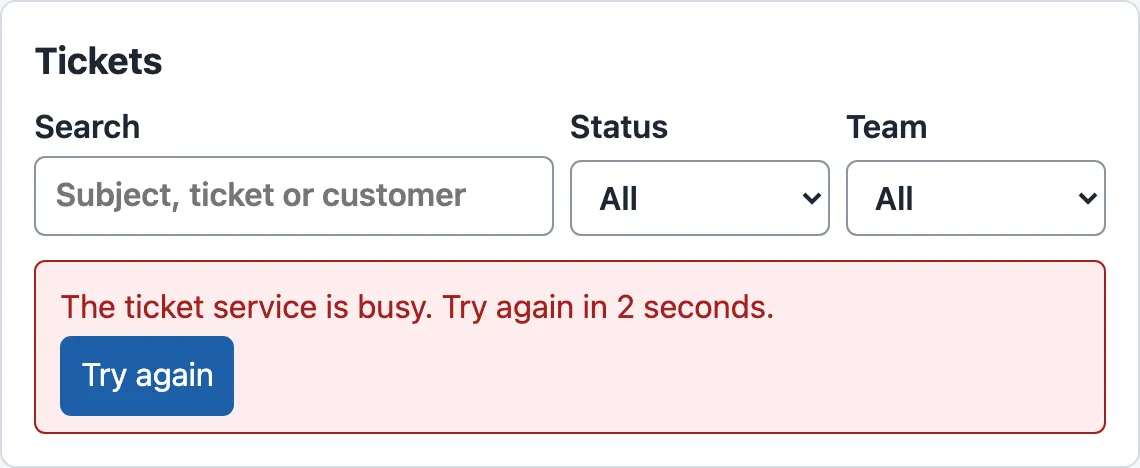
A busy server: the wait from Retry-After, in words, and a Try again button, because this error passes. -
Stop the mock API, and start it again with
npm run api. Click Try again. The list appears.
When to add these notes, and what they cost
Section titled “When to add these notes, and what they cost”Add the notes wherever a person acts on an AI result: a draft, a summary, a classification that routes work. They cost little in code: Citations.tsx has 32 lines, and errors.ts has 30. The real cost is elsewhere:
- The server must send the facts. The desk can show only what the API returns: the sources, the flag and the reason. If the API sends only text, ask for the fields first. The LLM applications and RAG courses built them.
- Space and attention. Every note takes space and a moment of reading. So the desk speaks only when there is something to say: no box for
highconfidence, and a quiet grey “Why” when no person is needed. - Words to maintain. Each error code needs a sentence, and a test. An unknown code falls back to the API’s message, so a new code still shows something.
Do not invent precision. A model’s own confidence is a word that it chose, not a probability that anyone measured. Showing “92% sure” would claim a measurement that does not exist. Thresholds and calibration in the machine learning course shows how a real probability is checked.
Common mistakes
Section titled “Common mistakes”Common mistake
Try again on an error that cannot change
Symptom: a ticket has no AI draft, or it does not exist. The desk shows Try again. The agent clicks it, waits, and gets the same error.
Cause: the old ErrorMessage showed the button whenever the page passed an onRetry function. It did not ask whether the error could pass.
Fix: decide by the error code. describeError() returns canRetry, and ErrorMessage shows the button only when it is true. errors.test.ts checks that no_draft gives canRetry: false, with “Write the reply yourself.” as the next step.
Common mistake
The confidence shown as a coloured score on every draft
Symptom (constructed): Tomás shows a green badge “Confidence: high” on every draft. After a week, the agents stop looking at it.
Cause: 65 of the 69 recorded drafts say high, including drafts that need a person, such as T-80007. A badge that almost never changes carries almost no information.
Fix: show uncertainty only when it is there (medium, low), in words, and put needs_human and the sources first. They are the notes that change what the agent does.
Your turn: words for a request that is too large
Section titled “Your turn: words for a request that is too large”Change one condition: a new error code. The mock API answers 413 with the code too_large when a request body is larger than 16 KB. Today, the desk shows the API’s message, “The request body is larger than 16 KB.”, and no Try again. Write the agent’s words for this error. First add a check to errors.test.ts and run it: it must fail. Then add the code to BY_CODE, decide whether trying again can help, and run the test again. Before you start, predict: does canRetry change from what the desk does today?
Show the answer
In src/lib/errors.test.ts, add these lines to the first test:
expect(describeError(new ApiError(413, 'too_large', 'x'))).toEqual({ text: 'This text is too long to send. Make it shorter, then send it again.', canRetry: false,});npx vitest run src/lib/errors.test.ts fails, because the desk still shows the API’s message (here, the test’s 'x'). The output, shortened:
× known codes become plain words, with whether to try again- "text": "This text is too long to send. Make it shorter, then send it again.",+ "text": "x", Tests 1 failed | 1 passed (2)Then add one entry to BY_CODE in src/lib/errors.ts:
too_large: { text: 'This text is too long to send. Make it shorter, then send it again.', canRetry: false },The test passes: Tests 2 passed (2). canRetry does not change. Without the entry, the status 413 is below 500, so the desk already offered no button. What changes is the sentence: it now says what to do, in the agent’s words. Sending the same text again cannot help, so there is still no Try again. The snapshot does not have this change.
Knowledge check
Section titled “Knowledge check”Check your understanding
The draft of T-80007 is polite and correct. Why must the desk show needs_human and the reason above the reply, and what would go wrong without them?
Show the answer
The customer threatens to go to small claims court. The model set needs_human: true with the reason that this threat requires a person. The reply alone, “A member of our team will contact you…”, looks finished. An agent could send it and close the ticket, and the legal threat would wait in a closed ticket. The yellow box “A person must handle this ticket.” and the reason tell the agent what to do before they read the reply. The desk still offers Use this draft, because the agent is that person; it never sends anything by itself.
Does your answer have the main points of ours?
Sign in and enroll in the course to save your answers. Every check counts toward the certificate.
Check your understanding
Predict: the API answers 503 with the code unavailable and Retry-After: 2 for the list, and 404 with the code no_draft for a draft. What does the agent see in each case, and which one has a Try again button?
Show the answer
For the list: “The ticket service is busy. Try again in 2 seconds.” with Try again, because a busy server can recover. The Retry-After value replaces “a few seconds”. For the draft: “No AI draft exists for this ticket. Write the reply yourself.” with no button, because the draft will not exist on the next try, and the words give the next step instead.
Does your answer have the main points of ours?
Sign in and enroll in the course to save your answers. Every check counts toward the certificate.
Check your understanding
65 of the 69 recorded drafts have confidence high. Omar wants a big green 'high confidence' badge on each of them. What do you recommend, and why?
Show the answer
Show nothing extra for high, and show a sentence in words for medium and low. The confidence is a label that the model wrote about itself, not a measured probability. It is high on almost every draft, even on T-80007, which needs a person. A badge that almost never changes teaches agents to ignore it. The notes that change what an agent does are needs_human with its reason, the sources, and the warning when the documents do not answer.
Does your answer have the main points of ours?
Sign in and enroll in the course to save your answers. Every check counts toward the certificate.
Module practice: a mock stream and a document status
Section titled “Module practice: a mock stream and a document status”This module’s practice has two parts. First, a worked example with every step visible. Then a task of your own, in the same project.
Guided practice: test one ending of a mock stream
Section titled “Guided practice: test one ending of a mock stream”A mock stream is a fake answer that a test builds, so the panel can be tested without the mock API. src/test/stream.ts has two helpers: sseResponse(events) sends a list of events and then closes, and openStream(events, signal) sends events and then waits until the request is stopped. Write one test that checks the finished draft, with every value visible.
-
Create
src/features/draft/DraftEndings.test.tsxwith this content:src/features/draft/DraftEndings.test.tsx // Module 4's practice: the endings of a mock streamed draft must look different.import { render, screen } from '@testing-library/react';import userEvent from '@testing-library/user-event';import { expect, test } from 'vitest';import { installFakeApi } from '../../test/fakeApi';import { fullDraft, openStream, sseResponse } from '../../test/stream';import { DraftPanel } from './DraftPanel';const pieces: [string, unknown][] = [['start', { model: 'chat-small' }],['token', { text: 'Your refund' }],['token', { text: ' is on its way.' }],];async function startDraft() {render(<DraftPanel ticketId="T-64979" onUse={() => {}} />);await userEvent.click(screen.getByRole('button', { name: 'Write a draft' }));}test('completion: black text, Use this draft, no alert', async () => {installFakeApi(() => sseResponse([...pieces, ['done', fullDraft]]));await startDraft();expect(await screen.findByText('Draft finished. Check it before you use it.')).toBeInTheDocument();expect(screen.getByText('Your refund is on its way.')).not.toHaveClass('muted');expect(screen.getByRole('button', { name: 'Use this draft' })).toBeInTheDocument();expect(screen.queryByRole('alert')).not.toBeInTheDocument();});The fake stream sends
start, two pieces (“Your refund”, “ is on its way.“) anddonewithfullDraft, whosereplyis exactly “Your refund is on its way.”. So the final check passes. -
Run only this file:
Terminal window npx vitest run src/features/draft/DraftEndings.test.tsxThe output ends with:
Test Files 1 passed (1)Tests 1 passed (1) -
Check that the test can fail. In the test, change
' is on its way.'to' is on the way.', and run it again. The final reply no longer equals the streamed text, so the panel showsinvalid. The output shows the failed test and the panel’s HTML (shortened):× completion: black text, Use this draft, no alertTestingLibraryElementError: Unable to find an element with the text: Draft finished. Check it before you use it..data-status="invalid"The draft did not pass the checks. Do not use it.This is the final check of Streaming interfaces at work. Change the text back.
Independent task
Section titled “Independent task”Do two things on your own, with tests:
- Cancellation and failure. Add two tests to
DraftEndings.test.tsx: one where the agent presses Stop (useopenStream), and one where the stream sends anerrorevent. Each test must show that its ending looks different from the finished draft. Check the words, the colour of the text (themutedclass), the Use this draft button and the alert. - A document status view. Larkfield will let customers attach a PDF invoice. The server reads it in the background, as a job with the same six states. Build
src/features/documents/DocumentStatus.tsx. It takes ajobIdand afileName, and it follows the job withuseJobPolling. It says each state in words about the document. It offers Cancel the reading while queued, and Try again only for a dead letter. Test it with the fake API: one test that followsqueued → running → succeeded, and one that shows that a cancelled and a failed reading look different.
Show a worked solution
The two new tests for the draft:
test('cancellation: grey text, no Use this draft, no alert', async () => {  installFakeApi((_url, init) => openStream(pieces, init.signal));  await startDraft();  await screen.findByText('Your refund is on its way.');  await userEvent.click(screen.getByRole('button', { name: 'Stop' }));  expect(screen.getByText(/You stopped the draft/)).toBeInTheDocument();  expect(screen.getByText('Your refund is on its way.')).toHaveClass('muted');  expect(screen.queryByRole('button', { name: 'Use this draft' })).not.toBeInTheDocument();  expect(screen.queryByRole('alert')).not.toBeInTheDocument();});
test('failure: an alert in words, no Use this draft', async () => {  installFakeApi(() => sseResponse([...pieces.slice(0, 2), ['error', { error: { code: 'ai_unavailable', message: 'x' } }]]));  await startDraft();  expect(await screen.findByRole('alert')).toHaveTextContent('The AI service stopped answering');  expect(screen.getByText('No draft.')).toBeInTheDocument();  expect(screen.queryByRole('button', { name: 'Use this draft' })).not.toBeInTheDocument();});
The document status reuses the job’s hooks and changes only the words:
import type { JobState } from '../../api/jobs';import { ErrorMessage } from '../../ui/ErrorMessage';import { useJobActions, useJobPolling } from '../jobs/useJob';
// The same six job states, in the words of a document that the server reads in the background.const TEXT: Record<JobState, string> = {  queued: 'The document waits to be read.',  running: 'Reading the document…',  succeeded: 'The document is read.',  failed: 'This document cannot be read. Ask the customer for another copy.',  cancelled: 'You cancelled the reading. The document is saved without it.',  dead_letter: 'Reading failed several times and stopped. You can try again later.',};
/** The background reading of one attached document: polled every second until it is final. */export function DocumentStatus({ jobId, fileName }: { jobId: number; fileName: string }) {  const job = useJobPolling(jobId);  const { cancel, retry } = useJobActions(jobId);
if (job.isPending) return <p className="muted">Checking the document…</p>; if (job.isError) return <ErrorMessage error={job.error} onRetry={() => job.refetch()} />; const j = job.data; const bad = j.state === 'failed' || j.state === 'dead_letter'; return ( <section aria-label={`Document ${fileName}`} data-state={j.state}> <p role="status" className={bad ? 'error' : j.state === 'succeeded' ? 'success' : undefined}> {fileName}: {TEXT[j.state]} </p> {j.state === 'queued' && ( <button type="button" className="secondary" onClick={() => cancel.mutate()}> Cancel the reading </button> )} {j.state === 'dead_letter' && ( <button type="button" onClick={() => retry.mutate()}> Try again </button> )} </section> );}import { screen } from '@testing-library/react';import userEvent from '@testing-library/user-event';import { expect, test } from 'vitest';import type { Job } from '../../api/jobs';import { installFakeApi, json } from '../../test/fakeApi';import { renderWithCache } from '../../test/render';import { DocumentStatus } from './DocumentStatus';
const job = (state: Job['state']): Job => ({ job_id: 7, ticket_id: 'T-500001', state, attempts: 1, max_attempts: 5, created_at: '', started_at: null, finished_at: null, last_error: null, result: null,});
test('follows the reading until it is done', async () => { const states = [job('queued'), job('running'), job('succeeded')]; installFakeApi(() => json(200, states.length > 1 ? states.shift() : states[0])); renderWithCache(<DocumentStatus jobId={7} fileName="invoice.pdf" />); expect(await screen.findByText('invoice.pdf: The document waits to be read.')).toBeInTheDocument(); expect(await screen.findByText('invoice.pdf: The document is read.', {}, { timeout: 4000 })).toBeInTheDocument();});
test('cancelled, done and failed look different', async () => { installFakeApi((url) => json(200, url.pathname.endsWith('/cancel') ? job('cancelled') : job('queued'))); const first = renderWithCache(<DocumentStatus jobId={7} fileName="invoice.pdf" />); await userEvent.click(await screen.findByRole('button', { name: 'Cancel the reading' })); const cancelled = await screen.findByRole('status'); expect(cancelled).toHaveTextContent('You cancelled the reading'); expect(cancelled).not.toHaveClass('error'); expect(cancelled).not.toHaveClass('success'); first.unmount();
installFakeApi(() => json(200, job('failed'))); renderWithCache(<DocumentStatus jobId={7} fileName="invoice.pdf" />); const failed = await screen.findByText(/cannot be read/); expect(failed).toHaveClass('error'); expect(screen.queryByRole('button')).not.toBeInTheDocument();});npx tsc --noEmit prints nothing, and npm test then ends with Test Files 17 passed (17) and Tests 45 passed (45). The first document test takes about 2 seconds, because it polls once a second. The snapshot end-of-m04 does not have these files.
Why this design: the document reading is the same kind of job, so it reuses useJobPolling and useJobActions, and only the words change. A cancelled reading has no colour (the agent chose it), a failed one is red, and a finished one is green. The tests check the words, the class and the buttons, not only the text.
Check your understanding
Module completion check: show how the ticket desk keeps cancellation, completion and failure visually distinct, for the streamed draft and for the background job. Name what differs on the screen, and the test that checks it.
Show the answer
The draft. Completion (done): “Draft finished. Check it before you use it.”, the text in black, the reason and the sources, and Use this draft. Cancellation (stopped): “You stopped the draft. The text below is not complete.”, the text in grey (muted), only Write a new draft and Discard, no alert. An interrupted stream looks like a cancellation, with its own sentence. Failure (failed): “No draft.” and a red alert in words, no Use this draft. DraftPanel.test.tsx has one test for each ending, and the module practice’s DraftEndings.test.tsx checks the class, the button and the alert.
The job. Done: the green “The AI work is done.” and the team. Cancelled: “You cancelled the AI work. The ticket is saved without it.”, with no colour. Failed: red, “Trying again will not help”, no button. Dead letter: red, with Try again. JobStatus.test.tsx checks that failed and dead letter look different and that a queued job can be cancelled. In both views, each ending has its own words, its own look and only the buttons that make sense.
Does your answer have the main points of ours?
Sign in and enroll in the course to save your answers. Every check counts toward the certificate.
Recap
- A trustworthy screen adds four notes to an AI result: sources, uncertainty, review actions and recoverable errors. They do not make the model better; they make its mistakes easier to catch.
- Of the 69 recorded drafts, 11 need a person, 8 have sources, 1 found no answer in the documents, and 65 say
high. So the desk says “no sources” clearly, putsneeds_humanfirst, and speaks about confidence only when it is nothigh. - Use this draft fills the reply form. The agent decides, edits and sends; the AI never sends.
- Errors use the code, in the agent’s words: what happened and what to do. Try again appears only when it can help, with the wait from
Retry-After.
Module 4 in one paragraph. The ticket desk now shows the AI’s work as it happens and as it ends. The draft streams in pieces with a Stop button. A state machine keeps eight states apart, so a stopped, interrupted, failed or invalid draft never looks finished. The desk follows a new ticket’s background job by polling every second. The job lab measured the alternative: one server-sent events connection instead of 5 requests, and the end on screen after 29 ms instead of 403 ms. Each finished result carries its notes: sources, needs_human, honest uncertainty, and errors in words with the right next step. npm test passes 61 checks, the same as the snapshot end-of-m04.
Next, Module 5 measures the desk in the browser: the size of its code, the time to draw the large list, and which of the usual speed tips really help.
Next: Measure the browser