
Query lifecycle
- Lesson 9
- 60 min
- Module 3: Data fetching and state management
Lesson 9 of 19 · Frontend Architecture and Performance for AI AppsQuery lifecycle
1. Web foundations bridge
2. Components and application structure
3. Data fetching and state management
4. AI-specific interaction states
5. Performance and scalability
6. Security, accessibility and handoff
What you will be able to do
A cached copy is born, gets old, is fetched again, and is thrown away. Control each step. Then the desk never shows the answer to an old search, and it recovers by itself when the server is busy for a moment.
Before you startWhat to know and to have ready
What you need to know
- Local state, server state, the cache, keys,
staleTimeanduseTicket, from Local versus server state. - The stale-response race and the effect cleanup with an
AbortController, from Rendering and effects. - HTTP status codes 404 and 503, and the error shape of the ticket API, from Validation and error responses in Build and Deploy Your First API.
What you need on your computer
- Your
ticket-deskat the end of the previous lesson, with TanStack Query installed.npm testpasses with 14 Vitest tests. - Two terminals: one for the mock API, one for the desk.
Tested with Node.js 24.18.0 on macOS (Apple silicon), in Chromium. The Windows and Linux commands are written but not tested. The mock API’s list times are simulated: 60 ms, plus 0.1 ms for each ticket that matches the search.
Milk in the fridge
Section titled “Milk in the fridge”Think of a carton of milk in a shared office fridge. When you buy it, it is fresh, and for some days you use it without a second thought. After the date on the carton, you do not throw it away at once. You still use it, but you check it, and you buy a new carton soon.
Sometimes a colleague sticks a note on it: “This one is finished, buy a new one.” From that moment, the carton is old, whatever its date says. And if nobody touches a carton for weeks, someone clears it out of the fridge.
A copy in the desk’s cache has the same life. It has a date, it gets old, other events can mark it as old, and it is removed when nobody uses it.
The life of one copy
Section titled “The life of one copy”The previous lesson gave every copy an age limit of 30 seconds. Here is the whole life of a copy, with its names:
- No copy. A screen asks for a key that the cache has never seen.
- Fetching. The cache runs the query function, and the screen shows “Loading…”.
- Fresh. The answer arrives. For 30 seconds (
staleTime), every screen that asks for the key gets the copy at once, with no request. - Stale. After 30 seconds, the copy is still shown at once. But the cache fetches it again when a screen opens it, or when the browser window gets the focus. Then the copy is fresh again.
- Invalidated. After the desk changes something on the server, it marks the copies that the change touches as stale at once. This is called invalidation: the note on the milk carton. TanStack Query’s function is
invalidateQueries. The screens that show those copies fetch them again. - Removed. A copy that no screen has used for 5 minutes (
gcTime) is thrown away.
Two things can happen to a request while the copy is fetching. It can fail: then the cache may try again. And the agent can make it useless, for example by typing one more letter: then the cache cancels it. The rest of this lesson is about these two cases.

Text description of the diagram
A copy starts with no data. When a screen asks for its key with useQuery, the cache starts fetching. When the answer arrives, the copy is fresh for 30 seconds: every screen gets it at once, with no request. After 30 seconds, or at once after invalidateQueries, the copy is stale. It is still shown at once, but the cache fetches it again when a screen opens it or when the window gets the focus. A copy that no screen uses for 5 minutes is removed. Two notes describe a request that is running. If it fails with no answer or a 503, the cache tries again after the Retry-After time, or after 1 and then 2 seconds. It tries at most twice, and never for a 4xx answer. Then the screen shows an error with Try again. If the key changes while the request runs, the old request is cancelled.
A worked example: five steps and their requests
Section titled “A worked example: five steps and their requests”The course team opened the desk in Chromium and counted the requests that reached the mock API after each step. This is the desk at the end of the module, with staleTime 30 seconds:
| Step | Ticket requests | List requests | Why |
|---|---|---|---|
| Open the desk on T-80008 | 1 | 1 | no copy of either key: fetching |
| Open T-80007 | 2 | 1 | a new key: fetching |
| Back to T-80008, within 30 s | 2 | 1 | the copy is fresh: no request |
| Send a reply to T-80008 | 3 | 2 | the reply invalidates the ticket and the lists |
| Type “parcel” in the search | 6 sent, 5 closed early | each letter is a new key; the old requests are cancelled |
Read the last two rows carefully. A reply changes the ticket’s messages, and the list shows the number of messages, so both copies are now old. The desk marks them as stale, and the screens fetch them again: one more ticket request and one more list request. You write this invalidation in Pagination and forms. The last row is the subject of the next section.
Move the list to the cache
Section titled “Move the list to the cache”The list still uses useApi. Its key must contain everything that changes the answer: the search text and the two filters. Then each search has its own copy:
| What the agent typed | The list’s key |
|---|---|
| (nothing) | ['tickets', 'list', { status: '', team: '', q: '' }] |
| p | ['tickets', 'list', { status: '', team: '', q: 'p' }] |
| parcel | ['tickets', 'list', { status: '', team: '', q: 'parcel' }] |
TanStack Query compares keys by their content, so a new object with the same values is the same key. All the keys of the tickets start with 'tickets', and all the list keys with 'tickets', 'list'. So one call can later invalidate every list at once, whatever its filter.
-
In
src/features/tickets/queries.ts, add the list keys and a hook for the first page of the list:src/features/tickets/queries.ts // Server state of the tickets: the cache keys and the queries.import { useQuery } from '@tanstack/react-query';import { getTicket } from '../../api/tickets';import { getTicket, listTickets } from '../../api/tickets';import type { TicketFilter } from '../../api/types';export const PAGE_SIZE = 50;/** One place for the cache keys: every key of the tickets starts with 'tickets'. */export const ticketKeys = {all: ['tickets'] as const,lists: () => [...ticketKeys.all, 'list'] as const,list: (filter: TicketFilter) => [...ticketKeys.lists(), filter] as const,detail: (id: string) => [...ticketKeys.all, 'detail', id] as const,};/** The first page of the list. A new filter is a new key, so it has its own cache entry. */export function useTicketList(filter: TicketFilter) {return useQuery({queryKey: ticketKeys.list(filter),queryFn: ({ signal }) => listTickets(filter, PAGE_SIZE, null, signal),placeholderData: (previous) => previous, // keep showing the old results while the new ones load});}export function useTicket(id: string) {placeholderDataanswers a question that a new key raises: what does the list show while “parcel” loads? Without it, the list would disappear and show “Loading tickets…” after every letter. With it, the old results stay on the screen, andisPlaceholderDatais true until the new answer arrives. -
In
src/features/tickets/TicketList.tsx, use the hook:src/features/tickets/TicketList.tsx import { useState } from 'react';import { listTickets } from '../../api/tickets';import type { TicketFilter } from '../../api/types';import { useApi } from '../../lib/useApi';import { ErrorMessage } from '../../ui/ErrorMessage';import { useTicketList } from './queries';import { TicketFilters } from './TicketFilters';import { TicketRow } from './TicketRow';…const [filter, setFilter] = useState<TicketFilter>(NO_FILTER);const tickets = useApi((signal) => listTickets(filter, 50, null, signal), [filter.status, filter.team, filter.q]);const list = useTicketList(filter);const tickets = list.data?.items ?? [];…{tickets.status === 'loading' && <p className="muted">Loading tickets…</p>}{tickets.status === 'error' && <ErrorMessage error={tickets.error} />}{tickets.status === 'success' && ({list.isPending && <p className="muted">Loading tickets…</p>}{list.isError && <ErrorMessage error={list.error} onRetry={() => list.refetch()} />}{list.isSuccess && (<><p className="muted">{tickets.data.items.length === 0 ? 'No ticket matches.' : `Showing ${tickets.data.items.length} tickets.`}</p><p className="muted" aria-live="polite">{tickets.length === 0 ? 'No ticket matches.' : `Showing ${tickets.length} tickets.`}{list.isPlaceholderData && ' Updating…'}</p><ul className="rows">{tickets.data.items.map((t) => ({tickets.map((t) => (aria-live="polite"asks a screen reader to read the line when it changes, after it finishes what it is reading. Camille, who uses a screen reader, then hears “Showing 50 tickets. Updating…” and the new count. -
The component tests need a cache too. Create
src/test/render.tsx:src/test/render.tsx // Renders a component inside a fresh cache, as main.tsx does, without retries (tests are fast).import { QueryClient, QueryClientProvider } from '@tanstack/react-query';import { render } from '@testing-library/react';import type { ReactElement } from 'react';export function renderWithCache(ui: ReactElement) {const client = new QueryClient({ defaultOptions: { queries: { retry: false, gcTime: Infinity } } });return { client, ...render(<QueryClientProvider client={client}>{ui}</QueryClientProvider>) };}Each test gets its own empty cache, so no test sees the copies of another one.
-
In
src/features/tickets/TicketList.test.tsx, replacerenderwithrenderWithCachein the three tests. Then replace the last test, so it also checks Try again:src/features/tickets/TicketList.test.tsx test('shows the API’s error and can try again', async () => {let calls = 0;installFakeApi(() => (++calls === 1 ? apiError(503, 'unavailable', 'The ticket service is not available.') : json(200, { items: [ticket(1)], next: null })));renderWithCache(<TicketList selectedId={null} />);expect(await screen.findByRole('alert')).toHaveTextContent('The ticket service is not available.');await userEvent.click(screen.getByRole('button', { name: 'Try again' }));expect(await screen.findByText('Ticket number 1')).toBeInTheDocument();});The import line becomes
import { screen } from '@testing-library/react';, plusimport { renderWithCache } from '../../test/render';.
An old answer arrives last
Section titled “An old answer arrives last”You met this problem, the stale-response race, in Rendering and effects. The search box sends one request per letter. The short search “p” is the slowest: about 907 ms of simulated server time, against about 167 ms for “parcel”. So the answer for “p” arrives last. If the screen shows every answer when it arrives, it ends with the results for “p”, while the box says “parcel”.
The desk has a lab page for this problem. The lab shows the same search in three versions, which you choose with a radio button: an effect without cleanup, our useApi with its cleanup, and TanStack Query.
-
Copy the folder
src/labs/from the snapshotend-of-m03into yoursrc/. It has three files:LabsPage.tsx(the list of labs),RaceLab.tsx(the lab) andRaceLab.test.tsx(its tests).Terminal window cp -R ../nextia-learning-labs/C22/snapshots/end-of-m03/src/labs src/Terminal window Copy-Item -Recurse ..\nextia-learning-labs\C22\snapshots\end-of-m03\src\labs src\The command assumes that the labs repository is next to
ticket-desk. Change the path if yours is elsewhere. -
Open
src/labs/RaceLab.tsxand read the three hooks. The first one is the mistake, on purpose:src/labs/RaceLab.tsx (part) /** The mistake: an effect without cleanup. Every answer is shown when it arrives, also an old one. */function useNaiveSearch(q: string): Answer | null {const [answer, setAnswer] = useState<Answer | null>(null);useEffect(() => {search(q).then(setAnswer, () => {});}, [q]);return answer;}function useCleanupSearch(q: string): Answer | null {return useApi((signal) => search(q, signal), [q]).data;}function useLibrarySearch(q: string): Answer | null {return useQuery({ queryKey: ['race', q], queryFn: ({ signal }) => search(q, signal) }).data ?? null;}Each answer remembers which search it belongs to. So the lab can show “but the box says” when the answer does not match the box.
-
Add the route and the link in
src/App.tsx. The router already knows#/labs:src/App.tsx import { TicketView } from './features/tickets/TicketView';import { LabsPage } from './labs/LabsPage';import { useRoute } from './router';…New ticket</a><a href="#/labs" aria-current={route.page === 'labs' ? 'page' : undefined}>Labs</a></nav></header><main className="layout">{route.page === 'new' ? (<NewTicketForm />) : ({route.page === 'new' && <NewTicketForm />}{route.page === 'labs' && <LabsPage lab={route.lab} />}{route.page === 'tickets' && (<><TicketList selectedId={route.page === 'tickets' ? route.ticketId : null} /><TicketList selectedId={route.ticketId} /><div className="detail">{route.page === 'tickets' && route.ticketId ? (<TicketView ticketId={route.ticketId} />) : (<p className="muted">Choose a ticket in the list.</p>)}{route.ticketId ? <TicketView ticketId={route.ticketId} /> : <p className="muted">Choose a ticket in the list.</p>}</div></>)} -
Start the mock API and the desk (
npm run api,npm run dev). Open http://localhost:5173/#/labs/race. -
Keep Effect without cleanup chosen. Type
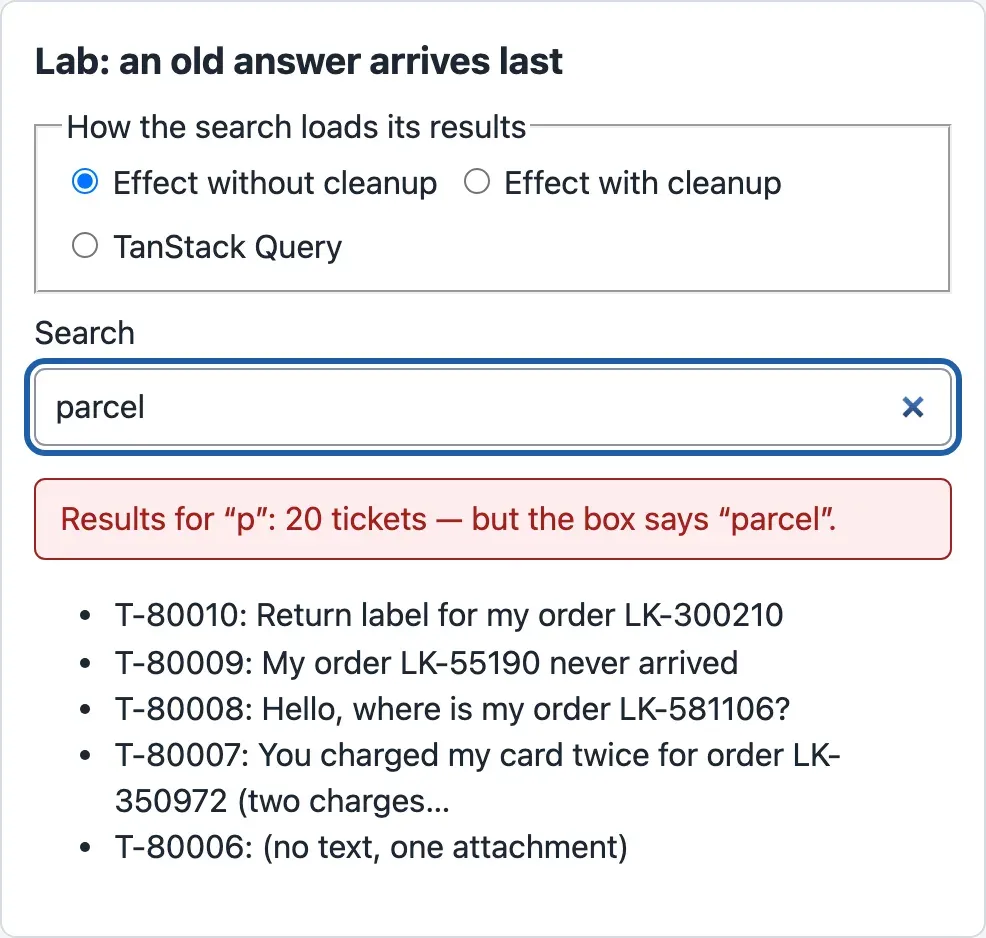
parcelin the box at a normal speed. Wait two seconds.
The line under the box turns red:
Why “p”? The course team recorded every request of the page while a test browser typed “parcel”, with 120 ms between keys. The diagram draws each request as a bar, from the moment it was sent to the moment it ended:

Text description of the diagram
The top timeline is the effect without cleanup. Six requests run at the same time. The request for “p” starts at 7 ms and ends at 912 ms. The others end earlier: “par” at 508 ms, “parc” at 573, “pa” at 632, “parce” at 699 and “parcel” at 827. Each answer replaces the one before on the screen, so the last one, “p”, stays. The bottom timeline is TanStack Query. Each request ends, cancelled, when the next letter is typed: “p” at 130 ms, “pa” at 254, and so on. Only “parcel”, from 626 to 792 ms, is answered, and it is shown. useApi with its cleanup gives the same picture as the library.
So, without cleanup, the screen is right only by luck: it depends on the order in which the answers arrive. Over 10 runs in Chromium, the effect without cleanup showed the results for “p” 10 times out of 10. The two other versions showed “parcel” 10 times out of 10.
- Open the Network panel of the developer tools, and type
v1/ticketsin its filter. - Reload the page, so the lab starts with an empty box and an empty cache.
- Choose TanStack Query, and type
parcel. The line under the box is grey:Results for “parcel”: 20 tickets. - Look at the requests whose address ends with
q=p,q=pa,q=par,q=parcandq=parce. In Chrome and Edge, their status is (canceled). The request forq=parcelhas the status 200.
How does the library know? When the key changes from ['race', 'p'] to ['race', 'pa'], no component uses the copy for “p” any more. Its request is still running, and the query function took the signal. So TanStack Query aborts that signal, and the browser closes the request. The answer for “p” can never arrive. This cancellation saves work too: the server stops the search, and the browser does not download an answer that nobody wants.
You get this in the desk’s own list for free. In the course team’s run, typing “parcel” in the desk’s search box sent 6 list requests, and 5 of them were closed early.
When the server is busy: retries
Section titled “When the server is busy: retries”Think of calling a busy office. A recorded voice says: “All our lines are busy. Please call again in two minutes.” You do not give up, and you do not call again every second either. You wait two minutes and call once more. If it is still busy after a few tries, you write an email instead.
A server can say the same thing. The status 503 Service Unavailable means “busy now, try later”, and the header Retry-After: 2 says how many seconds to wait. The mock API has a mode in which every second list answer is a 503. Start it in the first terminal (stop the normal one first with Ctrl+C):
node mock-api/server.mjs --list flakyThree list requests in a row, with curl:
$ curl -s -i "http://127.0.0.1:8100/v1/tickets?limit=1" | head -1HTTP/1.1 200 OK$ curl -s -i "http://127.0.0.1:8100/v1/tickets?limit=1" | grep -E "^(HTTP|Retry-After)|error"HTTP/1.1 503 Service UnavailableRetry-After: 2{"error":{"code":"unavailable","message":"The ticket service is not available. Try again in a few seconds.","request_id":"04a9a1a9-0ec0-4222-b1eb-ac35c35e9291","fields":[]}}$ curl -s -i "http://127.0.0.1:8100/v1/tickets?limit=1" | head -1HTTP/1.1 200 OKThe request_id is different on each run. A second try would have worked. But not every error is like that. A 404 Not Found for T-99999 will be a 404 on every try: the ticket does not exist. A 422 for a bad filter will not become valid either. Trying again only makes the agent wait longer for the same error.
So the desk’s rule for retries is:
- Retry when no answer came (
network_error) or when the server is busy (503). Those can change in a second. - Never retry any other 4xx answer. It will not change.
- Wait as long as
Retry-Aftersays. If the server does not say, wait 1 second, then 2 seconds. - Stop after 2 retries, and show the error with Try again. The agent decides what happens next.
- Never retry a change (a POST or a PATCH) by itself. A second POST could save a second reply. Pagination and forms shows how a form can send again safely.
-
Replace
src/api/queryClient.tswith this version. The new lines are the retry rule:src/api/queryClient.ts // The cache of server data (TanStack Query) and its rules for this app.import { QueryClient } from '@tanstack/react-query';import { ApiError } from './client';/** Try again only when trying again can help: no answer, or the server is busy (503). Never for 4xx. */export function shouldRetry(failureCount: number, error: Error): boolean {if (!(error instanceof ApiError)) return false;const temporary = error.code === 'network_error' || error.status === 503;return temporary && failureCount < 2;}export function makeQueryClient(): QueryClient {return new QueryClient({defaultOptions: {queries: {staleTime: 30_000, // an answer counts as fresh for 30 s: no new request in that timegcTime: 5 * 60_000, // an answer that no screen uses stays in the cache for 5 minutesretry: shouldRetry,retryDelay: (attempt, error) =>error instanceof ApiError && error.retryAfter ? error.retryAfter * 1000 : 500 * 2 ** attempt,refetchOnWindowFocus: true,},mutations: { retry: false }, // a change is never sent twice by itself},});}failureCountcounts the failures so far, starting at 0.ApiError, from Module 2, already reads theRetry-Afterheader intoretryAfter.500 * 2 ** attemptgives 1,000 ms after the first failure and 2,000 ms after the second.refetchOnWindowFocus: trueis TanStack Query’s default; the line makes the choice visible. -
Test the rule without a browser. Create
src/api/queryClient.test.ts:src/api/queryClient.test.ts import { expect, test } from 'vitest';import { ApiError } from './client';import { shouldRetry } from './queryClient';test('retries a busy server or a lost connection, at most twice', () => {expect(shouldRetry(0, new ApiError(503, 'unavailable', 'Busy.'))).toBe(true);expect(shouldRetry(1, new ApiError(0, 'network_error', 'No answer.'))).toBe(true);expect(shouldRetry(2, new ApiError(503, 'unavailable', 'Busy.'))).toBe(false);});test('never retries an answer that will not change: 4xx', () => {expect(shouldRetry(0, new ApiError(404, 'not_found', 'No ticket.'))).toBe(false);expect(shouldRetry(0, new ApiError(422, 'invalid_request', 'Not valid.'))).toBe(false);}); -
Run all the checks with
npm test. After the mock API’s 21 checks, Vitest prints:Test Files 8 passed (8)Tests 19 passed (19)The 5 new tests are the 2 of the retry rule and the 3 of the race lab: the mistake shows “p”, and the two fixes show “pa”.
Now see the rule work. Keep the mock API in its --list flaky mode, open the desk, and choose pending in the Status filter. In the course team’s run, the first request for that filter got a 503 after 82 ms. The desk sent the same request again at 2086 ms, two seconds later as Retry-After asked, and got 200. All that time the list showed the old results with “Showing 50 tickets. Updating…”. The agent saw no error at all.
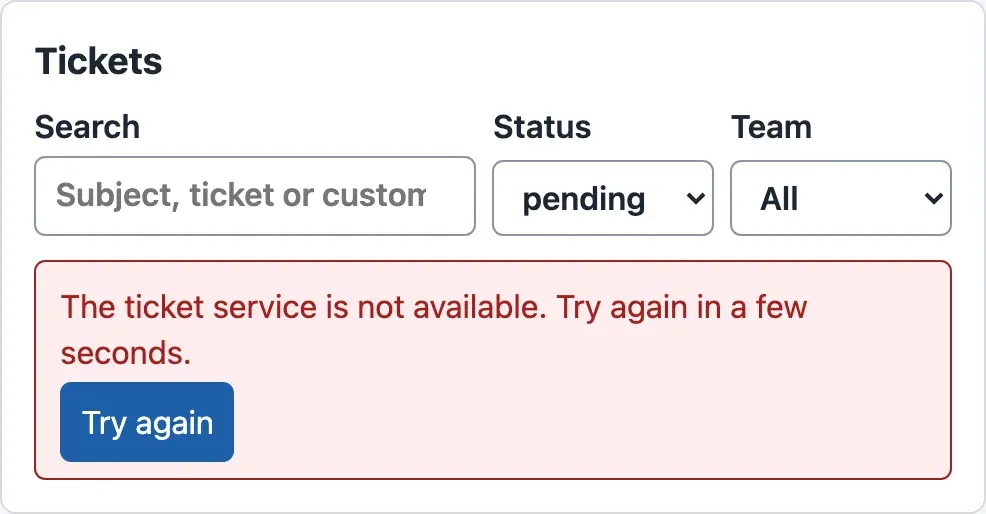
Then stop the mock API and start it with --list fail, where every list answer is a 503. Choose a filter again. In the course team’s run, the desk sent three requests: at 14 ms, 2079 ms and 4145 ms. After the third 503, it stops and shows the error:
Start the mock API again without a mode before you go on: npm run api.
When to use retries and cancellation, and what they cost
Section titled “When to use retries and cancellation, and what they cost”Retries help with short problems: a server that restarts, a busy moment, a phone that loses the network for a second. They cost time: with --list fail, the agent waited about 4.2 seconds before the error. They also add load to a server that is already busy, which is why the desk waits and stops after two retries. Do not retry when the answer cannot change, and never retry a change by itself.
Cancellation helps whenever a newer request makes an older one useless: search boxes, filters, moving quickly between tickets. It needs the request function to take the signal, as every function in api/tickets.ts does. It cannot undo work that the server has already done. Cancelling a PATCH in the browser does not undo the change on the server, so the desk never cancels changes.
Your turn: a 429 is busy too
Section titled “Your turn: a 429 is busy too”The ticket API can also answer 429 Too Many Requests when one desk sends too many requests, with a Retry-After header. A 429 is a 4xx answer, but it is temporary: a second try after the wait can work. Change shouldRetry so that it retries a 429 too. Add a test line that proves it. Before you run the tests, predict: does the test “never retries an answer that will not change: 4xx” still pass?
Show the answer
const temporary = error.code === 'network_error' || error.status === 503;const temporary = error.code === 'network_error' || error.status === 503 || error.status === 429;test('retries 429 Too Many Requests', () => { expect(shouldRetry(0, new ApiError(429, 'rate_limited', 'Too many requests.', [], 2))).toBe(true);});npx vitest run src/api/queryClient.test.ts --reporter=verbose prints:
 ✓ src/api/queryClient.test.ts > retries a busy server or a lost connection, at most twice 1ms ✓ src/api/queryClient.test.ts > never retries an answer that will not change: 4xx 0ms ✓ src/api/queryClient.test.ts > retries 429 Too Many Requests 0ms
 Test Files  1 passed (1)      Tests  3 passed (3)
Yes, the 4xx test still passes, because it checks only 404 and 422. But its name and the comment on shouldRetry now say too much: “never for 4xx” is not true any more. Change them to “never for other 4xx answers”. The retryDelay needs no change: it already waits the Retry-After time, here 2 seconds. This is not part of the project’s snapshot; keep it or undo it, as you like.
Common mistake
Every error is retried, and the agent waits for a 404
Symptom: Tomás removes the desk’s retry rule: “The library retries by itself. Why write our own?” Now an agent opens a link to a ticket that does not exist, http://localhost:5173/#/tickets/T-99999. The screen shows “Loading T-99999…” for a long time before it says “There is no ticket T-99999.”
The course team measured both versions in Chromium, from opening the link to the error on the screen:
| Version | Requests for T-99999 | Error on the screen after |
|---|---|---|
| TanStack Query’s default retries | 4 | 7.3 s |
The desk’s shouldRetry |
1 | 0.1 s |
Cause: TanStack Query’s default is to retry every failed query 3 times, with waits of 1, 2 and 4 seconds. The library cannot know which of your errors are temporary. A 404 is not.
Fix: give the library your API’s rule, as shouldRetry does: retry only network_error and 503 (and 429, if you did the exercise), at most twice, and never other 4xx answers.
Consequence in AI work: AI endpoints often answer 4xx for a request that will never work. Examples are a prompt that is too long, blocked content, or a daily quota that is used up. Retrying them wastes the agent’s time and, on a paid service, money. Retry only what a second try can fix.
Knowledge check
Section titled “Knowledge check”Check your understanding
Predict: in the race lab, a slow network makes every answer take 1 second longer. With the effect without cleanup, which results does the screen show after the agent types 'parcel'? With TanStack Query?
Show the answer
With the effect without cleanup, it still shows the results for “p”. Each answer is 1 second later, but the order of arrival does not change: “p” still needs about 900 ms of server time, against about 170 ms for “parcel”. It was sent first, but it arrives last, and the last answer stays on the screen.
With TanStack Query, it shows “parcel”. The order of arrival does not matter. Each new letter is a new key, the old request is cancelled, and only the copy for the key in the box is shown.
Does your answer have the main points of ours?
Sign in and enroll in the course to save your answers. Every check counts toward the certificate.
Check your understanding
For each answer, does the desk retry it, and why? (a) no answer, the Wi-Fi dropped; (b) 503 with Retry-After: 2; (c) 404 for T-99999; (d) 422 because the status filter is 'urgent'; (e) a 503 for the PATCH that changes a status.
Show the answer
- (a) Yes, up to 2 retries: the network can come back in a second.
- (b) Yes, after 2 seconds, as the server asked; at most 2 retries, then an error with Try again.
- (c) No: the ticket will not exist on the next try.
- (d) No: “urgent” is not a valid status on any try. The fix is in the request, not in time.
- (e) No: it is a change, and the desk never sends a change twice by itself (
mutations: { retry: false }). The agent sees the error and decides.
Does your answer have the main points of ours?
Sign in and enroll in the course to save your answers. Every check counts toward the certificate.
Check your understanding
Sam builds the list's key as ['tickets', 'list'], without the filter. What goes wrong when the agent types 'parcel'?
Show the answer
All searches share one copy. When the filter changes, the key does not, so the cache does not fetch: the copy is fresh for 30 seconds, and the screen keeps the results of the first search. Even after a refetch, the query function runs with whatever filter it saw, and nothing cancels an older request. A key must contain everything that changes the answer: here the search text and both filters.
Does your answer have the main points of ours?
Sign in and enroll in the course to save your answers. Every check counts toward the certificate.
Recap
- A copy in the cache is fetched, fresh for 30 seconds, then stale: shown at once and fetched again when a screen opens it or the window gets the focus. Invalidation makes it stale at once after a change. An unused copy is removed after 5 minutes.
- Without cleanup, an old answer can arrive last and replace a newer one. In the race lab, the effect without cleanup showed the results for “p” under “parcel” 10 times out of 10.
- A key must contain everything that changes the answer. Each search is a new key, and the old request is cancelled through its
signal. The desk’s search closed 5 of its 6 requests early. - Retry only what a second try can fix: no answer and 503, after
Retry-After, at most twice. Never retry other 4xx answers or a change. The library’s default retries made a 404 take 7.3 seconds. npm test: 19 Vitest tests, after the mock API’s 21.
Next, the list loads one page at a time, and the desk changes tickets: a reply, a status, a new ticket that is never saved twice.
Next: Pagination and forms