
Choose a branch workflow
- Lesson 2
- 45 min
- Module 1: Understand the delivery path
Lesson 2 of 15 · CI/CD, Testing and Safe ReleasesChoose a branch workflow
1. Understand the delivery path
2. Create a repeatable CI pipeline
3. Manage environments and secrets
4. Release AI and database changes
5. Recover and maintain the release process
What you will be able to do
A pipeline must know which branch holds the code that can go to production. Choose a branch workflow that answers that question. Then write every pull request with its source and its target, so that nobody merges in the wrong direction.
Before you startWhat to know and to have ready
What you need to know
- A branch is a label on a commit, from Branch basics: A branch is a label on a commit in Git and Team Development Essentials.
- A pull request, with a source and a target, from The pull request sequence: What a pull request is in the Git course.
- Merge commits, from Merge strategies: One branch, three ways into main in the Git course.
- Release branches, tags and version numbers, from Release branches and tags: The team releases a version and Version numbers in the Git course.
- A fix on a release, merged back into
main, from Keep histories consistent: Two places, one fix in the Git course. - The pipeline and its words, from From commit to release: The words, on the real pipeline.
What you need on your computer
- Git, from Set up Git: Step 1: check that Git is installed in the Git course. The guided practice clones the public reference repository into a new practice folder,
~/projects/c19-reference. It does not change your own project. - Your ticket API from Docker and Cloud Essentials for AI Developers, in
~/projects/ticket-api. This lesson does not change it. If it is missing, copy the Docker course’s snapshotend-of-m05, as in Use a snapshot.
Run with GitHub Actions (ubuntu-24.04 runners) in the public repository Nextia-Intelligence/ticket-api-ci. The Git commands were run with Git 2.54 on macOS. The Windows steps are not tested.
Two questions for every change
Section titled “Two questions for every change”Before Amira writes a line of code, she answers two questions. Where does the change start? Where does it go? A pull request writes the answers as its source branch and its target branch: “feature/classifier-1.1 into main”.
A branch workflow is the team’s rule for these answers: which branches exist, what each is for, where each one starts, and where it merges. A pipeline depends on that rule. It must know which branch to build for production, and which branches only get checks. Two workflows are common.
Mainline development
Section titled “Mainline development”In mainline development (also called trunk-based development), main is the only long-lived branch, and it is always releasable. Every change starts on a short-lived branch from main, and goes back into main by a pull request. A release is a tag on a commit of main.
This is the real history of the reference repository, from the start to version 1.2.0:
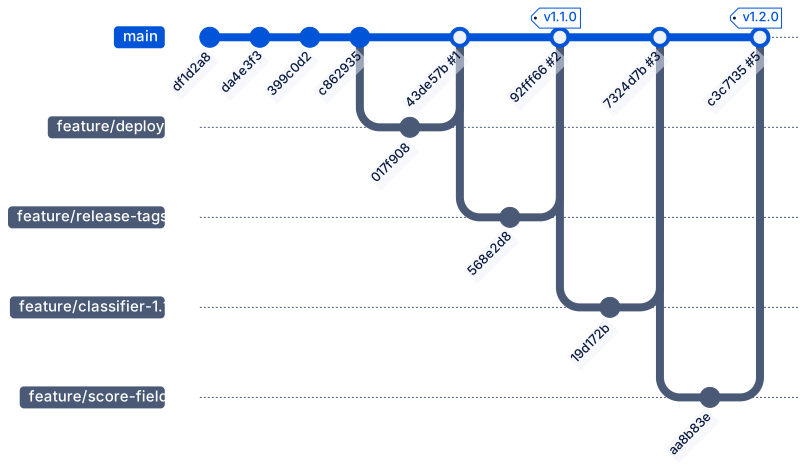
Text description of the diagram
main starts with four commits. Then each change has its own branch from main: feature/deploy, feature/release-tags, feature/classifier-1.1 and feature/score-field. Each branch has one commit and goes back into main with a merge commit, from pull requests 1, 2, 3 and 5. The tag v1.1.0 is on the merge of PR #2. The tag v1.2.0 is on the merge of PR #5.
Read three things in it:
- One change per branch. Each feature branch has one commit and goes back within the hour. A short branch has few conflicts, and its pull request is small enough to review.
- No branch waits for a release.
maingets every finished change. The pipeline builds every commit onmainonce, so every commit onmainhas an image that can go to production. - A release is a tag, not a branch.
v1.1.0andv1.2.0point to commits ofmain. Nothing was copied to another branch to make them.
The first commits (da4e3f3, 399c0d2, c862935) went to main without a pull request. At that time, the repository had no ruleset yet: Module 2 adds it. From PR #1 on, every change came through a pull request.
PR #4 is not in the graph. Its source was feature/fewer-urgent-tickets, its target main, and its checks failed, so Amira closed it without a merge (Lesson 3 shows why). Its commits never reached main, so git log main does not show them. That is the point of the gate.
Release branches
Section titled “Release branches”With release branches, the team cuts a branch such as release/1.2 from main when the next version is ready. The release branch gets only fixes, while new work continues on main. Each release is a tag on the release branch, and the fixes are merged back into main. The Git course taught this workflow. GitFlow is a well-known variant: it adds a develop branch for new work, and keeps main for released versions only.
The same kind of history with a release branch would look like this. It is an example, not the reference repository:
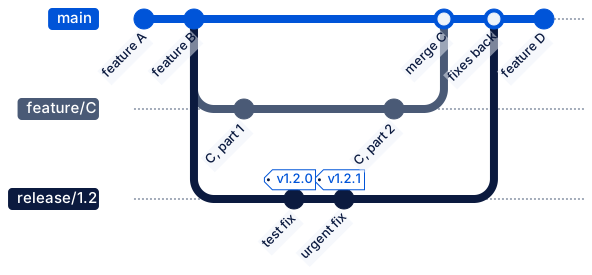
Text description of the diagram
In this example, main has features A and B. The team cuts release/1.2 from feature B. So the release does not contain feature C, which is still in progress on its own branch. The release branch gets a test fix, tagged v1.2.0, and later an urgent fix, tagged v1.2.1. Feature C is merged into main. Then the release branch is merged into main, so that the two fixes are not lost, and main continues with feature D.
Which one fits
Section titled “Which one fits”| Mainline development | Release branches | |
|---|---|---|
| Branches that live long | main only |
main and one branch for each supported version |
| Where a release comes from | A tag on main |
A tag on release/x.y |
| A fix for production | A normal pull request into main, or a hotfix branch from the tag |
A pull request into release/x.y, then merged back into main |
| What the pipeline builds for production | Every commit on main |
Every commit on each release branch |
| Fits when | One deployed service, small changes, many deployments a week | Several versions in use at the same time, or slow releases: an app that waits for store review, software that customers install themselves, a long test phase |
| Risk | Unfinished work on main must not reach users: keep it small, or hide it behind a setting |
A fix on the release is forgotten on main and comes back as a bug in the next version |
The ticket API is one service with one production. The team deploys several times a day, and every change is small. Users never run an old version: the help desk uses the one deployment. So the course uses mainline development.
Two rules keep main releasable:
- Every change on
mainpassed the checks. The ruleset of Module 2 requires a pull request with green checks. - Unfinished work is switched off. PR #3 put the new classifier on
mainwithCLASSIFIER_VERSION=1.0as the default, so production behaved as before. Module 4 turns it on step by step.
One exception remains: an urgent fix when main already has changes that are not ready for production. Then the team uses a short-lived hotfix branch, made from the release tag. That is the only time a branch starts from somewhere other than main. The reference repository did it once:
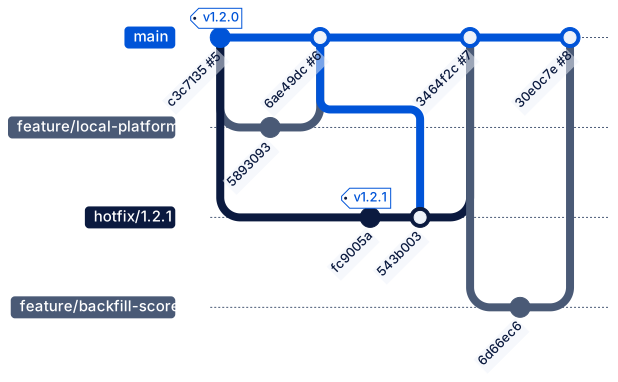
Text description of the diagram
After v1.2.0, main got PR #6, feature/local-platform. Production still ran v1.2.0 and had a bug. The hotfix branch hotfix/1.2.1 starts at the commit of the tag v1.2.0, so it does not contain PR #6. Its commit fc9005a has the fix and the tag v1.2.1. Then main is merged into the hotfix branch (543b003), because the ruleset required the branch to be up to date. Then PR #7 merges hotfix/1.2.1 into main (3464f2c). Last, PR #8 adds feature/backfill-score.
Why from the tag? Production ran v1.2.0. A hotfix must change only the bug, so it starts from exactly what production runs. If it started from the newest main, it would also take PR #6 to production without its own release. Module 5 teaches the full hotfix procedure; this module only places it in the workflow.
Versions and tags
Section titled “Versions and tags”A version number tells users what to expect from a release. The ticket API uses semantic versioning: MAJOR.MINOR.PATCH, as in the Git course. For an API, “breaking” means that a client that worked before can fail now:
| Change in the reference repository | Version | Why |
|---|---|---|
| The first release through the pipeline | 1.1.0 |
The starting version from the Docker course. |
New field score in every answer; confidence stays, marked as deprecated |
1.1.0 → 1.2.0 |
MINOR: new, and old clients still work. |
Fix: GET /v1/history failed with rows from 1.1.0 |
1.2.0 → 1.2.1 |
PATCH: a fix only. |
Planned: remove confidence |
→ 2.0.0 |
MAJOR: clients that read confidence break. |
Two different things are called a tag in this course:
- A Git tag is a fixed name for one commit:
v1.2.0→c3c7135. It never moves. - An image tag is a name for an image in the registry:
ghcr.io/usmanahmed99/ticket-api-ci:1.2.0, andsha-c3c7135for the same image. The release workflow gives the image the version tag when you push the Git tag. The image’s digest identifies its content. A tag can be moved to another digest.
The reference repository uses annotated tags, which store a message, a date and the person who made them. git tag -a v1.2.0 -m "…" makes one. The guided practice shows their messages.
Worked example: read the real history
Section titled “Worked example: read the real history”Amira wants to know which releases contain PR #3, and whether the hotfix reached main. Git answers both from a clone. She clones the public repository into a practice folder:
cd ~/projectsgit clone https://github.com/Nextia-Intelligence/ticket-api-ci.git c19-referencecd c19-referencegit log --oneline --first-parent maincd $HOME\projectsgit clone https://github.com/Nextia-Intelligence/ticket-api-ci.git c19-referencecd c19-referencegit log --oneline --first-parent main--first-parent follows only the commits that main itself made, and leaves out the commits of the branches. The output:
30e0c7e Merge pull request #8 from usmanahmed99/feature/backfill-score3464f2c Merge pull request #7 from usmanahmed99/hotfix/1.2.16ae49dc Merge pull request #6 from usmanahmed99/feature/local-platformc3c7135 Merge pull request #5 from usmanahmed99/feature/score-field7324d7b Merge pull request #3 from usmanahmed99/feature/classifier-1.192fff66 Merge pull request #2 from usmanahmed99/feature/release-tags43de57b Merge pull request #1 from usmanahmed99/feature/deployc862935 Fix the two lint findings: raise ... from None, and sort the imports399c0d2 Add the CI pipeline: lint, tests, audit, then build, smoke-test and push the imageda4e3f3 Describe the delivery path: branches, checks and promotiondf1d2a8 Start from C18: ticket-api 1.1.0 in a containerEvery line after c862935 is a merge of a pull request, and each message names its source. This is mainline development, read from the history. Then the tags:
git tag -n1git tag --contains 7324d7bThe output:
v1.1.0 ticket-api 1.1.0: the first release through the pipelinev1.2.0 ticket-api 1.2.0: score next to confidence; classifier keywords-1.1 (off by default)v1.2.1 ticket-api 1.2.1: hotfix for GET /v1/history with rows from 1.1.0v1.2.0v1.2.1The first three lines are the tags with their messages. The last two lines answer the question: PR #3’s merge commit 7324d7b is in v1.2.0 and v1.2.1, but not in v1.1.0. Now the hotfix:
git branch -a --contains fc9005agit tag --contains 5893093The output:
* main remotes/origin/HEAD -> origin/main remotes/origin/hotfix/1.2.1 remotes/origin/mainThe hotfix commit fc9005a is on main, so the next release from main keeps the fix. The second command printed nothing: no tag contains 5893093, the commit of PR #6. Version 1.2.1 was made from v1.2.0, so it does not have PR #6. That is correct for a hotfix. It also means that a fix on main reaches users only with the next release from main.
The branch list on GitHub shows the same workflow from another side:
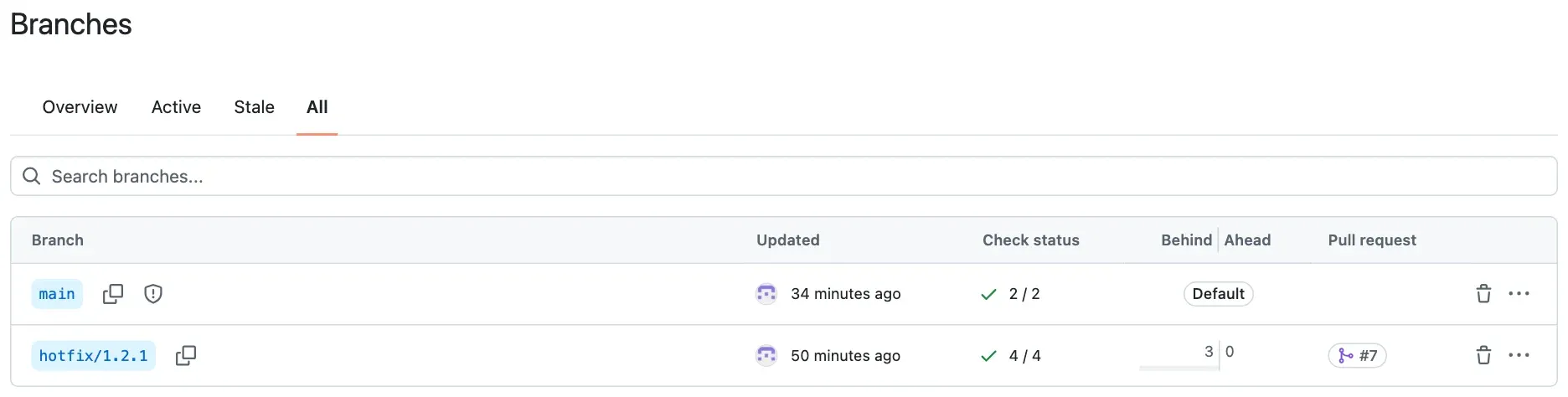
0 ahead is the proof in the browser: the hotfix branch has no commit that main lacks.
Write the source and the target
Section titled “Write the source and the target”A pull request with the wrong target merges a change into the wrong place. Write both names every time, in this order: “source into target”. These are the real pull requests:
| PR | Source | Target | Result |
|---|---|---|---|
| #1 | feature/deploy |
main |
merged, 43de57b |
| #2 | feature/release-tags |
main |
merged, 92fff66, tagged v1.1.0 |
| #3 | feature/classifier-1.1 |
main |
merged, 7324d7b |
| #4 | feature/fewer-urgent-tickets |
main |
closed: a check failed |
| #5 | feature/score-field |
main |
merged, c3c7135, tagged v1.2.0 |
| #6 | feature/local-platform |
main |
merged, 6ae49dc |
| #7 | hotfix/1.2.1 |
main |
merged, 3464f2c (the tag v1.2.1 is on the branch, fc9005a) |
| #8 | feature/backfill-score |
main |
merged, 30e0c7e |
Every target is main. Every source except one starts from main. The exception is hotfix/1.2.1, which starts from the tag v1.2.0. On GitHub, the pull request page says it in one line, as on PR #3: “merged 1 commit into main from feature/classifier-1.1”.
The project’s rule, in docs/release-process.md (Lesson 3 writes it):
| Branch | Made from | Merges into | Used for ||---|---|---|---|| `main` | | | The current code. Every commit on `main` is built once, and the image can go to production. || `feature/<short-name>` | `main` | `main`, by pull request | Every normal change. Short-lived: one change, merged within a few days. || `hotfix/<version>` | the release tag, for example `v1.2.0` | `main`, by pull request, after the release | An urgent fix to the version in production, when `main` already has changes that are not ready. |Guided practice: read the history yourself
Section titled “Guided practice: read the history yourself”- Clone the reference repository into
~/projects/c19-reference, as in the worked example. - Run
git branch --show-current. Check that the output ismain. - Run
git log --oneline --first-parent main. Count the merges of pull requests. - Run
git log --oneline --graph --all. Find the commit wherehotfix/1.2.1starts. - Run
git tag -n1. Write down each tag and its version type (MAJOR, MINOR or PATCH) compared with the tag before it. - Run
git tag --contains 7324d7b. Write down the releases that contain PR #3. - Run
git merge-base --is-ancestor fc9005a 6ae49dc && echo yes || echo no. Predict the answer first: was the fix onmainat6ae49dc? - Run the same command with
3464f2cinstead of6ae49dc.
Show the expected results
main.- Seven merges of pull requests: #1, #2, #3, #5, #6, #7 and #8. PR #4 was closed.
hotfix/1.2.1starts atc3c7135, the commit with the tagv1.2.0. In the graph,fc9005a (tag: v1.2.1)hasc3c7135as its parent.v1.1.0, the start;v1.2.0, MINOR (new fieldscore, old clients still work);v1.2.1, PATCH (a fix).v1.2.0andv1.2.1.no. At6ae49dc(PR #6), the fix existed only on the hotfix branch. Production ran it, butmaindid not have it.yes. PR #7 merged the fix intomainas3464f2c.
The command git merge-base --is-ancestor A B asks: is commit A in the history of commit B? It prints nothing, and its exit code is 0 for yes and 1 for no. && echo yes || echo no prints the answer. In PowerShell, write git merge-base --is-ancestor fc9005a 6ae49dc; if ($?) { "yes" } else { "no" }.
Your turn: write the branch and the pull request
Section titled “Your turn: write the branch and the pull request”For each change, write the branch name, where it starts, and the pull request as “source into target”. main already has a change that is not released yet.
- Sam reports that “I lost my password” gets priority 1. The team wants a better rule for “lost”, for the next normal release.
- Production runs
v1.2.1. After a deployment, the help desk sees that every ticket gets the categoryother. The team wants a fix today. - A spelling mistake in
README.md.
Show one answer
feature/lost-password-rule, frommain. Pull request:feature/lost-password-ruleintomain. It goes out with the next release frommain. (The real PR #4 tried this, asfeature/fewer-urgent-ticketsintomain. The AI evaluation gate stopped it: Lesson 3.)hotfix/1.2.2, from the tagv1.2.1(git switch -c hotfix/1.2.2 v1.2.1). Tagv1.2.2on the branch after its checks pass, then deploy that image. Then the pull requesthotfix/1.2.2intomain, so the next release keeps the fix. It does not start frommain, because the change onmainis not ready for production.feature/readme-typo(ordocs/readme-typoif the team uses that prefix), frommain, intomain. It is a normal change. It gets the same checks as every other change, even though it changes no code.
Common mistake
The fix is in production, but not on main
Symptom: a hotfix runs in production and the bug is gone. Two weeks later, the next release from main brings the same bug back. Users see it again, and nobody changed that code.
Cause: the hotfix branch started from the release tag, so its fix is only on that branch. main does not get it by itself. In the reference repository, this was true for a short time. Between the release v1.2.1 (18:51) and the merge of PR #7 (18:58), production had the fix and main did not. Check it in your clone:
git merge-base --is-ancestor fc9005a 6ae49dc && echo yes || echo noThe output:
noA second trap is the direction. The commit 543b003 Merge branch 'main' into hotfix/1.2.1 merged main into the hotfix branch: GitHub’s Update branch button did that, because the ruleset requires an up-to-date branch. It brings main’s changes to the hotfix branch. It does not bring the fix to main. Only PR #7, hotfix/1.2.1 into main, did that.
Fix:
- Open the pull request “hotfix branch into
main” in the same hour as the release. Do not wait for the next release. - Read the source and the target before you merge: “
hotfix/1.2.1intomain”. - Check with Git that the fix is on
main:git branch -a --contains <fix commit>must listmain. - The fix needs a test that fails without it. The test then stays on
mainand catches the bug if it comes back. Module 5 shows the test of 1.2.1.
For a real AI service: a model fix can be lost the same way. A hotfix sets a new threshold or a new rule. If it is not on main, the next model release brings the old behaviour back. Users see a regression, and the evaluation results of the hotfix give a false sense of safety.
Check your understanding
Predict: version 2.0 removes the deprecated field confidence. Which part of the version changes, and why not the middle number?
Show the answer
The MAJOR number: 1.2.1 → 2.0.0. A client that reads confidence fails after the change, so it is a breaking change. The middle number is for new things that old clients can ignore, such as adding score in 1.2.0. That is why 1.2.0 kept confidence and only marked it as deprecated: the clients get time to move to score before 2.0.
Does your answer have the main points of ours?
Sign in and enroll in the course to save your answers. Every check counts toward the certificate.
Check your understanding
Why does the team use mainline development for the ticket API, and why is the hotfix branch made from the tag v1.2.0 instead of from main?
Show the answer
The ticket API is one service with one production. Changes are small and deployed often, and users never run an old version, so the team does not need a branch for each version. main is always releasable: every change passed the checks, and unfinished work is switched off. The hotfix branch starts from v1.2.0 because that is exactly what production runs. A branch from main would also take PR #6 to production, unreleased and untested as a release. After the release, the pull request hotfix/1.2.1 into main brings the fix back to main.
Does your answer have the main points of ours?
Sign in and enroll in the course to save your answers. Every check counts toward the certificate.
Recap
- A branch workflow says where each change starts and where it merges. A pull request writes it as “source into target”.
- Mainline development: one long-lived
main, always releasable; short feature branches; a release is a tag onmain. Release branches: one branch per supported version; fixes there, merged back intomain. - The ticket API uses mainline development: one service, small changes, many deployments. Unfinished work is switched off by a setting.
- A hotfix branch starts from the release tag, and goes back into
mainby a pull request. Check it withgit branch -a --contains <commit>. - Semantic versioning: PATCH for a fix, MINOR for something new that old clients can ignore, MAJOR for a breaking change. A Git tag names a commit; an image tag names an image, and the digest is its content.
- To remove the practice clone: delete the folder
~/projects/c19-reference. Nothing else changed.
Next: Define checks