
Build and test
- Lesson 5
- 45 min
- Module 2: Create a repeatable CI pipeline
Lesson 5 of 15 · CI/CD, Testing and Safe ReleasesBuild and test
1. Understand the delivery path
2. Create a repeatable CI pipeline
3. Manage environments and secrets
4. Release AI and database changes
5. Recover and maintain the release process
What you will be able to do
A green run must mean something: the tests passed, no known vulnerability is in the packages, and the image starts and answers. Build that image once, test it, and keep exactly that one.
Before you startWhat to know and to have ready
What you need to know
- The clean runner, the cache and the first job, from Runner setup: Worked example: the first workflow.
- pytest and the tests of the ticket API, from Automated endpoint tests: TestClient: requests without a server in Build and Deploy Your First API.
- A smoke check, from Verify and clean up: A smoke check in the API course.
- Image names, tags and digests, from Registry and deployment: Registry, repository and tag in Docker and Cloud Essentials for AI Developers.
- Why the cloud needs
linux/amd64, from Registry and deployment: Build for the cloud’s CPU in the Docker course.
What you need on your computer
- Your repository
ticket-api-ciwith the first job and a green run, from Runner setup: Guided practice. - Docker Desktop (or Docker Engine on Linux), from Install and verify: Install Docker in the Docker course, for
scripts/check.sh. - If your project is missing or broken, copy the snapshot
end-of-m01and do Runner setup: Worked example: the first workflow again. The snapshot has no workflow yet.
Run with GitHub Actions (ubuntu-24.04 runners) in the public repository Nextia-Intelligence/ticket-api-ci, and Docker Desktop 4.81.0 on macOS (Apple silicon). The Windows and Linux steps are not tested.
The exact versions, on every runner
Section titled “The exact versions, on every runner”The job installs from requirements-lock.txt, not from requirements.txt:
- name: Install the exact versions run: python -m pip install -r requirements-lock.txtrequirements.txt says what the project needs. The lock file says which exact version of every package, including the packages that those packages need. The green run’s log lists what it installed (shortened):
Successfully installed CacheControl-0.14.4 ... fastapi-0.142.2 ... pip_audit-2.10.1 ... pytest-9.1.1 ... ruff-0.16.10 ... uvicorn-0.54.0 ...Every run installs these same versions until someone changes the lock file in a commit. So a red run tells you that the code or the lock file changed, never that a package released a new version overnight. The new version arrives only when you choose it, in a commit that the pipeline checks.
Checks that mean something
Section titled “Checks that mean something”A check is meaningful when it can fail for a reason that matters to users. Lint found two real problems in Runner setup. Two more checks go in the first job now, after Lint:
- name: Unit and contract tests run: python -m pytest --junitxml=reports/junit.xml - name: Security - known vulnerabilities in the image's packages run: pip-audit -r requirements-run.txt --progress-spinner offTests. pytest runs the 25 tests from the API course and the Docker course. They test the endpoints, the invalid inputs and the failing classifier. A contract test compares the API with contract/openapi.json. --junitxml=reports/junit.xml also writes the results to a file in JUnit XML, a format that many tools can read. Publish evidence keeps that file. Add reports/ to .gitignore, because the file is an output, not source code.
Security check. pip-audit compares packages with a public database of known vulnerabilities. It reads requirements-run.txt, the packages that the image installs, because those are what users meet. The development tools, such as pytest, never go in the image.
The green run’s output of the two steps:
collected 25 items
tests/test_classify.py ...............                                   [ 60%]tests/test_contract.py ..                                                [ 68%]tests/test_history.py ........                                           [100%]
- generated xml file: /home/runner/work/ticket-api-ci/ticket-api-ci/reports/junit.xml -============================== 25 passed in 0.42s ==============================No known vulnerabilities found
Know the limits too. pip-audit sees only Python packages, not the Debian packages of the base image. And it finds only vulnerabilities that are already known and published. A pass means “nothing known today”, so run it on every change.
Build once, then keep that build
Section titled “Build once, then keep that build”The checks test the code. Users get an image. So the pipeline must test the image too, and then deliver that image, not a new one.
Why not build again later, for example once for staging and once for production? Amira tests it on her Mac. She builds the same commit twice, with no cache:
docker build -q --no-cache -t c19m02-ticket-api:a .docker build -q --no-cache -t c19m02-ticket-api:b .The output:
sha256:9f93ccc6caaab583c4b1b9dc8e4e892f86ee0d7e7bd0ca6b5bea94904e833618sha256:3a4656c8cadaab5acd3a8509580d9005626ac47a8f1385c6282c9645fd514256Same commit, same Dockerfile, two different images. Each build records its own time, and a build without the cache can also download a newer package or base image. A second build is a new artifact that nobody tested.

Text description of the diagram
In the upper flow, one build is tested and pushed, and every later environment runs exactly that digest. In the lower flow, each environment gets its own build. The production image was never tested, and nobody can prove that it is the same as the staging image, because its ID is different. The lower IDs come from the two local builds above. The upper digest is the real image that the reference pipeline pushed. Module 3 promotes it.
The image job
Section titled “The image job”The second job builds the image, tests it on the runner, and pushes it to the GitHub Container Registry (GHCR, ghcr.io). It runs only after the checks passed:
image: name: Build, smoke-test and push the image needs: checks runs-on: ubuntu-24.04 timeout-minutes: 15 permissions: contents: read packages: write env: IMAGE: ghcr.io/${{ github.repository }} PUSH: ${{ github.event_name != 'pull_request' }} steps: - uses: actions/checkout@v7 - uses: docker/setup-buildx-action@v4 - name: Read the version from pyproject.toml id: version run: python3 -c "import tomllib; print('version=' + tomllib.load(open('pyproject.toml', 'rb'))['project']['version'])" >> "$GITHUB_OUTPUT" - name: Image names and labels id: meta uses: docker/metadata-action@v6 with: images: ${{ env.IMAGE }} tags: | type=sha,prefix=sha- type=semver,pattern={{version}} - name: Build (and keep it here for the smoke test) uses: docker/build-push-action@v7 with: context: . platforms: linux/amd64 load: true tags: ticket-api:candidate build-args: | VERSION=${{ steps.version.outputs.version }} REVISION=${{ github.sha }} cache-from: type=gha cache-to: type=gha,mode=max - name: Smoke-test the image before it leaves this runner run: | docker run -d --name candidate -p 127.0.0.1:8000:8000 -e API_KEY=ci-smoke-key ticket-api:candidate for _ in $(seq 1 30); do curl -fs http://127.0.0.1:8000/health && break; sleep 1; done scripts/smoke.sh http://127.0.0.1:8000 ci-smoke-key - name: Sign in to GitHub Container Registry if: env.PUSH == 'true' uses: docker/login-action@v4 with: registry: ghcr.io username: ${{ github.actor }} password: ${{ secrets.GITHUB_TOKEN }} - name: Push the same build if: env.PUSH == 'true' id: push uses: docker/build-push-action@v7 with: context: . platforms: linux/amd64 push: true tags: ${{ steps.meta.outputs.tags }} labels: ${{ steps.meta.outputs.labels }} build-args: | VERSION=${{ steps.version.outputs.version }} REVISION=${{ github.sha }} cache-from: type=ghaThe parts, from the top:
needs: checks: the image job waits for the job with the IDchecks. If the checks fail, GitHub skips this job, as in the first red run.permissions: this job alone may write packages, so itsGITHUB_TOKENcan push to GHCR. The checks job still has onlycontents: read.PUSHistruefor every trigger except a pull request. A pull request builds and smoke-tests, but pushes nothing, so a branch can never put an image in the registry. Theif: env.PUSH == 'true'lines skip the last steps on a pull request.- The version comes from
pyproject.toml(1.1.0), so it has one source. docker/metadata-actionmakes the image names.type=sha,prefix=sha-gives the tagsha-plus the first 7 characters of the commit, such assha-c862935. The tag names the commit, so it never moves to other code.type=semveradds a tag such as1.1.0only when the trigger is a version tagv1.1.0. The step also makes labels (information inside the image). Publish evidence reads them.- The first build makes
linux/amd64, the CPU type of the cloud (see the Docker course).load: truekeeps the image in the runner’s Docker asticket-api:candidate, a release candidate: an image that can become a release if it passes every check.cache-to: type=ghasaves the layers in the GitHub Actions cache. The Dockerfile does not useVERSIONandREVISIONyet. The build arguments are there for later. - The smoke check starts the candidate on the runner and runs
scripts/smoke.shagainst it. - The push builds again, with
cache-from: type=gha. The steps of the Dockerfile are the same, so every step comes from the cache, and BuildKit only packs and sends the same layers.
scripts/smoke.sh is the smoke check from the API course, as a script that ends with exit code 1 if any check fails:
#!/usr/bin/env bash# Smoke check of a running ticket API: the main paths, and one failure path.#   scripts/smoke.sh <base URL> <API key># Exits with 1 when a check fails. Prints no secret.set -uo pipefail
url=${1:?Give the base URL, for example https://ticket-api-staging...}key=${2:?Give the API key}failed=0
check() {  # name, expected status, curl arguments...  local name=$1 expected=$2; shift 2  local status  status=$(curl -s -o /dev/null -w '%{http_code}' --max-time 30 "$@")  if [ "$status" = "$expected" ]; then    echo "ok    $name ($status)"  else    echo "FAIL  $name: expected $expected, got $status"    failed=1  fi}
check "health" 200 "$url/health"check "ready" 200 "$url/ready"check "classify with the key" 200 -X POST "$url/v1/classify" \  -H 'Content-Type: application/json' -H "X-API-Key: $key" -d '{"subject":"Parcel lost"}'check "classify without a key" 401 -X POST "$url/v1/classify" \  -H 'Content-Type: application/json' -d '{"subject":"Parcel lost"}'
exit $failed
Make it executable before you commit it: chmod +x scripts/smoke.sh. Git keeps that permission, and the runner needs it.
The full file at this point is in the reference repository: ci.yml at c862935. It has three more steps, which the next lesson adds.
What the run did
Section titled “What the run did”
Text description of the diagram
Job 1 runs the four checks. Whatever happens, it then uploads the test report as the artifact reports. If a check fails, the run is red and job 2 never starts. If all pass, job 2 builds the image and smoke-tests it on its runner. For a pull request, the run ends there, and nothing goes to the registry. For a push to main, a hotfix branch or a version tag, job 2 pushes the same build to GHCR. Then it records the image’s provenance and uploads build-info.json as the artifact build-info. This lesson adds everything except the two artifacts and the provenance. Publish evidence adds those.
The reference run 37663364319 shows the same graph:
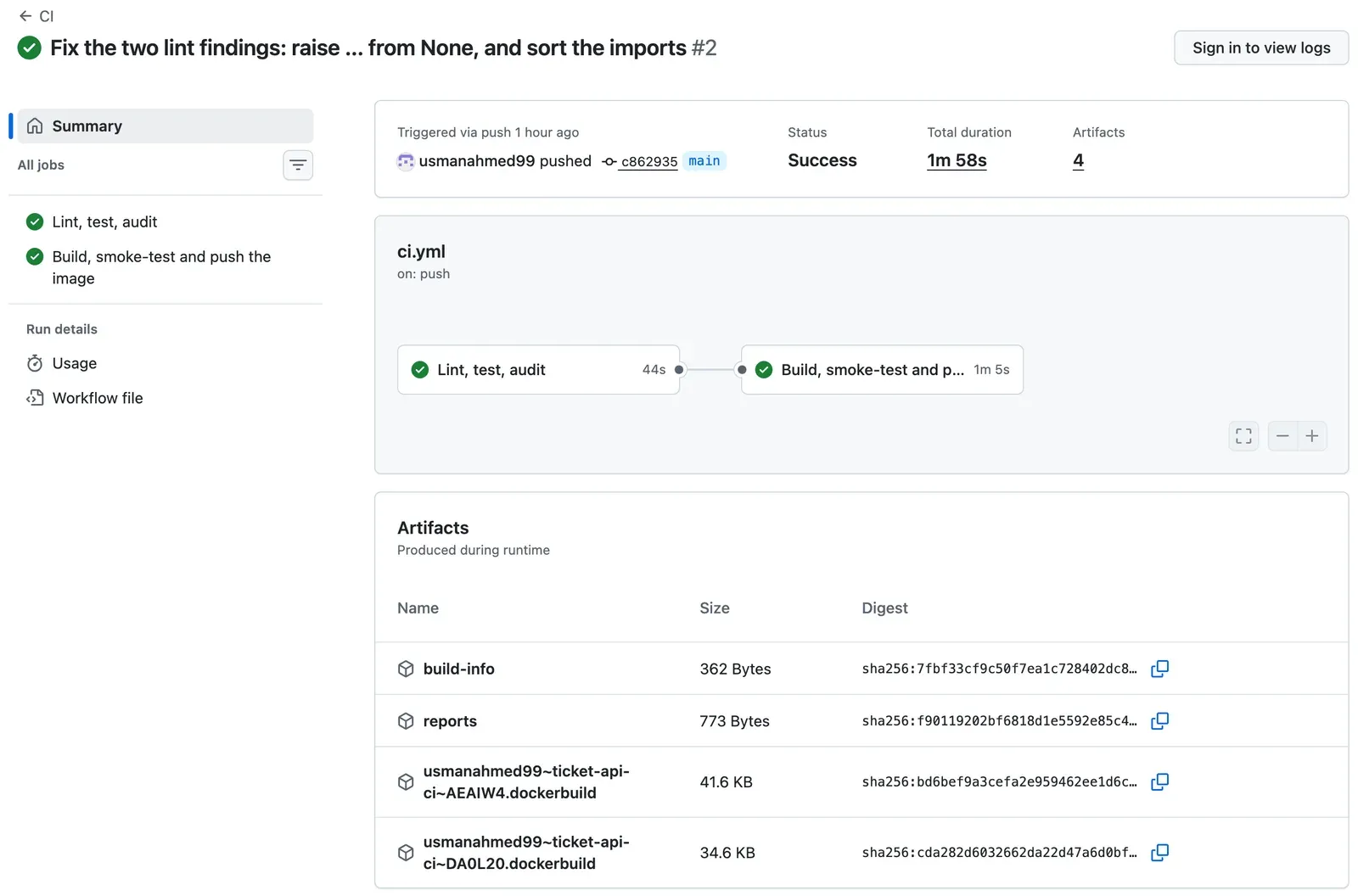
The image job’s log shows each part. The first build ran every step, because the cache was still empty (shortened):
#11 [5/7] RUN pip install -r requirements-run.txt#11 DONE 10.4s#13 [7/7] COPY ticket_api ./ticket_api#13 DONE 0.0s#16 exporting to GitHub Actions Cache#16 DONE 10.3sThe smoke check on the runner:
{"status":"ok"}ok health (200)ok ready (200)ok classify with the key (200)ok classify without a key (401)The first line looks strange. The wait loop’s curl -fs …/health printed the body {"status":"ok"} with no line break, and the first ok line follows it. It is harmless. The reference repository later added -o /dev/null to that curl, so the body is not printed.
Then the push. Every step came from the cache, and the push sent the layers that the smoke check had tested:
#7 [2/7] RUN useradd --create-home --uid 10001 app#7 CACHED...#10 [5/7] RUN pip install -r requirements-run.txt#10 CACHED...#12 [7/7] COPY ticket_api ./ticket_api#12 CACHED#14 pushing manifest for ghcr.io/usmanahmed99/ticket-api-ci:sha-c862935@sha256:6c9bb4ed7c7cffc27f0c5489ba867d4d5db16def1c59c8bcbaeb3d26c45ce2e1sha256:6c9bb4ed… is the digest of what the registry now holds. Module 3 deploys exactly this digest. One honest detail: the pushed image also has labels, and the tested copy did not. So the pushed digest is not the same as the tested copy’s ID. The code, the packages and every layer are the same: every step says CACHED.
Will this run push?
Section titled “Will this run push?”| Trigger | Checks | Build and smoke check | Push | Image tags |
|---|---|---|---|---|
Pull request, any branch into main |
yes | yes | no | none |
Push to main |
yes | yes | yes | sha-<7> |
Push to hotfix/1.2.1 |
yes | yes | yes | sha-<7> |
Push of the tag v1.1.0 |
yes | yes | yes | sha-<7> and 1.1.0 |
In the last row, the tag 1.1.0 points to a new build of an old commit. Module 3 removes that trigger and tags the image that main built already. The first pull request in the reference repository (run 37664331105) proves the first row: its image job took 32 s, with every Dockerfile step CACHED and no push.
The same checks on your computer
Section titled “The same checks on your computer”Waiting 2 minutes for the runner to find a lint error is slow. scripts/check.sh runs the same checks, in the same order, on your computer:
#!/usr/bin/env bash# Run the same checks as the CI pipeline, on your computer, in the same order.# Use it before you push. Needs the virtual environment (requirements-lock.txt)# and Docker. Database tests run only when TEST_DATABASE_URL is set.set -euo pipefail
step() { printf '\n== %s\n' "$1"; }
step "Lint"ruff check .
step "Tests"python -m pytest -q --junitxml=reports/junit.xml
step "Security: known vulnerabilities in the image's packages"pip-audit -r requirements-run.txt --progress-spinner off
step "Build the image"docker build -q -t ticket-api:check . >/dev/null
step "Smoke check of the image"docker run -d --rm --name ticket-api-check -p 127.0.0.1:8099:8000 -e API_KEY=check-key ticket-api:check >/dev/nulltrap 'docker stop ticket-api-check >/dev/null' EXITfor _ in $(seq 1 20); do curl -fs http://127.0.0.1:8099/health >/dev/null && break; sleep 0.5; donescripts/smoke.sh http://127.0.0.1:8099 check-key
printf '\nAll checks passed.\n'
set -e stops the script at the first failure, as a failed step stops a job. The image runs on port 8099, so it does not collide with an API on 8000. The trap line stops the container when the script ends, also after a failure. The script builds for your computer’s CPU (on a Mac with Apple silicon: arm64). That is enough to find a broken image before you push. The runner builds linux/amd64. (The comment mentions database tests, which arrive in Module 4.)
chmod +x scripts/check.shscripts/check.shThe output, from the test Mac. (The test used the names c19m02-ticket-api:check and c19m02-ticket-api-check.)
== LintAll checks passed!
== Tests.........................                                                [100%]25 passed in 0.25s
== Security: known vulnerabilities in the image's packagesNo known vulnerabilities found
== Build the image
== Smoke check of the imageok    health (200)ok    ready (200)ok    classify with the key (200)ok    classify without a key (401)
All checks passed.
It took 14 s, with the image layers already in the local cache.
Guided practice: add the checks and the image job
Section titled “Guided practice: add the checks and the image job”- Add the two steps Unit and contract tests and Security to the checks job.
- Add
reports/to.gitignore. - Add
scripts/smoke.shandscripts/check.sh, and make both executable withchmod +x. - Run
scripts/check.sh. Continue only when it printsAll checks passed. - Add the job
image. - Check the file with actionlint.
- Commit and push to
main. - Open the run. Check that the image job started only after the checks job.
- In the image job’s log, find the smoke check lines, the
CACHEDlines of the push, and the digest. - Open the package page,
https://github.com/<you>/ticket-api-ci/pkgs/container/ticket-api-ci. Find the tagsha-plus the first 7 characters of your commit.
Show the expected result
scripts/check.sh ends with All checks passed. On GitHub, the run has two green jobs. Lint, test, audit takes about 45 s. Build, smoke-test and push the image takes about a minute. The tests step says 25 passed, and the security step says No known vulnerabilities found. The smoke check prints four ok lines. The push lists the six Dockerfile steps after FROM as CACHED, then pushing manifest for ghcr.io/<you>/ticket-api-ci:sha-…@sha256:…. The package page shows the tag sha-….
GitHub’s documentation says that a new package is private by default. But a package that a workflow publishes with GITHUB_TOKEN gets the visibility of its repository. In the reference repository, the package was public at once: an anonymous request for the manifest answered 200. Check yours. If it says Private, open the package, then Package settings → Change visibility (at the bottom, under “Danger Zone”). A public package cannot be made private again.
Your turn: break one check, find it in one second
Section titled “Your turn: break one check, find it in one second”Do this on your computer only. In ticket_api/config.py, remove from None from line 28 again, so that the line is as it was in the first red run. Predict: which steps does scripts/check.sh run, how long does it take, and what is its exit code? Run it. Then undo the change with git restore ticket_api/config.py.
Show the answer
It runs only Lint. The output:
== LintB904 Within an `except` clause, raise exceptions with `raise ... from err` or `raise ... from None` to distinguish them from errors in exception handling --> ticket_api/config.py:28:13...Found 1 error.The exit code is 1, and it took less than a second on the test Mac. set -e stopped the script at the first failure, so no tests ran and no image was built. The runner does the same: the image job is skipped. You found in one second what the runner found in 25 s, and without a push. This is the first half of this module’s completion check: reproduce a failing check on your computer.
Common mistake
The smoke check passes on the happy path, and the API is open
Symptom: someone shortens the smoke-test step and starts the candidate without -e API_KEY=ci-smoke-key. The image starts, /health answers, and classify works. The test Mac ran the image that way and called scripts/smoke.sh:
docker run -d --name c19m02-candidate -p 127.0.0.1:8098:8000 c19m02-ticket-api:ascripts/smoke.sh http://127.0.0.1:8098 ci-smoke-keyThe output:
ok health (200)ok ready (200)ok classify with the key (200)FAIL classify without a key: expected 401, got 200The exit code was 1. In CI, this step fails, and the push steps never run.
Cause: with no API_KEY and no REQUIRE_API_KEY, the ticket API starts open, as in the Docker course. Any request can classify, with or without a key. Three checks passed. Only the check that must fail showed the problem.
Fix: start the candidate as it runs in production: with a key. In the cloud, REQUIRE_API_KEY=true makes a missing key stop the app, as in the Docker course. Keep the failure path in the smoke check. Then remove the container: docker rm -f c19m02-candidate.
For a real AI service: a model API that answers without a key costs money for every request and can leak data. A smoke check that tests only what should work cannot see that. Every smoke check needs at least one request that must be refused.
Check your understanding
The image job builds twice: once with load: true, then again with push: true. Why is that not the rebuild mistake from the diagram?
Show the answer
The second build uses the same commit, the same Dockerfile and the layer cache from the first (cache-from: type=gha). Every step said CACHED, so no step ran again. BuildKit packed the same layers that the smoke check had tested and sent them to GHCR. The mistake is a second build that runs the steps again, for example on another day or for another environment: then the packages or the base image can differ, and the result is an image that nobody tested. Here, the only difference is the labels that the pushed image carries.
Does your answer have the main points of ours?
Sign in and enroll in the course to save your answers. Every check counts toward the certificate.
Check your understanding
Predict: Sam opens a pull request from feature/x into main. Which jobs and steps run, and what is in GHCR afterwards?
Show the answer
Both jobs run. The checks job runs lint, tests and pip-audit. If they pass, the image job builds linux/amd64 and smoke-tests the candidate on its runner. Then PUSH is false, because the trigger is pull_request, so the sign-in and the push steps are skipped. GHCR has nothing new. The image is pushed only after the change reaches main, where the push to main runs the pipeline again on the merged code.
Does your answer have the main points of ours?
Sign in and enroll in the course to save your answers. Every check counts toward the certificate.
Check your understanding
Practical: show a green run of your pipeline with two jobs. Where do you find the digest of your image, and which tag names its commit?
Show the answer
The run has Lint, test, audit, then Build, smoke-test and push the image, connected in the graph. The image job’s step Push the same build has the line pushing manifest for ghcr.io/<you>/ticket-api-ci:sha-<7>@sha256:…, with the digest. The step’s output Digest shows it again. The tag sha- plus the first 7 characters of the commit names the commit. The package page of your repository lists the same tag.
Does your answer have the main points of ours?
Sign in and enroll in the course to save your answers. Every check counts toward the certificate.
Recap
- Install from the lock file, so a red run means that your change broke something, not that a package changed overnight.
- Meaningful checks: lint, the tests (with a JUnit report) and pip-audit on the image’s packages. Know what each cannot see.
- Build once. Smoke-test the candidate on the runner, then push that same build, tagged
sha-<7>. A second build is a new, untested artifact. - A pull request builds and tests, and never pushes.
scripts/check.shruns the same checks on your computer before you push.
Next, keep the evidence. That is the test report, a record of the commit and run that made each digest, and a signed proof of the image’s source. Then protect main with a ruleset.
Next: Publish evidence