
Promote to staging
- Lesson 9
- 50 min
- Module 3: Manage environments and secrets
Lesson 9 of 15 · CI/CD, Testing and Safe ReleasesPromote to staging
1. Understand the delivery path
2. Create a repeatable CI pipeline
3. Manage environments and secrets
4. Release AI and database changes
5. Recover and maintain the release process
What you will be able to do
Move the tested image to staging with no person typing a deploy command. Check it there, and let it reach production only when a reviewer says yes.
Before you startWhat to know and to have ready
What you need to know
- Revisions, and why the old one keeps the traffic until the new one is ready, from Operational configuration: Three probes, two endpoints.
- Smoke checks, from Verify and remove: Smoke checks and A smoke check in Build and Deploy Your First API.
- Git tags, from Release branches and tags: Tag the release.
- The environments, identities and secrets, from Configuration separation: One image, many environments and Credentials and access: Two questions for the pipeline.
What you need on your computer
- Your project on the branch
feature/deploy, withdeploy/local/and the keys, from Configuration separation: Guided practice. - The GitHub environments
stagingandproduction, from Credentials and access: The GitHub environments. Live route: also the identities, federated credentials and variables from the same lesson. scripts/smoke.shfrom Build and test: Guided practice: add the checks and the image job, and the build evidencebuild-info.jsonfrom Publish evidence: Guided practice: keep the evidence.- Docker Desktop, from Install and verify: Install Docker in Docker and Cloud Essentials for AI Developers. On Windows, run the
.shscripts in Git Bash or WSL. - If your project is missing or broken, copy the snapshot
end-of-m02, as in Use a snapshot, and do the guided practice of the last two lessons again. The GitHub environments are settings: make them again if they are gone.
Run with GitHub Actions (ubuntu-24.04 runners) in the public repository Nextia-Intelligence/ticket-api-ci, Docker Desktop 4.81.0 (Engine 29.6.1, Compose 5.2.0) on macOS (Apple silicon), and Azure CLI 2.88.0 in canadacentral. The Windows and Linux steps are not tested.
The path of one digest
Section titled “The path of one digest”Amira’s rule for this lesson: after CI, nobody builds, and nobody types a deploy command. The pipeline takes the digest from CI’s evidence and moves it, one environment at a time. A promotion is this move of the same artifact to the next environment.

Text description of the diagram
The workflow starts only after CI succeeds on main. Its first job reads the digest from CI’s build-info.json. Staging deploys it, waits until the new revision is ready, and runs the smoke check. A failure at any step ends the run: production never starts. If staging passes, the production job waits for a reviewer. An approval sends the same digest through the same steps. A rejection leaves production as it was.
Three kinds of check happen in staging:
| Check | What it proves here | Who does it |
|---|---|---|
| Health check | The new revision starts and answers: /health and /ready give 200 |
The platform (the probes) and the smoke check |
| Integration check | This image works with this environment’s settings and secret: classify with the key gives 200, without the key 401 |
The smoke check |
| User-acceptance check | The change does what users need, judged by a person | A tester or the help desk lead, in staging, before the approval |
The smoke check, from Define checks: Eight checks, eight purposes, sends a few fast requests on the most important paths to a real deployment. It does not replace the tests in CI; it proves that this deployment works. For the user-acceptance check, staging has SHOW_DOCS=true: a tester opens /docs and tries real tickets in the browser. In the test run, the reviewer approved on the smoke results only, because one person did everything.
The Deploy workflow
Section titled “The Deploy workflow”The workflow has two files. deploy.yml decides what to deploy and in which order. deploy-to.yml holds the steps for one environment, so that staging and production run exactly the same steps.
# Continuous delivery: promote one image, by digest, to staging and then to# production. It starts when CI succeeds on main, or by hand with a digest# (for a hotfix or a rollback). Production waits for a reviewer's approval.name: Deploy
on:  workflow_run:    workflows: [CI]    types: [completed]    branches: [main]  workflow_dispatch:    inputs:      digest:        description: "The image digest to deploy, for example sha256:4f1c..."        required: true      reason:        description: "Why you deploy it by hand (hotfix, rollback, ...)"        required: true
permissions:  contents: read
concurrency:  group: deploy  cancel-in-progress: false
jobs:  resolve:    name: Find the image    if: github.event_name == 'workflow_dispatch' || github.event.workflow_run.conclusion == 'success'    runs-on: ubuntu-24.04    permissions:      actions: read    outputs:      digest: ${{ steps.digest.outputs.digest }}    steps:      - name: Get build-info.json from the CI run        if: github.event_name == 'workflow_run'        uses: actions/download-artifact@v7        with:          name: build-info          run-id: ${{ github.event.workflow_run.id }}          github-token: ${{ github.token }}      - name: Choose the digest        id: digest        env:          INPUT_DIGEST: ${{ inputs.digest }}        run: |          if [ -n "$INPUT_DIGEST" ]; then digest="$INPUT_DIGEST"; else digest=$(jq -r .digest build-info.json); fi          case "$digest" in sha256:*) ;; *) echo "Not a digest: $digest"; exit 1;; esac          echo "digest=$digest" >> "$GITHUB_OUTPUT"          echo "Deploying ghcr.io/${{ github.repository }}@$digest" >> "$GITHUB_STEP_SUMMARY"
  staging:    needs: resolve    uses: ./.github/workflows/deploy-to.yml    with:      environment: staging      image: ghcr.io/${{ github.repository }}@${{ needs.resolve.outputs.digest }}    secrets: inherit    permissions:      contents: read      id-token: write
  production:    needs: [resolve, staging]    uses: ./.github/workflows/deploy-to.yml    with:      environment: production      image: ghcr.io/${{ github.repository }}@${{ needs.resolve.outputs.digest }}    secrets: inherit    permissions:      contents: read      id-token: write
The full file is in the reference repository: deploy.yml at 92fff66. The parts, in order:
| Part | What it does, and why |
|---|---|
workflow_run of CI, completed, branches: [main] |
Starts when a CI run on main ends. Pull requests and other branches never deploy. |
if: … conclusion == 'success' |
A red CI run ends the Deploy run at once: GitHub skips the resolve job and the jobs after it. |
workflow_dispatch with digest and reason |
A deployment by hand, of a digest that CI built earlier. Module 5 uses it for the hotfix and the rollback. |
concurrency: deploy, cancel-in-progress: false |
Only one deployment at a time, and a running one is never stopped halfway. A second one waits. |
download-artifact with run-id |
Takes build-info.json from the CI run that started this run. actions: read lets the token read that run’s artifacts. |
case "$digest" in sha256:* |
Refuses anything that is not a digest, such as a tag. A tag can move; a digest cannot. |
uses: ./.github/workflows/deploy-to.yml |
Calls the reusable workflow for one environment. needs: [resolve, staging] makes production wait for staging. |
secrets: inherit |
Passes the secrets on. The called job still gets an environment’s secrets only after its rules pass. |
One more fact about workflow_run: GitHub runs the Deploy workflow file from the default branch, main, even when the CI run was for another branch. So the deployment steps are always the reviewed ones on main. Module 5 needs this for the hotfix.
# The same deployment steps for every environment. The environment's settings# (app name, resource group, URL, identity) are variables of the GitHub# environment; its API key for the smoke check is an environment secret.name: Deploy to one environment
on:  workflow_call:    inputs:      environment:        required: true        type: string      image:        required: true        type: string
jobs:  deploy:    name: Deploy to ${{ inputs.environment }}    runs-on: ubuntu-24.04    timeout-minutes: 20    environment:      name: ${{ inputs.environment }}      url: ${{ vars.APP_URL }}    permissions:      contents: read      id-token: write    steps:      - uses: actions/checkout@v7      - name: Sign in to Azure with this environment's identity (no password)        uses: azure/login@v3        with:          client-id: ${{ vars.AZURE_CLIENT_ID }}          tenant-id: ${{ vars.AZURE_TENANT_ID }}          subscription-id: ${{ vars.AZURE_SUBSCRIPTION_ID }}      - name: Deploy the image        env:          IMAGE: ${{ inputs.image }}        run: |          az config set extension.use_dynamic_install=yes_without_prompt --only-show-errors          az containerapp update --name "${{ vars.APP_NAME }}" --resource-group "${{ vars.RESOURCE_GROUP }}" \            --image "$IMAGE" --query "properties.latestRevisionName" -o tsv      - name: Wait for the new revision        run: |          for _ in $(seq 1 30); do            state=$(az containerapp show -n "${{ vars.APP_NAME }}" -g "${{ vars.RESOURCE_GROUP }}" \              --query "properties.latestReadyRevisionName == properties.latestRevisionName" -o tsv)            [ "$state" = "true" ] && echo "The new revision is ready." && exit 0            sleep 10          done          echo "The new revision did not become ready in 5 minutes."; exit 1      - name: Smoke check        env:          SMOKE_API_KEY: ${{ secrets.SMOKE_API_KEY }}        run: scripts/smoke.sh "${{ vars.APP_URL }}" "$SMOKE_API_KEY"      - name: Record the deployment        run: |          {            echo "### ${{ inputs.environment }}"            echo "Image: \`${{ inputs.image }}\`"            echo "Revision: $(az containerapp show -n "${{ vars.APP_NAME }}" -g "${{ vars.RESOURCE_GROUP }}" --query properties.latestRevisionName -o tsv)"            echo "Started by: ${{ github.actor }}, run ${{ github.run_id }}"          } >> "$GITHUB_STEP_SUMMARY"
deploy-to.yml at 92fff66. environment: name is the line that connects this job to everything from the last lesson. It brings the variables, the secret, the branch policy, the reviewer and the OIDC subject. The same file serves both environments, and only vars and secrets change. The four steps:
- Sign in with the environment’s identity, as in Credentials and access.
- Deploy with
az containerapp update --image. It makes a new revision and changes nothing else on the app:SHOW_DOCSand the secret stay as they are. - Wait until the newest revision is also the newest ready revision: 30 tries, 10 s apart, at most 5 minutes. Until then, the old revision keeps the traffic, as in the Docker course.
- Smoke check the environment’s own address with its own key, then write a summary.
Worked example (live): the first deployment
Section titled “Worked example (live): the first deployment”Amira committed the two workflow files with the local environment files on feature/deploy, and opened the pull request feature/deploy into main: pull request #1. Both required checks passed, and she merged it (merge commit 43de57b). CI ran on main, and its success started Deploy run 37664760027.
The first attempt failed at the sign-in, as Credentials and access shows. After the fix, attempt 2 ran. The timeline (live, from the run’s jobs and log):
| Time (UTC) | What happened |
|---|---|
| 18:10:23 | “Find the image” took the digest sha256:a8af875a… from the CI run’s build-info.json (kept from attempt 1). |
| 18:11:32 | The staging job started. 18:11:57: Azure CLI login succeeds by using OIDC. |
| 18:12:18 | az containerapp update printed the new revision ticket-api-staging--0000001. |
| 18:12:42 | The new revision is ready., then the four smoke checks passed. The job took 1 min 15 s. |
| 18:12:47 | The production job waited for its reviewer. |
| 18:13:04 | Approved. The production job started with the same digest. |
| 18:13:29 | New revision ticket-api-production--0000001. 18:13:54: ready, and the four checks passed. The job took 55 s. |
The staging log (live, shortened):
Attempting Azure CLI login by using OIDC...Azure CLI login succeeds by using OIDC.ticket-api-staging--0000001The new revision is ready.ok health (200)ok ready (200)ok classify with the key (200)ok classify without a key (401)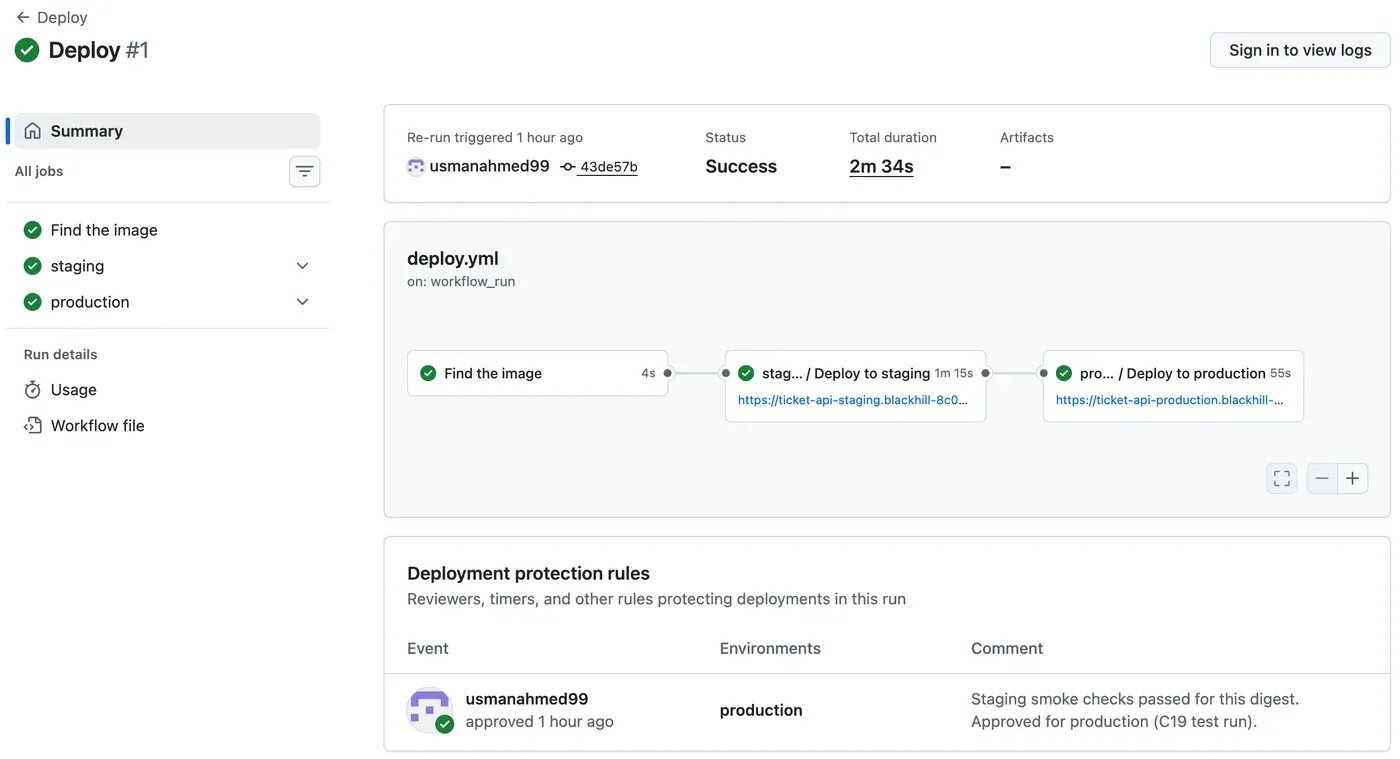
The page shows the order (staging before production), the addresses from environment: url, and the approval: who, for which environment, and why. Anyone can open it. That is a traceable approval.
Approve the production deployment
Section titled “Approve the production deployment”When the production job waits, the run’s page shows a Review deployments button for the reviewers. The steps:
- Open the run (Actions → Deploy → the run).
- Check the staging job: the smoke check lines, and the image digest in the summary. If a tester checked staging, read their result.
- Choose Review deployments.
- Select
production, and write a comment that says what you checked. - Choose Approve and deploy. To stop the release, choose Reject.
The test run approved through GitHub’s REST API, which does the same thing and records the same comment. To approve that way, you need the environment’s ID and the run’s ID. Do this only on your own repository, because it starts a production deployment:
gh api repos/<you>/ticket-api-ci/environments --jq '.environments[] | {name, id}'gh api --method POST repos/<you>/ticket-api-ci/actions/runs/<run-id>/pending_deployments \ -F "environment_ids[]=<production id>" -f state=approved \ -f comment="Staging smoke checks passed for this digest."The record of the approval, read back from the run (live):
gh api repos/Nextia-Intelligence/ticket-api-ci/actions/runs/37664760027/approvals --jq '.[] | {state, comment, user: .user.login, environments: [.environments[].name]}'{"comment":"Staging smoke checks passed for this digest. Approved for production (C19 test run).","environments":["production"],"state":"approved","user":"usmanahmed99"}Deployments on GitHub
Section titled “Deployments on GitHub”Each job with environment: also makes a deployment record. The repository listed 21 of them at the end of the day, for example (live):
gh api repos/Nextia-Intelligence/ticket-api-ci/deployments --jq '.[] | [.environment, .sha[0:7], .created_at] | @tsv'production 92fff66 2026-10-07T18:18:57Zstaging 92fff66 2026-10-07T18:18:02Zproduction 43de57b 2026-10-07T18:12:47Zstaging 43de57b 2026-10-07T18:11:28Zstaging 43de57b 2026-10-07T18:10:28Z(The newest ones are left out.) The first line for 43de57b in staging is attempt 1, which failed. The deployments page of a repository needs a sign-in, so this course shows the API answer instead of a screenshot.
A version without a new build
Section titled “A version without a new build”The image in production has a digest, but people talk about versions. The help desk lead asks “are we on 1.1.0?”, not “are we on sha256:4eb3db8d?”. A Git tag v1.1.0 names the commit. The image needs the version too. It must be the same image, not a new build. Configuration separation: A second build for the release shows why.
Amira’s second pull request, feature/release-tags into main (pull request #2), removed the tag trigger from ci.yml, added the release notes docs/releases/1.1.0.md, and added this workflow:
# A release: when a version tag (v1.2.0) is pushed, give the image that CI# already built and tested for that commit its version tag, and create the# GitHub release. Nothing is built again, so the release is the same digest# that staging and production run.name: Release
on:  push:    tags: ["v*"]
permissions:  contents: write  packages: write
jobs:  release:    runs-on: ubuntu-24.04    timeout-minutes: 10    env:      IMAGE: ghcr.io/${{ github.repository }}    steps:      - uses: actions/checkout@v7      - uses: docker/login-action@v4        with:          registry: ghcr.io          username: ${{ github.actor }}          password: ${{ secrets.GITHUB_TOKEN }}      - name: Tag the tested image with the version        id: tag        run: |          version="${GITHUB_REF_NAME#v}"          source="$IMAGE:sha-${GITHUB_SHA::7}"          docker buildx imagetools inspect "$source" > /dev/null || {            echo "No image $source: CI must build and test this commit first."; exit 1; }          docker buildx imagetools create --tag "$IMAGE:$version" "$source"          digest=$(docker buildx imagetools inspect "$IMAGE:$version" --format '{{json .Manifest}}' | jq -r .digest)          echo "version=$version" >> "$GITHUB_OUTPUT"          echo "digest=$digest" >> "$GITHUB_OUTPUT"      - name: Create the GitHub release        env:          GH_TOKEN: ${{ github.token }}        run: |          notes="docs/releases/${{ steps.tag.outputs.version }}.md"          [ -f "$notes" ] || { echo "Write the release notes in $notes first."; exit 1; }          {            cat "$notes"            echo            echo "Image: \`$IMAGE@${{ steps.tag.outputs.digest }}\` (tag \`${{ steps.tag.outputs.version }}\`)"          } > notes.md          gh release create "$GITHUB_REF_NAME" --title "$GITHUB_REF_NAME" --notes-file notes.md
release.yml at 92fff66. docker buildx imagetools create writes a new tag in the registry that points to the existing image. It copies no layers and builds nothing. If CI never built the commit, the release stops with No image …: CI must build and test this commit first. If the release notes are missing, it stops too.
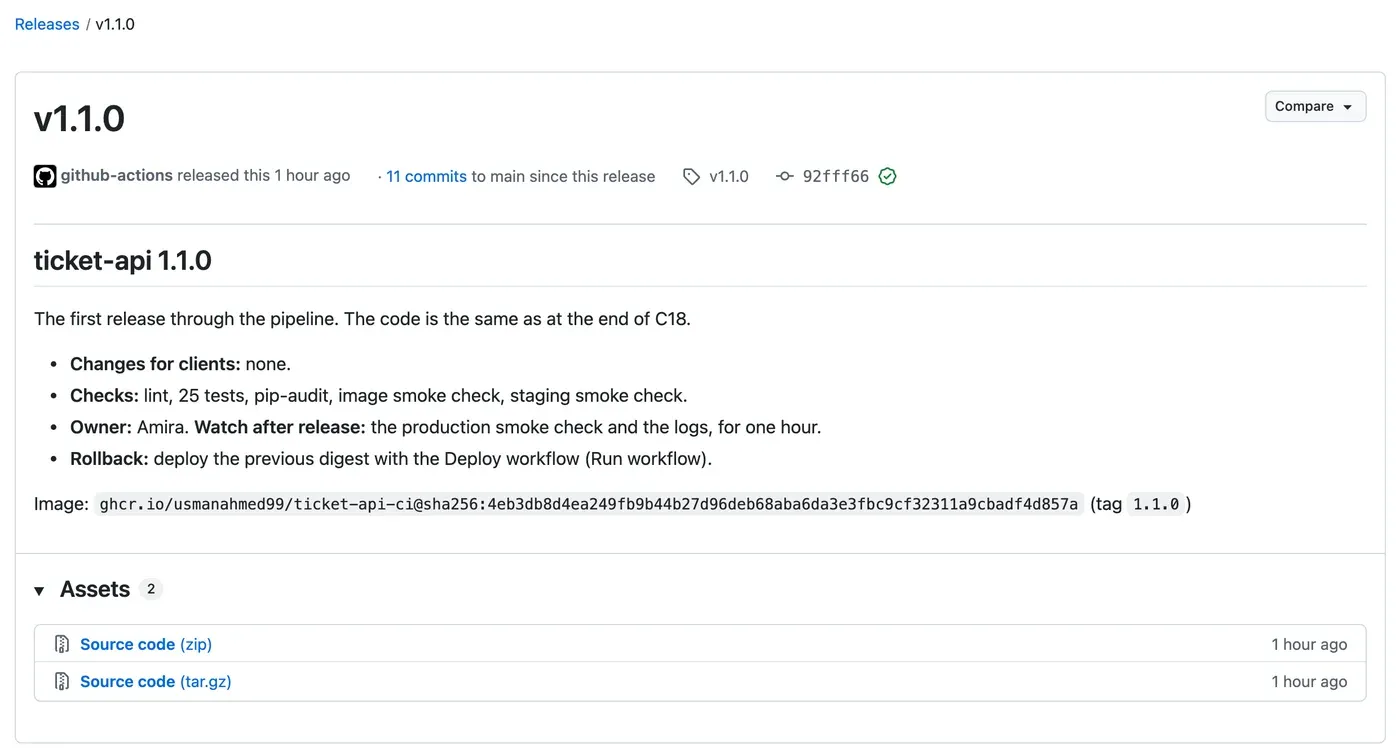
The merge of pull request #2 made commit 92fff66. CI built it (sha-92fff66), and Deploy run 37665743749 promoted it: staging in 51 s, then the approval (“Release 1.1.0: staging smoke checks passed. Approved for production.”), then production in 1 min 8 s. Then Amira tagged the commit. Wait for the CI run on main to be green first, so that the image exists:
git switch maingit pullgit tag -a v1.1.0 -m "ticket-api 1.1.0"git push origin v1.1.0The tag started Release run 37665781129. It took 8 s. Its log (live, shortened):
Login Succeeded!#1 [internal] pushing ghcr.io/usmanahmed99/ticket-api-ci#1 0.000 copying sha256:73311f52b091f4e64e4990f351159f0af4e0735056173260377c21829869dd1b from ghcr.io/usmanahmed99/ticket-api-ci:sha-92fff66 to ghcr.io/usmanahmed99/ticket-api-ci#1 0.000 copying sha256:34c3ddd916f50832e73a8a30877e3ae872a2c7e2510b352f585f2bb049c86f49 from ghcr.io/usmanahmed99/ticket-api-ci:sha-92fff66 to ghcr.io/usmanahmed99/ticket-api-ci#1 0.359 pushing sha256:4eb3db8d4ea249fb9b44b27d96deb68aba6da3e3fbc9cf32311a9cbadf4d857a to ghcr.io/usmanahmed99/ticket-api-ci:1.1.0https://github.com/Nextia-Intelligence/ticket-api-ci/releases/tag/v1.1.0“copying” here means pointers: the two manifests (the linux/amd64 image and its attestation) get a second name. Check it yourself; anyone can read the public package:
docker buildx imagetools inspect ghcr.io/usmanahmed99/ticket-api-ci:sha-92fff66docker buildx imagetools inspect ghcr.io/usmanahmed99/ticket-api-ci:1.1.0The output (both shortened to the first lines):
Name:      ghcr.io/usmanahmed99/ticket-api-ci:sha-92fff66MediaType: application/vnd.oci.image.index.v1+jsonDigest:    sha256:4eb3db8d4ea249fb9b44b27d96deb68aba6da3e3fbc9cf32311a9cbadf4d857a
Name:      ghcr.io/usmanahmed99/ticket-api-ci:1.1.0MediaType: application/vnd.oci.image.index.v1+jsonDigest:    sha256:4eb3db8d4ea249fb9b44b27d96deb68aba6da3e3fbc9cf32311a9cbadf4d857a
One digest, three names: sha-92fff66, 1.1.0, and the digest itself, which staging and production already ran.
The local route
Section titled “The local route”The simulated route does the same promotion with two scripts. promote-local.sh starts one environment with one image, then runs the same smoke.sh as the pipeline:
#!/usr/bin/env bash# Deploy one image to a local environment, then smoke-check it.#   scripts/promote-local.sh staging    ghcr.io/<you>/ticket-api-ci@sha256:...#   scripts/promote-local.sh production ghcr.io/<you>/ticket-api-ci@sha256:...# Needs .env (POSTGRES_PASSWORD) and secrets/<environment>_api_key.txt.set -euo pipefail
environment=${1:?Give the environment: staging or production}export IMAGE=${2:?Give the image with its digest}settings="deploy/local/$environment.env"[ -f "$settings" ] || { echo "No settings file $settings"; exit 1; }
docker compose -f deploy/local/compose.yaml --env-file "$settings" --env-file .env up -d --waitport=$(grep '^PORT=' "$settings" | cut -d= -f2)scripts/smoke.sh "http://127.0.0.1:$port" "$(cat "secrets/${environment}_api_key.txt")"echo "$environment now runs $IMAGE"#!/usr/bin/env bash# Stop a local environment. Add --volumes to delete its database too.# scripts/stop-local.sh staging [--volumes]set -euo pipefailenvironment=${1:?Give the environment: staging or production}shift# compose.yaml needs IMAGE to read the file, but "down" does not use it.IMAGE=unused docker compose -f deploy/local/compose.yaml \ --env-file "deploy/local/$environment.env" --env-file .env down "$@"up -d --wait returns only when every container is healthy, so the smoke check never runs against a half-started API. set -euo pipefail stops the script at the first failure. Make both scripts executable: chmod +x scripts/promote-local.sh scripts/stop-local.sh. Git records this, so the change is part of your commit.
The order is the pipeline’s order. You run staging first. You run production only after staging’s smoke check passed: that second command is your approval.
The image that did not start on a Mac
Section titled “The image that did not start on a Mac”Amira ran the local staging with the image of release 1.1.0, on her Mac with Apple silicon:
scripts/promote-local.sh staging ghcr.io/usmanahmed99/ticket-api-ci@sha256:4eb3db8d4ea249fb9b44b27d96deb68aba6da3e3fbc9cf32311a9cbadf4d857aCommon mistake
no matching manifest for linux/arm64/v8
Symptom: the script stopped before any container started (simulated):
Image ghcr.io/usmanahmed99/ticket-api-ci@sha256:4eb3db8d4ea249fb9b44b27d96deb68aba6da3e3fbc9cf32311a9cbadf4d857a Pulling Image ghcr.io/usmanahmed99/ticket-api-ci@sha256:4eb3db8d4ea249fb9b44b27d96deb68aba6da3e3fbc9cf32311a9cbadf4d857a Error no matching manifest for linux/arm64/v8 in the manifest list entries: no match for platform in manifest: not foundError response from daemon: no matching manifest for linux/arm64/v8 in the manifest list entries: no match for platform in manifest: not foundCause: CI builds only linux/amd64, the CPU type of the cloud. Docker asks for the image of its own computer, linux/arm64/v8 on Apple silicon, and the image has none. imagetools inspect above shows it: one linux/amd64 manifest and the attestation (unknown/unknown). On an Intel or AMD computer, this error does not happen.
Fix: do not build a second, arm64 image for your computer: that is a different artifact again. Ask for the cloud’s image, and let Docker Desktop emulate it. Add one line (and its comment) to the api service in deploy/local/compose.yaml:
api: image: ${IMAGE:?Set IMAGE to the image name with its digest} # The pipeline builds for the cloud's processors. On Apple silicon (arm64), # Docker Desktop emulates them, so you run the same build as the cloud. platform: linux/amd64The reference repository added this line later, in pull request #6, after version 1.2.0. You add it now. Emulation is slower, but the test API started and passed its smoke check in about 10 s.
For a real AI service: a model server often uses CPU-specific code (for example, faster math libraries). An arm64 build for your laptop can give other numbers or other errors than the amd64 build in production. Test the build that production runs, even if it is slower on your computer.
Worked example (simulated): staging, then production
Section titled “Worked example (simulated): staging, then production”With the platform line, the same command (simulated):
Image ghcr.io/usmanahmed99/ticket-api-ci@sha256:4eb3db8d4ea249fb9b44b27d96deb68aba6da3e3fbc9cf32311a9cbadf4d857a Pulled Network ticket-api-staging_default Created Volume ticket-api-staging_pgdata Created Container ticket-api-staging-db-1 Created Container ticket-api-staging-api-1 Created Container ticket-api-staging-db-1 Healthy Container ticket-api-staging-api-1 Healthyok health (200)ok ready (200)ok classify with the key (200)ok classify without a key (401)staging now runs ghcr.io/usmanahmed99/ticket-api-ci@sha256:4eb3db8d4ea249fb9b44b27d96deb68aba6da3e3fbc9cf32311a9cbadf4d857a(The Creating, Starting and Waiting lines are left out.) The pull and the start took 10 s in total. Inside the container, Python reports the emulated CPU: docker exec ticket-api-staging-api-1 python -c "import platform; print(platform.machine())" printed x86_64.
Staging passed, so Amira approves her own local production: scripts/promote-local.sh production with the same image. The output has the same lines with ticket-api-production, and ends with production now runs ghcr.io/usmanahmed99/ticket-api-ci@sha256:4eb3db8d…. The image was already on the computer, so it needed no pull.
Now the comparison, with the same image in both:
docker inspect --format '{{.Name}} {{.Image}}' ticket-api-staging-api-1 ticket-api-production-api-1curl -s -o /dev/null -w '%{http_code}\n' http://127.0.0.1:8081/docscurl -s -o /dev/null -w '%{http_code}\n' http://127.0.0.1:8082/docsThe output (simulated):
/ticket-api-staging-api-1 sha256:4eb3db8d4ea249fb9b44b27d96deb68aba6da3e3fbc9cf32311a9cbadf4d857a/ticket-api-production-api-1 sha256:4eb3db8d4ea249fb9b44b27d96deb68aba6da3e3fbc9cf32311a9cbadf4d857a200404The same digest as in the cloud, and the same difference: /docs on in staging, off in production. Each environment also has its own data. The smoke check’s classify request wrote one row in each database, and /v1/history in staging lists only staging’s rows, with request IDs that production does not have.
Guided practice: promote your own digest
Section titled “Guided practice: promote your own digest”Choose your route. You need the digest of your latest green CI run on main (from build-info.json).
- Add
platform: linux/amd64to theapiservice indeploy/local/compose.yaml. - Add
scripts/promote-local.shandscripts/stop-local.sh, and make them executable. - Simulated: run
scripts/promote-local.sh staging ghcr.io/<you>/ticket-api-ci@<digest>. Expected: fouroklines, andstaging now runs …. - Simulated: run the same command with
production. Expected: the same lines for production. - Simulated: compare the two
apicontainers withdocker inspectand/docs, as in the worked example. - Live: add
.github/workflows/deploy.ymlanddeploy-to.yml. Commit everything onfeature/deploy. - Live: open the pull request
feature/deployintomain. Wait for both required checks, then merge. - Live: open Actions → Deploy. Watch staging pass, then approve production with a comment.
- Both: on a new branch
feature/release-tags, remove the tag trigger fromci.yml, as in Configuration separation: A second build for the release. Commit it withdocs/releases/1.1.0.mdandrelease.yml, and merge the branch intomainby pull request. (On the simulated route, the pull request of step 7 has no workflow files; merge it with the local files.) - Both: when CI on
mainis green, tag the merge commitv1.1.0and push the tag. Check that the Release run is green, and thatimagetools inspectgives the same digest for:1.1.0and:sha-<7>.
Show the expected result
Simulated: both scripts end with … now runs ghcr.io/<you>/ticket-api-ci@sha256:…, with your digest. docker inspect shows the same image ID for both api containers, and /docs gives 200 on 8081 and 404 on 8082.
Live: the Deploy run shows three green jobs, like the screenshot above. The staging job’s log has The new revision is ready. and the four ok lines. The run’s page lists your approval with its comment. Your apps’ /docs gives 200 in staging and 404 in production.
Both: the Release run is green, your repository has the release v1.1.0 with the image line, and :1.1.0 has the same digest as :sha-<7> of the tagged commit.
Your turn: a red staging
Section titled “Your turn: a red staging”Predict, then (simulated) try it. Stop the local staging database, but leave its API running:
docker stop ticket-api-staging-db-1scripts/smoke.sh http://127.0.0.1:8081 "$(cat secrets/staging_api_key.txt)"Which checks fail? What would the Deploy workflow do with production if this happened in the staging job? Start the database again with docker start ticket-api-staging-db-1.
Show the answer
The output (simulated):
ok health (200)FAIL ready: expected 200, got 503ok classify with the key (200)ok classify without a key (401)/health still answers 200: the process runs. /ready checks the database, so it answers 503 while the database is down, and smoke.sh exits with 1. Classify still passes, because the classifier does not need the database. One failed check is enough. In the pipeline, a failed smoke check fails the staging job. production has needs: [resolve, staging], so it never starts, and nobody is even asked to approve. Production keeps its old revision. That is the point of staging: a problem stops before it reaches the users. After docker start, the same smoke check passed again in the test.
Check your understanding
Where does the Deploy workflow get the digest that it deploys, and why does it refuse a value that does not start with sha256:?
Show the answer
From build-info.json, the artifact of the CI run on main that started the Deploy run (or from the digest input of a deployment by hand). CI built and tested exactly that image. The workflow refuses anything that is not a digest because a tag such as 1.1.0 or latest can be moved to other content; a digest always means the same bytes. So staging and production deploy what CI tested, and nothing else.
Does your answer have the main points of ours?
Sign in and enroll in the course to save your answers. Every check counts toward the certificate.
Check your understanding
Predict: the staging smoke check fails in a Deploy run. What happens to the production job, and what does production run afterwards?
Show the answer
The staging job fails. The production job needs the staging job, so GitHub skips it. It never waits for an approval and never signs in. Production keeps running its current revision, with the old digest. The new digest stops in staging until a fix comes through CI again.
Does your answer have the main points of ours?
Sign in and enroll in the course to save your answers. Every check counts toward the certificate.
Check your understanding
Why does release.yml use docker buildx imagetools create instead of docker build for the version tag? How can you check the result?
Show the answer
imagetools create gives the image that CI already built and tested (sha-92fff66) a second tag, 1.1.0. It builds nothing, so the release is the same artifact that staging checked and production runs. A build would make a new artifact that nobody tested. Check with docker buildx imagetools inspect on both tags: the Digest: lines must be the same (sha256:4eb3db8d… for 1.1.0).
Does your answer have the main points of ours?
Sign in and enroll in the course to save your answers. Every check counts toward the certificate.
Module practice
Section titled “Module practice”Task: deploy the same artifact to two practice environments, local or hosted, and prove that only the settings differ.
- Take the digest of one green CI run on
main. - Deploy it to staging and check it: the live Deploy workflow, or
scripts/promote-local.sh staging. - Approve it for production (live: Review deployments, with a comment), or run
scripts/promote-local.sh production(simulated). - Collect the evidence in a short table. Give the digest, the smoke check result and the
/docsstatus for each environment. Add who approved and why, and where each setting and secret lives. - Then do it without the cloud or without the pipeline, whichever you did not do: read the other route’s evidence above, and write one sentence about what it proves that yours does not.
Show a model answer
The reference evidence for release 1.1.0:
| Evidence | Staging | Production |
|---|---|---|
| Image (live, run 37665743749) | ghcr.io/usmanahmed99/ticket-api-ci@sha256:4eb3db8d… |
the same |
Image (simulated, docker inspect) |
sha256:4eb3db8d… |
the same |
| Smoke check | 4 × ok |
4 × ok |
/docs |
200 |
404 |
| Setting that differs | SHOW_DOCS=true (app setting; deploy/local/staging.env) |
SHOW_DOCS=false |
| Key | Staging’s own: app secret api-key, GitHub environment secret SMOKE_API_KEY; secrets/staging_api_key.txt |
Production’s own, in the same places |
| Identity (live) | id-deploy-staging, Container Apps Contributor on ticket-api-staging |
id-deploy-production, on ticket-api-production |
| Approval | none needed | usmanahmed99: “Release 1.1.0: staging smoke checks passed. Approved for production.” |
| Release | Tag v1.1.0 = sha-92fff66 = sha256:4eb3db8d… |
Only the live route proves these: a sign-in with no stored password, scoped roles, a recorded approval, and HTTPS on a real address. What the simulated route proves at no cost: one Compose project per environment, its own database, and the exact cloud image (by emulation).
Module check
Section titled “Module check”Check your understanding
Retrieval: name the five things that may differ between staging and production in this module, and the one thing that must not.
Show the answer
May differ: the settings (such as SHOW_DOCS), the secret (each environment’s API key), and the identity that deploys, with its role. Also the data store and the rules: production has a required reviewer. Must not differ: the artifact, the image digest (and so the code and the packages in it).
Does your answer have the main points of ours?
Sign in and enroll in the course to save your answers. Every check counts toward the certificate.
Check your understanding
Explain or predict: a colleague turns off the required reviewer on production to save time. A merge to main has a bug that the smoke check does not see. What changes in the path to production, and which protections still work?
Show the answer
Without the reviewer, the production job starts as soon as staging passes. The digest reaches production about one minute after staging, and nobody looks at staging first. The other protections still work: the ruleset and the required checks before the merge, the build-once digest, the staging smoke check (a failure still stops production), the branch policy and the scoped identity. But the bug that the smoke check does not see goes straight to users. The approval is the place for a user-acceptance check in staging; keep it.
Does your answer have the main points of ours?
Sign in and enroll in the course to save your answers. Every check counts toward the certificate.
Check your understanding
Completion check: show that staging and production behave differently because of their settings only, without changing any application code.
Show the answer
Show the same digest in both environments: the Deploy log’s IMAGE: lines (live), or docker inspect --format '{{.Name}} {{.Image}}' on both api containers (simulated). Then show a difference that comes from a setting: /docs gives 200 in staging and 404 in production. Then change only the setting. Write SHOW_DOCS=false in deploy/local/staging.env, and run scripts/promote-local.sh staging with the same image. The test run printed Container ticket-api-staging-api-1 Recreate, the four ok lines, and then /docs gave 404 in staging. With SHOW_DOCS=true again, it gave 200, and the staging history still had its 4 rows: the database was not touched. No code, no image and no build changed. (Live: az containerapp update -n ticket-api-staging -g rg-ticket-api-ci --set-env-vars SHOW_DOCS=false changes the setting the same way; this was not run in the test.)
Does your answer have the main points of ours?
Sign in and enroll in the course to save your answers. Every check counts toward the certificate.
Recap
- The Deploy workflow starts after CI succeeds on
main, takes the digest frombuild-info.json, and promotes it: staging, the smoke check, the approval, then production with the same steps. deploy-to.ymlholds one environment’s steps: sign in (OIDC),az containerapp update --image, wait for the ready revision, smoke check, summary.environment:brings the variables, the secret and the rules.- A failure at any step stops the digest where it is. Production keeps its old revision.
- The approval is public and traceable: who, which environment, and the comment.
release.ymltags the tested image with the version, without a build:1.1.0=sha-92fff66=sha256:4eb3db8d….- Locally:
promote-local.sh staging, thenproduction. On Apple silicon,platform: linux/amd64runs the cloud’s image by emulation.
Reset. Remove the local environments and their data, and the image:
scripts/stop-local.sh staging --volumesscripts/stop-local.sh production --volumesdocker image rm ghcr.io/<you>/ticket-api-ci@sha256:<digest>The test run printed Removed for both api and db containers, both networks and both volumes. Live: Module 4 uses the two apps again, and they cost practically nothing while idle. If you stop here, delete everything with az group delete --name rg-ticket-api-ci --yes --no-wait. The GitHub environments, variables and releases cost nothing and can stay. To start Module 4 from a known state, use the snapshot end-of-m03 and make the GitHub settings of this module again.
Next, a change to the AI model itself: the pipeline must decide if a new classifier is good enough before any environment gets it.
Next: AI evaluation gate