
Define checks
- Lesson 3
- 50 min
- Module 1: Understand the delivery path
Lesson 3 of 15 · CI/CD, Testing and Safe ReleasesDefine checks
1. Understand the delivery path
2. Create a repeatable CI pipeline
3. Manage environments and secrets
4. Release AI and database changes
5. Recover and maintain the release process
What you will be able to do
“All tests passed” says nothing about the mistakes that no test looks for. Give each check one clear job, so that together they catch the mistakes that matter, and the fast ones fail first.
Before you startWhat to know and to have ready
What you need to know
- pytest and
TestClient, from Automated endpoint tests: TestClient: requests without a server in Build and Deploy Your First API. - The contract test, from Keep the documentation true: Catch an accidental change in the API course.
- Smoke checks, from Verify and clean up: A smoke check in the API course and Verify and remove: Smoke checks: what this deployment must prove in Docker and Cloud Essentials for AI Developers.
- The pipeline and its gates, from From commit to release: The pipeline and its gates.
- The branch workflow, from Choose a branch workflow: Write the source and the target.
What you need on your computer
- Your ticket API from the Docker course, in
~/projects/ticket-api(Windows:$HOME\projects\ticket-api), in a Git repository with every change committed, with its virtual environment.venvand 25 passing tests. The guided practice changes two files and then restores them. The module practice copies the project into the course’s own folder,~/projects/ticket-api-ci, and addsdocs/release-process.mdthere. - If the project is missing or broken, copy the Docker course’s snapshot
end-of-m05, as in Use a snapshot. Then make the virtual environment again and installrequirements-lock.txt, as in the API course. - A browser, and optionally
curland Python 3, as in Lesson 1.
Run with GitHub Actions (ubuntu-24.04 runners) in the public repository Nextia-Intelligence/ticket-api-ci. The local commands were run with Python 3.14.6 and pytest 9.1.1 on macOS (Apple silicon). The Windows steps are not tested.
25 tests passed, and the urgent ticket was not urgent
Section titled “25 tests passed, and the urgent ticket was not urgent”Sam reported that “I lost my password” gets priority 1. The help desk treats priority 1 as urgent, and a lost password is not. The classifier marks a ticket as urgent when it contains a word from a short list:
URGENT_WORDS = ("cannot", "locked out", "charged twice", "lost")The quick fix is to remove "lost". Amira tries it on her computer, and runs the tests:
python -m pytest -qThe output:
......................... [100%]25 passed in 0.36sEvery test passes. Then she asks the classifier about two tickets, before and after the change:
python -c "from ticket_api.classifier import KeywordClassifier; print(KeywordClassifier().predict('I lost my password'))"python -c "from ticket_api.classifier import KeywordClassifier; print(KeywordClassifier().predict('Parcel lost in transit'))"The output, before the change:
Prediction(category='login', priority=1, confidence=0.7)Prediction(category='shipping', priority=1, confidence=0.7)After the change:
Prediction(category='login', priority=2, confidence=0.7)Prediction(category='shipping', priority=2, confidence=0.7)Sam’s ticket is fixed. But a lost parcel is urgent, and it lost its priority too. No test noticed, because no test asks about a lost parcel. The tests check that the API works: status codes, validation, the contract. They do not check whether the classifier is good.
Amira tries a second mistake: she adds import os at the top of ticket_api/routes.py, a line that the code never uses. The result:
25 passed in 0.21sAgain, every test passes. The tests run the code. They do not read it. So each kind of mistake needs a check that looks for it. That is the rule of this lesson: name the mistake first, then choose the check.
Eight checks, eight purposes
Section titled “Eight checks, eight purposes”A check is an automatic step that passes or fails, and that stops the pipeline when it fails. The ticket API’s pipeline has eight. The last column is the time that each one took in the reference repository’s final CI run (run 37672744134):
| Check | Command | It catches | It cannot catch | Time |
|---|---|---|---|---|
| Lint | ruff check . |
Mistakes that are visible in the code without running it: an unused import, a name that does not exist, a missing from after raise, a line that is too long |
Wrong behaviour of code that is written correctly | under 1 s |
| Unit tests | pytest |
A function or an endpoint that does not do what the test expects: a wrong status code, a missing field, a validation rule | A case that no test has; a real database | about 2 s for all pytest tests |
| Contract test | pytest (tests/test_contract.py) |
An API change that nobody reviewed, such as a renamed field | A change that keeps the contract but changes the answers | (with the unit tests) |
| Integration (database) tests | pytest, with a PostgreSQL database |
Code that fails with a real database: a migration, a query, a type | A different database version in production; data that the tests do not have | (with the unit tests) |
| Security check | pip-audit -r requirements-run.txt |
A package with a known, published vulnerability | A vulnerability that is not published yet; a mistake in your own code | 9 s |
| AI evaluation | python -m evaluation.run |
A classifier that is worse than the one in production, or wrong on a must-pass ticket | A kind of ticket that is not in the labelled set | under 1 s |
| Image smoke check | scripts/smoke.sh against the new image, in the CI runner |
An image that does not start, or that answers wrongly | Settings, secrets and network of a real environment | 2 s (build: 9 s) |
| Deployment smoke check | scripts/smoke.sh against the environment’s address |
A deployment that does not work with these settings, this secret, this address | Rare paths that the smoke check does not call | part of each deploy job (about 55 s) |
The words, defined once:
- Lint (a linter) reads the code without running it, and reports patterns that are almost always mistakes. The project uses ruff with the rule groups E, F, I and B.
- A unit test runs one part of the code, such as one endpoint with
TestClient, and compares the result with the expected one. It needs no network and no database. - A contract test compares the API’s OpenAPI document with the reviewed copy in
contract/openapi.json. The API course wrote it. - An integration test runs the code together with a real dependency, here a PostgreSQL database that CI starts for the job.
- A security check compares the exact package versions with a public list of known vulnerabilities.
- An AI evaluation runs the classifier on labelled tickets that it never saw while it was being made, and compares the scores with fixed rules. A must-pass ticket is a labelled ticket that the classifier must always get right, with the right priority. Module 4 builds the evaluation.
- A smoke check sends a few real requests to a running copy, and checks the answers. The image smoke check runs on the CI runner; the deployment smoke check runs against staging and against production. (Another name for it is smoke test. The API course and the Docker course called it a smoke check, and this course does too.)
Today your project has the unit tests and the contract test (25 tests). Module 2 adds lint, the security check and the image smoke check. Module 3 adds the deployment smoke check. Module 4 adds the database tests and the AI evaluation.
Which check catches which mistake
Section titled “Which check catches which mistake”These are real mistakes from the reference repository and the courses before it. Each one stopped at the first check that looks for it:

Text description of the diagram
Six mistakes go from left to right through the checks. Two lint findings in the first CI run, and a line that is too long in PR #4, stop at lint. A renamed field from the API course stops at the contract test. The removed urgent word in PR #4 passes lint and the tests. It stops at the AI evaluation, because the must-pass ticket E033 lost its priority. A wrong Azure sign-in setting passes all CI checks and stops in staging, before production. Sam’s ticket, “I lost my password” with priority 1, passes every check and is in production, because no check contains that ticket.
Read the rows from the top:
-
The first CI run of the repository failed on lint. The Docker course’s code had a
raisewithoutfrom(B904,config.py:28) and unsorted imports (I001,routes.py:1). Its 25 tests passed on every computer. Only the linter reads the code. Module 2 reproduces this run and fixes it. -
PR #4’s first run failed on lint with
E501 Line too long (101 > 100): a real slip, fixed in the second commit. -
The contract test catches a renamed field. The API course showed it with
model_version→version. -
PR #4’s second run passed lint, tests and the security check, and failed the AI evaluation. This is Amira’s change from the start of the lesson, in the real repository:
accuracy 0.909must-pass failures: 1FAIL: must-pass cases failed: E033Gate failed.E033 is “Parcel lost in transit”. The overall accuracy did not change. Only the must-pass check saw the problem. Module 4 builds this gate.
-
The first deployment failed in staging, at the Azure sign-in. No CI check can test a cloud login. Staging can, and production did not start (Lesson 1, K2). Module 3 explains the error.
-
Sam’s ticket is still in production. No check has “I lost my password”. A check catches only the mistakes that it looks for.
Fast checks first
Section titled “Fast checks first”When a check fails, the pipeline stops, and the checks after it do not run. So put the fast and cheap checks first. A lint mistake then fails in under a second, and does not wait for an image build. The run page of PR #4 shows it:
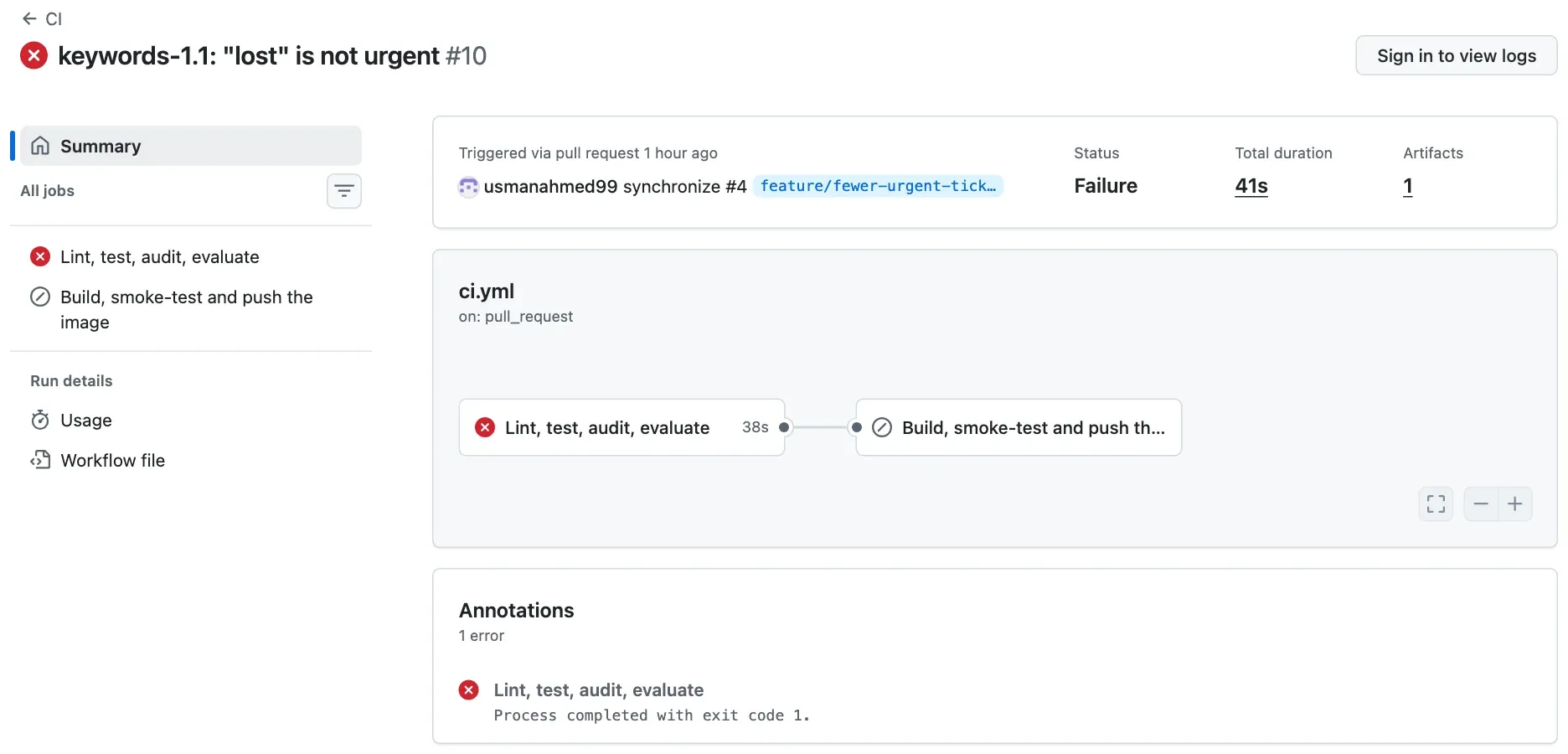
The page does not show which step failed: the logs need a sign-in. The public API lists the steps:
curl -s https://api.github.com/repos/Nextia-Intelligence/ticket-api-ci/actions/runs/37666571062/jobs \ | python3 -c "import json,sys; [print(s['name'], '|', s['conclusion']) for j in json.load(sys.stdin)['jobs'] for s in j['steps']]"curl.exe -s https://api.github.com/repos/Nextia-Intelligence/ticket-api-ci/actions/runs/37666571062/jobs | python -c "import json,sys; [print(s['name'], '|', s['conclusion']) for j in json.load(sys.stdin)['jobs'] for s in j['steps']]"The output:
Set up job | successRun actions/checkout@v7 | successRun actions/setup-python@v7 | successInstall the exact versions | successLint | successUnit and contract tests | successSecurity - known vulnerabilities in the image's packages | successAI evaluation gate | failureKeep the test and evaluation reports | successPost Run actions/setup-python@v7 | skippedPost Run actions/checkout@v7 | successComplete job | successThe image job has no steps in the list: it was skipped. “Keep the test and evaluation reports” ran after the failure on purpose (if: always(), Module 2), so the evidence of the failure is kept.
The order in the reference repository:
- In one job, the checks that need only the code: lint, then the tests, then the security check, then the AI evaluation. They share one runner and one installation.
- In a second job, only if the first passed: build the image, then smoke-test it. A build takes longer, and it is useless for code that already failed.
- After the deployment, in each environment: the deployment smoke check.
Fast first is a rule for the order, not a reason to leave a slow check out. The security check takes 9 seconds of the 50, and it is the only check that sees a vulnerable package.
Guided practice: see what the tests cannot see
Section titled “Guided practice: see what the tests cannot see”- Open a terminal in
~/projects/ticket-api. Activate the virtual environment:source .venv/bin/activate(Windows:.venv\Scripts\Activate.ps1). - Run
git status. Check that the output saysnothing to commit, working tree clean. - Run
python -m pytest -q. Check the last line:25 passed. - Ask the classifier about “Parcel lost in transit”, with the
python -ccommand of the worked example. Write down the priority. - In
ticket_api/classifier.py, remove, "lost"fromURGENT_WORDS. Save the file. - Predict: how many tests pass now? What priority does “Parcel lost in transit” get?
- Run
python -m pytest -q, then thepython -ccommand again. - Add
import osas the first line ofticket_api/routes.py. Save, and runpython -m pytest -qagain. - Restore both files:
git restore ticket_api/classifier.py ticket_api/routes.py. - Run
git statusagain. Check that the project is clean.
Show the expected results
25 passed in 0.53s(your time differs).Prediction(category='shipping', priority=1, confidence=0.7).- All 25 tests still pass, and the ticket gets priority 2.
25 passed, andPrediction(category='shipping', priority=2, confidence=0.7).25 passed. The tests run the code; they do not read it.nothing to commit, working tree clean.
Two different mistakes, and no failed test. The first one needs an AI evaluation with a must-pass ticket. The second one needs a linter. On Windows, if PowerShell refuses to run the activation script, run Set-ExecutionPolicy -Scope CurrentUser RemoteSigned once.
Your turn: choose the check
Section titled “Your turn: choose the check”For each mistake, name the first check in the pipeline that catches it. If none of the eight does, say what check is missing.
requirements-run.txtpins a version of a package that has a published vulnerability.- A new
Dockerfileline copies the code into the wrong folder. The image builds, but the app cannot start. - The
api-keysecret of the production app is empty. Staging has the right one. - A query in
ticket_api/history.pyuses a column name that exists only in SQLite, not in PostgreSQL. - A ticket with the subject “Charged twice” and the body “My card was charged twice for one order.” gets the category
billing, but priority 2.
Show the answers
- The security check (
pip-audit). The tests cannot see it: the vulnerable code works. - The image smoke check.
/healthdoes not answer, so the job fails before the image is pushed. The unit tests run the code from the folder, not from the image, so they pass. - The production deployment job. Either the new revision does not become ready, or the smoke check
classify with the keyfails. Every CI check and staging pass, because they use other keys. Only production’s own deploy job and smoke check test production’s settings. After it fails, the team deploys the last good digest (Module 5). - The integration (database) tests, if they run against PostgreSQL, as in the reference repository. A unit test without a database, or with another database, cannot see it.
- The AI evaluation, because this is the must-pass ticket E019, and it must have priority 1. If the ticket were not in the labelled set, no check would catch it, as with Sam’s ticket. The missing check is then a new labelled ticket.
Common mistake
Every check passed, and production still has the bug
Symptom: Sam’s ticket “I lost my password” gets priority 1 in production. Every pipeline run of the reference repository was green for the code that does this, from the first run to the last.
Cause: a check catches only the mistakes that it looks for. Look for the ticket in the labelled evaluation set (a clone from Lesson 2, in ~/projects/c19-reference):
grep -i "lost" evaluation/tickets.jsonlThe output:
{"id": "E011", "split": "dev", "subject": "Parcel lost", "body": "The courier says the parcel is lost.", "category": "shipping", "priority": 1, "must_pass": false}{"id": "E030", "split": "holdout", "subject": "Two-factor reset", "body": "I lost the phone with my two-factor app.", "category": "login", "priority": 2, "must_pass": false}{"id": "E033", "split": "holdout", "subject": "Parcel lost in transit", "body": "The tracking stopped and the parcel is lost.", "category": "shipping", "priority": 1, "must_pass": true}No ticket says “I lost my password”. E030 is close, but it is not a must-pass ticket, and the accuracy counts the category, not the priority. So every check passes.
Fix:
- Write the mistake down as a check before you fix it: add the ticket to the labelled set, with the priority that the help desk wants.
- Run the check. It must fail on the current code. A check that passes before the fix proves nothing.
- Then fix the code, and keep the check. It now protects every later change.
- Fix it without breaking E033. PR #4 removed “lost” for everyone, and the gate stopped it (Module 4). The real fix needs a rule that tells a lost password from a lost parcel. The final assignment of this course makes it.
For a real AI service: a model can pass every test of the code and still be wrong on the cases that users care about most. A green pipeline means “no known mistake”. The list of known mistakes grows from user reports like Sam’s. Turn each report into a labelled case.
Check your understanding
Your project has 25 passing tests. Name two kinds of mistake from this lesson that they cannot catch, and the check that catches each one.
Show the answer
An unused import, a missing from after raise or a line that is too long: the tests run the code but do not read it, so lint catches these. A classifier change that breaks an important ticket, such as “Parcel lost in transit” losing priority 1: the tests check that the API works, not that the classifier is right, so the AI evaluation with a must-pass ticket catches it. Other correct answers: a vulnerable package (the security check), an image that does not start (the image smoke check), a wrong secret in one environment (that environment’s deployment smoke check).
Does your answer have the main points of ours?
Sign in and enroll in the course to save your answers. Every check counts toward the certificate.
Check your understanding
Why does the pipeline run lint and the tests before it builds the image, and not the other way round?
Show the answer
Lint takes under a second and the tests about a second, and they fail for most code mistakes. The build and the image smoke check take longer. If a cheap check fails first, the pipeline stops at once, and nobody waits for a build of code that is already wrong. In the first run of the reference repository, the checks job failed at lint after 25 seconds, and the image job was skipped. The order changes the time to the first answer. Every check still runs for every change that gets that far.
Does your answer have the main points of ours?
Sign in and enroll in the course to save your answers. Every check counts toward the certificate.
Module practice
Section titled “Module practice”Guided practice → independent task. You followed one change through the pipeline (Lesson 1), placed changes in the branch workflow (Lesson 2) and chose checks (this lesson). Now write the project’s rules, and use them.
Part 1: write docs/release-process.md. First, give the course its own project folder, ~/projects/ticket-api-ci. Module 2 puts this folder on GitHub as your repository ticket-api-ci. Clone your project from the Docker course into it. A clone copies the commits and their files, and leaves out the git-ignored files, such as .venv, .env and secrets/. So nothing secret can go into the new repository by accident:
git clone ticket-api ticket-api-cicd ticket-api-cigit remote remove origingit log --oneline -1git remote remove origin removes the link back to the Docker course’s folder, so that Module 2 can add GitHub as the remote. git log shows the last commit of your Docker course project. That folder does not change. In ~/projects/ticket-api-ci, make the folder docs and the file docs/release-process.md. It needs three sections:
- Branches: each branch, where it is made from, where it merges, and what it is for. Write one example of a pull request with its source and target.
- Checks: each check, what it proves, and when it runs.
- From commit to production: the numbered steps, and what is never done again after the build.
Then commit it on main. The folder has no remote yet. Module 2 makes the GitHub repository and pushes this commit to it.
git add docs/release-process.mdgit commit -m "Describe the delivery path: branches, checks and promotion"Part 2: map two changes through your process. For each one, write every step in order: the branch (made from where), each pull request as “source into target”, the workflow runs and their triggers, each gate, the environments, the approval and the tag.
- A feature: the classifier
keywords-1.1, switched off by default. - A hotfix: production runs
v1.2.0,GET /v1/historyfails for old rows, andmainalready has a change that is not released.
Then compare your answer with the real path in the reference repository.
Show a model answer
Part 1. The reference repository’s file, as it was at the end of this module (da4e3f3):
# How a change reaches production
## Branches
We use **mainline development**: `main` is always releasable, and every change reaches it through a pull request.
| Branch | Made from | Merges into | Used for ||---|---|---|---|| `main` | | | The current code. Every commit on `main` is built once, and the image can go to production. || `feature/<short-name>` | `main` | `main`, by pull request | Every normal change. Short-lived: one change, merged within a few days. || `hotfix/<version>` | the release tag, for example `v1.2.0` | `main`, by pull request, after the release | An urgent fix to the version in production, when `main` already has changes that are not ready. |
A pull request names its source and target: for example, `feature/eval-gate` into `main`, or `hotfix/1.2.1` into `main`.
Releases are Git tags on `main` (or on a hotfix branch): `v1.1.0`, `v1.2.0`, `v1.2.1`. The version follows semantic versioning: the last number for a fix, the middle one for a new feature that does not break clients, the first one for a breaking change.
## Checks
| Check | What it proves | When ||---|---|---|| Lint (`ruff check .`) | The code has no simple mistakes, such as an unused import or a name that does not exist | Every pull request and every push || Unit and contract tests (`pytest`) | Each part does what it must; the API contract has not changed by accident | Every pull request and every push || Database tests (`pytest`, with PostgreSQL) | The migrations apply, and the history works with a real database | Every pull request and every push || Security (`pip-audit`) | No package in the image has a known vulnerability | Every pull request and every push || AI evaluation gate (`python -m evaluation.run`) | The classifier is not worse than the one in production, and every must-pass ticket is right | Every pull request and every push || Image smoke check (`scripts/smoke.sh`) | The built image starts and answers, before it leaves the CI runner | Every pull request and every push || Deployment smoke check | This deployment, with these settings, works | After each deployment, in each environment |
`scripts/check.sh` runs the same checks on your computer.
## From commit to production
1. A pull request runs every check. It can merge only when they pass.2. A push to `main` runs the checks again, builds the image once, smoke-checks it, and pushes it to `ghcr.io/usmanahmed99/ticket-api-ci` with the tag `sha-<commit>`. `build-info.json` records the digest, the commit and the run.3. The Deploy workflow deploys that digest to **staging** and smoke-checks it.4. A reviewer approves the **production** deployment in GitHub. The same digest goes to production and is smoke-checked again.
Nothing is built again after step 2. Staging and production run the same image; only their settings differ.
It describes checks that do not exist yet, such as scripts/check.sh and the database tests. That is on purpose: the file is the plan, and Modules 2 to 4 make it true. Your file can use other words. A reviewer marks it demonstrated when it names the source and target of each branch type, gives each check a purpose, and says that the image is built once and promoted by its digest.
Part 2, the feature (PR #3, real):
feature/classifier-1.1frommain; commit19d172b; the classifier is off by default (CLASSIFIER_VERSION=1.0).- Pull request
feature/classifier-1.1intomain. CI runs on the triggerpull_request(run 37666141730): all checks and a test build, no push. - Gate: the ruleset requires both checks green and the branch up to date. Merge:
7324d7b. - CI on the trigger
pushtomain(run 37666387332): the checks again, then the imagesha-7324d7b, built once, smoke-tested and pushed. Digestsha256:e5157802…. - Deploy on the trigger
workflow_run(run 37666627403): staging with that digest, smoke check; production waits for the reviewer; approved with a comment; the same digest in production, smoke check. - No tag yet. The change was released later in
v1.2.0, with PR #5.
Part 2, the hotfix (1.2.1, real):
hotfix/1.2.1from the tagv1.2.0, not frommain, becausemainhas PR #6, which is not released. Commitfc9005a: a test that fails without the fix, the fix, a smoke check of/v1/history, the version1.2.1and its notes.- Push the branch. CI runs on
pushtohotfix/**(run 37669759163) with every check, and pushes the imagesha-fc9005a. No check is skipped for a hotfix. - Tag
v1.2.1onfc9005a, and push it. The Release workflow (run 37669994015) gives that image the version tag, without a new build. - Deploy by hand, with Run workflow and the digest (run 37670050850, trigger
workflow_dispatch): staging, smoke check, approval, production, smoke check. The automatic Deploy runs only formain. - Pull request
hotfix/1.2.1intomain(PR #7). It was BEHINDmain, so Update branch mergedmaininto the hotfix branch (543b003), and the checks ran again. Merge:3464f2c. - CI and Deploy run for
mainas for every change. The next release frommainkeeps the fix.
A reviewer marks Part 2 demonstrated when both paths name every branch with its starting point, every pull request as source into target, the checks before each merge and each deployment, the approval, and the merge back of the hotfix. Module 5 runs the hotfix procedure in full.
Module check
Section titled “Module check”Check your understanding
Retrieval: name the parts of a GitHub Actions pipeline - trigger, workflow, job, step, runner, artifact, environment - with one example of each from the ticket API.
Show the answer
Trigger: the event that starts a workflow, such as a push to main, a pull request, a tag push or “workflow CI completed”. Workflow: one automated process in a YAML file, such as ci.yml. Job: a group of steps on one machine, such as “Lint, test, audit, evaluate”. Step: one command or action, such as ruff check .. Runner: the machine of one job, such as a new ubuntu-24.04 VM. Artifact: a file that the run keeps, such as build-info with the digest; the image is the main build output. Environment: a place where the app runs with its own settings and rules, such as staging and production.
Does your answer have the main points of ours?
Sign in and enroll in the course to save your answers. Every check counts toward the certificate.
Check your understanding
Predict: before the ruleset existed, Amira pushed a commit with two lint mistakes straight to main. What did the pipeline do, and what reached production?
Show the answer
CI ran on the push to main, and the step Lint failed: “Found 2 errors.” The tests and the security check in the same job were skipped, and the image job was skipped, so no image was pushed. Nothing reached production: Deploy starts only when CI succeeded on main, and there was no digest to deploy. This was run 37663263329. The pipeline protected production, but the bad commit was still on main. That is why Module 2 adds the ruleset: a pull request with green checks before anything reaches main.
Does your answer have the main points of ours?
Sign in and enroll in the course to save your answers. Every check counts toward the certificate.
Check your understanding
Completion check: explain what prevents an unvalidated commit from reaching production in the ticket API's pipeline. Name each control and what it stops.
Show the answer
Four controls, one after another:
- The ruleset on
mainstops a push straight tomainand requires a pull request. Its required checks (“Lint, test, audit, evaluate” and “Build, smoke-test and push the image”) must be green, on a branch that is up to date withmain. So no commit reachesmainwithout the checks. - CI on
mainruns every check again and builds the image only if they pass. A red check means no image. - Deploy uses only CI’s digest. It starts when CI succeeded on
mainand reads the digest from CI’sbuild-info. It never builds. Staging and production run exactly the image that was checked. A failed staging stops the run before production. - The production environment requires a reviewer and accepts deployments only from
main. A deployment by hand (workflow_dispatch, for a hotfix or a rollback) also goes through staging and this approval.
Name the gaps too. A check catches only what it looks for (Sam’s ticket). People with admin rights can change or bypass the rules. In the reference repository, the owner is an admin. The production environment allows admins to bypass its rule (can_admins_bypass: true in the API). A team removes that, and turns on Prevent self-review so that the reviewer is not the author (Module 3).
Does your answer have the main points of ours?
Sign in and enroll in the course to save your answers. Every check counts toward the certificate.
Recap
- Each check has one job. Lint reads the code; unit and contract tests run it; integration tests run it with a real database; the security check compares packages with known vulnerabilities; the AI evaluation scores the classifier on labelled tickets; smoke checks call a running image and each deployment.
- Name the mistake first, then choose the check. A check that passes before a fix proves nothing.
- Put fast checks first. When a check fails, the steps and jobs after it do not run.
- Every check can miss something. A green pipeline means “no known mistake”, and user reports add new known mistakes.
docs/release-process.mdholds the project’s rules: branches, checks and the path to production.
The module. You can now follow a change from a commit to production, read each gate and its exit, choose a branch for a change and write its pull request as source into target, and say which check protects production from which mistake.
Reset. To undo the guided practice, run git restore ticket_api/classifier.py ticket_api/routes.py in your project. To start the module practice again, delete the folder ~/projects/ticket-api-ci, and clone it again. To remove the practice clone, delete ~/projects/c19-reference. If your project is broken, copy this course’s snapshot end-of-m01 into ~/projects/ticket-api-ci, as in Use a snapshot. It has docs/release-process.md. Module 2 starts from it.
Next: Runner setup