
From commit to release
- Lesson 1
- 40 min
- Module 1: Understand the delivery path
Lesson 1 of 15 · CI/CD, Testing and Safe ReleasesFrom commit to release
1. Understand the delivery path
2. Create a repeatable CI pipeline
3. Manage environments and secrets
4. Release AI and database changes
5. Recover and maintain the release process
What you will be able to do
A change is not finished when it works on your computer. It is finished when it reaches users, through steps that a machine repeats the same way every time. Learn those steps on one real change, and see what stops a bad change at each one.
Before you startWhat to know and to have ready
What you need to know
- Branches and pull requests, with a source and a target, from The pull request sequence: What a pull request is in Git and Team Development Essentials.
- Tags and version numbers, from Release branches and tags: The team releases a version in the Git course.
- An image, its tag and its digest, and a registry, from Registry and deployment: Registry, repository and tag in Docker and Cloud Essentials for AI Developers.
- A revision of a container app, from Operational configuration: Worked example: apply the file (live) in the Docker course.
- A smoke check, from Verify and remove: Smoke checks: what this deployment must prove in the Docker course.
What you need on your computer
- A web browser. Everything in this lesson is on public pages of the reference repository Nextia-Intelligence/ticket-api-ci. You do not need to sign in.
- For the optional commands: a terminal with
curland Python 3 (from Build and Deploy Your First API). They read GitHub’s public API, which needs no account. - Your ticket API from the Docker course, in
~/projects/ticket-api(Windows:$HOME\projects\ticket-api). This lesson does not change it. If it is missing or broken, copy the Docker course’s snapshotend-of-m05, as in Use a snapshot. - You do not need a GitHub account or Azure yet. Module 2 makes your own repository, with a free GitHub account. Azure is optional in the whole course.
Run with GitHub Actions (ubuntu-24.04 runners) in the public repository Nextia-Intelligence/ticket-api-ci, and Azure CLI 2.88.0 in canadacentral. The commands of this lesson were run with curl and Python 3.14 on macOS. The Windows steps are not tested.
Six minutes from a commit to users
Section titled “Six minutes from a commit to users”Amira owns ticket-api, the support-ticket API from the API course and the Docker course. On 2026-10-07 at 18:20, she pushed one commit: a better classifier, keywords-1.1, switched off by default. At 18:26, production ran it. Between those two times, no person built anything, copied a file or typed a deployment command. Amira did two things: she merged a pull request, and she approved one deployment.
A machine did the rest, in a fixed order:
- It checked the change on the branch.
- After the merge, it checked the change again on
main, and built one image. - It deployed that image to a test copy of the service, and checked it there.
- After Amira’s approval, it deployed the same image to production, and checked it again.
Each step can stop the change. If a check fails, the next step does not start.
CI, continuous integration, is the first half: every change is merged into the main branch often, and a machine checks it on every push. CD is the second half: a machine takes the checked result to the environments where it runs. A pipeline is the whole automated path, from the commit to production. This course builds a pipeline for the ticket API, and every lesson shows the real one in the reference repository.
Delivery or deployment
Section titled “Delivery or deployment”CD has two meanings, and teams mix them up:
| Continuous delivery | Continuous deployment | |
|---|---|---|
| After the checks pass | Every change can go to production. | Every change goes to production. |
| Who decides about production | A person approves. | The pipeline. Nobody approves. |
| In this course | Yes: production waits for a reviewer. | No. |
The ticket API uses continuous delivery. The help desk depends on its priorities, and a new classifier changes them. A person reads the staging result and decides. The steps are the same automatic steps in both cases. Only the last gate differs.
The words, on the real pipeline
Section titled “The words, on the real pipeline”The reference repository uses GitHub Actions, the CI/CD service of GitHub. Other services, such as Azure DevOps Pipelines and GitLab CI, use the same ideas with other names. Module 2 maps them to Azure DevOps.

Text description of the diagram
The push to main is the trigger of workflow CI. CI has two jobs. The first job runs the checks as steps on a new virtual machine and keeps the test results as an artifact. The second job needs the first one: it builds the image, tests it, pushes it to the registry, and keeps a small file with the image’s digest as a second artifact. When CI completes, that event triggers workflow Deploy. Its first job reads the digest from the artifact. The second job deploys that image to the staging environment. The third job deploys it to the production environment, after a reviewer approves.
Each word names one part:
| Word | What it is | In the reference repository |
|---|---|---|
| Trigger | The event that starts a workflow. | A push to main; a pull request; “workflow CI completed”; a tag push; a person who selects Run workflow. |
| Workflow | One automated process, in a YAML file in .github/workflows/. |
ci.yml (CI), deploy.yml (Deploy), release.yml (Release). |
| Job | A group of steps that runs on one machine. Jobs can run one after another (needs:) or at the same time. |
“Lint, test, audit, evaluate”; “Build, smoke-test and push the image”. |
| Step | One command or one ready-made action in a job. Steps run in order. If one fails, the job stops. | ruff check .; pytest; “Push the same build”. |
| Runner | The machine that runs a job. A hosted runner is a new virtual machine (VM) for every job, deleted after it. | ubuntu-24.04, from GitHub. |
| Artifact | A file that a run keeps after its machine is deleted. | reports (test results); build-info (the image’s digest, the commit and the run). |
| Environment | A place where the application runs, with its own settings, secrets and rules. | staging and production. |
The container image is an artifact too, in a wider sense: the build output that you test and then deploy. In this course, “the artifact” means the image, and the pipeline names it by its digest. A tag can move to other content. A digest cannot.
Two more environment words. Staging is a copy of production where you test a change in the same conditions, before users see it. The image in staging is a release candidate: it becomes the release if it passes there. A release is a version that you give to users with a name, such as the Git tag v1.2.0, and notes about what changed.
Worked example: follow PR #3 to production
Section titled “Worked example: follow PR #3 to production”PR #3 has the source feature/classifier-1.1 and the target main. Amira opens PR #3 in the browser:
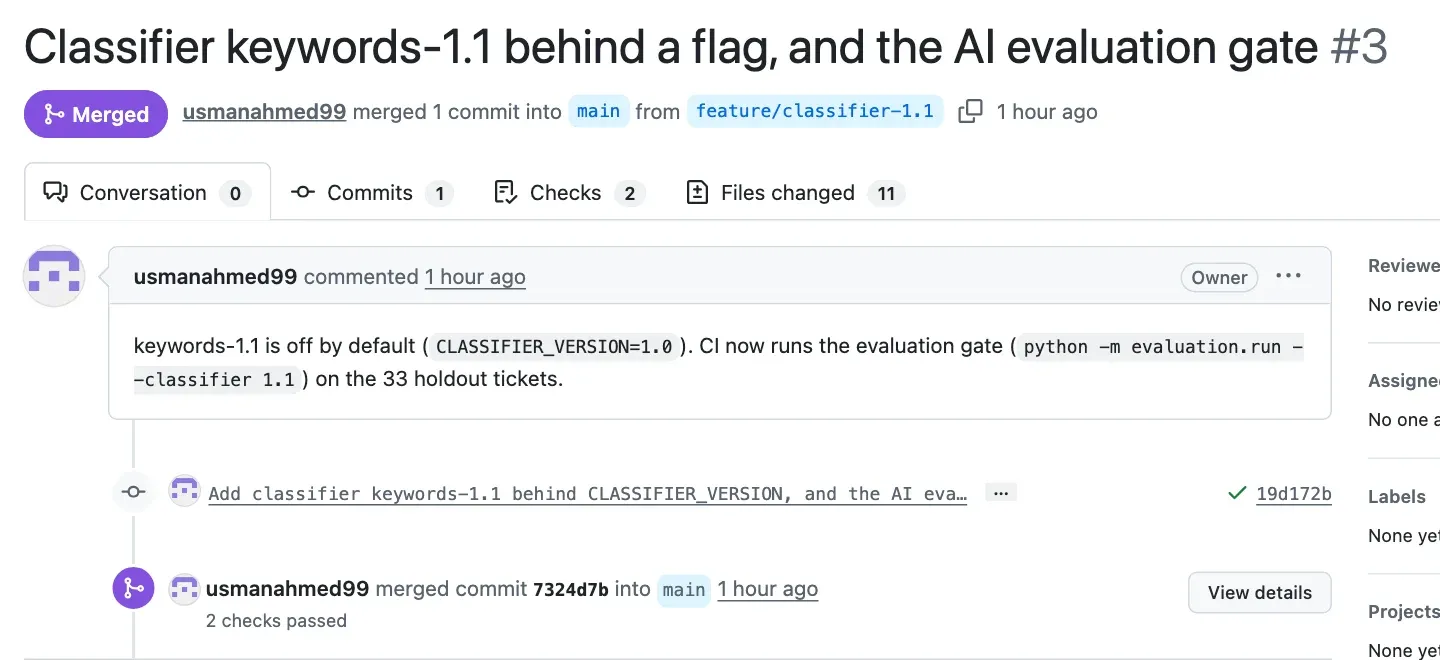
The page gives two commit IDs: 19d172b, the commit on the branch, and 7324d7b, the merge commit on main. Every run in the pipeline belongs to one of them. GitHub’s public API lists the runs of a commit. The output is short if you print only the fields that you need:
curl -s "https://api.github.com/repos/Nextia-Intelligence/ticket-api-ci/actions/runs?head_sha=7324d7b3ade618916d89d452bbe040c3fa630590" \ | python3 -c "import json,sys; [print(r['id'], r['name'], r['event'], r['conclusion']) for r in json.load(sys.stdin)['workflow_runs']]"curl.exe -s "https://api.github.com/repos/Nextia-Intelligence/ticket-api-ci/actions/runs?head_sha=7324d7b3ade618916d89d452bbe040c3fa630590" | python -c "import json,sys; [print(r['id'], r['name'], r['event'], r['conclusion']) for r in json.load(sys.stdin)['workflow_runs']]"The output:
37666627403 Deploy workflow_run success37666387332 CI push success37666141730 CI pull_request successThree runs, newest first. Read them from the bottom up, with the times from the run pages:
| Time (UTC) | What happened | Trigger | Evidence |
|---|---|---|---|
| 18:20:56 | Amira pushes 19d172b to feature/classifier-1.1 and opens the PR into main. |
PR #3 | |
| 18:21–18:22 | CI checks the branch: both jobs pass (25 s each). The image is built and tested, not pushed. | pull_request |
run 37666141730 |
| 18:22:55 | Amira merges. main gets the merge commit 7324d7b. |
PR #3 | |
| 18:23–18:24 | CI checks main again (40 s), then builds, smoke-tests and pushes the image sha-7324d7b (47 s). |
push |
run 37666387332 |
| 18:24:58 | Deploy sends the image to staging and smoke-checks it (55 s). | workflow_run |
run 37666627403 |
| 18:25:53 | Production waits for a reviewer. Amira approves. | the same run | |
| 18:26:54 | Production runs the same image, and its smoke check passes (53 s). | the same run |
Why does the pipeline check the code twice? The pull request run checks the branch. The run on main checks what main has after the merge, and only this run makes the image that can go to production. A pull request run never pushes an image.
The Deploy run shows the rest of the path on one page:
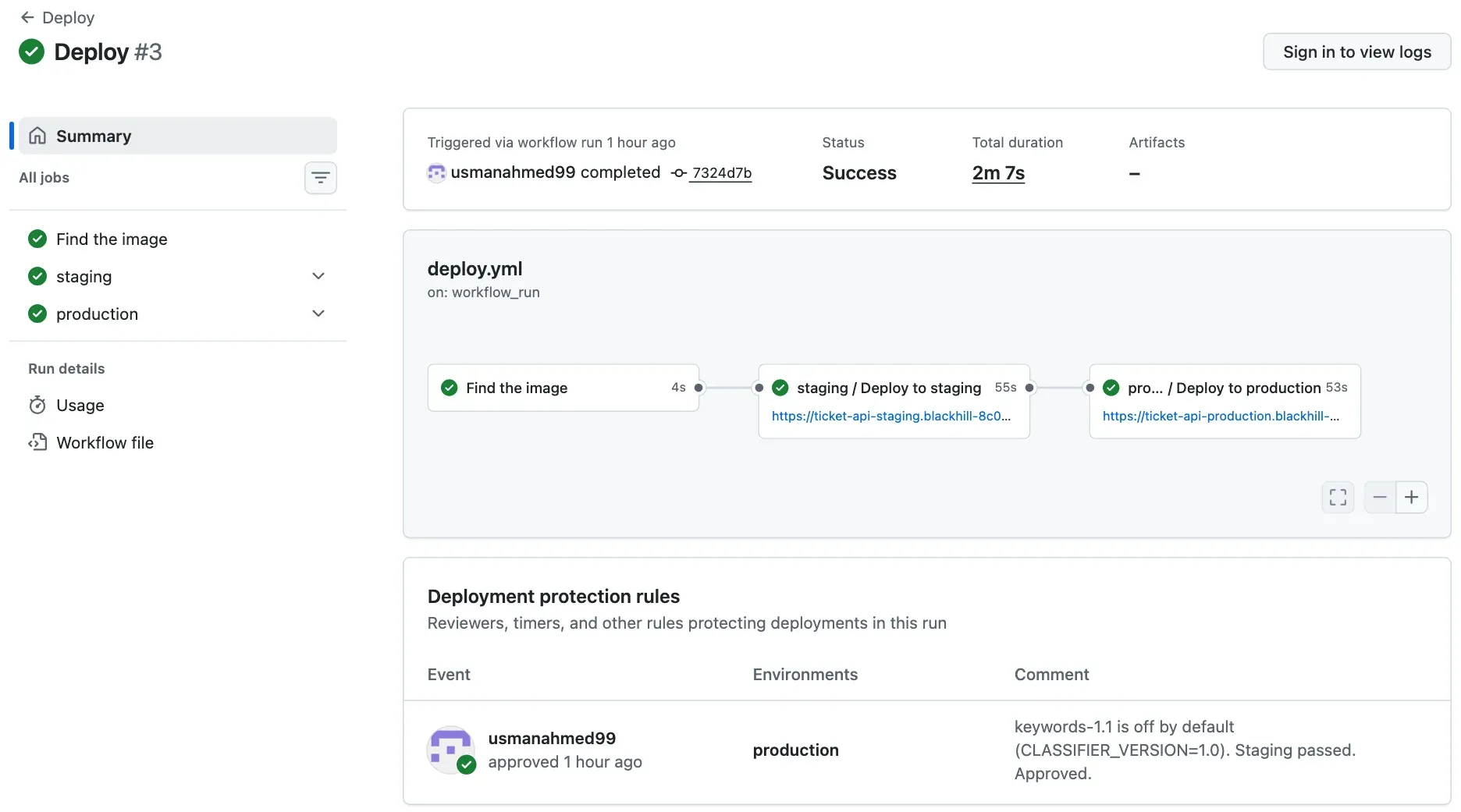
The logs need a sign-in, but the facts are in the run. Staging and production both received ghcr.io/usmanahmed99/ticket-api-ci@sha256:e5157802…, the digest that CI pushed for 7324d7b. Both smoke checks printed the same four lines:
ok health (200)ok ready (200)ok classify with the key (200)ok classify without a key (401)The approval has a comment that says why: the new classifier is off by default, and staging passed. A reviewer who approves without reading is not a gate.
The change is in production, but it is not yet a release. A release has a version name and notes. Later that day, v1.2.0 included this change, with notes and the digest of its image: see the v1.2.0 release. Lesson 2 explains tags and versions.
The pipeline and its gates
Section titled “The pipeline and its gates”A gate is a point that a change passes only if a condition is true. Every step of PR #3’s path has one, and every gate has an exit for a change that fails:

Text description of the diagram
Seven steps, in two workflows. In workflow CI: a commit on a branch, the pull request checks, the merge, and the build on main. A push straight to main is refused. A red check stops the merge. A branch that is blocked or behind main cannot merge until it is updated and checked again. A failed job on main pushes no image. When CI passes on main, workflow Deploy starts with the image’s digest. It deploys to staging and runs the smoke check; a failure stops the run before production. Production waits for a reviewer; without an approval, production keeps its current image. Production gets the same digest and its own smoke check; if it fails, the team deploys the last good digest. One artifact goes through every step after the build.
Look at what is not in the picture. No step builds a second image for production. No step copies files to a server. No person runs a command that the pipeline did not record. If staging and production ran two different builds, a test in staging would prove nothing about production. Module 2 builds the image once; Module 3 promotes it by its digest.
Not every gate is a check that you write. Steps 1 and 3 are rules of the repository (a ruleset, which Module 2 makes). Step 6 is a rule of the environment (Module 3). Lesson 3 of this module decides which checks steps 2 and 4 run.
Guided practice: trace a change yourself
Section titled “Guided practice: trace a change yourself”Trace PR #3 with your own browser and terminal. The goal is to find, for one change, every run and the image that reached production.
-
Open PR #3. Write down the source branch, the target branch and the merge commit.
-
Select the Checks tab. Write down the names of the two checks.
-
Run the
curlcommand of the worked example. Check that you get three runs. -
Open the CI run with the event
push:https://github.com/Nextia-Intelligence/ticket-api-ci/actions/runs/37666387332. Look at the job graph. Which job ran first? -
List the jobs of the Deploy run with their times:
Terminal curl -s https://api.github.com/repos/Nextia-Intelligence/ticket-api-ci/actions/runs/37666627403/jobs \| python3 -c "import json,sys; [print(j['name'], '|', j['conclusion'], '|', j['started_at'][11:19], '-', j['completed_at'][11:19]) for j in json.load(sys.stdin)['jobs']]"PowerShell (not tested) curl.exe -s https://api.github.com/repos/Nextia-Intelligence/ticket-api-ci/actions/runs/37666627403/jobs | python -c "import json,sys; [print(j['name'], '|', j['conclusion'], '|', j['started_at'][11:19], '-', j['completed_at'][11:19]) for j in json.load(sys.stdin)['jobs']]"The output:
Find the image | success | 18:24:50 - 18:24:54staging / Deploy to staging | success | 18:24:58 - 18:25:53production / Deploy to production | success | 18:26:01 - 18:26:54 -
Look at the gap between staging and production. What happened in those 8 seconds?
-
Open the Deploy run. Find who approved production, and why.
If curl prints API rate limit exceeded, wait one hour, or use the browser only. GitHub allows 60 requests per hour without a sign-in.
Show the expected answers
- Source
feature/classifier-1.1, targetmain, merge commit7324d7b. - “Lint, test, audit, evaluate” and “Build, smoke-test and push the image”. These are the two job names of workflow CI.
37666627403 Deploy,37666387332 CI push,37666141730 CI pull_request, allsuccess.- “Lint, test, audit, evaluate” ran first. The image job starts only when the checks job passed (
needs: checks). - As shown.
- Production waited for the required reviewer, and Amira approved. The wait was short because she was ready. A real wait can take hours, and the run waits with it.
- usmanahmed99 (Amira’s account in the test) approved, with the comment “keywords-1.1 is off by default (CLASSIFIER_VERSION=1.0). Staging passed. Approved.”
Your turn: trace the 1.2.0 release
Section titled “Your turn: trace the 1.2.0 release”PR #5 has the source feature/score-field and the target main. It added the field score and became version 1.2.0. Its merge commit is c3c7135ec035fc0f7990a23a111ca4d460830d01. Find its runs with the same curl command and this commit. Then answer: which workflows ran, and which one did not run for PR #3? Which digest went to production? Where do you find that digest without a sign-in?
Show the answer
The output (2026-10-07):
37667587273 Release push success37667574234 Deploy workflow_run success37667326873 CI push successA third workflow ran: Release, triggered by the push of the tag v1.2.0. A tag push is a trigger too. The v1.2.0 release page ends with the image: ghcr.io/usmanahmed99/ticket-api-ci@sha256:bd2316b56067c738199d6203a23845c97fb7b85b550379411eddd7cc6a2ddab8 (tag 1.2.0). The Deploy run sent the same digest to staging and production, and the approval comment says “Release 1.2.0: staging smoke checks passed. keywords-1.1 stays off in production for now.” The Release workflow built nothing: it gave the image that CI had built a version name. Module 3 shows how.
This run list has no pull_request run, because the PR’s runs belong to the branch commit, not to the merge commit. GitHub listed it for PR #3; do not depend on it.
Common mistake
The pull request is green, but production did not change
Symptom: Sam sees the green check marks on a pull request, and tells the help desk that the new classifier is live. The help desk sends a ticket, and the answer still says keywords-1.0.
Cause: a green pull request means that the branch passed the checks. The pull request run builds and tests an image, but it does not push it, so there is nothing to deploy. Look at the steps of PR #3’s run:
Smoke-test the image before it leaves this runner successSign in to GitHub Container Registry skippedPush the same build skippedProduction changes only after the merge, the CI run on main, a passed staging, and the approval. Here there is a second reason: keywords-1.1 is off by default. Even in production, the answers say keywords-1.0 until someone sets CLASSIFIER_VERSION=1.1 (Module 4).
Fix: to know what runs in production, read the Deploy run, not the pull request. Check three things: the run’s commit, its conclusion, and the digest that the production job deployed. In the reference repository, the Deploy run of 7324d7b answers all three.
For a real AI service: “the model is deployed” can mean “the pull request passed”, “the image exists”, “staging runs it” or “users get it”. The help desk acts on what users get. Say which one you mean, with the run as evidence.
Check your understanding
The ticket API's production waits for a reviewer. Is that continuous delivery or continuous deployment, and why did the team choose it?
Show the answer
Continuous delivery. Every change that passes the checks can go to production, and the steps are automatic, but a person approves the production step. The team chose it because a classifier change changes the priorities that the help desk works with. A person reads the staging result before users see it. With continuous deployment, the pipeline would send every passed change to production with no approval.
Does your answer have the main points of ours?
Sign in and enroll in the course to save your answers. Every check counts toward the certificate.
Check your understanding
Predict: the staging job of a Deploy run fails at its first step. What happens to production, and what image does it run after that?
Show the answer
The production job does not start, because it runs only after staging passed. Production keeps the image that it already had. This happened in the reference repository. The first attempt of Deploy run 37664760027 failed at the Azure sign-in in staging. The production job was skipped. Module 3 explains that error and its fix.
Does your answer have the main points of ours?
Sign in and enroll in the course to save your answers. Every check counts toward the certificate.
Recap
- CI checks every change on every push. CD takes the checked result to the environments. A pipeline is the whole path.
- Continuous delivery: every passed change can go to production, after an approval. Continuous deployment: it goes with no approval. This course uses delivery.
- A trigger starts a workflow. A workflow has jobs, a job has steps, and each job runs on a new runner. An artifact is a file that a run keeps. An environment is a place where the app runs, such as staging or production.
- PR #3 went from a commit to production in about six minutes, and passed a gate at every step. The image was built once, and staging and production ran the same digest.
- A green pull request is not a deployment. Read the Deploy run to know what production runs.
Next: Choose a branch workflow