
Runner setup
- Lesson 4
- 45 min
- Module 2: Create a repeatable CI pipeline
Lesson 4 of 15 · CI/CD, Testing and Safe ReleasesRunner setup
1. Understand the delivery path
2. Create a repeatable CI pipeline
3. Manage environments and secrets
4. Release AI and database changes
5. Recover and maintain the release process
What you will be able to do
A check that runs only on your computer depends on your computer. Give the checks a machine that starts clean for every job, so that a result means the same thing for everyone on the team.
Before you startWhat to know and to have ready
What you need to know
- Trigger, workflow, job, step, runner and artifact, from From commit to release: The words, on the real pipeline.
- Which check catches which mistake, and why lint runs first, from Define checks: Which check catches which mistake and Fast checks first.
- Commits, branches and
git push, from Pull request sequence: What a pull request is in Git and Team Development Essentials. - The exact versions in
requirements-lock.txt, from Environment and first endpoint: Step 1: make the project in Build and Deploy Your First API. - The layer cache of a Docker build, from Build efficiently: The layer cache in Docker and Cloud Essentials for AI Developers.
What you need on your computer
- The project folder
~/projects/ticket-api-ci(Windows:$HOME\projects\ticket-api-ci) with the Docker course’s ticket API 1.1.0 and the commit ofdocs/release-process.md, from Define checks: Module practice. It is a Git repository on the branchmain, with no remote yet. - Its virtual environment
.venv, made fromrequirements-lock.txt, as in Environment and first endpoint: Step 1: make the project in the API course. The clone of Module 1 has no.venv: make it in~/projects/ticket-api-ci. - A free GitHub account. You make a public repository in this lesson. Public repositories run GitHub Actions on GitHub’s standard runners for free.
- Git. The GitHub CLI
ghis optional: every GitHub step is also described in the web pages. - If your project is missing or broken, copy the snapshot
end-of-m01, as in Use a snapshot.
Run with GitHub Actions (ubuntu-24.04 runners) in the public repository Nextia-Intelligence/ticket-api-ci, and ruff 0.16.10 with Python 3.14 on macOS (Apple silicon). The Windows and Linux steps are not tested.
Where a job runs: the runner
Section titled “Where a job runs: the runner”Amira’s checks work on her Mac. Sam asks a fair question: “Do they also work on a computer that is not yours?” Her Mac has packages from old experiments, a cache from last week and settings that nobody wrote down. A check that passes there proves only that it passes there.
A runner is the machine that runs the jobs of a workflow. GitHub offers two kinds:
| GitHub-hosted runner | Self-hosted runner | |
|---|---|---|
| Who owns the machine | GitHub | You: a server, a VM or a computer in your office |
| State at the start of a job | A new virtual machine (VM) | Whatever the last job left on it |
| Cost for a public repository | Free on the standard runners | Your own hardware and its care |
| Use it for | Most pipelines, and all of this course | Special hardware (a GPU), or access to a private network |
The course uses only GitHub-hosted runners. A workflow chooses the runner with one line: runs-on: ubuntu-24.04.
A clean machine for every job
Section titled “A clean machine for every job”“With the exception of single-CPU runners, each GitHub-hosted runner is a new virtual machine (VM) hosted by GitHub” (GitHub Docs). The job’s log says which machine it got. Here is the start of the first job of run 37663364319 in the reference repository:
Current runner version: '2.337.0'Azure Region: southcentralusOperating SystemUbuntu24.04.5LTSRunner ImageImage: ubuntu-24.04Version: 20260927.320.1GITHUB_TOKEN PermissionsContents: readMetadata: readThe second job of the same run started about 6 seconds after the first ended. It ran on another VM, in centralus. Nothing from the first VM was on it. It checked out the code again.
This is the point of a clean runner. Every job starts from the same known image (here ubuntu-24.04, version 20260927.320.1). It gets only what the workflow installs. If a check needs a package that the lock file does not list, the job fails, on every run, for everyone. A missing step in the setup cannot hide on a runner.

Text description of the diagram
Job 1 runs the checks on a new VM. Job 2 builds the image on another new VM, and it must check out the code again, because nothing from job 1 is there. The arrow between them carries only the result: job 2 starts only if job 1 passed. Two things outside the VMs last after a job. A cache keeps files that make the next run faster, such as downloaded packages. An artifact keeps a result for people and for later jobs, such as the test report. Lesson 3 of this module is about artifacts.
A cache that cannot change the result
Section titled “A cache that cannot change the result”A clean VM has one cost: every job downloads everything again. A cache is a set of files that a job saves and a later job restores, so that it does not download them again. The workflow asks actions/setup-python to cache pip’s downloads:
- uses: actions/setup-python@v7 with: python-version: "3.14.8" cache: pip cache-dependency-path: requirements-lock.txtThe cache has a key: a name made from the runner’s OS, the Python version and a hash of requirements-lock.txt. A job restores a cache only if the key matches. The real logs show the three cases.
The first green run found no cache, installed in 15 s, and saved one at the end of the job:
pip cache is not found...Sent 44025642 of 44025642 (100.0%), 42.1 MBs/secCache saved with the key: setup-python-Linux-x64-24.04-Ubuntu-python-3.14.8-pip-ec6bc0c05328f7a2f23375d7193327a08c67ec754519aba7be011c58d10a258dThe next run (37664331105, the first pull request) had the same lock file, so the key matched:
Cache restored successfullyCache restored from key: setup-python-Linux-x64-24.04-Ubuntu-python-3.14.8-pip-ec6bc0c05328f7a2f23...The install took 12.3 s instead of 15.0 s. The saving is small, because pip still installs every package. It only skips the downloads. The third case is less obvious: the first run of all failed, and saved no cache. The cache is saved in a “post” step at the end of the job, and that step did not run after the failure.
Now the rule. A cache may make a job faster. It must never change what the job checks or builds. This cache keeps the rule for three reasons:
- The key comes from the lock file. If one version in
requirements-lock.txtchanges, the hash changes, the old cache does not match, and the job downloads again. - pip installs exactly the versions in the lock file. The cache only gives it the same files faster.
- A missing cache only makes the job slower. The result is the same.
A bad cache breaks the rule. For example, a cache of the whole .venv folder with a fixed key, such as venv, would restore old packages after the lock file changes. The checks would then test packages that the image does not have. Lesson 2 uses the same idea for the Docker build, with BuildKit’s layer cache (type=gha). As in the Docker course, a changed file makes its step run again.
GitHub deletes a cache that nobody used for 7 days, and a repository can keep 10 GB of caches by default. A job can restore caches from its own branch and from the default branch, main. (Source: GitHub Docs: dependency caching.)
Pin the actions too
Section titled “Pin the actions too”The workflow uses actions by major version: actions/checkout@v7. The action’s owner can move v7 to a newer v7.x release with fixes. The log shows the exact commit that v7 meant on that day:
Download action repository 'actions/checkout@v7' (SHA:3d3c42e5aac5ba805825da76410c181273ba90b1)Download action repository 'actions/setup-python@v7' (SHA:5fda3b95a4ea91299a34e894583c3862153e4b97)The strictest pin is that full commit SHA: uses: actions/checkout@3d3c42e5aac5ba805825da76410c181273ba90b1. GitHub says that this “is currently the only way to use an action as an immutable release” (GitHub Docs: secure use). The trade-off is the same as with an image digest in the Docker course: nothing changes without you, and that includes security fixes. This course pins by major version, because every action here comes from GitHub or Docker. For an action from a person or a small project, pin the SHA, and read the code of the version that you pin.
Worked example: the first workflow
Section titled “Worked example: the first workflow”Amira makes the repository, pushes the project, and adds the first workflow. She expects it to pass: the API course and the Docker course had 25 green tests.
1. Make the repository on GitHub
Section titled “1. Make the repository on GitHub”On github.com, Amira selects + (top right) → New repository. She enters the name ticket-api-ci, chooses Public, and leaves the README, .gitignore and licence options empty, because the project already has its files. She selects Create repository.
2. Check what Git will send, then push
Section titled “2. Check what Git will send, then push”cat .gitignoregit statusgit remote add origin https://github.com/<you>/ticket-api-ci.gitgit push -u origin mainReplace <you> with your GitHub user name. If Git says remote origin already exists, the folder still points to the Docker course’s folder: run git remote remove origin, as in Define checks: Module practice, and add the remote again. git push sends every commit of main, also the one with docs/release-process.md. If Git asks for a password, your GitHub password does not work. Sign in with gh auth login first, or use another method from GitHub’s documentation.
3. Add the tools and the lint settings
Section titled “3. Add the tools and the lint settings”Two new tools go in requirements.txt, in the part for working on the API: ruff, a fast linter for Python, and pip-audit, which Build and test uses.
# Needed to work on the APIpytest==9.1.1httpx2==2.13.1ruff==0.16.10pip-audit==2.10.1Install them and write the lock file again, as in the API course. In the reference repository, this added 18 lines, such as ruff==0.16.10 and pip_audit==2.10.1 and their dependencies.
python -m pip install -r requirements.txtpython -m pip freeze > requirements-lock.txtThen tell ruff what to check, in pyproject.toml:
[tool.ruff]line-length = 100target-version = "py312"
[tool.ruff.lint]select = ["E", "F", "I", "B"]
E and F are the basic errors (style errors and real mistakes, such as an unused import). I checks the order of the imports. B finds likely bugs. The course does not use ruff format. It would change the API course’s code only for style, and the history of each change would be harder to read.
4. The workflow file
Section titled “4. The workflow file”GitHub runs every YAML file in the folder .github/workflows/. Amira makes .github/workflows/ci.yml. The reference repository added the whole pipeline in one commit. This lesson starts with the first job and one check, and the next two lessons add the rest:
# Continuous integration: check every change, then build one image per commit.# Pull requests: checks and a test build (nothing is pushed).# main, hotfix/* and version tags: checks, then build, smoke-test and push the# image to GitHub Container Registry, with build evidence.name: CI
on:  pull_request:  push:    branches: [main, "hotfix/**"]    tags: ["v*"]
permissions:  contents: read
concurrency:  group: ci-${{ github.ref }}  cancel-in-progress: ${{ github.event_name == 'pull_request' }}
jobs:  checks:    name: Lint, test, audit    runs-on: ubuntu-24.04    timeout-minutes: 15    steps:      - uses: actions/checkout@v7      - uses: actions/setup-python@v7        with:          python-version: "3.14.8"          cache: pip          cache-dependency-path: requirements-lock.txt      - name: Install the exact versions        run: python -m pip install -r requirements-lock.txt      - name: Lint        run: ruff check .
Each part has a reason:
on:lists the triggers. Every pull request runs the checks. A push runs them onmain, on a hotfix branch and on a version tag. Module 3 removes the tag trigger, when the release workflow takes over.permissions: contents: readlimits theGITHUB_TOKEN, the key that GitHub gives each run, to reading the code. A job that needs more asks for it. The log’sGITHUB_TOKEN Permissionslines show the result.concurrencyputs the runs of one branch in one group. A new push to a pull request cancels the older run of that pull request. Onmain,cancel-in-progressisfalse, so every commit onmaingets its complete run.name: Lint, test, auditis the job’s name on GitHub. Lesson 3 makes this name a required check, so choose it with care.timeout-minutes: 15stops a job that hangs. The default is much longer.- The steps: get the code, get Python 3.14.8 with the pip cache, install the exact versions, lint.
In the expressions, ${{ github.ref }} is the branch or tag of the run, and ${{ github.event_name }} is the trigger, such as push.
5. Commit, push and predict
Section titled “5. Commit, push and predict”git add requirements.txt requirements-lock.txt pyproject.toml .github/workflows/ci.ymlgit commit -m "Add the CI pipeline: the first job, with lint"git pushPredict: the API course and the Docker course tested this code. Does the job pass?
On GitHub, open the repository’s Actions tab. The run appears within a few seconds. In the reference repository, the first run 37663263329 failed after 25 s:
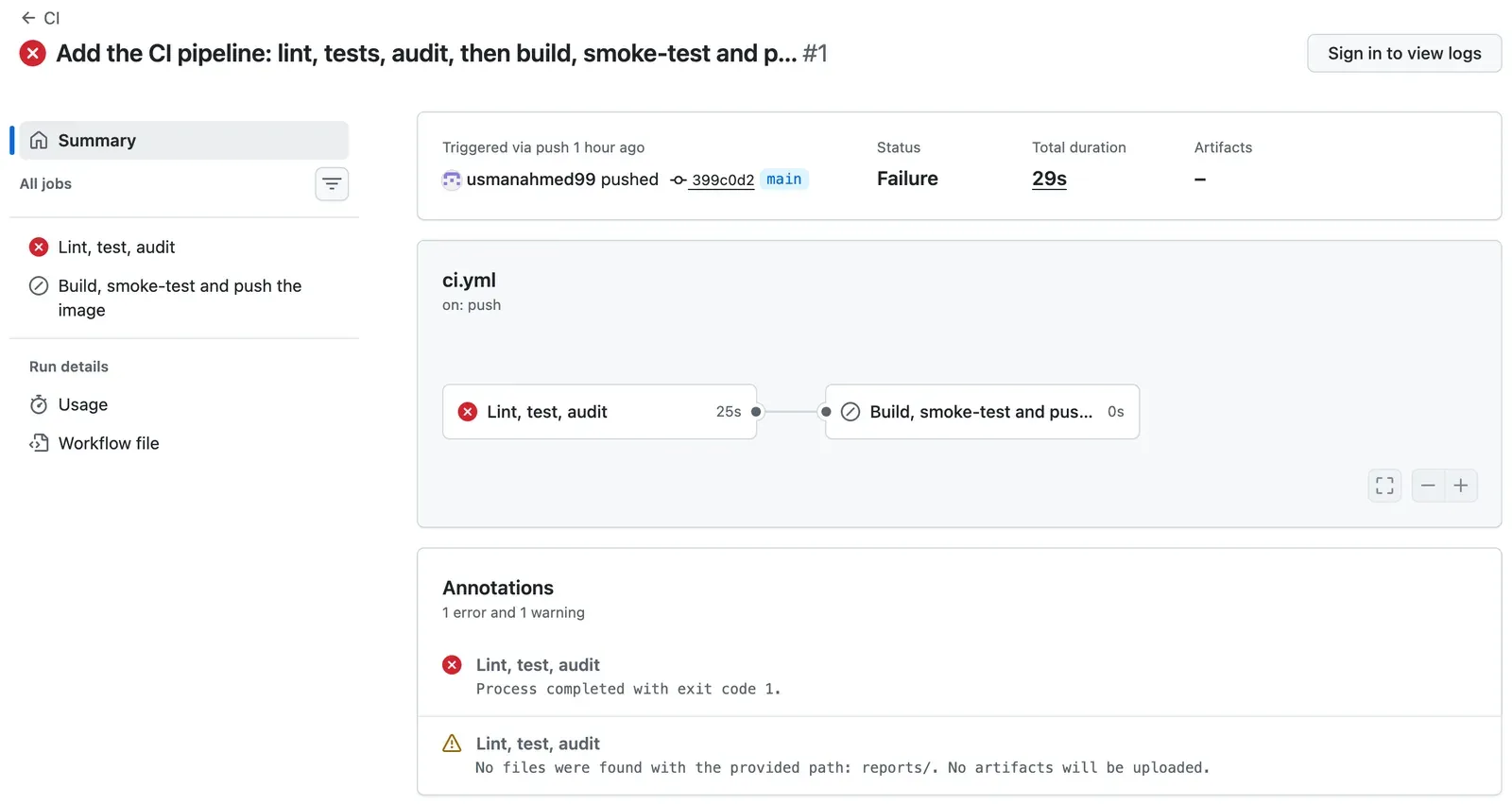
The page shows that the job failed, but not why. To read the log, sign in, open the job, and open the red step Lint. Or use the GitHub CLI:
gh run view --log-failedThe output (shortened; the reference run):
B904 Within an `except` clause, raise exceptions with `raise ... from err` or `raise ... from None` to distinguish them from errors in exception handling  --> ticket_api/config.py:28:13   |27 |         except OSError as error:28 |             raise SettingsError(f"{name}_FILE: cannot read {path}: {error.strerror}")   |             ^^^^^^^^^^^^^^^^^^^^^^^^^^^^^^^^^^^^^^^^^^^^^^^^^^^^^^^^^^^^^^^^^^^^^^^^^29 |     return os.environ.get(name) or None   |
I001 [*] Import block is un-sorted or un-formatted  --> ticket_api/routes.py:1:1...Found 2 errors.[*] 1 fixable with the `--fix` option.##[error]Process completed with exit code 1.
The code works, and its tests pass. But the linter found two problems that no test looked for. The tests checked what the code does. The linter checked how it is written.
6. Reproduce it on your computer
Section titled “6. Reproduce it on your computer”A failure in CI is easier to fix when you can see it on your own computer. The lock file gave the runner ruff 0.16.10, and it gave you the same version:
ruff --versionruff check .The output: ruff 0.16.10, then the same two errors, line for line, and Found 2 errors. The exit code is 1, as on the runner. Same tool, same version, same settings, same result. That is why the job installs from the lock file.
7. Fix the two findings
Section titled “7. Fix the two findings”I001 can be fixed automatically. ruff check --fix . sorts the imports of ticket_api/routes.py:
import asynciofrom typing import Annotated, get_args
import loggingfrom typing import Annotated, get_args
B904 needs a decision, so ruff does not fix it. Inside an except block, a new error carries the old error with it, and the log shows both. Here, SettingsError already says what went wrong in one clear line, so the old OSError adds only noise. from None says that this is on purpose:
except OSError as error: raise SettingsError(f"{name}_FILE: cannot read {path}: {error.strerror}") raise SettingsError(f"{name}_FILE: cannot read {path}: {error.strerror}") from NoneCheck again, then commit and push:
ruff check .python -m pytest -qgit commit -am "Fix the two lint findings: raise ... from None, and sort the imports"git pushThe output of the first two commands:
All checks passed!......................... [100%]25 passed in 0.25sThe new run is green. The Lint step of the reference repository’s run 37663364319 printed All checks passed! (same message). Its commit is c862935: two changed lines.
Guided practice: your runner and your first green run
Section titled “Guided practice: your runner and your first green run”- Make the public repository
ticket-api-cion GitHub, with no README. - Check
.gitignoreandgit status, then pushmain. - Add
ruff==0.16.10andpip-audit==2.10.1, install, and write the lock file again. - Add the
[tool.ruff]settings topyproject.toml. - Make
.github/workflows/ci.ymlwith the first job, then commit and push. - Open the run on the Actions tab. Write down the runner image version and the Azure region from Set up job.
- Read the failed step’s log. Then run
ruff check .on your computer and compare. - Fix the two findings, run
ruff check .and the tests, then commit and push. - Open the new run. In the step of
actions/setup-python, find the cache line. In the post step at the end of the job, findCache saved with the key.
Show the expected result
The first run is red. The Lint step shows B904 in ticket_api/config.py:28:13 and I001 in ticket_api/routes.py:1:1, then Found 2 errors. Your computer prints the same two errors. Set up job says Image: ubuntu-24.04 and a version (20260927.320.1 on the test day; yours can be newer), and an Azure region that can change from run to run. The second run is green, with All checks passed! in Lint. Its Python step says pip cache is not found, because the failed run saved no cache. Its last steps save a cache of about 44 MB. A third run with the same lock file would say Cache restored successfully.
Your turn: predict the linter
Section titled “Your turn: predict the linter”Do this on your computer only. Do not push it. Add one line at the top of ticket_api/main.py: import os. The module never uses os. Predict: how many findings does ruff check . report, and which rule codes? Can --fix repair them? Then run it, and remove the line again with ruff check --fix ..
Show the answer
Two findings, not one. The output (shortened):
I001 [*] Import block is un-sorted or un-formatted --> ticket_api/main.py:1:1...F401 [*] `os` imported but unused --> ticket_api/main.py:1:8...Found 2 errors.[*] 2 fixable with the `--fix` option.F401 is the unused import. I001 is the order: os must come after logging. Both have [*], so ruff check --fix . repairs both: it removes the line. The test computer printed Found 1 error (1 fixed, 0 remaining)., because the removal also fixed the order. A runner would report the same two findings, with the same versions. That is the reason to run ruff check . before every push: the runner’s answer is never a surprise.
Common mistake
The workflow file does not start
Symptom: you push a workflow, and no job starts. Instead, the Actions tab shows an error for the workflow file. This happens when GitHub cannot read the YAML. (This mistake was made on purpose on the test computer, not in the reference repository.)
Cause: one line has the wrong indentation. In YAML, the spaces at the start of a line decide what belongs to what. Here, with: moved two spaces to the left, out of its step:
- uses: actions/setup-python@v7 with: python-version: "3.14.8"Diagnose: check the file on your computer with actionlint, a checker for workflow files. It runs in a container, so there is nothing to install:
docker run --rm -v "$PWD":/repo -w /repo rhysd/actionlint:latest .github/workflows/*.ymlThe output:
.github/workflows/ci.yml:25:6: could not parse as YAML: did not find expected '-' indicator [syntax-check] |25 | steps: | ^~~~~The line number points to the list that broke (steps:), not to the wrong line. Read the lines under it.
Fix: move with: back under uses:, two spaces to the right of the -. Run actionlint again: no output means no problem found. Then commit and push.
For a real AI service: a workflow is code that guards production. Check it like code: actionlint before the push, and a pull request for every change to it, after Publish evidence adds the ruleset.
Check your understanding
Job 1 installs the packages from the lock file. Why must job 2 check out the code again, and why can it not use job 1's packages?
Show the answer
Each job runs on a new VM, and GitHub deletes the VM when the job ends. Job 2 starts on another clean VM, with nothing from job 1: no code, no packages, no files. Only what job 1 saved outside its VM lasts: a cache, an artifact, or its result (passed or failed). That is a feature. Job 2’s result depends only on what job 2 does, so nobody needs to know what was on a machine before.
Does your answer have the main points of ours?
Sign in and enroll in the course to save your answers. Every check counts toward the certificate.
Check your understanding
Sam wants a faster pipeline. He proposes to cache the whole .venv folder with the fixed key venv. What goes wrong when requirements-lock.txt changes, and how does the course's cache avoid it?
Show the answer
With a fixed key, the next run restores the old .venv, with the old versions. The checks then pass or fail on packages that the lock file, and the image, no longer have. The cache changed the result, which a cache must never do. The course’s cache has a key made from the hash of requirements-lock.txt, so a changed lock file never matches an old cache. It also stores only pip’s downloads: pip still installs exactly the versions in the lock file.
Does your answer have the main points of ours?
Sign in and enroll in the course to save your answers. Every check counts toward the certificate.
Check your understanding
Practical: show your first two runs. Which step failed in the first, which rule codes did it report, and what did ruff check . print on your computer?
Show the answer
The first run failed in the step Lint with exit code 1: B904 in ticket_api/config.py line 28 and I001 in ticket_api/routes.py line 1, then Found 2 errors. On your computer, ruff check . printed the same two findings, because the lock file gave both machines ruff 0.16.10 and pyproject.toml gave both the same rules. The second run, after the fix commit, is green, and its Lint step says All checks passed!
Does your answer have the main points of ours?
Sign in and enroll in the course to save your answers. Every check counts toward the certificate.
Recap
- A runner is the machine that runs a job. GitHub-hosted runners start each job on a new VM. Never put a self-hosted runner on a public repository.
- A clean VM makes every result repeatable: a job has only what the workflow installs.
- A cache may make a job faster, never different. Its key comes from the lock file, and it stores only downloads.
- Pin actions by major version, or by full commit SHA for the strictest pin.
- The first real run failed on lint, with the same two findings on the runner and on your computer. You fixed them and the run went green.
Next, the job gets the meaningful checks (tests and a security check), and a second job builds the image once and tests it.
Next: Build and test