
Pull-request sequence
- Lesson 7
- 45 min
- Module 3: Collaborate through reviews
Lesson 7 of 15 · Git and Team Development EssentialsPull-request sequence
1. Understand a repository
2. Work with branches and remotes
3. Collaborate through reviews
4. Resolve and recover
5. Release and hotfix practice
What you will be able to do
Get a change into main the way that teams do it: on its own branch, with a check and a review before the merge. After this lesson, you can take one change through every step of a pull request.
Before you startWhat to know and to have ready
What you need to know
- How
git push,git fetchandgit pullmove commits between your clone and the remote, from Synchronize deliberately: Your copy of the remote. - How Git joins two lines of work with a merge commit, from Synchronize deliberately: Both people commit at the same time.
What you need on your computer
- A terminal in your
~/projectsfolder. On Windows, use Git Bash, from Terminal bridge: Get a terminal. - Git, with your name and email address, from Set up Git: Step 2: tell Git who you are. The commits that you make in the lab show this name.
- An internet connection, one time, to clone the practice files in Set up the practice lab. That section makes the lab, and shows how to make it again with
--reset. - You do not need an account on a website. This lesson is a local simulation: the remote is a folder on your computer, and you play both people.
- The setup script makes its commits with fixed names and dates. So their hashes are the same as in this lesson, for example
e058b3f. The commits that you make yourself have different hashes. Use the ones from your own output.
Tested with Git 2.54 on macOS, Windows (Git Bash) and Linux. Git 2.40 or later is required. The setup script for the labs is not yet tested in Git Bash on Windows.
Set up the practice lab
Section titled “Set up the practice lab”From this module on, you practise in a lab that a script makes for you. The lab has a known start state: the same files, branches and commits as the lessons. If something goes wrong, you can make it again in a few seconds.
Your ~/projects/ticket-notes repository from Modules 1 and 2 does not change. The lab is in a new folder.
-
Go to your projects folder:
Terminal window cd ~/projects -
Get the practice files. Do this step only once. If you already have the
nextia-learning-labsfolder, rungit -C nextia-learning-labs pullto get the newest version instead.Terminal window git clone https://github.com/Nextia-Intelligence/nextia-learning-labs.gitThe output starts with
Cloning into 'nextia-learning-labs'.... -
Make the lab for this module:
Terminal window sh nextia-learning-labs/C14/setup.sh m03Output Ready: /Users/amira/projects/c14-labticket-notes your clonesam-notes Sam's cloneteam-remote.git the shared remoteNext: cd c14-lab/ticket-notesTo start this scenario again: sh nextia-learning-labs/C14/setup.sh m03 --reset -
Go into your clone, and look at the history:
Terminal window cd c14-lab/ticket-notesgit log --oneline --graph --allOutput * 2e9e37c (HEAD -> main, origin/main, origin/HEAD) Add the on-call number| * 6c3828f (origin/add-faq, add-faq) Add a network question to the FAQ| * 6b53600 Add FAQ|/| * 5a15d07 (origin/add-ticket-104) Improve README wording| * e34484f Add ticket 104|/* e058b3f Add ticket 103* bae8898 Add a format check for ticket notes* eec3e5b Ignore secrets, exports and logs* 55b7943 Add contacts* 6a0bdd9 Add ticket 102* e01bd9f Add first ticket note* ec0aceb Add READMEIf your hashes are the same, the lab is ready.
The c14-lab folder contains three repositories:
| Folder | What it is |
|---|---|
team-remote.git |
The shared remote: a bare repository, as in Module 2. |
ticket-notes |
Your clone. You work here as Amira. Your own commits show the name from your global settings (Module 1). |
sam-notes |
The clone of your teammate, Sam Okafor. Its identity is already set to Sam, so commits that you make there show his name. |
The other branches, add-ticket-104 and add-faq, are for the next two lessons.
To start again at any time, go to ~/projects and add --reset to the setup command. It deletes only the c14-lab folder, then makes it again:
sh nextia-learning-labs/C14/setup.sh m03 --resetWithout --reset, the script does not delete anything. It stops with The folder c14-lab already exists.
What a pull request is
Section titled “What a pull request is”On a team, nobody commits directly to main. Each change goes onto its own branch first. Then the author asks the team to merge it. This request is a pull request (PR): a request to merge a source branch into a target branch after review. GitLab calls the same thing a merge request.
Every PR has two branches. You must always know which is which:
- The source branch has the new commits. In this lesson, it is
add-ticket-template. - The target branch is where the commits go. Usually it is
main.
This lesson writes the pair as add-ticket-template → main.
Before the merge, two things happen:
- A check is a command that tests the change automatically, for example a format check or the tests of a program. On a hosted service such as GitHub, a continuous integration (CI) service runs the checks each time that you push to the branch.
- A review is when a teammate reads the change and decides. The reviewer either approves it, or requests changes: asks the author to fix something first.
At the end, someone merges the PR. You met merging in Module 2: Git joins two lines of history with a new commit that has both as parents.
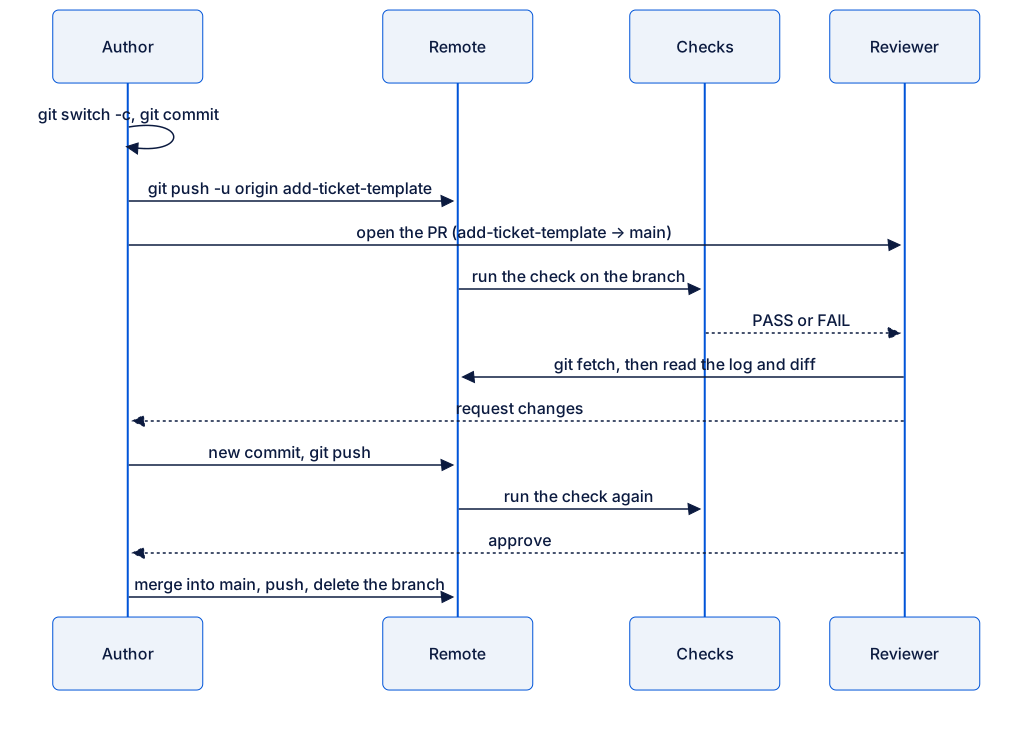
The simulation in this lesson
Section titled “The simulation in this lesson”A hosted service shows the PR on a web page. You do not need one to learn the sequence. This lesson does each step with Git commands and text files:
| Step | In this lesson (simulation) | On GitHub (optional, not required) |
|---|---|---|
| Make a branch and commit | git switch -c, git commit |
The same. |
| Push the branch | git push -u origin add-ticket-template |
The same. GitHub then shows a Compare & pull request button. |
| Open the PR | Write the PR description in a text file next to the repository. | Select Compare & pull request. Set base to main (the target) and compare to add-ticket-template (the source). Write the description, then select Create pull request. |
| Run the checks | Run sh check.sh yourself. |
CI runs the checks. You see the result on the Checks tab. |
| Review | In sam-notes, fetch, then read git log and git diff. Write the review in the PR file. |
The reviewer reads the Files changed tab, then selects Review changes, and then Request changes or Approve. |
| Respond to the review | Make a new commit on the same branch, and push. | The same. The PR shows the new commit. |
| Merge | Switch to main, merge with --no-ff, and push. |
Select Merge pull request, then Confirm merge. |
| Delete the branch | git branch -d and git push origin --delete |
Select Delete branch. Then run git branch -d on your computer. |
Worked example: a template for ticket lines
Section titled “Worked example: a template for ticket lines”The ticket-notes repository has a check, check.sh. It fails when a line in tickets.txt does not start with Ticket <number>: . New help desk staff do not know this format. Amira wants to add a template that shows it.
1. Make the branch
Section titled “1. Make the branch”Current branch: main. Amira makes sure that main is up to date, because the new branch starts from it:
git pullAlready up to date.She makes the source branch:
git switch -c add-ticket-templateSwitched to a new branch 'add-ticket-template'2. Commit
Section titled “2. Commit”Current branch: add-ticket-template. She makes template.txt with one line:
Ticket <number>: <the problem>. <what you did>.She stages and commits it:
git add template.txtgit commit -m "Add a template for ticket lines"[add-ticket-template d08926d] Add a template for ticket lines 1 file changed, 1 insertion(+) create mode 100644 template.txt3. Check before you push
Section titled “3. Check before you push”Before she asks for a review, Amira makes sure of two things. First, the branch contains only her change. main..add-ticket-template means “the commits on add-ticket-template that are not on main”:
git log --oneline main..add-ticket-templated08926d Add a template for ticket linesOne commit, and it is hers. Second, the check passes:
sh check.shPASS: 3 ticket lines checkedsh check.sh runs the script in the file check.sh. On GitHub, CI runs this same command for each push. Here, you run it yourself.
4. Push the branch
Section titled “4. Push the branch”git push -u origin add-ticket-templateTo /Users/amira/projects/c14-lab/team-remote.git * [new branch] add-ticket-template -> add-ticket-templatebranch 'add-ticket-template' set up to track 'origin/add-ticket-template'.5. Open the PR (simulation)
Section titled “5. Open the PR (simulation)”PR: add-ticket-template → main. A good PR description answers three questions for the reviewer: what is the problem, what did you change, and how did you check it. Amira writes it in a new file, ~/projects/c14-lab/pr-add-ticket-template.md. The file is next to the repository, not in it, so it does not go into a commit.
# Add a template for ticket lines
Source: add-ticket-template. Target: main.
## ProblemNew help desk staff write ticket lines in different formats.Then check.sh fails, and they do not know why.
## ChangeAdd template.txt. It shows the format that check.sh expects.
## How I checked- `git log --oneline main..add-ticket-template` shows only my commit.- `sh check.sh` on the branch: PASS: 3 ticket lines checked.
6. Review (simulation: you play Sam)
Section titled “6. Review (simulation: you play Sam)”Sam reviews in his own clone. He fetches, so that his record of the remote has the new branch:
cd ../sam-notesgit fetchFrom /Users/amira/projects/c14-lab/team-remote * [new branch] add-ticket-template -> origin/add-ticket-templateHe reads the commits and the change. The diff uses three dots: main...origin/add-ticket-template shows only the changes that the branch made. The next lesson explains why three dots matter.
git log --oneline main..origin/add-ticket-templategit diff main...origin/add-ticket-templated08926d Add a template for ticket linesdiff --git a/template.txt b/template.txtnew file mode 100644index 0000000..9333f70--- /dev/null+++ b/template.txt@@ -0,0 +1 @@Ticket <number>: <the problem>. <what you did>.The change is correct, but the placeholders alone are hard to follow. Sam requests changes. He adds his review to the end of the PR file:
## Review (Sam): request changes- Blocking: please add one real example line under the template. New staff learn the format faster from an example.7. Respond to the review
Section titled “7. Respond to the review”Current branch: add-ticket-template in Amira’s clone. She does not open a new PR. She adds a commit to the same branch:
Ticket <number>: <the problem>. <what you did>.Example: Ticket 101: printer offline. Restarted the spooler.cd ../ticket-notesgit commit -am "Add an example to the ticket template"sh check.shgit push[add-ticket-template 48f03a7] Add an example to the ticket template 1 file changed, 1 insertion(+)PASS: 3 ticket lines checkedTo /Users/amira/projects/c14-lab/team-remote.git d08926d..48f03a7 add-ticket-template -> add-ticket-templateA PR follows its source branch, not one fixed commit. So the push updates the PR: on GitHub, the new commit appears in the same PR, and the checks run again.
Sam fetches and reads again. Now the branch has two commits:
git fetchgit log --oneline main..origin/add-ticket-templateFrom /Users/amira/projects/c14-lab/team-remote d08926d..48f03a7 add-ticket-template -> origin/add-ticket-template48f03a7 Add an example to the ticket templated08926d Add a template for ticket linesHe reads the new commit with git show 48f03a7, and approves. He adds one line to the PR file: ## Review (Sam): approved.
8. Merge
Section titled “8. Merge”Current branch: main in Amira’s clone. PR: add-ticket-template → main. She switches to the target branch, and pulls, because a teammate can push to main during the review:
git switch maingit pullSwitched to branch 'main'Your branch is up to date with 'origin/main'.Already up to date.She merges the source branch into main:
git merge --no-ff --no-edit add-ticket-templateMerge made by the 'ort' strategy. template.txt | 2 ++ 1 file changed, 2 insertions(+) create mode 100644 template.txt--no-ffmeans “no fast-forward”. Here,maindid not move after the branch started, so Git could only move themainlabel forward.--no-ffmakes a merge commit anyway. The merge commit records that the PR was merged at this point. GitHub’s Create a merge commit option does the same. The third lesson of this module compares it with the other options.--no-editkeeps the message that Git suggests, so no editor opens.
The merge result is new: it combines the branch with the newest main. So she runs the check again, then looks at the history:
sh check.shgit log --oneline --graph -5PASS: 3 ticket lines checked* dbdc0c1 (HEAD -> main) Merge branch 'add-ticket-template'|\| * 48f03a7 (origin/add-ticket-template, add-ticket-template) Add an example to the ticket template| * d08926d Add a template for ticket lines|/* 2e9e37c (origin/main, origin/HEAD) Add the on-call number* e058b3f Add ticket 103The merge commit dbdc0c1 has two parents: 2e9e37c from main and 48f03a7 from the branch. She pushes main:
git pushTo /Users/amira/projects/c14-lab/team-remote.git 2e9e37c..dbdc0c1 main -> main9. Delete the branch
Section titled “9. Delete the branch”The work is in main now, so the branch label is not needed. She deletes it on her computer, then on the remote:
git branch -d add-ticket-templategit push origin --delete add-ticket-templateDeleted branch add-ticket-template (was 48f03a7).To /Users/amira/projects/c14-lab/team-remote.git - [deleted] add-ticket-template-d deletes a branch only when its commits are merged. The commits are not deleted: they are part of main.
Guided practice: your first pull request
Section titled “Guided practice: your first pull request”Do the worked example in your lab. You play Amira in ticket-notes and Sam in sam-notes. At each step, say the current branch and the PR (add-ticket-template → main) aloud or in a note.
-
In
~/projects/c14-lab/ticket-notes, rungit status. The output must showOn branch mainandworking tree clean. -
Run
git pull. The output isAlready up to date. -
Make the source branch:
Terminal window git switch -c add-ticket-template -
In your editor, make
template.txtwith the template line from the worked example. Save it. -
Stage and commit the file:
Terminal window git add template.txtgit commit -m "Add a template for ticket lines" -
Run
git log --oneline main..add-ticket-template. The output shows one commit: yours. -
Run
sh check.sh. The output isPASS: 3 ticket lines checked. -
Push the branch:
Terminal window git push -u origin add-ticket-templateThe output includes
* [new branch]. -
In your editor, make
~/projects/c14-lab/pr-add-ticket-template.md. Write the source, the target, and the three sections: Problem, Change and How I checked. -
Simulation: review as Sam. Go to Sam’s clone and fetch:
Terminal window cd ../sam-notesgit fetchThe output includes
[new branch] add-ticket-template -> origin/add-ticket-template. -
Read the change:
Terminal window git log --oneline main..origin/add-ticket-templategit diff main...origin/add-ticket-templateThe diff shows one new file,
template.txt. -
Add Sam’s review to the end of the PR file: request changes, and ask for an example line.
-
Go back to your clone. Make sure that you are on the source branch:
Terminal window cd ../ticket-notesgit statusThe output starts with
On branch add-ticket-template. -
Add the example line to
template.txt. Save it. Then commit, check and push:Terminal window git commit -am "Add an example to the ticket template"sh check.shgit push -
Run
cd ../sam-notes, thengit fetch, thengit log --oneline main..origin/add-ticket-template. The output shows two commits. Add## Review (Sam): approvedto the PR file. -
In
ticket-notes, switch to the target branch and update it:Terminal window git switch maingit pull -
Merge the source branch:
Terminal window git merge --no-ff --no-edit add-ticket-templateThe output starts with
Merge made by the 'ort' strategy. -
Run
sh check.sh. The output isPASS: 3 ticket lines checked. -
Run
git log --oneline --graph -5. The newest commit isMerge branch 'add-ticket-template', and it has two lines under it. -
Push
main:Terminal window git push -
Delete the branch on your computer and on the remote:
Terminal window git branch -d add-ticket-templategit push origin --delete add-ticket-template -
Run
git branch -a.add-ticket-templateandremotes/origin/add-ticket-templateare not in the list.
Your turn: prepare a PR of your own
Section titled “Your turn: prepare a PR of your own”Prepare a simulated PR for a new change. Use a branch name of your choice, for example add-ticket-105. The change can be a new line in tickets.txt, or a new contact in contacts.txt.
- Start from an up-to-date
main, and make the source branch. - Make one commit. Check that the branch contains only your commit, and that
sh check.shpasses. - Push the branch.
- Write
~/projects/c14-lab/pr-<your branch>.mdwith the source, the target, and the sections Problem, Change and How I checked. In How I checked, write the commands that you ran and their results.
Do not merge yet. A reviewer must be able to understand and check the PR from the file and the branch alone.
Show a model answer
git switch maingit pullgit switch -c add-ticket-105Add one line to the end of tickets.txt, and save it:
Ticket 105: new starter has no email account. Created the account.git commit -am "Add ticket 105"git log --oneline main..add-ticket-105sh check.shgit push -u origin add-ticket-10511525d0 Add ticket 105PASS: 4 ticket lines checkedTo /Users/amira/projects/c14-lab/team-remote.git * [new branch] add-ticket-105 -> add-ticket-105branch 'add-ticket-105' set up to track 'origin/add-ticket-105'.# Add ticket 105
Source: add-ticket-105. Target: main.
## ProblemTicket 105 (a new starter with no email account) is closed,but it is not in the ticket notes.
## ChangeAdd one line for ticket 105 to tickets.txt.
## How I checked- `git log --oneline main..add-ticket-105` shows one commit, "Add ticket 105".- `git diff --stat main...add-ticket-105` shows only tickets.txt, 1 line added.- `sh check.sh` on the branch: PASS: 4 ticket lines checked.A good problem statement says what is wrong without the change. Good validation notes give the exact commands and results, so the reviewer can repeat them. “I tested it” is not enough.
Common mistake
I committed on main, not on a branch
Symptom: you forgot git switch -c, and committed on main. git status shows:
On branch mainYour branch is ahead of 'origin/main' by 1 commit.  (use "git push" to publish your local commits)
nothing to commit, working tree clean
Do not follow the hint and push. A push sends the commit straight to the team’s main, with no check and no review.
Cause: the commit went onto the branch that HEAD pointed to, which was main.
Fix: put a new branch label on your commit, then move main back to where the remote has it.
-
Make the source branch from where you are now. It contains your commit:
Terminal window git switch -c add-ticket-template -
Move the
mainlabel back toorigin/main. You are not onmainnow, so this is allowed:Terminal window git branch -f main origin/mainOutput branch 'main' set up to track 'origin/main'. -
Check the result with
git log --oneline -3:Output d08926d (HEAD -> add-ticket-template) Add a template for ticket lines2e9e37c (origin/main, origin/HEAD, main) Add the on-call numbere058b3f Add ticket 103
Your commit is on add-ticket-template, and main is the same as origin/main again. Continue with the push and the PR. Use this fix only for a commit that you did not push.
Common mistake
The PR shows commits that are not mine
Symptom: the reviewer sees more commits and files than you changed:
git log --oneline main..origin/add-ticket-templategit diff --stat main...origin/add-ticket-template43b832b Add a template for ticket lines6c3828f Add a network question to the FAQ6b53600 Add FAQ faq.txt | 5 +++++ template.txt | 1 + 2 files changed, 6 insertions(+)Cause: you made the branch while you were on add-faq, not on main. git switch -c starts the new branch from the branch that you are on, so the new branch contains the FAQ commits too. If you merge it, they go into main without their own review.
Fix: make a correct branch from main, and copy only your file to it. git show add-ticket-template:template.txt prints the file as it is on the wrong branch, and > writes it into the folder.
git switch maingit switch -c add-templategit show add-ticket-template:template.txt > template.txtgit add template.txt, thengit commit -m "Add a template for ticket lines"- Run
git log --oneline main..add-template. It shows only your commit. - Push the new branch with
git push -u origin add-template, and use it for the PR. - Delete the wrong branch on the remote and on your computer:
git push origin --delete add-ticket-template, thengit branch -D add-ticket-template.
-D deletes a branch even when its commits are not merged. Use it only after you copied your work. To prevent this mistake, run git status before git switch -c, and make sure that it says On branch main.
Check your understanding
Predict: Sam requests changes on add-ticket-template → main. Amira adds a commit to add-ticket-template and pushes. Does she need to open a new PR? What does Sam see when he fetches?
Show the answer
No new PR. A PR follows its source branch, not one fixed commit. After the push, the same PR contains both commits. When Sam fetches, origin/add-ticket-template moves forward, and git log --oneline main..origin/add-ticket-template shows two commits. On GitHub, the checks also run again for the new commit.
Does your answer have the main points of ours?
Sign in and enroll in the course to save your answers. Every check counts toward the certificate.
Check your understanding
Practical check: before you ask for a review, show that your branch contains only your commits, which files it changes, and that the check passes.
Show the answer
On your source branch, run:
git log --oneline main..HEAD: only your commits are in the list.git diff --stat main...HEAD: only the files that you meant to change are in the list.sh check.sh: the output starts withPASS.
Write these commands and their results in the How I checked section of your PR description.
Does your answer have the main points of ours?
Sign in and enroll in the course to save your answers. Every check counts toward the certificate.
Recap
- A pull request asks to merge a source branch into a target branch after a check and a review. Always know both branches.
- The sequence is: branch, commit, check, push, open the PR, review, respond, merge, delete the branch.
- To respond to a review, push a new commit to the same branch. The PR updates itself.
git merge --no-ffalways makes a merge commit, which records where the PR was merged.- Run the check again after the merge, because the merge result is new.
- In this lab,
sh nextia-learning-labs/C14/setup.sh m03 --resetfrom~/projectsgives you a fresh start.
Next: Read and review diffs