
Publish evidence
- Lesson 6
- 50 min
- Module 2: Create a repeatable CI pipeline
Lesson 6 of 15 · CI/CD, Testing and Safe ReleasesPublish evidence
1. Understand the delivery path
2. Create a repeatable CI pipeline
3. Manage environments and secrets
4. Release AI and database changes
5. Recover and maintain the release process
What you will be able to do
A green tick says “it passed”, but not what passed, or which image came from it. Keep evidence that answers those questions months later, for someone who was not there. Then make the checks a rule, so that no change reaches main without them.
Before you startWhat to know and to have ready
What you need to know
- The two jobs, the smoke check and the push of the same build, from Build and test: The image job.
- The digest is the exact content of an image, and a tag is a label that can move, from Registry and deployment: Registry, repository and tag in Docker and Cloud Essentials for AI Developers.
- Pull requests and their checks, from Pull request sequence: What a pull request is in Git and Team Development Essentials.
What you need on your computer
- Your repository
ticket-api-ciwith both jobs and a green run onmain, from Build and test: Guided practice. - The GitHub CLI
gh, signed in to your GitHub account (gh auth login), to download artifacts and to verify an attestation. The other steps work in the web pages too. - Docker, for
docker buildx imagetools inspect. - If your workflow is broken, compare it with the reference file
ci.ymlatc862935. At the end of this lesson, your file is the same. The snapshotend-of-m02has all the files of this module, but no GitHub settings: you make the ruleset yourself.
Run with GitHub Actions (ubuntu-24.04 runners) in the public repository Nextia-Intelligence/ticket-api-ci, GitHub CLI 2.96.0 and Docker Desktop 4.81.0 on macOS (Apple silicon). The Windows and Linux steps are not tested.
What evidence must answer
Section titled “What evidence must answer”Three months from now, the help desk lead reports a strange classification. Amira knows which image runs in production: its digest. To find the cause, she needs answers to four questions, and the pipeline must already have kept them:
| Question | Evidence | Where it is |
|---|---|---|
| Which tests ran on this code, and did they pass? | The test report junit.xml |
The artifact reports of the run |
| Which commit and which run made this digest? | build-info.json |
The artifact build-info of the run |
| Can I check that without trusting a file? | A signed provenance attestation | GitHub’s attestation store and the registry |
| What does the image itself say? | Labels in the image | The image in GHCR |
An artifact in GitHub Actions is a file or folder that a run keeps after its VMs are gone. Anyone signed in to GitHub can download the artifacts of a public repository’s run. GitHub keeps them for 90 days by default. The reference run’s artifacts expire 90 days after the run.
The test report, even when the tests fail
Section titled “The test report, even when the tests fail”Add one step at the end of the checks job:
- name: Keep the test and evaluation reports if: always() uses: actions/upload-artifact@v7 with: name: reports path: reports/if: always() runs the step also when an earlier step failed. A report of failed tests is the most useful report of all. (The name says “evaluation” too: Module 4 adds the AI evaluation’s report to the same folder.)
In the first, red run, lint failed before pytest started, so there was no report to keep. The step said so, and GitHub showed it as a warning on the run page:
No files were found with the provided path: reports/. No artifacts will be uploaded.That warning is correct, not a second problem: no tests ran. In the green run, the step uploaded one file of 773 bytes. Download it and look inside:
gh run download 37663364319 --repo Nextia-Intelligence/ticket-api-ci -n reportshead -c 300 junit.xmlThe output:
<?xml version="1.0" encoding="utf-8"?><testsuites name="pytest tests"><testsuite name="pytest" errors="0" failures="0" skipped="0" tests="25" time="0.418" timestamp="2026-10-07T18:00:12.774920+00:00" hostname="runnervm8df0l">25 tests, 0 failures, 0 skipped, with the time and the name of the runner VM. Each test also has its own line. For your own run, leave out --repo … and use your run’s number: gh run list shows it.
build-info.json: digest, commit and run in one file
Section titled “build-info.json: digest, commit and run in one file”Add two steps at the end of the image job. Both run only when the image was pushed:
- name: Write build-info.json if: env.PUSH == 'true' run: | mkdir -p evidence cat > evidence/build-info.json <<JSON { "image": "${IMAGE}", "digest": "${{ steps.push.outputs.digest }}", "tags": $(jq -c -R -s 'split("\n") | map(select(length > 0))' <<< "${{ steps.meta.outputs.tags }}"), "commit": "${{ github.sha }}", "ref": "${{ github.ref_name }}", "run": "${{ github.server_url }}/${{ github.repository }}/actions/runs/${{ github.run_id }}" } JSON cat evidence/build-info.json { echo "### Image" echo "\`${IMAGE}@${{ steps.push.outputs.digest }}\`" echo "Commit \`${{ github.sha }}\`, tags: ${{ steps.meta.outputs.tags }}" | tr '\n' ' ' } >> "$GITHUB_STEP_SUMMARY" - name: Keep the build evidence if: env.PUSH == 'true' uses: actions/upload-artifact@v7 with: name: build-info path: evidence/build-info.jsonThe step writes a small JSON file. steps.push.outputs.digest is the digest that the push step reported. jq turns the list of tags (one per line) into a JSON list. github.sha is the full commit, and the last line builds the address of this run. The step prints the file, so the log has it too:
{ "image": "ghcr.io/usmanahmed99/ticket-api-ci", "digest": "sha256:6c9bb4ed7c7cffc27f0c5489ba867d4d5db16def1c59c8bcbaeb3d26c45ce2e1", "tags": ["ghcr.io/usmanahmed99/ticket-api-ci:sha-c862935"], "commit": "c8629352adc1c51933b0c95cb80b73bf6c97e99f", "ref": "main", "run": "https://github.com/Nextia-Intelligence/ticket-api-ci/actions/runs/37663364319"}This file is the link between the registry and the repository. A deployment needs it too: in Module 3, the Deploy workflow downloads build-info from the CI run and deploys exactly that digest. So the file is not only a record: it is the input of the next stage.
The last lines append three lines of Markdown to $GITHUB_STEP_SUMMARY. A job summary is “custom Markdown for each job” that GitHub shows “on the summary page of a workflow run” (GitHub Docs). Here it shows the image, its digest and the commit at the top of the run page. On the test day, a visitor who was not signed in saw the job graph and the artifacts, but not the logs.
Labels: the image describes itself
Section titled “Labels: the image describes itself”In the push step, labels: ${{ steps.meta.outputs.labels }} wrote labels into the image: name and value pairs that travel with it. Anyone can read them from the public registry, with no sign-in:
docker buildx imagetools inspect ghcr.io/usmanahmed99/ticket-api-ci:sha-c862935 --format '{{json .Image.Config.Labels}}'The output (formatted and shortened):
{ "org.opencontainers.image.created": "2026-10-07T18:00:42.131Z", "org.opencontainers.image.revision": "c8629352adc1c51933b0c95cb80b73bf6c97e99f", "org.opencontainers.image.source": "https://github.com/Nextia-Intelligence/ticket-api-ci", "org.opencontainers.image.title": "ticket-api-ci", "org.opencontainers.image.version": "sha-c862935", ...}The names come from the Open Container Initiative (OCI), so many tools understand them. revision is the commit. source is the repository. Without --format, the same command lists two entries for the tag: the linux/amd64 image, and one unknown/unknown entry, which is BuildKit’s own build record, as in the Docker course.
A label is useful, but anyone who can push an image can write any label. The next piece of evidence cannot be faked that way.
Provenance: a signed record of where the image came from
Section titled “Provenance: a signed record of where the image came from”Provenance is the record of how and from what an artifact was built: which source, which workflow, which run. An attestation is such a record with a cryptographic signature, so that you can check who made it. Add the permissions and one step to the image job:
permissions: contents: read packages: write id-token: write attestations: write - name: Record where the image came from if: env.PUSH == 'true' uses: actions/attest-build-provenance@v4 with: subject-name: ${{ env.IMAGE }} subject-digest: ${{ steps.push.outputs.digest }} push-to-registry: trueid-token: write lets the job get a short-lived identity token from GitHub. The signing service uses it to give the job a certificate that says “this is workflow ci.yml in this repository, at this commit, in this run”. attestations: write lets the job store the result. No key is stored anywhere: the identity comes from the run itself. Module 3 uses the same kind of token to sign in to Azure.
The log of the reference run:
Attestation type: Build ProvenanceAttestation created for ghcr.io/usmanahmed99/ticket-api-ci@sha256:6c9bb4ed7c7cffc27f0c5489ba867d4d5db16def1c59c8bcbaeb3d26c45ce2e1Attestation signed using certificate from Public Good Sigstore instanceAttestation signature uploaded to Rekor transparency loghttps://search.sigstore.dev?logIndex=3133904536Attestation uploaded to repositoryhttps://github.com/Nextia-Intelligence/ticket-api-ci/attestations/53659075Attestation uploaded to registryghcr.io/usmanahmed99/ticket-api-ci@sha256:2c0ec56270b121fa5e7be5b05645f29514002c43f1a0c74f27936fda0bdbdb7bSigstore signed it, a public log (Rekor) recorded it, and GitHub stored it in two places. The attestation page is public:
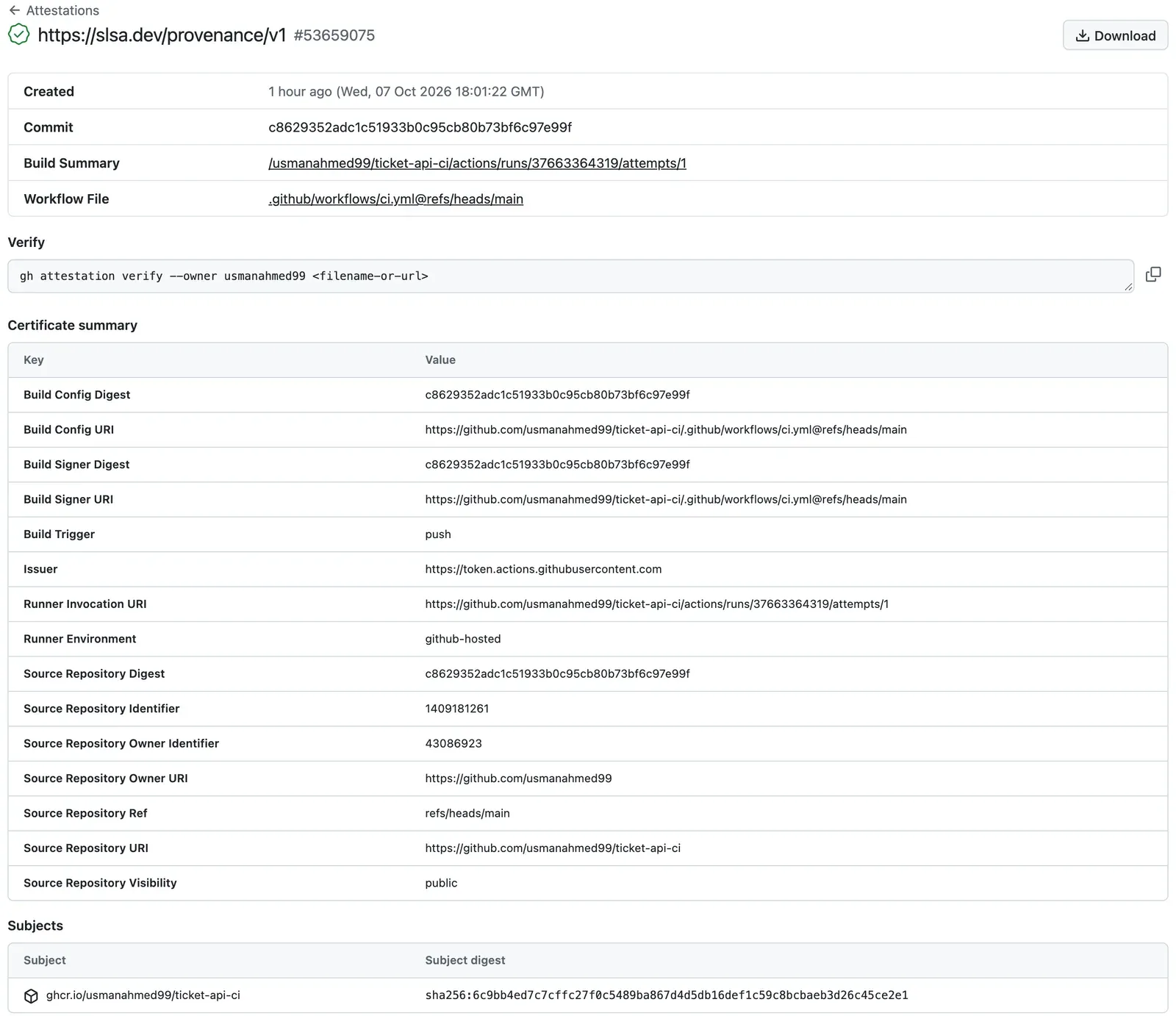
Now check it from the terminal. gh attestation verify downloads the attestation, checks the signature and compares the certificate with a policy:
gh attestation verify oci://ghcr.io/usmanahmed99/ticket-api-ci@sha256:6c9bb4ed7c7cffc27f0c5489ba867d4d5db16def1c59c8bcbaeb3d26c45ce2e1 --owner usmanahmed99The output:
Loaded digest sha256:6c9bb4ed7c7cffc27f0c5489ba867d4d5db16def1c59c8bcbaeb3d26c45ce2e1 for oci://ghcr.io/usmanahmed99/ticket-api-ci@sha256:6c9bb4ed7c7cffc27f0c5489ba867d4d5db16def1c59c8bcbaeb3d26c45ce2e1Loaded 1 attestation from GitHub API
The following policy criteria will be enforced:- Predicate type must match:................ https://slsa.dev/provenance/v1- Source Repository Owner URI must match:... https://github.com/usmanahmed99- Subject Alternative Name must match regex: (?i)^https://github.com/usmanahmed99/- OIDC Issuer must match:................... https://token.actions.githubusercontent.com
✓ Verification succeeded!
The following 1 attestation matched the policy criteria
- Attestation #1  - Build repo:..... usmanahmed99/ticket-api-ci  - Build workflow:. .github/workflows/ci.yml@refs/heads/main  - Signer repo:.... usmanahmed99/ticket-api-ci  - Signer workflow: .github/workflows/ci.yml@refs/heads/main
The command needs a GitHub sign-in (any account). A policy can be stricter. Predict: does the same image pass if the policy requires the branch hotfix/1.2.1?
gh attestation verify oci://ghcr.io/usmanahmed99/ticket-api-ci@sha256:6c9bb4ed7c7cffc27f0c5489ba867d4d5db16def1c59c8bcbaeb3d26c45ce2e1 --owner usmanahmed99 --source-ref refs/heads/hotfix/1.2.1The output ends with:
✗ Policy verification failed
Error: expected SourceRepositoryRef to be refs/heads/hotfix/1.2.1, got refs/heads/main
The exit code is 1. That is the use of an attestation: a deployment tool can refuse every image that a given workflow on main did not build.
Three notes from the test day. First, in a script, ask for JSON: without a terminal, the command printed nothing and only its exit code showed the result. --format json gives the commit and the run, for example with --jq '.[0].verificationResult.signature.certificate | {sourceRepositoryDigest, runInvocationURI}'. Second, on the GitHub Free, Pro and Team plans, attestations work only in public repositories. Third, GitHub’s how-to page now shows the action actions/attest@v4. The reference workflow’s actions/attest-build-provenance@v4 ran actions/attest inside, as its log shows. Both work.
Worked example: trace a digest back to its commit
Section titled “Worked example: trace a digest back to its commit”The completion check of this module asks you to trace a build to its source. Amira has the digest sha256:6c9bb4ed…. She follows the evidence:

Text description of the diagram
Start with the digest. The artifact build-info of the run that pushed it has the same digest, the commit and the run’s address. The run shows what was checked: both jobs, the 25 tests in reports, and the logs. The commit is the exact source code. The attestation is a second path that you can check on its own: its subject is the digest, and its signed certificate names the run and the commit. If both paths give the same commit, the trace is complete.
-
Get the digest that runs or that you pull:
Terminal docker buildx imagetools inspect ghcr.io/usmanahmed99/ticket-api-ci:sha-c862935The output starts with
Digest: sha256:6c9bb4ed7c7cffc27f0c5489ba867d4d5db16def1c59c8bcbaeb3d26c45ce2e1. -
Ask the signed record for the run and the commit:
Terminal gh attestation verify oci://ghcr.io/usmanahmed99/ticket-api-ci@sha256:6c9bb4ed7c7cffc27f0c5489ba867d4d5db16def1c59c8bcbaeb3d26c45ce2e1 --owner usmanahmed99 --format json --jq '.[0].verificationResult.signature.certificate | {sourceRepositoryDigest, runInvocationURI}'The output:
{"runInvocationURI":"https://github.com/usmanahmed99/ticket-api-ci/actions/runs/37663364319/attempts/1","sourceRepositoryDigest":"c8629352adc1c51933b0c95cb80b73bf6c97e99f"}. -
Download that run’s
build-infoand compare the digest:Terminal gh run download 37663364319 --repo Nextia-Intelligence/ticket-api-ci -n build-infocat build-info.jsonThe digest in the file is
sha256:6c9bb4ed…, the same. The commit isc8629352…, the same as in the attestation. -
Open the run: 37663364319. Both jobs are green, and the artifact
reportshas the 25 tests. -
Read the commit:
c862935, orgit show c862935in a clone. It is the lint fix from Runner setup.
The trace is complete: digest → build-info.json → run → commit, and the signed path agrees.
Protect main with a ruleset
Section titled “Protect main with a ruleset”The pipeline checks every change, but nothing stops a push to main that skips it. Until now, Amira pushed to main directly. A ruleset is a set of rules that GitHub enforces on branches. A required check is a check that must pass before a pull request can merge.
Make the ruleset after the first green run, because GitHub offers only check names that it has seen. In the reference repository, Amira made it at 18:02 UTC, one minute after the green run ended. On GitHub, open your repository, then:
- Select Settings. Under “Code, planning, and automation”, select Rulesets.
- Select New ruleset → New branch ruleset.
- Name it
Protect main. Set Enforcement status to Active. - Under Target branches, select Add a target, and add the default branch.
- Select Restrict deletions and Block force pushes.
- Select Require a pull request before merging. Set the required approvals to
0. (You work alone. Module 3 explains reviewers.) - Select Require status checks to pass before merging, then Require branches to be up to date before merging.
- Add the two checks:
Lint, test, auditandBuild, smoke-test and push the image. - Select Create.
These names are the name: values of the two jobs, not the job IDs. Require branches to be up to date means that a pull request must contain the newest main before it can merge. GitHub’s API calls it “strict”. Otherwise, two pull requests can each pass alone, and still break main together.
Check the result from the terminal. Use your own owner name, and read the ruleset’s number from the first command:
gh api repos/<you>/ticket-api-ci/rulesetsgh api repos/<you>/ticket-api-ci/rulesets/<number>The reference repository’s ruleset today (shortened):
{ "name": "Protect main", "enforcement": "active", "conditions": { "ref_name": { "include": ["~DEFAULT_BRANCH"] } }, "rules": [ { "type": "deletion" }, { "type": "non_fast_forward" }, { "type": "pull_request", "parameters": { "required_approving_review_count": 0 } }, { "type": "required_status_checks", "parameters": { "strict_required_status_checks_policy": true, "required_status_checks": [ { "context": "Lint, test, audit, evaluate" }, { "context": "Build, smoke-test and push the image" } ] } } ], "bypass_actors": []}Look at the first check: “Lint, test, audit, evaluate”. On the day of this module, it was Lint, test, audit. Module 4 renames the job, and the ruleset had to follow, as the common mistake below shows. bypass_actors is empty, so not even the owner can skip the rules.
From now on, every change reaches main through a pull request. The reference repository’s next change was pull request #1, feature/deploy into main. Its run 37664331105 built and tested the image, and pushed nothing.
Guided practice: keep the evidence
Section titled “Guided practice: keep the evidence”- Add Keep the test and evaluation reports to the checks job.
- Add
id-token: writeandattestations: writeto the image job’s permissions. - Add Record where the image came from, Write build-info.json and Keep the build evidence.
- Compare your
ci.ymlwith the reference file atc862935. Run actionlint. - Commit and push to
main. This is your last direct push. - Open the run. Check that it has the artifacts
reportsandbuild-info, and the job summary with the image. - Download both artifacts with
gh run download. - Verify your image with
gh attestation verify oci://ghcr.io/<you>/ticket-api-ci@<digest> --owner <you>. - Make the ruleset
Protect main.
Show the expected result
diff between your file and the reference file shows no difference, or only the comments. The run page lists four artifacts: reports (under 1 KB), build-info (under 1 KB) and two .dockerbuild build records. build-info.json has your image, a digest, the tag sha-<7>, your full commit, main and your run’s address. gh attestation verify ends with ✓ Verification succeeded! and names .github/workflows/ci.yml@refs/heads/main. gh api repos/<you>/ticket-api-ci/rulesets/<number> shows "enforcement": "active", "strict_required_status_checks_policy": true and the two check names Lint, test, audit and Build, smoke-test and push the image.
Your turn: trace a second image
Section titled “Your turn: trace a second image”The merge of pull request #1 in the reference repository pushed another image: sha256:a8af875a60ca868f018e5d83a60382acac691bbfbb7d33a46fe4cbf9942e513f. That pull request changed only workflow and deployment files, not the application code. First predict: is this digest the same as sha256:6c9bb4ed…? Then trace it to its run and its commit, with both paths.
Show the answer
The digest is different, although the code in the image did not change. The labels are part of the image, and they changed: a new revision (the commit), a new created time and a new version tag. A different commit always gives a different digest here. The signed path:
gh attestation verify oci://ghcr.io/usmanahmed99/ticket-api-ci@sha256:a8af875a60ca868f018e5d83a60382acac691bbfbb7d33a46fe4cbf9942e513f --owner usmanahmed99 --format json --jq '.[0].verificationResult.signature.certificate | {sourceRepositoryDigest, runInvocationURI}'The output: {"runInvocationURI":"https://github.com/usmanahmed99/ticket-api-ci/actions/runs/37664536375/attempts/1","sourceRepositoryDigest":"43de57baa70c998494d38ad0adda9a7152cfdb96"}. The record path: gh run download 37664536375 --repo Nextia-Intelligence/ticket-api-ci -n build-info gives the same digest, the tag sha-43de57b and the commit 43de57baa70c…. That commit is the merge commit of pull request #1, “Merge pull request #1 from usmanahmed99/feature/deploy”.
Common mistake
Both checks are green, and the pull request still cannot merge
Symptom: in the reference repository, pull request #3 had two green checks, but GitHub did not allow the merge. gh pr view 3 --json mergeStateStatus said BLOCKED.
Cause: the pull request renamed the first job to Lint, test, audit, evaluate. The ruleset still required a check named Lint, test, audit. No job reported that name any more, so GitHub waited for it, without end. A required check is a name, and GitHub does not know that the new name is the same job.
Fix: update the ruleset: Settings → Rulesets → Protect main → under the required status checks, remove the old name and add the new one. Then the pull request can merge. Better: change the ruleset in the same step as the job’s name, and write it in the pull request’s description. AI evaluation gate: A renamed check tells the full story.
For a real AI service: do not “fix” a blocked pull request by turning off the ruleset or by adding yourself to the bypass list. Each time the rules are off, an unchecked change can reach main, and from there, production.
Check your understanding
build-info.json and the provenance attestation both link a digest to a commit and a run. Why keep both?
Show the answer
They serve different uses. build-info.json is a simple file that the pipeline itself reads: the Deploy workflow in Module 3 takes the digest from it. But it is only a file: a job could write anything in it. The attestation has a signature from a certificate that GitHub’s identity token proved, and a public log records it. So a person or a tool can check it without trusting the pipeline’s files. When both give the same commit, the trace is strong. The labels are a third, weaker hint: anyone who can push can write any label.
Does your answer have the main points of ours?
Sign in and enroll in the course to save your answers. Every check counts toward the certificate.
Check your understanding
Why does the step that uploads reports have if: always(), while the build-info steps have if: env.PUSH == 'true'?
Show the answer
The test report is most useful when tests fail, so it must be uploaded also after a failed step. always() does that. (If lint fails before pytest, there is no report, and the step only warns.) build-info.json describes an image in the registry. Without a push, as in a pull request, there is no digest to record, so those steps run only when PUSH is true.
Does your answer have the main points of ours?
Sign in and enroll in the course to save your answers. Every check counts toward the certificate.
Module practice
Section titled “Module practice”Guided practice → independent task. You built the pipeline with Amira in three lessons. Now finish it on your own and document it, in two parts.
Part 1: the provider-specific pipeline. Your repository ticket-api-ci has .github/workflows/ci.yml with the two jobs and all evidence steps, a green run on main, and the ruleset Protect main. Make one more change through a pull request: add one line to README.md on the branch docs/pipeline-badge, then open a pull request from docs/pipeline-badge into main. Show that the pull request ran both checks, pushed nothing, and merged only after both passed. Then show the push run on main that the merge started, with its evidence.
Part 2: an Azure DevOps mapping guide. Many teams use Azure Pipelines (part of Azure DevOps) instead of GitHub Actions. The ideas are the same, but the names differ. Write a table that maps each part of your pipeline to its Azure Pipelines name. Include the file, the triggers, the jobs and their order, the steps, the runners, the cache and the test report. Also include artifacts, secrets and variables, environments and approvals, the cloud sign-in, a pipeline that starts after another one, and the required checks. Check every Azure DevOps name on learn.microsoft.com, and write the date of your check.
Show a model answer
Part 1. In the reference repository, pull request #1 is the model: its run 37664331105 ran Lint, test, audit (43 s) and Build, smoke-test and push the image (32 s, every Dockerfile step CACHED, no push, so no build-info artifact). After the merge, the push run 37664536375 on main pushed sha256:a8af875a… with the tag sha-43de57b, its build-info and its attestation. A reviewer marks part 1 demonstrated when the pull request run has no push, the merge waited for both required checks, and the main run has the artifacts reports and build-info and a verified attestation.
Part 2. The course checked these names on learn.microsoft.com. The pages: key concepts, jobs, GitHub repositories and triggers, agents, Microsoft-hosted agents, caching, test results, pipeline artifacts, logging commands, variable groups, secret variables, approvals and checks, connect to Azure, pipeline triggers, branch policies.
| This course (GitHub Actions) | Azure Pipelines | Note |
|---|---|---|
Workflow file .github/workflows/ci.yml |
YAML pipeline file, often azure-pipelines.yml |
A pipeline has stages; “each stage contains one or more jobs”. A one-stage pipeline can list jobs: directly. |
on: pull_request and on: push with branches: |
pr: trigger and trigger: (CI trigger) |
Both list branches, for example trigger: with - main. |
Job, runs-on: ubuntu-24.04 |
Job, pool: with vmImage: |
The docs’ examples use vmImage: 'ubuntu-latest'. |
needs: checks |
dependsOn: checks |
Without it, Azure Pipelines jobs “run in parallel”. GitHub jobs without needs also run in parallel. |
if: env.PUSH == 'true', if: always() |
condition:, for example succeeded(), failed(), always() |
A job runs by default only if the jobs that it depends on succeeded. |
Step: run: or uses: an action |
Step: a script, or a task | “A task is a prepackaged script that performs an action”, for example PublishTestResults@2. |
| GitHub-hosted runner, a new VM per job | Microsoft-hosted agent | “You get a fresh virtual machine for each job in the pipeline.” |
| Self-hosted runner | Self-hosted agent, in an agent pool | The same warning applies: it keeps state between jobs. |
setup-python with cache: pip |
Cache@2 task |
“Caches expire after seven days of no activity.” |
pytest --junitxml + artifact reports |
PublishTestResults@2 with testResultsFormat: 'JUnit' |
Azure DevOps also shows the results in a test tab. |
Artifact (upload-artifact, download-artifact) |
Pipeline artifact: publish / download keywords, or PublishPipelineArtifact@1 / DownloadPipelineArtifact@2 |
build-info.json would be a pipeline artifact. |
$GITHUB_STEP_SUMMARY |
Logging command ##vso[task.uploadsummary] |
It adds Markdown to the build summary. |
GITHUB_TOKEN with permissions: |
System.AccessToken |
The token of the run. |
Secrets, variables (secrets.*, vars.*) |
Variable groups (in the Library) and secret variables | A secret is marked with the lock icon and masked in logs. By default, secrets are not given to pull request builds from forks. |
| Environments with required reviewers (Module 3) | Environments with approvals and checks | The check that needs a person is called Approvals. Others are Branch control and Exclusive lock. |
OIDC sign-in with azure/login and a federated credential (Module 3) |
Azure Resource Manager service connection with workload identity federation | “Workload identity federation eliminates the need for secrets and secret management.” |
workflow_run: Deploy starts after CI (Module 3) |
Pipeline resource trigger: resources: → pipelines: with trigger: true |
It starts “when any version of the source pipeline completes”. |
| Ruleset with required checks | For Azure Repos: branch policies with Build validation set to Required. For a GitHub repository: the pipeline’s status check in GitHub’s rules | Branch policies also mean that “all changes must go through pull requests”. |
| Strict: branches must be up to date | Build validation’s build expiration Immediately when main is updated | The pull request’s build runs again after main changes. |
Provenance attestation, gh attestation verify |
Not mapped in this guide | Check the current Azure DevOps documentation before you plan it. |
A reviewer marks part 2 demonstrated when every row of the learner’s own pipeline has an Azure Pipelines name and a date. Each name needs a link to the page that the learner checked. A guess without a source is partially demonstrated.
Module check
Section titled “Module check”Check your understanding
Retrieval: what lasts after a job on a GitHub-hosted runner ends, and what is lost? Give one example of each from this pipeline.
Show the answer
The VM and everything on it is lost: the checked-out code, the installed packages, the ticket-api:candidate image and the running container. What the workflow saved outside the VM lasts. That is the caches (the pip downloads, 44 MB, and BuildKit’s layers with type=gha) and the artifacts (reports and build-info). It is also the image in GHCR, the attestation, the logs, and the job’s result, which needs: uses to start the next job.
Does your answer have the main points of ours?
Sign in and enroll in the course to save your answers. Every check counts toward the certificate.
Check your understanding
Predict: Sam merges a pull request that changes only README.md. Does the push run on main push a new image, and does its digest equal the one before? What does build-info.json then say?
Show the answer
Yes, the push run on main runs both jobs and pushes a new image, tagged sha- plus the merge commit. Its layers come from the cache, because the Dockerfile does not copy README.md. But the digest is different. The labels are part of the image, and they hold the new commit (revision), a new created time and the new tag. The reference repository showed this with pull request #1: no application change, and still sha256:a8af875a… instead of sha256:6c9bb4ed…. build-info.json records the new digest with the new commit and run. That is correct: each digest traces to exactly one commit.
Does your answer have the main points of ours?
Sign in and enroll in the course to save your answers. Every check counts toward the certificate.
Check your understanding
Completion check: reproduce a failing check of your pipeline on your computer, then trace your newest image on main back to its source commit. Show the commands and what each one gave.
Show the answer
Reproduce: for example, remove from None in ticket_api/config.py and run scripts/check.sh (or ruff check .). It stops at Lint with B904 at ticket_api/config.py:28:13, Found 1 error. and exit code 1, the same finding as the first red run on GitHub. Then git restore ticket_api/config.py. Trace: docker buildx imagetools inspect ghcr.io/<you>/ticket-api-ci:sha-<7> gives the digest. gh attestation verify oci://ghcr.io/<you>/ticket-api-ci@<digest> --owner <you> succeeds, and with --format json it names the run and the commit. gh run download <run> -n build-info gives the same digest and commit. The run page shows both jobs green and the reports artifact. git show <commit> shows the code. A reviewer marks it demonstrated when the failure was reproduced locally with the same rule code as in CI, and both paths name the same commit.
Does your answer have the main points of ours?
Sign in and enroll in the course to save your answers. Every check counts toward the certificate.
Recap
- Evidence answers questions for someone who was not there. Keep the test report (
reports), the record of digest, commit and run (build-info), the signed attestation and the labels. if: always()keeps the report of a failed run. The build evidence exists only when an image was pushed.gh attestation verifychecks the signature and a policy. A stricter policy, such as a branch, can refuse an image.- Trace any digest:
build-info.json→ run → commit, and the attestation as a second, signed path. - The ruleset
Protect mainrequires a pull request and both checks, with the branch up to date. A required check is a name: rename a job, update the ruleset.
Reset. On your computer: docker image rm ticket-api:check, then rm -rf reports evidence build-info.json junit.xml in the project. To reset the project’s files, copy the snapshot end-of-m02 through a pull request, as in Use a snapshot. A snapshot has no GitHub settings: make the ruleset Protect main again if it is missing. To start the module again with a new repository, delete the old one on GitHub (Settings, at the bottom of the page). Then delete its package in the package’s Package settings.
The module. You started with checks that ran only on Amira’s Mac. Now every change runs lint, 25 tests and a vulnerability check on a clean runner. Then the pipeline builds one image, smoke-tests it and pushes it by digest. Each image has evidence that traces it to its commit, and main accepts no change without the checks. Module 3 takes that digest and promotes it, unchanged, to staging and then to production.
Next: Configuration separation