
Hotfix procedure
- Lesson 14
- 50 min
- Module 5: Recover and maintain the release process
Lesson 14 of 15 · CI/CD, Testing and Safe ReleasesHotfix procedure
1. Understand the delivery path
2. Create a repeatable CI pipeline
3. Manage environments and secrets
4. Release AI and database changes
5. Recover and maintain the release process
What you will be able to do
An urgent fix tempts everyone to skip steps. Follow a short procedure instead. Start from what production runs, prove the bug with a test, and run every check. Then bring the fix back to main, so that the next release does not bring the bug back.
Before you startWhat to know and to have ready
What you need to know
- The hotfix sequence with Git (branch from the release, fix, tag, merge back), from Cherry-pick a fix: The hotfix sequence and Keep histories consistent: Merge the release back into main in Git and Team Development Essentials.
- Tags, from Release branches and tags: Tag the release in the Git course.
- The ruleset with required checks and “up to date” (strict), from Publish evidence: Protect main with a ruleset.
- The Release workflow (a tag gives the tested image its version, with no new build), from Promote to staging: A version without a new build.
- The three ways back, from Rollback strategy: Three things can go back.
What you need on your computer
- Your repository
ticket-api-ciwith the tagv1.2.0, from Migration safety: Guided practice: two versions on one database, and a virtual environment withrequirements-lock.txt, from Runner setup: 3. Add the tools and the lint settings. - Simulated route: the local production environment (
deploy/local/production.env,.env,secrets/production_api_key.txt), from Configuration separation: Guided practice: the local environment files and Promote to staging: Guided practice: promote your own digest. - Live route: the Azure apps, from Configuration separation: Worked example (live): two apps, one image, and the environments with the required reviewer, from Credentials and access: The GitHub environments.
- If your project is broken, copy the snapshot
end-of-m04(it still has the bug), as in Use a snapshot, and tag itv1.2.0. Make the GitHub settings again.
Run with GitHub Actions (ubuntu-24.04 runners) in the public repository Nextia-Intelligence/ticket-api-ci, Docker Desktop 4.81.0 on macOS (Apple silicon), and Azure CLI 2.88.0 in canadacentral. The Windows and Linux steps are not tested.
The bug that the checks missed
Section titled “The bug that the checks missed”Version 1.2.0 added score next to confidence, with migration 002. In Migration safety: Guided practice: two versions on one database, 1.1.0 and 1.2.0 ran on one database, and both could classify. Amira did not check one more endpoint: the history. Here is the test again, on the local production environment. 1.2.0 runs there. 1.1.0 runs next to it as ticket-api-old, on the same network and database, as during a real rollout:
KEY=$(cat secrets/production_api_key.txt)scripts/promote-local.sh production ghcr.io/usmanahmed99/ticket-api-ci@sha256:bd2316b56067c738199d6203a23845c97fb7b85b550379411eddd7cc6a2ddab8docker run -d --name ticket-api-old --platform linux/amd64 --network ticket-api-production_default \ -p 127.0.0.1:8083:8000 -e API_KEY=old-key \ -e DATABASE_URL="postgresql://tickets:$(grep '^POSTGRES_PASSWORD=' .env | cut -d= -f2)@db:5432/tickets" \ ghcr.io/usmanahmed99/ticket-api-ci@sha256:4eb3db8d4ea249fb9b44b27d96deb68aba6da3e3fbc9cf32311a9cbadf4d857acurl -s -X POST http://127.0.0.1:8082/v1/classify -H 'Content-Type: application/json' -H "X-API-Key: $KEY" -d '{"subject":"Package never arrived"}'curl -s -X POST http://127.0.0.1:8083/v1/classify -H 'Content-Type: application/json' -H "X-API-Key: old-key" -d '{"subject":"Package never arrived"}'curl -s -w '\nstatus %{http_code}\n' http://127.0.0.1:8082/v1/history -H "X-API-Key: $KEY"$KEY = Get-Content secrets/production_api_key.txt -Raw$PW = (Select-String '^POSTGRES_PASSWORD=(.*)' .env).Matches[0].Groups[1].Valuebash scripts/promote-local.sh production ghcr.io/usmanahmed99/ticket-api-ci@sha256:bd2316b56067c738199d6203a23845c97fb7b85b550379411eddd7cc6a2ddab8docker run -d --name ticket-api-old --platform linux/amd64 --network ticket-api-production_default ` -p 127.0.0.1:8083:8000 -e API_KEY=old-key -e "DATABASE_URL=postgresql://tickets:$PW@db:5432/tickets" ` ghcr.io/usmanahmed99/ticket-api-ci@sha256:4eb3db8d4ea249fb9b44b27d96deb68aba6da3e3fbc9cf32311a9cbadf4d857acurl.exe -s -X POST http://127.0.0.1:8082/v1/classify -H "Content-Type: application/json" -H "X-API-Key: $KEY" -d '{\"subject\":\"Package never arrived\"}'curl.exe -s -X POST http://127.0.0.1:8083/v1/classify -H "Content-Type: application/json" -H "X-API-Key: old-key" -d '{\"subject\":\"Package never arrived\"}'curl.exe -s -w "`nstatus %{http_code}`n" http://127.0.0.1:8082/v1/history -H "X-API-Key: $KEY"The output (simulated; the deployment lines are shortened):
ok health (200)ok ready (200)ok classify with the key (200)ok classify without a key (401)production now runs ghcr.io/usmanahmed99/ticket-api-ci@sha256:bd2316b56067c738199d6203a23845c97fb7b85b550379411eddd7cc6a2ddab8{"category":"other","priority":3,"confidence":0.2,"score":0.2,"model_version":"keywords-1.0"}{"category":"other","priority":3,"confidence":0.2,"model_version":"keywords-1.0"}{"error":{"code":"internal_error","message":"Something went wrong on the server.","request_id":"9dd82ef5ab9b","fields":[]}}status 500Every smoke check passed, and both versions classify. But the history of 1.2.0 answers 500. The log of the api container (docker logs ticket-api-production-api-1) says why:
pydantic_core._pydantic_core.ValidationError: 1 validation error for HistoryListitems.0.score Input should be a valid number [type=float_type, input_value=None, input_type=NoneType]INFO: 172.21.0.1:57096 - "GET /v1/history HTTP/1.1" 500 Internal Server ErrorAnd the table:
id | request_id | model_version | confidence | score----+--------------+---------------+------------+------- 1 | 4d10436731e8 | keywords-1.0 | 0.7 | 0.7 2 | a49f44a4effc | keywords-1.0 | 0.2 | 0.2 3 | ef19e98fb391 | keywords-1.0 | 0.2 |(3 rows)Row 3 came from 1.1.0, which does not know score. The response model of 1.2.0 requires a number for score, so one old row breaks the whole list. In the reference run, the same test gave the same 500 at 18:41 UTC.
Why every check missed it: the database tests made all their rows with 1.2.0’s code, so no row had an empty score. The smoke check did not call /v1/history. And the cloud apps have no database, so the history there answers 503 by design. The bug needs two versions on one database. A rollout of 1.2.0 makes exactly that state.
Hotfix or normal release?
Section titled “Hotfix or normal release?”A hotfix is a small release that fixes one urgent bug in the version that production runs, and nothing else. A normal fix goes through a feature/ branch into main and waits for the next release. Use a hotfix when both are true:
- The bug cannot wait for the next normal release.
mainhas changes after the release that you cannot release now.
Then the hotfix starts from the release tag, not from main: v1.2.0 is exactly the code in production, so 1.2.1 = 1.2.0 + one fix. In the reference repository, main had one change after v1.2.0: PR #6, the platform lines of the local Compose file. That change was harmless, and a fix through main would also have worked. Amira used the procedure anyway, as docs/release-process.md says: a procedure that you use only in a real emergency is a procedure that you have never tested.

Text description of the diagram
The hotfix branch hotfix/1.2.1 starts at the tag v1.2.0 (commit c3c7135). Meanwhile, main gets PR #6 (commit 6ae49dc). The hotfix branch gets one commit, fc9005a: a test that fails, then the fix. It gets the tag v1.2.1, and its image goes to production by hand, through staging and the approval. The branch does not have 6ae49dc. To merge it back, pull request #7 (hotfix/1.2.1 into main) was behind main, so “Update branch” merged main into the hotfix branch (543b003). Then PR #7 merged into main (3464f2c).
Worked example: hotfix 1.2.1
Section titled “Worked example: hotfix 1.2.1”1. Make the branch from the tag
Section titled “1. Make the branch from the tag”git fetch --tagsgit switch -c hotfix/1.2.1 v1.2.0The output:
Switched to a new branch 'hotfix/1.2.1'Check that you are on the right code: git log --oneline -1 shows the commit of the tag, and grep version pyproject.toml shows version = "1.2.0".
2. A test that fails because of the bug
Section titled “2. A test that fails because of the bug”Write the test before the fix. A test that fails first proves two things: it really finds the bug, and later, it proves that the fix works. Add it at the end of tests/test_database.py:
def test_history_reads_rows_from_version_1_1(database): """Version 1.1.0 writes no score. 1.2.0 failed with 500 on such rows.""" migrate.main([]) with psycopg.connect(database, autocommit=True) as conn: conn.execute( "INSERT INTO classifications" " (request_id, category, priority, confidence, model_version)" " VALUES ('old111', 'shipping', 1, 0.7, 'keywords-1.0')" ) [row] = History(database).recent(10) assert row["score"] == pytest.approx(0.7)The INSERT writes a row exactly as 1.1.0 does: without score. The database tests need a PostgreSQL database in TEST_DATABASE_URL, as in CI. Start a disposable one, and run the database tests:
docker run -d --name ticket-api-testdb -p 127.0.0.1:5433:5432 \ -e POSTGRES_USER=tickets -e POSTGRES_PASSWORD=ci-only-not-secret -e POSTGRES_DB=tickets postgres:18.6-trixieexport TEST_DATABASE_URL=postgresql://tickets:ci-only-not-secret@127.0.0.1:5433/ticketspython -m pytest -q tests/test_database.pydocker run -d --name ticket-api-testdb -p 127.0.0.1:5433:5432 ` -e POSTGRES_USER=tickets -e POSTGRES_PASSWORD=ci-only-not-secret -e POSTGRES_DB=tickets postgres:18.6-trixie$env:TEST_DATABASE_URL = "postgresql://tickets:ci-only-not-secret@127.0.0.1:5433/tickets"python -m pytest -q tests/test_database.pyThe password is the same as in ci.yml: it protects nothing, and the database is deleted after the lesson. If the first run says “connection refused”, wait 5 seconds for PostgreSQL to start. The output (shortened):
>       assert row["score"] == pytest.approx(0.7)E       assert None == 0.7 ± 7.0e-07EE         comparison failedE         Obtained: NoneE         Expected: 0.7 ± 7.0e-07
tests/test_database.py:61: AssertionErrorFAILED tests/test_database.py::test_history_reads_rows_from_version_1_1 - ass...1 failed, 2 passed in 0.10s
The test sees the same None as the log of the bug. Now you have a check that the pipeline runs on every change from now on.
3. The smallest fix
Section titled “3. The smallest fix”The fix changes one SQL query in ticket_api/history.py. For a row without score, it returns confidence, which has the same value in 1.1.0’s rows:
return conn.execute( "SELECT request_id, category, priority, confidence, score," " model_version, created_at" # Rows from version 1.1.0 have no score: use confidence. "SELECT request_id, category, priority, confidence," " COALESCE(score, confidence) AS score, model_version, created_at" " FROM classifications ORDER BY id DESC LIMIT %s",COALESCE(a, b) gives a, or b when a is empty. The fix does not change the table. Run the tests again. The output:
... [100%]3 passed in 0.10s4. The rest of the release, and a check that would have found it
Section titled “4. The rest of the release, and a check that would have found it”A hotfix is a release, so it gets everything a release gets:
- The version
1.2.1(the last number: a fix, no new feature), inpyproject.toml, inticket_api/main.py, and incontract/openapi.json(python -m ticket_api.export_contract). - The release notes
docs/releases/1.2.1.md. Release communication explains each line. - A smoke check for the history in
scripts/smoke.sh. The bug got through because no check called it:
# 200 with a database, 503 when history is off. A 500 is a bug (as in 1.2.0).check "history" "200|503" "$url/v1/history" -H "X-API-Key: $key"The check function now compares with a pattern ([[ "$status" =~ ^($expected)$ ]]), so one check can accept 200 or 503. See the whole diff in commit fc9005a: 7 files, 29 lines added, 6 removed.
Then run every check, as CI does. No check is skipped for a hotfix. An urgent change is exactly the change that people test least. With TEST_DATABASE_URL still set:
ruff check . && python -m pytest -q && pip-audit -r requirements-run.txt --progress-spinner off && python -m evaluation.run --classifier 1.1The output (shortened):
All checks passed!31 passed in 0.32sNo known vulnerabilities foundkeywords-1.1 on 33 holdout tickets (baseline keywords-1.0)accuracy 0.909...must-pass failures: 0Gate passed.scripts/check.sh runs the same and also builds and smoke-tests the image.
5. Push the branch: CI builds the image
Section titled “5. Push the branch: CI builds the image”git add -Agit commit -m "Hotfix 1.2.1: history works with rows from version 1.1.0"git push -u origin hotfix/1.2.1Check with git status before the commit that .env and secrets/ are not in the list (they are in .gitignore). CI runs on pushes to hotfix/**, not only on main. So the hotfix branch gets the same checks and the same image job as main: run 37669759163. “Lint, test, audit, evaluate” took 52 s, “Build, smoke-test and push the image” 47 s. The image got the tag sha-fc9005a.
6. Tag the release
Section titled “6. Tag the release”git tag -a v1.2.1 -m "ticket-api 1.2.1: hotfix for GET /v1/history with rows from 1.1.0"git push origin v1.2.1The tag starts the Release workflow (run 37669994015, 10 s). It gives the image sha-fc9005a the tag 1.2.1, and makes the GitHub release from docs/releases/1.2.1.md. Nothing is built again. If CI had not finished, the Release workflow would stop with “CI must build and test this commit first.”
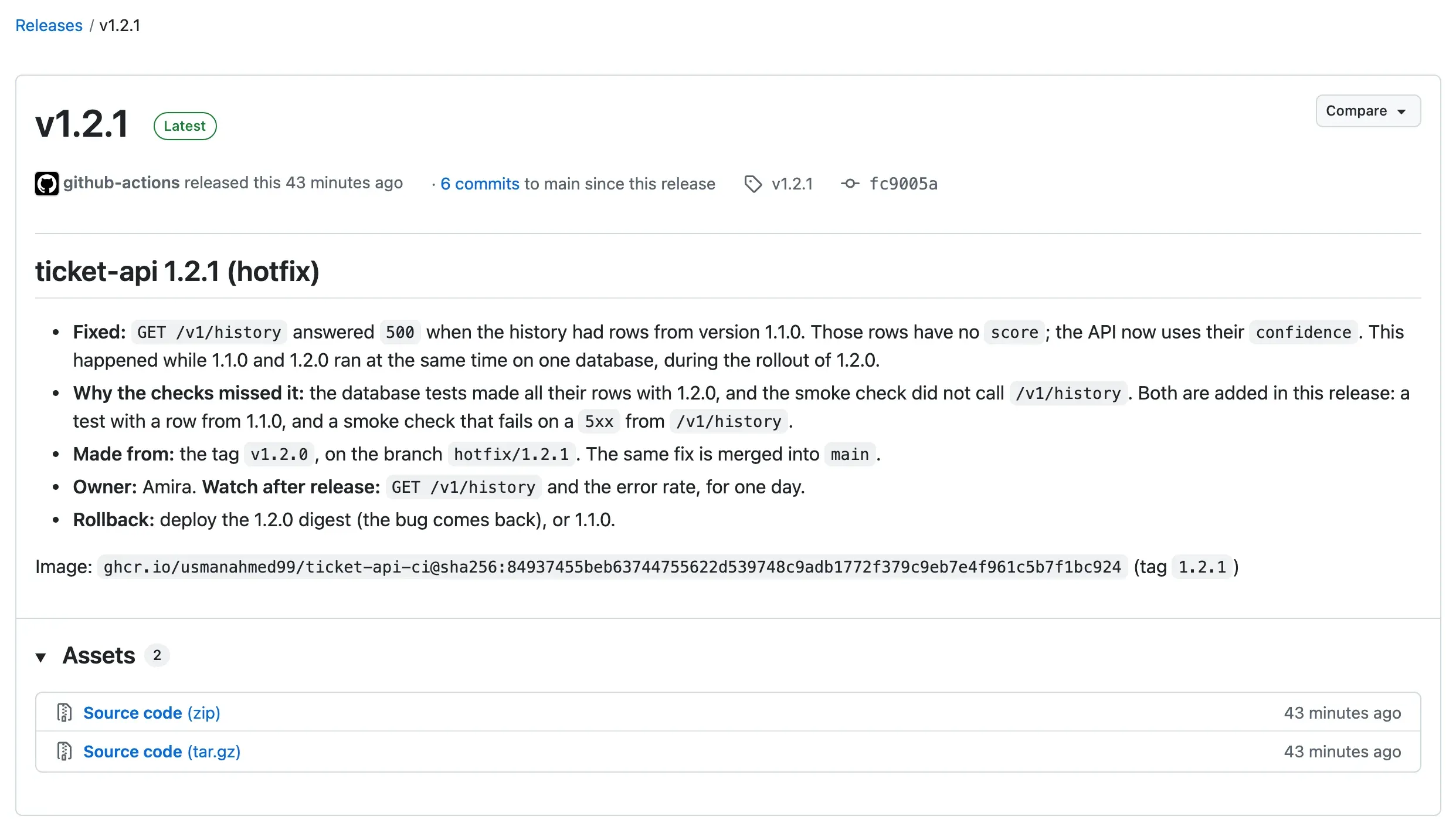
The release page names the commit (fc9005a) and the digest. These two values are what you deploy and what you can trace.
7. Deploy the hotfix by hand
Section titled “7. Deploy the hotfix by hand”The Deploy workflow starts by itself only for CI runs on main. A hotfix branch is not main, so start the workflow by hand, with the digest from the release. Select Actions → Deploy → Run workflow, branch main, digest sha256:84937455beb63744755622d539748c9adb1772f379c9eb7e4f961c5b7f1bc924, reason “Hotfix 1.2.1: GET /v1/history answered 500 with rows from 1.1.0”. Or:
gh workflow run deploy.yml -f digest=sha256:84937455beb63744755622d539748c9adb1772f379c9eb7e4f961c5b7f1bc924 \ -f reason="Hotfix 1.2.1: GET /v1/history answered 500 with rows from 1.1.0"The hotfix goes through staging and the approval, like every release. The reviewer’s comment was “Hotfix 1.2.1 passed staging. Approved for production.” The jobs of run 37670050850 (live):
Find the image 18:51:44 → 18:51:47 successstaging / Deploy to staging 18:51:52 → 18:52:43 successproduction / Deploy to production 18:52:59 → 18:53:50 successAbout 2 minutes from the start to production. Look at the run’s details: it ran the workflow files of main at commit 6ae49dc, not of the hotfix branch. The deployment steps always come from main, also for a hotfix. This is on purpose: the deployment process has one version. Release communication shows one effect of it.
Simulated route. Deploy the same digest locally. Run the command from a checkout of main (the common mistake below says why):
scripts/promote-local.sh production ghcr.io/usmanahmed99/ticket-api-ci@sha256:84937455beb63744755622d539748c9adb1772f379c9eb7e4f961c5b7f1bc924curl -s -w '\nstatus %{http_code}\n' 'http://127.0.0.1:8082/v1/history?limit=3' -H "X-API-Key: $KEY"The output (simulated, shortened):
ok health (200)ok ready (200)ok classify with the key (200)ok classify without a key (401)ok history (200)production now runs ghcr.io/usmanahmed99/ticket-api-ci@sha256:84937455beb63744755622d539748c9adb1772f379c9eb7e4f961c5b7f1bc924{"items":[{"request_id":"119fbf2734a9",…},{"request_id":"ef19e98fb391","category":"other","priority":3,"confidence":0.2,"score":0.2,"model_version":"keywords-1.0",…},…]}status 200The history works, and the old row ef19e98fb391 shows score 0.2, from its confidence. The history smoke check passes. In the database, the row is still empty: the fix changes how the API reads, not the data. Rollback strategy repairs the data with 003.
8. Merge the fix back into main
Section titled “8. Merge the fix back into main”Production has the fix. main does not. If the next release comes from main, the bug comes back. So open a pull request hotfix/1.2.1 into main at once, with the reason in the description. In the reference repository, this was PR #7, opened at 18:55.
PR #7 could not merge at first. Its state was BEHIND: main had PR #6, and the ruleset requires that a branch is up to date with main before it merges (strict mode). On the pull request page, GitHub says that the branch is out-of-date with the base branch, and offers Update branch to people who can merge. The reviewer selects it. That merges main into the hotfix branch (commit 543b003, “Merge branch ‘main’ into hotfix/1.2.1”), and every check runs again on the result. Strict mode exists for this reason: the checks must pass on the code that main will have after the merge, not only on the branch. With the CLI, the same: gh pr update-branch 7.
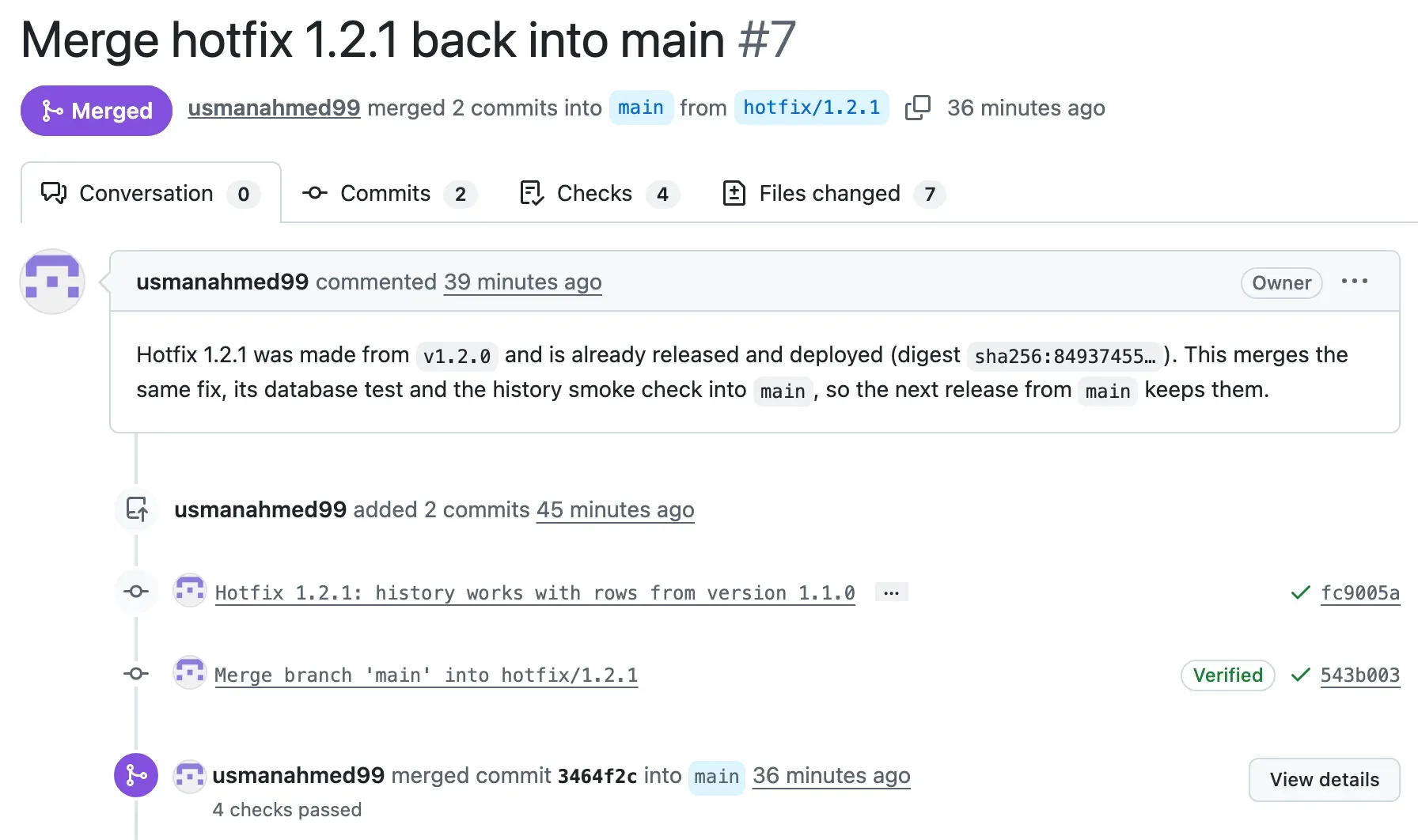
The checks passed again, and PR #7 merged at 18:58 as 3464f2c. That push to main started CI and then the Deploy workflow by itself. The approval comment was “main now has hotfix 1.2.1. Staging passed, including the new history check.”
9. Check that no fix is lost
Section titled “9. Check that no fix is lost”Do not trust “merged”. Check three things, in your own clone, after git switch main and git pull:
git branch --contains v1.2.1git log main --oneline | grep Hotfixgrep -n "def test_history_reads_rows_from_version_1_1" tests/test_database.pyThe output (from the local practice repository, shortened):
hotfix/1.2.1* mainb3ceff1 Hotfix 1.2.1: history works with rows from version 1.1.051:def test_history_reads_rows_from_version_1_1(database):main contains the commit of the tag. The hotfix commit is in the history of main. The test is in main’s files, so every later change runs it: the bug cannot come back without a red check. Use git branch -r --contains v1.2.1 to see the branches on GitHub too.
Common mistake
The tools of the hotfix branch are old
Symptom (simulated, reference run): after the hotfix, Amira deployed 1.2.1 locally from her checkout of hotfix/1.2.1, on her Mac (Apple silicon). Then she asked the history:
$ scripts/promote-local.sh production ghcr.io/usmanahmed99/ticket-api-ci@sha256:84937455… # 1.2.1$ curl http://127.0.0.1:8082/v1/history{"error":{"code":"internal_error","message":"Something went wrong on the server.","request_id":"bd725fc294ad","fields":[]}}status 500Still 500, after the fix. The promotion had failed, and 1.2.0 was still running.
Cause: the hotfix branch was made from v1.2.0. Its deploy/local/compose.yaml was the one of v1.2.0, without the line platform: linux/amd64, which came later in PR #6 on main. The image exists only for linux/amd64, so on Apple silicon Docker could not pull it (“no matching manifest for linux/arm64/v8”, as in Promote to staging: The image that did not start on a Mac). A hotfix branch has the code of the release, and also its old tools: every fix to scripts, Compose files or docs that main got later is missing. (In your own repository, v1.2.0 already has the platform lines, because you added them in Promote to staging: The image that did not start on a Mac. So this error does not happen to you. The trap is the same for every tool that main gets after the tag.)
Fix:
- Run the deployment tools from
main:git switch main, then the samepromote-local.shcommand with the same digest. Only the image comes from the hotfix. In the reference run, the history then answered200. - The Deploy workflow already does this: it always uses the workflow files of
main. - Merge the hotfix back into
mainsoon, so that the two branches do not drift further apart.
If the image is already on your computer, Docker does not pull it, and the old Compose file can work by chance. Do not rely on that: run the tools from main every time.
For a real AI service: the same is true for model-serving configuration, evaluation data and deployment scripts. A fix made from an old release must not bring old tooling back. Keep the deployment process on main, and change only the artifact.
Guided practice: a hotfix in a practice repository
Section titled “Guided practice: a hotfix in a practice repository”Do it in a disposable copy, so that a mistake costs nothing. You need Git and the snapshot end-of-m04.
- Copy the snapshot
end-of-m04to a new folder, for examplehotfix-practice. In it, rungit init -b main,git add -A,git commit -m "Version 1.2.0"andgit tag v1.2.0. - Make
mainmove on: add one line toREADME.md, and commit it onmain. - Make the hotfix branch from the tag:
git switch -c hotfix/1.2.1 v1.2.0. Check thatREADME.mddoes not have your new line. - Add the test
test_history_reads_rows_from_version_1_1. Start the test database, and runpython -m pytest -q tests/test_database.py. It must fail withassert None == 0.7. - Make the fix in
ticket_api/history.py. Run the tests again:3 passed. - Change the version to
1.2.1in the three places, add the history smoke check, and writedocs/releases/1.2.1.md. - Run all the checks. Commit with the message “Hotfix 1.2.1: history works with rows from version 1.1.0”. Tag
v1.2.1. - Check the trap:
git branch --contains v1.2.1must not listmainyet. - Update the branch:
git merge mainwhile you are onhotfix/1.2.1. Thengit switch mainandgit merge --no-ff hotfix/1.2.1. - Run the three checks of step 9 in the worked example.
Show the expected result
After step 7, git log --oneline --graph --all --decorate shows two branches from v1.2.0:
* b3ceff1 (HEAD -> hotfix/1.2.1, tag: v1.2.1) Hotfix 1.2.1: history works with rows from version 1.1.0| * 8a1d23c (main) Describe the local environments in the README|/* c63905b (tag: v1.2.0) Version 1.2.0Step 8 lists only * hotfix/1.2.1. git rev-list --count hotfix/1.2.1..main says 1: the branch is one commit behind main. That is the BEHIND of PR #7. After step 9:
* b0c1a03 (HEAD -> main) Merge hotfix 1.2.1 back into main|\| * aaf466e (hotfix/1.2.1) Merge branch 'main' into hotfix/1.2.1| |\| |/|/|* | 8a1d23c Describe the local environments in the README| * b3ceff1 (tag: v1.2.1) Hotfix 1.2.1: history works with rows from version 1.1.0|/* c63905b (tag: v1.2.0) Version 1.2.0The same shape as the diagram. Step 10 lists main, finds the hotfix commit, and finds the test. Your commit IDs are different. The full check gives 31 passed and “Gate passed.”
Remove the test database when you are done: docker rm -f -v ticket-api-testdb.
Your turn: the fix was made on main first
Section titled “Your turn: the fix was made on main first”Sometimes the order is the other way round. A developer fixes the bug in a pull request into main first. Then the team decides that production needs it now. main also has other changes that are not ready. In your practice repository, make the fix as a commit on main. How do you make 1.2.1 from it, without the other changes of main? Which checks prove that 1.2.1 has the fix and nothing else?
Show the answer
Make the hotfix branch from the tag, as before, and copy only the fix commit with cherry-pick (Cherry-pick a fix in the Git course):
git switch -c hotfix/1.2.1 v1.2.0git cherry-pick <commit of the fix on main>Then the same steps: version, notes, every check, tag v1.2.1, deploy the digest. Proofs: the new test fails on v1.2.0 and passes on v1.2.1; git diff v1.2.0 v1.2.1 --stat lists only the files of the fix and the release; git log v1.2.0..v1.2.1 --oneline shows one commit. In this order, main already has the fix. Still merge the hotfix branch back (or check with git log main --oneline | grep that the fix is there), so that the version change and the release notes are on main too.
Check your understanding
The hotfix is urgent. Sam suggests: skip the AI evaluation gate and the audit this time, the change is only one SQL line. What do you answer?
Show the answer
No check is skipped for a hotfix. People check an urgent change least, and production is already in trouble. A second bug now is worse than the first one. The checks are fast (in the reference run, all checks took 52 s and the image job 47 s). They proved something useful: the new test failed without the fix and passed with it, and the gate showed that the model did not change. A one-line SQL change can still break other queries or the contract. The procedure stays the same; only the branch is different.
Does your answer have the main points of ours?
Sign in and enroll in the course to save your answers. Every check counts toward the certificate.
Check your understanding
Predict: Amira deploys 1.2.1 from the hotfix branch and forgets the pull request into main. Two weeks later, version 1.3.0 is released from main. What happens?
Show the answer
1.3.0 is built from main, which never got the fix. The history query on main still reads score without COALESCE, so the bug comes back in production: GET /v1/history answers 500 for any row without score. The new database test and the history smoke check are missing too, so no check catches it. This is a regression. git branch --contains v1.2.1 would show it: main is not in the list. That is why the hotfix procedure ends with the merge back, and why the check after it is part of the procedure.
Does your answer have the main points of ours?
Sign in and enroll in the course to save your answers. Every check counts toward the certificate.
Check your understanding
PR #7 had green checks but its state was BEHIND. Why does the ruleset not let it merge, and what does Update branch do?
Show the answer
The ruleset is strict: a branch must be up to date with main. The checks of PR #7 ran on the hotfix branch alone, which did not have PR #6. After a merge, main would contain both, and nobody had checked that combination. Update branch merges main into the hotfix branch (commit 543b003). Then every required check runs again on the combined code. Only then can the pull request merge. Without strict mode, two changes that each pass alone can break main together.
Does your answer have the main points of ours?
Sign in and enroll in the course to save your answers. Every check counts toward the certificate.
Recap
- A hotfix is a small release of one fix for the version in production. Start it from the release tag:
git switch -c hotfix/1.2.1 v1.2.0. - Write a test that fails because of the bug, then make the smallest fix. Add the check that would have found the bug (here, the history smoke check).
- Run every check. CI runs on
hotfix/**, builds the image, and the tagv1.2.1releases that image without a new build. - Deploy the digest by hand with the Deploy workflow: staging, approval, production. The deployment steps come from
main. - Merge the hotfix back into
mainat once. If the pull request is BEHIND, Update branch and let the checks run again. - Verify:
git branch --contains v1.2.1listsmain, and the test is onmain. Run local tools frommain: the hotfix branch has old tools.
Next: Release communication