
Keep histories consistent
- Lesson 15
- 40 min
- Module 5: Release and hotfix practice
Lesson 15 of 15 · Git and Team Development EssentialsKeep histories consistent
1. Understand a repository
2. Work with branches and remotes
3. Collaborate through reviews
4. Resolve and recover
5. Release and hotfix practice
What you will be able to do
Make sure that a fix in a release is also in the next release. After this lesson, you can find release fixes that main does not have, and bring them back. You can also find a fix that is in the history twice.
Before you startWhat to know and to have ready
What you need to know
- The hotfix sequence and
git cherry-pick -x, from Cherry-pick a fix: The hotfix sequence. - How to resolve a merge conflict, from Conflicts step by step: Resolve, test and commit.
What you need on your computer
~/projects/c14-lab/ticket-notesin the state at the end of Cherry-pick a fix: Guided practice: release 1.0.1: onrelease/1.0, with the tagv1.0.1pushed.- If you also did the “Your turn” task, or if you are not sure, use the commands in Get the starting state. They make the
hotfixstate again and repeat the hotfix.
Get the starting state
Section titled “Get the starting state”These commands make the practice state again, and repeat the hotfix from the previous lesson. Run them one at a time, from ~/projects:
sh nextia-learning-labs/C14/setup.sh hotfix --resetcd c14-lab/ticket-notesgit switch release/1.0git switch -c hotfix/1.0.1git cherry-pick -x aeeb4b6git push -u origin hotfix/1.0.1git switch release/1.0git merge --no-ff --no-edit hotfix/1.0.1git tag -a v1.0.1 -m "Help desk notes 1.0.1"git pushgit push origin v1.0.1Then check the state:
git statusOn branch release/1.0Your branch is up to date with 'origin/release/1.0'.
nothing to commit, working tree cleanTwo places, one fix
Section titled “Two places, one fix”A fix can start in two places:
- On
mainfirst. Sam fixed the network team extension onmain. Then Amira copied it to the release with cherry-pick.mainalready has the fix. - On the release first. Sometimes the bug is urgent, or the code on
mainhas changed too much. Then the team fixes the release directly, with a hotfix branch fromrelease/1.0. Nowmaindoes not have the fix.
The second case has a risk. The next release, 1.1, starts from main. If main does not have the fix, version 1.1 has the old bug again. A regression is a bug that was fixed, and then comes back.
To prevent it, you bring the fix to main. The usual way is a back merge: you merge the release branch into main, with a pull request from release/1.0 to main. “Back” means back to development. You can also cherry-pick the fix to main, but a merge brings every release fix at the same time, and you cannot forget one.
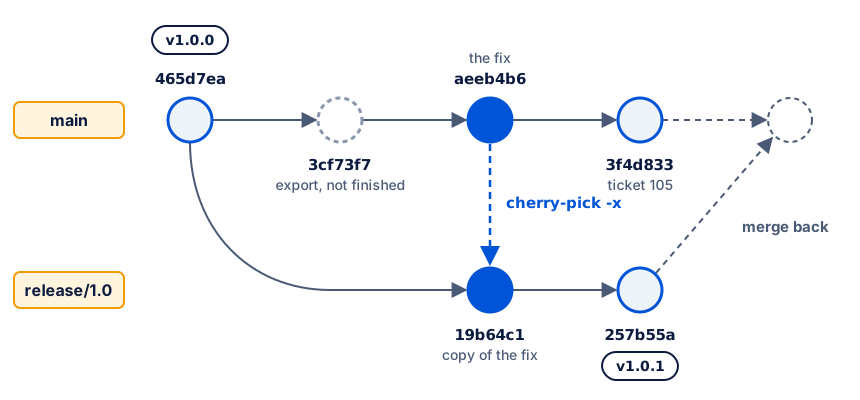
Teams also talk about a forward merge. It means a merge from an older release line into a newer one, for example from release/1.0 into release/1.1. It carries a fix forward in version order. Teams use these names in different ways. When you join a team, ask which direction each name means there.
Worked example: a fix on the release first
Section titled “Worked example: a fix on the release first”1. Run the check before the next release
Section titled “1. Run the check before the next release”Current branch: release/1.0. Before the team makes a new release branch, it lists the commits on the release that main does not have:
git log --oneline main..release/1.0257b55a Merge branch 'hotfix/1.0.1' into release/1.019b64c1 Fix the network team extension19b64c1 is the copy of Sam’s fix. main has the same change, in aeeb4b6, but Git compares commits, not changes. The copy is a different commit, so Git lists it.
To compare the changes, use three dots and --cherry-mark. main...release/1.0 lists the commits on either side, but not on both. --left-right marks each one with < for main or > for release/1.0. --cherry-mark shows = when the other side has a commit with the same change:
git log --oneline --left-right --cherry-mark main...release/1.0> 257b55a Merge branch 'hotfix/1.0.1' into release/1.0= 19b64c1 Fix the network team extension< 3f4d833 Add ticket 105= aeeb4b6 Fix the network team extension< 3cf73f7 Start the ticket export (not finished)The = marks show that aeeb4b6 and 19b64c1 contain the same change. The same fix is in the history twice: a duplicate fix. This is normal after a cherry-pick. The -x line in 19b64c1 also names aeeb4b6, so a person can see the link.
2. Fix the release directly
Section titled “2. Fix the release directly”The help desk reports that “more than 2 days” is not clear. It must say “2 working days”. The fix is urgent, so Amira fixes the release first.
Current branch: release/1.0. She makes a hotfix branch from it:
git switch -c hotfix/1.0.2Current branch: hotfix/1.0.2. She changes the last line of escalation.txt in her editor, and checks the diff:
diff --git a/escalation.txt b/escalation.txtindex 12f9ff4..1b5f8a3 100644--- a/escalation.txt+++ b/escalation.txt@@ -1,3 +1,3 @@ Escalate a ticket when: - the user cannot work, or-- the ticket is open for more than 2 days.+- the ticket is open for more than 2 working days.She commits, checks and pushes:
git commit -am "Fix the escalation wording"sh check.shgit push -u origin hotfix/1.0.2[hotfix/1.0.2 c27858d] Fix the escalation wording 1 file changed, 1 insertion(+), 1 deletion(-)PASS: 4 ticket lines checkedTo /Users/amira/projects/c14-lab/team-remote.git * [new branch] hotfix/1.0.2 -> hotfix/1.0.2branch 'hotfix/1.0.2' set up to track 'origin/hotfix/1.0.2'.PR: source hotfix/1.0.2 → target release/1.0. Sam reviews it and approves.
Current branch: release/1.0. Amira switches to the target, then merges, tags and pushes:
git switch release/1.0git merge --no-ff --no-edit hotfix/1.0.2git tag -a v1.0.2 -m "Help desk notes 1.0.2"git pushgit push origin v1.0.2To /Users/amira/projects/c14-lab/team-remote.git 257b55a..03ee8af release/1.0 -> release/1.0To /Users/amira/projects/c14-lab/team-remote.git * [new tag] v1.0.2 -> v1.0.2The help desk has the fix. But main does not:
git show main:escalation.txtEscalate a ticket when:- the user cannot work, or- the ticket is open for more than 2 days.If the team makes release/1.1 from main now, version 1.1 says “2 days” again. That is a regression.
3. Merge the release back into main
Section titled “3. Merge the release back into main”PR: source release/1.0 → target main. The reviewer looks at what the PR brings to main:
git diff main...release/1.0 --stat contacts.txt | 2 +- escalation.txt | 2 +- 2 files changed, 2 insertions(+), 2 deletions(-)The PR shows both release fixes. Both are fixes, and there is no unfinished work, so the reviewer approves.
Current branch: main. Amira switches to the target of the PR. She pulls first, so that she merges into the newest main:
git switch maingit pullgit merge --no-ff --no-edit release/1.0Already up to date.Merge made by the 'ort' strategy. escalation.txt | 2 +- 1 file changed, 1 insertion(+), 1 deletion(-)Look at the result. The PR showed two files, but the merge changed only escalation.txt. main already had the network team change from aeeb4b6. Git saw the same change on both sides, so it kept one copy of the line, without a conflict.
Current branch: main. She runs the check and pushes:
sh check.shgit pushPASS: 5 ticket lines checkedTo /Users/amira/projects/c14-lab/team-remote.git 3f4d833..9c54d1b main -> main4. Read the new history
Section titled “4. Read the new history”git log --oneline --graph --decorate -9* 9c54d1b (HEAD -> main, origin/main, origin/HEAD) Merge branch 'release/1.0'|\| * 03ee8af (tag: v1.0.2, origin/release/1.0, release/1.0) Merge branch 'hotfix/1.0.2' into release/1.0| |\| | * c27858d (origin/hotfix/1.0.2, hotfix/1.0.2) Fix the escalation wording| |/| * 257b55a (tag: v1.0.1) Merge branch 'hotfix/1.0.1' into release/1.0| |\| | * 19b64c1 (origin/hotfix/1.0.1, hotfix/1.0.1) Fix the network team extension| |/* | 3f4d833 Add ticket 105* | aeeb4b6 Fix the network team extension* | 3cf73f7 Start the ticket export (not finished)|/* 465d7ea (tag: v1.0.0) Add escalation rulesThe check from step 1 is now empty. main has every commit of the release, so this command prints nothing:
git log --oneline main..release/1.0The duplicate is still there. main now has two commits with the same change:
git log --oneline --grep "network team" main19b64c1 Fix the network team extensionaeeb4b6 Fix the network team extension--grep lists only the commits whose message contains the text. Here the duplicate is harmless: both commits make the same change, so the file is correct.
When duplicate fixes cause trouble
Section titled “When duplicate fixes cause trouble”Two copies of the same change merge without trouble. Two different fixes for the same bug do not. For example, Amira writes “2 working days” on the release, and Sam writes “48 hours” on main. Then one of two things happens:
- Both fixes change the same line. The back merge stops with a conflict. The first common mistake below shows it.
- The fixes change different lines. Git merges them without a conflict, and the file now has both fixes. For example, a missing contact is added twice, in two places.
To prevent this, use one fix with one source:
- Agree a team rule, and use only one of these:
- Fix on
mainfirst, then cherry-pick to the release (the previous lesson). - Fix on the release first, then merge the release back into
main(this lesson).
- Fix on
- Before you write a fix, check whether someone already fixed the bug, for example with
git log --oneline --grep "escalation" --all. - Always use
cherry-pick -x, so that each copy names its original. - Merge the release back into
mainafter each release, not weeks later.
Guided practice: fix the release, then merge back
Section titled “Guided practice: fix the release, then merge back”-
Start from Get the starting state. Current branch:
release/1.0. -
Run
git log --oneline --left-right --cherry-mark main...release/1.0. Two lines start with=. -
Make the hotfix branch from the release:
Terminal git switch -c hotfix/1.0.2Current branch:
hotfix/1.0.2. -
In
escalation.txt, changemore than 2 daystomore than 2 working days. Save the file. -
Commit, check and push:
Terminal git commit -am "Fix the escalation wording"sh check.shgit push -u origin hotfix/1.0.2 -
Review the PR, source
hotfix/1.0.2→ targetrelease/1.0, withgit diff release/1.0...hotfix/1.0.2. The diff changes onlyescalation.txt. -
Merge it into the target, and release
v1.0.2:Terminal git switch release/1.0git merge --no-ff --no-edit hotfix/1.0.2git tag -a v1.0.2 -m "Help desk notes 1.0.2"git pushgit push origin v1.0.2Current branch:
release/1.0. -
Run
git show main:escalation.txt. It still says2 days. -
Run
git log --oneline main..release/1.0. The output lists four commits, includingFix the escalation wording. -
Review the back-merge PR, source
release/1.0→ targetmain:Terminal git diff main...release/1.0 --statThe output lists
contacts.txtandescalation.txt, and nothing else. -
Switch to
main, and pull:Terminal git switch maingit pullCurrent branch:
main. -
Merge the release into
main:Terminal git merge --no-ff --no-edit release/1.0The output lists only
escalation.txt. -
Run
sh check.sh. The output starts withPASS. Then rungit push. -
Run
git log --oneline main..release/1.0. The output is empty. -
Run
git log --oneline --grep "network team" main. The output lists two commits with the same message.
Your turn: bring a fix back with cherry-pick
Section titled “Your turn: bring a fix back with cherry-pick”The help desk extension is wrong in the release. It must be 4110, not 4100. Start from the end of the guided practice.
- Release the fix as
v1.0.3. Make it on the release first, with a hotfix branch. - Bring the fix to
mainwith a cherry-pick, not a back merge. Use a branch calledport-help-desk-fix, made frommain, and a PR with the targetmain. - Run
git log --oneline main..release/1.0. Is the output empty? Explain why, and show a command that provesmainhas the fix.
Write the current branch and the PR source and target at each step.
Show a model answer
| Step | Current branch | PR source → target |
|---|---|---|
| Make the hotfix branch | release/1.0 → hotfix/1.0.3 |
none |
| Fix, commit, check, push | hotfix/1.0.3 |
none |
| Review | hotfix/1.0.3 |
hotfix/1.0.3 → release/1.0 |
Merge, tag v1.0.3, push |
release/1.0 |
hotfix/1.0.3 → release/1.0 (merged) |
| Make the port branch | main → port-help-desk-fix |
none |
| Cherry-pick, check, push | port-help-desk-fix |
none |
| Review | port-help-desk-fix |
port-help-desk-fix → main |
| Merge, push | main |
port-help-desk-fix → main (merged) |
git switch release/1.0git switch -c hotfix/1.0.3git commit -am "Fix the help desk extension"sh check.shgit push -u origin hotfix/1.0.3git switch release/1.0git merge --no-ff --no-edit hotfix/1.0.3git tag -a v1.0.3 -m "Help desk notes 1.0.3"git pushgit push origin v1.0.3git switch maingit switch -c port-help-desk-fixgit cherry-pick -x hotfix/1.0.3sh check.shgit push -u origin port-help-desk-fixgit switch maingit merge --no-ff --no-edit port-help-desk-fixgit pushBefore the commit, change Help desk: ext. 4100 to Help desk: ext. 4110 in contacts.txt. git cherry-pick -x hotfix/1.0.3 copies the newest commit of hotfix/1.0.3, which is the fix.
The check is not empty:
git log --oneline main..release/1.02810d0a Merge branch 'hotfix/1.0.3' into release/1.0642f5ce Fix the help desk extensionmain has a copy of 642f5ce, not 642f5ce itself, so Git lists it. --cherry-mark proves that the change is on both sides:
git log --oneline --left-right --cherry-mark main...release/1.0< 211a8eb Merge branch 'port-help-desk-fix'= 147f70e Fix the help desk extension> 2810d0a Merge branch 'hotfix/1.0.3' into release/1.0= 642f5ce Fix the help desk extensiongit show main:contacts.txt also shows Help desk: ext. 4110.
This is one reason to prefer a back merge: after a merge, the check is empty when everything is on main. After a cherry-pick, the check lists commits that main already has, and you must check each one with --cherry-mark.
Common mistake
The bug came back in version 1.1
Symptom: the team finished the export, and made release/1.1 from main. The help desk reports that 1.1 says “2 days” again:
git show release/1.1:escalation.txtEscalate a ticket when:- the user cannot work, or- the ticket is open for more than 2 days.Cause: the fix went onto release/1.0 first, and nobody merged it back into main. release/1.1 came from main, so it does not have the fix. The check shows the missing commits. The hashes are different from the worked example, because this output comes from a separate practice run.
git log --oneline release/1.1..release/1.089962f3 Merge branch 'hotfix/1.0.2' into release/1.0cafc5f2 Fix the escalation wordinge9e566e Merge branch 'hotfix/1.0.1' into release/1.04ef81fb Fix the network team extensionFix:
-
Merge the old release into the new one, with a PR from
release/1.0torelease/1.1. This is a forward merge. Current branch:release/1.1.Terminal git merge --no-ff --no-edit release/1.0Output Merge made by the 'ort' strategy.escalation.txt | 2 +-1 file changed, 1 insertion(+), 1 deletion(-) -
Run
git log --oneline release/1.1..release/1.0again. The output is empty. -
Merge
release/1.0back intomainas well, as in the worked example. Otherwiserelease/1.2has the same problem.
To prevent this, run git log --oneline main..release/1.0 before you make a new release branch. Merge back until the output is empty, or until --cherry-mark shows = for every commit.
Common mistake
The back merge stops with a conflict
Symptom: Amira released “2 working days” in v1.0.2. At the same time, Sam fixed the same bug on main with “48 hours”. The back merge into main stops:
Auto-merging escalation.txtCONFLICT (content): Merge conflict in escalation.txtAutomatic merge failed; fix conflicts and then commit the result.Cause: two people fixed the same bug in different ways. The two fixes change the same line, so Git cannot choose. git diff shows both versions and the original:
Escalate a ticket when: - the user cannot work, or++<<<<<<< HEAD +- the ticket is open for more than 48 hours.++||||||| 465d7ea++- the ticket is open for more than 2 days.++======= - the ticket is open for more than 2 working days.++>>>>>>> release/1.0Fix:
-
Talk to Sam. Agree on one wording. Here the team keeps “2 working days”, because the help desk already uses it in
v1.0.2. -
Edit
escalation.txtso that it contains only the agreed line, with no conflict markers. -
Stage the file, and finish the merge:
Terminal git add escalation.txtgit commit --no-editOutput [main f2744e8] Merge branch 'release/1.0' -
Run
sh check.sh, thengit push.
To prevent this, agree on one source for each fix, as in When duplicate fixes cause trouble.
Module check: the fix is where it must be
Section titled “Module check: the fix is where it must be”The module asks you to show two things: both branches contain the fix, and unrelated work was not released. Run these commands at the end of the guided practice. If you also did “Your turn”, the help desk line shows ext. 4110.
Both branches have the fixed line. Show the file on each branch:
git show release/1.0:contacts.txtgit show main:contacts.txtHelp desk: ext. 4100Network team: ext. 4401Accounts team: ext. 4300Help desk: ext. 4100Network team: ext. 4401Accounts team: ext. 4300Both branches have a commit with the fix. --grep finds the commits by message:
git log --oneline --grep "network team" release/1.019b64c1 Fix the network team extensionYou may know git branch --contains, which lists the branches that contain a commit. It does not work for a cherry-picked fix:
git branch --contains aeeb4b6* mainrelease/1.0 is not in the list, but it has the fix. It contains the copy, 19b64c1, not aeeb4b6. git branch --contains looks for one exact commit, not for a change. So check the file contents, or use --grep and --cherry-mark.
Unrelated work was not released. Compare the first release with the release branch now:
git diff v1.0.0 release/1.0 --stat contacts.txt | 2 +- escalation.txt | 2 +- 2 files changed, 2 insertions(+), 2 deletions(-)Only the two fixed files changed. export.txt and tickets.txt are not in the list, so the unfinished export and ticket 105 were not released.
Check your understanding
Predict: Amira fixes a bug directly on release/1.0 and releases v1.0.4. Nobody merges back. Two weeks later, the team makes release/1.1 from main. Does version 1.1 have the fix? Which command shows the problem before the team makes release/1.1?
Show the answer
No. release/1.1 comes from main, and main never got the fix, so the bug comes back: a regression. Run git log --oneline main..release/1.0 before you make release/1.1. It lists the fix commit, because main does not have it. Merge release/1.0 back into main first, with a PR from release/1.0 to main.
Does your answer have the main points of ours?
Sign in and enroll in the course to save your answers. Every check counts toward the certificate.
Check your understanding
Practical check: show that main and release/1.0 both contain the network team fix, and that the export was not released. Why does git branch --contains aeeb4b6 not list release/1.0?
Show the answer
git show main:contacts.txtandgit show release/1.0:contacts.txtboth showNetwork team: ext. 4401.git log --oneline --grep "network team" release/1.0lists19b64c1, the copy with the-xline.git diff v1.0.0 release/1.0 --statlists onlycontacts.txtandescalation.txt.git show release/1.0:export.txtfails.
git branch --contains looks for the exact commit aeeb4b6. The release has a copy with a different hash, so the command does not list it, although the change is there.
Does your answer have the main points of ours?
Sign in and enroll in the course to save your answers. Every check counts toward the certificate.
Recap
- A fix that starts on the release branch must also reach
main. If not, the next release brings the bug back: a regression. - A back merge brings the release into
mainwith a PR fromrelease/1.0tomain. A forward merge goes from an older release line into a newer one. Names vary between teams. - Before you make a new release branch, run
git log --oneline main..release/1.0. - A cherry-pick makes a duplicate: the same change in two commits.
--cherry-markshows them with=. Same changes merge cleanly. Different fixes for one bug cause conflicts. - Use one source for each fix,
cherry-pick -x, and a team rule: fix onmainfirst, or fix on the release and merge back. - You can now release a version, fix it with a traceable cherry-pick, and keep
mainand the release consistent.
Next: Final assignment