
Credentials and access
- Lesson 8
- 45 min
- Module 3: Manage environments and secrets
Lesson 8 of 15 · CI/CD, Testing and Safe ReleasesCredentials and access
1. Understand the delivery path
2. Create a repeatable CI pipeline
3. Manage environments and secrets
4. Release AI and database changes
5. Recover and maintain the release process
What you will be able to do
Let the pipeline deploy with no cloud password stored anywhere. Each environment can change only its own app, and production waits until a person approves.
Before you startWhat to know and to have ready
What you need to know
- Identities, roles and scope, from Identity and secrets: Identities and Roles and scope.
- Where an app’s secret lives, from Identity and secrets: Where the secret lives.
- The environments and their settings, from Configuration separation: One image, many environments.
What you need on your computer
- Your project on the branch
feature/deploy, withdeploy/local/and the two git-ignored keys insecrets/, from Configuration separation: Guided practice. - Admin rights on your repository
github.com/<you>/ticket-api-ci. It must be public: on the free plan, required reviewers work only in public repositories. - Optional: the GitHub CLI
gh. Every GitHub step is also described in the web interface. - Live route only: the resource group
rg-ticket-api-ciwith the appsticket-api-stagingandticket-api-production, and their two keys, from Configuration separation: Worked example (live). - If your project is missing or broken, copy the snapshot
end-of-m02, as in Use a snapshot, and do the guided practice of the last lesson again.
Run with GitHub Actions (ubuntu-24.04 runners) in the public repository Nextia-Intelligence/ticket-api-ci, Docker Desktop 4.81.0 on macOS (Apple silicon), and Azure CLI 2.88.0 in canadacentral. The Windows and Linux steps are not tested.
Two questions for the pipeline
Section titled “Two questions for the pipeline”In the Docker course, Amira deployed from her own terminal, signed in as herself. Now a runner must deploy: a fresh virtual machine that GitHub starts and deletes for each job. Azure asks it the same two questions as before:
- Who are you? The identity.
- What may you do here? The role and its scope.
The old answer to question 1 is a password. You make a service principal with a client secret, and you store the secret in GitHub. It works, and it has three problems. The secret is valid for months. It works from any computer, so a copy in a log or a fork is as good as the original. And one secret often serves every environment.
The answer in this course has no password. OIDC (OpenID Connect) is a standard way for one system to tell another, with a signed token, who is calling. GitHub signs a short-lived token for each job. It says, for example, “this is a job of Nextia-Intelligence/ticket-api-ci in the environment staging”. Azure trusts such a token only if it matches a federated credential. That is a rule on an Azure identity that names the token’s issuer, audience and subject. The subject is the exact text in the token’s sub field.

Text description of the diagram
Read it from top to bottom. GitHub, not the workflow file, writes the subject, so a workflow cannot claim to be a different repository or environment. Entra ID (Microsoft’s identity service, formerly Azure Active Directory) compares the subject with the federated credential, character by character. If it matches, the runner gets an access token for one identity, and that identity’s role decides what the token can change. Nothing in the picture is stored for later: both tokens expire soon.
The rest of this lesson builds the three parts: the Azure identities, the GitHub environments, and the token’s permission in the workflow.
Scoped identities (live)
Section titled “Scoped identities (live)”Each environment gets its own identity, and each identity gets one role on one app: Container Apps Contributor on its own container app. It can deploy a new image to that app. It cannot change the other app, delete the resource group, or read anything else in the subscription. That is least privilege, as in the Docker course, with one more boundary: staging’s pipeline job cannot touch production, even by mistake.
RG=rg-ticket-api-ciaz identity create -g $RG -n id-deploy-staging -o nonePRINCIPAL_ID=$(az identity show -g $RG -n id-deploy-staging --query principalId -o tsv)APP_ID=$(az containerapp show -g $RG -n ticket-api-staging --query id -o tsv)az role assignment create --assignee-object-id $PRINCIPAL_ID --assignee-principal-type ServicePrincipal \ --role "Container Apps Contributor" --scope $APP_ID -o none$RG = "rg-ticket-api-ci"az identity create -g $RG -n id-deploy-staging -o none$PRINCIPAL_ID = az identity show -g $RG -n id-deploy-staging --query principalId -o tsv$APP_ID = az containerapp show -g $RG -n ticket-api-staging --query id -o tsvaz role assignment create --assignee-object-id $PRINCIPAL_ID --assignee-principal-type ServicePrincipal ` --role "Container Apps Contributor" --scope $APP_ID -o none-o none prints nothing on success. Do the same for production: id-deploy-production and ticket-api-production. Then check the two assignments:
az role assignment list --all --query "[?contains(scope,'rg-ticket-api-ci')].{role:roleDefinitionName, scope:scope}" -o tableThe output (live, the subscription ID shortened):
Role Scope-------------------------- ---------------------------------------------------------------------------------------------Container Apps Contributor /subscriptions/.../resourceGroups/rg-ticket-api-ci/providers/Microsoft.App/containerapps/ticket-api-stagingContainer Apps Contributor /subscriptions/.../resourceGroups/rg-ticket-api-ci/providers/Microsoft.App/containerapps/ticket-api-productionTwo rows, and each scope ends with one app’s name. A scope that ends with rg-ticket-api-ci or with the subscription is too wide. Delete that assignment, and make it again with the app’s ID.
The federated credentials
Section titled “The federated credentials”First find the exact subject that GitHub writes for your repository. Ask GitHub, read-only:
gh api repos/<you>/ticket-api-ci/actions/oidc/customization/subThe output for the reference repository:
{"use_default":true,"use_immutable_subject":true,"sub_claim_prefix":"repo:usmanahmed99@43086923/ticket-api-ci@1409181261"}use_immutable_subject: true means that the subject has immutable IDs: the owner’s account number after @, and the repository’s number after the second @. Someone can rename an account or take an old name again; these numbers never change. So the subject of a staging job is:
repo:usmanahmed99@43086923/ticket-api-ci@1409181261:environment:stagingYour numbers are different. Without gh, open https://api.github.com/repos/<you>/ticket-api-ci/actions/oidc/customization/sub in the browser, or copy the prefix from the error message in the failure case.
PREFIX=$(gh api repos/<you>/ticket-api-ci/actions/oidc/customization/sub --jq .sub_claim_prefix)echo "${PREFIX}:environment:staging"az identity federated-credential create -g $RG --identity-name id-deploy-staging --name github-staging \ --issuer https://token.actions.githubusercontent.com \ --subject "${PREFIX}:environment:staging" \ --audiences api://AzureADTokenExchange -o table$PREFIX = gh api repos/<you>/ticket-api-ci/actions/oidc/customization/sub --jq .sub_claim_prefix"${PREFIX}:environment:staging"az identity federated-credential create -g $RG --identity-name id-deploy-staging --name github-staging ` --issuer https://token.actions.githubusercontent.com ` --subject "${PREFIX}:environment:staging" ` --audiences api://AzureADTokenExchange -o tableDo the same for production: --identity-name id-deploy-production --name github-production and :environment:production. The three values must match the token exactly:
| Field | Value | Why |
|---|---|---|
| Issuer | https://token.actions.githubusercontent.com |
Only tokens that GitHub Actions signed |
| Audience | api://AzureADTokenExchange |
The value that azure/login asks for |
| Subject | <prefix>:environment:staging |
Only jobs of this repository in this environment |
The subject names the environment, not a branch. A job gets the subject …:environment:staging only if it runs in the GitHub environment staging, and the environment decides which branches may use it. So the GitHub environment is the gate, and the next section makes it.
Last, note each identity’s client ID. It is not a secret: it names the identity, and it is useless without a token that matches the federated credential.
az identity show -g $RG -n id-deploy-staging --query clientId -o tsvaz identity show -g $RG -n id-deploy-production --query clientId -o tsvaz account show --query "{tenant:tenantId, subscription:id}" -o tableThe GitHub environments
Section titled “The GitHub environments”A GitHub environment is a named set of rules, variables and secrets in a repository. A job that names it (environment: staging) gets its variables and secrets only if it passes its rules. Make two: staging and production.
In the web interface: Settings → Environments → New environment. For each one:
- Name it
staging(later,production). The name must match the workflow and the federated credential. - Under Deployment branches and tags, choose Selected branches and tags, and add the rule
main. Now only jobs frommaincan use this environment. - Production only: turn on Required reviewers, and add yourself (in a team: the people who may approve a release). Save the rules.
- Under Environment variables, add the four variables in the table below, with this environment’s values.
- Under Environment secrets, add
SMOKE_API_KEYwith this environment’s key. Live: the key that you gave the app. Simulated: the content ofsecrets/<environment>_api_key.txt.
Then add two repository variables (Settings → Secrets and variables → Actions → Variables): AZURE_TENANT_ID and AZURE_SUBSCRIPTION_ID. They are the same for both environments.
| Name | Kind | staging (reference values) | production |
|---|---|---|---|
APP_NAME |
Environment variable | ticket-api-staging |
ticket-api-production |
APP_URL |
Environment variable | https://ticket-api-staging.blackhill-8c0e6b69.canadacentral.azurecontainerapps.io |
https://ticket-api-production.blackhill-8c0e6b69.… |
AZURE_CLIENT_ID |
Environment variable | The client ID of id-deploy-staging (89e675c2-…) |
The client ID of id-deploy-production (e06c2c32-…) |
RESOURCE_GROUP |
Environment variable | rg-ticket-api-ci |
rg-ticket-api-ci |
SMOKE_API_KEY |
Environment secret | The staging app’s key | The production app’s key |
AZURE_TENANT_ID, AZURE_SUBSCRIPTION_ID |
Repository variables | One value each, for both |
Why are the IDs variables and not secrets? None of them can sign in alone: a sign-in needs a token that matches the federated credential, and only GitHub can sign one. The azure/login step prints them in the log anyway (in the reference run, tenant-id: 5908b9a3-… and subscription-id: 223d2ae4-… are in the log). A secret is for a value that gives access by itself, like the API key.
With the GitHub CLI, the same settings are commands. They change your repository, so run them only on your own:
gh variable set APP_NAME --env staging --body ticket-api-staginggh secret set SMOKE_API_KEY --env staging < secrets/staging_api_key.txtgh variable set AZURE_TENANT_ID --body <your tenant ID>gh secret set … < file reads the key from the file, so it never appears in your shell history.
Check the environments
Section titled “Check the environments”Ask GitHub what it has, read-only. The reference repository answered (live, shortened to the useful fields):
gh api repos/<you>/ticket-api-ci/environments --jq '.environments[] | {name, rules: [.protection_rules[].type], can_admins_bypass}'{"can_admins_bypass":true,"name":"production","rules":["required_reviewers","branch_policy"]}{"can_admins_bypass":true,"name":"staging","rules":["branch_policy"]}The environment secrets show their names, never their values:
{"total_count":1,"secrets":[{"name":"SMOKE_API_KEY","created_at":"2026-10-07T18:05:58Z","updated_at":"2026-10-07T18:05:58Z"}]}Environment secrets and the approval
Section titled “Environment secrets and the approval”An environment secret is a secret that only the jobs of one environment can read. A repository secret goes to every job of every workflow. The difference matters at the approval. The production job does not start until the reviewer approves, and before it starts, it gets nothing: not the production key, not an Azure token. A change in a pull request cannot read the production key, because the branch policy allows only main.
A required reviewer is a person (or a team) who must approve before a job in that environment starts. In the test run, the reviewer and the author were the same account, because one person ran the whole course. In a team, the reviewer is someone else. Turn on Prevent self-review in the production environment, so that the person who started the deployment cannot approve it. Also look at can_admins_bypass: true above: by default, an administrator can skip the rules. In a team, turn off Allow administrators to bypass configured protection rules.
The token’s own permissions
Section titled “The token’s own permissions”The workflow’s own token, GITHUB_TOKEN, is a third credential. GitHub makes it for each run, and it can change the repository. Give each workflow and each job only what it needs, with permissions:. The Deploy workflow of the next lesson starts with:
permissions: contents: readand gives the deploy jobs one more right:
permissions: contents: read id-token: writeid-token: write does not let the job write to the repository. It lets the job ask for an OIDC token. Without it, azure/login cannot get one. The run log lists what the token can do. In the deploy job of run 37664760027 (live):
GITHUB_TOKEN PermissionsContents: readMetadata: readThe job can read the code and nothing more. Compare the Release workflow of the next lesson, which must create a release and tag an image: Contents: write, Metadata: read, Packages: write. Each workflow asks for its own rights, and no job has rights that it does not use.
The simulated route: keys and boundaries
Section titled “The simulated route: keys and boundaries”The simulated route has no identities and no OIDC, because nothing on your computer asks a cloud for access. It keeps the other boundaries:
- One key per environment.
secrets/staging_api_key.txtandsecrets/production_api_key.txthold different keys. Compose mounts each one only into its ownapicontainer, at/run/secrets/api_key. - Nothing secret in Git.
secrets/and.envare git-ignored. The settings files indeploy/local/hold no secret. - A key from one environment does not open the other. With both local environments running, the staging key sent to production gave (simulated):
curl -s -o /dev/null -w '%{http_code}\n' -X POST http://127.0.0.1:8082/v1/classify \ -H 'Content-Type: application/json' -H "X-API-Key: $(cat secrets/staging_api_key.txt)" \ -d '{"subject":"Package never arrived"}'401What the simulation cannot show: the identity, the role and the OIDC exchange. Read the live parts of this lesson for them, and look at the real runs: the failure below and its fix are public.
Guided practice: set up access
Section titled “Guided practice: set up access”- Both routes: make the GitHub environments
stagingandproduction, with the branch policymain, and the required reviewer onproduction. - Both routes: add
SMOKE_API_KEYto each environment, from the matching file insecrets/(simulated) or the app’s key (live). - Live route: make the two identities and their role assignments. Check that
az role assignment listshows two rows, each scoped to one app. - Live route: read your subject prefix with
gh api …/oidc/customization/sub. Print"${PREFIX}:environment:staging"and check it by eye. - Live route: make the two federated credentials.
- Live route: add the four environment variables to each environment, and the two repository variables.
- Check: run
gh api repos/<you>/ticket-api-ci/environments --jq '.environments[].name'. Expected:productionandstaging.
Show the expected result
gh api …/environments lists two environments: production with the rules required_reviewers and branch_policy, and staging with branch_policy. Each environment has the secret SMOKE_API_KEY. Live: each environment has APP_NAME, APP_URL, AZURE_CLIENT_ID and RESOURCE_GROUP, and the repository has AZURE_TENANT_ID and AZURE_SUBSCRIPTION_ID. az identity federated-credential list -g rg-ticket-api-ci --identity-name id-deploy-staging -o table shows one credential whose subject ends with :environment:staging and starts with your own repo:<you>@<number>/ticket-api-ci@<number>. You have not deployed anything yet: the first deployment is in the next lesson.
Your turn: the wrong identity
Section titled “Your turn: the wrong identity”The production job runs with environment: production. Suppose a mistake in a workflow sends staging’s client ID (vars.AZURE_CLIENT_ID from the wrong place) with the production job’s token. Predict what happens at the sign-in, and why. Then predict what happens if someone gives id-deploy-staging a second federated credential with the subject …:environment:production.
Show the answer
The first case fails at the sign-in. The production job’s token has the subject …:environment:production. id-deploy-staging trusts only …:environment:staging, so Entra ID answers AADSTS700213: No matching federated identity record found, the same error as in the first deployment. The mistake cannot deploy anything.
The second case removes the boundary. Then a production job could sign in as id-deploy-staging, and a staging job still as well. It could change only the staging app (the role is scoped to it), but the two environments now share one identity. Keep one identity per environment, with one federated credential each. If you need a change, make it on the right identity.
The first deployment failed at the sign-in
Section titled “The first deployment failed at the sign-in”Common mistake
The subject that most guides show
Symptom: the first Deploy run, run 37664760027, attempt 1, failed after 14 s in the staging job. The step “Sign in to Azure with this environment’s identity (no password)” failed. The production job never started.
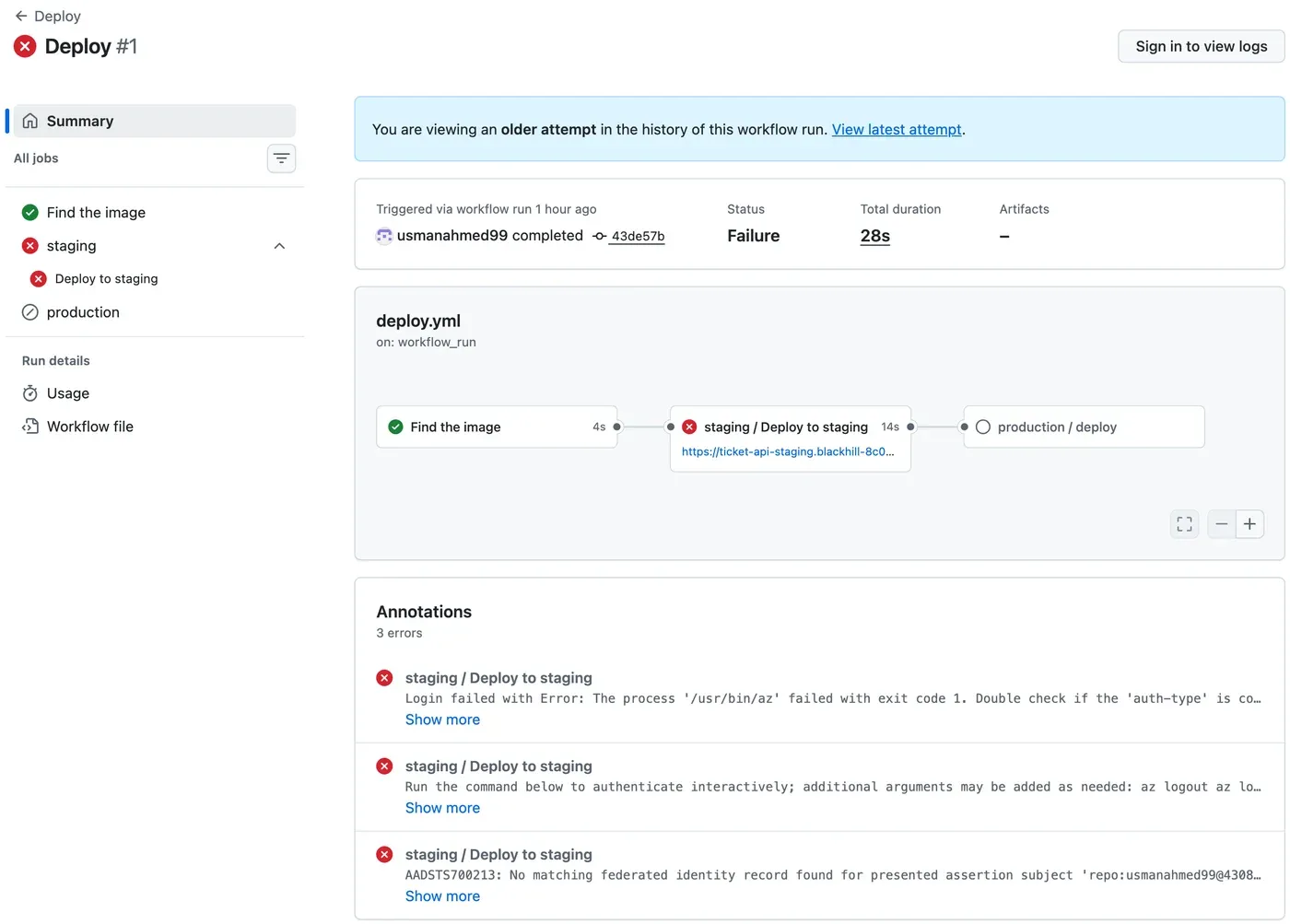
The log said (live, shortened):
Federated token details: issuer - https://token.actions.githubusercontent.com subject claim - repo:usmanahmed99@43086923/ticket-api-ci@1409181261:environment:staging audience - api://AzureADTokenExchangeAttempting Azure CLI login by using OIDC...##[error]AADSTS700213: No matching federated identity record found for presented assertion subject 'repo:usmanahmed99@43086923/ticket-api-ci@1409181261:environment:staging'. Check your federated identity credential Subject, Audience and Issuer against the presented assertion.Cause: the federated credential had the subject repo:usmanahmed99/ticket-api-ci:environment:staging. That is the format that most guides show. This repository’s tokens use immutable IDs, so the token said repo:usmanahmed99@43086923/ticket-api-ci@1409181261:environment:staging. One character different is no match.
Diagnose: the error message prints the subject that GitHub sent. Compare it with az identity federated-credential list -g rg-ticket-api-ci --identity-name id-deploy-staging --query "[].subject" -o tsv. Or ask GitHub for the prefix, as above.
Fix:
- Run the
az identity federated-credential createcommand again, with the same--nameand the subject from"${PREFIX}:environment:staging". It replaced the old subject in the test run. Do the same for production. - In the run’s page, choose Re-run jobs → Re-run failed jobs. Attempt 2 kept the green “Find the image” job from attempt 1, and ran staging and production again. Staging passed, and production waited for the approval.
For a real AI service: the failure was safe. The sign-in failed closed: no token, no change, and production stayed on its old version. A deployment credential that “always works” (a stored password with wide rights) would also work for an attacker. A credential that fails on one wrong character works only for the job it was made for.
Check your understanding
Why does the course use OIDC federated credentials instead of storing an Azure client secret in GitHub?
Show the answer
A client secret is a long-lived password. Anyone with a copy can use it from any computer, and one secret often serves all environments. With OIDC, you store nothing. GitHub signs a short-lived token for each job. Azure gives an access token only if the token’s issuer, audience and subject match the federated credential, for example …:environment:staging. Each identity accepts only its own environment’s jobs, and its role allows changes to one app only.
Does your answer have the main points of ours?
Sign in and enroll in the course to save your answers. Every check counts toward the certificate.
Check your understanding
Predict: a pull request changes deploy-to.yml to print the secret SMOKE_API_KEY of production. Does the pull request's CI run get the production key? Explain.
Show the answer
No. SMOKE_API_KEY is an environment secret of production. A job gets it only if it runs in that environment and passes its rules: the branch policy allows only main, and the required reviewer must approve. A pull request’s run is not on main, so it cannot use the environment. Even on main, the change would first need a review and the approval. GitHub also masks secret values in logs.
Does your answer have the main points of ours?
Sign in and enroll in the course to save your answers. Every check counts toward the certificate.
Check your understanding
The deploy job has permissions contents: read and id-token: write. What can the job do with GITHUB_TOKEN, and what does id-token: write allow?
Show the answer
With GITHUB_TOKEN, the job can only read the repository (the log shows Contents: read and Metadata: read). It cannot push, make a release or change settings. id-token: write lets the job ask GitHub’s OIDC provider for a signed ID token. azure/login trades it for an Azure access token. Without it, the sign-in fails before it starts.
Does your answer have the main points of ours?
Sign in and enroll in the course to save your answers. Every check counts toward the certificate.
Recap
- Each environment has its own identity,
id-deploy-stagingorid-deploy-production, with Container Apps Contributor on its own app only. - OIDC: GitHub signs a short-lived token per job; a federated credential trusts one exact issuer, audience and subject. No password is stored anywhere.
- Read the subject prefix with
gh api …/actions/oidc/customization/sub: this repository uses immutable IDs (repo:usmanahmed99@43086923/ticket-api-ci@1409181261). In zsh, write${PREFIX}in braces. - GitHub environments
stagingandproduction: branch policymain, a required reviewer on production, environment variables for the names and IDs, and the environment secretSMOKE_API_KEY. - In a team: Prevent self-review, and no administrator bypass.
permissions:givesGITHUB_TOKENonlycontents: read, plusid-token: writefor the deploy jobs.
Everything is ready for a deployment that no person types. The next lesson writes the Deploy workflow, sends the first digest to staging, and waits for your approval before production.
Next: Promote to staging