
Cherry-pick a fix
- Lesson 14
- 45 min
- Module 5: Release and hotfix practice
Lesson 14 of 15 · Git and Team Development EssentialsCherry-pick a fix
1. Understand a repository
2. Work with branches and remotes
3. Collaborate through reviews
4. Resolve and recover
5. Release and hotfix practice
What you will be able to do
Fix a bug in a released version without releasing unfinished work. You copy one commit from main to the release branch, and you can prove that nothing else came with it.
Before you startWhat to know and to have ready
What you need to know
- What
main,release/1.0andv1.0.0are, from Release branches and tags: The team releases a version. - How to open a simulated pull request and merge it with
git merge --no-ff, from Pull-request sequence: 8. Merge. - How to resolve a conflict and revert a commit, from Conflicts step by step: Resolve, test and commit and Undo safely: Revert it.
What you need on your computer
- The folder
~/projects/nextia-learning-labs. You cloned it in Pull-request sequence: Set up the practice lab. If it is missing, do step 2 of that section. - This lesson uses the practice state
hotfix. You make it in Set up the practice state. The setup command deletes yourc14-labfolder and makes it again. The state already hasrelease/1.0andv1.0.0, so you do not need your work from the last lesson.
A bug in version 1.0
Section titled “A bug in version 1.0”The help desk uses version 1.0. It calls the network team on extension 4410, but nobody answers. The correct extension is 4401.
Sam already fixed this on main. But main has two other new commits since the release:
| Commit | Message | Can it go into a 1.0 fix? |
|---|---|---|
3cf73f7 |
Start the ticket export (not finished) | No. It is not finished. |
aeeb4b6 |
Fix the network team extension | Yes. This is the fix. |
3f4d833 |
Add ticket 105 | No. It is new content, not a fix. |
If the team merges main into release/1.0, all three commits go into the release. The help desk then gets an unfinished export. The team needs only aeeb4b6.
A hotfix is a fix for a version that people already use. The team releases it as a PATCH version, here v1.0.1.
Cherry-pick copies the change of one commit onto your current branch, as a new commit. Git reads the diff of the commit that you choose, and applies that diff to your branch. The new commit has the same message and the same author. It has a different hash, because it has a different parent.
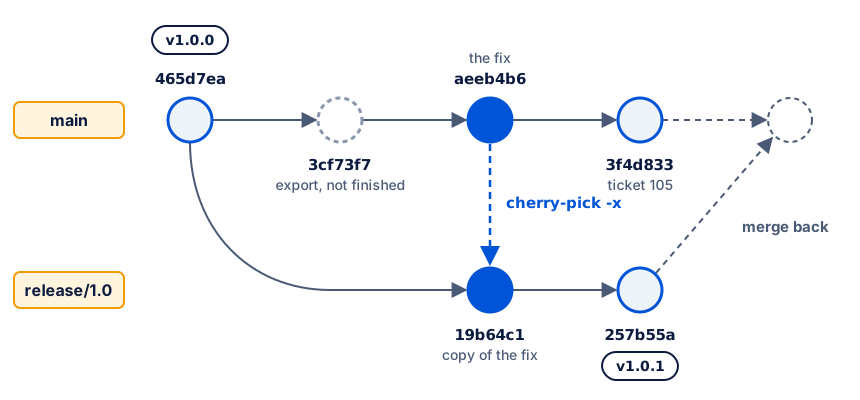
The fix and its copy have the same color, because they contain the same change. They are different commits, with different hashes.
The hotfix sequence
Section titled “The hotfix sequence”Every step happens on a known branch. Check the branch before each command.
| Step | Current branch | PR source → target |
|---|---|---|
| 1. Find and inspect the fix | release/1.0 |
none |
| 2. Make the hotfix branch | release/1.0 → hotfix/1.0.1 |
none |
| 3. Cherry-pick, check, push | hotfix/1.0.1 |
none |
| 4. Open and review the PR | hotfix/1.0.1 |
hotfix/1.0.1 → release/1.0 |
| 5. Merge, tag, push | release/1.0 |
hotfix/1.0.1 → release/1.0 (merged) |
The fix goes into the release through a pull request, the same as other changes. The target is release/1.0, not main.
Set up the practice state
Section titled “Set up the practice state”-
Run the setup script with the scenario
hotfix:Terminal cd ~/projectssh nextia-learning-labs/C14/setup.sh hotfix --resetcd c14-lab/ticket-notesThe output starts with
Ready:. -
Look at all references:
Terminal git log --oneline --graph --all --decorate -5Output * 3f4d833 (HEAD -> main, origin/main, origin/HEAD) Add ticket 105* aeeb4b6 Fix the network team extension* 3cf73f7 Start the ticket export (not finished)* 465d7ea (tag: v1.0.0, origin/release/1.0) Add escalation rules* f330fdc Add ticket 104You have the remote branch
origin/release/1.0, but no localrelease/1.0yet.
Worked example: release version 1.0.1
Section titled “Worked example: release version 1.0.1”1. Find the fix
Section titled “1. Find the fix”Current branch: main. Amira switches to release/1.0. Git makes a local branch that tracks origin/release/1.0:
git switch release/1.0Switched to a new branch 'release/1.0'branch 'release/1.0' set up to track 'origin/release/1.0'.Current branch: release/1.0. She lists the commits that are on main but not on release/1.0. A..B means “commits in B that are not in A”:
git log --oneline release/1.0..main3f4d833 Add ticket 105aeeb4b6 Fix the network team extension3cf73f7 Start the ticket export (not finished)2. Inspect the fix
Section titled “2. Inspect the fix”A commit message describes the change, but the diff is the change. Amira reads the diff before she copies it:
git show aeeb4b6commit aeeb4b6389efc1d6d75e474e911499fc5fe73e12Author: Sam Okafor <sam@example.com>Date: Tue Oct 6 09:12:00 2026 -0400
Fix the network team extension
diff --git a/contacts.txt b/contacts.txtindex 0ce0116..48d016f 100644--- a/contacts.txt+++ b/contacts.txt@@ -1,3 +1,3 @@ Help desk: ext. 4100Network team: ext. 4410Network team: ext. 4401 Accounts team: ext. 4300The commit changes one line in one file. It does what the message says.
3. Check the dependencies
Section titled “3. Check the dependencies”A fix depends on an earlier commit when it changes lines that the earlier commit added. If that earlier commit is not on the release, the fix cannot apply there. Amira asks two questions.
Does the release have the lines that the fix changes? She shows contacts.txt as it is on release/1.0:
git show release/1.0:contacts.txtHelp desk: ext. 4100Network team: ext. 4410Accounts team: ext. 4300The release has the line Network team: ext. 4410, the same as the line that the fix removes. So the fix can apply.
Does the fix need another commit from main? The only commit between the release and the fix is the export. --stat shows which files it changed:
git show --stat 3cf73f7 Start the ticket export (not finished)
export.txt | 2 ++ 1 file changed, 2 insertions(+)The export changed only export.txt. The fix changed only contacts.txt. The fix does not need the export.
4. Make the hotfix branch from the release
Section titled “4. Make the hotfix branch from the release”Current branch: release/1.0. Amira makes the hotfix branch here, not on main. A branch starts from the commit that you are on, and the fix must go onto the release:
git switch -c hotfix/1.0.1Switched to a new branch 'hotfix/1.0.1'5. Cherry-pick the fix
Section titled “5. Cherry-pick the fix”Current branch: hotfix/1.0.1. The -x option adds a line to the new commit message. The line names the original commit, so that anyone can trace the copy back to it.
git cherry-pick -x aeeb4b6[hotfix/1.0.1 19b64c1] Fix the network team extension Author: Sam Okafor <sam@example.com> Date: Tue Oct 6 09:12:00 2026 -0400 1 file changed, 1 insertion(+), 1 deletion(-)The new commit is 19b64c1. Your hash is different, because you made the copy at a different time. Git kept Sam as the author, because he wrote the change. The full message shows the -x line:
git log -1commit 19b64c13a2bb62fa029d4884fc18af8816ff3f1dAuthor: Sam Okafor <sam@example.com>Date: Tue Oct 6 09:12:00 2026 -0400
Fix the network team extension
(cherry picked from commit aeeb4b6389efc1d6d75e474e911499fc5fe73e12)The graph now shows the copy on its own line, from v1.0.0:
git log --oneline --graph --all --decorate -6* 19b64c1 (HEAD -> hotfix/1.0.1) Fix the network team extension| * 3f4d833 (origin/main, origin/HEAD, main) Add ticket 105| * aeeb4b6 Fix the network team extension| * 3cf73f7 Start the ticket export (not finished)|/* 465d7ea (tag: v1.0.0, origin/release/1.0, release/1.0) Add escalation rules* f330fdc Add ticket 1046. Check, push and open the pull request
Section titled “6. Check, push and open the pull request”Current branch: hotfix/1.0.1. Amira runs the check, then pushes the branch:
sh check.shgit push -u origin hotfix/1.0.1PASS: 4 ticket lines checkedTo /Users/amira/projects/c14-lab/team-remote.git * [new branch] hotfix/1.0.1 -> hotfix/1.0.1branch 'hotfix/1.0.1' set up to track 'origin/hotfix/1.0.1'.PR: source hotfix/1.0.1 → target release/1.0. This is a simulated pull request, as in Module 3. The reviewer, Sam, checks the diff that the PR adds to the release:
git diff release/1.0...hotfix/1.0.1diff --git a/contacts.txt b/contacts.txtindex 0ce0116..48d016f 100644--- a/contacts.txt+++ b/contacts.txt@@ -1,3 +1,3 @@ Help desk: ext. 4100-Network team: ext. 4410+Network team: ext. 4401 Accounts team: ext. 4300The diff has one changed line. No export, no ticket 105. Sam approves.
7. Merge, tag and push
Section titled “7. Merge, tag and push”Current branch: release/1.0. Amira switches to the target of the PR, and merges it:
git switch release/1.0git merge --no-ff --no-edit hotfix/1.0.1Merge made by the 'ort' strategy. contacts.txt | 2 +- 1 file changed, 1 insertion(+), 1 deletion(-)Current branch: release/1.0. She tags the release, and pushes the branch and the tag:
git tag -a v1.0.1 -m "Help desk notes 1.0.1"git pushgit push origin v1.0.1To /Users/amira/projects/c14-lab/team-remote.git 465d7ea..257b55a release/1.0 -> release/1.0To /Users/amira/projects/c14-lab/team-remote.git * [new tag] v1.0.1 -> v1.0.18. Prove the result
Section titled “8. Prove the result”Amira proves that version 1.0.1 has the fix, and nothing else. First, the files that changed between the two versions:
git diff v1.0.0 v1.0.1 --stat contacts.txt | 2 +- 1 file changed, 1 insertion(+), 1 deletion(-)Then, the commits that are in 1.0.1 but not in 1.0.0:
git log --oneline v1.0.0..v1.0.1257b55a Merge branch 'hotfix/1.0.1' into release/1.019b64c1 Fix the network team extensionLast, the unfinished export is not in the release:
git show v1.0.1:export.txtfatal: path 'export.txt' does not exist in 'v1.0.1'This error is the result that she wants. The full graph now matches the diagram at the start of the lesson:
* 257b55a (HEAD -> release/1.0, tag: v1.0.1, origin/release/1.0) Merge branch 'hotfix/1.0.1' into release/1.0|\| * 19b64c1 (origin/hotfix/1.0.1, hotfix/1.0.1) Fix the network team extension|/| * 3f4d833 (origin/main, origin/HEAD, main) Add ticket 105| * aeeb4b6 Fix the network team extension| * 3cf73f7 Start the ticket export (not finished)|/* 465d7ea (tag: v1.0.0) Add escalation rules* f330fdc Add ticket 104* e058b3f Add ticket 103Guided practice: release 1.0.1
Section titled “Guided practice: release 1.0.1”-
Run the setup from Set up the practice state. You are on
maininticket-notes. -
Switch to the release branch:
Terminal git switch release/1.0Current branch:
release/1.0. The output includesset up to track 'origin/release/1.0'. -
Run
git log --oneline release/1.0..main. The output lists three commits. Write down the hash ofFix the network team extension. -
Run
git show aeeb4b6. Check that it changes only the network team line incontacts.txt. -
Run
git show release/1.0:contacts.txt. Check that the release hasNetwork team: ext. 4410. -
Make the hotfix branch from the release:
Terminal git switch -c hotfix/1.0.1Current branch:
hotfix/1.0.1. -
Copy the fix:
Terminal git cherry-pick -x aeeb4b6The output starts with
[hotfix/1.0.1and a new hash. -
Run
git log -1. The message ends with(cherry picked from commit aeeb4b6...). -
Run
sh check.sh. The output starts withPASS. -
Push the hotfix branch:
Terminal git push -u origin hotfix/1.0.1 -
Review the simulated PR, source
hotfix/1.0.1→ targetrelease/1.0:Terminal git diff release/1.0...hotfix/1.0.1The diff shows one changed line in
contacts.txt, and nothing else. -
Switch to the target branch, and merge:
Terminal git switch release/1.0git merge --no-ff --no-edit hotfix/1.0.1Current branch:
release/1.0. The output includesMerge made by the 'ort' strategy. -
Tag the release:
Terminal git tag -a v1.0.1 -m "Help desk notes 1.0.1" -
Push the branch, then the tag:
Terminal git pushgit push origin v1.0.1 -
Run
git diff v1.0.0 v1.0.1 --stat. The output lists onlycontacts.txt. -
Run
git show v1.0.1:export.txt. The output isfatal: path 'export.txt' does not exist in 'v1.0.1'.
Your turn: release 1.0.2
Section titled “Your turn: release 1.0.2”Sam finds a second bug: the accounts team extension is 4310, not 4300. You play both people. Start from the end of the guided practice.
- As Sam, in
sam-notes, fix the line incontacts.txtonmain. Commit with the messageFix the accounts team extension, and push. - As Amira, in
ticket-notes, release the fix as version 1.0.2. - For each step, write the current branch, and the PR source and target if there is one.
Two rules apply. Add ticket 105 is new content, not a fix, so it must not go into the release. The release must not contain export.txt.
Show a model answer
| Step | Where | Current branch | PR source → target |
|---|---|---|---|
| Sam pulls, fixes, commits, pushes | sam-notes |
main |
none (in a real team: fix-accounts → main) |
| Amira pulls the fix | ticket-notes |
main |
none |
| Find and inspect the fix | ticket-notes |
main |
none |
| Make the hotfix branch | ticket-notes |
release/1.0 → hotfix/1.0.2 |
none |
| Cherry-pick, check, push | ticket-notes |
hotfix/1.0.2 |
none |
| Review | ticket-notes |
hotfix/1.0.2 |
hotfix/1.0.2 → release/1.0 |
Merge, tag v1.0.2, push |
ticket-notes |
release/1.0 |
hotfix/1.0.2 → release/1.0 (merged) |
As Sam, get the latest main, then change Accounts team: ext. 4300 to Accounts team: ext. 4310 in your editor. Commit and push:
cd ../sam-notesgit pullgit commit -am "Fix the accounts team extension"git pushAs Amira, find the fix. git log lists four commits, because the copy of the first fix has a different hash from Sam’s original. The next lesson explains this.
cd ../ticket-notesgit switch maingit pullgit log --oneline release/1.0..main772b7bf Fix the accounts team extension3f4d833 Add ticket 105aeeb4b6 Fix the network team extension3cf73f7 Start the ticket export (not finished)Pick only 772b7bf (your hash is different). Check it with git show 772b7bf first.
git switch release/1.0git switch -c hotfix/1.0.2git cherry-pick -x 772b7bfsh check.shgit push -u origin hotfix/1.0.2git diff release/1.0...hotfix/1.0.2git switch release/1.0git merge --no-ff --no-edit hotfix/1.0.2git tag -a v1.0.2 -m "Help desk notes 1.0.2"git pushgit push origin v1.0.2Prove the result:
git diff v1.0.1 v1.0.2 --statgit log --oneline v1.0.1..v1.0.2 contacts.txt | 2 +- 1 file changed, 1 insertion(+), 1 deletion(-)3a01c9f Merge branch 'hotfix/1.0.2' into release/1.09e8c739 Fix the accounts team extensiongit show v1.0.2:tickets.txt ends with ticket 104, so ticket 105 is not in the release.
Common mistake
The cherry-pick stops with a conflict
Symptom: Sam changed the wording of ticket 105 on main, in a commit called Fix the wording of ticket 105. On hotfix/1.0.1, you try to copy it:
git cherry-pick -x bd75493Auto-merging tickets.txtCONFLICT (content): Merge conflict in tickets.txterror: could not apply bd75493... Fix the wording of ticket 105git status shows You are currently cherry-picking commit bd75493 and both modified: tickets.txt.
Cause: the commit depends on a commit that is not on the release. It changes the line for ticket 105, and that line came from Add ticket 105. The release does not have that line:
git show release/1.0:tickets.txtTicket 101: printer offline. Restarted the spooler.Ticket 102: password reset email not received.Ticket 103: shared drive is slow. Moved the user to the new server.Ticket 104: laptop will not charge. Replaced the power adapter.Fix:
-
Stop the cherry-pick. Git puts the branch back as it was:
Terminal git cherry-pick --abortgit statusOutput On branch hotfix/1.0.1nothing to commit, working tree clean -
Decide with your team. Here the release has no ticket 105, so the release does not need this fix. Do not pick it.
If a real fix depends on an earlier commit, you must also pick that commit, or write the fix again for the release. Do not resolve the conflict by adding lines that the release never had. Always run git show before you pick, so that you see the dependency first.
Common mistake
I picked the wrong commit
Symptom: you copied 3cf73f7 instead of the fix, and pushed the hotfix branch. The PR review shows the wrong file:
git diff release/1.0...hotfix/1.0.1 --stat export.txt | 2 ++ 1 file changed, 2 insertions(+)Cause: the hashes 3cf73f7 and aeeb4b6 are on lines next to each other in git log. It is easy to copy the wrong one.
Fix: on hotfix/1.0.1, before you merge the PR:
-
Revert the wrong copy:
Terminal git revert --no-edit HEADOutput (first line) [hotfix/1.0.1 38d6b6e] Revert "Start the ticket export (not finished)" -
Copy the correct commit:
git cherry-pick -x aeeb4b6. -
Review the PR diff again:
Terminal git diff release/1.0...hotfix/1.0.1 --statOutput contacts.txt | 2 +-1 file changed, 1 insertion(+), 1 deletion(-) -
Push, and ask for review again.
The diff is now correct. The history of the hotfix branch still shows the mistake and its revert, which is honest and safe.
Check your understanding
Predict: you cherry-pick aeeb4b6 onto hotfix/1.0.1. Does the new commit have the hash aeeb4b6? Does git log release/1.0..main still list aeeb4b6 after you merge the hotfix?
Show the answer
No to the first question. The copy is a new commit with a new hash, because it has a different parent. Yes to the second: release/1.0 contains the copy, not aeeb4b6 itself, so git log release/1.0..main still lists aeeb4b6. The -x line is how a person traces the copy back to the original.
Does your answer have the main points of ours?
Sign in and enroll in the course to save your answers. Every check counts toward the certificate.
Check your understanding
Practical check: prove that v1.0.1 contains the fix, and does not contain the unfinished export or ticket 105.
Show the answer
git show v1.0.1:contacts.txtshowsNetwork team: ext. 4401.git diff v1.0.0 v1.0.1 --statlists onlycontacts.txt.git log --oneline v1.0.0..v1.0.1lists only the copy of the fix and the merge commit.git show v1.0.1:export.txtfails withdoes not exist, andgit show v1.0.1:tickets.txtends with ticket 104.
Does your answer have the main points of ours?
Sign in and enroll in the course to save your answers. Every check counts toward the certificate.
Recap
- Cherry-pick copies the change of one commit onto your current branch, as a new commit with a new hash.
- Use
git log --oneline release/1.0..mainto find the fix, andgit showto read it before you copy it. - Check dependencies: the release must have the lines that the fix changes, and the fix must not need other commits from
main. - Make
hotfix/1.0.1fromrelease/1.0, pick with-x, then open a PR with the targetrelease/1.0. - Tag the merged result
v1.0.1, push the tag, and prove the release withgit diff v1.0.0 v1.0.1 --stat.