
Artifact lineage
- Lesson 5
- 55 min
- Module 2: Version and reproduce the system
Lesson 5 of 19 · MLOps and LLMOps: Operating AI in ProductionArtifact lineage
1. Define operational ownership
2. Version and reproduce the system
3. Instrument useful telemetry
4. Monitor changing behaviour
5. Release and improve safely
6. Handle incidents and handoff
What you will be able to do
For any answer that the service gave, find the exact code, database, prompt, model and data versions that made it. Without that link, a bad week leaves you with complaints and no way to say which change caused them.
Before you startWhat to know and to have ready
What you need to know
- The live service, the triage step, the practice tickets and the
opstool, from Run the live service. - The components and their owners, from What is operated, and the SLOs from Service objectives.
- The prompt v2, the candidate prompt v3 and the evaluation set’s version
d4c96eaa10c0, from Evaluating and Testing AI Systems. A hash as a version, from Label and version. - Migrations, from Databases and Storage for AI Applications, and image digests and releases, from CI/CD, Testing and Safe Releases.
What you need on your computer
- Your project
ticket-apiat the end of Module 1, or a copy of the snapshotend-of-m01.python -m pytestprints185 passed. - Docker running PostgreSQL, Azurite and Valkey (
docker compose up -d db azurite cache), Python 3.12 or later, VS Code and four terminals. - The labs repository in
~/projects/nextia-learning-labs, for the saved telemetry and the course’s manifests.
No account, no key and no money. The steps that read saved files need no Docker.
A number on a yoghurt pot
Section titled “A number on a yoghurt pot”Look at the lid of a yoghurt pot. Next to the date, there is a short code, for example L2318B. It is the lot number. You never read it, and the factory hopes that you never need to.
Now picture a bad week at the factory. Some customers get sick after the same yoghurt. The factory reads the lot number on one pot and finds everything that went into that lot: the milk delivery, the recipe version, the machine. It recalls that lot only, and it knows which change to undo.
Without the number, the factory knows only that “some yoghurt was bad last week”. It must recall everything, and it must guess the cause.
Larkfield’s help desk had that kind of week.
Last week at Larkfield
Section titled “Last week at Larkfield”You know the story from Run the live service. For about two days, customers waited for answers on safety tickets, and nobody noticed. The accept SLI stayed at 100.00%. Behind it, the draft SLI fell to 91.79%. Ten tickets that needed a person reached nobody.
In this course, you study that week as a practice replay of the incident; the answers are real recordings. The cause was one settings change on the server: ASSISTANT_PROMPT=assistant-v3. Prompt v3 is the candidate that the evaluation course tested, and its evaluation had said DO NOT SHIP. Nobody made a release, ran a gate or tried it on a few tickets first.
After that week, Grace asks Amira three questions:
- “Which of our answers came from the new prompt, and since when?”
- “Was it the same prompt that Priya tested, or a changed copy?”
- “What else changed at the same time: the code, the database, the model?”
Amira opens the database. Each row of ai_runs has a prompt_version column, and the newer rows say assistant-v3. That answers part of question 1. Nothing answers the rest:
assistant-v3is a file name. Anyone can edit the file and keep the name. The row cannot say which text was sent.- The row does not name the code, the migrations or the model version. The provider can change its model behind the same name.
- Nothing links the prompt to Priya’s evaluation or to its result. The evidence that said DO NOT SHIP was in another project, and the server did not know about it.
So Amira can say “some answers used something called v3”. She cannot say exactly what made them, or whether anyone approved it. That is the factory without lot numbers.
The idea: one record of every version, and its ID on every result
Section titled “The idea: one record of every version, and its ID on every result”The service’s answers depend on many things that people make and change. The code, the container image, the database migrations, the prompt files, the model, the search index and the evaluation set are all artifacts. An artifact is a file, or a set of files, that the service’s behaviour depends on, and that has versions.
Lineage is the recorded path from a result back to everything that made it: the artifacts and the input. It answers “where did this come from?”, as the lot number does for the yoghurt.
The project gets lineage in two steps:
- A release manifest: one small file that lists the exact version of every artifact in a release. A ship’s manifest is the list of its cargo; this one is the list of what is in the release.
- A release ID on every result. The service reads its manifest when it starts, and it writes the manifest’s ID next to every AI result that it makes.
Then the path is short: answer, release ID, manifest, every version.
Lineage is a core part of MLOps and LLMOps, the work that Run the live service named. Big teams often use a model registry, a service that stores model versions and their records. This course uses no registry product. The manifests in operations/releases/ play that part, and you can read them with a text editor.
A tiny example: how a release ID is made
Section titled “A tiny example: how a release ID is made”A release ID must change when anything in the manifest changes. It must also stay the same when nothing changes, so that two people get the same ID for the same release.
A hash does both. You met it in Label and version: SHA-256 turns any text into 64 characters. The same text always gives the same 64 characters. A one-character change gives a completely different result.
Take a manifest with three values: the code version, the prompt and the model version. Write it as one text, with the keys in a fixed order. Hash the text, and keep the first 6 characters. Run it:
Run Python in your browser
Make a release ID from three versions
The box prints the text, its SHA-256 and the release ID 1.5.0-6a704e. Remove the # in front of manifest["prompt"] = "assistant-v3" and run it again. The ID becomes 1.5.0-9873bb. One value changed, so the whole ID changed.
Tab adds four spaces. Press Esc, then Tab, to leave the box. Ctrl+Enter runs the code.
The output, with every value:
{"code": "1.5.0", "model": "gpt-6-luna-2026-09-22", "prompt": "assistant-v2"}6a704ee33487fba391ec1a958a4bd2d497debf13cbe78fa0a7efb749a45c6b82release ID: 1.5.0-6a704eWhy sort the keys? Python writes a dictionary in the order that you made it. Two people could write the same manifest in another order and get two IDs. With sort_keys=True, the text depends only on the values.
Why only 6 characters? A person must read the ID in a log and say it on a call. Six characters give about 16 million values, enough for one service’s releases.

Text description of the diagram
The real manifest has seven sections: code, database, assistant, model, retrieval, data and settings. The project writes them as one JSON text with sorted keys and hashes it with SHA-256. The hash of the course’s prompt v2 release starts with 4fafd1, so its ID is 1.5.0-4fafd1. The same manifest with the prompt assistant-v3 hashes to another value, and its ID is 1.5.0-767b56.
What the project’s manifest holds
Section titled “What the project’s manifest holds”Here is the manifest of the release that ran prompt v2 in every recorded scenario of this course. It is data/releases/1.5.0-4fafd1.toml in the labs repository. TOML is a simple settings format: [section] lines, then name = value lines.
# A release manifest: every version that makes this release's answers.# Written by python -m ops release build. Do not edit: a change makes a new release.id = "1.5.0-4fafd1"
[code]version = "1.5.0"commit = "none (the project folder is not a Git repository)"fingerprint = "c8ee0759e085"image = "not built (the course runs the service with Python)"
[database]migrations = 20last_migration = "020_release_state.sql"
[assistant]prompt = "assistant-v2"prompt_fingerprint = "82a15031e521"schema = "ticket_analysis"schema_fingerprint = "f66acdf35fe1"max_completion_tokens = 1000
[model]deployment = "chat-small"expected_version = "gpt-6-luna-2026-09-22"embedding = "embed-small-384-v1"
[retrieval]answer_prompt = "answer-v1"search = "PostgreSQL full-text search, the 2 best documents"index_version = "75cf862216c3"
[data]evaluation_set = "d4c96eaa10c0"evaluation_inputs = "3f90ab808275"evidence = "baseline-v2-chat-small-r1-b6a2b9"
[settings]BREAKER_FAILURES = "5"INTAKE_MODE = "queue"JOB_MAX_ATTEMPTS = "5"PROVIDER_TIMEOUT = "10"QUEUE_MAX = "5000"
This manifest belongs to the course-end project, so it lists 20 migrations and an index version. Your project at this stage has 16 migrations, and you build its own manifest below.

Text description of the diagram
On the left are the sources: the code and its Git commit, the migrations, the prompt files and the provider’s deployment. Below them are the search index, the evaluation set with its saved run, and the behaviour settings. Each one feeds one section of the manifest in the middle. At the top of the manifest is its ID, 1.5.0-4fafd1. On the right, the ID goes to four places. They are every row of ai_runs, the X-Release-ID header, the telemetry of Module 3 and the dashboards of Module 5. A dashed arrow shows the way back: python -m ops trace starts at one answer and ends at this manifest.
Read the sections one at a time:
[code]: the fingerprint is a hash of the Python files inticket_api/andsimulator/. It catches a file that changed without a new commit. The course’s project folder is not a Git repository, socommitsays so.[database]: code and database must match. A release that expects migration 016 cannot run on a database that stops at 015.[assistant]and[model]: the prompt, the schema, the deployment name and the model version expected behind it. LLM-specific configuration looks at these closely.[retrieval]: how answers to questions find their documents. Module 4 adds the index.[data]: the evaluation set and the saved run that support this release. This is data lineage: the evidence travels with the release.[settings]: environment variables that change what the service does with a ticket. The build reads them from the shell, not from.env.
Passwords, keys and addresses are not in it. They say where the release runs, not what it is.
Put the manifest into your project
Section titled “Put the manifest into your project”The snapshot end-of-m02 has the files of all three lessons of this module. Copy them, apply the migration and build your first manifest.
-
In a terminal, go to your project and activate the virtual environment. If
data/telemetryis missing, copy the saved telemetry and the course’s manifests from the labs repository.Terminal window cd ~/projects/ticket-apisource .venv/bin/activatels data/telemetry || cp -R ../nextia-learning-labs/C25/data/telemetry ../nextia-learning-labs/C25/data/releases data/Terminal window cd ~\projects\ticket-api.venv\Scripts\Activate.ps1if (-not (Test-Path data\telemetry)) { Copy-Item -Recurse ..\nextia-learning-labs\C25\data\telemetry, ..\nextia-learning-labs\C25\data\releases data\ }data/releasesholds the course’s two manifests,1.5.0-4fafd1.tomland1.5.0-767b56.toml. -
Copy this module’s files from the snapshot
end-of-m02. Seven files are new, and eleven change.Terminal window S=../nextia-learning-labs/C25/snapshots/end-of-m02mkdir -p operations/experiments .github/workflowsfor f in migrations/016_release_ids.sql ticket_api/releases.py ticket_api/config.py \ticket_api/intake.py ticket_api/main.py ticket_api/repository.py ticket_api/worker.py \ops/cmd_release.py ops/cmd_trace.py ops/cmd_experiments.py ops/telemetry.py \operations/experiments/EXP-001-prompt-v3.toml tests/test_releases.py \.env.example Dockerfile .dockerignore .github/workflows/release.yml README.md; docp "$S/$f" "$f"doneTerminal window $S = "..\nextia-learning-labs\C25\snapshots\end-of-m02"New-Item -ItemType Directory -Force operations\experiments, .github\workflows$files = 'migrations\016_release_ids.sql', 'ticket_api\releases.py', 'ticket_api\config.py','ticket_api\intake.py', 'ticket_api\main.py', 'ticket_api\repository.py', 'ticket_api\worker.py','ops\cmd_release.py', 'ops\cmd_trace.py', 'ops\cmd_experiments.py', 'ops\telemetry.py','operations\experiments\EXP-001-prompt-v3.toml', 'tests\test_releases.py','.env.example', 'Dockerfile', '.dockerignore', '.github\workflows\release.yml', 'README.md'foreach ($f in $files) { Copy-Item "$S\$f" $f } -
Apply the new migration. It adds one column,
ai_runs.release_id, and keeps your data.Terminal window python -m ticket_api.migrateapplied 016_release_idsDatabase is up to date (16 migrations). -
Run the tests. Expect
193 passed, 1 deselected, 8 more than before:Terminal window python -m pytest -
Build the manifest of your project with prompt v2, and save it.
--evidencenames the evaluation run that supports this prompt: the baseline run of the evaluation course.Terminal window python -m ops release build --prompt assistant-v2 --evidence baseline-v2-chat-small-r1-b6a2b9 --writeThe command prints the manifest, then where it saved it. The last line:
Saved operations/releases/1.5.0-99b6da.toml. Run the service with RELEASE_ID=1.5.0-99b6daYour ID is
1.5.0-99b6daif your files are exactly the snapshot’s files. If your project is a Git repository, or a file differs (for example its line endings on Windows), your ID differs. That is correct: it is another release. -
Open
.env. At the end, add the line that the command printed. Use your own ID if it is different.Terminal window RELEASE_ID=1.5.0-99b6da
What the new files do
Section titled “What the new files do”| File | What it does |
|---|---|
ticket_api/releases.py |
Builds a manifest, writes it as TOML, reads it and checks it against the files. CURRENT holds the release ID of the request or job that runs now. |
ticket_api/config.py |
With RELEASE_ID set, the service reads operations/releases/<ID>.toml when it starts. It takes the prompt from the manifest. It refuses to start if the prompt or the migrations do not match. |
migrations/016_release_ids.sql |
The column ai_runs.release_id, with an index. Older rows keep NULL. |
ticket_api/intake.py, worker.py, main.py, repository.py |
Put the release ID on every AI result, and the header X-Release-ID on every API answer. |
ops/cmd_release.py |
python -m ops release build, list, show, diff and verify. |
ops/cmd_trace.py |
python -m ops trace: from one answer back to its versions and its input. |
ops/cmd_experiments.py, operations/experiments/ |
Experiment records, for Experiment records. |
.github/workflows/release.yml |
The release workflow now builds the manifest with the image digest and the commit, and attaches it to the GitHub release. This course does not run it. |
Dockerfile, .dockerignore |
The image now contains operations/, so a container can read its manifest. |
Run the service with its release
Section titled “Run the service with its release”Start the three processes as in Run the live service. Use one terminal for each, with the virtual environment active:
python -m simulatorfastapi devpython -m ticket_api.workerIn a fourth terminal, send one ticket and look at the headers. On Windows, type curl.exe instead of curl, and put the command on one line without the \.
curl -i -X POST http://127.0.0.1:8000/v1/tickets -H "Content-Type: application/json" \ -d '{"customer_id": "C-0022", "subject": "Charged twice", "body": "Two payments for one order."}'The author’s run printed this. Your dates, times, IDs and ticket number will differ:
HTTP/1.1 202 Accepteddate: Sun, 11 Oct 2026 07:56:27 GMTserver: uvicorncontent-length: 125content-type: application/jsonlocation: /v1/jobs/1server-timing: rate_limit;dur=3.2, db;dur=8.4x-request-id: 048459a68d5fx-release-id: 1.5.0-99b6da
{"ticket_id":"T-500001","job_id":1,"state":"queued","status_url":"/v1/jobs/1","queued_ahead":0,"estimated_wait_seconds":null}
The header x-release-id names the release. Any client, any log line and any support person can now quote it.
Now send five practice tickets, and look at what the worker saved:
python -m scripts.practice --tickets 5 --rate 2docker compose exec db psql -U tickets -c "SELECT ticket_id, task, prompt_version, finish_reason, release_id FROM ai_runs WHERE created_at > now() - interval '10 minutes' ORDER BY run_id"After a few seconds, the worker has done the six tickets: your curl ticket and the five practice tickets. Each one has two AI results, the triage and the embedding:
ticket_id | task | prompt_version | finish_reason | release_id-----------+--------+----------------+---------------+-------------- T-500001 | triage | assistant-v2 | stop | 1.5.0-99b6da T-500001 | embed | | | 1.5.0-99b6da T-500002 | triage | assistant-v2 | stop | 1.5.0-99b6da T-500002 | embed | | | 1.5.0-99b6da T-500003 | triage | assistant-v2 | stop | 1.5.0-99b6da T-500004 | triage | assistant-v2 | stop | 1.5.0-99b6da T-500004 | embed | | | 1.5.0-99b6da T-500003 | embed | | | 1.5.0-99b6da T-500006 | triage | assistant-v2 | stop | 1.5.0-99b6da T-500006 | embed | | | 1.5.0-99b6da T-500005 | triage | assistant-v2 | stop | 1.5.0-99b6da T-500005 | embed | | | 1.5.0-99b6da(12 rows)The worker runs up to four jobs at a time, and they finish in any order. Your rows can be in another order. Now count all the rows by release:
docker compose exec db psql -U tickets -c "SELECT release_id, prompt_version, count(*) FROM ai_runs GROUP BY 1, 2 ORDER BY 1, 2" release_id | prompt_version | count--------------+----------------+------- 1.5.0-99b6da | assistant-v2 | 6 1.5.0-99b6da | | 6 | draft-v2 | 94 | | 200(4 rows)Every new AI result carries 1.5.0-99b6da. The 294 rows of the small data, made before you set RELEASE_ID, have an empty release_id. Did you send tickets in Module 1 without a reset afterwards? Then you also see their rows without a release ID: a line with assistant-v2, and more empty lines. You cannot add lineage to them afterwards. That is why the ID must be in place before the next change, not after it.
Stop the API and the worker with Ctrl+C. Keep the simulator running if you go on to the next lesson today.
From an answer back to its versions
Section titled “From an answer back to its versions”The saved telemetry of the replayed “last week” has the release ID on every ticket. Module 3 shows how the service writes telemetry; here, you only read it. Take ticket T-503354, one of the safety tickets that got no answer:
python -m ops trace T-503354 data/telemetry/release-full.jsonl.gz --releases data/releasesTicket T-503354 input received +7.9 min, request 8b8ed4e114fc, channel web_form, 292 characters, language guess en message fingerprint 3f8c9237238c5e1d = practice ticket T-65663 (made up for the evaluation course; split holdout, slice needs_person) result no_answer after 9.201 s: team None, needs a person None, finish length, 1495 tokens in, 1000 out, US$0.000650 answered by gpt-6-luna-2026-09-22 (replayed), prompt assistant-v3, trace 62bdee6f5950708a65de0362c9584db4 release 1.5.0-767b56 (data/releases/1.5.0-767b56.toml) code 1.5.0, commit none (the project folder is not a Git repository), fingerprint c8ee0759e085 image not built (the course runs the service with Python) migrations 20, last 020_release_state.sql prompt assistant-v3 (fingerprint e91df8e7a92a), schema ticket_analysis (f66acdf35fe1), at most 1000 tokens model chat-small, expected version gpt-6-luna-2026-09-22, embeddings embed-small-384-v1 retrieval answer-v1, index 75cf862216c3 evaluation set d4c96eaa10c0 (inputs 3f90ab808275), evidence candidate-v3-chat-small-r1-31b45fRead it in three blocks:
- input: the input’s provenance, its origin. The tool never prints the customer’s text. The message’s fingerprint matches practice ticket T-65663: the hot, cracked pan from the evaluation course.
- result:
finish lengthmeans that the model used all 1,000 tokens and wrote no answer, so no team and no “needs a person”. - release: every version that made this answer. The evidence is
candidate-v3-chat-small-r1-31b45f: the run whose decision was DO NOT SHIP.
Grace’s first question now has an exact answer: every ticket whose result says 1.5.0-767b56. The next lesson answers the other two from the manifests.

Text description of the diagram
The ticket T-503354 got no answer. Its triage result carries the release ID 1.5.0-767b56. That ID opens the manifest. The manifest names the prompt assistant-v3 with its fingerprint, the model with its expected version, and the evidence: the evaluation course’s candidate run. The evidence leads to the experiment record EXP-001, whose decision was “do not ship”. On the other side, the message fingerprint shows that the input was practice ticket T-65663.
The release ID also lets a dashboard split every number by release. Module 5 replays the same change as a canary: prompt v3 for 10% of the tickets. Grafana’s release table from that practice run shows the two releases side by side:
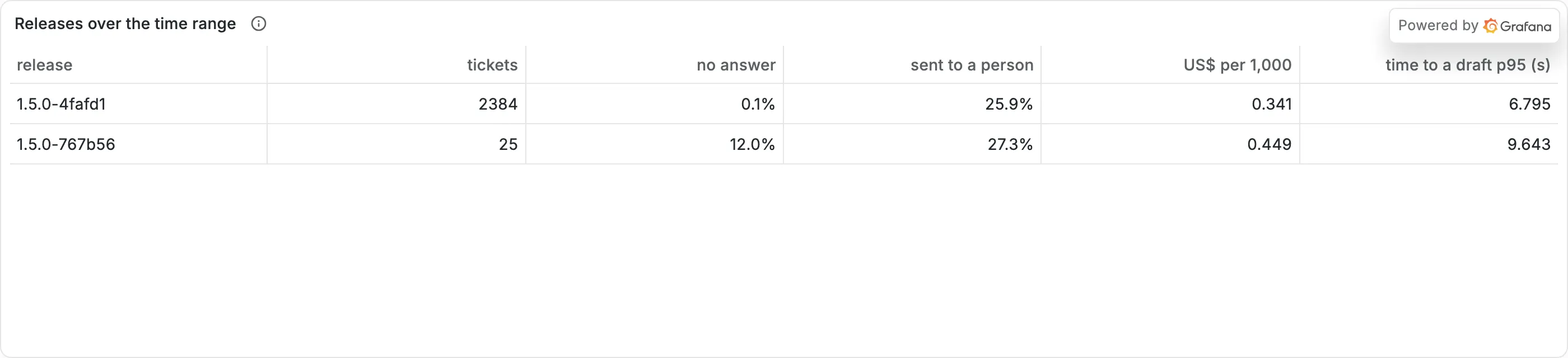
Every result has a release ID, so the dashboard groups by it. Only 25 tickets of release 1.5.0-767b56 were enough to show 12.0% without an answer, against 0.1% for 1.5.0-4fafd1.
When to use a manifest, and what it costs
Section titled “When to use a manifest, and what it costs”Sam asks, “We already have Git. Isn’t the commit enough?”
Amira answers: “The commit names the code. It does not name the model version that the provider runs, the database, the setting on the server or the evaluation that approved it. Last week’s change was a setting, with no commit at all.”
Use a manifest for any service whose behaviour depends on more than its code: a model, a prompt, a data set or an index. A tool writes it at release time, never a person by hand. Put its ID on every result that someone may ask about later.
You may not need one for a small script that runs once, or for a prototype that nobody depends on. There, a Git commit in a log line is enough.
What it costs:
- One column, one header and 12 characters in each log line.
- Discipline. Every change to a listed artifact needs a new manifest and a new ID. A quick fix “just on the server” breaks the rule. That is the point, but people feel it as friction.
- A manifest is only as good as its list. If the service depends on something that the manifest does not name, lineage stops there. Review the list when you add a dependency.
Common mistakes
Section titled “Common mistakes”Common mistake
The worker stops at once: no release manifest
Symptom: after you set RELEASE_ID, the worker stops with an error like this, and the API does not start either:
Settings error: RELEASE_ID: no release manifest operations/releases/1.5.0-abcdef.tomlCause: RELEASE_ID names a manifest that is not in operations/releases/. You made a typing mistake, or you built the manifest without --write.
Diagnose: python -m ops release list shows the manifests that exist.
Fix: copy the ID exactly from ops release list, or build the manifest again with --write. To run without a release, leave RELEASE_ID= empty. New rows then get no release ID.
Common mistake
ops trace cannot find the manifest
Symptom: python -m ops trace T-503354 data/telemetry/release-full.jsonl.gz prints the input and the result, then stops:
ops trace: no release manifest operations/releases/1.5.0-767b56.tomlCause: without --releases, the tool looks in your project’s own operations/releases/. The course’s manifests are in data/releases/.
Fix: add --releases data/releases. In real work, keep every manifest that ever ran in production. A deleted manifest breaks the lineage of every answer that it made.
Reset. If your project is broken, copy the snapshot end-of-m02, keep your .env, and run python -m scripts.load --reset, as the snapshots README shows.
Knowledge check
Section titled “Knowledge check”Check your understanding
Last week, ai_runs already had prompt_version = 'assistant-v3'. Name two questions that this column could not answer, and say what the manifest adds for each one.
Show the answer
First, “was it the prompt that was tested?” The column holds a file name, and anyone can edit the file and keep its name. The manifest adds the prompt fingerprint, a hash of the text that is sent. Second, “what else changed?” The column says nothing about the code, the migrations or the model version. The manifest names all of them. A third good answer: “was it approved?” The manifest’s evidence line links to the evaluation run, and so to its decision.
Does your answer have the main points of ours?
Sign in and enroll in the course to save your answers. Every check counts toward the certificate.
Check your understanding
Predict: in your shell, you set PROVIDER_TIMEOUT=12 and build the manifest again. Does the release ID change? Why does that matter?
Show the answer
Yes. PROVIDER_TIMEOUT is one of the behaviour settings that the build reads from the shell. The [settings] section changes, so the hash changes, and the ID changes. It matters because a timeout changes what customers get. In the replay, one v3 answer took 12.1 s, and with a 10 s timeout that ticket became a dead letter. Two releases that behave differently must have two IDs.
Does your answer have the main points of ours?
Sign in and enroll in the course to save your answers. Every check counts toward the certificate.
Check your understanding
Practical check: show that your service puts the release ID on its results. Which outputs prove it?
Show the answer
python -m pytest prints 193 passed. The build with --write saves operations/releases/1.5.0-99b6da.toml, or your own ID. With RELEASE_ID in .env, curl -i shows x-release-id: 1.5.0-99b6da, and the new rows of ai_runs have that release_id. The rows made before have none.
Does your answer have the main points of ours?
Sign in and enroll in the course to save your answers. Every check counts toward the certificate.
Recap
- An artifact is a versioned thing that the service’s behaviour depends on: code, image, migrations, prompts, model, index, evaluation set. Lineage is the path from a result back to all of them and to its input.
- A release manifest lists the exact version of each artifact. Its release ID is the code version plus the first 6 characters of a hash of the manifest, so any change makes a new ID.
- The service reads its manifest when it starts (
RELEASE_ID). The ID goes on every AI result and every API answer. python -m ops tracewalks from one answer to its versions and to its input’s provenance. For the replayed T-503354, it ends at the evidence that said do not ship.- Your project builds its own manifest,
1.5.0-99b6da, andpython -m pytestprints193 passed.
Next, you look inside the AI part of the manifest. Why is a prompt’s name not its version? And what can the provider change without telling you?