
Approvals, people and waiting time
- Lesson 9
- 40 min
- Module 3: Instrument the workflow
Where we are
In the last two lessons, we gave every model call and every tool call its own span. But the writes of the double refund ended up as traces of their own, with no run and no person, because they happen after an approval, sometimes the next morning. In this lesson, we record the approval: who decided, with which role, and how long the run waited, with two traces joined by a link. We start with a doctor's referral.
Lesson 9 of 28 · Observability for AI Agents: Traces, Costs and Audit TrailsApprovals, people and waiting time
1. Why agents need their own observability
2. OpenTelemetry for agents
3. Instrument the workflow
4. Find agent failures in Grafana
5. Cost
6. Audit trails
7. Alerts, service levels and quality
8. Tools: Langfuse, others and the run inspector
What you will be able to do
Record a run that stops for a person’s approval and goes on hours later. Make the approval a second trace with a span link to the first. Record who decided, with which role and limit. Measure the wait as a number, not as an open span.
Before you startWhat to know and to have ready
What you need to know
- The tool and write spans, the operation ID and the idempotency key, from Tool calls, errors and retries.
- How the agents course’s workflow waits for approval: the run is saved, and
python -m resolver approvecontinues it. Each role has an approval limit: an agent may approve up to 100, a team lead up to 500.
What you need on your computer
- The project as the last lesson left it: 81 tests pass, and
show_spans.pyis in the project folder. - A terminal in
observable-workflow, with the virtual environment active.
Tested on macOS (Apple silicon) with Python 3.12.13. The Windows and Linux commands are written, not run.
A doctor’s referral
Section titled “A doctor’s referral”Your family doctor sees you on Monday and writes a referral to a specialist. The referral has a number. Three weeks later, the specialist sees you, reads the referral, and writes a report that names the same number.
That is two visits, not one long visit. Nobody keeps a timer running in the waiting room for three weeks. Still, anyone can join the two visits, because the report names the referral. And anyone can count the wait: it is the gap between the two dates on the papers.
The problem: the writes have no run and no person
Section titled “The problem: the writes have no run and no person”At the end of the last lesson, the double refund had three traces: the run, and two lonely write spans. The writes carry the operation and the keys, but no run ID and no approver. obs trace T-90104 showed 0 write call(s) and the outcome waiting_approval, while the customer had two refunds.
Grace asks the first question of every audit: “Who approved this refund, and when?” The telemetry cannot answer it. And Kwame asks another one: “How long do our customers wait for a person?” The telemetry cannot answer that either.
The cause is the shape of the workflow. python -m resolver run proposes and stops. python -m resolver approve is another process, maybe the next morning. When it writes, no span of the run is open in it, so every span starts a new trace.
One long span, or two traces?
Section titled “One long span, or two traces?”The first idea is one span that starts at the proposal and ends at the approval. Tomás likes it: “Then the trace shows the whole run.” Three things go wrong with it:
- A span lives in memory until it ends. For R-1014-040, that is 15 hours. If the process stops in the night, the span is lost, and the run has no record at all.
- The run is not one process. The approval comes from another command, or another service. There is no open span there to end.
- The waterfall becomes unreadable. Sixteen seconds of work become thin lines at the two ends of a 15-hour bar. And the course’s Collector decides which traces to keep 10 seconds after a trace’s first span arrives (
decision_wait: 10s), long before the approval comes.
So we make the referral: two traces, joined by a span link. A span link is a reference from one span to a span in another trace: the other trace’s ID and span ID, with attributes if needed. A parent says “I am part of you”. A link says “I continue from you”, without joining the two trees.
How the workflow records it
Section titled “How the workflow records it”- Trace 1 ends with a short span,
approval.request: the role that may decide (needs_role), its limit and the number of actions. The workflow saves this span’s trace ID and span ID in the run’s saved state, next to the proposal. - Trace 2 starts when a person decides. Its first span is
approve support-resolution, with a span link toapproval.request. It records the run ID, the approver’s staff ID, the role and its limit, the decision, and the wait in seconds (larkfield.approval.wait_s). The writes and the reply are its children. - The wait is also recorded in a metric,
larkfield.approval.wait, a histogram with buckets from 1 minute to 1 day. Dashboards and alerts use it, as Module 7 shows.
The approver is usr-sam, a staff ID, never a name. The run ID is on the first span of both traces, so a search by run finds both.
approve is our own operation name: no GenAI convention describes a person’s decision yet. The larkfield. prefix says that the attributes are ours too.
Worked example: 15 hours 25 minutes
Section titled “Worked example: 15 hours 25 minutes”Here is the double refund of the replayed week, run R-1014-040, from obs trace R-1014-040 --data data/telemetry/week:
| Trace 1: the proposal | Trace 2: the decision | |
|---|---|---|
| First span starts | Wed 14 Oct 17:52:00 | Thu 15 Oct 09:17:12 |
| Work | 6.6 s: two model calls, one read, approval.request |
10.0 s: two refund calls, the reply |
| Ends | 17:52:06.6, with approval.request |
09:17:22 |
| Key attributes | larkfield.run.id = R-1014-040 |
the same run ID, approver = usr-sam, role = agent, limit = 100, wait_s = {w.double_refund_wait_s} |
The wait is from the end of approval.request to the start of approve: 17:52:06.6 to 09:17:12, that is 15 h 25 min 5 s, or 55,505 seconds. The person’s time is not a span: it is the gap between two traces, and one number.

Text description of the diagram
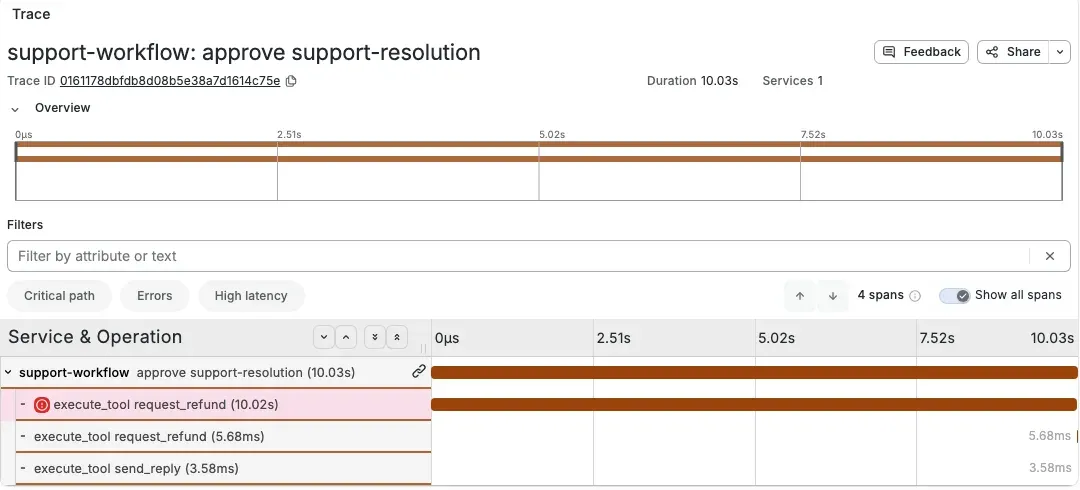
Trace 1 is the agent’s work, 6.6 seconds, ending with approval.request. Then the run waits 15 hours 25 minutes, and no span is open during the wait. Trace 2 is Sam’s decision and the writes, 10 seconds. Its first span has a link to approval.request, and it carries the wait as wait_s, 55,505.4 seconds. Under it, the first refund call times out after 10 seconds. The retry with a new key is done at once: the double refund, now under the person who approved it.
Grafana draws the same link. In the course team’s Grafana run of the week, the first span of trace 2 has a link icon that opens trace 1:
Add the approval traces to your project
Section titled “Add the approval traces to your project”-
Copy the live workflow’s new version and its test:
Terminal window S=../nextia-learning-labs/C31/snapshots/end-of-m03cp $S/resolver/live.py resolver/cp $S/tests/test_approval_traces.py tests/Terminal window $S = "..\nextia-learning-labs\C31\snapshots\end-of-m03"Copy-Item $S\resolver\live.py resolver\Copy-Item $S\tests\test_approval_traces.py tests\Terminal window S=../nextia-learning-labs/C31/snapshots/end-of-m03cp $S/resolver/live.py resolver/cp $S/tests/test_approval_traces.py tests/ -
Open
resolver/live.pyand read the docstring. Then findapproval.requestinstart(), anddef decide(for trace 2:telemetry.link_to()makes the link from the saved reference. The reply is now a write span too,execute_tool send_reply, in_send(). -
Run the tests:
python -m pytest -q. The last line says84 passed, 1 deselected. The new tests check the link, the approver, the wait and the two writes with one operation and two keys. -
Delete
work/, and replay the double refund with the same two commands as in the last lesson:run, thenapprove … --naive-retry. -
Read the trace:
python -m obs trace T-90104.Run T-90104-agent_structured-chat-strong-1 | ticket T-90104 | chat-strong (agent_structured) | release 2.0.0 | language en2 model call(s), 1 read(s), 2 write call(s), 4586 tokens in, 265 out, US$0.00000Trace 1 32de69cc4e8617aeb25415a04e601c6a … 6.6 s0.0 s |========================| 6.56 s invoke_agent support-resolver resolve rule W20.0 s |========= | 2.39 s chat chat-strong 2160 in / 47 out - stop2.4 s | = | 0.00 s execute_tool get_order ok LK-7939962.4 s | ================| 4.17 s chat chat-strong 2426 in / 218 out - stop6.6 s | =| 0.00 s approval.request needs agent... waited 0 min 00 s for a person (this trace has a link to 4e3da4d9776081b6 in trace 32de69cc...)Trace 2 c204c6376ffbcad2fa4d9e9ba7fca580 … 10.0 s0.0 s |========================| 10.01 s approve support-resolution approved by usr-sam (agent, limit 100)0.0 s |========================| 10.00 s execute_tool request_refund ERROR timeout LK-793996 9.95 RFD-LATE key 797fbb5bbb9f8a7e10.0 s | =| 0.00 s execute_tool request_refund done LK-793996 9.95 RFD-LATE key 797fbb5bbb9f8a7e-retry110.0 s | =| 0.00 s execute_tool send_reply sentOutcome: resolved -
Read the line between the traces. You approved at once, so the wait is 0. Why not the few seconds that you took to type? The run clock of trace 1 ran 6.6 seconds ahead of the wall clock, with the recorded model time. Trace 2 starts where trace 1’s clock ended.
-
Print the two spans that the link joins:
python show_spans.py approv.approval.request trace 32de69cc span 4e3da4d9 parent 030420adlarkfield.approval.limit = 100.0larkfield.approval.needs_role = agentlarkfield.proposal.actions = 1approve support-resolution trace c204c637 span 71c71303 parent nonelarkfield.customer.id = C-61975…larkfield.approval.approver = usr-samlarkfield.approval.role = agentlarkfield.approval.limit = 100.0larkfield.approval.wait_s = 0.0gen_ai.operation.name = approvelarkfield.approval.decision = approvedlarkfield.run.id = T-90104-agent_structured-chat-strong-1…link to trace 32de69cc, span 4e3da4d9The last line of
approvenames the trace and the span ofapproval.request: that is the link. Your IDs differ, but they must match each other.
The double refund is now one connected story: the proposal, the person, and the two refund calls under that person’s decision.
Guided practice: a real wait, and two writes
Section titled “Guided practice: a real wait, and two writes”The workflow measures the wait with the wall clock. So a real wait gives a real number. T-90103 is a cracked planter: chat-strong proposes a replacement and a free return label, two writes.
-
Run the ticket:
Terminal window python -m resolver run T-90103 --variant agent_structured --model chat-strongThe proposal lists two actions,
reship_itemandcreate_return_label. -
Wait about one minute. Then approve:
Terminal window python -m resolver approve T-90103-agent_structured-chat-strong-1 --as agentreship_item LK-640436: done (operation 221dccf204b80a63, 1 call(s))create_return_label LK-640436: done (operation 0f8c2e98df53719d, 1 call(s))Status: doneReply sent. Ticket: resolved. -
Read the trace:
python -m obs trace T-90103.... waited 1 min 10 s for a person (this trace has a link to 8a5e151518170b24 in trace ed36a312...)Trace 2 fdef56b77b85f88ef78c5d9a4767cff3 … 0.0 s0.0 s |========================| 0.00 s approve support-resolution approved by usr-sam (agent, limit 100)0.0 s |============ | 0.00 s execute_tool reship_item done LK-640436 PLANTER x 1 key 221dccf204b80a630.0 s | ===== | 0.00 s execute_tool create_return_label done LK-640436 PLANTER key 0f8c2e98df53719d0.0 s | =======| 0.00 s execute_tool send_reply sentThe course team paused 75 seconds. The trace says 1 min 10 s: the pause and the time the commands took, minus the 6.8 seconds by which the run clock of trace 1 was ahead. Your wait differs.
-
Print the writes with
python show_spans.py reship_item, thenpython show_spans.py create_return_label. Both sayparent 4c9a3167: the span ID of theapprovespan (yours differs). So each write names the decision that allowed it.
That is the evidence that the completion check of this module asks for. A write span’s parent is the decision. The decision records the person and the role, and its link leads back to the request in trace 1.
Your turn: an approval that the rules refuse
Section titled “Your turn: an approval that the rules refuse”Change one condition: a refund larger than an agent’s limit. T-65273 proposes a refund that needs a team lead. Predict, before you run it: does trace 2 exist? What does it say, and which outcome does the run have?
python -m resolver run T-65273python -m resolver approve T-65273-agent-chat-small-1 --as agentpython -m obs trace T-65273The course team’s result
Not approved: An agent may not approve this: it needs a team lead (refund approval limits). 3.9 s | =| 0.00 s approval.request needs team lead
... waited 0 min 00 s for a person (this trace has a link to 03c168924f495e56 in trace 35305645...)Trace 2 2e79d83acbd1f4cc570c021026888e74 … 0.0 s 0.0 s | | 0.00 s approve support-resolution refused_by_rules by usr-sam (agent, limit 100)
Outcome: waiting_approvalTrace 2 exists and has one span: the decision, refused_by_rules, with an ERROR status (approval_refused), and no write under it. The run still waits for a team lead. A refused attempt is evidence too: it shows that the limits worked, and who tried.
How long do customers wait?
Section titled “How long do customers wait?”The week’s 118 approvals give Kwame his answer. The times are simulated from Larkfield’s staffed hours: weekdays 08:30–17:30, weekends 10:00–16:00, and a proposal after hours waits for the next morning.
Text description of the chart
Seven bars for 118 approvals. Under 5 minutes: 4. 5 to 15 minutes: 20. 15 to 30 minutes: 30. 30 to 60 minutes: 34. 1 to 4 hours: 5. 4 to 8 hours: 6. Over 8 hours: 19, the proposals of the evening that waited for the next morning.
The median wait is 31.8 minutes, but the 95th percentile is 15.2 hours, and 19 approvals waited more than 8 hours. An average would hide this shape: most waits are short, and a group waits all night. The double refund was one of the night group: proposed Wednesday evening, approved Thursday morning.
Common mistake
The run has no ticket and no model
Symptom: after an approval, obs runs shows a run with an empty ticket and model, and obs trace shows only the decision:
Run T-90104-agent_structured-chat-strong-1 | ticket  |  () | release  | language0 model call(s), 0 read(s), 1 write call(s), 0 tokens in, 0 out, US$0.00000
Trace 1 f646ea8662f9d78d69feade02ea5eca9  …  0.0 s     0.0 s |========================|   0.00 s  approve support-resolution  approved by usr-sam (agent, limit 100)
The course made this on purpose: it deleted work/telemetry/traces.jsonl between run and approve.
Cause: trace 1 is not in the data. A link is only a reference: it does not copy trace 1 into trace 2. If a store drops trace 1, the link points to nothing. In production, this happens when sampling decides per trace. In the course’s Collector run of the week, tail sampling kept 275 of 434 traces, and 99 runs lost one of their two traces.
Diagnose: python show_spans.py approve still shows link to trace …. Search that trace ID in your store. If it is not there, it was sampled out, deleted, or never exported.
Recover: keep both traces of a run, or neither: sample by run ID, not by trace, and keep every run with an approval. Keep the decision itself out of sampling: Module 6 sends it to the audit trail, which is never sampled.
When to split a run, and what it costs
Section titled “When to split a run, and what it costs”Split a run into linked traces whenever it waits for something outside the program: a person, a queue that may take hours, a scheduled job. Keep one trace when the wait is short and in the same process, such as a retry after 2 seconds.
Two traces cost something. Every search and every dashboard must join them by run ID or by the link. And a store or a sampler can drop one of them. Record the run ID on the first span of both, always. Record the wait as an attribute and a metric, so that nobody needs the two traces to know how long a customer waited.
Grace’s audit question needs more than a trace, though. A trace store keeps data for weeks, while an approval may need to be explained for years. Module 6 records the same decision as an audit event.
Knowledge check
Section titled “Knowledge check”Check your understanding
Tomás proposes one span that starts at the proposal and ends at the approval, 'so the trace shows the whole run'. Give two reasons against it, and describe what the workflow records instead.
Show the answer
A span stays in memory until it ends: for R-1014-040 that is 15 hours, and it is lost if the process stops. The approval comes from another process, where there is no open span to end. And a 15-hour bar makes the 16 seconds of work unreadable. Instead, trace 1 ends with an approval.request span. Trace 2 starts with approve support-resolution, which has a span link to approval.request. That span records the run ID, the approver’s staff ID, the role, the limit, the decision and the wait in seconds. The wait is also a histogram metric.
Does your answer have the main points of ours?
Sign in and enroll in the course to save your answers. Every check counts toward the certificate.
Check your understanding
In the replayed week, the median approval wait is 31.8 minutes. Why is that not enough to answer 'how long do our customers wait for a person?'
Show the answer
The waits have two groups: most are under an hour, and 19 of 118 waited more than 8 hours, the proposals of the evening that waited for the next morning. The 95th percentile is 15.2 hours. A median or an average hides the night group. Show the distribution, or at least a high percentile and the count over a threshold, as the histogram metric allows.
Does your answer have the main points of ours?
Sign in and enroll in the course to save your answers. Every check counts toward the certificate.
Check your understanding
Completion check: from your own telemetry of T-90103 (or of the double refund), show which approval allowed each write. Name the spans and the attributes that prove it.
Show the answer
Each write span (execute_tool reship_item and execute_tool create_return_label, or the two request_refund calls) has a parent: approve support-resolution in trace 2. In the course team’s run, python show_spans.py reship_item shows parent 4c9a3167. That approve span records larkfield.approval.approver = usr-sam, larkfield.approval.role = agent, larkfield.approval.limit = 100.0, larkfield.approval.decision = approved and larkfield.approval.wait_s. Its link names the trace and span of approval.request in trace 1, which says the role needed. The run ID is on both first spans.
Does your answer have the main points of ours?
Sign in and enroll in the course to save your answers. Every check counts toward the certificate.
Recap
- A run that waits for a person is two traces: trace 1 ends with
approval.request, trace 2 starts withapprove support-resolutionand a span link to it. - The decision records the run ID, the approver’s staff ID, the role, the limit, the decision and the wait in seconds. The writes and the reply are its children.
- The wait is a gap and a number, never an open span: 15 h 25 min for the double refund; in the replayed week, a median of 31.8 minutes and 19 waits over 8 hours.
- A link is a reference: if a sampler or a store drops one trace, the run loses half of its story.
Your project now: the files of the last two lessons plus live.py and tests/test_approval_traces.py, with 84 tests that pass. The double refund is one connected story, from the ticket to the person to the two refund calls. But the workflow has a design with two workers, and its order lookup can go through an MCP server. Next, you keep the story whole when the work moves to another worker or another process.
Next: Many agents and handoffs