
Permission enforcement
- Lesson 11
- 110 min
- Module 4: Add reliability and access control
Lesson 11 of 22 · Portfolio Capstone: Build, Evaluate and Ship an AI ProductPermission enforcement
1. Select and bound the project
2. Prepare data and architecture
3. Build one complete user journey
4. Add reliability and access control
5. Evaluate and improve
6. Deploy and operate
7. Prepare the portfolio presentation
What you will be able to do
Make the assistant check three things on every request: who is calling, whether they belong to this shop, and what their role allows. Then add a second lock in the database, so a forgotten filter still cannot show another shop’s documents.
Before you startWhat to know and to have ready
What you need to know
- Your project at the end of Module 3, from Integrate retrieval: the API, the page, the pipeline and the recorded answers. In that version, nobody signs in.
- Your threat review and access rules, from Threat and cost review, and the access criteria A1 to A4, from Acceptance criteria.
- The pieces that this lesson reuses, each taught in full in Authentication, Permissions and Multi-Tenant Applications:
- sign-in with a provider: Application flows;
- token checks: Read a token: JWT, signatures and keys;
- cookies and CSRF: Browser session choices;
- the order of the checks: Authorization in the API;
- row-level security: Tenant-safe queries.
- Access levels in search, from Permissions and isolation in RAG: Building AI That Uses Your Data.
Your project
~/projects/doc-assistantat the end of Module 3:python -m pytestends with62 passed. PostgreSQL runs (docker compose up -d --wait db).- The labs repository in
~/projects/nextia-learning-labs. You copy the snapshotend-of-m04in this lesson. - Three terminals, each in the project folder with the virtual environment active.
This lesson copies the files of the whole module. The next two lessons explain the failure and cleanup parts of the same copy. Tested with Python 3.12 on macOS. The PowerShell commands are written, not run.
A bank with safe deposit boxes
Section titled “A bank with safe deposit boxes”Think of a bank that rents safe deposit boxes. At the counter, the clerk first looks at your identity card: who you are.
Next, the clerk looks you up in the bank’s own list of box holders; your card says nothing about boxes. If you are not on the list, the clerk says “I cannot help you with that”. The answer is the same for a box that does not exist, so a stranger learns nothing.
Some holders may only look into a box; others may also put things in and take things out. The list says which. And the vault itself has a second lock: the door of box 214 opens only with the key of box 214. A mistake at the counter does not open the wrong box.
The document assistant needs the same counter and the same vault. Larkfield and Bramble Books are two box holders. Their documents are the contents of the boxes.
The problem: in Module 3, everyone is Sam, everywhere
Section titled “The problem: in Module 3, everyone is Sam, everywhere”At the end of Module 3, every request acts as one practice user, Sam, in whichever shop the URL names. Sam works at Larkfield. Start the API of Module 3 and ask it who you are:
curl -s http://127.0.0.1:8000/auth/session{"user_id":"usr-sam","name":"","csrf_token":"","via":"dev"}via: dev means that nobody signed in. Now Sam asks for Bramble Books’ documents. The list comes back, with three staff-only documents of the other shop: refund-approval-procedure, staff-discount and supplier-terms. Then Sam asks a question in Bramble’s assistant:
curl -s -X POST http://127.0.0.1:8000/v1/tenants/bramble/answers \ -H 'content-type: application/json' -d '{"question": "What is the staff discount?"}'The answer (shortened):
"answer":"Staff get 30 percent off books for themselves and their household.""citations":[{"title":"Staff discount (staff only)","doc_key":"staff-discount","access":"staff", ...}]"provider":"mock"A Larkfield employee just read a staff-only policy of another company. The mock provider answered, because nobody recorded this question; the passage says it plainly, so a real model would too.
The second failure is inside one shop. Omar is a read-only member of Larkfield: he may ask, but staff-only procedures are not for him. In Module 3, the scripts give everybody the role staff:
python -m scripts.ask "What is the staff discount?" --tenant larkfield --user usr-omar --as-of 2026-10-09Omar (staff) at Larkfield asks: What is the staff discount?Passages found: 81007010cd4d staff-discount-and-perks v1, 7919a06cc2aa staff-discount-and-perks v1, 93cb6359874a privacy-policy v3, 6fddb68adafa privacy-policy v3, 2638b732560d support-team-routing v4Answer (answerable): Staff get 20% off all products except gift cards, up to $2,000 of purchases per calendar year. It cannot be combined with other promotions or discount codes.Nothing here looks like an error: both requests return 200, with good answers and valid citations. A missing access check hides behind the happy path. Module 3 left it out on purpose, to build one journey first. Now Grace’s criteria A1 to A4 must hold.
The idea: four checks, always in the same order
Section titled “The idea: four checks, always in the same order”The fix is the bank clerk’s routine, written as code that runs before every route of a shop. The first check is authentication: proving who the caller is. The other checks are authorization: deciding what that caller may do. A tenant is one customer organization that shares the application with others; here, a shop.
- Who is calling? A signed-in browser sends a session cookie. A script sends an access token. Without either, the answer is 401.
- Is the caller a member of the shop in the path? The API reads the
membershipstable. Without a row for this person and this shop, the answer is 404 Not found. A shop that does not exist gets the very same answer. - Does the role allow this action? An owner or staff member may upload and delete. A read-only member may only ask and read. A role that is too small gets 403.
- Which rows may the request see? Every query names the shop, and the database adds row-level security. The search keeps only the access levels of the role.

Text description of the diagram
Omar’s request for Larkfield’s documents meets four checks in order. Check 1, login.identify(): no valid token or cookie leaves with 401. Check 2, access.membership(): no membership row, as for Ines, Tomás or a made-up shop, leaves with 404. Check 3, require_change(): an upload or delete by a read-only member leaves with 403. Check 4 limits the rows to Larkfield and, for Omar, to public documents. His request ends with 200 and 30 documents.
Why 404 and not 403 for an outsider? A 403 would say “this shop exists, but not for you”. That tells a stranger which shops use the assistant. The authentication course calls this order identity, then membership, then role. Note also what the token does not carry: a shop or a role. The token says only who the person is. The membership table says the rest, and the API reads it on every request. So when Grace removes a member, the change works on the next request.
A tiny example: one request, seven callers
Section titled “A tiny example: one request, seven callers”Here is the same list request, GET /v1/tenants/larkfield/documents, made by seven different callers. Before you read the last column, predict it from the four checks.
| Caller | Membership at Larkfield | Check that decides | Result |
|---|---|---|---|
| nobody (no token) | – | 1 | 401 unauthenticated |
| Sam | staff | – | 200, 36 documents |
| Grace | owner | – | 200, 36 documents |
| Omar | read-only | 4 | 200, 30 documents (6 staff-only hidden) |
| Ines | none (owner at Bramble Books) | 2 | 404 not_found |
| Tomás | none | 2 | 404 not_found |
Sam, at /tenants/acme/ |
no such shop | 2 | 404 not_found |
Omar’s upload stops at check 3. Camille is the interesting one: she is staff at Larkfield and read-only at Bramble Books. Her role depends on the shop in the path, never on her token. The test tests/test_access.py checks this whole matrix: people × shops × list, ask and upload.
Update your project
Section titled “Update your project”On the standard track, copy the end of Module 4 over your project. On the own-idea track, do the same in a copy, and use it as the reference for your own changes.
-
Save your own work first. In the project folder, run
git add -Aandgit commit -m "End of Module 3". The copy in step 3 overwrites changed files. -
Get the new snapshots:
Terminal window git -C ~/projects/nextia-learning-labs pull -
Copy the snapshot over your project. No file of Module 3 is removed by Module 4, so a copy is enough:
Terminal window cp -R ~/projects/nextia-learning-labs/C27/snapshots/end-of-m04/. ~/projects/doc-assistant/Terminal window Copy-Item -Recurse -Force ~\projects\nextia-learning-labs\C27\snapshots\end-of-m04\* ~\projects\doc-assistant\As in Module 3, get your own files of
docs/back from your commit:git checkout -- docs. Module 4 changes no file there. -
Make
.envagain from.env.example, because the sign-in settings are new:cp .env.example .env(PowerShell:Copy-Item .env.example .env -Force). Then put your database password back in its three places. -
Make the practice identity provider’s keys and the two secrets:
Terminal window python -m idp initMade a signing key (OR3Awot8TUBq8zIJ) and the clients in …/doc-assistant/.idp.Wrote the client secret of doc-assistant-web to …/doc-assistant/.env.Wrote a new SESSION_SECRET (the API signs its session cookies with it).The provider keeps only the client secret's SHA-256. Never commit .env or .idp/.Your key ID differs.
.idp/and.envare in.gitignore. -
Apply the two new migrations to your database, then check the status:
Terminal window python -m doc_assistant.migratepython -m doc_assistant.migrate --statusapplied 002_row_level_securityapplied 003_duplicate_safe_ingestion2 migration(s) applied.001_core applied002_row_level_security applied003_duplicate_safe_ingestion applied -
Run the tests. The last line is
95 passed:Terminal window python -m pytest
If step 6 stops with a UniqueViolation, your database has the same file twice. The failure case “The migration refuses your database” in Failure handling explains it and the fix.
Sign in on the page
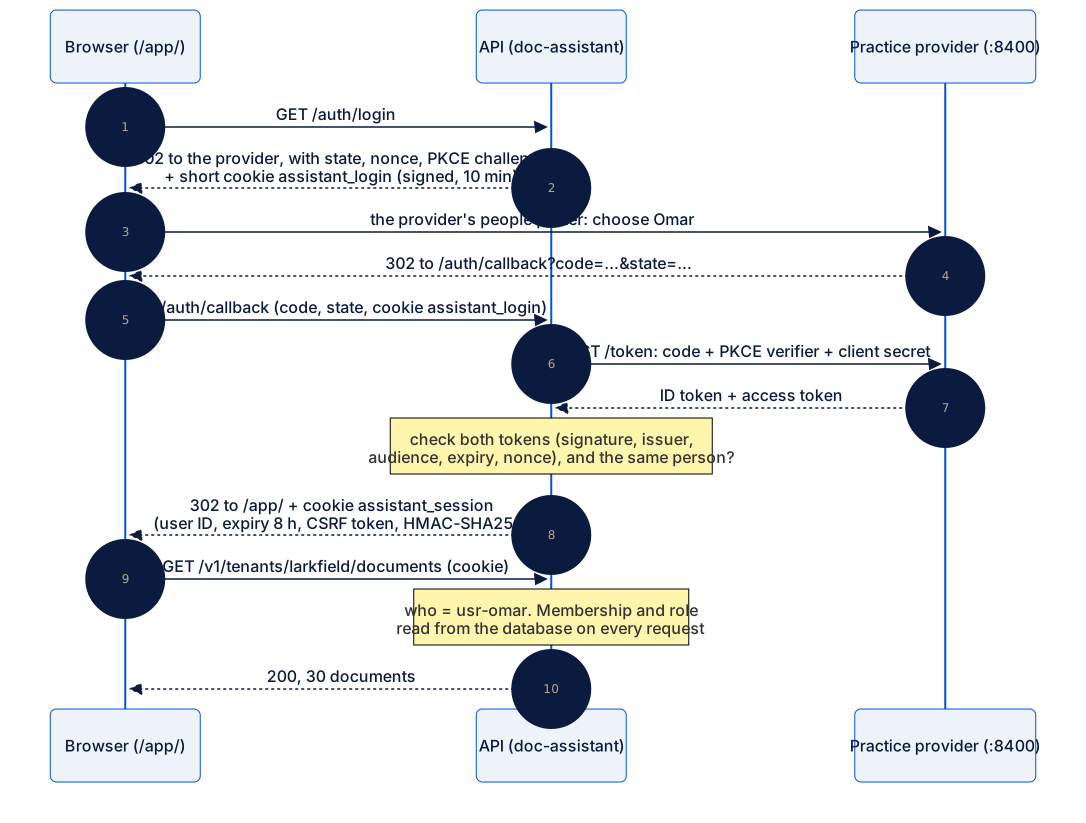
Section titled “Sign in on the page”The page signs people in through the API, with the authentication course’s practice identity provider: made-up people, no passwords, practice only. The API is a backend for the frontend: the browser never holds a token, only a cookie that the API signed.
-
In the first terminal, start the provider. It prints
Practice identity provider: http://localhost:8400 (made-up people, no passwords).Terminal window python -m idp -
In the second terminal, start the API:
Terminal window fastapi dev doc_assistant/main.py -
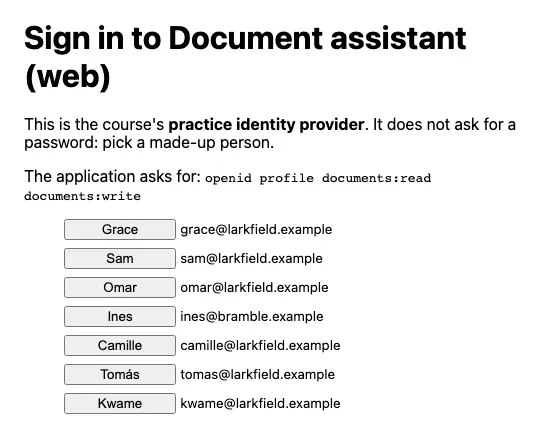
Open http://127.0.0.1:8000. The page says You are not signed in. Select Sign in. The provider’s page opens: choose Omar.
-
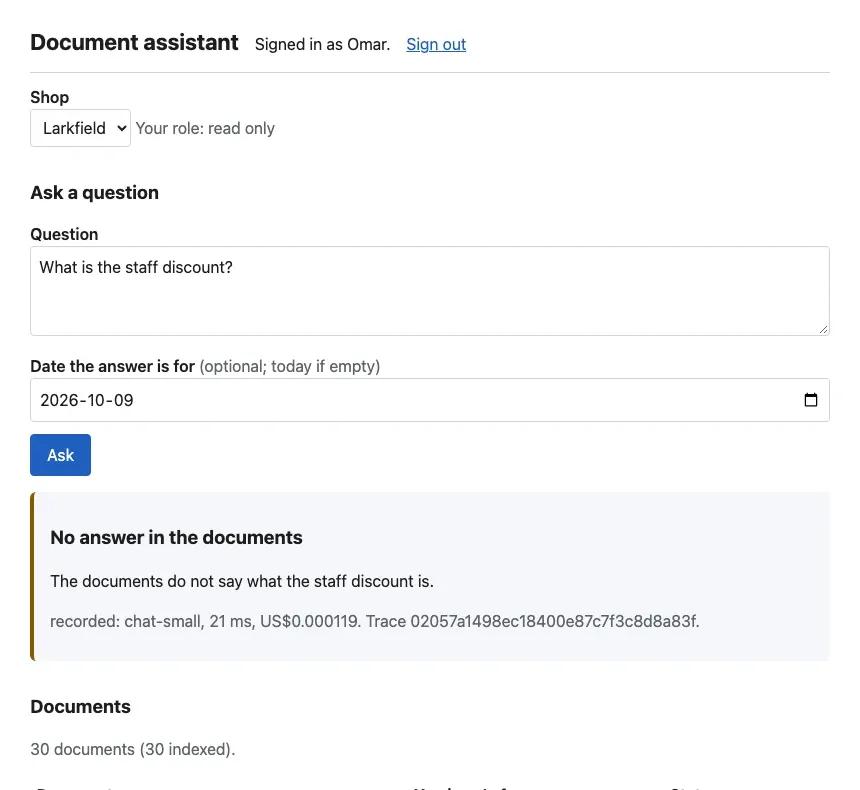
Check that the page says Signed in as Omar, Your role: read only, and lists 30 documents for Larkfield.
Text description of the diagram
The browser asks the API for /auth/login and is sent to the provider, with a random state, a nonce and a PKCE challenge. The person chooses Omar. The provider sends the browser back to /auth/callback with a one-time code. The API exchanges the code for an ID token and an access token, and checks both. Then it sets assistant_session: the user ID, an expiry 8 hours later and a CSRF token, signed with SESSION_SECRET. Later requests send this cookie, and the API reads Omar’s membership on each one.
But why not keep a session table, as the authentication course did? Sam chose a signed cookie: no table, no clean-up job. The cost is written in the threat review. A signed cookie cannot be cancelled before it expires, so a stolen cookie works for up to 8 hours. Removing a membership still works at once, because the cookie holds no shop and no role. For a shop assistant with practice data, Sam accepts this. For a bank, you would keep the session table.
The cookie is HttpOnly, so JavaScript on the page cannot read it. And every request that changes something must also send the header X-CSRF-Token. Another website can make your browser send the cookie, but it cannot read the token.
What the page does, step by step
Section titled “What the page does, step by step”The course team ran the same sign-in with curl, to see each step that the browser hides (cookie values and codes replaced by …):
GET /auth/login 302 location: http://localhost:8400/authorize?response_type=code&client_id=doc-assistant-web&…&code_challenge_method=S256 set-cookie: assistant_login=…; HttpOnly; Max-Age=600; Path=/; SameSite=laxPOST /authorize (the picker), Omar 302 location: http://127.0.0.1:8000/auth/callback?code=…&state=…GET /auth/callback?code=…&state=… 302 location: /app/ set-cookie: assistant_session=…; HttpOnly; Max-Age=28800; Path=/; SameSite=laxGET /auth/session 200 {"user_id":"usr-omar","name":"Omar","csrf_token":"…","via":"session"}POST /v1/…/answers, no CSRF header 403 {"code":"csrf_failed","message":"This request needs the page's X-CSRF-Token header.", …}POST /v1/…/answers, with the header 200 {"answerable": false, "answer": "The documents do not say what the staff discount is.", …}the cookie with one character changed 401 {"code":"unauthenticated","message":"Sign in first.", …}POST /auth/logout, with the header 200 {"signed_out":true}Max-Age=28800 is the 8 hours. A cookie with one changed character fails its signature, so the API treats the caller as nobody: 401.
Tokens for scripts and curl
Section titled “Tokens for scripts and curl”Scripts, tests and curl do not click through a sign-in page. They send an access token in the Authorization header. The practice provider makes one on your computer, valid for 10 minutes. In the third terminal:
OMAR=$(python -m idp token usr-omar)curl -s http://127.0.0.1:8000/v1/me -H "Authorization: Bearer $OMAR"$OMAR = python -m idp token usr-omarcurl.exe -s http://127.0.0.1:8000/v1/me -H "Authorization: Bearer $OMAR"{"user":{"user_id":"usr-omar","name":"Omar","email":"omar@larkfield.example"},"via":"token","memberships":[{"tenant_id":"larkfield","name":"Larkfield","role":"read_only"}]}Make tokens for Sam, Ines and Tomás in the same way (SAM, INES, TOMAS). Then run the tiny example for real. Each line shows the response body and the status:
no token, larkfield: {"code":"unauthenticated","message":"Sign in first.","request_id":"6211c18e31e94c61"} 401Ines, larkfield: {"code":"not_found","message":"Not found.","request_id":"eb6e0a8d622b4da7"} 404Tomás, larkfield: {"code":"not_found","message":"Not found.","request_id":"90ad388c14d448c0"} 404Sam, acme: {"code":"not_found","message":"Not found.","request_id":"a1422a5b69384a8e"} 404Sam asks at bramble: {"code":"not_found","message":"Not found.","request_id":"f7801f72b69640cc"} 404Omar uploads: {"code":"forbidden","message":"Your role in Larkfield (read_only) cannot upload or delete documents.","request_id":"3f374c76ddcb46d3"} 403a broken token: {"code":"unauthenticated","message":"The access token was refused: The token is not a JWT. (malformed).","request_id":"f05e4464721a4cc8"} 401The three 404 bodies are identical except the request_id. The opening attack of this lesson, Sam asking in Bramble’s assistant, now ends at check 2. The terminal script refuses it too, because scripts/common.py now uses the same membership function. python -m scripts.ask "What is the staff discount?" --tenant bramble --user usr-sam ends with doc_assistant.errors.ApiError: Not found.
The code of the checks is short. Open doc_assistant/deps.py:
def principal(request: Request, tenant: str) -> Principal: who = identify(request) # 401 when nobody is signed in with request.app.state.db.admin() as conn: # memberships: read on every request, never cached p = membership(conn, who.user_id, tenant) # 404 when the caller is not a member of this shop request.state.user_id, request.state.tenant = p.user_id, p.tenant_id return pEvery route of a shop takes who: Principal = Depends(principal), so no route can skip it. access.py maps each role to its access levels, and the upload and delete routes call require_change(who) first. The token checks in auth.py are the authentication course’s, with the audience doc-assistant.
The second lock: row-level security
Section titled “The second lock: row-level security”Every query in the project says tenant_id = %s. But one day, someone writes a report or a quick fix that forgets it. Row-level security is a PostgreSQL feature: policies on a table decide, row by row, what a query may see and write. The database applies them to every query, whether the filter was written or forgotten. It is the vault’s second lock.
Migration 002_row_level_security.sql creates a role without special powers, assistant_app, and one policy on each of the four tables that hold a shop’s data:
CREATE POLICY one_tenant ON chunks USING (tenant_id = current_setting('app.tenant_id', true)) WITH CHECK (tenant_id = current_setting('app.tenant_id', true));USING filters the rows that a query reads. WITH CHECK refuses rows that a query writes. Run the forgotten query yourself in psql (open it with docker compose exec db psql -U assistant -d assistant). First as the Compose user, then inside a transaction as the role of the API. Predict the three counts first.
SELECT tenant_id, count(*) FROM chunks GROUP BY tenant_id;BEGIN;SET LOCAL ROLE assistant_app;SELECT tenant_id, count(*) FROM chunks GROUP BY tenant_id;SELECT set_config('app.tenant_id', 'bramble', true);SELECT tenant_id, count(*) FROM chunks GROUP BY tenant_id;INSERT INTO answers (tenant_id, user_id, question, as_of, answerable, answer, provider, model, latency_ms) VALUES ('larkfield', 'usr-ines', 'x', '2026-10-11', false, 'x', 'x', 'x', 1);ROLLBACK; larkfield | 185 bramble | 60(2 rows)...(0 rows)... bramble | 60(1 row)
ERROR: new row violates row-level security policy for table "answers"Text description of the chart
A column chart with three columns. The Compose user assistant sees 245 passages: 185 of Larkfield and 60 of Bramble Books. The role assistant_app without a shop setting sees 0. The role assistant_app with app.tenant_id set to bramble sees 60, Bramble’s passages only.
Why does the Compose user see everything? SELECT rolname, rolsuper, rolbypassrls FROM pg_roles shows assistant | t | t. The Docker image makes it a superuser, and policies never apply to a superuser. That is why db.py switches the role at the start of every shop transaction:
conn.execute("SELECT set_config('role', %s, true), set_config('app.tenant_id', %s, true)", (self.app_role, tenant_id))The last argument, true, ends both settings with the transaction, before the connection goes back to the pool. The authentication course measured the cost of this statement: a fraction of a millisecond.
Source access checks: what a read-only member retrieves
Section titled “Source access checks: what a read-only member retrieves”The shop is not the only boundary. Inside Larkfield, 6 of the 36 documents are staff-only. A read-only member must never get their passages, not in the list, not in the search, and not in an answer. The search filters by access level before it keeps the best 5 passages, so a hidden passage never takes a place. Ask Omar’s question again:
python -m scripts.ask "What is the staff discount?" --tenant larkfield --user usr-omar --as-of 2026-10-09Omar (read_only) at Larkfield asks: What is the staff discount?Passages found: 93cb6359874a privacy-policy v3, 6fddb68adafa privacy-policy v3, 1dc2f10bbe79 policy-governance v2, b8eb17ce658e policy-governance v2, 3a423579caf1 privacy-policy v3Answer (not answerable): The documents do not say what the staff discount is.recorded chat-small | 3261 ms | tokens 946 in, 30 out | US$0.000110 | trace 2ccf6551e5af3f429bcab78026f52cf4Compare it with the start of this lesson. Omar is now read_only, his five passages are all public, and the answer is an honest “the documents do not say”. Sam still gets the 20% answer.
The course team checked all 11 staff-only questions of the question bank as a read-only member, with real answers. The search returned 0 staff-only passages, and the model abstained on 10. The eleventh, “Does a customer have to send back a faulty 60-dollar product under warranty?”, it answered from the public warranty policy. That is allowed: the public document answers it too.
One more place could leak: the recordings. A recording is found by its question, not its passages, so Omar could have been shown Sam’s recorded answer. The recorded provider therefore replays a recording only if the caller’s passages include every passage that it cites. You met this rule in Integrate retrieval; it matters now that roles differ.
When to use it, and what it costs
Section titled “When to use it, and what it costs”Use all four checks in every multi-tenant product, from the first day that real people sign in. Each request costs one membership query and one extra statement per transaction: milliseconds, against a model call of about a second. The checks also add a part that can fail: the API needs the provider’s keys to check a token.
Do not skip a layer because another one exists. The membership check stops outsiders, row-level security catches a forgotten filter, and the access-level filter keeps staff-only text from read-only members.
Common mistakes
Section titled “Common mistakes”Common mistake
Every request with a token gets 503 identity_provider_unavailable
Symptom: the API starts, but every request with a token, and the page’s Sign in link, answer:
{"code":"identity_provider_unavailable","message":"The identity provider cannot be reached.","request_id":"a31de875e6b4407a"}Cause: the practice provider does not run, or runs on another port than OIDC_ISSUER in .env. The API needs the provider’s public keys to check a token’s signature, and it fetches them from the provider.
Fix: start python -m idp in its own terminal, and check that it prints the same address as OIDC_ISSUER. If requests still fail, restart the API too.
Common mistake
Row-level security is on, and a query still sees both shops
Symptom: in psql or in a script, a query that forgot WHERE tenant_id counts 245 passages, even after set_config('app.tenant_id', 'bramble', true).
Cause: the connection runs as the Compose user assistant, a superuser. Policies never apply to a superuser, and PostgreSQL gives no warning.
Fix: run shop work through db.tenant(...), which switches to assistant_app. Keep db.admin() for the few jobs that must cross shops: migrations, the loader, the membership lookup. Check SELECT current_user; inside the transaction when in doubt.
Your project
Section titled “Your project”On the standard track, your project now matches the snapshot. On the own-idea track, make the same four checks for your own users and tenants. Write your roles and their access levels in access.py, and your memberships in the identity data.
Keep this evidence in docs/evidence/ (or the place that your evidence plan names):
- The output of
python -m pytest tests/test_access.py tests/test_auth.py -v: every line of the access matrix passes. - Your own curl transcript of the tiny example: one line per caller, with the status code.
- The
psqltransaction above, run against your database: the three counts and the refused insert. - One sentence in your threat review on your session choice and its accepted risk.
Checklist
- A request without a token or cookie gets 401 on every shop route.
- A non-member gets the same 404 body for a real shop and a made-up one.
- A read-only member gets 403 on upload and delete, and no staff-only passage in the list, the search or an answer.
- The API runs shop queries as a role without superuser powers, with the shop set per transaction.
- Requests from the page that change data need the CSRF token.
Knowledge check
Section titled “Knowledge check”Check your understanding
Ines is the owner of Bramble Books. She asks a question at /v1/tenants/larkfield/answers with a valid token. Which check stops her, with which status, and why that status and not 403?
Show the answer
Check 2, the membership check: there is no membership row for Ines at Larkfield, so the API answers 404 not_found with the body “Not found.”. A 403 would tell her that Larkfield exists and uses the assistant. The 404 body is identical to the one for a shop that does not exist, such as acme, so an outsider learns nothing. Her token is fine: check 1 passes.
Does your answer have the main points of ours?
Sign in and enroll in the course to save your answers. Every check counts toward the certificate.
Check your understanding
Predict: inside a transaction as assistant_app with no app.tenant_id set, how many passages does SELECT count(*) FROM chunks return? And as the Compose user? Explain both.
Show the answer
As assistant_app without a shop: 0. The policy compares each row’s tenant_id with current_setting('app.tenant_id', true), which is empty (NULL), so no row matches. That is the safe default. As the Compose user assistant: all 245 (185 + 60), because it is a superuser, and policies never apply to a superuser. That is why db.tenant() switches the role in every transaction.
Does your answer have the main points of ours?
Sign in and enroll in the course to save your answers. Every check counts toward the certificate.
Check your understanding
Practical check: with the provider and the API running, make a token for Camille. List the documents of both shops, and try one upload in each. What do you get, and why?
Show the answer
At Larkfield she is staff: the list has 36 documents, and an upload is accepted (202). At Bramble Books she is read-only. The list has 12 of the 15 documents: the 3 staff-only ones are hidden. An upload gets 403 forbidden: “Your role in Bramble Books (read_only) cannot upload or delete documents.”. Her token is the same in both requests. The role comes from the membership for the shop in the path. Delete your test upload afterwards, or run python -m scripts.load_pack --reset.
Does your answer have the main points of ours?
Sign in and enroll in the course to save your answers. Every check counts toward the certificate.
Recap
- In Module 3, Sam read Bramble’s staff-only discount and Omar read Larkfield’s. Both requests returned 200 with good answers: a missing access check hides behind the happy path.
- Four checks run on every shop request: who (401), member of this shop (404, also for a made-up shop), role (403), and which rows.
- The browser holds one signed
HttpOnlycookie with a CSRF token; scripts send access tokens. Neither carries a shop or a role: the API reads the membership on every request. - Row-level security is the second lock: a forgotten filter as
assistant_appsees one shop or nothing. It never applies to the superuser of Compose. - A read-only member retrieves 0 staff-only passages. On the 11 staff-only questions, the model abstained 10 times and answered once from a public document.
Next, the assistant learns to fail well: refused files, duplicate uploads and a model provider that does not answer.
Next: Failure handling