
Browser session choices
- Lesson 8
- 50 min
- Module 3: Sessions and application integration
Lesson 8 of 19 · Authentication, Permissions and Multi-Tenant ApplicationsBrowser session choices
1. Identity and permission basics
2. Understand login and tokens
3. Sessions and application integration
4. Enforce resource access
5. Background work and administration
6. Validate and document the design
What you will be able to do
Let people sign in to the help desk in a browser without giving the browser a token that a script could steal. The API keeps the tokens on the server and gives the browser only a session cookie. Then protect that cookie from requests that other sites start.
Before you startWhat to know and to have ready
What you need to know
- The authorization code flow with PKCE, and the three tokens it returns, from Application flows.
- What a signed token is, and that anyone who holds it can use it, from Read a token.
- The checks that the API runs on every access token, from Token meaning.
What you need on your computer
- The project after Module 2, in
~/projects/ticket-api:python -m pytestprints181 passed. - PostgreSQL and Azurite running, with the data of both shops loaded, and the practice provider set up with
python -m idp init. - The labs repository next to the project, in
~/projects/nextia-learning-labs. Rungit pullin it to get the snapshotend-of-m03. - A browser. The steps use Chrome’s developer tools; Firefox and Safari have the same panels under other names.
You need no account and no money. Tested on macOS (Apple silicon) with Python 3.12 and Chromium 156; the Windows commands are written but not tested.
A wristband at a festival
Section titled “A wristband at a festival”At a music festival, you show your ticket once, at the gate. The staff check it and fix a wristband on your arm. For the rest of the weekend, you show the wristband at the bar and at the stage. Nobody asks for the ticket again.
Some people do it differently. They keep the paper ticket in a back pocket and show it everywhere. A pickpocket who takes it can use it at another gate, because the ticket works for anyone who holds it. The wristband is safer: it is fixed to your arm, and nobody can take it off without cutting it.
The wristband has one weak point. It works wherever your arm goes. A stranger can pull your arm over the bar and order a drink. The barman sees a valid wristband and puts the drink on your bill. So a careful bar also asks for a code word that the staff told you at the gate. The stranger who pulls your arm does not know it.
A proof that cannot be taken, its weak point, and a code word: these are the three parts of this lesson.
The problem: a token is a paper ticket
Section titled “The problem: a token is a paper ticket”At the end of Module 2, scripts.login signed Sam in and printed an access token. A command-line program can keep that token in memory and send it in the Authorization header. Now the help desk needs a page in a browser. Where does the page keep the tokens?
A common answer is the browser’s local storage (localStorage), a small store that each site’s JavaScript can read and write. The page reads the access token from it before each request. It also keeps the refresh token there, so that it can get new tokens without a new sign-in.
This works until someone else’s JavaScript runs in the page. That is cross-site scripting (XSS): text from an attacker reaches the page as code. For example, a customer writes <script>…</script> into a ticket message, and a page shows the message without escaping it. The script then runs with the same rights as the page’s own code. It can read everything that the page can read.
Here is a constructed case that shows what that means. The author signed Sam in with scripts.login and put his access token into localStorage on the help desk page in Chromium. Then the author ran one line, as an injected script would:
localStorage.getItem("access_token") // 732 characters: Sam's access tokenThen the author used the stolen string from a terminal, as an attacker would from another computer:
curl -s -o /dev/null -w '%{http_code}' -H "Authorization: Bearer <the 732 characters>" http://127.0.0.1:8000/v1/me200The API answered as it should: the token is valid, so the caller is Sam. The API cannot know that the token left the browser. It is a paper ticket, and it works for anyone who holds it. The access token lasts 10 minutes, but the refresh token in the same store makes new access tokens for 8 hours.
The idea: the server keeps the tokens, the browser keeps a wristband
Section titled “The idea: the server keeps the tokens, the browser keeps a wristband”The fix is to keep the tokens away from the browser completely. The ticket API itself does the sign-in, as the backend of its own page. It swaps the code for the tokens, keeps them on the server, and gives the browser only a random session ID in a cookie.
A cookie is a small value that a site asks the browser to keep. The browser sends it back with every request to that site, without any JavaScript. A session is the server’s record of one sign-in: who signed in, when, and until when. The cookie names the session. This pattern has a name: a backend for frontend (BFF), a backend that does the security work for its own front end.
The wristband part is the cookie’s HttpOnly attribute. It tells the browser: send this cookie with requests, but never show it to JavaScript. An injected script that reads document.cookie gets an empty string. There is no token to send away, because the page never had one.

Text description of the diagram
In design A, the token sits where any script in the page can read it. In design B, the browser holds only a cookie that JavaScript cannot read. Now look at the dashed arrow in B. An injected script can still call the API from inside the open page, because the browser adds the cookie. So HttpOnly limits the damage to the open page; it does not make XSS harmless. You still escape every value that you show in a page.
A tiny example: what each side keeps
Section titled “A tiny example: what each side keeps”Take one made-up session. The cookie’s value is a random string, for example larkfield-practice-cookie-0001 (a real one has 43 random characters). The API does not store this value. It stores its SHA-256, the same kind of fingerprint as in PKCE:
| Who keeps what | Value |
|---|---|
The browser: cookie ticket_session |
larkfield-practice-cookie-0001 |
The API: sessions.session_sha256 |
4915b043c9618e3f1de7985beec1ad89f6dba7dc527a4fb816f423b6d03bc527 |
The API: sessions.refresh_token_encrypted |
bytes that only SESSION_KEY can decrypt |
A script in the page: document.cookie |
"" |
Why the fingerprint? A copy of the sessions table, for example from a backup, gives 64 hexadecimal characters per session, which cannot be turned back into a cookie. The API computes the SHA-256 of each request’s cookie and looks for that value.
The weak point: the browser sends the cookie by itself
Section titled “The weak point: the browser sends the cookie by itself”The browser adds the cookie to every request to the API, whoever started the request. That is the wristband’s weak point. A page on another site can contain a form that sends POST http://127.0.0.1:8000/auth/logout as soon as it opens. If the browser added Sam’s cookie, the API would sign Sam out, and Sam would not know why. With the ticket routes of Module 4, the same trick could add a message as Sam.
This attack is cross-site request forgery (CSRF): another site makes your browser send a request that your cookie makes valid. The attacker never sees the cookie. It only borrows the browser’s habit of sending it.
Two locks stop it, one in the browser and one in the API:
SameSite=Laxon the cookie. The browser does not send the cookie with aPOST, or with afetch, that another site started. It still sends it when you follow a link from another site to the API, because that is a normal visit. So aGETmust never change anything.- A CSRF token, the code word. At sign-in, the API makes a second random value for the session. The page reads it from
GET /auth/sessionand sends it in the headerX-CSRF-Tokenwith every request that changes something. Another site cannot get that value, because the browser does not let one site read another site’s answers. So it cannot send the header.
The author tested all four cases in Chromium against the practice API. The other site was a constructed page on http://localhost:8099:

Text description of the diagram
The first two rows are the browser’s decision: does this request get the cookie? The last two rows are the API’s decision: is the CSRF token there too? Row three plays a browser that sent the cookie anyway, for example an old browser that ignores SameSite. The CSRF token still stops it. A fetch from the other site also failed (Failed to fetch), because the API allows no other site in its CORS settings.
Larkfield: a sign-in page served by the API
Section titled “Larkfield: a sign-in page served by the API”Kwame, the architect, asks his three questions again: who is the caller, what may they do, in which organization? For a browser, he adds a fourth one: “Where does the proof of the first answer live?” Amira’s answer is the design above. The API serves a small page at /app/, on the same address as the API, so the page and the API are the same site. The tokens never leave the server.
Tomás asks: “Why not keep the token in a JavaScript variable instead?” Amira answers: “An injected script runs in the same memory, so it can read the variable too. The cookie design has no token in the browser at all.”
Guided practice: add the browser sign-in
Section titled “Guided practice: add the browser sign-in”The code is in the snapshot end-of-m03. Copy it, then read the important parts below.
-
In
~/projects/ticket-api, with the virtual environment active, copy the session code, the migration and the tests:Terminal window S=../nextia-learning-labs/C23/snapshots/end-of-m03mkdir -p ticket_api/staticfor f in migrations/015_sessions.sql ticket_api/sessions.py ticket_api/login.py \ticket_api/static/app.html ticket_api/auth.py ticket_api/config.py \ticket_api/errors.py ticket_api/main.py ticket_api/repository.py \ticket_api/security.py tests/test_sessions.py tests/conftest.py \contract/openapi.json .env.example; do cp "$S/$f" "$f"; doneTerminal window $S = "..\nextia-learning-labs\C23\snapshots\end-of-m03"New-Item -ItemType Directory -Force ticket_api\static | Out-Nullforeach ($f in 'migrations\015_sessions.sql', 'ticket_api\sessions.py', 'ticket_api\login.py','ticket_api\static\app.html', 'ticket_api\auth.py', 'ticket_api\config.py','ticket_api\errors.py', 'ticket_api\main.py', 'ticket_api\repository.py','ticket_api\security.py', 'tests\test_sessions.py', 'tests\conftest.py','contract\openapi.json', '.env.example') { Copy-Item "$S\$f" $f }You copied 9 changed files and 5 new ones. The new code needs no new package: the encryption comes from the
cryptographypackage that PyJWT already installed. -
Add four lines to
.env. Open the file in your editor and add them at the end:Terminal window OIDC_CLIENT_ID=help-desk-webOIDC_REDIRECT_URI=http://127.0.0.1:8000/auth/callbackPOST_LOGOUT_REDIRECT_URI=http://127.0.0.1:8000/app/SESSION_COOKIE_SECURE=falseThe first three name the API’s registration at the provider; Provider configuration explains each one. The last line is for your computer only, and the failure case below shows why.
OIDC_CLIENT_SECRETandSESSION_KEYare already in.env:python -m idp initwrote them in Module 2. -
Apply the new migration. It adds two tables,
login_requestsandsessions:Terminal window python -m ticket_api.migrateapplied 015_sessionsDatabase is up to date (15 migrations). -
Run the tests:
Terminal window python -m pytest193 passed, 1 deselectedThe 12 new tests in
tests/test_sessions.pyplay the browser and follow each redirect by hand. -
Start the provider in one terminal and the API in a second one, both with the virtual environment active. If the provider still runs from Module 2, keep it. If the API runs, stop it with Ctrl+C and start it again, so that it reads the new lines of
.env:Terminal window python -m idpTerminal window fastapi dev -
Open http://127.0.0.1:8000/app/ and choose Sign in. The provider’s page names the application “Help desk (web)” and its scopes. Pick Sam. You come back to
/app/: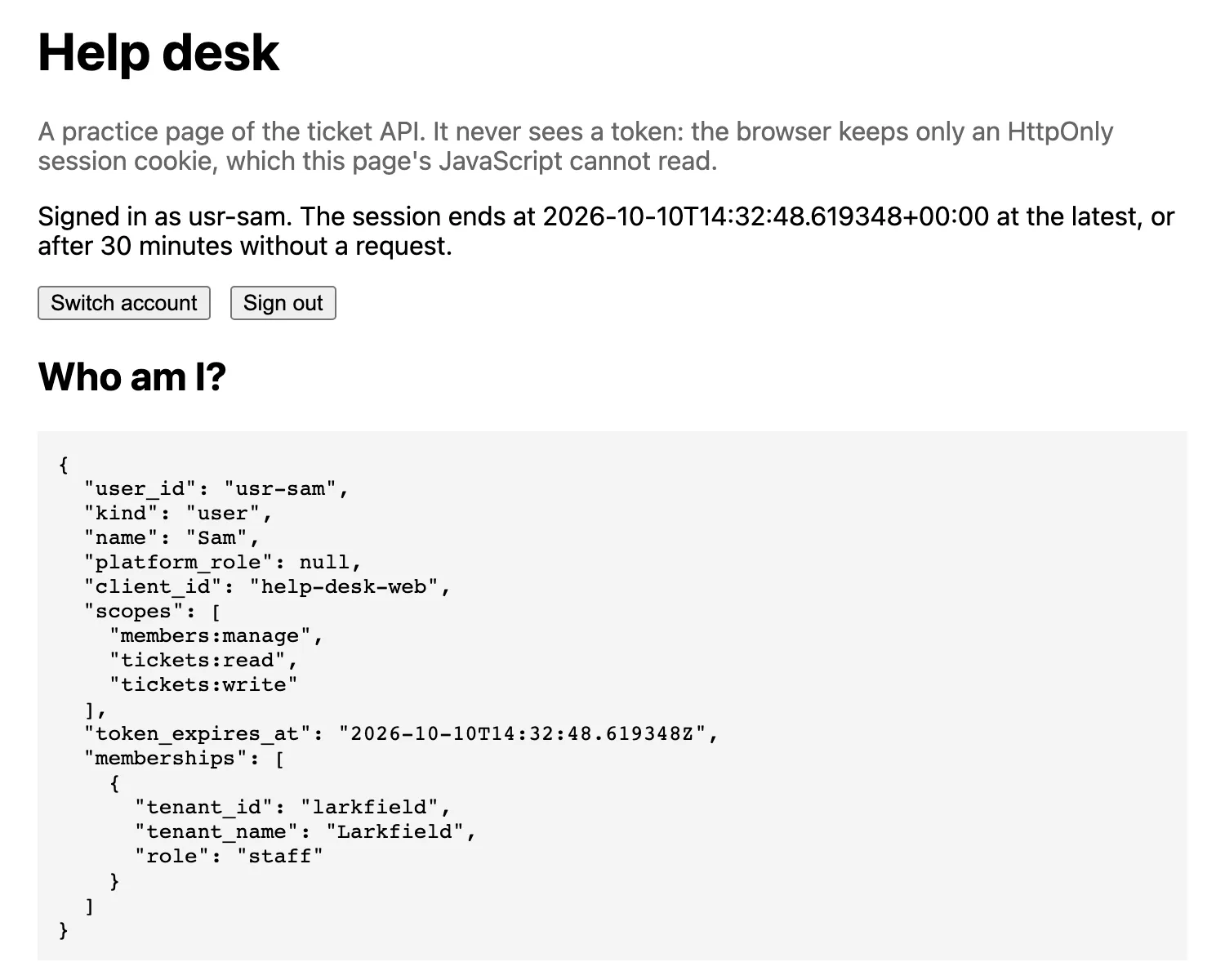
The help desk page after Sam's sign-in, in Chromium. The page called /v1/me with the cookie only; it has no token to send. -
Open the developer tools (F12 on Windows, Cmd+Option+I on macOS). Choose Application, then Cookies and
http://127.0.0.1:8000. Findticket_session. The HttpOnly column has a tick, and SameSite saysLax. -
In the Console of the same tools, type
document.cookieand press Enter. The answer is'', an empty string. Then typeawait (await fetch('/v1/me')).json(). You get Sam’s answer: the page can use the session, but cannot see it.
See every step with curl
Section titled “See every step with curl”The browser hides the redirects, and curl shows them. Keep both programs running, and use a cookie jar: a file where curl keeps cookies, as a browser does. Each command prints one intermediate value.
TO=$(curl -s -o /dev/null -w '%{redirect_url}' -c jar.txt "http://127.0.0.1:8000/auth/login?return_to=/app/")echo "$TO"BACK=$(curl -s -o /dev/null -w '%{redirect_url}' -b jar.txt -c jar.txt -d user=usr-sam "$TO")echo "$BACK"curl -s -i -b jar.txt -c jar.txt "$BACK"curl -s -i -b jar.txt http://127.0.0.1:8000/v1/me$to = curl.exe -s -o NUL -w '%{redirect_url}' -c jar.txt "http://127.0.0.1:8000/auth/login?return_to=/app/"$to$back = curl.exe -s -o NUL -w '%{redirect_url}' -b jar.txt -c jar.txt -d user=usr-sam "$to"$backcurl.exe -s -i -b jar.txt -c jar.txt "$back"curl.exe -s -i -b jar.txt http://127.0.0.1:8000/v1/meThe output, with the long random values of the first line shortened (…) and the date and server headers left out:
http://localhost:8400/authorize?response_type=code&client_id=help-desk-web&redirect_uri=http%3A%2F%2F127.0.0.1%3A8000%2Fauth%2Fcallback&scope=openid+profile+email+offline_access+tickets%3Aread+tickets%3Awrite+members%3Amanage&state=-NISkOf_…&nonce=AyxDqtfT…&code_challenge=U-CpPRKr…&code_challenge_method=S256http://127.0.0.1:8000/auth/callback?code=tpddqllbFgemr2MCH2PyyLqTNGbuH-x5nN0sbpESlE4&state=hlsGqhUFC8usBnSZEoIoYTg1nkXNDBe4HTTP/1.1 302 Foundlocation: /app/set-cookie: ticket_session=p2nTgBlu45F5TGrc7vJBRszoLlKCf0BjfNNhbs_ntvk; HttpOnly; Max-Age=28800; Path=/; SameSite=laxHTTP/1.1 200 OKcontent-type: application/jsoncache-control: no-store
{"user_id":"usr-sam","kind":"user","name":"Sam","platform_role":null,"client_id":"help-desk-web","scopes":["members:manage","tickets:read","tickets:write"],"token_expires_at":"2026-10-10T14:31:02.535232Z","memberships":[{"tenant_id":"larkfield","tenant_name":"Larkfield","role":"staff"}]}
The first line is the address that the API built, with state, nonce and the PKCE challenge of Application flows. The second line is the provider’s answer to -d user=usr-sam, the click on Sam: only a one-time code. The callback swapped the code on the server, so the browser gets only Set-Cookie. Max-Age=28800 is 8 hours; Secure is missing because of SESSION_COOKIE_SECURE=false. The last answer is /v1/me with the cookie and no token. For a session, token_expires_at shows the session’s end, and cache-control: no-store tells the browser not to keep a copy of one person’s answer.
Open jar.txt in your editor. It has two lines that start with #HttpOnly_: one for 127.0.0.1 (ticket_session) and one for localhost (idp_session, the provider’s own cookie). The next lesson shows why that second cookie matters.
Now test the code word. Sign out without it, then with it:
curl -s -X POST -b jar.txt http://127.0.0.1:8000/auth/logoutCSRF=$(curl -s -b jar.txt http://127.0.0.1:8000/auth/session | python -c "import sys, json; print(json.load(sys.stdin)['csrf_token'])")curl -s -X POST -b jar.txt -c jar.txt -H "X-CSRF-Token: $CSRF" http://127.0.0.1:8000/auth/logoutcurl.exe -s -X POST -b jar.txt http://127.0.0.1:8000/auth/logout$csrf = (curl.exe -s -b jar.txt http://127.0.0.1:8000/auth/session | ConvertFrom-Json).csrf_tokencurl.exe -s -X POST -b jar.txt -c jar.txt -H "X-CSRF-Token: $csrf" http://127.0.0.1:8000/auth/logout{"error":{"code":"csrf_failed","message":"This request needs the X-CSRF-Token header of your session.","request_id":"36f61abb4c6a","fields":[]}}{"signed_out":true,"provider_logout_url":"http://localhost:8400/logout?post_logout_redirect_uri=http%3A%2F%2F127.0.0.1%3A8000%2Fapp%2F"}The first request had a valid cookie and no code word: 403 csrf_failed. The second one had both. At the end of the course, the same check protects every route that changes a ticket. There, a new message with the cookie and no CSRF token gets 403, and with the token it gets 201.
Read the code that did it
Section titled “Read the code that did it”Three places in the copied code carry the design. Open each one.
ticket_api/login.py,set_cookie():httponly=True,secure=fromSESSION_COOKIE_SECURE,samesite="lax". A comment on each line says what it stops.ticket_api/sessions.py,create(): a new random value for every sign-in; the table keeps only its SHA-256. Suppose the API reused a value that the browser brought. Then an attacker could plant a value and wait for the victim to sign in (session fixation).ticket_api/security.py,current_identity(): a bearer token is checked as in Module 2. Without one, the API uses the cookie, and any method other thanGET,HEADorOPTIONSmust also bringX-CSRF-Token.
You can see the server’s side in the database. In a terminal in the project folder:
docker compose exec db psql -U tickets -c "SELECT left(session_sha256, 16) AS sha256_start, user_id, refresh_token_encrypted IS NOT NULL AS refresh_kept, end_reason FROM sessions ORDER BY created_at DESC LIMIT 1;" sha256_start | user_id | refresh_kept | end_reason------------------+---------+--------------+------------ f1410dbe80b1701d | usr-sam | t | logout(1 row)The row keeps the sign-out and its reason, but not the cookie.
Your turn: send Sam somewhere else
Section titled “Your turn: send Sam somewhere else”The sign-in starts at /auth/login?return_to=/app/, and the callback sends the browser to return_to. An attacker could send Sam a link to the real sign-in with return_to=https://evil.example/. After a real sign-in, Sam would land on a page that only looks like the help desk. This mistake is an open redirect.
Predict where the callback sends the browser. Then run the curl sequence again with return_to=https://evil.example/ in the first command, and read the location line of the callback.
Show the answer
location: /app/safe_return_to() in login.py accepts only a path on this site. It must start with /, not with //, and have no \. Anything else becomes /app/. The test test_return_to_cannot_send_you_to_another_site checks it.
Run the callback command (the third one) a second time, too. The answer is 400 login_failed: “This sign-in is unknown, was used already, or is too old. Start again.” Each state works once, for 10 minutes.
When to use a backend session, when not, and what it costs
Section titled “When to use a backend session, when not, and what it costs”Use it when your own site serves the pages and the API, as here: a help desk, an internal tool. Every token stays on the server, and you control sign-out and expiry. Do not use it for a program that is not a browser. The command-line client and a mobile app keep their tokens themselves and send Authorization: Bearer. The API accepts both.
The costs: the server keeps state (one row per sign-in, a database read and write per request), and every route that changes something needs the CSRF check. A front end on another site needs CORS and SameSite=None, which removes the first lock; that design is outside this course.
Common mistake
The sign-in works in Chrome and fails in Safari
Symptom: you pick Sam on the provider’s page and come back to /app/, but the page says “You are not signed in.” In Chrome and Firefox, the same steps work.
Cause: the line SESSION_COOKIE_SECURE=false is missing from .env, so the API uses its default, true. A Secure cookie may travel only over HTTPS. Chrome and Firefox make an exception for 127.0.0.1 and localhost; WebKit, the engine of Safari, does not. The author tested it with SESSION_COOKIE_SECURE=true on http://127.0.0.1. Chromium 156 and Firefox 157 signed in. WebKit 27.2 answered {"signed_in":false}.
Diagnose: open the callback in the developer tools’ Network panel. Its set-cookie header ends with ; Secure, and the browser marks the cookie as blocked. python -m scripts.check_identity, from Provider configuration, prints PROBLEM cookie Secure=True, redirect URI over HTTP.
Fix:
- Add
SESSION_COOKIE_SECURE=falseto.env. - Stop
fastapi devwith Ctrl+C and start it again, so that it reads.env. - Sign in again.
On a server, do the opposite: serve the API over HTTPS and keep the default true. Anyone on the same network can read a session cookie that travels over plain HTTP.
Check your understanding
An injected script runs in the /app/ page while Sam is signed in. What can it take away, and what can it still do? Compare with a page that keeps the tokens in localStorage.
Show the answer
With the backend session, it can take nothing away: the cookie is HttpOnly, so document.cookie is empty, and the page has no token. But it can still send requests from the open page with Sam’s cookie, until the page closes or the session ends. With tokens in localStorage, the script sends the access and refresh tokens away, and the attacker uses them from any computer. In the constructed test, curl with the stolen token got 200 as Sam.
Does your answer have the main points of ours?
Sign in and enroll in the course to save your answers. Every check counts toward the certificate.
Check your understanding
Predict: a page on another site sends a form with POST /auth/logout to the ticket API while Sam is signed in. What does the API answer, and why? What would it answer if the browser ignored SameSite?
Show the answer
401 not_signed_in, and Sam stays signed in. The cookie has SameSite=Lax, so the browser does not send it with a POST that another site started, and the API sees no session at all. If the browser sent the cookie anyway, the API would answer 403 csrf_failed, because the request has no X-CSRF-Token header. The other site cannot get the CSRF token: it is only in the answer of GET /auth/session, which the browser does not let another site read.
Does your answer have the main points of ours?
Sign in and enroll in the course to save your answers. Every check counts toward the certificate.
Check your understanding
Practical: show that the browser has the session cookie, that the page's JavaScript cannot read it, and that the database does not contain it.
Show the answer
In the developer tools, Application → Cookies → http://127.0.0.1:8000 lists ticket_session with HttpOnly ticked and SameSite Lax. In the Console, document.cookie returns '', while fetch('/v1/me') still returns Sam’s answer. In psql, SELECT left(session_sha256, 16), user_id FROM sessions shows a hexadecimal fingerprint, not the cookie’s value. The cookie has 43 characters; session_sha256 has 64 hexadecimal characters that cannot be turned back into it.
Does your answer have the main points of ours?
Sign in and enroll in the course to save your answers. Every check counts toward the certificate.
Recap
- Tokens in the browser’s storage are paper tickets: an injected script can send them away. A stolen access token got 200 as Sam from curl.
- A backend for frontend keeps the tokens on the server. The browser gets the cookie
ticket_session: HttpOnly, SameSite=Lax, 8 hours, Secure on a server. The table keeps its SHA-256. - Cookies travel by themselves, so changes need CSRF protection: SameSite=Lax, and the header
X-CSRF-Token(403 csrf_failedwithout it). return_toaccepts only a local path, and eachstateworks once.- On your computer,
SESSION_COOKIE_SECURE=false: Safari’s engine refuses a Secure cookie over plain HTTP.
The session now starts well. The next lesson follows it to its end: expiry, refresh, sign-out, a disabled account and a second person at the same browser.
Next: Session lifecycle