
Failure handling
- Lesson 12
- 100 min
- Module 4: Add reliability and access control
Lesson 12 of 22 · Portfolio Capstone: Build, Evaluate and Ship an AI ProductFailure handling
1. Select and bound the project
2. Prepare data and architecture
3. Build one complete user journey
4. Add reliability and access control
5. Evaluate and improve
6. Deploy and operate
7. Prepare the portfolio presentation
What you will be able to do
Make every failure clear, bounded and safe. Refuse a bad file at once, store the same file only once, and stop waiting for a model that does not answer. Then tell the user what happened.
Before you startWhat to know and to have ready
What you need to know
- The four checks and the practice tokens, from Permission enforcement.
- Ingestion as jobs with states (
uploaded → parsing → indexed | failed), from Backend foundation. - The error states on the page, from Frontend foundation.
- The pieces that this lesson reuses:
- timeouts, retries and back-off: Handle provider limits, in Building Reliable Applications with LLM APIs;
- messages for people: Communicate failure, in the same course;
- job states and leases: Job lifecycle, in Scaling APIs and AI Workloads;
- duplicate deliveries: Delivery and retries, in the same course;
- one error shape: Validation and error responses, in Build and Deploy Your First API.
Your project
~/projects/doc-assistantat the snapshotend-of-m04, from the last lesson:python -m pytestends with95 passed. PostgreSQL runs, and the pack is loaded (python -m scripts.load_pack).- For the manual run: four terminals with the virtual environment active. The practice identity provider runs in the first (
python -m idp).
No new file to copy: the last lesson copied the whole module. Tested with Python 3.12 on macOS. The PowerShell commands are written, not run.
Calling a supplier for a customer
Section titled “Calling a supplier for a customer”A shop assistant phones a supplier for a customer at the counter. Nobody answers. How long should it ring?
A good assistant has a rule. Let it ring for 30 seconds, hang up, wait a moment, and call again. After the third call, stop and tell the customer the truth: “The supplier does not answer. I placed no order, so nothing is charged. Please try again later.”
A bad assistant lets it ring forever, while the customer waits at the counter. Or they call 50 times in a row, and a supplier who is only busy gets busier.
The same shop has a parcel counter. A parcel that is too big for the shelves is refused at once, at the counter. A parcel that looks fine but is broken inside is accepted first. In the back room, it gets a label: “damaged: the box was crushed”. And a parcel that arrives twice is shelved once.
The document assistant now needs all of these rules.
The problem: what Module 3 does when something goes wrong
Section titled “The problem: what Module 3 does when something goes wrong”Two failures show the problem in the Module 3 project. The first is a file that is uploaded twice. Before this module, a second upload of the same version is refused with 409, but the same bytes under another name are not. Here, Bramble’s FAQ goes in a second time as faq-copy, by Sam (Module 3 has no sign-in, so every request is Sam):
{"code":"conflict","message":"Version 4 of faq already exists. Upload it with a new version number, or delete the old one first.", ...} 409{"document":{"document_id":"fb88a033-…","doc_key":"faq-copy","version":"4","title":"Frequently asked questions", ... "sha256":"61d4344ea4a2db57…","status":"uploaded", ...},"duplicate":false} 202After indexing, Bramble has 16 documents instead of 15:
{'indexed': 16} [('faq', '4', 'indexed', '61d4344ea4a2'), ('faq-copy', '4', 'indexed', '61d4344ea4a2')]Two documents now have the same fingerprint, 61d4344ea4a2. This happens in real life. A person uploads the same file under a new name, or the browser sends an upload again after a slow network. Each copy has its own passages, and both copies compete for the five places of a search:
python -m scripts.ask "How long do special orders take to arrive?" --tenant bramblePassages found: 7035d9d70022 faq-copy v4, 57b00765f51c special-orders v2, 311c86d6f6b4 special-orders v2, 7c37a489a316 special-orders v2Only four passages. The search found both copies of the FAQ answer, and the context step (context.py) dropped one as a near-duplicate. So the copy cost the model one passage of evidence. Worse, a person who deletes “the FAQ” deletes one copy, and the assistant keeps answering from the other.
The second failure is the model provider. In Module 3, the live provider makes one call, with a timeout. A provider that is busy for one second gives the user an error, even if a second try would work. The recorded answers never fail, so you never see this on your computer.
The module must handle four failures: the wrong tenant, a missing source, an invalid file, and a provider timeout. You handled the first in the last lesson. This lesson adds the others, and one script that runs all four for real.

Text description of the diagram
The diagram has two columns. The left column is a question: Ines asks at Bramble Books. It passes five steps to a stored answer with citations, 200. The exits are to the right of the steps. Without a token or cookie, 401 unauthenticated, “Sign in first.”. As a non-member, or at a shop that does not exist, 404 not_found, “Not found.”. When no passage answers, a 200 that abstains: “The documents do not say whether we sell e-books.”. When the model does not answer in time, 504 provider_timeout: “The model did not answer in time. Your question was not saved; try again.”, after 3 calls in about 9 seconds with a 2-second timeout. The right column is an upload by Grace. A read-only member such as Omar leaves at the role check with 403 forbidden. A file over 5,000,000 bytes leaves with 413, a Word file with 415. The same file again returns the existing document, 200, "duplicate": true. A file that is accepted but cannot be parsed ends with the status failed and a reason: “This file is not a readable PDF (PdfStreamError).”. The cut PDF, the Word file, the large file and the slow provider are constructed for the test.
Refuse a bad file at the counter
Section titled “Refuse a bad file at the counter”Some problems are visible in the request itself, so the API refuses them before it stores anything. create_document() in ingest.py checks them in this order, cheapest first:
- an empty file: 422
empty_file; - the size: 413
file_too_large; - the type, by the file name: 415
unsupported_file; - the metadata: 422
validation_error, with the field and the problem.
Each answer has the one error shape of the project: code for programs, message for people, and request_id to find the log line.
Other problems show only when the worker opens the file. A PDF that was cut during the upload looks fine from the outside. The API accepts it with 202, and the worker tries to parse it. A parse error is final, so the worker does not try again. The document goes to failed, with a reason that a person can act on. Every other error, for example a lost database connection, puts the document back to uploaded, at most 3 attempts in all. A crashed worker leaves a lease behind; when it ends, another worker takes the job.
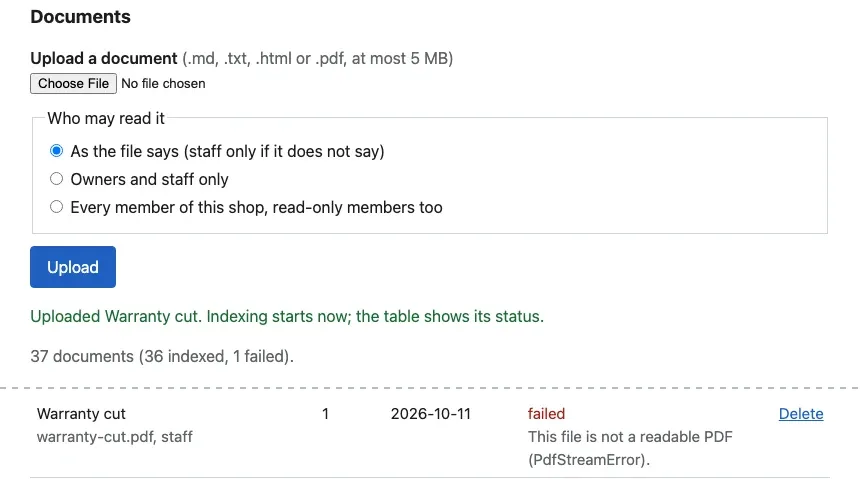
Why accept a file that fails a second later? Parsing a large PDF can take seconds, and the request should not wait. The failed row keeps its reason until somebody deletes it.
Store the same file once
Section titled “Store the same file once”How do you know that two files are the same? You compare a fingerprint: the SHA-256 hash of the bytes. The same bytes always give the same 64 characters, and one changed character gives completely different ones. Try it on Bramble’s FAQ and on a copy with one word changed. Copy data/bramble/documents/faq.md to faq-2.md in the project folder, and change “5 business days” to “6 business days” in the copy:
shasum -a 256 data/bramble/documents/faq.md faq-2.md61d4344ea4a2db573f8ce15d43908fe004cd2564dfba0eeca72294e1ad8be9ea data/bramble/documents/faq.md9687554465bf65b818eea6da20c079823bbfa0eed39cf8fa3480482cbf819d54 faq-2.mdOn Linux, the command is sha256sum; in PowerShell, Get-FileHash faq-2.md. The API stores this hash with every document. Before it inserts a new one, it looks for a document of the same shop with the same hash. If one exists, it returns that document with 200 and "duplicate": true, and stores nothing. This is duplicate-safe ingestion: an upload that is repeated has the same result as one upload. The general name for this property is idempotent.
Try three uploads with Ines’s token, made as in Tokens for scripts and curl. First the FAQ again. Then an exact copy under another name and key, as in the Module 3 problem. Then the same copy with one line added:
INES=$(python -m idp token usr-ines)U=http://127.0.0.1:8000/v1/tenants/bramble/documentscurl -s -F file=@data/bramble/documents/faq.md $U -H "Authorization: Bearer $INES"cp data/bramble/documents/faq.md faq-copy.mdcurl -s -F file=@faq-copy.md -F doc_key=faq-copy $U -H "Authorization: Bearer $INES"printf '\n## New\n\nA change.\n' >> faq-copy.mdcurl -s -F file=@faq-copy.md $U -H "Authorization: Bearer $INES"The three responses, with their status codes:
faq.md again: 200 {"document":{"document_id":"a8162929-…","doc_key":"faq","version":"4", … "status":"indexed", …}, "duplicate": true}the same bytes as faq-copy: 200 {"document":{"document_id":"a8162929-…","doc_key":"faq","version":"4", … "status":"indexed", …}, "duplicate": true}one line added, version 4: 409 {"code":"conflict","message":"Version 4 of faq already exists. Upload it with a new version number, or delete the old one first.", …}The second line is the Module 3 failure, fixed: the copy under a new name returns the existing document, with its ID. The third line is a different file that claims an existing version, so it is a real conflict, and the message says what to do. Two shops may upload the same file: each gets its own copy, because the check and the constraint include tenant_id.
One gap remains. Two uploads of the same file at the same moment can both look, find nothing, and both insert. So migration 003_duplicate_safe_ingestion.sql adds a second lock in the database:
ALTER TABLE documents ADD CONSTRAINT documents_same_file_once UNIQUE (tenant_id, sha256);The second insert then fails with a UniqueViolation, and create_document() returns the first document instead. The test test_the_same_file_twice_is_one_document checks the normal case. The command python -m scripts.load_pack uses the same function, so loading twice is safe:
larkfield: 0 documents uploaded, 36 already therebramble: 0 documents uploaded, 15 already thereStop waiting: timeouts and bounded retries
Section titled “Stop waiting: timeouts and bounded retries”Back to the phone call. A timeout is the longest time you wait for one answer. A retry is one more try after a failure. Bounded means there is a fixed maximum, so the total wait has a limit too. Between tries, the wait grows (back-off), with a little randomness (jitter), so that many clients do not all call again at the same second.
The live provider in providers.py follows these rules:
for attempt in range(1, self.retries + 2): try: ... # one call, with the timeout except ProviderError as e: if e.kind not in ("timeout", "rate_limited", "unavailable") or attempt > self.retries: raise wait = min(e.retry_after or 2 ** (attempt - 1), 10) * random.uniform(0.8, 1.2) self.sleep(wait)Only three kinds of error are tried again: a timeout, HTTP 429 (busy) and a 5xx (the provider failed). A 400 is never tried again, because the same request would fail in the same way. The OpenAI client’s own retries are off (max_retries=0), so this loop is the only one, and its limit is the real limit.
A tiny example with every number
Section titled “A tiny example with every number”Take the setting of the failure script: a timeout of 2 seconds and 2 retries, against a practice provider that never answers in time. Predict the total time before you read on.
- Call 1: waits 2 s, times out.
- Wait about 1 s (2⁰ = 1, times 0.8 to 1.2).
- Call 2: waits 2 s, times out.
- Wait about 2 s (2¹ = 2, times 0.8 to 1.2).
- Call 3: waits 2 s, times out. No retries are left, so the API answers 504.
That is 2 + 1 + 2 + 2 + 2 = 9 seconds, give or take the jitter. The course team measured three runs: 10.6 s, 9.1 s and 8.7 s. The first run includes about a second to start the HTTP client.

Text description of the diagram
The timeline runs from 0 to 10 seconds. In the API’s row, call 1 runs from 0 to 2 seconds and gets no answer. A wait of 1.1 seconds follows. Call 2 runs from 3.1 to 5.1 seconds, then a wait of 2.0 seconds. Call 3 runs from 7.1 to 9.1 seconds. At 9.1 seconds, the API gives up and answers 504. In the practice provider’s row, each call is still waiting when the API hangs up. The provider answers only after 30 seconds.
What does the user get? The pipeline turns each final provider error into one clear response: a timeout is 504 provider_timeout, “The model did not answer in time. Your question was not saved; try again.”; a busy provider is 503 provider_busy with Retry-After: 30. “Not saved” is true: the answer is stored only at the end of the pipeline, so a failed question leaves nothing half-done. That is Grace’s criterion B7.
But why not wait longer, to be sure? Because the wait multiplies. With the defaults in .env (PROVIDER_TIMEOUT_S=20, PROVIDER_RETRIES=2), the worst case is 3 × 20 seconds plus the waits: about 63 seconds. A real model call took about 1.3 seconds at the median in the course’s evaluation, and a customer on the phone will not wait a minute. A shorter timeout cuts off slow but good answers; more retries make the worst case longer. Write your choice and its worst case in your threat review.
Run the four failure cases
Section titled “Run the four failure cases”The script scripts/failure_cases.py runs all four cases for real, against your database, with practice tokens. It runs the API in its own process, so no server needs to run. It undoes its changes at the end: the deleted policy is uploaded and indexed again, the bad uploads are deleted.
python -m scripts.failure_casesThe first lines show the embedding model loading (Loading weights: …). The summary follows:
wrong shop: Ines asks at Larkfield -> 404 in 0.04 s: {"code": "not_found", "message": "Not found."}wrong shop: a shop that does not exist -> 404 in 0.0 s: {"code": "not_found", "message": "Not found."}missing source: no document answers -> 200 in 3.2 s: {"answerable": false, "answer": "The documents do not say whether we sell e-books.", "provider": "recorded"}missing source: delete the gift card policy -> 200 in 0.01 s: {}missing source: ask about gift cards again -> 200 in 0.02 s: {"answerable": false, "answer": "The documents do not say how long a gift card is valid.", "provider": "recorded"}invalid file: a PDF cut during the upload (accepted, then indexed) -> uploaded in 0.04 s: {}invalid file: its status after indexing -> failed in 0.0 s: {"error": "This file is not a readable PDF (PdfStreamError)."}invalid file: a Word file -> 415 in 0.0 s: {"code": "unsupported_file", "message": "Upload a .md, .txt, .html or .pdf file."}invalid file: 6 MB -> 413 in 0.01 s: {"code": "file_too_large", "message": "The file is 5,000,001 bytes; the limit is 5,000,000 bytes."}provider timeout: 2 s timeout, 2 retries -> 504 in 8.9 s: {"code": "provider_timeout", "message": "The model did not answer in time. Your question was not saved; try again.", "provider_calls": 3}Your times differ; the first question loads the embedding model. Read the 413 line closely. The API reads at most one byte more than the limit into memory, so it reports a 6 MB file as 5,000,001 bytes. The missing-source case is the next lesson’s subject. The cut PDF, the Word file, the large file and the slow provider are constructed for the test.
The slow provider by hand
Section titled “The slow provider by hand”The script hides the moving parts, so run the timeout once by hand. The practice identity provider keeps running in the first terminal. Stop the API of the last lesson.
-
In the second terminal, start the practice model provider in the mode
slow. It answers every request after 30 seconds:Terminal window python -m scripts.fake_provider --mode slowFake provider (slow) on http://127.0.0.1:8401/v1. Ctrl+C stops it. -
In the third terminal, start the API with the live provider pointed at it, and a 2-second timeout:
Terminal window ANSWER_PROVIDER=live LLM_BASE_URL=http://127.0.0.1:8401/v1 PROVIDER_TIMEOUT_S=2 fastapi run doc_assistant/main.pyTerminal window $env:ANSWER_PROVIDER="live"; $env:LLM_BASE_URL="http://127.0.0.1:8401/v1"; $env:PROVIDER_TIMEOUT_S="2"fastapi run doc_assistant/main.py -
In a fourth terminal, make a token for Ines and ask a question:
Terminal window INES=$(python -m idp token usr-ines)curl -s -w '\n%{http_code} in %{time_total} s\n' -X POST http://127.0.0.1:8000/v1/tenants/bramble/answers \-H "Authorization: Bearer $INES" -H 'content-type: application/json' \-d '{"question": "How long does delivery to Ontario take?"}'{"code":"provider_timeout","message":"The model did not answer in time. Your question was not saved; try again.","request_id":"7e46c0b6e5344e72"}504 in 9.200686 sThe first request after a start took 12.5 seconds, because it also loads the embedding model.
-
Stop the fake provider and restart it with
--mode busy. It answers every call with 429 andRetry-After: 1. Ask again withcurl -ito see the headers:HTTP/1.1 503 Service Unavailableretry-after: 30...{"code":"provider_busy","message":"The model provider is busy. Try again in a minute.","request_id":"2563d8e1a9c147de"}It took 5.5 seconds: three calls, with waits of about 1 second as the provider asked.
-
Stop the API and the fake provider with Ctrl+C. Start the API again without the three settings, so that the recorded answers come back.
On Windows, the three $env: settings stay in that terminal: close it, or remove them with Remove-Item Env:ANSWER_PROVIDER, Env:LLM_BASE_URL, Env:PROVIDER_TIMEOUT_S.
When to use it, and what it costs
Section titled “When to use it, and what it costs”Use a timeout on every call to a service that you do not control, always. Add retries only for errors that can pass: a timeout, a 429, a 5xx. Keep them few, because each retry multiplies the worst-case wait and adds load on a provider that is already in trouble. With a paid model, a retry after a timeout can also cost twice. The provider may have done the work and billed it, even if the answer came too late.
Check cheap things at the door, and expensive things in the job. Fingerprints cost one hash per upload, a few milliseconds even for 5 MB, and one index. They do not catch two files that differ by one space; that would need a comparison of the text, which this project does not do.
Common mistakes
Section titled “Common mistakes”Common mistake
The migration refuses your database
Symptom: you copied the end of Module 4 over a project that you used in Module 3. python -m doc_assistant.migrate stops after the first new migration:
psycopg.errors.UniqueViolation: could not create unique index "documents_same_file_once"DETAIL: Key (tenant_id, sha256)=(bramble, 61d4344ea4a2db573f8ce15d43908fe004cd2564dfba0eeca72294e1ad8be9ea) is duplicated.applied 002_row_level_security--status then shows 002_row_level_security applied and 003_duplicate_safe_ingestion pending. python -m scripts.load_pack --reset fails with the same error, because it applies the migrations first.
Cause: in Module 3, you uploaded the same file twice under two names, as in the problem above. Migration 003 cannot promise “one document per file” while two exist.
Diagnose: list the copies in psql:
SELECT doc_key, version, left(sha256, 12) AS sha256 FROM documents WHERE tenant_id = 'bramble' AND sha256 IN (SELECT sha256 FROM documents WHERE tenant_id = 'bramble' GROUP BY sha256 HAVING count(*) > 1); doc_key | version | sha256----------+---------+-------------- faq | 4 | 61d4344ea4a2 faq-copy | 4 | 61d4344ea4a2Fix: delete the extra copy. Its file and passages go with it (ON DELETE CASCADE). Then migrate again:
DELETE FROM documents WHERE tenant_id = 'bramble' AND doc_key = 'faq-copy';applied 003_duplicate_safe_ingestion1 migration(s) applied.With practice data only, you can also start from an empty database: docker compose down --volumes, docker compose up -d --wait db, python -m doc_assistant.migrate, then python -m scripts.load_pack.
Common mistake
Every question fails with 503 provider_unavailable
Symptom: after a manual run, every question returns 503 provider_unavailable, “The model provider is not available. Try again later.”.
Cause: the API still has ANSWER_PROVIDER=live and points to the practice provider, which you stopped. A refused connection counts as “unavailable”, so the API tries 3 times and gives up.
Fix: start the API in a terminal without the settings of the manual run. curl -s http://127.0.0.1:8000/ready shows "answer_provider":"recorded" when it is right.
Your project
Section titled “Your project”On the own-idea track, your provider adapter, your parser and your upload route are your own. Copy the rules, not the code. Put a timeout on every external call, and retry only errors that can pass, a fixed number of times. Keep a fingerprint per shop with a unique constraint, and one error shape. Then make your own version of failure_cases.py with your own data.
Keep this evidence:
- The output of
python -m scripts.failure_cases(or yours): all four cases, with the status of each. - Your worst-case wait, calculated from your timeout and your retries, in the threat review.
- The tests for refused files, duplicates and the slow provider:
python -m pytest tests/test_failures.py -v.
Checklist
- An empty, too large or unsupported file is refused before anything is stored, with its own code.
- A file that cannot be parsed ends as
failed, with a reason that a person can act on. - The same file uploaded twice by one shop is one document; the second upload says
duplicate. - Every model call has a timeout; only timeouts, 429 and 5xx are tried again, a fixed number of times.
- A failed question stores nothing, and the message says so.
Knowledge check
Section titled “Knowledge check”Check your understanding
With PROVIDER_TIMEOUT_S=5 and PROVIDER_RETRIES=1, the provider never answers. Predict how long the user waits, and what they see.
Show the answer
Two calls of 5 seconds each, with one wait between them. The wait is about 1 second (2⁰ = 1, times 0.8 to 1.2). The total is about 5 + 1 + 5 = 11 seconds. Then the API answers 504 provider_timeout with “The model did not answer in time. Your question was not saved; try again.”. Nothing is stored.
Does your answer have the main points of ours?
Sign in and enroll in the course to save your answers. Every check counts toward the certificate.
Check your understanding
Explain why a cut PDF gets 202 and then the status failed, while a Word file gets 415 at once.
Show the answer
The Word file is refused by its name. The parser does not read .docx, and the request already shows the name, so the API refuses it before it stores anything. The cut PDF has a valid name and size, so nothing in the request is wrong. Only the parser finds the problem, in the worker, after the upload is accepted. Another try would fail in the same way, so the worker sets failed at once, with the reason “This file is not a readable PDF (PdfStreamError).”.
Does your answer have the main points of ours?
Sign in and enroll in the course to save your answers. Every check counts toward the certificate.
Check your understanding
Practical check: upload data/bramble/documents/gift-cards.md twice with Ines's token. What do the two responses show, and how many gift card documents does the list have?
Show the answer
With the pack loaded, both uploads return 200 with "duplicate": true and the ID of the existing gift card policy. Its SHA-256 is already stored for Bramble Books. In an empty shop, the first upload returns 202, and the second returns 200 with the same ID. Either way, the list has one gift-cards document.
Does your answer have the main points of ours?
Sign in and enroll in the course to save your answers. Every check counts toward the certificate.
Recap
- Bad input is refused at the door, cheapest check first: 422 empty, 413 too large, 415 wrong type, 422 bad metadata. A file that fails in the parser ends as
failed, with a reason. - A SHA-256 fingerprint per shop and the unique constraint of migration 003 make uploads duplicate-safe. The same bytes return the existing document.
- Every model call has a timeout. Only a timeout, a 429 or a 5xx is tried again, at most
PROVIDER_RETRIEStimes, with growing waits. With a 2-second timeout and 2 retries, the user gets a 504 after about 9 seconds and 3 calls, and nothing is stored. python -m scripts.failure_casesruns the four cases of this module for real: wrong shop, missing source, invalid file, provider timeout.
Next, what the user sees when the assistant cannot answer, the evidence behind each answer, and deletion.
Next: User review and cleanup