
Basic protection
- Lesson 18
- 50 min
- Module 6: Test and harden the service
Lesson 18 of 21 · Build and Deploy Your First APIBasic protection
1. Understand the web request
2. Build a small FastAPI service
3. Design a usable contract
4. Document the API with OpenAPI and Swagger UI
5. Explore and test with Postman
6. Test and harden the service
7. Deploy and verify
What you will be able to do
Make the API safe to put on the internet. Only callers with the key can classify, and a huge body cannot use up the server’s memory. A slow classifier cannot keep a request waiting for ever. The service stays responsive, and every refusal is a clear error.
Before you startWhat to know and to have ready
What you need to know
- Secrets in environment variables, from Configuration and secrets: Secrets.
- The request ID middleware, from Configuration and logging: A request ID for every request.
- Tests with their own settings, from Configuration and logging: Tests with their own settings.
What you need on your computer
config.py,create_appinmain.py, the request ID andtests/conftest.py, from Configuration and logging: Guided practice: settings and request IDs.python -m pytestpasses.- The collection and the Local environment in the folder
postman, from Tests and repeatable runs: Save the collection in the project. - The Postman CLI, from Tests and repeatable runs: Run it from the terminal: the Postman CLI.
- In the Postman app, the variable
apiKeyin Local and the API key authorization of the collection. You made them in Collections, variables and environments: Worked example: two Postman environments. - If your project is missing or broken, copy the snapshot
end-of-m05, the project at the end of Module 5, as in Use a snapshot. Then do the guided practice of Automated endpoint tests and of Configuration and logging again. To use the collection in the Postman app, import the files inpostman/(Import).
Tested with Python 3.14.6, FastAPI 0.142.2, pytest 9.1.1 and the Postman CLI 1.69.0 on macOS.
Three risks, three protections
Section titled “Three risks, three protections”Once the API is on the internet, anyone can send it anything. Three problems are likely first:
| Risk | Example | Protection |
|---|---|---|
| Strangers use the API | Someone finds the URL and classifies a million tickets on your account | An API key that callers must send |
| A body that is too large | One request with 500 MB of text uses up the server’s memory | A body-size limit: 413 |
| A dependency that does not answer | A model server hangs. Every request waits, and the API stops answering anyone | A time limit: 503 after 2 seconds |
This lesson’s API key is for service-to-service calls. Another program of your company, such as the help desk’s system, calls the API with a key that you gave it. It is not a login for people. Users, passwords and permissions are a different problem, taught in the course on authentication.
The API key
Section titled “The API key”An API key is a long random secret that a client sends in a header, here X-API-Key. The server compares it with the key in its settings. A wrong or missing key gets 401.
The key is a setting, and a secret, as in the Python course. It comes from the environment variable API_KEY, and field(repr=False) keeps it out of printed settings. The time limit is a setting too:
import osfrom dataclasses import dataclass, field

@dataclass(frozen=True)class Settings:    api_key: str | None = field(repr=False)    allowed_origins: list[str]    classifier_mode: str    classifier_timeout: float    log_level: str    show_docs: bool

def load_settings() -> Settings:    """Read the settings from environment variables, with safe defaults."""    origins = os.environ.get("ALLOWED_ORIGINS", "")    return Settings(        api_key=os.environ.get("API_KEY") or None,        allowed_origins=[o.strip() for o in origins.split(",") if o.strip()],        classifier_mode=os.environ.get("CLASSIFIER_MODE", "keywords"),        classifier_timeout=float(os.environ.get("CLASSIFIER_TIMEOUT", "2.0")),        log_level=os.environ.get("LOG_LEVEL", "INFO").upper(),        show_docs=os.environ.get("SHOW_DOCS", "true").lower() == "true",    )
The check is a dependency, in a new module:
import secretsfrom typing import Annotated
from fastapi import Depends, HTTPException, Requestfrom fastapi.security import APIKeyHeader
api_key_header = APIKeyHeader(name="X-API-Key", auto_error=False)

def require_api_key( request: Request, api_key: Annotated[str | None, Depends(api_key_header)]) -> None: """Allow the request only with the API key from the server's settings.""" expected = request.app.state.settings.api_key if expected is None: return if api_key is None or not secrets.compare_digest(api_key, expected): raise HTTPException( status_code=401, detail="A valid X-API-Key header is required." )| Part | Why |
|---|---|
APIKeyHeader(name="X-API-Key") |
Reads the header, and tells FastAPI to document it. Swagger UI then shows an Authorize button. |
auto_error=False |
Without the header, the value is None, so this function decides the error, in the standard shape. |
if expected is None: return |
No key in the settings means no check. That is convenient on your computer, and dangerous on a server. |
secrets.compare_digest |
Compares in a way that takes the same time for every wrong key. A normal == stops at the first different character, and the time difference can help an attacker guess the key, one character at a time. |
Because “no key” means “open”, the application warns at start when API_KEY is not set. In create_app, after app.state.settings = settings:
if settings.api_key is None: logger.warning( "API_KEY is not set: /v1/classify accepts requests without a key" )The route gets the dependency, and two more documented responses:
from ticket_api.security import require_api_key

@router.post(    "/classify",    # ... summary, description and response_description as before    responses={        401: {            "model": ErrorResponse,            "description": "The API key is missing or wrong.",        },        413: {"model": ErrorResponse, "description": "The request body is too large."},        # ... 422 and 503 as before    },    dependencies=[Depends(require_api_key)],)
dependencies=[...] runs the check before the route, without passing a value to the function. /v1/categories and /health stay open: they reveal nothing secret, and hosting tools must reach /health without a key. Add 401: "unauthorized" to CODES in errors.py, so the error has a clear code. If browsers call the API, add "X-API-Key" to allow_headers in the CORS settings.
The body-size limit
Section titled “The body-size limit”A ticket is short. The limit is 16 KB, which is about 16,000 characters. That is far more than any real ticket, and far less than what could hurt the server. The check is in the middleware, before FastAPI reads the body, because reading a huge body is the problem:
MAX_BODY_BYTES = 16_384
    # in create_app:    @app.middleware("http")    async def request_id_and_limits(request: Request, call_next):        request.state.request_id = uuid.uuid4().hex[:12]        started = time.perf_counter()        length = request.headers.get("content-length")        if length and int(length) > MAX_BODY_BYTES:            response = error_response(                request,                413,                "body_too_large",                f"The body is larger than {MAX_BODY_BYTES} bytes.",            )        else:            response = await call_next(request)        response.headers["X-Request-ID"] = request.state.request_id        # ... the log line, as before        return response
The client’s Content-Length header says the size before the body arrives, so the API refuses without reading it. A client can leave that header out and send the body in parts. For that case, production servers and hosting platforms have their own limit too. This check is the first layer, not the only one.
The time limit
Section titled “The time limit”The classifier runs in the request. If it hangs, the request waits, and so does the client. With enough hanging requests, the API stops answering anyone. A time limit turns “waits for ever” into a fast, clear 503.
To have something slow to test with, classifier.py gets a third simulated classifier, which waits 5 seconds:
import time

class SlowClassifier(KeywordClassifier):    """Simulates a classifier that takes too long to answer."""
    version = "slow"
    def predict(self, text: str) -> Prediction:        time.sleep(5)        return super().predict(text)

def make_classifier(mode: str) -> KeywordClassifier | UnavailableClassifier:    classifiers = {        "keywords": KeywordClassifier,        "unavailable": UnavailableClassifier,        "slow": SlowClassifier,    }    if mode not in classifiers:        raise ValueError(f"unknown CLASSIFIER_MODE {mode!r}")    return classifiers[mode]()
The route waits for the classifier for at most classifier_timeout seconds:
import asyncio
from fastapi.concurrency import run_in_threadpool
from ticket_api.classifier import ClassifierUnavailable, KeywordClassifier

async def classify( ticket: TicketIn, request: Request, classifier: Annotated[KeywordClassifier, Depends(get_classifier)],) -> Classification: text = f"{ticket.subject}\n{ticket.body}" timeout = request.app.state.settings.classifier_timeout try: prediction = await asyncio.wait_for( run_in_threadpool(classifier.predict, text), timeout ) except TimeoutError: raise ClassifierUnavailable(f"no answer within {timeout} seconds") from None return Classification( category=prediction.category, priority=prediction.priority, confidence=prediction.confidence, model_version=classifier.version, )| Part | Meaning |
|---|---|
async def |
The route can now wait for something without blocking the server. |
run_in_threadpool(classifier.predict, text) |
Runs the normal (not async) predict in a separate thread, so the server can answer other requests meanwhile. |
asyncio.wait_for(..., timeout) |
Waits at most timeout seconds. Then it raises TimeoutError. |
raise ClassifierUnavailable(...) from None |
Turns the time-out into the 503 from the first lesson. from None keeps the log short. |
The slow thread itself keeps running until it ends. The time limit protects the client and the server’s ability to answer. With a real model server, you also set a timeout on the HTTP client that calls it. You did this with httpx in the Python course.
All the layers together
Section titled “All the layers together”
Text description of the diagram
A request to POST /v1/classify passes five checks in order. A body over 16 KB gets 413 body_too_large. An unknown path or method gets 404 not_found or 405 method_not_allowed. A missing or wrong API key gets 401 unauthorized. A body that does not match TicketIn gets 422 invalid_request. A classifier that does not answer within the time limit, or is down, gives 503 classifier_unavailable. Only a request that passes all five gets 200 with a Classification.
There is one exception to the order: FastAPI reads the JSON before it runs the key check. So a body that is not valid JSON at all gets 422, even without a key.
Worked example: the protected API
Section titled “Worked example: the protected API”Amira starts the API with a key. On her computer, the key can be simple. On a server, it must be long and random (Module 7):
API_KEY=local-dev-key fastapi dev ticket_api/main.py$env:API_KEY = "local-dev-key"fastapi dev ticket_api/main.pyAPI_KEY=local-dev-key fastapi dev ticket_api/main.py| Request | Response |
|---|---|
| Classify, no key | 401 {"error":{"code":"unauthorized","message":"A valid X-API-Key header is required.",...}} |
Classify, X-API-Key: wrong |
401, the same |
Classify, X-API-Key: local-dev-key |
200 {"category":"billing","priority":1,...} |
| Classify, with the key and a 20,000-character body | 413 {"error":{"code":"body_too_large","message":"The body is larger than 16384 bytes.",...}} |
GET /v1/categories and GET /health, no key |
200 |
With CLASSIFIER_MODE=slow CLASSIFIER_TIMEOUT=1, a classify request answers 503 after about 1 second, not 5, and the log says why:
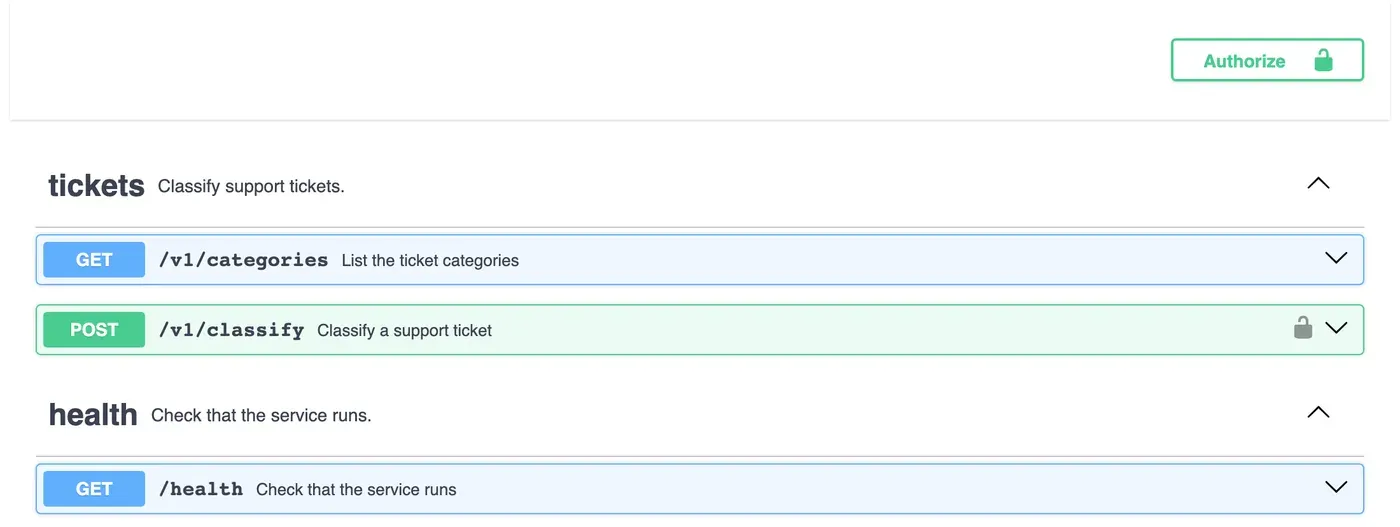
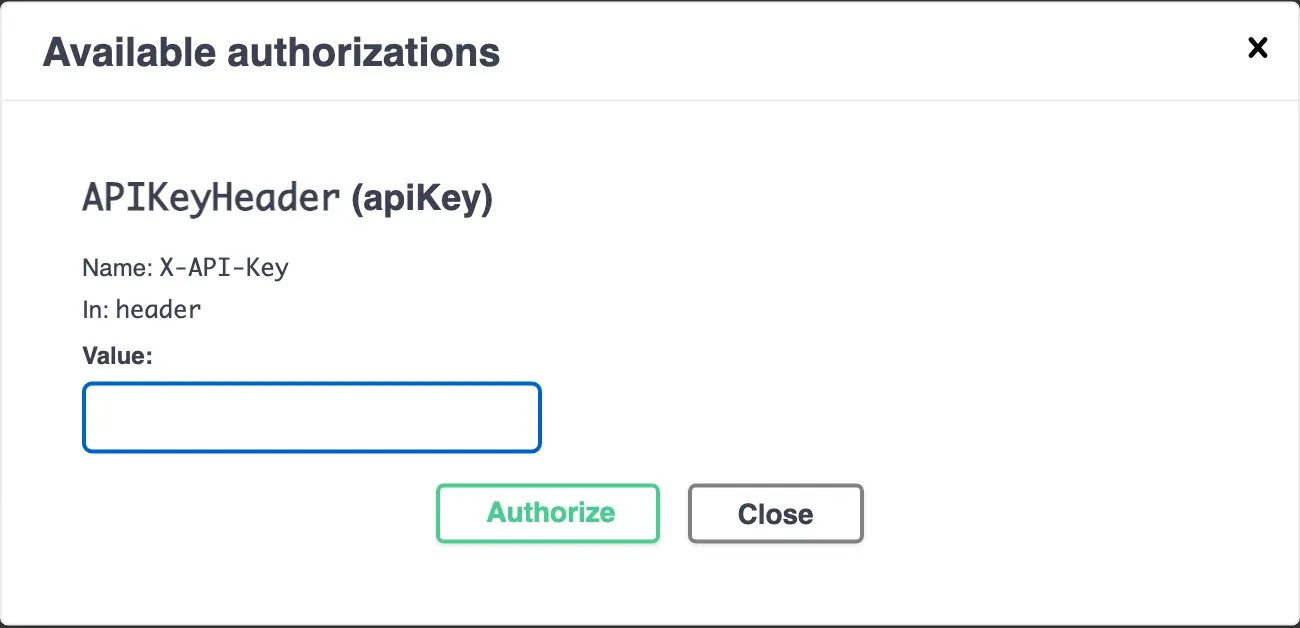
WARNING ticket_api: classifier unavailable: no answer within 1.0 seconds id=0d227e283ea8INFO ticket_api: POST /v1/classify 503 1006ms id=0d227e283ea8Swagger UI shows the key too. An Authorize button appears, and the classify endpoint has a lock icon:
Tests for the protections
Section titled “Tests for the protections”Add these to tests/test_classify.py. The fixtures from the last lesson make each one short. Also add api_key=None and classifier_timeout=2.0 to TEST_SETTINGS in conftest.py:
def test_body_too_large(client):    response = client.post("/v1/classify", json={"subject": "x", "body": "a" * 20_000})    assert response.status_code == 413    assert response.json()["error"]["code"] == "body_too_large"

def test_slow_classifier_times_out(make_client):    client = make_client(classifier_mode="slow", classifier_timeout=0.1)    response = client.post("/v1/classify", json={"subject": "Refund"})    assert response.status_code == 503

def test_api_key_is_required_when_set(make_client):    client = make_client(api_key="test-key")    assert client.post("/v1/classify", json={"subject": "x"}).status_code == 401    response = client.post(        "/v1/classify", json={"subject": "x"}, headers={"X-API-Key": "test-key"}    )    assert response.status_code == 200
classifier_timeout=0.1 keeps the test fast: it waits 0.1 seconds, not 5.
Guided practice: protect and check
Section titled “Guided practice: protect and check”-
Make
security.py. Changeconfig.py,classifier.py,routes.py,main.pyanderrors.py(add401: "unauthorized"toCODES). -
Add the tests, and the two settings to
TEST_SETTINGS. Run the tests. The contract test fails: read the new401and413responses in its difference, then export the contract. All tests pass. -
Start the API without
API_KEY. Find the warning in the terminal. -
Start it with
API_KEY=local-dev-key. Send the requests from the worked example’s table with curl or Postman. -
In Swagger UI, select Authorize, type
local-dev-key, and tryPOST /v1/classify. -
In Postman, give
apiKeythe local valuelocal-dev-keyin the Local environment. Send Classify a support ticket:200. -
Duplicate Classify a support ticket as Reject a missing key. In its Authorization tab, choose No Auth. Replace its tests with: status is
401, and the code isunauthorized. -
Export the collection again into
postman/. Run it from the terminal, with the key in the command, not in a file:Terminal window postman collection run postman/ticket-api.postman_collection.json -e postman/local.postman_environment.json --env-var "apiKey=local-dev-key"Output (end) | requests | 7 | 0 || assertions | 28 | 0 |
Your turn: the edge of the body limit
Section titled “Your turn: the edge of the body limit”Test the limit at its boundary, as in the Python course. A body of exactly 16,384 bytes must pass the size check, and one of 16,385 bytes must get 413. Write the test. Hint: json.dumps(...) gives the body as text, and len(text.encode()) is its size in bytes. Send it with content= and the Content-Type header, so you control the exact size.
What status code does the 16,384-byte body get, if not 413? Why?
Show one answer
import json

def body_of_size(size: int) -> str:    """A JSON ticket body of exactly `size` bytes."""    empty = json.dumps({"subject": "x", "body": ""})    return json.dumps({"subject": "x", "body": "a" * (size - len(empty))})

@pytest.mark.parametrize(("size", "status"), [(16_384, 422), (16_385, 413)])def test_body_limit_boundary(client, size, status):    body = body_of_size(size)    assert len(body.encode()) == size    response = client.post(        "/v1/classify", content=body, headers={"Content-Type": "application/json"}    )    assert response.status_code == status
16,384 bytes passes the size check, but the body field is then longer than its limit of 5,000 characters, so validation answers 422. That is correct: the two limits protect different things. The size limit protects the server’s memory, before anything is read. The field limit is part of the contract. A test of the size limit only needs to show that it is not 413.
Common mistake
Everyone gets 401 after you set the key
Symptom: after you start the API with API_KEY, every classify request gets 401, also from your own Postman collection, although you set the key.
Cause: the key that the client sends is not exactly the key that the server has. There are some common reasons. The Postman environment is not active (the selector shows No environment). Or the key is only in the shared value of a different environment. Or there is a space or a line break at the end of the value. Or the server was started in a terminal without the variable (the startup warning says so).
Fix:
- Check the server: if its terminal shows
API_KEY is not set, start it again with the variable. - In Postman, check the active environment, and hold the pointer over
{{apiKey}}to see the value that will be sent. - Check the request’s Authorization tab: Inherit auth from parent, and the collection’s tab: API Key, key
X-API-Key, in Header. - Never fix it by turning the check off. A
401that you understand is the protection working.
Check your understanding
A teammate says the API is now secure, because it has an API key and CORS. What does each one protect, and what is still not protected?
Show the answer
The API key decides which programs may classify: only those that have the key. CORS decides which web pages a browser lets read the responses. Neither one identifies a person. The key is shared by every program that has it: if it leaks, anyone can use it until you replace it. There are also no per-user permissions and no limit on how many requests one caller sends. Those need authentication for users and rate limits, which later courses teach.
Does your answer have the main points of ours?
Sign in and enroll in the course to save your answers. Every check counts toward the certificate.
Check your understanding
Module check: with CLASSIFIER_MODE=slow, what does the client receive, how long does it wait, and what does it NOT receive?
Show the answer
The client receives 503 with "code": "classifier_unavailable" and a request ID. It receives it after the time limit (2 seconds by default), not after the 5 seconds that the classifier takes. It does not receive a stack trace, an internal error message, or a hanging connection. The server stays responsive for other requests, because the classifier runs in a separate thread. The log has a WARNING with the same request ID.
Does your answer have the main points of ours?
Sign in and enroll in the course to save your answers. Every check counts toward the certificate.
Recap
- An API key in a header (
X-API-Key) limits who can call an endpoint. Compare it withsecrets.compare_digest. Warn when no key is set. APIKeyHeaderdocuments the key, so Swagger UI shows Authorize, and Postman sends it from the collection’s Authorization.- A body-size limit in the middleware refuses huge bodies with
413before they are read. - A time limit around the classifier turns “waits for ever” into a fast
503. - Keys go in environment variables and Postman local values, and into the CLI with
--env-var, never in files.
The API is now tested, logged and protected. In the last module, you deploy it.
Next: Hosting bridge