
Documentation people can use
- Lesson 11
- 45 min
- Module 4: Document the API with OpenAPI and Swagger UI
Lesson 11 of 21 · Build and Deploy Your First APIDocumentation people can use
1. Understand the web request
2. Build a small FastAPI service
3. Design a usable contract
4. Document the API with OpenAPI and Swagger UI
5. Explore and test with Postman
6. Test and harden the service
7. Deploy and verify
What you will be able to do
Make /docs answer a stranger’s questions without them asking you. It must say what each endpoint is for and what each field means. It must show what a real request looks like, and what every error looks like. A developer who can use your API from the documentation alone does not need a meeting with you.
Before you startWhat to know and to have ready
What you need to know
- The gaps in the generated documentation, from OpenAPI and Swagger UI: Worked example: does the documentation tell the truth?.
Fieldand its limits in a Pydantic model, from Request and response models: Models describe the data.
What you need on your computer
ticket_api/models.py,routes.pyandmain.py, as at the end of Browser access and CORS: Guided practice: allow the test page. This lesson changes all three.- The development server runs, and
/docsopens, as in OpenAPI and Swagger UI: Swagger UI: try the API in the browser. - If your project is missing or broken, copy the snapshot
end-of-m03, the project at the end of Module 3, as in Use a snapshot. The lesson before this one changes no project files, so you can continue here.
Tested with FastAPI 0.142.2 and Pydantic 2.13 on macOS.
Where each part of the documentation comes from
Section titled “Where each part of the documentation comes from”Everything in Swagger UI comes from your code. To improve the documentation, you add information in the right place:
| In Swagger UI | Comes from | Where |
|---|---|---|
| Title, version and the text under them | title, version and description of FastAPI(...) |
main.py |
| Section names and their descriptions | tags on routes, and openapi_tags in FastAPI(...) |
routes.py, main.py |
| The line next to the path | summary= on the route |
routes.py |
| The text when you open an endpoint | description= on the route |
routes.py |
| Each documented status code | The return type, and responses= on the route |
routes.py |
| Field descriptions and limits | Field(description=..., ...) |
models.py |
| The example body | json_schema_extra={"examples": [...]} on the model |
models.py |
Write for a developer who has never seen your code. Say what a value means, not only its type: “1 is the most urgent, 3 the least” is useful, “the priority” is not.
Worked example: the models
Section titled “Worked example: the models”Amira adds a docstring, field descriptions and an example to each model. Here is the new models.py:
from typing import Literal
from pydantic import BaseModel, ConfigDict, Field
Category = Literal["billing", "login", "shipping", "account", "other"]

class TicketIn(BaseModel):    """A support ticket to classify."""
    model_config = ConfigDict(        extra="forbid",        json_schema_extra={            "examples": [                {                    "subject": "Charged twice for March",                    "body": "My card was charged two times for the same invoice.",                }            ]        },    )
    subject: str = Field(        min_length=1, max_length=120, description="The short title of the ticket."    )    body: str = Field(        default="", max_length=5000, description="The customer's message. Optional."    )

class Classification(BaseModel):    """The predicted category and priority of a ticket."""
    model_config = ConfigDict(        json_schema_extra={            "examples": [                {                    "category": "billing",                    "priority": 1,                    "confidence": 0.9,                    "model_version": "keywords-1.0",                }            ]        }    )
    category: Category = Field(description="The team that should handle the ticket.")    priority: int = Field(ge=1, le=3, description="1 is the most urgent, 3 the least.")    confidence: float = Field(        ge=0, le=1, description="How sure the classifier is, from 0 to 1."    )    model_version: str = Field(description="The classifier that made the prediction.")

class CategoryList(BaseModel):    categories: list[Category] = Field(        description="Every category that /v1/classify can return."    )

class Health(BaseModel):    status: Literal["ok"]

class ErrorDetail(BaseModel):    code: str = Field(description="A stable code that a program can check.")    message: str = Field(description="A short explanation for a person.")    fields: list[str] = Field(        default=[], description="The request fields that are not valid, if any."    )

class ErrorResponse(BaseModel):    model_config = ConfigDict(        json_schema_extra={            "examples": [                {                    "error": {                        "code": "invalid_request",                        "message": "The request is not valid.",                        "fields": ["subject"],                    }                }            ]        }    )
error: ErrorDetail| Part | Shows in the documentation as |
|---|---|
The docstring """A support ticket to classify.""" |
The description of the schema. |
description="..." in Field |
A line under each field in the schema. |
json_schema_extra={"examples": [...]} |
The example body. Swagger UI puts it in the box for Try it out, so a developer can send a real, useful request with one click. |
Health |
A model for /health, so that its response is documented like the others. |
Choose examples that work and teach: the TicketIn example returns billing with priority 1, which shows what the API does. An example of {"subject": "string"} returns other, which shows nothing.
Worked example: the routes and the app
Section titled “Worked example: the routes and the app”On the route, a summary, a description, and the real error response:
from ticket_api.models import (    Category,    CategoryList,    Classification,    ErrorResponse,    TicketIn,)

@router.get("/categories", summary="List the ticket categories")def list_categories() -> CategoryList:    return CategoryList(categories=list(get_args(Category)))

@router.post(    "/classify",    summary="Classify a support ticket",    description=(        "Predicts the category and priority of one ticket from its subject and body. "        "The same text always gives the same result."    ),    response_description="The predicted category and priority",    responses={        422: {            "model": ErrorResponse,            "description": "A field is missing or not valid.",        },    },)def classify(    # ... the function does not change
responses={422: {"model": ErrorResponse, ...}} replaces FastAPI’s default 422 schema with the shape that the API really sends. That fixes the most important gap from the last lesson.
In main.py, the application gets a version, a description, and a description for each tag. /health gets its own tag and a model:
from ticket_api.models import Health
DESCRIPTION = """Classifies support tickets into a category and a priority.
The classifier is a deterministic mock: it uses keywords, so the same textalways gives the same result. Every error has the same shape:`{"error": {"code": ..., "message": ..., "fields": [...]}}`."""
app = FastAPI(    title="Ticket Classifier API",    version="1.0.0",    description=DESCRIPTION,    openapi_tags=[        {"name": "tickets", "description": "Classify support tickets."},        {"name": "health", "description": "Check that the service runs."},    ],)

@app.get("/health", tags=["health"], summary="Check that the service runs")def health() -> Health:    return Health(status="ok")
The description is Markdown, so `...` shows as code. It is the first thing a developer reads. So it says the two facts that every client needs: the results are deterministic, and all errors have one shape. version="1.0.0" is the version of the API’s contract, not of the code. Change it when the contract changes.
The result
Section titled “The result”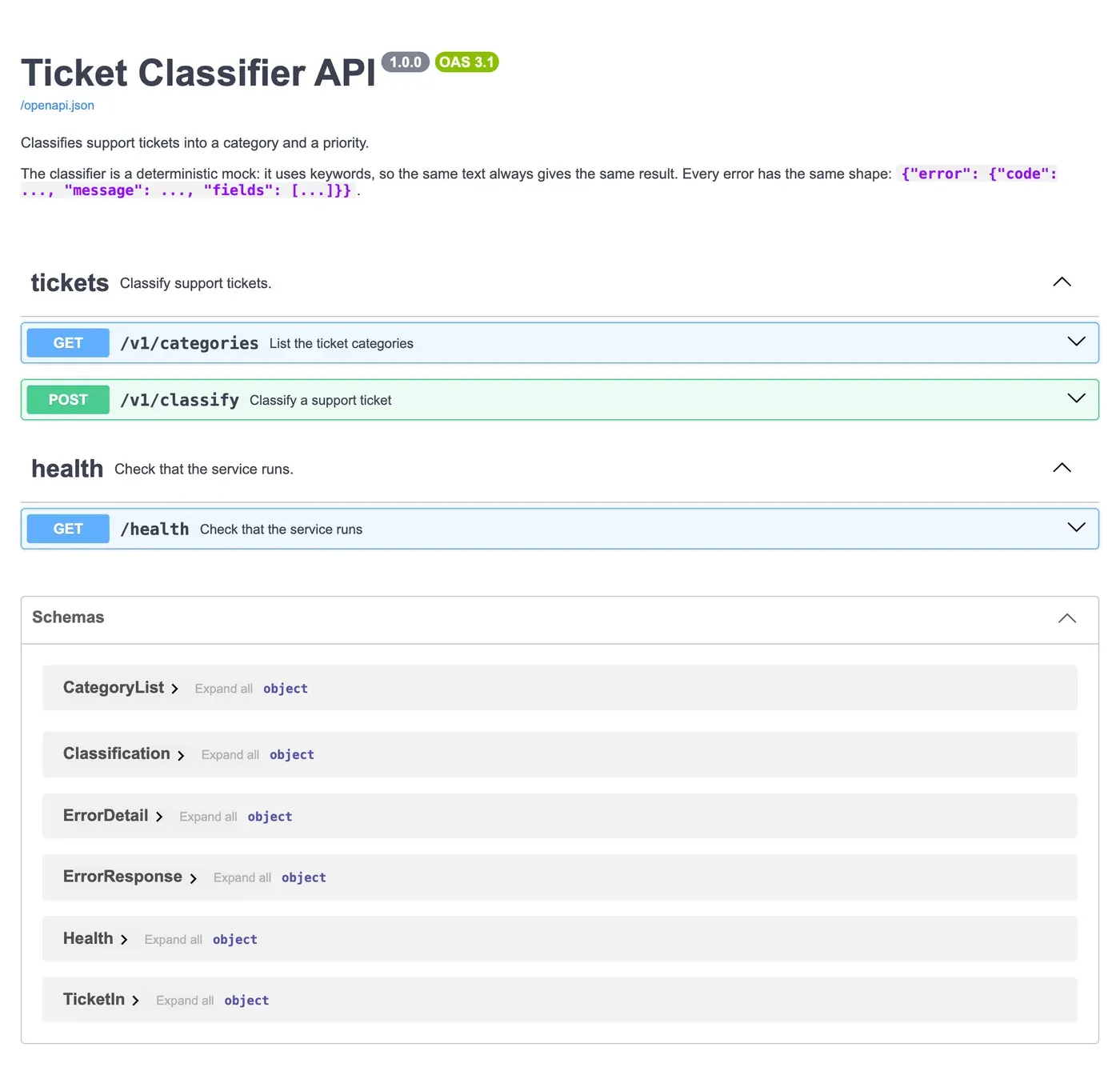
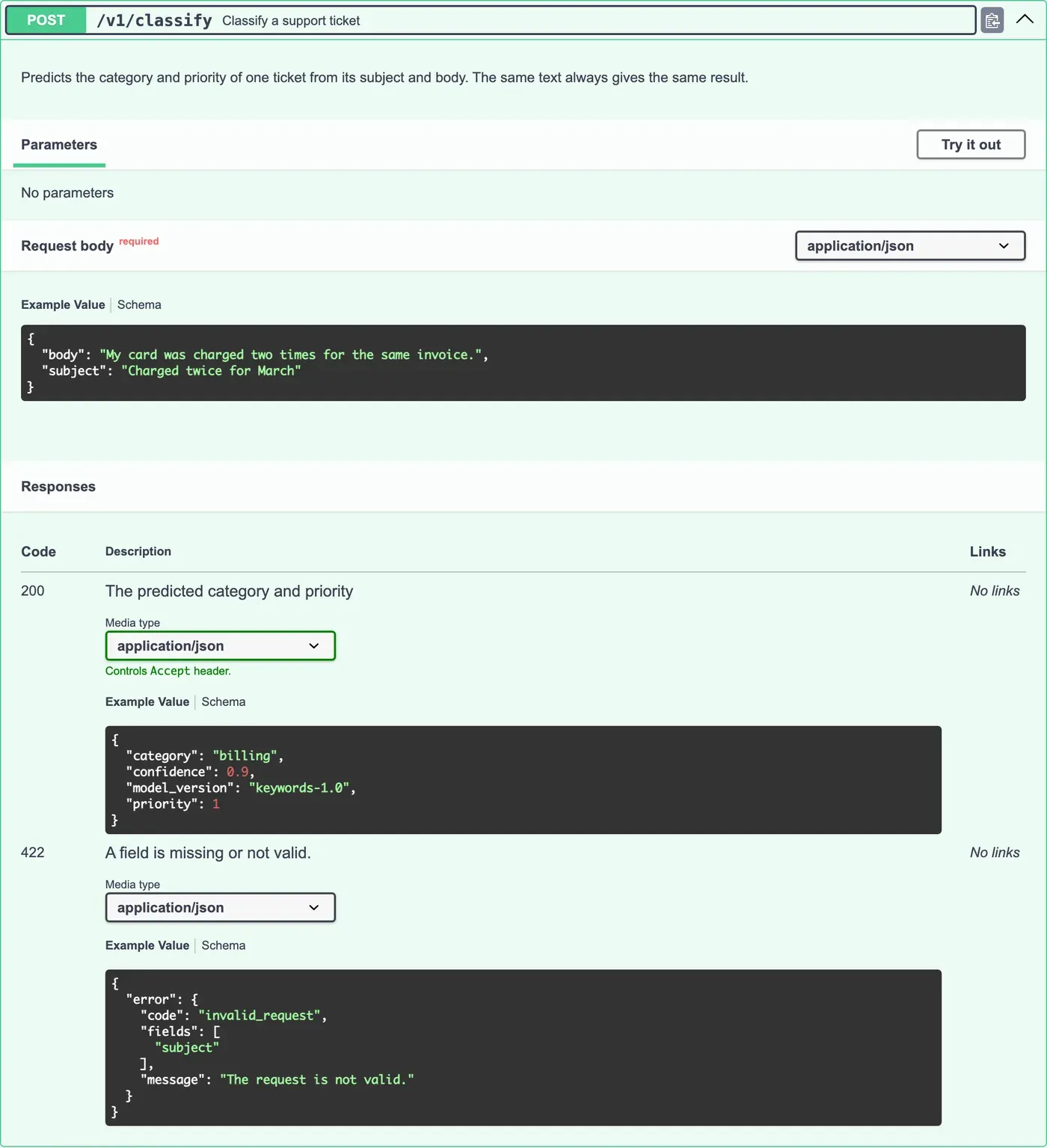
Guided practice: document the API
Section titled “Guided practice: document the API”- Replace
models.pywith the worked example. - Make the changes to
routes.pyandmain.py. Save, and reload/docs. - Check the overview: the version is
1.0.0, the description is under the title, and/healthis in its own section. - Open
POST /v1/classify, select Try it out, and Execute the example body without changes. The response isbilling, priority1. - Change the body to
{"subject": ""}, and execute it. Compare the response with the422example. They have the same shape now. - Open Schemas › Classification, and expand it. Each field has its description.
Your turn: document the categories endpoint
Section titled “Your turn: document the categories endpoint”A frontend developer must build a menu of categories from GET /v1/categories, using only /docs. Improve its documentation:
- A description on the route that says when to call it, for example once when the page loads.
- A
response_description. - An example on
CategoryList. - A sentence in the description that says that
othermeans “no category matched”, so the menu can leave it out if it wants.
Then reload /docs, and check every change as a stranger would.
Show one answer
@router.get( "/categories", summary="List the ticket categories", description=( "Returns every category that /v1/classify can return, in a fixed order. " "Call it once, for example when a page loads. " "`other` means that no category matched the ticket." ), response_description="The categories",)class CategoryList(BaseModel): model_config = ConfigDict( json_schema_extra={ "examples": [ {"categories": ["billing", "login", "shipping", "account", "other"]} ] } )
categories: list[Category] = Field( description="Every category that /v1/classify can return." )Note that the example must stay true when the categories change. In the next lesson, a test checks that the documented examples still work.
Common mistake
A documented example that the API rejects
Symptom: a developer selects Try it out, sends the example from /docs without a change, and gets 422. They decide that the API is broken.
Cause: the example no longer matches the model. Someone renamed a field (for example subject to title), shortened a limit, or added a required field, and did not update json_schema_extra. Pydantic does not check examples. They are only text in the document.
Fix:
- Send each example yourself after every change to a model.
- Better: make a test do it, so a wrong example fails the build. You write that test in the next lesson.
- Keep examples next to the fields that they show, in the model, so a change to one is close to the other.
Check your understanding
Why does the error example use a real code, invalid_request, instead of letting Swagger UI generate one?
Show the answer
A generated example uses the type only, so it shows "code": "string", which tells a developer nothing about the values to expect. A real example shows the actual code to check in their program, and the real shape of fields. Examples are often the first and only part of the documentation that developers read.
Does your answer have the main points of ours?
Sign in and enroll in the course to save your answers. Every check counts toward the certificate.
Check your understanding
You change the response model and add an optional field explanation. Which number in FastAPI(...) do you change, and how?
Show the answer
version. Adding an optional response field is not a breaking change, so it is a small step, for example from 1.0.0 to 1.1.0. A breaking change would get a new path version (/v2) and a new major version, 2.0.0. The version tells clients which contract they are looking at.
Does your answer have the main points of ours?
Sign in and enroll in the course to save your answers. Every check counts toward the certificate.
Recap
- Every part of
/docscomes from your code: the app, the routes and the models. - Describe what values mean, not only their types.
- Give each model a real example that works and teaches. Swagger UI uses it for Try it out.
- Document every error response with its real model:
responses={422: {"model": ErrorResponse, ...}}. - The
versionis the version of the contract.
Next, you make a test fail when the documentation and the API stop matching.