
OpenAPI and Swagger UI
- Lesson 10
- 40 min
- Module 4: Document the API with OpenAPI and Swagger UI
Lesson 10 of 21 · Build and Deploy Your First APIOpenAPI and Swagger UI
1. Understand the web request
2. Build a small FastAPI service
3. Design a usable contract
4. Document the API with OpenAPI and Swagger UI
5. Explore and test with Postman
6. Test and harden the service
7. Deploy and verify
What you will be able to do
Use the documentation that your API already has: a machine-readable contract and an interactive page where anyone can try each endpoint. Then check it against the API’s real behaviour, because documentation that is wrong is worse than none.
Before you startWhat to know and to have ready
What you need to know
- Your contract table, from Resource and endpoint design: Rule 4: write the contract as a table, and the error shape, from Validation and error responses: Three shapes are two too many.
- JSON bodies, from HTTP fundamentals: Bodies and JSON.
What you need on your computer
- The API with
/v1/classify,/v1/categoriesand/health, with one error shape, as at the end of Browser access and CORS: Guided practice: allow the test page. - The development server runs:
fastapi dev ticket_api/main.py, as in Environment and first endpoint: Step 3: start the server. - An editor that can format JSON, for example VS Code.
- An internet connection: the documentation pages load their scripts from a public CDN.
- If your project is missing or broken, copy the snapshot
end-of-m03, the project at the end of Module 3. Use a snapshot has the steps.
Tested with FastAPI 0.142.2 (OpenAPI 3.1) and Chrome 141 on macOS.
OpenAPI: the contract as data
Section titled “OpenAPI: the contract as data”In Module 3, you wrote the contract as a table, for people. OpenAPI is a standard format for the same contract, as JSON (or YAML), for programs. An OpenAPI document lists every path and method, the parameters, the request body, and every response with its status code. It also lists the schema of each body: its fields, types and limits.
You did not write one, but your API has it. FastAPI builds the document from your code, every time the application starts:
- the routes give the paths, methods and status codes,
- the Pydantic models give the schemas,
- the arguments of
FastAPI(...)give the title and the version.
Because many tools read the same format, one document feeds all of them:

Text description of the diagram
The app metadata (title, version, tags), the models (fields, limits, examples) and the routes (methods, paths, summaries) are your code. FastAPI generates openapi.json from them. Swagger UI at /docs shows it and lets you try requests. ReDoc at /redoc shows it for reading. Postman can import it as a collection (Module 5). Tests can compare it with a reviewed copy of the contract (lesson 3 of this module).
Read the document
Section titled “Read the document”The document is at /openapi.json. Amira saves it to a file, to read it in VS Code:
curl -o openapi.json http://127.0.0.1:8000/openapi.jsonIt is one long line. In VS Code, open it, and use Format Document (Shift+Alt+F, or Shift+Option+F on macOS) to make it readable. Here is the part for POST /v1/classify, shortened:
"/v1/classify": { "post": { "tags": ["tickets"], "summary": "Classify", "requestBody": { "content": {"application/json": {"schema": {"$ref": "#/components/schemas/TicketIn"}}}, "required": true }, "responses": { "200": {"description": "Successful Response", "content": {"application/json": {"schema": {"$ref": "#/components/schemas/Classification"}}}}, "422": {"description": "Validation Error", "content": {"application/json": {"schema": {"$ref": "#/components/schemas/HTTPValidationError"}}}} } }}$ref means “the schema is defined elsewhere in this document”, under components. Here is TicketIn:
"TicketIn": { "type": "object", "properties": { "subject": {"type": "string", "maxLength": 120, "minLength": 1, "title": "Subject"}, "body": {"type": "string", "maxLength": 5000, "title": "Body", "default": ""} }, "required": ["subject"], "additionalProperties": false}Every rule from your model is there: minLength and maxLength from Field(...), required because subject has no default, and additionalProperties: false from extra="forbid". You wrote the rules once, in Python. The document, the validation and the documentation all come from that one place.
Swagger UI: try the API in the browser
Section titled “Swagger UI: try the API in the browser”Swagger UI is a web page that shows an OpenAPI document as interactive documentation. FastAPI serves it at /docs. Open http://127.0.0.1:8000/docs:
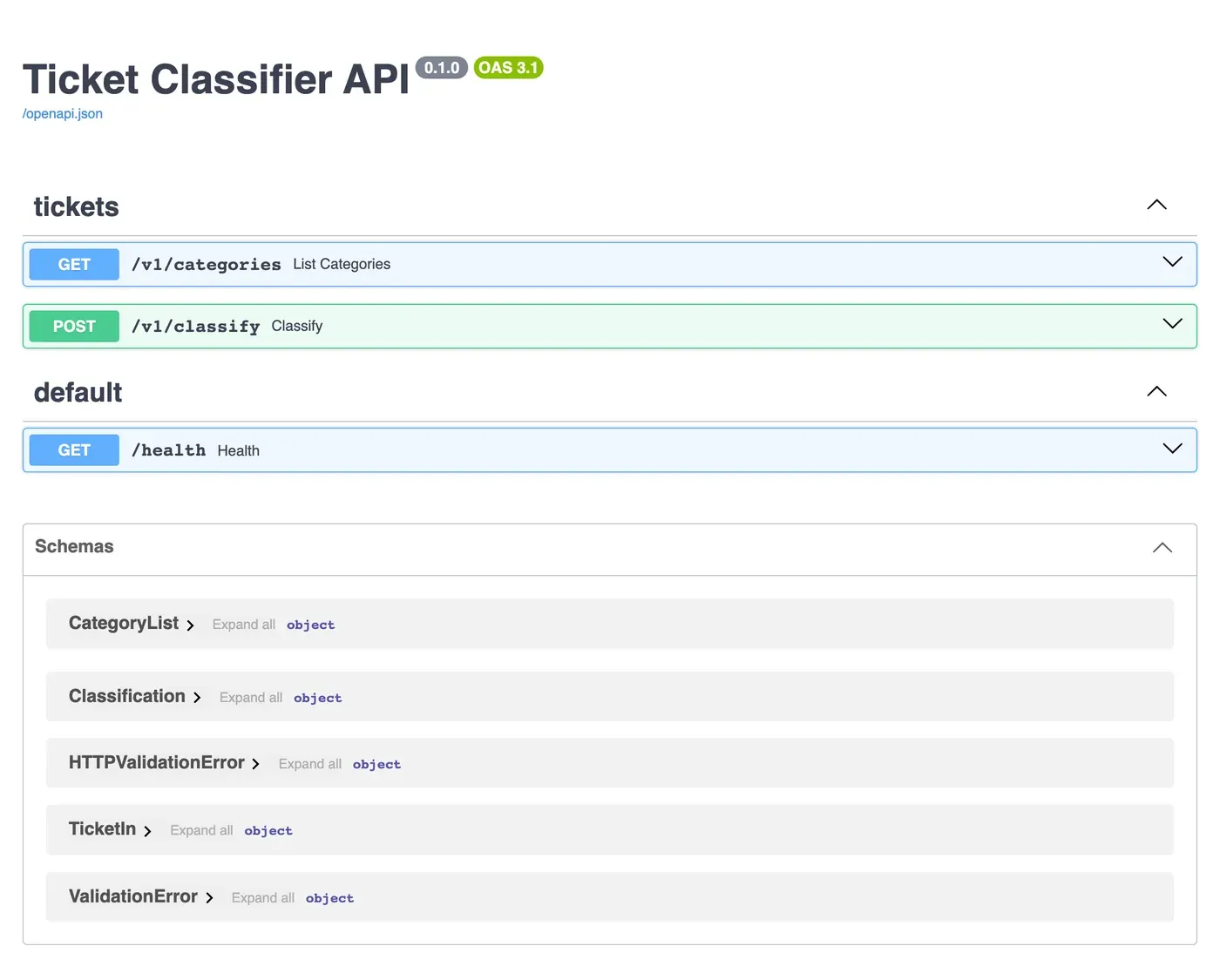
Select POST /v1/classify to open it:
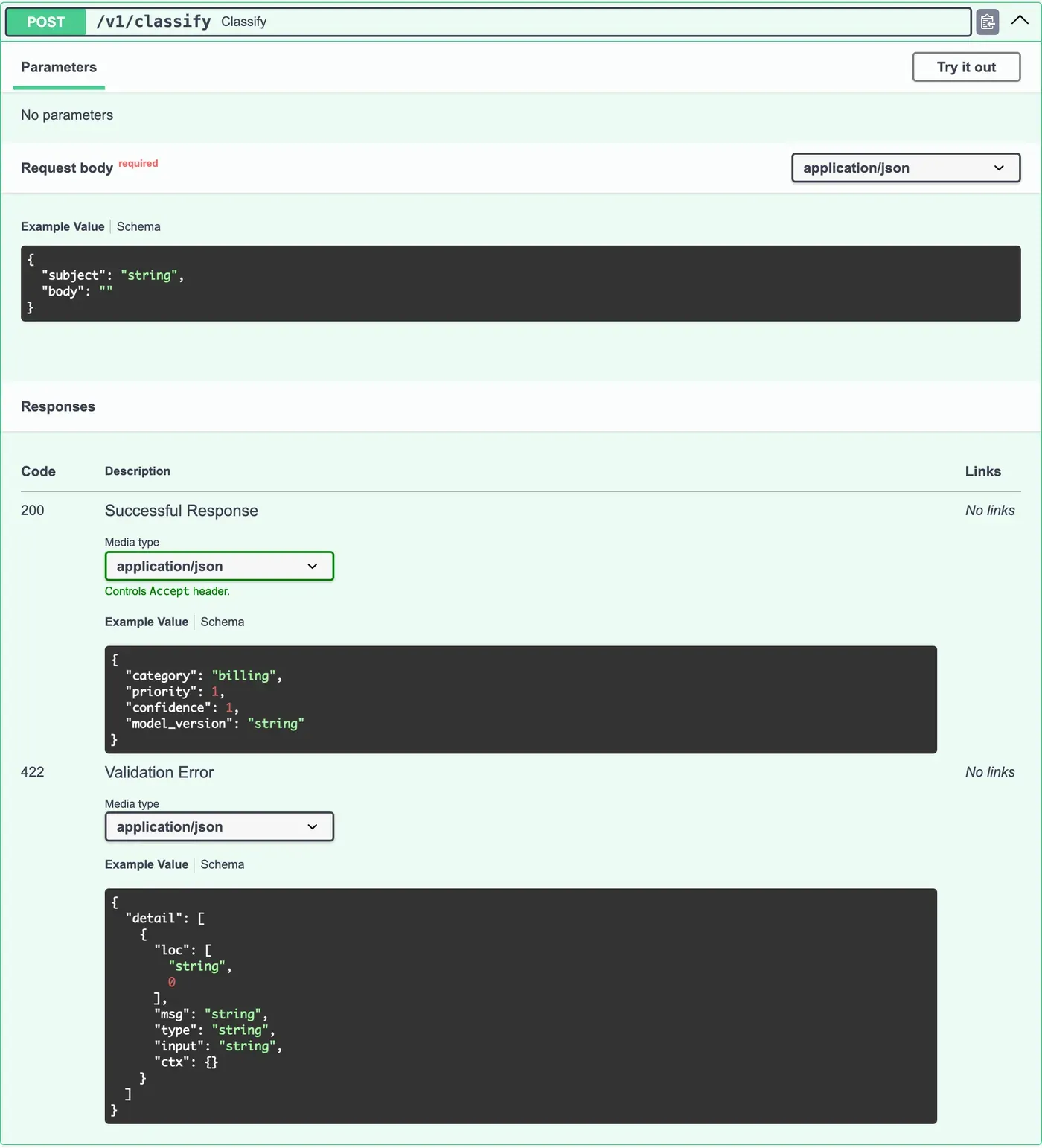
To send a real request, select Try it out. The example body becomes a text box that you can change. Select Execute:
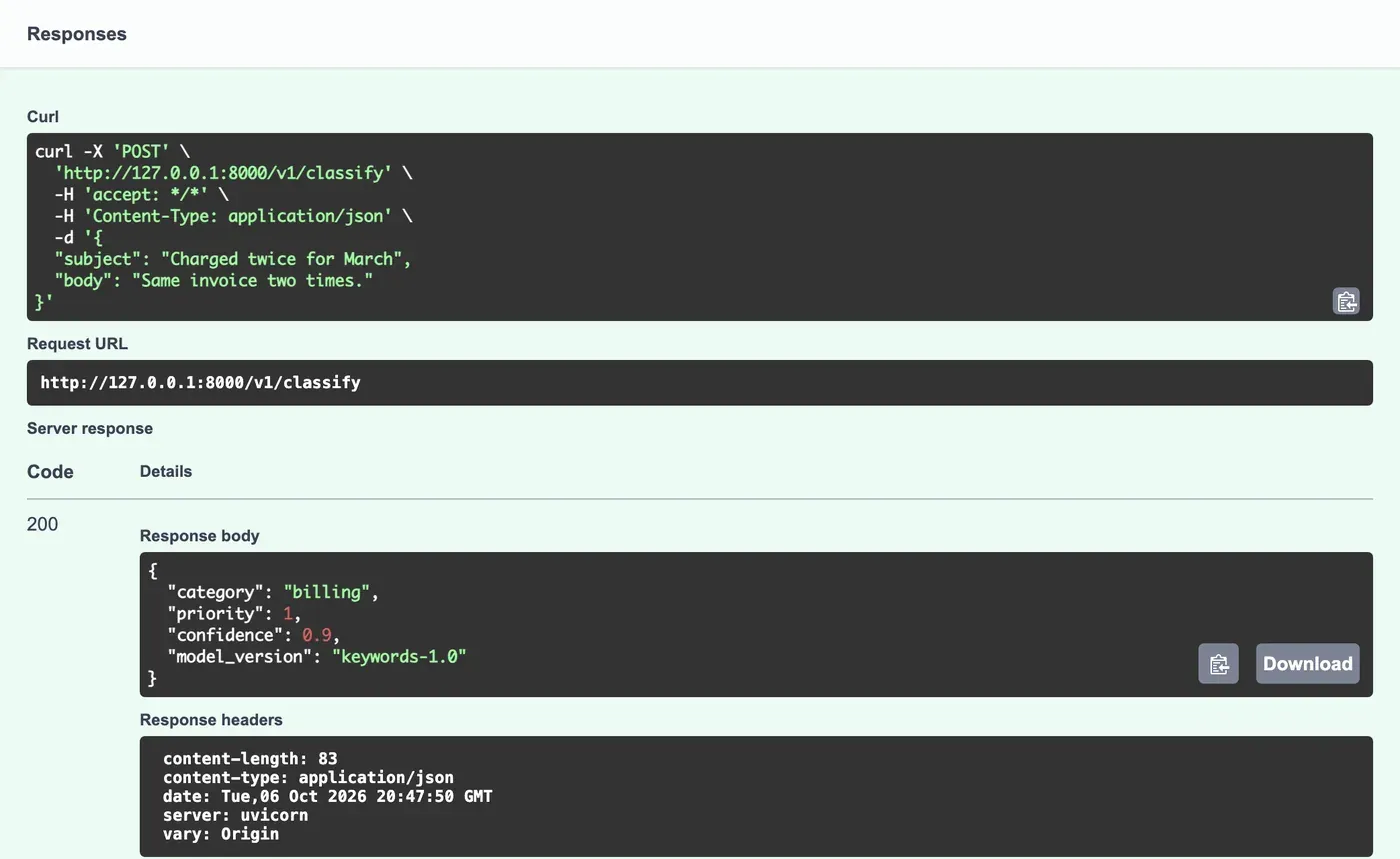
Swagger UI sends a real request from your browser to your API. It also shows the same request as a curl command. This is a quick way to build a command for the terminal or for a bug report. (The curl command uses '...' quotes for the body. On Windows, use a body file instead, as in Module 1.)
ReDoc: documentation for reading
Section titled “ReDoc: documentation for reading”FastAPI also serves ReDoc at /redoc. It is the same document, shown as a long page with the endpoints on the left and the schemas in the middle. It has no Try it out. Teams often use Swagger UI while they build, and ReDoc as the reference page for the people who use the API. Both read the same openapi.json, so they can never disagree with each other. They can still disagree with the code, as you see next.
Worked example: does the documentation tell the truth?
Section titled “Worked example: does the documentation tell the truth?”Amira compares the documentation with her contract table from Module 3. She tries {"subject": ""} in Swagger UI:
| Documentation says | API really answers | |
|---|---|---|
422 body |
{"detail": [{"loc": [...], "msg": "...", "type": "...", "input": "...", "ctx": {}}]} |
{"error": {"code": "invalid_request", "message": "...", "fields": ["subject"]}} |
The documentation is wrong. FastAPI adds the standard 422 schema (HTTPValidationError) to every endpoint with a body. But in Module 3, Amira replaced the real response with her own shape. A frontend developer who trusts /docs writes code for detail, and it fails on the first invalid ticket.
She finds more gaps:
404,405and500are not documented, and they all use theerrorshape.- The summaries are made from the function names:
Classify,List Categories. Nothing says what the endpoint does. - The example body is
{"subject": "string", "body": ""}. Sent as it is, it returnsother, which teaches nothing. - Nothing explains
priority(is 1 the most urgent or the least?) orconfidence. /healthis underdefault, mixed with nothing, and has no description.
None of these is a bug in the API. They are bugs in the documentation, and the next lesson fixes them.
Guided practice: tour your documentation
Section titled “Guided practice: tour your documentation”- Open
http://127.0.0.1:8000/docs. Check that you see the three endpoints and the schemas. - Open
GET /v1/categories, select Try it out, then Execute. The response body lists the five categories, with code200. - Open
POST /v1/classify, select Try it out, put the subjectCharged twice for Marchin the body, and select Execute. Copy the curl command, and run it in a terminal (on Windows, change it to use a body file). You get the same result. - Change the body to
{"subject": ""}, and execute it. Compare the response body with the422example under Responses. They do not match. - Open
http://127.0.0.1:8000/redoc. Find the schema ofClassification, and compare it with Swagger UI’s Schemas section. - Save the document with
curl -o openapi.json http://127.0.0.1:8000/openapi.json, format it in VS Code, and findadditionalProperties.
Your turn: review the documentation as a stranger
Section titled “Your turn: review the documentation as a stranger”Imagine that you are a frontend developer who must build a page that sends tickets to this API, and you only have /docs. Write down three questions that the documentation does not answer. For each one, write where in the code the answer should go: the route, a model field, or the app.
Show some answers
- “What does priority 1 mean?” → a description on the
priorityfield inClassification. - “What must I show the user when I get an error?” → the error responses, documented with
ErrorResponse, on the route. - “Which categories exist, and can new ones appear?” → a description on
category, and the app description. - “Is the body field required?” → visible in the schema (
requiredlists onlysubject), but a description ofbodymakes it clear. - “Is there a limit on the subject?” → visible in the schema (
maxLength: 120), but not in the example. - “Do I need a key?” → not yet. Module 6 adds one, and the documentation must say so.
Common mistake
/docs shows an empty page
Symptom: http://127.0.0.1:8000/docs shows a white page, or only the title of the tab. /openapi.json works.
Cause: the Swagger UI page loads its JavaScript and styles from a public CDN (cdn.jsdelivr.net). Without an internet connection, or on a network that blocks that site, the page has no code to run. ReDoc at /redoc has the same dependency. The API itself is fine.
Fix:
- Open the developer tools’ Console and Network tabs. Failed requests to
cdn.jsdelivr.netconfirm the cause. - Connect to the internet, or try a different network.
- Without internet, read
/openapi.jsondirectly, or import it into Postman (next module), which does not need the CDN.
Check your understanding
You change max_length of subject from 120 to 200 in TicketIn. What must you change in the documentation?
Show the answer
Nothing by hand. FastAPI generates the OpenAPI document from the model when the application starts. So maxLength becomes 200 in /openapi.json, in Swagger UI and in ReDoc at the same time. That is the main advantage of generated documentation: the rules live in one place.
Does your answer have the main points of ours?
Sign in and enroll in the course to save your answers. Every check counts toward the certificate.
Check your understanding
If the documentation is generated from the code, how can it be wrong?
Show the answer
It only knows what the code tells FastAPI. The error handlers change the real 422 response, but the route does not say so, so FastAPI documents its own default shape. And it cannot know things that are only in your head, such as what priority 1 means. Generated documentation is complete about structure, and you must add the meaning and the exceptions.
Does your answer have the main points of ours?
Sign in and enroll in the course to save your answers. Every check counts toward the certificate.
Recap
- OpenAPI is a standard, machine-readable contract: paths, methods, parameters, bodies, responses and schemas.
- FastAPI generates it at
/openapi.jsonfrom your routes, models and app settings. - Swagger UI (
/docs) shows it and sends real requests with Try it out. ReDoc (/redoc) shows it for reading. - Generated documentation can still be wrong: here, the
422shape. Always compare it with the real responses.
Next, you fix every gap: descriptions, examples, and the error responses as they really are.