
Browser-to-server basics
- Lesson 1
- 30 min
- Module 1: Understand the web request
Lesson 1 of 21 · Build and Deploy Your First APIBrowser-to-server basics
1. Understand the web request
2. Build a small FastAPI service
3. Design a usable contract
4. Document the API with OpenAPI and Swagger UI
5. Explore and test with Postman
6. Test and harden the service
7. Deploy and verify
What you will be able to do
Know what happens between “send a request to a URL” and “my code receives it”. When a request fails, this tells you where to look: in the address, the network, the connection or the application.
Before you startWhat to know and to have ready
What you need to know
- You completed Python for Practical AI Engineering, or you can use a terminal, a virtual environment and httpx. Basic HTTP client use: Request and response introduced requests, responses and status codes. This module adds what happens on the way.
What you need on your computer
- Nothing. You do not install or run anything in this lesson.
Clients and servers
Section titled “Clients and servers”On the web, a client is a program that asks for something, and a server is a program that answers. Your browser is a client. So are curl, Postman, and a Python program that uses httpx. The API that you build in this course is a server: it waits for requests, and answers each one.
The client and the server talk with HTTP (Hypertext Transfer Protocol): a set of rules for the text of a request and a response. Each exchange starts with the client. A server never sends anything that nobody asked for.
The parts of a URL
Section titled “The parts of a URL”A URL (Uniform Resource Locator) is the address of a resource, for example a web page or an API endpoint. Here is a URL that this course’s API will answer:
https://api.example.com:443/v1/classify?lang=en| Part | Value | Meaning |
|---|---|---|
| Scheme | https |
How to talk to the server. https is HTTP with encryption. http has no encryption. |
| Host | api.example.com |
The name of the server. |
| Port | 443 |
Which program on that server. Usually left out: https means 443, and http means 80. |
| Path | /v1/classify |
Which resource on the server. |
| Query | lang=en |
Extra values, after ?, as name=value pairs joined by &. |
Python can split a URL into these parts. Try it with your own URLs:
Run Python in your browser
Split a URL into its parts
Change the URL to http://localhost:8000/health, and run it again. Which part is now None, and why?
Tab adds four spaces. Press Esc, then Tab, to leave the box. Ctrl+Enter runs the code.
From a name to a server: DNS
Section titled “From a name to a server: DNS”A computer on the internet has an IP address, a number such as 185.199.109.133. People use names, such as raw.githubusercontent.com, because names are easier to remember and can stay the same when the numbers change.
DNS (Domain Name System) turns a name into an IP address. Before a client can connect, it asks a DNS server a question. The question is: “Which IP address is raw.githubusercontent.com?” The answer is cached for a while, so the next request does not ask again.
The name localhost is special. It always means “this computer”, and it does not need DNS. Its IP address is 127.0.0.1. When you run your API on your own computer, the URL is http://localhost:8000 or http://127.0.0.1:8000.
Ports: which program
Section titled “Ports: which program”One server computer can run many programs that answer requests: a web server, a database, your API. A port is a number from 1 to 65535 that selects one of them. A program listens on a port, and the operating system gives it every connection to that port.
| Port | Usually |
|---|---|
443 |
HTTPS |
80 |
HTTP |
8000 |
A development server on your own computer, such as the API in this course |
Only one program can listen on a port at a time. If a second program tries, it gets an error such as address already in use. You meet this error in the next module.
HTTPS: TLS keeps the conversation private
Section titled “HTTPS: TLS keeps the conversation private”With http, every request and response travels as plain text. Any computer on the way, for example a public Wi-Fi router, can read it, including passwords and API keys.
HTTPS is HTTP inside a TLS (Transport Layer Security) connection. Before the first request, the client and the server do two things:
- The server shows a certificate: a signed document that proves that it really is
api.example.com. The client checks the signature, and stops if it does not match. - They agree on keys to encrypt everything after that. Computers on the way can see that you talk to the server, but not what you say.
Use https for every API on the internet. http is fine only for localhost, where the request never leaves your computer.
The whole journey
Section titled “The whole journey”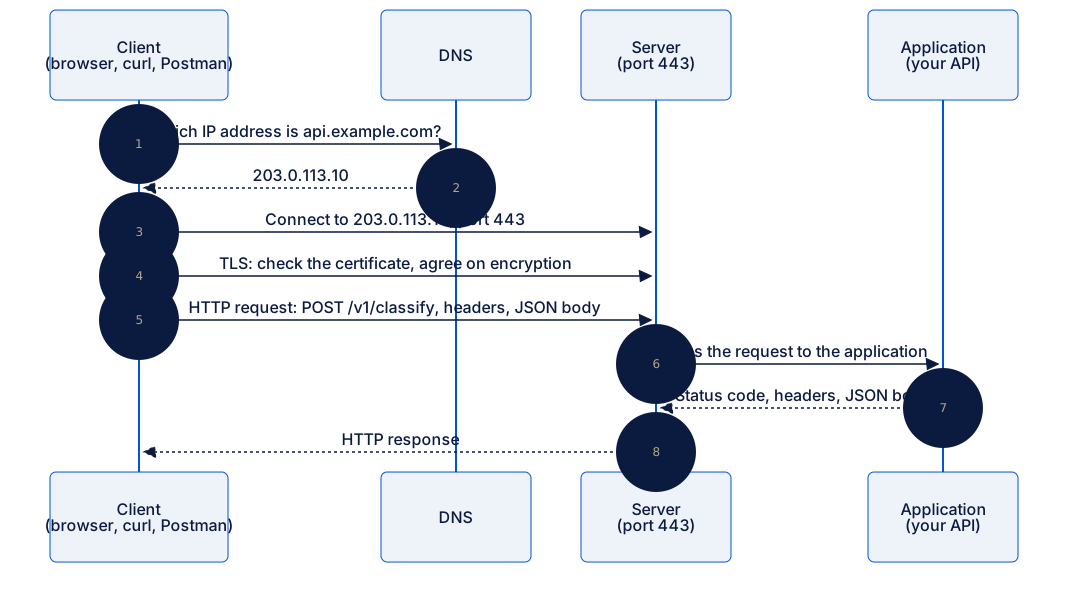
Text description of the diagram
- The client asks DNS for the IP address of
api.example.com. - DNS answers
203.0.113.10. - The client connects to that address, on port 443.
- TLS: the client checks the server’s certificate, and they agree on encryption.
- The client sends the HTTP request: the method and path
POST /v1/classify, the headers and a JSON body. - The server passes the request to the application, which is your API.
- The application returns a status code, headers and a JSON body.
- The server sends this HTTP response to the client.
Each step can fail, and each failure looks different. This is the most useful thing to remember from this lesson:
| Fails at | The client sees | Where to look |
|---|---|---|
| 1–2 DNS | Could not resolve host, nodename nor servname provided |
The host name in the URL. |
| 3 Connection | Couldn't connect to server, Connection refused, or a timeout |
Is the server running? Is the port correct? |
| 4 TLS | certificate verify failed, SSL errors |
The certificate, or http and https mixed up. |
| 6–7 Application | A response with a 4xx or 5xx status code |
The request, or the application’s code and logs. |
Steps 1 to 4 fail before your application sees anything, so there is nothing in its logs. Steps 6 and 7 give a real HTTP response. The connection worked, and the application said no.
The case studies at the end of the course
Section titled “The case studies at the end of the course”The lessons build one small API step by step. The course ends with two case studies: complete projects on real data, from an empty folder to a tested, documented and deployed API. You download a starter project, follow the steps in VS Code, and compare your work with a finished version.
Case studies in this course
At the end of the course, you use what you learn on a realistic project, from the data to the recommendation. Complete at least one for the certificate; the others are optional.
- Serve a house-price modelWrap a ready-made model in a validated, tested, documented and deployed estimate API.
- Build a data API for city service requestsA read-only API over a real database: filters, stable pagination, daily statistics, tests and the deployment steps.
You need to complete at least one case study for the certificate. Each one is also a portfolio piece that you can publish and show. They use the whole course, so most learners start them after Module 7.
Guided practice: name the failure
Section titled “Guided practice: name the failure”For each message, say at which step the request failed, and what to check first. Then compare with the answers.
curl: (6) Could not resolve host: api.exmaple.comcurl: (7) Failed to connect to localhost port 8000 after 0 ms: Couldn't connect to server- A response with status
404and the body{"detail":"Not Found"} ssl.SSLCertVerificationError: certificate verify failed: unable to get local issuer certificate- A response with status
503and the body{"error": {"code": "classifier_unavailable"}}
Show the answers
- DNS. The host name has a typing mistake:
exmaple. - Connection. Nothing listens on port 8000 on this computer. Start the server, or check the port.
- Application. The server answered, so the connection worked. The path does not exist in the application.
- TLS. Python cannot check the certificate. On macOS with Python from python.org, run Install Certificates.command, as in Install and verify Python.
- Application. The API worked, but a part that it depends on did not. The body says which part.
Common mistake
http and https mixed up
Symptom: a request to your local API fails with an SSL error, such as SSL: WRONG_VERSION_NUMBER. Or a request to a public API returns a redirect or an error.
Cause: the scheme does not match what the server speaks. A development server on your computer speaks plain http, so https://localhost:8000 sends TLS to a program that does not understand it. Most public APIs speak only https.
Fix:
- For your own computer, use
http://localhost:8000(orhttp://127.0.0.1:8000). - For a deployed API, use
https://. - Copy URLs from the service’s documentation instead of typing them.
Check your understanding
A request gets a response with status 500. Did DNS work? Did the connection work?
Show the answer
Yes to both. A status code comes from the application, at step 7, and it cannot exist unless DNS, the connection and TLS all worked. A 500 means that the application itself had an error. Look in the application’s logs, not in the network.
Does your answer have the main points of ours?
Sign in and enroll in the course to save your answers. Every check counts toward the certificate.
Check your understanding
Why is http://localhost:8000 acceptable while you develop, but http://api.example.com is not acceptable for a real API?
Show the answer
A request to localhost never leaves your computer, so no other computer can read it. A request to api.example.com crosses many networks. Without TLS, any computer on the way can read or change it, including API keys and personal data.
Does your answer have the main points of ours?
Sign in and enroll in the course to save your answers. Every check counts toward the certificate.
Recap
- A client asks, a server answers, and HTTP is the language between them.
- A URL has a scheme, a host, an optional port, a path and an optional query.
- DNS turns a host name into an IP address.
localhostis always this computer. - A port selects one program on the server. HTTPS (port 443) adds TLS: a certificate check and encryption.
- Errors before step 6 come from the network. A status code comes from the application.
Next, you look inside the request and the response: methods, headers, parameters, bodies and status codes.
Next: HTTP fundamentals