
Text and OCR paths
- Lesson 6
- 60 min
- Module 2: Prepare and extract content
Lesson 6 of 19 · Document and Multimodal AIText and OCR paths
1. Understand document inputs
2. Prepare and extract content
3. Recover structure and tables
4. Use multimodal models deliberately
5. Validate and review results
6. Evaluate and deliver the pipeline
7. Case studies
What you will be able to do
Get the words out of a page in three ways: the PDF text layer, OCR and a vision model. Compare them on the same receipts. Then you know which path to use for which file, what each one costs per page, how long it takes, and where each one fails.
Before you startWhat to know and to have ready
What you need to know
- The intake checks and the files of Module 2 in your project, from Input handling:
python -m pytest -qprints63 passed. - The text layer of a digital PDF, its lines with boxes in points, and why reading order matters, from Larkfield’s policy, in reading order in Layout and meaning.
- The receipt’s nine fields and
normalise, from Larkfield’s contract in Define the extraction contract. - A JSON schema for a model’s answer, from Define a schema in Building Reliable Applications with LLM APIs.
What you need on your computer
- The project
~/projects/doc-extractwith the virtual environment active. No account, no key and no money: the vision model’s answers are recorded, and the project replays them.
Tested with Python 3.12.13, pdfplumber 0.11.10, RapidOCR 3.10.0 and ONNX Runtime 1.31.0 on macOS (Apple silicon). The vision answers were recorded from one hosted vision model, gpt-6.1-sol-2026-09-29. The Windows and Linux commands are not tested.
Three ways to get the words of a letter
Section titled “Three ways to get the words of a letter”You need the words of a letter in your computer. There are three ways to get them.
If the sender emailed you the file that they typed, you copy the text: exact, instant, and you know where each word was. If you only have the paper, you type it again yourself: slower, with some typing mistakes, more when the print is faint. Or you give the paper to a colleague and ask: “Fill this form from it.” Your colleague understands even a messy letter. But you wait, you pay for their time, and they do not say where on the page they saw each value. Sometimes, they “tidy up” a word that they read too fast.
Documents give a program the same three choices. This lesson measures all three on Larkfield’s receipts.
The problem: one reader for every page
Section titled “The problem: one reader for every page”Tomás has a simple plan: “Every PDF is an image anyway. Let’s send every page to the vision model.” The model is good. But look at one clean digital receipt, D009, with the three paths side by side:
python -m doc_extract.compare D009D009 receipt-lk-863042.pdf (digital_pdf, fr)field true value text ocr visionvendor Larkfield Larkfield ok Larkfield ok LARKEFIELD WRONGorder_number LK-863042 LK-863042 ok LK-863042 ok LK-863042 okdate 2026-06-06 2026-06-06 ok 2026-06-06 ok 2026-06-06 okcurrency CAD CAD ok CAD ok CAD oksubtotal 605.00 605.00 ok 605.00 ok 605.00 okshipping - - ok - ok - oktax 90.60 90.60 ok 90.60 ok 90.60 oktotal 695.60 695.60 ok 695.60 ok 695.60 okpayment_method Mastercard Mastercard ok Mastercard ok Mastercard ok
text 9/9 correct, 0.01 socr 9/9 correct, 0.99 svision 8/9 correct, 11.49 s, 1413 + 817 tokens = US$0.0110 (recorded)The PDF’s own text says LARKFIELD. The model wrote LARKEFIELD, a letter that is not on the page. The text layer read the page in 0.01 seconds, for no money. The model took 11.49 seconds and cost about one US cent.
The opposite plan fails too. Read D025, a scanned PDF, with the text layer, and every printed field is missing. The PDF holds a picture of the receipt, not its text. So no single reader is right for every page.
The idea: three paths, one record
Section titled “The idea: three paths, one record”The project reads a page in three ways. Each one is a path.
- The text layer. A digital PDF stores its text as characters with positions, and pdfplumber reads them directly, as in Layout and meaning.
- OCR, which you met in Document types: a program that finds text in a picture and reads it. The project uses RapidOCR, on your computer’s CPU. For each line, it gives the characters and a bounding box (left, top, right, bottom). It also gives a score from 0 to 1: how sure it is.
- A vision model: a model that takes pictures as well as text, as Document types said. You send the page as a picture with a request (“fill these fields”), and it answers with values. It copes with unusual layouts, but it gives no box, and it costs money and seconds per page.
The important design choice is what the paths give back. The text layer and OCR give back the same record: a Page with its file, page number and unit, and its Lines, each with a text, a box and a score. This is the normalised representation: one shape for every path. The rules that fill the contract (fields.py) run on these lines, whatever path made them. So a comparison of the paths compares how well each one reads. And every value keeps its lines, so its file, page and box: you can always go back to its place on the page.

Text description of the diagram
The original file never changes. A digital PDF goes through the text layer to a Page in points; a scan or photo goes through OCR to a Page in pixels. Both Pages hold Lines with text, box and score (always 1.0 for the text layer). The same rules turn both into values that keep their file, page and box. The third path sends the page as a picture to the vision model, whose answer has values only, and no box.
A tiny example: one photo, three lines
Section titled “A tiny example: one photo, three lines”Take D036, Camille’s French receipt from Montréal, photographed on a table. Run OCR on it:
python -m doc_extract.ocr D036The first lines of the output, and the lines around the total:
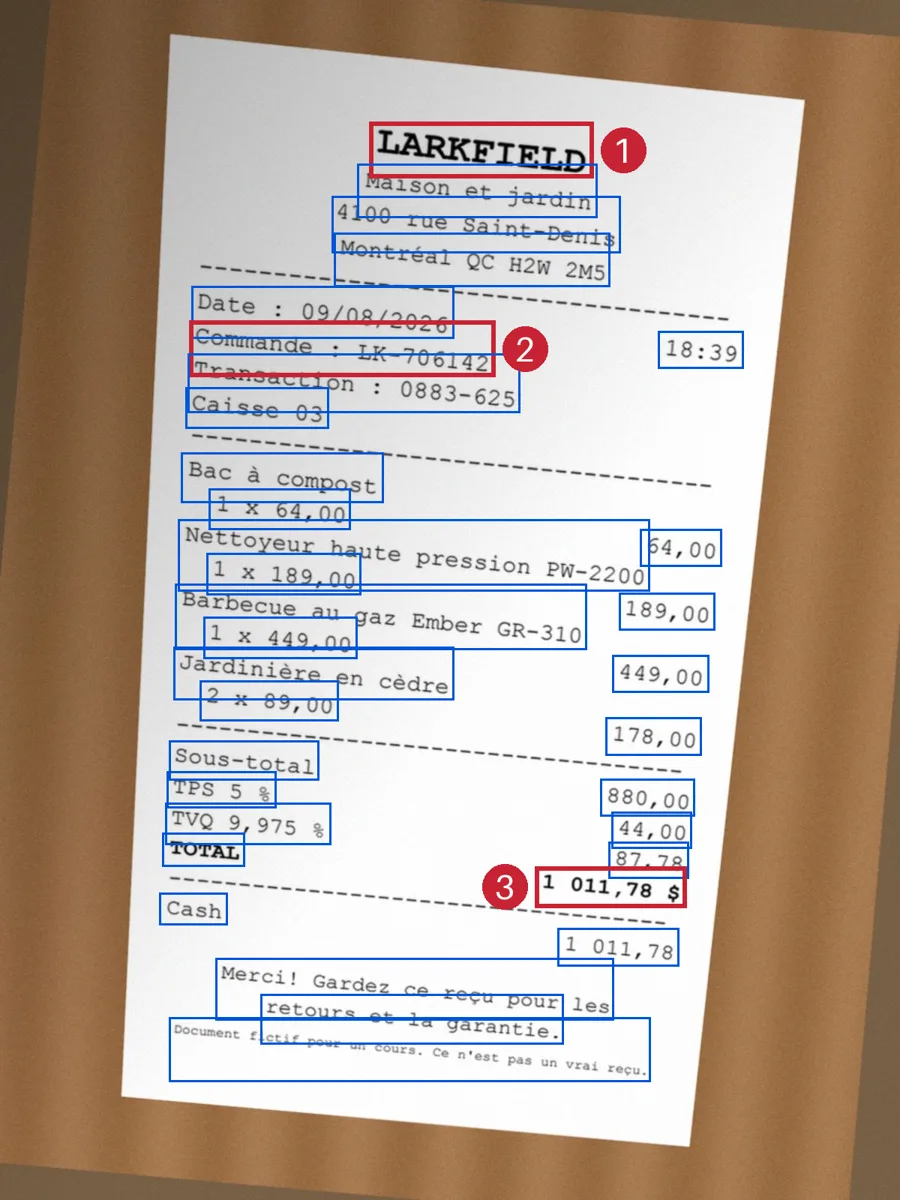
IMG_4817.jpg, page 1: 34 lines by rapidocr 3.10.0 in 1.02 s (0 with a score under 0.80) 1.00 [ 492 162 791 238] LARKFIELD 1.00 [ 476 219 796 290] Maison et jardin 0.96 [ 442 261 828 338] 4100 rue Saint-Denis 0.99 [ 445 310 814 382] Montréal QC H2W 2M5 0.97 [ 255 381 605 451] Date : 09/08/2026 0.99 [ 252 428 660 502] Commande : LK-706142 ... 1.00 [ 216 1110 326 1155] TOTAL 1.00 [ 811 1122 919 1171] 87,78 0.98 [ 714 1155 915 1210] 1 011,78 $ 1.00 [ 212 1190 304 1234] CashEach line is the score, the box in pixels of the 1,200 × 1,600 photo (left, top, right, bottom), then the text. The accents of Montréal are right. The page took one second. The first run takes longer, because RapidOCR loads its models; the result is kept in out/cache/ocr/, so the next run is instant.
Text description of the diagram
The original photo of D036, slightly tilted, with a thin blue rectangle around each of the 34 lines that OCR found. Three red, numbered rectangles mark LARKFIELD (1), “Commande : LK-706142” (2) and the total “1 011,78 $” (3). Because the photo is tilted, the amounts on the right sit a little lower than their labels.
Here are the three numbered lines as records, exactly as the project stores them:
text |
box (px) |
score |
|
|---|---|---|---|
| 1 | LARKFIELD |
492, 162, 791, 238 | 1.00 |
| 2 | Commande : LK-706142 |
252, 428, 660, 502 | 0.99 |
| 3 | 1 011,78 $ |
714, 1155, 915, 1210 | 0.98 |
They belong to the same Page: file IMG_4817.jpg, page 1, unit px, path ocr. With these values, anybody can open the photo and draw the box of the total: that is the evidence.
Then the rules work on the lines. They look for a row that starts with TOTAL and take the amount on the same row: 1 011,78 $. The contract’s normalise turns it into 1011.78. The French date 09/08/2026 becomes 2026-08-09, because a receipt from Quebec prints the day first.
“On the same row” hides a trap. The photo is tilted by about 5 degrees, so each amount on the right sits lower than its label. If you sort the lines from top to bottom by their top value, you get this order:
Sous-totalTPS 5 %880,00TVQ 9,975 %44,00TOTAL87,781 011,78 $Read naively, TPS 5 % is followed by 880,00, and TOTAL by 87,78. Both pairs are wrong: a reading-order error, before any model sees the text. The project’s pages.rows groups lines into rows along the page’s slope (5.33 degrees here) and gets Sous-total 880,00, TPS 5 % 44,00 and TOTAL 1 011,78 $.
The vision path: a recorded answer
Section titled “The vision path: a recorded answer”The third path sends the page picture to a vision model with prompt v2: a strict JSON schema with the nine fields, and rules for values that are not printed. Input and prompt design builds it. The course recorded one answer per receipt page, with its tokens and time, and the project replays it, so you need no key:
python -m doc_extract.vision D036recorded answer (replayed; nothing was sent)D036 IMG_4817.jpg page 1, prompt v2: gpt-6.1-sol-2026-09-29, 3135 tokens in, 787 out, 10.65 s, about US$0.0141 vendor LARKFIELD (confidence 1.0) order_number LK-706142 (confidence 1.0) date 2026-08-09 (confidence 1.0) currency CAD (confidence 0.99) subtotal 880.00 (confidence 1.0) shipping absent (not_printed) (confidence 1.0) tax 131.78 (confidence 1.0) total 1011.78 (confidence 1.0) payment_method Cash (confidence 1.0) item: 1 x Bac à compost @ 64.00 = 64.00 item: 1 x Nettoyeur haute pression PW-2200 @ 189.00 = 189.00 item: 1 x Barbecue au gaz Ember GR-310 @ 449.00 = 449.00 item: 2 x Jardinière en cèdre @ 89.00 = 178.00Every value is right, and the model also listed the four items. Read the cost line. The picture and the prompt were 3,135 tokens in: tokens are the pieces of text and image that a model reads and bills. The answer was 787 tokens out. The list price is US$2 per million tokens in and US$10 per million out. So the call cost 3,135 × 2 / 1,000,000 + 787 × 10 / 1,000,000 = US$0.0063 + US$0.0079, about US$0.0141. Prices change: check your provider’s current price page. The answer took 10.65 seconds.
Two things are missing. The model does not say where any value is. And its “confidence” is a number that it writes, not a measurement. Confidence and review routing shows what it is worth.
Compare the three paths on one page
Section titled “Compare the three paths on one page”-
Compare the paths on the French photo:
Terminal window python -m doc_extract.compare D036D036 IMG_4817.jpg (photo, fr)field true value text ocr visionvendor Larkfield (cannot read) Larkfield ok LARKFIELD okorder_number LK-706142 (cannot read) LK-706142 ok LK-706142 okdate 2026-08-09 (cannot read) 2026-08-09 ok 2026-08-09 okcurrency CAD (cannot read) CAD ok CAD oksubtotal 880.00 (cannot read) 880.00 ok 880.00 okshipping - (cannot read) - ok - oktax 131.78 (cannot read) 131.78 ok 131.78 oktotal 1011.78 (cannot read) 1011.78 ok 1011.78 okpayment_method Cash (cannot read) Cash ok Cash okocr 9/9 correct, 1.02 svision 9/9 correct, 10.65 s, 3135 + 787 tokens = US$0.0141 (recorded)A photo has no text layer. A field is
okwhen its normalised value equals the true value, soLARKFIELDcounts forLarkfield. A field that is not printed (-) is right when the path leaves it empty. -
Compare them on a digital PDF:
Terminal window python -m doc_extract.compare D011The last lines:
text 9/9 correct, 0.01 socr 9/9 correct, 0.85 svision 9/9 correct, 7.15 s, 1359 + 561 tokens = US$0.0083 (recorded)All three are right. The text layer is about 85 times faster than OCR and about 700 times faster than the model, and it costs nothing.
-
Compare them on D025, a scan that lies on its side:
Terminal window python -m doc_extract.compare D025text 1/9 correct, 0.00 socr 1/9 correct, 0.93 svision 9/9 correct, 8.27 s, 3194 + 598 tokens = US$0.0124 (recorded)The text layer and OCR get only the shipping “right”, because it is not printed. A scanned PDF holds a picture, not text, and OCR reads the picture on its side as garbage. The next lesson, Image preparation, fixes OCR on this page.
Explore the three paths
Section titled “Explore the three paths”The explorer shows six of the course’s receipts through the three paths. Each panel draws the boxes that its path can give on the page: green for a right value, red for a wrong one. The table below compares every field with the true value. Here, OCR reads the prepared picture of the next lesson.
Explore
One page, three paths
Predict first: Which path gets the most fields right on a photo, and which one can show you where each value is on the page?
D036 (IMG_4817.jpg): A French phone photo: OCR and the model both get 9 of 9. OCR gives every value its own box; the model gives values only.
PDF text layer
Cannot read this file: a picture has no text layer.
OCR (prepared picture)
- 9 of 9 right
- 1.25 s
- boxes: 8 of 8 values
Vision model (recorded)
- 9 of 9 right
- 10.65 s
- 3135 + 787 tokens, about US$0.0141
- boxes: 6 of 8 values (found again on the OCR lines; the model gives none)
| Field | True value | Text layer | OCR | Vision model |
|---|---|---|---|---|
vendor | Larkfield | – | Larkfieldright | LARKFIELDright |
order_number | LK-706142 | – | LK-706142right | LK-706142right |
date | 2026-08-09 | – | 2026-08-09right | 2026-08-09right |
currency | CAD | – | CADright | CADright |
subtotal | 880.00 | – | 880.00right | 880.00right |
shipping | not printed | – | (nothing)right: not printed | (nothing)right: not printed |
tax | 131.78 | – | 131.78right | 131.78right |
total | 1011.78 | – | 1011.78right | 1011.78right |
payment_method | Cash | – | Cashright | Cashright |
Text description of the explorer
One control picks the document. For each one, three panels show the page with each path’s boxes and counts. A table lists every field. D011, a digital PDF: all three paths get 9 of 9, in 0.006 s, 0.96 s and 7.15 s (about US$0.0083). D036, a French photo: OCR and the model get 9 of 9; OCR has a box for each of its 8 values, the model for 6. D025, a scan on its side: no text layer; OCR on the prepared picture and the model get 9 of 9. D049, the partner shop: OCR with the rules gets 6 of 9, the model 9 of 9. D045, bottom cut off: 8 of 9 each (OCR misses the currency, the model the tax). D046, unreadable: 1 of 9 each. The answer: on photos, the model gets as many fields right or more, but only OCR shows where every value is.
All 54 receipt pages: what each path reads well
Section titled “All 54 receipt pages: what each path reads well”Six documents are examples. The course measured the three paths on every receipt page: 53 receipts and the receipt page of the warranty claim. They show 435 printed values; a value that is not printed is not counted here.
- Text layer
- OCR (raw picture)
- Vision model
Text description of the chart
Printed values right, as text layer, OCR and vision model. Digital PDFs: 96.5%, 96.5%, 99.4%. Scanned PDFs: 0%, 86.0%, 100%. Scanned images: 0% (cannot read), 81.2%, 100%. Photos: 0% (cannot read), 88.0%, 92.3%.
On digital PDFs, the text layer is as good as OCR. Their 6 missing values are on the partner shop’s two receipts, whose words the rules do not know. On scans, OCR loses values that the model keeps, mostly on the two turned pages, D025 and D026. On photos, even the model drops: nobody can read D046, and on D045 it missed the tax. Over all 435 values: the text layer 169 (38.9%, because it reads only digital PDFs), OCR 392 (90.1%), the model 425 (97.7%). With image preparation, OCR reaches 408 (93.8%), as the next lesson shows.
compare --all counts in another way, so check you read it right. It counts all 9 fields of every receipt, and a field that is not printed counts as right when it stays empty:
python -m doc_extract.compare --allsource text ocr visiondigital_pdf 183/189 (97%) 183/189 (97%) 188/189 (99%)scan_pdf 8/63 (13%) 55/63 (87%) 63/63 (100%)scan_image cannot read 76/90 (84%) 90/90 (100%)photo cannot read 121/135 (90%) 126/135 (93%)mixed_pdf 3/9 (33%) 9/9 (100%) 9/9 (100%)Correct fields of 9 per receipt; a field is correct when its normalised value is the true one.The first run takes about 30 seconds of OCR; later runs use the cache. The text layer’s 8/63 on scanned PDFs is only the empty shipping fields. That is why the lessons count printed values.
Time and money per page
Section titled “Time and money per page”| Path | Time per page (median) | Money per page | Gives boxes |
|---|---|---|---|
| Text layer | 5.4 ms | none | yes, in points |
| OCR, raw picture | 0.49 s | none (your CPU) | yes, in pixels |
| OCR, prepared picture | 0.97 s | none (your CPU) | yes, on the original picture |
| Vision model, prompt v2 | 7.35 s (p95 10.65 s) | about US$0.0113 (3,135 tokens in, 556 out) | no |
These times are from the course’s computer, with other work running, so compare the ratios, not the numbers. The model is about 15 times slower than OCR and more than 1,000 times slower than the text layer. For 1,000 pages, it costs about 1,000 × US$0.0113 = US$11.30 at the list price.
Which OCR engine, and why
Section titled “Which OCR engine, and why”OCR is not one program. The course compared two OCR engines that install with pip alone, on the same 54 prepared receipt pages. A character error rate (CER) counts the characters that the engine got wrong, as a share of the printed characters: lower is better.
| RapidOCR 3.10.0 | OnnxTR 0.9.0 | |
|---|---|---|
| Character error rate | 5.69% | 6.55% |
| Printed words found | 93.2% | 92.0% |
| Accented French words read right | 42 of 42 | 42 of 42 |
| Printed values right (with the same rules) | 408 of 435 | 400 of 435 |
| Time per page (median) | 0.51 s | 0.50 s |
| Peak memory | 1,336 MB | 1,253 MB |
| Models at first use | inside the package | 102 MB downloaded |
RapidOCR wins by a small margin, and its models come inside the package. Behind a company firewall, a download of 102 MB from GitHub can fail. The course did not try Tesseract, the best-known free engine. It needs a system package (Homebrew, apt or an installer), and the course keeps the setup to pip. A small margin can change with other documents, so measure on your own files before you choose.
Where each path fails
Section titled “Where each path fails”- The text layer reads only what the PDF stores as text: a scan inside a PDF gives nothing. Its storage order is not always the reading order, as two columns showed in Layout and meaning.
- OCR fails on turned pages (D025 and D026 raw: 1 of 9 each). It drops spaces on poor pictures (
Nettoyeur haute pressionPW-2200on D036) and mixes rows on a tilted photo. And the rules after it know only Larkfield’s words, so they missAMOUNT DUEon D049. - The vision model costs money and seconds, gives no box, and can write a value that is not on the page:
LARKEFIELDon D009. With a plain prompt, it invented 11 order numbers; Input and prompt design shows that case and its fix.
When to use each path, and what it costs
Section titled “When to use each path, and what it costs”Use the text layer whenever a page has one: it is exact, instant, free and gives boxes. Use OCR for pictures: scans, photos and the scanned pages of a mixed PDF. It runs on your CPU, gives boxes and scores, and takes about a second per page. Document types already sends each page to one of these two routes.
Use the vision model only where those two and the rules are not enough: an unknown layout, required values that the rules could not find. It costs about a cent and seven seconds per page, and its values have no evidence unless you find them again in the OCR lines. Combine methods builds that rule. It calls the model on 9 of the 54 receipts: US$0.0018 per document on average, instead of US$0.0113 per page.
The model has one more cost: privacy. Each page that you send leaves your computer, and a receipt can show a name, an address and the last digits of a card. Send only the pages that need it, under an agreement that your company accepts.
A live call, if you want one (optional)
Section titled “A live call, if you want one (optional)”With your own key for an OpenAI-compatible endpoint whose model reads pictures, set VISION_BASE_URL, VISION_API_KEY and VISION_MODEL in a .env file (see .env.example), then run python -m doc_extract.vision D036 --live. It costs about one US cent per page, and your answer can differ from the recorded one. Nothing later depends on it. The course did not test --live with other providers.
Common mistake
Treating every PDF as an image
Symptom: Tomás sends every page to the vision model. The values look right in a quick check. Then the bill arrives: about a cent per page, for the 21 digital receipts too. And on D009, a clean digital PDF, the vendor is LARKEFIELD, a word that is not on the page.
Cause: A digital PDF is not an image. It already holds its text as characters, exactly as the shop’s till printed them. Drawing it as a picture and asking a model to read it throws that text away, then pays to guess it back.
Diagnose: Run python -m doc_extract.route and look at the route of each page. A page with the route text has a text layer: compare the model’s values with textlayer on that page. compare D009 shows the difference at once.
Fix: Read the text layer when a page has one. Send pictures to OCR. Call the model only for the fields that the rules could not fill, as Combine methods does.
Consequence in AI work: the pipeline is slower, more expensive and less exact on the easiest documents. It also loses the evidence that the text layer gives for free.
Your turn: the partner shop’s photo
Section titled “Your turn: the partner shop’s photo”Change one condition: the shop. D049 is a phone photo of a receipt from Maple & Pine Hardware, a partner store whose till prints other words than Larkfield’s. Before you run anything, predict: which fields will OCR with the rules miss, and which will the model get? Then run python -m doc_extract.compare D049 and python -m doc_extract.ocr D049, and explain the result from the OCR lines.
Show the answer
D049  IMG_5101.jpg  (photo, en)field           true value    text            ocr             visionvendor          Maple & Pine Hardware(cannot read)   MAPLE & PI ok   MAPLE & PI okorder_number    -             (cannot read)   - ok            - okdate            2026-09-23    (cannot read)   2026-09-23 ok   2026-09-23 okcurrency        CAD           (cannot read)   CAD ok          CAD oksubtotal        27.45         (cannot read)   - WRONG         27.45 okshipping        -             (cannot read)   - ok            - oktax             3.57          (cannot read)   3.57 ok         3.57 oktotal           31.02         (cannot read)   - WRONG         31.02 okpayment_method  Visa          (cannot read)   - WRONG         Visa ok
ocr     6/9 correct, 0.68 svision  9/9 correct, 6.46 s, 3135 + 489 tokens = US$0.0112 (recorded)
OCR read the words well: MERCH 27.45, AMOUNT DUE 31.02 and TENDER VISA****4821, with scores of 1.00. The rules miss three fields because they look for Larkfield’s words (Subtotal, TOTAL). So this is a rules error, not an OCR error, on a layout that the course made unknown to the rules on purpose. The model gets all 9. This is where the model earns its cost, and Combine methods uses it exactly there.
Knowledge check
Section titled “Knowledge check”Check your understanding
Name the three paths and, for each one, what it gives back for one line of text on the page.
Show the answer
The text layer gives the line’s characters exactly as the PDF stores them, a box in points, and a score of 1.0. OCR gives the characters it read from the picture, a box in pixels, and a score from 0 to 1 that says how sure it is. Both give the same record, a Line in a Page, so the same rules can use them and every value keeps its file, page and box. The vision model gives values for the fields, with a “confidence” that it writes itself, and no box.
Does your answer have the main points of ours?
Sign in and enroll in the course to save your answers. Every check counts toward the certificate.
Check your understanding
Predict and explain: Omar asks why the text layer gets only 38.9% of the printed values right overall, when it gets 96.5% on digital PDFs. What do you answer, and which number should guide the choice of path?
Show the answer
Scans and photos have no text layer, so the text layer gets none of their values. Its 169 of 435 come almost only from digital PDFs. Neither number alone guides the choice: the choice is per page. Use the text layer for pages that have one: 96.5% there, in milliseconds, for free. Use OCR for pictures, and the model where the rules still miss required values. That is why route decides page by page.
Does your answer have the main points of ours?
Sign in and enroll in the course to save your answers. Every check counts toward the certificate.
Check your understanding
Practical check: run compare on D021, a crooked French scan. Which paths read it, how many fields does each get right, and what do the time and cost lines tell you?
Show the answer
python -m doc_extract.compare D021 shows the text layer at 1/9 correct: only the empty shipping, because a scanned PDF has no text. OCR gets 9/9 correct in about 0.9 seconds. The model gets 9/9 correct in 8.92 seconds, for 3,194 + 602 tokens, about US$0.0124. On this scan, OCR is as right as the model, about ten times faster and free. A crooked scan of 2 degrees is not a problem for OCR; a page on its side is.
Does your answer have the main points of ours?
Sign in and enroll in the course to save your answers. Every check counts toward the certificate.
Recap
- Three paths read a page. The text layer is exact, takes 5.4 ms, costs nothing and gives boxes in points, but only for digital PDFs. OCR reads any picture in about 0.5 to 1 s on the CPU, with boxes in pixels and a score. A vision model reads like a person, in about 7 s and for about US$0.0113 per page, with no box.
- The text layer and OCR give one normalised representation: lines with text, box and score, on a page with its file and unit. The same rules use it, and every value keeps its source.
- On the 435 printed values of 54 receipt pages: text layer 169 (38.9%), OCR 392 (90.1%), vision model 425 (97.7%). By document type, the text layer and OCR tie on digital PDFs, OCR loses on turned scans, and even the model drops on photos.
- Each path fails in its own way. Scans have no text layer; OCR fails on turned pages and drops spaces; the rules do not know every layout; the model writes
LARKEFIELDon a clean PDF. RapidOCR beat OnnxTR on the same pages, by a small margin.
Next, you prepare pictures before OCR: turn, crop, straighten and enlarge, and keep every box on the original.
Next: Image preparation