
Layout and meaning
- Lesson 3
- 50 min
- Module 1: Understand document inputs
Lesson 3 of 19 · Document and Multimodal AILayout and meaning
1. Understand document inputs
2. Prepare and extract content
3. Recover structure and tables
4. Use multimodal models deliberately
5. Validate and review results
6. Evaluate and deliver the pipeline
7. Case studies
What you will be able to do
Read the text layer of a PDF with the box of every line, and put the lines in the order a person reads them. See how a wrong order, a lost footnote or a turned page changes what a document says.
Before you startWhat to know and to have ready
What you need to know
- Routes and the text layer, from The idea: look inside, then route, and bounding boxes, from A tiny example: the first bytes of five files, both in Document types.
- Page headers, footers and page boundaries in a PDF, from Parse and normalize in RAG: Building AI That Uses Your Data. This lesson uses the same returns policy, version 4.
What you need on your computer
- Your folder
doc-extractwith its active virtual environment, andpython -m pytest -qprinting13 passed. - The labs folder
nextia-learning-labsnext to it. You copy three new files of the project from it.
Tested with Python 3.12 on macOS (Apple silicon). The Windows (PowerShell) and Linux commands are written, not tested.
Reading a newspaper across the columns
Section titled “Reading a newspaper across the columns”Open a printed newspaper. A page has four or five columns of text, a large headline, a photo with a caption, and a small note at the bottom. You never read it straight across, from the left edge to the right edge. You read the headline, then one column from top to bottom, then the next column.
Nobody taught you this rule in words. The page shows it: the white gap between the columns, the larger letters of the headline, the small type of the note. Where a thing is on the page, and how it looks, tells you what it is and when to read it.
Now imagine that you read across the columns. “The council voted on Tuesday to” is followed by “Rain is expected for most of”. The words are all there. The meaning is gone.
The problem: the right words in the wrong order
Section titled “The problem: the right words in the wrong order”Larkfield’s returns policy, version 4 (D054), has two columns on page 1. It is the same policy that the document assistant of the RAG course answers from. A simple reader takes the lines of a page from top to bottom, and each row from left to right. On D054 it gives this:
This policy applies to orders delivered inGo to Orders in your account, choose the itemCanada.and select Return an item. Or contact the helpdesk.Read it as a sentence: “This policy applies to orders delivered in Go to Orders in your account, choose the item Canada.” Each line is correct. The order is wrong, because the reader went across the two columns.
This matters later in the pipeline. The RAG assistant cuts text into chunks and answers from them. A chunk that mixes two columns can join the return window of one section with the condition of another. Then a customer gets an answer that the policy never gave, with a citation that looks right.
The policy has 25 paragraphs and list items. In this naive order, only 10 of 25 come out whole, word for word. The other 15 are cut and mixed with lines from the other column.
The idea: layout tells the order and the role of each line
Section titled “The idea: layout tells the order and the role of each line”The layout of a page is where each piece of text is, and how it looks. That means its position, its size, its font and the gaps around it. A reader uses layout to find two things:
- Reading order: which line comes after which. On a page with columns, the order goes down one column, then down the next.
- The role of each line: a title, a heading, a paragraph, a list item or a footnote. The running header and footer are lines that repeat on every page. A table is a layout too: its rows and columns say which value belongs to which product.
A program can see layout only if it keeps the box of every line: its left, top, right and bottom edges. You met this bounding box in the previous lesson. With the boxes, a program can find the white gap between two columns, as your eye does.
So the project keeps one form for every page, whatever path read it. A page is a list of lines, and each line has its text, its box, its unit and how sure the reader was. The text layer gives boxes in points: 1/72 of an inch, measured from the top-left corner of the page. OCR, in Module 2, gives boxes in pixels of the picture. With the file, the page number and the box, you can always go back and look at the place where a value came from.
A tiny example: one receipt line by line
Section titled “A tiny example: one receipt line by line”Start with a page that has one column: the till receipt D011. The text layer gives each line with its box [x0 top x1 bottom] in points. Here are six of its 29 lines:
receipt-lk-103119.pdf, page 1: 29 lines from the text layer (227 x 339 pt) [ 75.6 22.7 151.2 36.7] LARKFIELD [ 14.2 101.8 100.6 110.8] Order: LK-103119 [ 14.2 189.3 57.4 198.3] Subtotal [ 180.2 189.3 212.6 198.3] 189.00 [ 14.2 226.8 41.2 235.8] TOTAL [ 158.6 226.8 212.6 235.8] CAD 211.68Read the numbers. The page is 227 points wide and 339 high: about 8 cm by 12 cm, a narrow till receipt. LARKFIELD starts 75.6 points from the left edge, so it is centred. TOTAL and CAD 211.68 have the same top, 226.8, and the same bottom, 235.8. So they are on one row. TOTAL is at the left edge, at 14.2; the amount ends at 212.6, near the right edge.
Why is TOTAL one line and CAD 211.68 another? Because a wide space separates them, about 117 points. The project starts a new line at a wide space, as an OCR engine also does. Then pages.rows puts lines with the same height on one row, left to right. So “TOTAL” finds its amount by its position, not because they happen to be one string.
On this receipt, the naive order is right: one column, top to bottom. On the policy, it is not.
Larkfield’s policy, in reading order
Section titled “Larkfield’s policy, in reading order”Mei’s layout.py finds the columns from the boxes. It looks for an empty vertical band between 30% and 70% of the page’s width: a place where no line crosses. The band must be at least 8 points wide, with at least three lines on each side. Then it is the gap between two columns. Lines that cross the gap, such as the title, span the whole page. They cut the page into bands, and in each band the left column is read before the right one.
Guided practice: read the policy in two orders
Section titled “Guided practice: read the policy in two orders”-
In
~/projects/doc-extract, with the virtual environment active, copy this lesson’s three files and their tests from the snapshotend-of-m01:Terminal window S=../nextia-learning-labs/C13/snapshots/end-of-m01cp $S/doc_extract/pages.py $S/doc_extract/textlayer.py $S/doc_extract/layout.py doc_extract/cp $S/tests/test_textlayer.py $S/tests/test_layout.py tests/Terminal window $S = "..\nextia-learning-labs\C13\snapshots\end-of-m01"foreach ($f in 'pages.py', 'textlayer.py', 'layout.py') { Copy-Item "$S\doc_extract\$f" doc_extract\ }foreach ($f in 'test_textlayer.py', 'test_layout.py') { Copy-Item "$S\tests\$f" tests\ }pages.pyholds the line and page records.textlayer.pyreads the text layer.layout.pyfinds the reading order. -
Run the tests:
Terminal window python -m pytest -q.................... [100%]20 passed in 6.04s -
Read the text layer of the receipt D011:
Terminal window python -m doc_extract.textlayer D011It prints the 29 lines, each with its box. You saw six of them in the tiny example.
-
Try the same on the scanned receipt D019:
Terminal window python -m doc_extract.textlayer D019scan0001.pdf, page 1: 0 lines from the text layer (612 x 792 pt)(no text layer: this page is a picture. Use OCR.)The router sent D019 to
ocr, and this is why: its page is a letter-size picture, 612 × 792 points, with no characters. -
Read the policy D054 in both orders:
Terminal window python -m doc_extract.layout D054returns-policy-v4.pdf, page 1: two columns, gap at x = 306 ptreturns-policy-v4.pdf, page 2: one columnFirst 12 lines, naive order (top to bottom across the page):Larkfield · Returns policy · version 4Page 1Returns policyWho this policy is forHow to start a returnThis policy applies to orders delivered inGo to Orders in your account, choose the itemCanada.and select Return an item. Or contact the helpdesk.The version that applies is the one in force onthe date the order was delivered. OrdersFirst 12 lines, reading order (column by column):Larkfield · Returns policy · version 4Returns policyWho this policy is forThis policy applies to orders delivered inCanada.The version that applies is the one in force onthe date the order was delivered. Ordersdelivered before 1 November 2026 follow version3 (30 days).Return windowYou can return an unused item within 45 days ofdelivery¹ for a full refund of the item price.Paragraphs kept whole: naive 10 of 25, reading order 25 of 25
The gap is at x = 306 points: the middle of a page 612 points wide. In reading order, all 25 paragraphs and list items come out whole. The truth file holds the policy’s paragraphs, so the project can count this exactly. The picture shows the two orders as a path from line to line.

Text description of the diagram
Both copies show page 1 of the returns policy, with a light grey box around each line of the text layer. On the left, the red path joins the lines in naive order. It starts at the running header, “Larkfield · Returns policy · version 4”, jumps right to “Page 1” and comes back to the title. Then it goes from the left column to the right column and back on almost every row. So the path mixes the sentences of the two columns. On the right, the green path joins the lines in reading order. A dashed line marks the gap between the columns, at x = 306 points. The path goes down the whole left column, from “Who this policy is for” to the last item of the list “Items that cannot be returned”. It continues with the two footnotes and the footer. Then a thin line jumps back up to “Page 1” and to the top of the right column. The path goes down the right column, from “How to start a return” to “Exchanges”.
Look at the end of the green path. After the left column, the reading order takes the footnotes, the footer and then “Page 1”, before the right column. The text of the columns is right, but the running header and footer still sit in the stream as if they were text. The repeated parts of a page, called page furniture, need their own rule. The first lesson of Module 3 removes them.
More than order: the role of each line
Section titled “More than order: the role of each line”Reading order is one part of layout. The picture below colours each line of the same page by its role. The roles come from the text layer alone: position on the page, font size and bold.
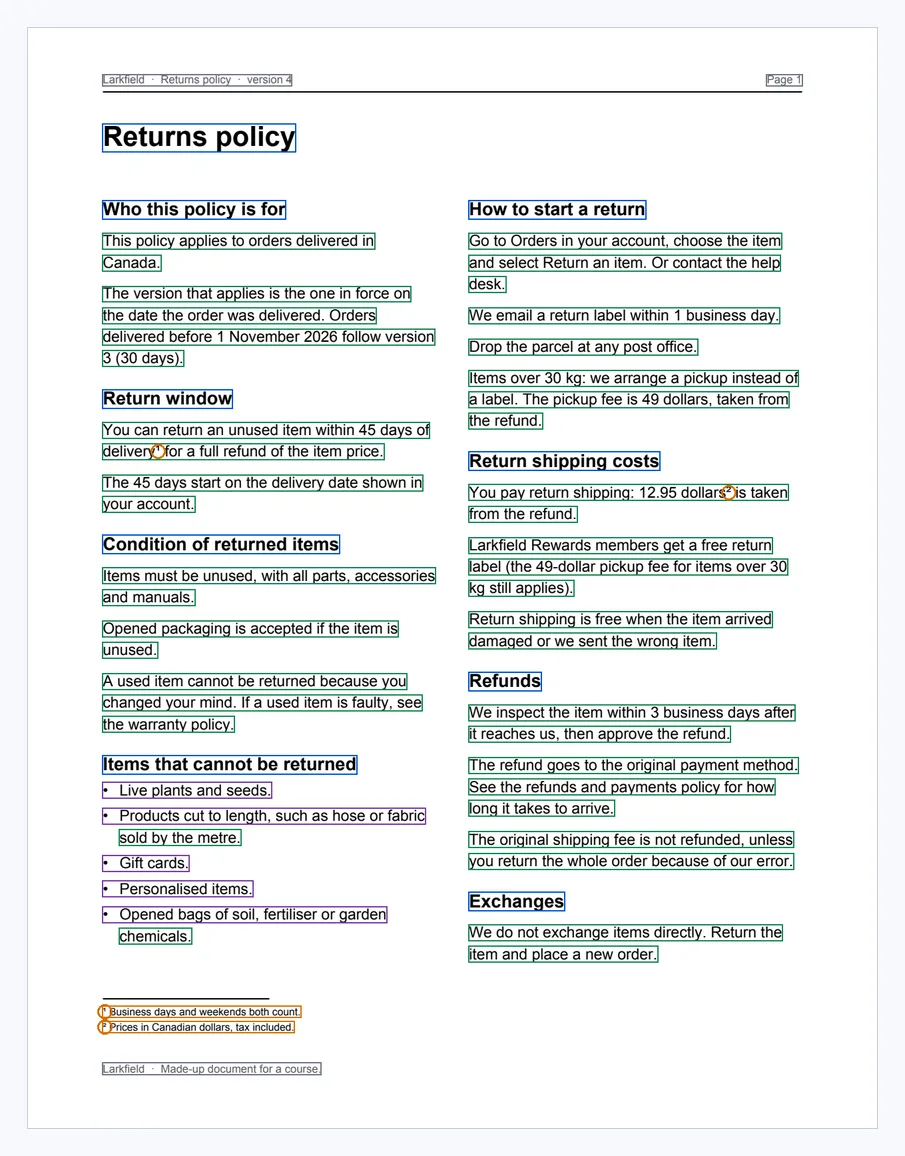
Text description of the diagram
Each line of page 1 has a box coloured by its role. Grey: the running header at the top, “Larkfield · Returns policy · version 4” and “Page 1”. Also grey: the footer, “Larkfield · Made-up document for a course.” They repeat on page 2. Blue: the title, “Returns policy”, and the eight headings in bold, such as “Return window” and “Exchanges”. Green: the lines of the paragraphs. Purple: the five items of the list “Items that cannot be returned”, each starting with a bullet. Orange: the two footnotes in small type at the foot of the page. Two orange circles mark the small raised marks that point to them. Mark 1 follows “within 45 days of delivery”, and mark 2 follows “12.95 dollars”.
Each role changes the meaning when it is lost:
- Headings give context. “45 days” is under “Return window”; without the heading, a chunk does not say what the 45 days are for.
- Footnotes change the sentence they belong to. “You can return an unused item within 45 days of delivery¹” depends on footnote 1: “Business days and weekends both count.” Lose the link, and a reader may count only business days. Then 45 days becomes about nine weeks instead of six and a half.
- Running headers and footers repeat on every page. Left in the text, “Page 1” lands in the middle of a paragraph, as the RAG course saw.
- Tables keep a value with its row and column. The supplier’s price list D056 continues on page 2, with its header row repeated. Read line by line, the second header looks like a product. The second lesson of Module 3 recovers the table cell by cell.
- Turned pages change which way the lines run. Page 2 of D055, the Quebec warranty, is a table stored on its side. The PDF says “turn this page by 90 degrees”, and the text layer gives the lines upright, with the page as 792 × 612 points. A turned scan is different: the picture itself lies on its side, and OCR reads it badly until the picture is turned. Module 2 measures that.
When to care about layout, and what it costs
Section titled “When to care about layout, and what it costs”Care about reading order whenever a page has more than one column, a sidebar, or text next to a table. Policies, reports, catalogues and forms often do. Care about roles when meaning depends on context: headings for search and citations, footnotes for conditions, table cells for prices.
On Larkfield’s receipts, one column is the rule. There, the important layout is the row: a label at the left and its amount at the right. The project’s rows keeps that pair together, even on a crooked photo. There, “the same row” means “the same height along the slope of the receipt”. A test checks it with a receipt turned by 5 degrees.
Layout rules have a cost: they are guesses about how pages are made. The gap must be between 30% and 70% of the width, and at least 8 points wide. A page with three columns, a photo inside a column or a heading inside the gap can break the rule. So keep the rule simple, test it on your own documents, and count what it keeps, as layout does with “25 of 25”. Never trust a rule that you did not measure.
Common mistakes
Section titled “Common mistakes”Common mistake
Sentences that mix two columns
Symptom: text from a policy reads like the line below, and an assistant answers strangely from it: “This policy applies to orders delivered in Go to Orders in your account, choose the item Canada.”
Cause: the code took the lines top to bottom across the whole page. So each row joined a line of the left column to a line of the right one.
Diagnose: run python -m doc_extract.layout on the document. If it says “two columns” and “naive 10 of 25”, the naive order breaks most paragraphs. If it says “one column” for a page that you can see has two, the gap rule did not fit: look at the boxes with textlayer.
Fix: use layout.reading_order(page), not the order of the lines in the file. Check the result by counting whole paragraphs, as the command does.
Common mistake
A box in points drawn on a picture in pixels
Symptom: you draw the box of TOTAL from D011, [14.2 226.8 41.2 235.8], on the picture out/show/D011-p1.png. The rectangle lands above and to the left of the word, and it is too small.
Cause: the text layer measures in points, 72 per inch. The picture from show has 100 pixels per inch (100 dpi): 315 × 471 pixels for a page of 227 × 339 points. The two units differ by 100/72, about 1.39.
Fix: multiply each number by 100/72 before you draw: TOTAL becomes about [19.7 315.0 57.2 327.5] pixels. Always keep the unit with the box. This is why every Page in the project has a unit, pt or px.
Your turn: the order of a receipt
Section titled “Your turn: the order of a receipt”Change one thing: run the same command on a receipt. Before you run it, predict: for D011, does layout find two columns? Are the naive order and the reading order the same? Then run python -m doc_extract.layout D011.
Show the answer
receipt-lk-103119.pdf, page 1: one column
First 12 lines, naive order (top to bottom across the page):  LARKFIELD  Home & Garden  1020 Main St  Vancouver BC V6A 2W1  ------------------------------------  Date: 2026-08-22  19:39  Order: LK-103119  Transaction: 0349-224  Till 03  ------------------------------------  PW-2200 pressure washer
The reading order prints the same 12 lines. A receipt has one column, so there is no gap to find, and the reading order falls back to the naive order. The command prints no “Paragraphs kept whole” line, because a receipt has no paragraphs in its truth.
Look at Date: 2026-08-22 and 19:39: two lines on one row, as TOTAL and its amount are. On a receipt, the row matters more than the column.
Knowledge check
Section titled “Knowledge check”Check your understanding
Explain, with the returns policy, how a wrong reading order changes the meaning even when every line is read correctly. Then name one other layout part whose loss changes the meaning.
Show the answer
In naive order, the reader takes each row across both columns. “This policy applies to orders delivered in” is followed by “Go to Orders in your account, choose the item” from the right column, then “Canada.” Every line is right, but the sentence now joins two sections. Only 10 of the 25 paragraphs come out whole; in reading order, 25 of 25.
Another part: the footnote. “within 45 days of delivery¹” depends on footnote 1, “Business days and weekends both count.” Without the link, a reader may count only business days and give a longer return window. (Also good: a heading, which says what “45 days” is for; or a table header, which says which column a price is in.)
Does your answer have the main points of ours?
Sign in and enroll in the course to save your answers. Every check counts toward the certificate.
Check your understanding
Predict: on D011, `CAD 211.68` has the box [158.6 226.8 212.6 235.8] in points. Where is it on the 100 dpi picture from `show`, in pixels? And on a picture drawn at 200 dpi?
Show the answer
At 100 dpi, multiply by 100/72 (about 1.389): [220.3 315.0 295.3 327.5] pixels. At 200 dpi, multiply by 200/72 (about 2.778): [440.6 630.0 590.6 655.0] pixels. The box is the same place on the page; only the unit changes. That is why a box is useless without its unit, and, for a picture of a PDF page, without the picture’s dpi.
Does your answer have the main points of ours?
Sign in and enroll in the course to save your answers. Every check counts toward the certificate.
Check your understanding
Practical check: after this lesson, how many tests pass, and what do `textlayer D019` and the last line of `layout D054` print?
Show the answer
python -m pytest -q prints 20 passed. textlayer D019 prints scan0001.pdf, page 1: 0 lines from the text layer (612 x 792 pt) and (no text layer: this page is a picture. Use OCR.). The last line of layout D054 is Paragraphs kept whole: naive 10 of 25, reading order 25 of 25.
Does your answer have the main points of ours?
Sign in and enroll in the course to save your answers. Every check counts toward the certificate.
Recap
- Layout is where text is on the page and how it looks. It gives the reading order and the role of each line: title, heading, paragraph, list item, footnote, running header or footer, table cell.
- The project keeps every page as lines with a box
[x0 top x1 bottom]and a unit: points (1/72 inch) for the text layer, pixels for a picture. To draw a box in points on a 100 dpi picture, multiply by 100/72. - On the two-column policy D054, the naive order keeps 10 of 25 paragraphs whole. The reading order finds the gap at x = 306 pt and keeps 25 of 25.
- A lost footnote, heading or table header changes the meaning. Turned and repeated parts need their own rules, in Modules 2 and 3.
python -m pytest -qprints20 passed.
Next, before any field is extracted, you write down exactly what Larkfield needs from a receipt, and what may be missing.