
Define the extraction contract
- Lesson 4
- 50 min
- Module 1: Understand document inputs
Lesson 4 of 19 · Document and Multimodal AIDefine the extraction contract
1. Understand document inputs
2. Prepare and extract content
3. Recover structure and tables
4. Use multimodal models deliberately
5. Validate and review results
6. Evaluate and deliver the pipeline
7. Case studies
What you will be able to do
Write down exactly what Larkfield needs from a receipt before any code extracts it. Name each field, its format and unit, its evidence, and the reasons it may be missing. Then every reader, a rule, OCR or a model, can be checked against the same promise.
Before you startWhat to know and to have ready
What you need to know
- A JSON schema, required fields and
null, from Define a schema and Handle incomplete results in Building Reliable Applications with LLM APIs. - Text-layer boxes in points, from The idea: layout tells the order and the role of each line in Layout and meaning.
What you need on your computer
- Your folder
doc-extractwith its active virtual environment, andpython -m pytest -qprinting20 passed. - The labs folder
nextia-learning-labsnext to it. You copy the contract, its document and its tests from it.
Tested with Python 3.12 on macOS (Apple silicon). The Windows (PowerShell) and Linux commands are written, not tested.
A form at the border
Section titled “A form at the border”Think of the arrival card that some countries ask travellers to fill in. It does not say “write about your trip”. It asks for exact things, in exact forms:
- “Date of birth: DD / MM / YYYY”, with a box for each digit.
- “Amount of cash you carry, in Canadian dollars”.
- “Flight number. If you arrived by car, write NONE.”
Every traveller fills it in the same way. The officer can read a thousand cards and compare them, and a computer can check them. A blank box is never a mystery: “NONE” means “I have no flight”, and a blank means “I forgot”. The form decides these rules before anybody fills it in.
The problem: the same receipt, three different answers
Section titled “The problem: the same receipt, three different answers”Camille, the agent in Montréal, opens the photo D036 and types what they see: the date 09/08/2026 and the total 1 011,78 $. Grace’s weekly report reads the date as 8 September, because the report uses the American order, month first. The receipt is from Quebec, where the day comes first: it is 9 August. The report also cannot add 1 011,78 $ to other totals, because it expects 1011.78.
Tomás tries a vision model with a plain request: “Return the receipt’s fields as JSON.” On D003, a till receipt with no order number, the model returns an order number anyway: 0693-220. That is the receipt’s transaction number, printed on the line Transaction: 0693-220. Over the 54 receipt pages, this plain request filled the order number with something else 11 times, every time by copying the transaction number. Was it wrong? Nobody had written that a transaction number is not an order number.
And D045, the photo with the bottom cut off: what is its total? An empty cell? Zero? 405.61, the subtotal plus the tax? Each answer means something different to the agent who reads it, and nobody had said which one is right.
None of these are reading errors. They are missing decisions. Until the team writes down what each field is, no reader can be right or wrong.
The idea: an extraction contract
Section titled “The idea: an extraction contract”An extraction contract is a written promise about the output of the pipeline. It says which fields it returns, in which format and with which evidence. It also says what it writes when a value is not there. It is also called an extraction schema. It is a schema in the sense of the LLM applications course, plus two things that documents need.
For each field, the contract says:
- its kind and format: text, a code such as
LK-and 6 digits, a date asYYYY-MM-DD, money with a point and two decimals; - its unit: the currency, here CAD or USD;
- if it is required: a receipt without a total is not usable for a refund;
- the evidence it must carry: the file, the page and the box where the value is printed. This is the value’s provenance, its place of origin. With it, an agent can check any value in one look;
- the reasons it may be missing: a value can be absent, but only for a stated reason.
The last point is the one that most schemas skip. In the contract, every value has a status:

Text description of the diagram
The flow starts with one field of the contract, for example the total. First question: is it printed on the page? If yes, second question: can you read it? If yes, the status is found, and the record keeps the value and its evidence: the file, the page and the box. If it is printed but cannot be read, the status is absent, with the reason unreadable. If the field is not printed, the question is: does it follow from something that is printed? If yes, the status is inferred, and the evidence points to the printed text that it follows from. If no, the status is absent, with the reason not_printed, or cut_off when the picture lost that part of the document.
So “absent” is a correct answer, when the document does not show the value. What is never correct is a guess: a plausible value with no place on the page. The transaction number in the order field is a guess. So is 405.61 as the total of D045.
A tiny example: the contract record of one receipt
Section titled “A tiny example: the contract record of one receipt”D004 is a French online order from Larkfield, a digital PDF. The picture shows the boxes of the values that the contract needs, from its text layer.
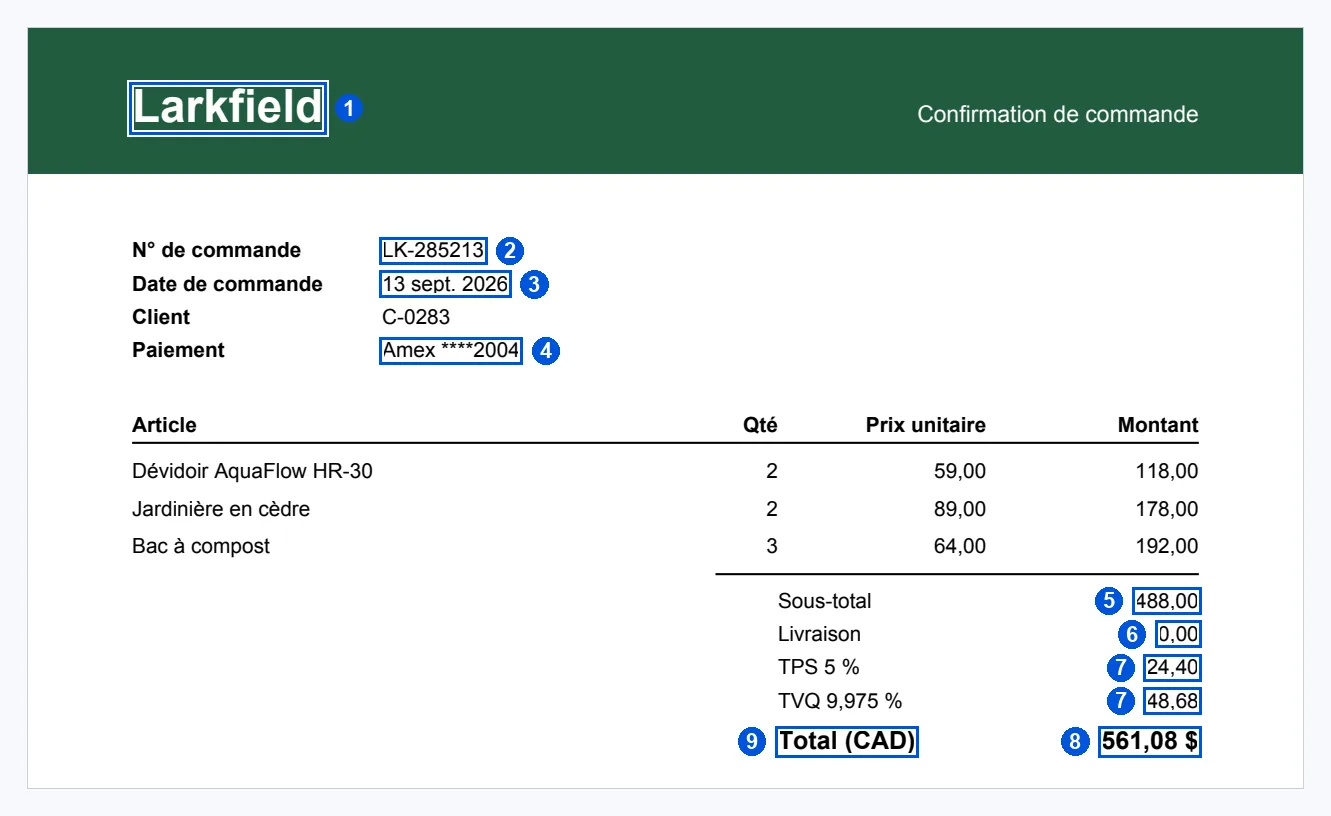
Text description of the diagram
The top part of the French order confirmation D004. The blue boxes come from the PDF’s text layer. Box 1 is the shop’s name, Larkfield, on a green band. Box 2 is the order number LK-285213, next to “N° de commande”. Box 3 is the date “13 sept. 2026”. Box 4 is the payment, “Amex ****2004”. Below a table of three items, box 5 is the subtotal 488,00, after “Sous-total”. Box 6 is the shipping, 0,00, after “Livraison”. Two boxes have number 7: the two taxes, 24,40 after “TPS 5 %” and 48,68 after “TVQ 9,975 %”. Box 8 is the total, “561,08 $”. Box 9 is the label “Total (CAD)”, which gives the currency.
Here is the contract record, field by field. Every value is in the contract’s format, and every value says where it came from.
| # | Field | Printed | Contract value | Status | Evidence (page 1, box in pt) |
|---|---|---|---|---|---|
| 1 | vendor | Larkfield |
Larkfield | found | [50.0 27.6 141.7 49.6] |
| 2 | order_number | LK-285213 |
LK-285213 | found | [170.0 102.1 218.9 112.1] |
| 3 | date | 13 sept. 2026 |
2026-09-13 | found | [170.0 118.1 230.6 128.1] |
| 4 | payment_method | Amex ****2004 |
Amex | found | [170.0 150.1 236.1 160.1] |
| 5 | subtotal | 488,00 |
488.00 | found | [531.4 270.1 562.0 280.1] |
| 6 | shipping | 0,00 |
0.00 | found | [542.5 286.1 562.0 296.1] |
| 7 | tax | 24,40 and 48,68 |
73.08 | found | two boxes: [537.0 302.1 562.0 312.1], [537.0 318.1 562.0 328.1] |
| 8 | total | 561,08 $ |
561.08 | found | [515.3 336.5 562.0 348.5] |
| 9 | currency | Total (CAD) |
CAD | found | [360.0 336.5 426.0 348.5] |
Check it as the validation module will: 488.00 + 0.00 + 24.40 + 48.68 = 561.08. The tax is the sum of the two lines, as the contract says: 24.40 + 48.68 = 73.08. The payment keeps “Amex” and drops ****2004: the contract never stores a card number, because Larkfield does not need it.
As a record that a program writes, the total of D004 could look like this. This one is written by hand for the lesson; Module 3 makes the real records from code.
{ "field": "total", "value": "561.08", "status": "found", "printed": "561,08 $", "evidence": { "file": "receipt-lk-285213.pdf", "page": 1, "box": [515.3, 336.5, 562.0, 348.5], "unit": "pt" }}The record keeps both the printed text and the value in the contract’s format. The printed text lets a person compare with the page; the value lets a program add, compare and validate.
Larkfield’s contract
Section titled “Larkfield’s contract”Grace says which fields her agents need for a warranty or refund claim. Mei writes them as code, and Priya checks that the truth file uses the same forms. The contract’s name has a version: receipt-v1. When a field changes, the version changes, and old results still say which promise they kept.
Guided practice: install and read the contract
Section titled “Guided practice: install and read the contract”-
In
~/projects/doc-extract, with the virtual environment active, copy the contract, its written version and its tests from the snapshotend-of-m01. The folderdocsis new:Terminal window S=../nextia-learning-labs/C13/snapshots/end-of-m01mkdir -p docscp $S/doc_extract/contract.py doc_extract/cp $S/docs/extraction-contract.md docs/cp $S/tests/test_contract.py tests/Terminal window $S = "..\nextia-learning-labs\C13\snapshots\end-of-m01"New-Item -ItemType Directory -Force docs | Out-NullCopy-Item "$S\doc_extract\contract.py" doc_extract\Copy-Item "$S\docs\extraction-contract.md" docs\Copy-Item "$S\tests\test_contract.py" tests\ -
Run the tests:
Terminal window python -m pytest -q........................................ [100%]40 passed in 6.15s20 new tests check the money and date formats, the vendor names, and that every field of the code is also in the written contract.
-
Print the contract:
Terminal window python -m doc_extract.contractExtraction contract receipt-v1: one record per receiptEvidence for every found or inferred value: file, page and box (x0, top, x1, bottom) in the page's unit; for a spreadsheet, sheet and cellfield kind required may be missing because formatvendor text yes unreadable the shop's name, e.g. Larkfieldorder_number code no not_printed, cut_off, unreadable LK- and 6 digits, e.g. LK-547562In-store receipts have a transaction number instead. Never put the transaction number here.date date yes cut_off, unreadable YYYY-MM-DD (ISO 8601)Receipts from Quebec print the day first: 09/08/2026 is 9 August 2026.currency code yes unreadable CAD or USD (ISO 4217)A shop in Canada that prints only '$' or no symbol: CAD, with status inferred.subtotal money yes cut_off, unreadable 2 decimals, a point, no thousands separator: 1011.78shipping money no not_printed, cut_off, unreadable 2 decimalsTill receipts have no shipping line: absent, not_printed (counts as 0.00).tax money yes cut_off, unreadable 2 decimals: the sum of all tax lines (GST, HST, PST, QST)total money yes cut_off, unreadable 2 decimals: the amount paidpayment_method enum no not_printed, cut_off, unreadable Visa, Mastercard, Amex, Debit or Cash (no card number)items: a list, one entry per printed line: description (as printed), quantity (a whole number), unit_price (2 decimals), line_total (2 decimals) -
Open
docs/extraction-contract.mdin VS Code. It is the same contract, written for people: Grace’s team reads this file, not the code. It also lists the checks that Module 5 adds.
Read the column “may be missing because”. The vendor may be missing only if it is unreadable: every receipt prints its shop. The order number may also be not_printed, because in-store receipts have none. The total may be cut_off or unreadable, never not_printed: every receipt prints a total. So a reader that says “total: absent, not_printed” breaks the contract, and the pipeline can catch it.
The same value, written one way
Section titled “The same value, written one way”The contract also holds the functions that write a printed value in the contract’s form. This is called normalisation. Try them at a Python prompt in your project folder:
>>> from doc_extract import contract>>> contract.money("561,08 $")'561.08'>>> contract.money("1 011,78 $")'1011.78'>>> contract.parse_date("13 sept. 2026", day_first=True)'2026-09-13'>>> contract.parse_date("09/08/2026", day_first=True)'2026-08-09'>>> contract.payment("Amex ****2004")'Amex'>>> contract.vendor("LARKFIELD")'Larkfield'>>> print(contract.order_number("Transaction: 0693-220"))NoneThe money function reads the French form, with a space between thousands and a decimal comma. The date function needs to know if the day comes first, so the receipt’s language or province is part of the input. And a transaction number is not an order number: the function finds no LK- and returns nothing, rather than a wrong value.
Three ways to be absent
Section titled “Three ways to be absent”The contract’s reasons are not words for a report. Each one tells the agent what to do next. The picture shows one receipt for each reason.

Text description of the diagram
On the left, the top of D003, a till receipt from a Larkfield shop. It prints the date, “Transaction: 0693-220” and “Till 03”, but no order line: an in-store purchase has no order number. In the middle, D045, a phone photo of a till receipt on a table. The photo ends just below the HST line, so the total and the payment are outside the picture. On the right, D046, a phone photo that is so blurred and dark that no word can be read, although the receipt printed every value.
- not_printed (D003’s order number): nothing is wrong. The agent finds the order by another way, for example the date and the total.
- cut_off (D045’s total): the customer can send a better photo. The value exists on the paper.
- unreadable (D046, every field): the file is useless as it is. The truth file still holds D046’s values, because the receipt printed them. A reader that answers “absent, unreadable” is honest, but the document must go to a person. Module 5 sends every receipt with a missing required field to review.
When to write a contract, and what it costs
Section titled “When to write a contract, and what it costs”Write the contract first, before any extraction code, and agree on it with the people who use the values. In this course, every reader of Module 2 fills the same contract. So you can compare the text layer, OCR and a vision model field by field. Without it, you could only compare impressions.
Keep it as small as the work needs. Grace’s agents need nine fields and the item lines. They do not need the till number, the time or the card ending, so the contract leaves them out. Every field that you add must be extracted, validated and evaluated.
The contract has costs. A strict contract makes more values absent: an honest “absent” goes to a person, and somebody pays for that time. A new kind of document needs its own contract: the price list and the policies of Module 3 have records of their own. And a new shop’s receipts can need new rules. The partner shop, Maple & Pine Hardware, writes “AMOUNT DUE” instead of “TOTAL”. The contract does not change, but the code that fills it must learn the new words.
Common mistakes
Section titled “Common mistakes”Common mistake
A Quebec date read month first
Symptom: the French receipt D036 prints 09/08/2026. The extracted date is 2026-09-08, but the truth says 2026-08-09. The value has the right form, so nothing looks wrong.
Cause: the date was read month first, as in the United States:
>>> contract.parse_date("09/08/2026")'2026-09-08'Fix: pass what the page tells you. Receipts from Quebec, and French ones, print the day first: contract.parse_date("09/08/2026", day_first=True) gives '2026-08-09'. The contract writes this rule in the date’s notes, so every reader follows it. A date such as 31/02/2026 returns None: there is no 31 February, and the contract never invents one.
Common mistake
A transaction number in the order field
Symptom: for D003, the order number is 0693-220. The truth says “not on the document”.
Cause: the reader took the nearest number that looked like an identifier. The plain request to the vision model did this on 11 receipts.
Fix: follow the contract’s format: LK- and 6 digits. A value in another form is not an order number, whatever its label. Write absent, with the reason not_printed. Module 4 measures a model prompt that knows this rule: it stopped every one of these 11 inventions.
Your turn: the contract record of a photo
Section titled “Your turn: the contract record of a photo”Change one thing: write the record for the French photo D036 instead of the PDF D004. Open out/show/D036-p1.png (or run python -m doc_extract.show D036 again). For each of the nine fields, write the value in the contract’s format and its status. Leave the boxes empty: a photo has no text layer, and OCR finds the boxes in Module 2. Be careful with the currency and the shipping.
Show the answer
| Field | Printed | Value | Status |
|---|---|---|---|
| vendor | LARKFIELD |
Larkfield | found |
| order_number | Commande : LK-706142 |
LK-706142 | found |
| date | Date : 09/08/2026 |
2026-08-09 | found (day first: Montréal) |
| currency | only $ |
CAD | inferred: a Larkfield shop in Canada that prints only $ |
| subtotal | 880,00 |
880.00 | found |
| shipping | nothing | — | absent, not_printed: a till receipt has no shipping line |
| tax | TPS 5 % 44,00 and TVQ 9,975 % 87,78 |
131.78 | found (two boxes) |
| total | 1 011,78 $ |
1011.78 | found |
| payment_method | Cash |
Cash | found |
Check: 880.00 + 44.00 + 87.78 = 1011.78, and the truth from python -m doc_extract.documents D036 agrees with every value.
The currency is the only inferred value: the photo prints $, not CAD. The evidence of an inferred value points to what it follows from: the $ of the total and the Montréal address. The shipping is absent, not 0.00: the receipt does not print it. The contract says that it counts as 0.00 in the sum, but the record does not pretend that the receipt printed it.
Module practice: classify documents and choose routes
Section titled “Module practice: classify documents and choose routes”You now have the three tools of this module: the router, the layout and the contract. Together they answer the first question for any new file: what is it, how do you read it, and what can you expect from it?
A worked example, small. Here are three documents, with the route from route and a plan:
| Document | Kind and routes | Reader | What to expect from the contract |
|---|---|---|---|
D011 receipt-lk-103119.pdf |
digital: text |
text layer, rows | all nine fields found except shipping (absent, not_printed); boxes in points |
D019 scan0001.pdf |
scan: ocr |
OCR on the page picture | the text layer is empty; boxes in pixels of the picture; the small receipt sits on a large grey page, so cropping may help |
D058 warranty-claim-wc-2026-0418.pdf |
mixed: text ocr |
page 1 text layer (the claim form), page 2 OCR (the receipt) | the receipt fields come from page 2 only; the evidence must say page 2 |
Each row says the kind, the route of every page, the reader, and one thing that can go wrong. The plan for D058 shows why routes belong to pages.
Your task. Do the same for these eight documents. First predict the kind and routes from the name and what you know. Then run python -m doc_extract.route on each, and documents where the truth helps. For each one, write the reader and what to expect from the contract, including the values that may be absent.
D004 receipt-lk-285213.pdf · D026 scan0008.jpg · D040 IMG_4845.jpg · D047 IMG_4894.jpg · D052 order-us-lk-159455.pdf · D056 aquaflow-price-list.pdf · D057 aquaflow-price-list.xlsx · D061 receipt-download.pdf
Show a worked solution
| Document | Kind and routes (from route) |
Reader | What to expect |
|---|---|---|---|
| D004 | digital: text (420 characters) |
text layer | French: decimal commas, “13 sept. 2026”; tax = two lines; all nine fields found, as in this lesson |
| D026 | scan: ocr |
OCR | French; the truth’s “how it was made” says "turn": 180: the page is upside down, so OCR needs the page turned first (Module 2) |
| D040 | photo: ocr |
OCR | French; a photo with a strong tilt; boxes in pixels; day-first date |
| D047 | photo: ocr |
OCR | the top is cut off: vendor and date absent. The date may be cut_off, but the vendor’s only allowed reason is unreadable: this photo does not fit the contract. The honest reason is cut_off, so the rule is too strict here; a better contract would allow it, an improvement you can make later. Both fields are required, so the receipt goes to review |
| D052 | digital: text (324 characters) |
text layer | currency USD, not CAD: the contract allows it, and Module 5 warns before a refund |
| D056 | digital: text text |
text layer, then a table reader | not a receipt: the receipt contract does not apply; a table that continues on page 2 (Module 3) |
| D057 | spreadsheet: sheet |
the cells | not a receipt; evidence is a sheet and a cell, not a page and a box |
| D061 | unreadable: stop (“cannot open: PdfminerException”) |
none | no fields; the file must be stopped with a reason (Module 2 says it is a broken download) |
Your notes may differ. Check three things. Every row names the route of every page. The French and turned documents name what the reader must handle. And the documents that are not receipts, or cannot be read, do not get receipt fields.
Knowledge check
Section titled “Knowledge check”Check your understanding
Module completion check: explain, with three documents from this module, why one extraction method will not fit all of Larkfield's inputs.
Show the answer
The inputs differ inside, not only in how they look.
- D011, a till PDF, holds its text: the text layer gives every line exactly, with boxes, in milliseconds and for free. OCR or a vision model would be slower, cost more, and can misread (the model read “LARKEFIELD” on the clean PDF D009).
- D019, a scanned PDF, has no text layer: a text reader returns zero lines, without an error. Only OCR or a vision model can read it.
- D058 has both kinds of page: page 1 is text, page 2 a scanned receipt. Even one file needs two methods, so the route is chosen per page.
Also good: D057 is a spreadsheet, read by its cells. D061 cannot be opened, so it stops with a reason. D054 needs reading order, or 15 of its 25 paragraphs break.
Does your answer have the main points of ours?
Sign in and enroll in the course to save your answers. Every check counts toward the certificate.
Check your understanding
Predict: a reader returns these values for the cut-off photo D045. Which ones break the contract, and why? (a) total: absent, reason cut_off. (b) total: 405.61, found. (c) shipping: 0.00, found. (d) payment_method: absent, reason not_printed.
Show the answer
- (a) Keeps the contract. The total is printed on the receipt, but the photo lost it.
- (b) Breaks it. 405.61 = 358.95 + 46.66 is a computed guess, not a value printed on the page; “found” would need a box. It is an invented value.
- (c) Breaks it. A till receipt prints no shipping line. The right answer is absent, not_printed. It counts as 0.00 in the sum, but the record must not say “found”.
- (d) Wrong reason. Till receipts print the payment; on D045 the photo cut it off. The reason is cut_off. It matters: cut_off tells the agent to ask for a better photo.
Does your answer have the main points of ours?
Sign in and enroll in the course to save your answers. Every check counts toward the certificate.
Check your understanding
Practical check: after this lesson, how many tests pass, what is the first line of `python -m doc_extract.contract`, and what does `contract.parse_date('09/08/2026', day_first=True)` return?
Show the answer
python -m pytest -q prints 40 passed. The first line is Extraction contract receipt-v1: one record per receipt. parse_date('09/08/2026', day_first=True) returns '2026-08-09': 9 August, as a Quebec receipt means it. Your project now matches the snapshot end-of-m01, except its README.md, which lists this module’s commands. Copy it from the snapshot if you want it.
Does your answer have the main points of ours?
Sign in and enroll in the course to save your answers. Every check counts toward the certificate.
Recap
- An extraction contract (extraction schema) gives each field’s kind, format, unit and if it is required. It names the evidence each value carries (file, page, box: its provenance), and the reasons it may be missing.
- Every value has a status: found, inferred or absent with a reason (
not_printed,cut_off,unreadable). Absent is a correct answer; a guess never is. - D004’s record has nine values in the contract’s format, each with its box. Tax = 24.40 + 48.68 = 73.08, and 488.00 + 0.00 + 73.08 = 561.08.
- Normalisation writes each value one way:
1 011,78 $is1011.78;09/08/2026on a Quebec receipt is2026-08-09; a transaction number is never an order number. python -m pytest -qprints40 passed. Your project is the snapshotend-of-m01.
Module 1 in one paragraph. You made the course’s 65 documents, whose true values are known because the generator wrote them first. You looked inside each file: the first bytes give its format, and each PDF page either holds a text layer or is a picture. So you routed 25 digital files to the text layer, 35 pictures to OCR and one spreadsheet to its cells, and stopped 3. The mixed claim went page by page. You saw that layout carries meaning: in naive order, only 10 of the policy’s 25 paragraphs survive, and 25 of 25 in reading order. And you wrote the contract that every reader must fill: nine fields, each with its format, its evidence and its allowed reasons to be absent.
Next, Module 2 stops bad files at the door, then compares the text layer, OCR and a vision model on the same pages.
Next: Input handling