
Session lifecycle
- Lesson 9
- 55 min
- Module 3: Sessions and application integration
Lesson 9 of 19 · Authentication, Permissions and Multi-Tenant ApplicationsSession lifecycle
1. Identity and permission basics
2. Understand login and tokens
3. Sessions and application integration
4. Enforce resource access
5. Background work and administration
6. Validate and document the design
What you will be able to do
Decide when a browser session ends, and test each ending: idle, absolute, refresh refused, sign-out and a second person at the same browser. A session that ends too late keeps access that someone lost. A sign-out that ends too little hands the previous person’s data to the next one.
Before you startWhat to know and to have ready
What you need to know
- The backend session, the cookie
ticket_sessionand the CSRF token, from Browser session choices. - Refresh tokens: new tokens without a new sign-in, from Application flows.
What you need on your computer
- The project after Browser session choices:
python -m pytestprints193 passed. - The practice provider (
python -m idp) and the API (fastapi dev) running, each in its own terminal. - A third terminal in the project folder, with the virtual environment active, for curl and
psql.
Tested on macOS (Apple silicon) with Chromium 156; the Windows commands are written but not tested. Some steps change times in the sessions table by hand, so that you do not wait 30 minutes or 8 hours. Those steps are labelled as constructed.
A shared computer at the library
Section titled “A shared computer at the library”A public library has a few computers for everyone. You sit down, sign in to your email, and read for a while. Then a friend calls, and you leave for twenty minutes. Some library computers sign you out after a quiet period, and all of them sign everyone out at closing time. Those are two clocks: one for silence, one for the whole day.
There is a third trap. Before you go, you close your email and click “Sign out”. The next visitor opens the same email website and clicks “Sign in”. The website does not ask for a password: it signs them in as you. Your mail program signed you out, but the account service behind it still remembered you. The next person now reads your mail.
So “signed out” has more than one meaning. To end a session completely, you must know every place that remembers you.
The problem: a session that ends too late, or not completely
Section titled “The problem: a session that ends too late, or not completely”The ticket API’s sessions from the last lesson last up to 8 hours. Three questions show the problem.
- Sam leaves the help desk open and goes home at noon. The cookie works until evening. Anyone at Sam’s desk can use it.
- Larkfield disables Omar’s account at the identity provider. The API keeps its own session for Omar. How long does Omar’s open browser keep working?
- Sam signs out, and Ines sits down at the same desk. She clicks “Sign in”. Who does the API think she is?
The third question has a measured answer, and it is the wrong one. The author signed Sam in, ended his session at the API only, and then signed in “as Ines” in the same browser. The provider showed no page at all, and /v1/me answered "user_id": "usr-sam". The same happened in Chromium:
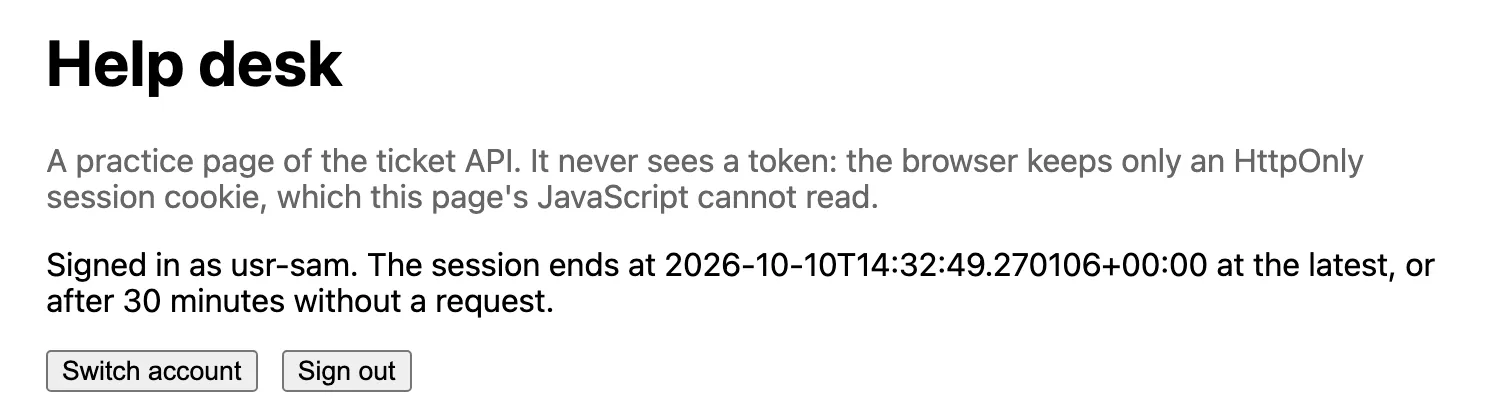
This lesson gives each question an answer that the code enforces and a test proves.
The idea: three clocks and four endings
Section titled “The idea: three clocks and four endings”A session needs three clocks, and each one answers a different risk.
- Idle timeout: the session ends after a time without any request. This is the library’s quiet-period rule. It protects the forgotten tab. The project uses 30 minutes (
SESSION_IDLE_MINUTES). - Absolute timeout: the session ends a fixed time after the sign-in, whatever happens. This is closing time. It forces a fresh sign-in every working day. The project uses 8 hours (
SESSION_MAX_HOURS). - Access time: the access token inside the session lasts 10 minutes. After that, the API asks the provider again with the refresh token. If the provider says no, the session ends. This is how a decision at the provider reaches the API within minutes.
Each ending writes its reason into the session’s row, in end_reason: idle_timeout, absolute_timeout, provider_refused, or logout for a sign-out. The next request with that cookie gets 401 session_ended, with the reason in the message, and the API deletes the cookie. Here is the whole life of a session:

Text description of the diagram
Start on the left. A sign-in first waits in login_requests for at most 10 minutes, and its state works once. A good callback makes the session active. While it is active, each request moves the idle clock, and a refresh renews the access time. Four arrows leave the active state, one per end reason. An ended session never becomes active again: the only way back is a new sign-in, with a new cookie.
A tiny example: Sam’s morning
Section titled “A tiny example: Sam’s morning”Here is one constructed morning, with the rules of the code. Sam signs in at 09:00. Three clocks start: access until 09:10, idle end at 09:30, absolute end at 17:00.
| Time | Sam’s request | What the API does | Access until | Idle end |
|---|---|---|---|---|
| 09:00 | signs in | new session, cookie set | 09:10 | 09:30 |
| 09:04 | GET /v1/me |
200; the idle clock moves | 09:10 | 09:34 |
| 09:25 | GET /v1/me |
access time over: refresh at the provider; 200 | 09:35 | 09:55 |
| 10:10 | GET /v1/me |
45 minutes without a request: 401 session_ended (idle_timeout) |
— | — |

Text description of the diagram
Read the rows from top to bottom. Between 09:10 and 09:25, the access time is over, but nothing happens: the API refreshes only when a request needs it. At 09:25, it refreshes before it answers. The idle line starts again at every request, so its end moves from 09:30 to 09:34 to 09:55. At 10:10, the idle check runs first, before any refresh, so the session ends without a call to the provider.
Notice the order at 10:10. The API checks the absolute end first, then the idle end, and only then the access time. An ended session never reaches the provider.
Larkfield: test each ending
Section titled “Larkfield: test each ending”Grace, Larkfield’s owner, asks for proof, not promises: “Show me each way a session ends.” The tests already do it. Run them first:
python -m pytest tests/test_sessions.py -vtests/test_sessions.py::test_sign_in_sets_an_httponly_cookie_and_the_api_knows_the_person PASSEDtests/test_sessions.py::test_the_server_keeps_only_a_hash_of_the_cookie_and_an_encrypted_refresh_token PASSEDtests/test_sessions.py::test_a_callback_with_an_unknown_or_used_state_fails PASSEDtests/test_sessions.py::test_return_to_cannot_send_you_to_another_site PASSEDtests/test_sessions.py::test_a_change_with_the_cookie_needs_the_csrf_token PASSEDtests/test_sessions.py::test_logout_ends_the_session_and_revokes_the_refresh_token PASSEDtests/test_sessions.py::test_a_session_ends_when_idle_or_too_old[last_seen_at = now() - interval '31 minutes'-idle_timeout] PASSEDtests/test_sessions.py::test_a_session_ends_when_idle_or_too_old[expires_at = now() - interval '1 second'-absolute_timeout] PASSEDtests/test_sessions.py::test_the_session_asks_the_provider_again_when_the_access_token_is_old PASSEDtests/test_sessions.py::test_a_disabled_account_loses_the_session_at_the_next_refresh PASSEDtests/test_sessions.py::test_account_switching_starts_a_new_session_for_the_other_person PASSEDtests/test_sessions.py::test_the_page_and_the_session_answer_are_not_cached PASSEDThe tests move times in the database instead of waiting. Now do the same by hand, against the running API, so that you see each answer.
Guided practice
Section titled “Guided practice”-
In the third terminal, define two small helpers.
signinfollows the sign-in like the browser, with the cookie jarjar.txt. It opens the provider’s page first; only if the page asks, it picks the person.mecalls/v1/mewith the jar:Terminal window signin() {TO=$(curl -s -o /dev/null -w '%{redirect_url}' -b jar.txt -c jar.txt "http://127.0.0.1:8000/auth/login?return_to=/app/$2")BACK=$(curl -s -o /dev/null -w '%{redirect_url}' -b jar.txt -c jar.txt "$TO") # open the provider's page# no redirect: the page asks for a person, so pick one[ -z "$BACK" ] && BACK=$(curl -s -o /dev/null -w '%{redirect_url}' -b jar.txt -c jar.txt -d user="$1" "$TO")curl -s -o /dev/null -b jar.txt -c jar.txt "$BACK"curl -s -b jar.txt http://127.0.0.1:8000/auth/session; echo}me() { curl -s -b jar.txt http://127.0.0.1:8000/v1/me; echo; }Terminal window function signin($user, $extra = "") {$to = curl.exe -s -o NUL -w '%{redirect_url}' -b jar.txt -c jar.txt "http://127.0.0.1:8000/auth/login?return_to=/app/$extra"$back = curl.exe -s -o NUL -w '%{redirect_url}' -b jar.txt -c jar.txt "$to" # open the provider's page# no redirect: the page asks for a person, so pick oneif (-not $back) { $back = curl.exe -s -o NUL -w '%{redirect_url}' -b jar.txt -c jar.txt -d "user=$user" "$to" }curl.exe -s -o NUL -b jar.txt -c jar.txt "$back"curl.exe -s -b jar.txt http://127.0.0.1:8000/auth/session}function me { curl.exe -s -b jar.txt http://127.0.0.1:8000/v1/me }Start with a fresh browser: delete
jar.txt(rm -f jar.txt, orRemove-Item jar.txtin PowerShell). Then runsignin usr-sam. The answer starts with{"signed_in":true,"user_id":"usr-sam". -
Refresh (constructed). Move Sam’s access time one minute into the past, then call the API:
Terminal window docker compose exec db psql -U tickets -c "UPDATE sessions SET access_expires_at = now() - interval '1 minute' WHERE user_id = 'usr-sam' AND ended_at IS NULL;"medocker compose exec db psql -U tickets -c "SELECT user_id, access_expires_at - now() AS access_left FROM sessions WHERE user_id = 'usr-sam' AND ended_at IS NULL;"Terminal window docker compose exec db psql -U tickets -c "UPDATE sessions SET access_expires_at = now() - interval '1 minute' WHERE user_id = 'usr-sam' AND ended_at IS NULL;"medocker compose exec db psql -U tickets -c "SELECT user_id, access_expires_at - now() AS access_left FROM sessions WHERE user_id = 'usr-sam' AND ended_at IS NULL;"UPDATE 1{"user_id":"usr-sam","kind":"user","name":"Sam", … }user_id | access_left---------+-----------------usr-sam | 00:09:59.687126(1 row)/v1/meanswered 200, and the access time is 10 minutes again. The API used the refresh token at the provider before it answered. The provider rotated the refresh token too: the row now keeps the new one, encrypted. -
Disabled at the provider. Sign in as Omar, then disable him at the provider:
Terminal window rm -f jar.txtsignin usr-omarpython -m idp disable usr-omarmeTerminal window Remove-Item jar.txt -ErrorAction SilentlyContinuesignin usr-omarpython -m idp disable usr-omarmeusr-omar is disabled: they cannot sign in or refresh tokens. Tokens already issued stay valid until they expire.{"user_id":"usr-omar", … }Omar still gets 200. His session’s access time is not over, so the API does not ask the provider yet. Now move his access time back (constructed), as in step 2, and call again:
Terminal window docker compose exec db psql -U tickets -c "UPDATE sessions SET access_expires_at = now() - interval '1 second' WHERE user_id = 'usr-omar' AND ended_at IS NULL;"mepython -m idp enable usr-omarTerminal window docker compose exec db psql -U tickets -c "UPDATE sessions SET access_expires_at = now() - interval '1 second' WHERE user_id = 'usr-omar' AND ended_at IS NULL;"mepython -m idp enable usr-omar{"error":{"code":"session_ended","message":"Your session has ended (provider_refused). Sign in again.", … }}usr-omar is enabled: they can sign in.The provider refused the refresh, so the session ended. Without the constructed step, this happens at most 10 minutes after the account is disabled: the access time is the limit of stale access.
-
Idle and absolute (constructed). Sign in as Camille, move their last request 31 minutes back, and call:
Terminal window rm -f jar.txtsignin usr-camilledocker compose exec db psql -U tickets -c "UPDATE sessions SET last_seen_at = now() - interval '31 minutes' WHERE user_id = 'usr-camille' AND ended_at IS NULL;"meTerminal window Remove-Item jar.txt -ErrorAction SilentlyContinuesignin usr-camilledocker compose exec db psql -U tickets -c "UPDATE sessions SET last_seen_at = now() - interval '31 minutes' WHERE user_id = 'usr-camille' AND ended_at IS NULL;"me{"error":{"code":"session_ended","message":"Your session has ended (idle_timeout). Sign in again.", … }}Do it again, from
signin usr-camille, withexpires_at = now() - interval '1 second'instead of thelast_seen_atchange. The message says(absolute_timeout). -
Sign-out, and a copy of the old cookie. Sign Sam in, keep a copy of the jar, and sign out with the CSRF token. Then use the copy:
Terminal window rm -f jar.txtsignin usr-samcp jar.txt sams-jar.txtCSRF=$(curl -s -b jar.txt http://127.0.0.1:8000/auth/session | python -c "import sys, json; print(json.load(sys.stdin)['csrf_token'])")curl -s -X POST -b jar.txt -c jar.txt -H "X-CSRF-Token: $CSRF" http://127.0.0.1:8000/auth/logout; echocurl -s -b sams-jar.txt http://127.0.0.1:8000/v1/me; echoTerminal window Remove-Item jar.txt -ErrorAction SilentlyContinuesignin usr-samCopy-Item jar.txt sams-jar.txt$csrf = (curl.exe -s -b jar.txt http://127.0.0.1:8000/auth/session | ConvertFrom-Json).csrf_tokencurl.exe -s -X POST -b jar.txt -c jar.txt -H "X-CSRF-Token: $csrf" http://127.0.0.1:8000/auth/logoutcurl.exe -s -b sams-jar.txt http://127.0.0.1:8000/v1/me{"signed_out":true,"provider_logout_url":"http://localhost:8400/logout?post_logout_redirect_uri=http%3A%2F%2F127.0.0.1%3A8000%2Fapp%2F"}{"error":{"code":"session_ended","message":"Your session has ended (logout). Sign in again.", … }}Deleting the cookie in the browser is not enough, and the API does not rely on it. The row says
logout, so a copied cookie is dead too. The API also revoked the refresh token at the provider.
Count the endings in your database:
docker compose exec db psql -U tickets -c "SELECT end_reason, count(*) FROM sessions GROUP BY 1 ORDER BY 1;"The author’s run of the same steps gave one absolute_timeout, one idle_timeout, three logout, one provider_refused, and one session still active (end_reason empty). Your counts depend on how often you tried.
Account switching: the sign-in that nobody saw
Section titled “Account switching: the sign-in that nobody saw”Now step 5 has a second half. Sam signed out at the API. Ines sits down and runs signin usr-ines with the same jar, as the next person at the same browser would:
signin usr-ines{"signed_in":true,"user_id":"usr-sam", … }The answer says usr-sam. The provider redirected at once, so the helper never reached the step that picks usr-ines. This is the library trap, and the diagram shows why:

Text description of the diagram
Follow the two cookies. ticket_session belongs to the API, and the sign-out deleted it. idp_session belongs to the provider, on another site, and the API cannot delete it. When the next sign-in reaches the provider, the provider sees its own valid session for Sam. It does what single sign-on is for: it signs him in without asking. Real providers do the same.
There are two fixes, and the page at /app/ uses both.
- Sign out ends the API’s session and then sends the browser to the
provider_logout_urlfrom the answer. That is the provider’s end-session address (RP-initiated logout). The provider ends its own session and sends the browser back to/app/. - Switch account ends the API’s session and starts a new sign-in with
prompt=select_account. That parameter asks the provider to show its page even when it remembers someone. Sam’s session at the provider may continue; that is his choice on his device.
Try the second fix with the helper. Its second argument adds text to the sign-in address:
CSRF=$(curl -s -b jar.txt http://127.0.0.1:8000/auth/session | python -c "import sys, json; print(json.load(sys.stdin)['csrf_token'])")curl -s -X POST -b jar.txt -c jar.txt -H "X-CSRF-Token: $CSRF" http://127.0.0.1:8000/auth/logout > /dev/nullsignin usr-ines "&prompt=select_account"{"signed_in":true,"user_id":"usr-ines", … }The provider showed its page, and the pick reached it. In the author’s Chromium run, Switch account did the same: the page showed Signed in as usr-ines, and nothing of Sam’s. After Sign out, the provider’s logout sent the browser back to /app/, which said “Not signed in.” The Back button showed “Not signed in.” too.
What the browser keeps of the previous person
Section titled “What the browser keeps of the previous person”Switching accounts must not leave Sam’s data on Ines’s screen. The project stops it in three places:
- The page keeps data only in memory.
clearData()inapp.htmlempties it at sign-out, before anything else happens. - Every authenticated answer says
Cache-Control: no-store:/v1/me,/auth/session,/app/and, from Module 4, every ticket. The browser and any proxy keep no copy, so Back and the history cannot show Sam’s answers to Ines. - Each sign-in gets a new session and a new cookie. Sam’s old cookie stays dead (
401 session_ended), even if someone kept it.
Your turn: a one-minute idle limit
Section titled “Your turn: a one-minute idle limit”So far, the idle and absolute endings were constructed. Make one real. Stop fastapi dev with Ctrl+C, and start it again with a one-minute idle limit:
SESSION_IDLE_MINUTES=1 fastapi dev$env:SESSION_IDLE_MINUTES = "1"; fastapi devSign in with signin usr-grace, call me, wait 70 seconds, and call me again. Predict both answers before you run them. Then start the API again without the setting (in PowerShell, run Remove-Item Env:SESSION_IDLE_MINUTES first).
Show the answer
The first me answers 200 with Grace’s memberships, and it moves her idle end to one minute later. After 70 seconds without a request, the second me answers:
{"error":{"code":"session_ended","message":"Your session has ended (idle_timeout). Sign in again.", … }}The access time (10 minutes) was not over. The idle check comes first, so the API did not call the provider.
When to choose which limits, and what they cost
Section titled “When to choose which limits, and what they cost”The three numbers are choices, not facts of nature. Choose them with the people who use the page.
- Idle 30 minutes suits a help desk, where people step away often. A shorter idle limit protects shared desks better, but people sign in more often, and they may find a way around it.
- Absolute 8 hours is one working day. It also limits a stolen cookie: it works for one day at most, not for weeks.
- Access time 10 minutes bounds stale access from the provider: a disabled account ends within 10 minutes. Shorter means more calls to the provider; each active session refreshes about six times an hour.
The costs: a database write on every request (the idle clock), a call to the provider every 10 minutes per active session, and people who must sign in again. The provider’s limits matter too: its refresh token here lasts 8 hours, so the API cannot refresh beyond that anyway.
A removed membership is not a provider decision: Larkfield removes Camille in its own table. From Module 4, the API reads the membership on every request, so their access ends at their next request. Lifecycle changes measures that path.
Common mistake
Everyone is signed out a few minutes after each restart
Symptom: after you restart the API, or after fastapi dev reloads because you saved a file, people stay signed in for a few minutes. Then every one of them gets 401 session_ended (provider_refused), although nobody was disabled. The API’s log printed SESSION_KEY is not set: sessions end when the API stops at start-up.
Cause: SESSION_KEY is missing from .env, so the API makes a new random key at each start. The refresh tokens in the sessions table were encrypted with the old key. The sessions continue until their access time is over. Then the API cannot decrypt the refresh token, so it cannot refresh, and it ends the session.
Diagnose: python -m scripts.check_identity, from the next lesson, prints PROBLEM SESSION_KEY is set with the hint “Without it, every restart of the API signs everyone out.” In the database, the ended sessions have end_reason = 'provider_refused' within 10 minutes of the restart.
Fix:
- Check
.envfor a lineSESSION_KEY=….python -m idp initwrites it; if you made.envagain later, it is missing. - Run
python -m idp init --forceto write new secrets. It also makes a new signing key and new client secrets, so restart the provider and the API afterwards. - Sign in again. Sessions now survive a restart of the API.
On a server, keep SESSION_KEY in the secret store, as the API key in the Docker course. If it leaks, change it: every session then ends at its next refresh, which is the safe result.
Check your understanding
Why does a session need both an idle timeout and an absolute timeout? Give a case that each one catches and the other does not.
Show the answer
The idle timeout catches a forgotten session. Sam leaves the desk at noon, and the session ends 30 minutes later, although the 8 hours are not over. The absolute timeout catches a session that never goes quiet. A page that polls every minute, or a stolen cookie in constant use, never trips the idle clock. It still ends 8 hours after the sign-in. The absolute end also forces a fresh sign-in, so the provider checks the person and their second factor again.
Does your answer have the main points of ours?
Sign in and enroll in the course to save your answers. Every check counts toward the certificate.
Check your understanding
Predict: Larkfield disables Omar at the provider 2 minutes after his last refresh. He keeps working in his open browser. When does his session end, with which reason, and why not at once?
Show the answer
About 8 minutes later, at his first request after the 10-minute access time is over. Then the API tries to refresh, the provider refuses, and the session ends with provider_refused: 401 session_ended. It does not end at once, because the API does not ask the provider on every request. The access time is the agreed limit of stale access. If 10 minutes is too long, shorten the access time. Or let the provider tell the API at once (back-channel logout, not built in this course).
Does your answer have the main points of ours?
Sign in and enroll in the course to save your answers. Every check counts toward the certificate.
Check your understanding
Completion check: Sam is signed in at a shared desk. Show, with commands or in the browser, that Ines can take over without seeing anything of Sam's, and that Sam's old session cannot be used again.
Show the answer
Use Switch account (or sign out, then signin usr-ines "&prompt=select_account"). Evidence: the provider shows its page, and /auth/session answers "user_id":"usr-ines". The page shows only Ines’s /v1/me, because clearData() emptied it. The answers say Cache-Control: no-store, so Back shows nothing of Sam’s. A copy of Sam’s cookie gets 401 session_ended (logout). Then show the failure that this prevents. After an API-only sign-out without prompt=select_account, the same signin usr-ines answers usr-sam.
Does your answer have the main points of ours?
Sign in and enroll in the course to save your answers. Every check counts toward the certificate.
Recap
- A session has three clocks: idle (30 min), absolute (8 h) and access time (10 min, renewed with the refresh token).
- It has four endings, each kept in
sessions.end_reason:logout,idle_timeout,absolute_timeout,provider_refused. The next request gets401 session_endedand loses the cookie. - A disabled account at the provider loses its session at the next refresh, so within 10 minutes; a copied cookie after sign-out is dead.
- Signing out of the API does not sign out of the provider. Without care, the next “Sign in” silently signs the previous person in again. Fix it with the provider’s logout URL and with
prompt=select_accountfor Switch account. - No data of the previous person stays: memory cleared at sign-out,
Cache-Control: no-storeon every personal answer, and a new cookie per sign-in.
The next lesson looks at the other side of all these redirects: what the provider must know about the API, and what changes with a real provider.
Next: Provider configuration