
Provider configuration
- Lesson 10
- 50 min
- Module 3: Sessions and application integration
Lesson 10 of 19 · Authentication, Permissions and Multi-Tenant ApplicationsProvider configuration
1. Identity and permission basics
2. Understand login and tokens
3. Sessions and application integration
4. Enforce resource access
5. Background work and administration
6. Validate and document the design
What you will be able to do
Make the provider and the API agree, setting by setting, and check the agreement with one command before anyone signs in. Then connect the same API to a real identity provider, and learn what a mock can hide.
Before you startWhat to know and to have ready
What you need to know
- The browser sign-in and its cookie, from Browser session choices.
- The endings of a session and the provider’s logout, from Session lifecycle.
- Issuer, audience and token type, from Token meaning.
What you need on your computer
- The project after Session lifecycle, with the provider and the API running.
- Optional, for the real provider: Docker with about 1 GB of free memory, and about 750 MB of disk space for the Keycloak image. You need no account and no money, and you delete everything at the end.
Tested on macOS (Apple silicon) with Keycloak 26.8.0. The Windows commands are written but not tested. Microsoft Entra ID is described from Microsoft’s documentation and was not tested.
A parcel and an address
Section titled “A parcel and an address”You order a book online. The shop gives the courier your name and your address, and the courier brings the parcel to that address only. If the house number is wrong by one digit, the courier does not leave the parcel with a neighbour who looks friendly. The parcel goes back to the depot, and you wait.
Both sides must have the same facts. The shop wrote the address down when you made your account; the courier reads it from the label. Nobody notices a mistake until a parcel does not arrive. And the rule “only to the registered address” is what makes the delivery safe.
The problem: one character, and nobody can sign in
Section titled “The problem: one character, and nobody can sign in”The sign-in of this module has about ten settings on two sides. The provider keeps a record of the application, and the API keeps its own .env. One character of difference stops every sign-in, and the error appears in a different place each time.
The author changed one setting at a time on a working project. Here are three real results:
OIDC_REDIRECT_URIsaidhttp://localhost:8000/auth/callbackinstead ofhttp://127.0.0.1:8000/auth/callback. The two names mean the same computer, but they are different text. The browser stopped at the provider, with a 400 and{"error":"invalid_request","error_description":"This redirect URI is not registered for the application."}. The API never heard of it.OIDC_CLIENT_SECRETwas wrong. The sign-in page worked, Sam picked his name, and then the API’s callback answered400 login_failed: “The provider refused the code: invalid_client.”OIDC_AUDIENCEsaidbilling-api. Everything worked until the API checked the tokens:400 login_failed, “The tokens are not valid: The token is not for billing-api.”
Three causes, three places, and in each case the person at the browser sees only “it does not work”.
The idea: an application registration, and its mirror in .env
Section titled “The idea: an application registration, and its mirror in .env”A provider signs people in only for applications that it knows. Its record of one application is the application registration (Keycloak says “client”; Microsoft says “app registration”). The API keeps the same facts in its settings. Each fact has a job:
- Client ID (
help-desk-web): the application’s name in every request. - Client type and secret: a confidential client, such as a backend, can keep a secret. With it, the client proves that a token request comes from the application. A public client, such as
ticket-clion your computer, has no secret and relies on PKCE alone. - Redirect URI: the only addresses that may receive codes. A provider never sends a code to an address that is not on the list. In the same way, the courier never leaves a parcel at the wrong door.
- Post-logout redirect URI: where the provider may send the browser after its own sign-out.
- Allowed origins (CORS): other sites whose JavaScript may call the API. The help desk page is on the API’s own site, so the list is empty:
ALLOWED_ORIGINSstays unset. - Scopes and audience: what the application may ask for, and which API the access tokens are for (
ticket-api). - Issuer and keys: who signs the tokens, and where the public keys are.

Text description of the diagram
Read each line as a pair. The left box is a fact that the provider keeps; the right box is where the API keeps the same fact. The label says what the person at the browser gets when the two differ. Only the redirect URI fails at the provider, before any code exists. The others fail later, at the API’s callback, when the API checks what came back.
A tiny example: the practice registration
Section titled “A tiny example: the practice registration”The practice provider keeps its registrations in .idp/clients.json. Open it. The entry of the help desk looks like this (yours has another secret_sha256):
{ "client_id": "help-desk-web", "name": "Help desk (web)", "type": "confidential", "grant_types": ["authorization_code", "refresh_token"], "redirect_uris": ["http://127.0.0.1:8000/auth/callback"], "post_logout_redirect_uris": ["http://127.0.0.1:8000/app/"], "scopes": ["openid", "profile", "email", "offline_access", "tickets:read", "tickets:write", "members:manage"], "secret_sha256": "a595db1059bb4466f0162c6e0d2ede1e0a8d354cbaccd8d420857348c815d0c8"}Compare it with your .env. OIDC_CLIENT_ID=help-desk-web is the first line. OIDC_REDIRECT_URI is the one entry of redirect_uris, character for character. OIDC_CLIENT_SECRET is the secret whose SHA-256 is the last line: the provider, like the API’s sessions table, keeps only a fingerprint. The scopes include offline_access, which allows the refresh token of the last lesson.
Larkfield: check both sides with one command
Section titled “Larkfield: check both sides with one command”Amira does not want to find a mismatch through a person who cannot sign in. The project has a check that asks the provider what a real sign-in would meet, setting by setting. It changes nothing.
-
Copy the check, the identity document and the optional real-provider files from the snapshot:
Terminal window S=../nextia-learning-labs/C23/snapshots/end-of-m03mkdir -p docs optionalcp "$S/scripts/check_identity.py" scripts/cp "$S/docs/identity-config.md" docs/cp -R "$S/optional/keycloak" optional/Terminal window $S = "..\nextia-learning-labs\C23\snapshots\end-of-m03"New-Item -ItemType Directory -Force docs, optional | Out-NullCopy-Item "$S\scripts\check_identity.py" scripts\Copy-Item "$S\docs\identity-config.md" docs\Copy-Item -Recurse "$S\optional\keycloak" optional\Your project is now the snapshot
end-of-m03, file for file. -
With the provider running, run the check:
Terminal window python -m scripts.check_identitySign-in settings:OK issuer: .env says http://localhost:8400, the provider says http://localhost:8400OK published keys: 1 (1 for RS256)OK the provider supports PKCEOK application help-desk-web with redirect URI http://127.0.0.1:8000/auth/callback: 200OK client secret: the provider answers 'invalid_grant' to a made-up codeOK SESSION_KEY is setOK cookie Secure=False, redirect URI over HTTPOK audience: ticket-apiallowed origins (CORS): none (same site only)0 problem(s).If you published a second key in Read a token and did not retire the old one, the keys line says
2 (2 for RS256). That is also OK.Look at the client secret line. The check sends a made-up code with the real secret.
invalid_grantmeans “the code is wrong”, so the provider accepted the secret.invalid_clientwould mean a wrong secret. -
Break one setting for one run. An environment variable wins over
.env, so the file does not change:Terminal window OIDC_REDIRECT_URI=http://localhost:8000/auth/callback python -m scripts.check_identityTerminal window $env:OIDC_REDIRECT_URI = "http://localhost:8000/auth/callback"; python -m scripts.check_identity; Remove-Item Env:OIDC_REDIRECT_URIPROBLEM application help-desk-web with redirect URI http://localhost:8000/auth/callback: 400Register this exact redirect URI for the application at the provider.The other lines stay OK, and the last line says
1 problem(s).TryOIDC_CLIENT_SECRET=not-the-secrettoo:PROBLEM client secret: the provider answers 'invalid_client' to a made-up codeinvalid_client means the secret (OIDC_CLIENT_SECRET) is wrong or missing. -
Stop the provider (Ctrl+C in its terminal) and run the check once more. It stops at the first line, because nothing else can be checked:
Sign-in settings:PROBLEM discovery at http://localhost:8400: [Errno 61] Connection refusedIs the provider running? python -m idpOn Windows and Linux, the error number and text differ. Start the provider again.
-
Open
docs/identity-config.md. It lists every setting of both sides in two tables, with the practice values and the reason for each one. Another team can set up the API with it. Handoff uses it.
A real provider: Keycloak in Docker (optional)
Section titled “A real provider: Keycloak in Docker (optional)”The practice provider follows the standards, but it was written for this course. A mock agrees with the code that it was written next to, so it can hide mistakes. To find them, run a real provider once. Keycloak is an open-source identity provider (Apache-2.0 licence) that runs in Docker on your computer, with no account. Its development mode keeps everything in memory, uses plain HTTP, and must never hold real people.
This route is optional; the rest of the course uses the practice provider. Plan for about 20 minutes.
-
Start Keycloak. Choose your own administrator password instead of
choose-one:Terminal window docker run -d --name ticket-keycloak -p 127.0.0.1:8480:8080 \-e KC_BOOTSTRAP_ADMIN_USERNAME=admin -e KC_BOOTSTRAP_ADMIN_PASSWORD=choose-one \quay.io/keycloak/keycloak:26.8.0 start-devTerminal window docker run -d --name ticket-keycloak -p 127.0.0.1:8480:8080 `-e KC_BOOTSTRAP_ADMIN_USERNAME=admin -e KC_BOOTSTRAP_ADMIN_PASSWORD=choose-one `quay.io/keycloak/keycloak:26.8.0 start-devWait about one minute, until http://127.0.0.1:8480 answers in your browser.
-
Make the realm, the registration and one made-up person with the project’s script. It uses Keycloak’s admin API:
Terminal window KEYCLOAK_ADMIN_PASSWORD=choose-one python optional/keycloak/setup.pyTerminal window $env:KEYCLOAK_ADMIN_PASSWORD = "choose-one"; python optional/keycloak/setup.pyKeycloak is ready. Put these lines in .env (instead of the practice provider's):OIDC_ISSUER=http://127.0.0.1:8480/realms/helpdeskOIDC_CLIENT_ID=help-desk-webOIDC_CLIENT_SECRET=<a secret made by Keycloak>ACCESS_TOKEN_TYPES=JWTSign in as sam with the password <a random password> (made up; shown once).Keycloak's user ID for sam (the token's sub): 364a4212-e593-464b-8055-bcd9773134e9Give it a membership, for example:INSERT INTO users (user_id, name, email) VALUES ('364a4212-e593-464b-8055-bcd9773134e9', 'Sam (Keycloak)', 'sam.keycloak@larkfield.example');INSERT INTO memberships (tenant_id, user_id, role) VALUES ('larkfield', '364a4212-e593-464b-8055-bcd9773134e9', 'staff');Your secret, password and user ID differ. Keep the output open.
-
In
.env, put#in front of your practiceOIDC_ISSUERandOIDC_CLIENT_SECRETlines, and add the printedOIDC_ISSUERandOIDC_CLIENT_SECRETlines.OIDC_CLIENT_ID=help-desk-webis already in.envwith the same value, so do not add it a second time. Leave outACCESS_TOKEN_TYPES=JWTfor now: the next step shows why it is needed. Restartfastapi dev. -
Open http://127.0.0.1:8000/app/ and choose Sign in. This time a real sign-in page asks for a password:
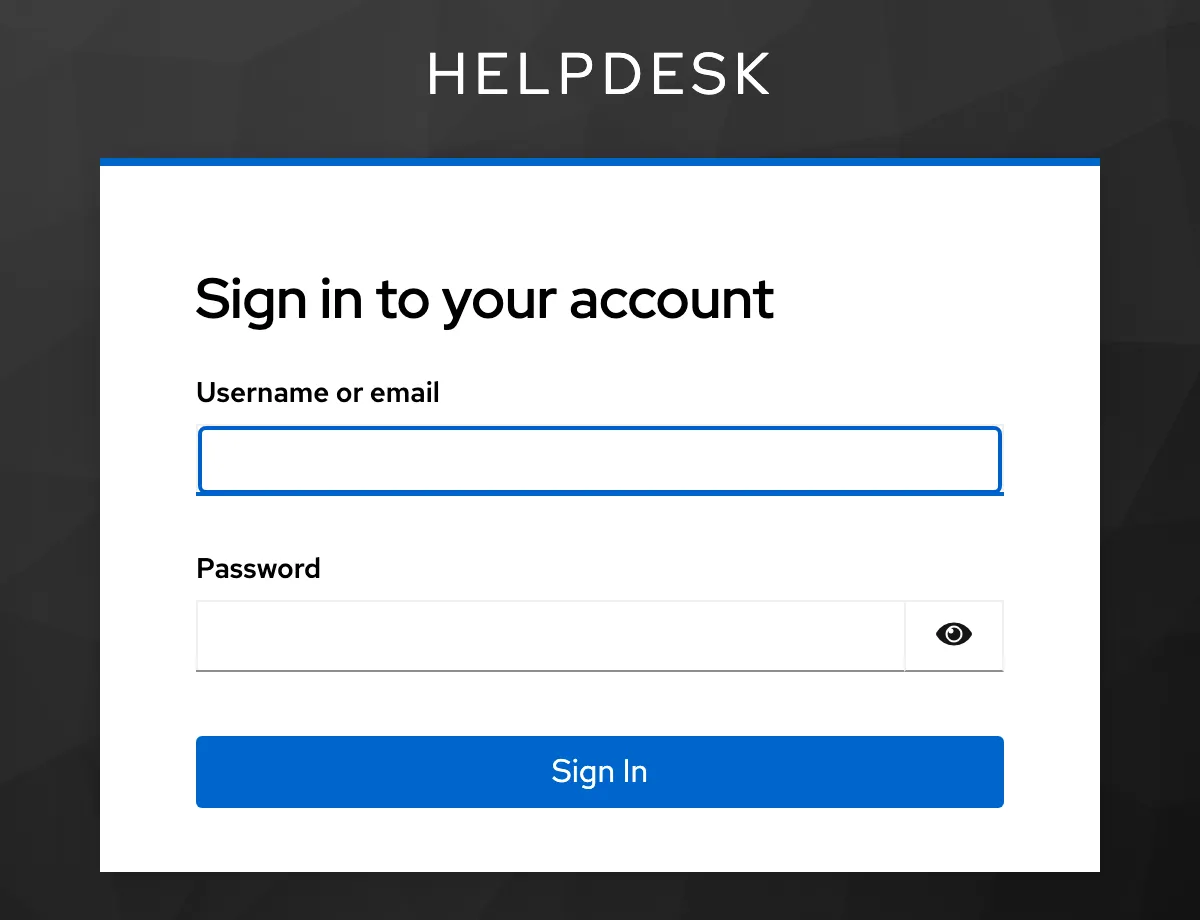
The same Sign in button, now with a real provider: Keycloak asks for the made-up person's password. The API never sees it. Sign in as
samwith the printed password. You come back to the API with an error:{"error":{"code":"login_failed","message":"The tokens are not valid: This is not an access token (an ID token is for the application, not the API).", … }}Keycloak’s access tokens have
typ: JWTin their header, notat+jwtas the practice provider’s. The API’s cheap extra check of Token meaning refused them. -
Add
ACCESS_TOKEN_TYPES=JWTto.env, restartfastapi dev, and sign in again. You land on/app/. The page shows Keycloak’s ID for Sam, a UUID, with"memberships": []. Keycloak’s Sam is a new person to the API: the practiceusr-samand this one share a name and an email address, but not asub. -
The sign-in already added Sam’s row to
users, so run only the second printedINSERT, the membership, inpsql(docker compose exec db psql -U tickets). Reload the page. Nowmembershipslistslarkfield,Larkfield,staff. -
Run
python -m scripts.check_identity. All 8 lines say OK against Keycloak, and the last line says0 problem(s).Then choose Sign out. The API’s answer names Keycloak’s end-session address,http://127.0.0.1:8480/realms/helpdesk/protocol/openid-connect/logout, and the page sends the browser there. -
Delete everything:
Terminal window docker rm -f ticket-keycloakIn
.env, remove the four Keycloak lines and the#in front of your practice lines. Restartfastapi dev, and check withpython -m scripts.check_identity.
setup.py also made two settings in Keycloak that the practice provider does not need. An audience mapper puts ticket-api into the aud of Keycloak’s access tokens. And the client gets Keycloak’s basic scope, which adds sub: without it, the API refuses the token with “The token has no sub claim”.
Why does ACCESS_TOKEN_TYPES=JWT not let ID tokens in? Because the audience check still runs. An ID token’s audience is the application, help-desk-web; the API accepts only ticket-api. The type check was a cheap extra; the audience is the essential check.
Two real bugs that the mock had hidden
Section titled “Two real bugs that the mock had hidden”When the course’s author first connected Keycloak, the sign-in failed twice. Both bugs were in the API, and the practice provider had accepted both. They are fixed in your copy. The author made each one again on purpose, to show the real messages.
Bug one: a PKCE verifier that was too short. The API’s first version made the verifier with secrets.token_urlsafe(24): 32 characters. The PKCE standard (RFC 7636) requires 43 to 128. The practice provider did not check the length, so every test passed. Keycloak checks it:
{"error":"invalid_grant","error_description":"PKCE verification failed: Invalid code verifier"}The person at the browser saw only 400 login_failed: “The provider refused the code: invalid_grant.” The fix is one line in sessions.py: secrets.token_urlsafe(48), 64 characters. The practice provider now checks the length too, and a test proves it. With 32 characters, it answers: “The code_verifier must have 43 to 128 characters (A-Z a-z 0-9 - . _ ~).”
Bug two: an email address that had to be unique. The second bug is the failure case below.
The lesson of both bugs is the same. A mock that you write yourself shares your assumptions. Test once against a real provider before people depend on the sign-in, even a provider that you then delete.
Common mistake
The first sign-in with a real provider fails with a 500
Symptom: with Keycloak, Sam enters his password, and the API’s callback answers 500 internal_error, “Something went wrong on the server.” The practice provider never caused it.
Cause: the first version of the users table had a UNIQUE constraint on email. Keycloak’s Sam has a new user ID but the same address as the practice usr-sam, sam@larkfield.example. The API’s first sign-in adds a row for each new person, and the insert broke the constraint. The API’s log said:
psycopg.errors.UniqueViolation: duplicate key value violates unique constraint "users_email_unique"DETAIL: Key (email)=(sam@larkfield.example) already exists.Diagnose: a 500 always has a log line. Search the API’s terminal for Error near the time of the callback. A constraint name in the message tells you which rule broke.
Fix: an email address is contact data, never the key of a person. A person’s key is the provider’s sub. Two providers, or two accounts, can share an address, and a person can change it. Migration 013 in your project has a normal index on lower(email), not a unique one; the course changed it before any learner applied it. After the run, the author’s database had 2 people with sam@larkfield.example, and both could sign in.
Microsoft Entra ID: the same settings, other names (not tested)
Section titled “Microsoft Entra ID: the same settings, other names (not tested)”Many companies use Microsoft Entra ID, the identity service of Microsoft 365 and Azure. This course did not test it: it needs an Azure account, and the course uses none. The table maps the settings from Microsoft’s documentation. Check it against a real token before you rely on it.
| What the API needs | Practice provider | Microsoft Entra ID (from the documentation) |
|---|---|---|
| Client ID | help-desk-web |
the Application (client) ID of an app registration, a UUID |
| Client secret | from python -m idp init |
Certificates & secrets → a new client secret, shown once |
| Redirect URI | http://127.0.0.1:8000/auth/callback |
Authentication → a platform of type Web with this URI |
| Audience | ticket-api |
Expose an API: an Application ID URI, for example api://ticket-api, and scopes such as tickets.read |
| Issuer | http://localhost:8400 |
https://login.microsoftonline.com/<directory ID>/v2.0, when the manifest sets requestedAccessTokenVersion to 2 |
| Token type | at+jwt |
JWT: set ACCESS_TOKEN_TYPES=JWT |
| Scopes in the token | scope |
scp (the API reads both) |
| Person’s ID | sub |
sub differs per application; oid is the same in every application of the directory. This API uses sub |
Two differences matter for this API. Scope names with : may need other names, such as tickets.read; the API’s scope checks would then need the same names. And Entra ID’s version 2 access tokens may carry the API’s client ID in aud instead of the Application ID URI. Decode a real token with scripts.token decode, and set OIDC_AUDIENCE to what you see.
Your turn: a second address for the API
Section titled “Your turn: a second address for the API”Run a second copy of the API on port 8001, for example to try a change next to the running one. Stop nothing. In a new terminal, with the virtual environment active:
OIDC_REDIRECT_URI=http://127.0.0.1:8001/auth/callback POST_LOGOUT_REDIRECT_URI=http://127.0.0.1:8001/app/ fastapi dev --port 8001$env:OIDC_REDIRECT_URI = "http://127.0.0.1:8001/auth/callback"; $env:POST_LOGOUT_REDIRECT_URI = "http://127.0.0.1:8001/app/"; fastapi dev --port 8001Predict what http://127.0.0.1:8001/app/ → Sign in shows. Then make the sign-in work by changing only the provider’s side. Do not change the API.
Show the answer
The browser stops at the provider with 400 and “This redirect URI is not registered for the application.” The provider has only port 8000 on its list, and it sends no code to an address that is not on it.
Add the new address to the list in .idp/clients.json, in the entry of help-desk-web:
"redirect_uris": ["http://127.0.0.1:8000/auth/callback", "http://127.0.0.1:8001/auth/callback"],"post_logout_redirect_uris": ["http://127.0.0.1:8000/app/", "http://127.0.0.1:8001/app/"],The practice provider reads the file at each request, so the next sign-in works without a restart. The author did the same with a second port, and the sign-in on it ended with Set-Cookie: ticket_session=… as usual. Remove the two new entries when you finish: each registered address is one more place where codes may go.
When to use a mock, a real provider, and what each costs
Section titled “When to use a mock, a real provider, and what each costs”Use the practice provider for development and tests. It needs no account, starts at once, and lets you make people, disable them and rotate keys with one command. Its cost is the one you saw: it shares your assumptions.
Run a real provider before people depend on the sign-in, and again when you change provider. Keycloak in Docker is free and local, and you can delete it in one command. A company’s own provider (Entra ID, or another) costs an account, an administrator who registers the application, and time for each change. In return, it brings what a mock never has: real passwords, a second factor, account recovery and an audit of sign-ins. Those are the provider’s job, not the API’s.
Check your understanding
The provider refuses to send a code to a redirect URI that is not registered, and shows an error page instead. Why is an error page safer than a redirect to that address?
Show the answer
The code is the step before the tokens. Suppose the provider redirected to any address in the request. An attacker could start a sign-in with their own address as redirect_uri and send the link to Sam. After Sam signs in, the attacker receives Sam’s code. The registered list limits the codes to addresses that the application owns. An error page sends nothing anywhere: the person sees a problem, and no code exists.
Does your answer have the main points of ours?
Sign in and enroll in the course to save your answers. Every check counts toward the certificate.
Check your understanding
Predict: with Keycloak and the API's default settings, the sign-in fails with 'This is not an access token'. You set ACCESS_TOKEN_TYPES=JWT. Can someone now use Keycloak's ID token to call the API? Explain.
Show the answer
No. The type check was only a cheap first filter. Keycloak’s ID token has the audience help-desk-web, the application. The API accepts only tokens whose audience is ticket-api, so the audience check refuses the ID token. Keycloak puts ticket-api into access tokens only because setup.py made an audience mapper. The essential check is the audience, not the type.
Does your answer have the main points of ours?
Sign in and enroll in the course to save your answers. Every check counts toward the certificate.
Check your understanding
Practical: run python -m scripts.check_identity, then break one setting with an environment variable. Explain what the check did for each OK line about the provider, and what a person at the browser would see for the setting you broke.
Show the answer
The check read the provider’s discovery document and compared its issuer with OIDC_ISSUER. It fetched the keys at jwks_uri and counted the RS256 ones, and it read the PKCE methods. It opened the authorization address with the client ID and redirect URI (200 means both are known). It sent a made-up code with the client secret: invalid_grant means the secret was accepted. For a broken redirect URI, the person sees the provider’s 400 “This redirect URI is not registered for the application.” For a broken secret, they pick their name and then get the API’s 400 login_failed “The provider refused the code: invalid_client.”
Does your answer have the main points of ours?
Sign in and enroll in the course to save your answers. Every check counts toward the certificate.
Recap
- An application registration at the provider and the API’s
.envdescribe the same facts, from the issuer to the token type. One character of difference stops every sign-in. python -m scripts.check_identitychecks the facts against the provider before anyone signs in;docs/identity-config.mdlists them for another team.- The redirect URI fails at the provider, before any code exists; the other mismatches fail at the API’s callback with
400 login_failed. - Keycloak 26.8.0 in Docker worked with
ACCESS_TOKEN_TYPES=JWT, an audience mapper and itsbasicscope (forsub). Its people need their own memberships, because theirsubis new. - The real provider found two bugs that the mock had hidden. The PKCE verifier had 32 characters, not 43 to 128. A unique email address caused a 500 at the first sign-in. Email is contact data;
subis the key. - Microsoft Entra ID uses the same settings with other names; it is described here from its documentation, not tested.
Module 3 is complete: people sign in through the API with a cookie, sessions end on time, and the provider settings are checked. Module 4 uses the identity to decide what each person may do, in which organization, on every route.
Next: Authorization in the API