
Boxes and IoU
- Lesson 13
- 35 min
- Module 4: Detect and count
Where we are
So far, every answer was one label for the whole photo. Hamid also needs to know how many boxes are on a pallet. In this lesson, we meet the box: what a detector returns, how IoU judges a box, and how non-maximum suppression removes doubles.
Lesson 13 of 30 · Vision AI: See, Count and InspectBoxes and IoU
1. Seeing is a business problem
2. Baselines and pretrained classifiers
3. Embeddings, CLIP and few labels
4. Detect and count
6. Inspect for defects
7. Match, search and describe
8. Run vision in production
What you will be able to do
Read what a detector returns, judge each box with intersection over union (IoU), and remove double boxes with non-maximum suppression (NMS). Then count the boxes on Larkfield’s pallets, and see why a right count can still hide wrong boxes.
NotebookDo this lesson in a notebook
The notebook has the code, the tasks and the checks of this lesson. It reads the pallet photos and the boxes of a detector, and computes IoU by hand. Then it draws the boxes on a tight pallet and runs NMS at three lines. Its setup cells download the pallet photos (no model and no key), so it needs no local setup. About 30 minutes; the cells run in a few seconds.
Colab and Kaggle open your own copy. They need a free Google or Kaggle account. Stuck? See the solution notebook.
Before you startWhat to know and to have ready
What you need to know
- The five kinds of answer, and the box among them, from Box: where is it, and how many? in Five kinds of answer.
- Precision and recall, from The precision–recall trade-off in the machine learning course.
What you need on your computer
- For the notebook: nothing. It runs in Colab or Kaggle.
- For the project steps: your
larkvisionproject at the end of Module 3, with its virtual environment, and the practice files in../nextia-learning-labs. If your project is broken, copy the snapshotend-of-m03again, as in Meet the Larkfield images.
Tested with Python 3.12 on macOS. The Windows commands are written out but were not run.
Counting boxes by eye
Section titled “Counting boxes by eye”Before a pallet goes on a truck, a person in Hamid’s warehouse counts its boxes. They point at each box with a finger: “one, two, three…”. Two things can go wrong. They can point at the same box twice. Or they can skip a box that hides between two others.
A detector counts in the same way. It points at each object with a rectangle. It can point twice at one box, and it can miss a box. This lesson gives you the tools to see both mistakes.
The problem: a label cannot count
Section titled “The problem: a label cannot count”In Modules 2 and 3, every method gave one label for the whole photo: “candle”, “mug”, “vase”. A label for a pallet photo would be “boxes”. It says nothing about how many boxes there are, or where they are.
Hamid needs the number. A pallet of 22 boxes and a pallet of 51 boxes both get the label “boxes”. So we need a different kind of answer: one rectangle for each object.
What a detector returns
Section titled “What a detector returns”A detector is a model that finds objects in a photo. For each object, it returns three things:
- A box: a rectangle around the object. In this course a box is four numbers,
[x, y, w, h]: the left edge, the top edge, the width and the height, in pixels. The point (0, 0) is the top-left corner of the photo. - A class: what the object is, for example “box”.
- A score from 0 to 1: how sure the detector is.
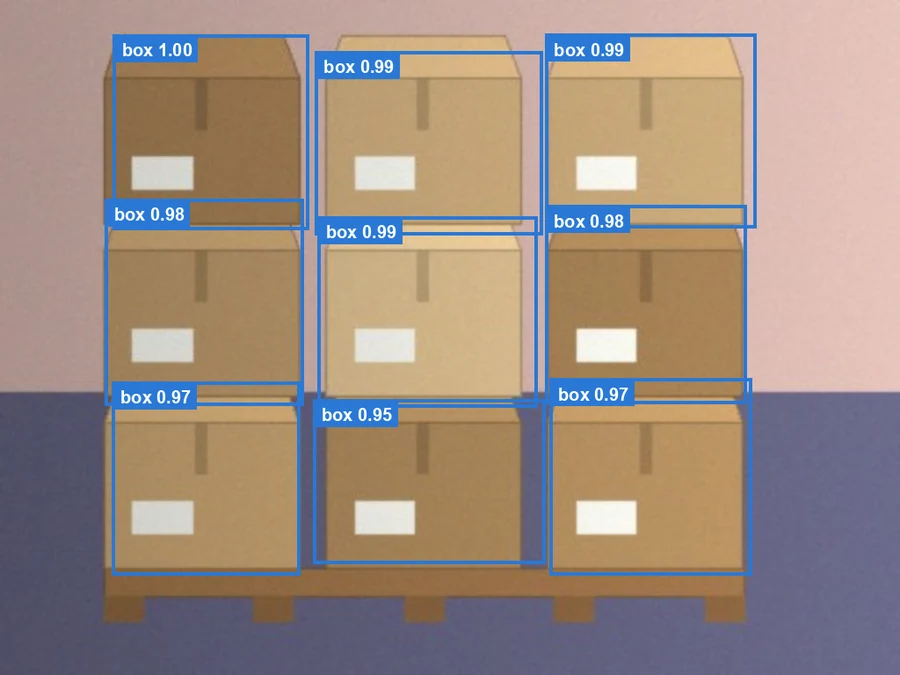
This is what a detector returns on a loose pallet. It is the detector that you fine-tune in a later lesson of this module. Here we only read its boxes.
Text description of the diagram
A synthetic pallet photo, 512 by 384 pixels, with nine cardboard boxes in three columns and three layers. Each box has a blue rectangle drawn by the detector, a little larger or smaller than the box. Each rectangle has a label with the class “box” and a score: 1.00 for the top-left box, 0.99 for three boxes, 0.98 for two, 0.97 for two and 0.95 for the bottom-middle box.
The three best boxes, as numbers:
Box [x, y, w, h] |
Class | Score |
|---|---|---|
[64.3, 19.5, 111.6, 111.4] |
box | 0.9952 |
[310.2, 19.4, 120.1, 110.3] |
box | 0.9948 |
[179.2, 29.1, 129.6, 104.4] |
box | 0.9935 |
These are the three boxes of the top layer. The first box starts 64 pixels from the left and 20 pixels from the top. It is 112 pixels wide and 111 pixels high.
What “a box” means here
Section titled “What “a box” means here”The pallet photos are drawn by our code, so we know every true box exactly. Each test photo is loose (gaps between the boxes), medium or tight (the boxes touch). There are 30 test photos with 619 boxes, from 6 to 51 a photo.
We count the boxes you can see. A box behind another box is not counted. A person standing in front of the pallet sees the same.
IoU: how good is one box?
Section titled “IoU: how good is one box?”A detector’s box is never exactly the true box. It is a few pixels too wide, or too low. So we need a rule: when is a box close enough?
The rule compares two areas:
- The overlap: the area that the two boxes share.
- The area that the two boxes cover together.
Intersection over union (IoU) is the overlap divided by the area together. “Intersection” is the overlap, and “union” is the area together. IoU is 1 when the two boxes are the same, and 0 when they do not touch.
A tiny example
Section titled “A tiny example”Box A is [10, 10, 40, 40] and box B is [30, 20, 40, 40]. Both are 40 × 40 = 1,600 square pixels.
| Step | Value |
|---|---|
| Overlap: from x = 30 to 50, and from y = 20 to 50 | 20 × 30 = 600 |
| Together: area A + area B − overlap | 1,600 + 1,600 − 600 = 2,600 |
| IoU = overlap ÷ together | 600 ÷ 2,600 = 0.23 |

Text description of the diagram
A grid from 0 to 80 across and 0 to 70 down. Box A is a blue square from (10, 10) to (50, 50). Box B is an orange square from (30, 20) to (70, 60). The area that they share, from x = 30 to 50 and y = 20 to 50, is green. Next to the grid, the sum: overlap 20 wide times 30 high is 600; together 1,600 plus 1,600 minus 600 is 2,600; IoU is 600 divided by 2,600, which is 0.23. Under 0.5, so B is a wrong box for A.
Why divide by the area together, and not by the area of one box? A huge box that covers the whole pallet also covers each true box completely. Divided by the true box, it would score 1. Divided by the area together, it scores low, because most of its area is empty.
The line at 0.5
Section titled “The line at 0.5”The usual rule says a box is right when its IoU with a true box is at least 0.5. Each true box can match one box only. A second box on the same true box is wrong.
What 0.5 looks like on a pallet:

Text description of the diagram
Three close-ups of the same box from the pallet S-062. The true box is a white dashed rectangle. A second rectangle has the same size, moved down and to the right. At IoU 0.3 it is moved by 21.5 pixels, and the green overlap is less than half of the true box: wrong. At IoU 0.5 it is moved by 12.3 pixels, and the overlap is about two thirds of the true box: right, but only just. At IoU 0.9 it is moved by 1.8 pixels and almost covers the true box: right.
An IoU of 0.5 looks generous: the box is moved by about a fifth of its size. That is fine for counting. To place a robot’s gripper, you would ask for more. Some measures average over lines from 0.5 to 0.95. You meet them in the next lesson.
Non-maximum suppression: one box for one object
Section titled “Non-maximum suppression: one box for one object”A detector does not find each object once. It proposes many boxes, and many of them sit on the same object with slightly different edges. On the tight pallet S-063, the detector proposes 200 boxes (its limit) for 22 true boxes. 133 of them have a score of at least 0.6.
If we counted all 133, the count would be six times too high. We must keep one box for each object.
The idea
Section titled “The idea”Non-maximum suppression (NMS) keeps the best boxes and removes their doubles:
- Sort the boxes by score, best first.
- Keep the best box.
- Remove every other box whose IoU with it is above a line, the NMS line.
- Repeat with the best box that is left.
“Non-maximum” means “not the best one”. “Suppression” means “removal”. So NMS removes the boxes that are not the best of their group.
A tiny example
Section titled “A tiny example”Four boxes on two touching boxes, with an NMS line of 0.5. This is a constructed example: the scores and the IoU values are chosen to show each step.
| Box | Score | IoU with box 1 | IoU with box 3 | Result |
|---|---|---|---|---|
| 1 | 0.95 | – | 0.05 | kept: the best box |
| 2 | 0.80 | 0.70 | 0.10 | removed: 0.70 > 0.5 with box 1 |
| 3 | 0.75 | 0.05 | – | kept: the best box left |
| 4 | 0.40 | 0.10 | 0.62 | removed: 0.62 > 0.5 with box 3 |
Two boxes are kept: the count is 2. With a line of 0.75, box 2 (0.70) and box 4 (0.62) are under the line, so nothing is removed and the count is 4.
Two lines decide the count
Section titled “Two lines decide the count”A count from a detector depends on two lines:
- The score line: keep boxes with a score of at least this value. A high line drops unsure boxes, and some real boxes with them.
- The NMS line: remove a box whose IoU with a better box is above this value. A low line removes more boxes, and on a tight pallet it can remove a real neighbour.
Try both lines in the explorer. The boxes are the real boxes of the detector, before NMS.
Explore
Score line, NMS line and IoU on a pallet
Predict first: On the tight pallet, with the score line at 0.60, how many boxes are left if you move the NMS line to 0.90?
- True box (dashed)
- Kept box, right
- Kept box, wrong
- Your box (thick) and its overlap
The boxes are the recorded boxes of the detector fine-tuned on 40 pallet photos, before non-maximum suppression. It keeps its best 200 boxes a photo, so the lowest score here is about 0.34. The photos are drawn by our code (synthetic).
- Boxes on the pallet
- 22
- Boxes above the score line
- 133 of 200
- Count: boxes kept after NMS
- 22
- Count error
- 0
- Right boxes (IoU at least 0.5)
- 21
- Wrong boxes
- 1
- Missed boxes
- 1
- IoU of your box
- 0.45
- Overlap ÷ together (px²)
- 1,830 ÷ 4,092
The score line 0.60 keeps 133 of the 200 recorded boxes. NMS at IoU 0.50 removes 111 overlapping boxes and keeps 22. The pallet has 22 boxes. 21 kept boxes are right, 1 is wrong, and 1 true box is missed. The count is right, but the boxes are not all right: a wrong box and a missed box cancel out. Your box has an IoU of 0.45 with the true box under it: a wrong box (under 0.5).
Text description of the explorer
The explorer shows a pallet photo with dashed true boxes, blue boxes that the detector keeps and that match a true box, and orange kept boxes that match no true box. A thick green box is “your box”, on the true box nearest the centre. The controls choose the photo (S-063, tight, 22 boxes, or S-062, medium, 24 boxes), the score line from 0.30 to 0.95, the NMS line from 0.10 to 1.00 (1.00 turns NMS off), and two sliders that move your box right and down by up to 48 pixels. The readout shows the boxes above the score line, the count after NMS, the count error, the right, wrong and missed boxes, the IoU of your box, and its overlap and union in square pixels. On S-063 at score 0.60, NMS 0.50 keeps 22 boxes: 21 right, 1 wrong and 1 true box missed. NMS 0.30 keeps 21, NMS 0.70 keeps 31, NMS 0.90 keeps 97, and with NMS off all 133 count. Your box starts 16 pixels right and 8 pixels down: IoU 0.45 on S-063 and 0.50 on S-062.
At NMS 0.90, 97 boxes are left: almost every double survives, because two doubles rarely overlap by more than 90%. At 0.50, 22 are left. At 0.30, 21 are left: the line now removes a real box that overlaps its neighbour.
Look at the readout at the starting lines. The count is 22, exactly right. But one kept box is wrong and one true box is missed. The two mistakes cancel. A right count does not prove right boxes.
Larkfield: count the pallets with the project
Section titled “Larkfield: count the pallets with the project”The project gets a new command, vision count. It reads the recorded boxes of a detector for the 30 test pallets and applies a score line and, if you ask, NMS. Then it compares the counts with the truth. It runs in about a second, with no model.
-
Open a terminal and go to your
larkvisionfolder. Activate the virtual environment:source .venv/bin/activateon macOS and Linux,.venv\Scripts\Activate.ps1on Windows. -
If this is a new terminal, set
LARKVISION_DATAagain. It lives only in the terminal where you set it. The command is step 5 of The project on your computer. -
Copy this module’s command, its tests and the README from the snapshot
end-of-m04:Terminal window S=../nextia-learning-labs/C42/snapshots/end-of-m04cp "$S/larkvision/commands/count.py" larkvision/commands/cp "$S/tests/test_count.py" tests/cp "$S/README.md" .Terminal window $S = "..\nextia-learning-labs\C42\snapshots\end-of-m04"Copy-Item "$S\larkvision\commands\count.py" larkvision\commands\Copy-Item "$S\tests\test_count.py" tests\Copy-Item "$S\README.md" .Your project now matches the snapshot
end-of-m04. The command needs no new package. -
Run the tests. Three new tests check the counting on a tiny fake pallet:
Terminal window python -m pytest -q................. [100%]17 passed in 1.27sYou had 14 tests at the end of Module 3. Your time will differ.
-
Count with the score line that was chosen on the validation photos, 0.6:
Terminal window vision count --method finetuned-40 --score 0.6finetuned-40 (score >= 0.6): count error 2.5 boxes a photo (bias +1.63), exact on 63% of photosloose 10 photos: error 0.2, bias +0.2medium 10 photos: error 0.4, bias +0.4tight 10 photos: error 6.9, bias +4.3AP at IoU 0.5: 0.867; kept boxes that cover two boxes: 0The count error is the mean of the absolute differences between the counted and the true boxes: 2.5 boxes a photo. The bias is the mean difference with its sign: +1.63 means “too many, on average”. On loose and medium pallets the count is almost perfect. On tight pallets it is off by 6.9 boxes a photo. The last line gives AP, one score for all the boxes of the detector. Pretrained detectors explains it.
-
Lower the score line to 0.5:
Terminal window vision count --method finetuned-40 --score 0.5finetuned-40 (score >= 0.5): count error 5.8 boxes a photo (bias +5.8), exact on 53% of photosloose 10 photos: error 0.3, bias +0.3medium 10 photos: error 0.4, bias +0.4tight 10 photos: error 16.7, bias +16.7AP at IoU 0.5: 0.867; kept boxes that cover two boxes: 38The tight pallets now get 16.7 boxes too many a photo. The detector’s AP does not change, because AP uses every score (the next lesson explains it). Only the count changes, because the count depends on the line.
The last line counts kept boxes that lie over two touching boxes. The command counts such a box once for each pair of boxes under it. At score 0.5, four wide boxes do it, and together they lie over 38 pairs. At 0.6 there are none.
Common mistake
A count that looks good on average
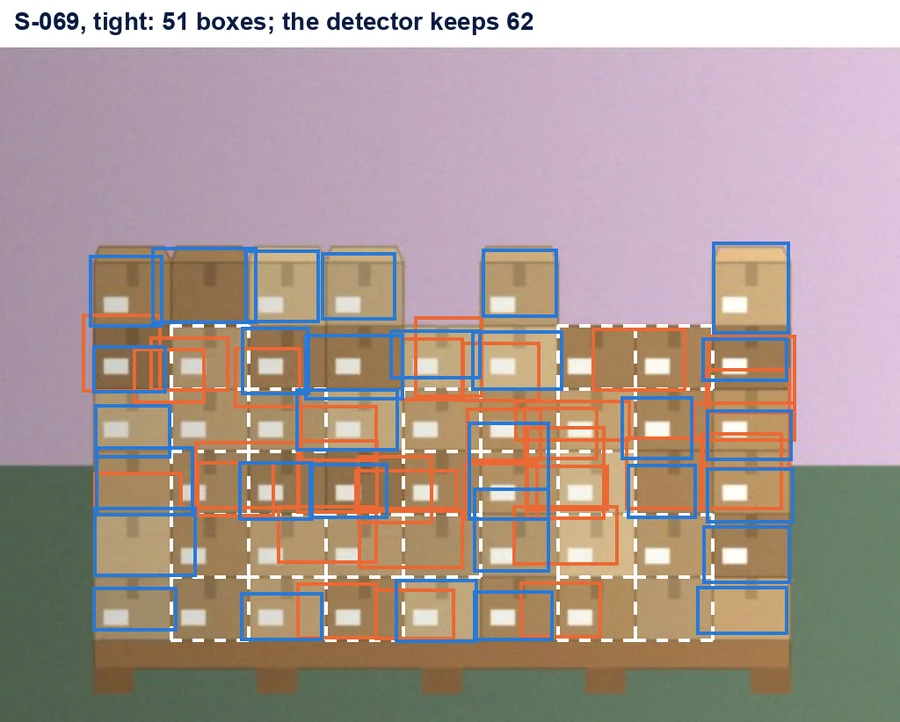
Symptom: Priya reports “count error 2.5 boxes a photo” and Hamid is happy. Then his team checks a tight pallet by hand. The detector’s 62 boxes are far from its 51 boxes, and many of the boxes sit in the wrong place.
Text description of the diagram
A synthetic pallet with 51 small boxes in tight rows. The detector keeps 62 rectangles. 30 blue rectangles sit well on a box. 32 orange rectangles sit between two boxes, over two boxes, or on a box that already has a better rectangle. 21 boxes have a dashed white outline: no rectangle found them.
Cause: the mean hides the tight pallets. Loose and medium pallets are almost perfect, so they pull the mean down. And on a tight pallet, wrong boxes and missed boxes partly cancel. On S-069 the count error is 11, but 32 boxes are wrong and 21 are missed.
Fix: report the error by crowding, as vision count does. And check the boxes, not only the count: count the right, wrong and missed boxes at IoU 0.5 on a sample of photos.
Consequence in AI work: one average over easy and hard cases tells you about the easy ones. Split every result by the condition that matters to the business, here how tight the pallet is.
When to use boxes, and what they cost
Section titled “When to use boxes, and what they cost”Use boxes when the answer is “where” or “how many”: boxes on a pallet, items on a shelf, products in a photo. Boxes also let a person check the answer quickly: they look at the rectangles.
Do not use boxes when one label per photo is enough (“is this a candle?”). Do not use them when you need the exact outline of an object, such as a damaged area. Labels are cheaper, and masks, in Module 5, are more exact.
What it costs:
- Labels: a person must draw every box in the training photos. The 40 training pallets have 817 boxes.
- Two lines to choose: the score line and the NMS line change the count. Choose them on validation photos, never on the test photos.
- Crowding: IoU and NMS both work worse when objects touch. Plan to check tight scenes by hand.
Guided practice: boxes and IoU in the notebook
Section titled “Guided practice: boxes and IoU in the notebook”- Open the notebook from the box Do this lesson in a notebook at the top of this page.
- Run the setup cells and the helper cell. The data cell ends with the
Ready:line. - In section 1, run the cell. You see
30 photos, 619 true boxes, 1310 recorded boxes. - In section 2, predict if the IoU of A and B is above 0.5. Then run the cell. You see
IoU 0.231. - In section 3, run the cell. It draws the tight pallet S-063 with 22 red boxes and 22 green true boxes.
- In section 4, predict which NMS line gives fewer boxes. Then run the cell. You see 21 boxes at 0.3, and 22 at 0.5 and 0.7.
- In section 5, write the count error on tight pallets in
tight_error, and run the check cell. It printsCheck passed.
The recorded boxes in the notebook already went through the detector’s own NMS, at 0.5. So NMS at 0.5 and 0.7 changes nothing there, and only 0.3 removes one more box. In the explorer, the boxes come before NMS, so every line matters.
Your turn: find the line where the count breaks
Section titled “Your turn: find the line where the count breaks”Use the explorer on the medium pallet S-062, with the score line at 0.60. Before you move anything, predict: from which NMS line does the count stop being 24?
Show the answer
From 0.10 to 0.50, the count stays at 24, and all 24 boxes are right. At 0.70 it jumps to 31: seven doubles survive, because they overlap their best box by between 50% and 70%. At 0.90 the count is 114.
On the medium pallet, a low NMS line costs nothing: the boxes do not touch, so no real box overlaps another one. On the tight pallet, 0.30 already removes a real box (21 instead of 22). So the safe range of the NMS line depends on how close the objects are.
Knowledge check
Section titled “Knowledge check”Check your understanding
Box A is [0, 0, 60, 60] and box B is [30, 0, 60, 60]. Compute their IoU. Is B a right box for A at the usual line?
Show the answer
The boxes have the same height and B starts 30 pixels to the right. The overlap is 30 wide and 60 high: 1,800. Each box is 60 × 60 = 3,600. Together: 3,600 + 3,600 − 1,800 = 5,400. IoU = 1,800 ÷ 5,400 = 0.33. That is under 0.5, so B is a wrong box for A, although it covers half of A.
Does your answer have the main points of ours?
Sign in and enroll in the course to save your answers. Every check counts toward the certificate.
Check your understanding
Tomás turns NMS off to 'keep every box the detector found'. On the tight pallet S-063, at the score line 0.6, what count does he get, and why?
Show the answer
He gets 133 boxes for 22 true boxes. A detector proposes many boxes on each object, with slightly different edges. Without NMS, every one of them counts. NMS at 0.5 keeps the best box of each group and gives 22. NMS is not optional when you count: it is the step that turns proposals into one box per object.
Does your answer have the main points of ours?
Sign in and enroll in the course to save your answers. Every check counts toward the certificate.
Check your understanding
Hamid asks: 'Your count was exactly 22 on the tight pallet S-063. So the detector is perfect there?' What do you answer?
Show the answer
No. At the score line 0.6 and NMS 0.5, 21 of the 22 kept boxes are right, 1 is wrong and 1 true box is missed. The wrong box and the missed box cancel, so the count looks perfect. To judge a detector, count the right, wrong and missed boxes at IoU 0.5, and split the results by crowding. On tight pallets, the count error is 6.9 boxes a photo.
Does your answer have the main points of ours?
Sign in and enroll in the course to save your answers. Every check counts toward the certificate.
Recap
- A detector returns a box
[x, y, w, h], a class and a score for each object it finds. - IoU is the overlap of two boxes divided by the area they cover together. A box is usually right when its IoU with a true box is at least 0.5.
- NMS keeps the best box and removes boxes that overlap it above the NMS line. On S-063, it turns 133 boxes into 22.
- The count depends on two lines. At the score line 0.6, the count error is 2.5 boxes a photo (tight 6.9). At 0.5, it is 5.8 (tight 16.7).
- A right count can hide wrong boxes. Report results by crowding, and check the boxes on a sample.
You can now judge one box and count the boxes of one detector. But you do not yet have a detector for Larkfield’s boxes: the boxes in this lesson came from one that we trained. Next, we try detectors that others trained on millions of photos, and learn to judge a whole detector with one number.
Next: Pretrained detectors