
Autocomplete
- Lesson 23
- 35 min
- Module 7: The parts of search that people see
Where we are
Our ranking is now measured and much better. People see search before they finish typing. In this lesson, we build autocomplete from the query log and the catalogue, and we remove suggestions that lead to bad or empty pages.
Lesson 23 of 30 · Search and Ranking: Find the Best MatchAutocomplete
1. The search problem
2. Measure relevance before you change anything
3. Lexical search: the baseline to beat
4. Understand the query
5. Dense and hybrid retrieval
6. Re-rank the top results
7. The parts of search that people see
8. Run search in production
What you will be able to do
Suggest whole queries while a person types, from searches that worked before, and keep out the suggestions that lead to empty or bad pages.
NotebookBuild autocomplete in a notebook
The notebook builds suggestions from the synthetic query log with a sorted list and a binary search. You measure how often the right query appears after three letters, and you list the searches that must never be suggested. Its setup cells download the data, so it needs no local setup. About 35 minutes.
Colab and Kaggle open your own copy. They need a free Google or Kaggle account. Stuck? See the solution notebook.
Before you startWhat to know and to have ready
What you need to know
- The synthetic query log and its clicks, from Meet the catalogue and the query log.
- Why clicks only come from products that were shown, from Learn from clicks.
What you need on your computer
- The project
larkfield-searchwith its virtual environment active, and the labs repository next to it, as in the earlier modules. - The ranker of Learning to rank, trained with
search ltr train. If you ransearch resetsince then, train it again: it takes a few seconds. - This lesson copies the eight files of this module from the snapshot
end-of-m07. They need no new package.
The parts of search that people see
Section titled “The parts of search that people see”Modules 2 to 6 made the ranking better. People never see a ranking measure. They see a page: a search box, a list of products, and some ways to narrow the list. This module builds the parts of that page, one per lesson.
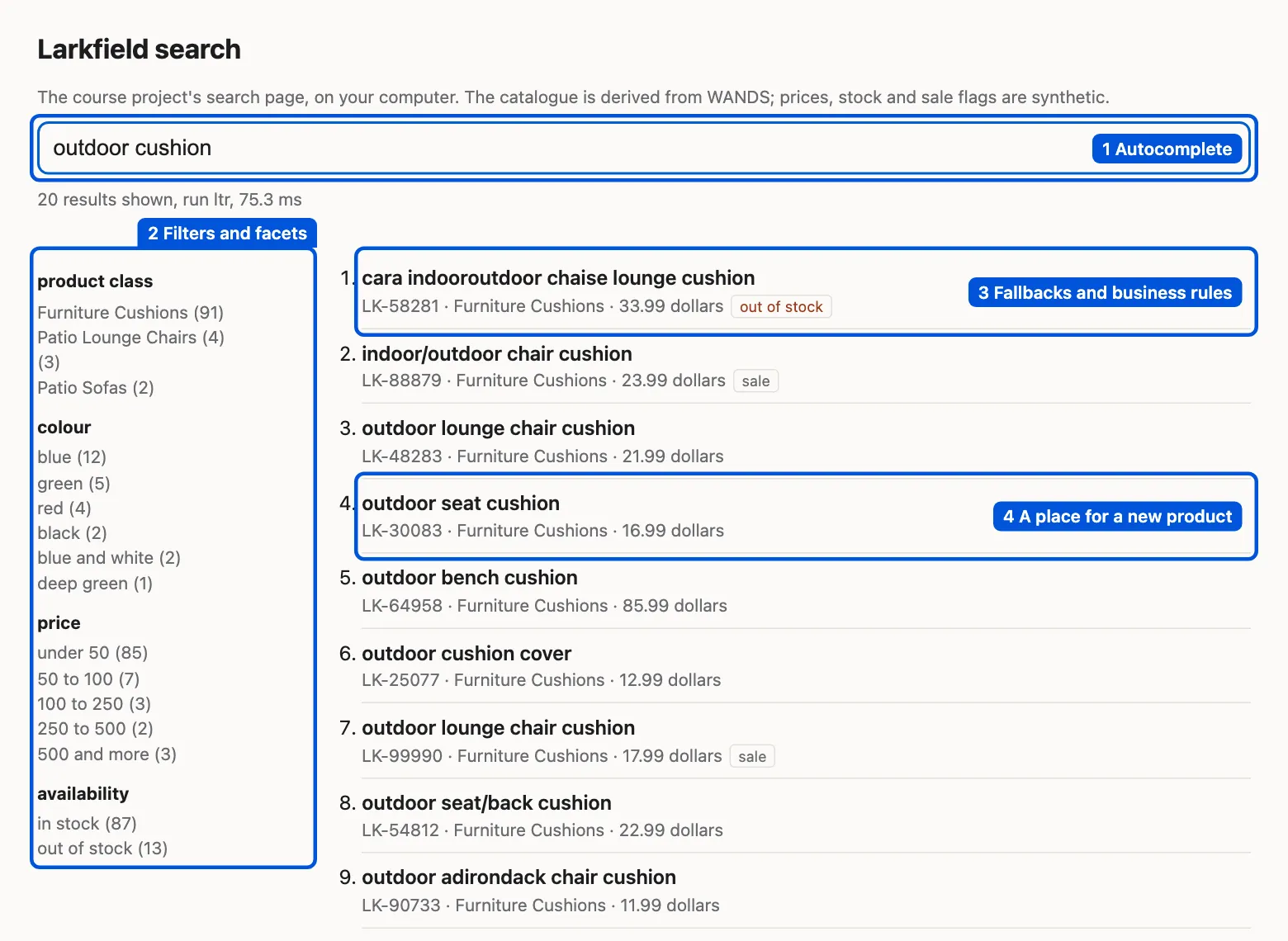
- Autocomplete, this lesson: suggestions while a person types.
- Filters and facets: counts per colour, price and class, and filters that never give an empty page.
- Zero results and business rules: what to show when nothing matches, and what a rule like “sale items first” costs.
- New products and the cold start: a place on the page for products that have no clicks yet.
The page is small and plain on purpose. It is a tool to see your changes, not a shop. Prices, stock and sale flags are synthetic: our code made them.
A shop assistant who finishes your sentence
Section titled “A shop assistant who finishes your sentence”A customer comes to the counter and says “I am looking for a gar…”. A good shop assistant does not wait. She says: “Garden statues? Or a garage storage rack?” She has heard these requests many times. She offers the common ones first, and she never offers a product that the shop does not sell.
Autocomplete does the same job in a search box. It guesses the full query from the first letters.
The problem: people type queries that fail
Section titled “The problem: people type queries that fail”In the synthetic log, 30.9% of searches found nothing with Larkfield’s search today. Many of them failed because of what people typed. “ligth bulb” was searched 139 times and never found a product. “canapé” was searched 79 times, with the same result.
A good suggestion stops this early. A person who types “lig” and sees “light bulbs” will probably take the suggestion. But a careless suggester can also make it worse. Suppose we suggest every text from the log, by how often people typed it. Then “lig” would suggest “ligth bulb” first, and lead people straight to an empty page.
So we need two things. First, a fast way to find the texts that start with the typed letters. Second, rules for which texts may become suggestions.
The idea: suggest queries that worked
Section titled “The idea: suggest queries that worked”Autocomplete (also called query suggestions) shows a short list of full queries while a person types. Each suggestion comes from somewhere:
- The query log. Texts that other people searched, and that led to a click. A click says that the search found something that the person wanted.
- The catalogue. The names of the product classes, such as “garden statues” or “table lamps”. They always find products.
Each suggestion has a weight: how good it is. For a log query, the weight is the number of its searches that got a click. For a class name, it is 1 for each 20 products of the class (at least 1).
To find suggestions quickly, we use a prefix index. A prefix is the start of a word or text: “gar” is a prefix of “garden statues”. The index is just the list of suggestion texts, in alphabetical order. In a sorted list, every text that starts with “gar” sits next to the others. So we only need to find the first one.
A tiny worked example
Section titled “A tiny worked example”Take five suggestions and their weights:
| Text | Weight |
|---|---|
| game chairs | 2 |
| garage sports storage rack | 37 |
| garden accents | 4 |
| garden statues | 12 |
| gas detector | 13 |
The table is already sorted. A person types “gar”. We look for the first text that does not come before “gar” in alphabetical order. “game chairs” comes before “gar”, because “m” comes before “r”. “garage sports storage rack” does not. So the matches start at position 1 (Python counts from 0).
Then we read on while the text starts with “gar”: “garage sports storage rack”, “garden accents”, “garden statues”. “gas detector” does not start with “gar”, so we stop. Last, we sort the three matches by weight: 37, 12, 4.
Here is the same in Python. Type the lines after >>> into python:
>>> import bisect>>> weights = {"game chairs": 2, "garage sports storage rack": 37, "garden statues": 12, "garden accents": 4, "gas detector": 13}>>> keys = sorted(weights)>>> keys['game chairs', 'garage sports storage rack', 'garden accents', 'garden statues', 'gas detector']>>> i = bisect.bisect_left(keys, "gar")>>> i1>>> found = []>>> while i < len(keys) and keys[i].startswith("gar"):... found.append(keys[i])... i += 1...>>> found['garage sports storage rack', 'garden accents', 'garden statues']>>> sorted(found, key=lambda t: -weights[t])['garage sports storage rack', 'garden statues', 'garden accents']bisect.bisect_left does a binary search. It looks at the middle of the list, keeps the half where “gar” must be, and repeats. Each step halves the list, so a list of 1,000 texts needs only about 10 steps. That is why a sorted list is enough for Larkfield: no special data structure is needed.
The real index
Section titled “The real index”The project does exactly this with 1,046 suggestions: 500 log queries with a click, and 546 more texts from the product class names. The diagram shows the real list around “gar”.

Text description of the diagram
On the left, part of the sorted list of 1,046 suggestions, with each text’s weight. Rows 399 and 400 are “game chairs” (2) and “game table accessories” (1). Rows 401 to 406 are highlighted: garage sports storage (1), garage sports storage rack (37), garage storage cabinets (1), garden accents (4), garden statues (12), garlands & swag (1). Then “gas” (2) and “gas detector” (13). An arrow from “Binary search for gar” points to the first highlighted row. A second box lists the six matches sorted by weight: garage sports storage rack (37), garden statues (12), garden accents (4), garage sports storage (1), garage storage cabinets (1), garlands & swag (1).
Keep bad suggestions out
Section titled “Keep bad suggestions out”A suggestion is a promise that the search works. So a log query must pass three tests.
- It led to a click at least once. A text that nobody clicked is not a proven query.
- It never returned an empty page. If any search of the text found nothing, the text is out.
- The spelling checker would not change any of its words. “ligth” would be corrected to “light”, so a text with “ligth” is out.
On this log, rule 1 already does all the work. A misspelt query never found anything with today’s search, so it never got a click. Rules 2 and 3 remove no extra text here. We keep them as a safety net. When you add suggestions from another source, such as a list from the merchandising team, they still check every text.
Real shops add more rules: no offensive words, no brand names of other shops, no private data. Our log has none of these, so the project does not check for them. Your shop must.
Guided practice: add this module’s files
Section titled “Guided practice: add this module’s files”This module adds eight files to the project. You copy all of them now, from the snapshot end-of-m07. This lesson explains suggest.py and the search page. The next lessons explain the other files.
-
In
larkfield-search, with the virtual environment active, copy the files of this module and the README. There is no new package, sorequirements.txtdoes not change.Terminal window S=../nextia-learning-labs/C38/snapshots/end-of-m07mkdir -p larkfield_search/staticfor f in larkfield_search/suggest.py larkfield_search/facets.py larkfield_search/business.py larkfield_search/runs/rules.py larkfield_search/app.py larkfield_search/static/search.html larkfield_search/commands/page.py tests/test_page.py README.md; docp "$S/$f" "$f"doneTerminal window $S = "..\nextia-learning-labs\C38\snapshots\end-of-m07"New-Item -ItemType Directory -Force larkfield_search\static | Out-Nullforeach ($f in 'larkfield_search\suggest.py', 'larkfield_search\facets.py', 'larkfield_search\business.py', 'larkfield_search\runs\rules.py', 'larkfield_search\app.py', 'larkfield_search\static\search.html', 'larkfield_search\commands\page.py', 'tests\test_page.py', 'README.md') { Copy-Item "$S\$f" $f } -
Run the tests:
Terminal window python -m pytest -q.................................... [100%]36 passed in 5.11sModule 6 ended with 31 tests. The five new ones test this module’s code. Your time will differ.
-
Ask for suggestions. The first call reads the log and writes the suggestions to
outputs/suggestions.json, so later calls are fast:Terminal window search suggest gar37 garage sports storage rack12 garden statues4 garden accents1 garage sports storage1 garage storage cabinets1 garlands & swagThe number is the weight. “garage sports storage rack” has 37 searches with a click in the log. “garden statues” is a class name: the class has 242 products, and 242 ÷ 20 is 12, rounded down.
-
Try a prefix that many log queries share:
Terminal window search suggest sof139 sofa24 sofa & console tables24 sofa with ottoman17 sofas1 soft seating -
Now try “lamp”:
Terminal window search suggest lampThe command prints nothing. Larkfield sells many lamps, so why? The prefix index matches the start of the whole text. The lamp classes are “table lamps” and “floor lamps”, which start with “table” and “floor”. The only logged query that starts with “lamp” is French, “lampes solaires fantaisistes”, and it never found anything. So no suggestion starts with “lamp”.
-
Start the search page:
Terminal window search serveLarkfield search page: http://127.0.0.1:8038/ (run ltr; stop with Ctrl+C)The first start loads the ranker and the bi-encoder, so it takes a few seconds. It may also print notes from PyTorch and Hugging Face. Open http://127.0.0.1:8038/ in your browser and type “gar”.
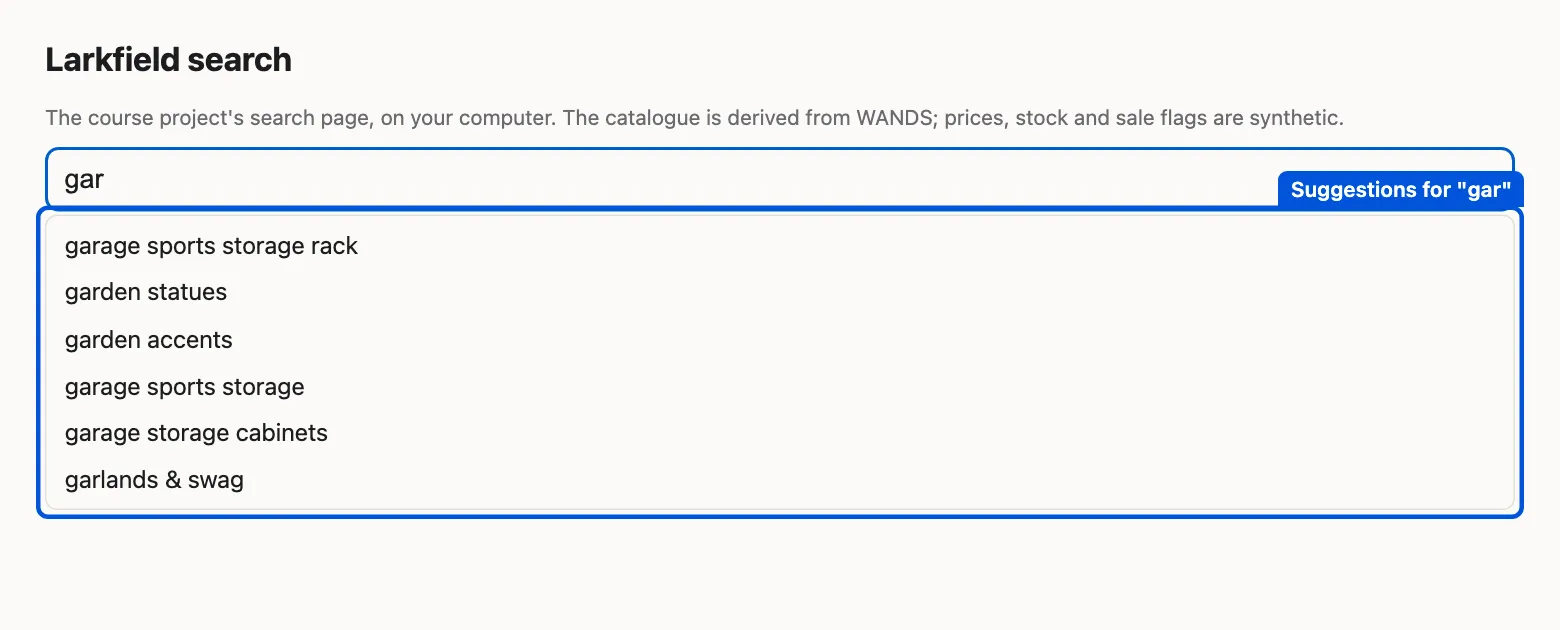
The page asks /api/suggest after each pause in typing and shows the same six suggestions as search suggest gar. We added the blue box. -
Stop the server with Ctrl+C in its terminal.
The page is a small web server from Python’s standard library (app.py). It answers three addresses: / gives the page, /api/suggest?q=… the suggestions, and /api/search?q=… the results with their facets. It listens only on your computer (127.0.0.1). If port 8038 is in use, start it with search serve --port 8039.
The code of the suggestions
Section titled “The code of the suggestions”Open larkfield_search/suggest.py. The function suggestions() applies the three rules above, adds the class names, and sorts the list. The function suggest() is the binary search of the worked example:
def suggest(prefix, n=8): """The n best suggestions that start with the prefix: [(text, weight)].""" items = suggestions() keys = [t for t, _ in items] p = fold(prefix).lstrip() i = bisect.bisect_left(keys, p) found = [] while i < len(keys) and keys[i].startswith(p): found.append(items[i]) i += 1 return sorted(found, key=lambda x: (-x[1], x[0]))[:n]fold is the normaliser of Normalise text: lower case, no accents, and units written one way. So “Gar” and “gar” give the same suggestions, and “canapé” would match “canape”. When two suggestions have the same weight, the alphabetical order decides, so the list never changes at random.
How often is the right query suggested?
Section titled “How often is the right query suggested?”A suggester is good if it offers the query that the person wanted. We can measure that with the log. Take the 120 English test queries. For each, type its first three letters, and check whether the full query is among the 8 suggestions.
The result: 60% of the 120 queries are suggested after 3 letters. After 5 or 8 letters, the share is still 60%. More letters do not help. Why?
Text description of the chart
A bar chart with three bars. 72 of the 120 English test queries are among the 8 suggestions after their first 3 letters. 47 are never suggested, because no search of the text got a click in the synthetic log. 1 query, “outdoor light fixtures” (weight 4), is a suggestion. But more than 8 heavier suggestions start with “outdoor “, so it does not appear even after 8 letters.
The missing 48 queries are not a problem of the index. 47 of them never got a click, so they are not in the list at all. The last one, “outdoor light fixtures”, is in the list with weight 4. But many heavier suggestions start with “outdoor “, so it stays out of the top 8.
This is the selection bias of Learn from clicks. The log only knows what today’s search showed. A query that failed today never got a click, so it never becomes a suggestion, even if the new ranker answers it well. Type “cous” and you get nothing: every French cushion query (“coussin zodiac”, “coussin de chaise”) found nothing with today’s search. Our French queries are machine-translated, but real French customers would meet the same wall.
There are two fixes. First, rebuild the suggestions from the log of the new search after a release, so queries that now work can earn clicks. Second, add sources that do not depend on the log: the product class names already do this, and you could add French class names too.
When to use autocomplete, and what it costs
Section titled “When to use autocomplete, and what it costs”Use it for every product search. It saves typing, it steers people to queries that work, and it costs very little. Larkfield’s list has about a thousand texts. It fits in memory, and a binary search takes microseconds.
Be careful about three things:
- Suggestions feed themselves. A suggested query is typed more often, so it earns more clicks, so it stays on top. A new good query has a hard time to enter the list. Rebuild the weights often, and do not let one week of traffic decide forever.
- A prefix of the whole text misses words in the middle. “lamp” finds nothing, although “table lamps” exists. A second index of every word start (so “lamp” also finds “table lamps”) fixes this, at the cost of more and noisier suggestions.
- Suggestions are content. A suggestion that is offensive, private or wrong is shown to everyone. Check new suggestions before they go live, as Hana’s team checks a new banner.
Common mistake
Suggestions that lead to empty pages
Symptom: after a release of autocomplete, the share of empty pages goes up, not down. People click a suggestion and see nothing.
Cause: the suggestions were built from every logged query, by how often people typed it. Popular failures, such as “ligth bulb” (139 searches, all empty), became suggestions.
Diagnosis: take the top suggestion of the 100 most common prefixes, run each one, and count the empty pages. Any empty page is a bug.
Fix: keep only texts that led to a click and never returned nothing, as suggest.py does. Add the spelling check for texts that come from other sources.
Consequence in AI work: a system that learns from its own outputs repeats its own mistakes. Data from the past must be filtered for what worked, not for what was frequent.
Try it yourself
Section titled “Try it yourself”Before you run anything, predict: what does search suggest "outdoor c" show? Then run it:
search suggest "outdoor c"The output, and what it shows
20 outdoor conversation setsOnly one suggestion. No query in the synthetic log starts with “outdoor c”, not even “outdoor cushion”. The one suggestion is a class name: the class has 415 products, so its weight is 415 ÷ 20, rounded down, which is 20.
Then try search suggest can. The first suggestion, “canadian” (263), is a real WANDS query that the synthetic log repeats often. Is it a good suggestion for someone who types “can” and wants “canapé”? This is where suggestions by language would help.
Knowledge check
Section titled “Knowledge check”Check your understanding
The sorted list has 1,046 texts. About how many steps does a binary search need to find where “gar” starts? And why is a sorted list enough?
Show the answer
About 10 steps, because each step halves the list: 1,046 → 523 → 262 → … → 1. A sorted list is enough because every text that starts with “gar” sits next to the others. After the binary search finds the first one, we read on until a text no longer starts with “gar”.
Does your answer have the main points of ours?
Sign in and enroll in the course to save your answers. Every check counts toward the certificate.
Check your understanding
Tomás proposes: “Let us suggest the 1,000 most frequent texts of the log. Frequent means good.” What goes wrong?
Show the answer
Frequent failures become suggestions. “hibou” (216 searches), “ligth bulb” (139) and “ampoule” (119) are among the most common texts, and all of them returned nothing. A suggestion must be a search that worked: the project keeps only texts with a click that never returned nothing.
Does your answer have the main points of ours?
Sign in and enroll in the course to save your answers. Every check counts toward the certificate.
Check your understanding
After 3, 5 and 8 letters, 60% of the English test queries are suggested. Why does typing more letters not help here?
Show the answer
Almost all the missing queries are not suggestions at all. 47 of the 48 never got a click in the synthetic log. More letters only help when the right query is in the list but outranked by heavier ones. That happens for one query here, “outdoor light fixtures”.
Does your answer have the main points of ours?
Sign in and enroll in the course to save your answers. Every check counts toward the certificate.
Recap
- Autocomplete suggests full queries while a person types. Larkfield’s suggestions come from log queries with a click (weight: searches with a click) and from product class names.
- A prefix index can be a sorted list: a binary search finds the first match in about 10 steps, and the matches sit together.
- A suggestion is a promise that the search works: keep texts that led to a click and never returned nothing, and check spelling.
- On the English test queries, 60% are suggested after 3 letters. Almost all the others never got a click in the log: suggestions inherit the blind spots of the search that made the log.
- The project now has eight new files and 36 tests, and a search page:
search serve.
The search box now helps people type a good query. Next, people look at the results and want to narrow them: only blue, only under 50 dollars, only in stock. That is the job of filters and facets.
Next: Filters and facets