
Filters and facets
- Lesson 24
- 30 min
- Module 7: The parts of search that people see
Where we are
Autocomplete helps people type a good query. After the results appear, people narrow them down. In this lesson, we compute facet counts, make filters that never return zero, and see how facets and ranking work together.
Lesson 24 of 30 · Search and Ranking: Find the Best MatchFilters and facets
1. The search problem
2. Measure relevance before you change anything
3. Lexical search: the baseline to beat
4. Understand the query
5. Dense and hybrid retrieval
6. Re-rank the top results
7. The parts of search that people see
8. Run search in production
What you will be able to do
Show people what the results contain, as counts per colour, price, class and stock. Let them narrow the results without ever reaching an empty page.
NotebookBuild facets and filters in a notebook
The notebook counts the facets of one test query’s results, and you write a filter that agrees with its counts. Then you check that a filter keeps the order of the ranking, and you measure how many products have no colour or no class. Its setup cells download the data, so it needs no local setup. About 25 minutes.
Colab and Kaggle open your own copy. They need a free Google or Kaggle account. Stuck? See the solution notebook.
Before you startWhat to know and to have ready
What you need to know
- The ranker
ltr, from Learning to rank. - Price and class detection in the query, from Detect what the query asks for.
What you need on your computer
- The project with the files of this module, copied in Autocomplete. This lesson explains
facets.py; it adds no file.
A shop assistant who knows the shelf
Section titled “A shop assistant who knows the shelf”A customer asks for an outdoor cushion. The shop assistant looks at the shelf and says: “We have about a hundred. Most are under 50 dollars. Twelve are blue. Thirteen are out of stock at the moment.” The customer says “Blue, please.” The assistant now shows twelve cushions, not a hundred.
The assistant does two useful things. She counts what is on the shelf for this request. And she never offers a choice that leads to nothing. She does not say “We have red cushions over 500 dollars” when there are none.
The problem: filters that lead to nothing
Section titled “The problem: filters that lead to nothing”Many shops build their filter panel from the whole catalogue. The panel lists every colour and every price band, whatever the person searched for. Then a person clicks “blue”, then “500 and more”, and sees an empty page.
We can show this on Larkfield. Search “outdoor cushion” with the ranker ltr, keep the blue results, then ask for the price band “500 and more”. Type the lines after >>> into python, in the project folder. runs.get("ltr") gives the run as a function. It takes the query text, a query ID (None: none here) and the number of results:
>>> from larkfield_search import facets, runs>>> res = runs.get("ltr")("outdoor cushion", None, 100)>>> ids = [p for p, _ in res]>>> facets.facets(ids)["colour"][('blue', 12), ('green', 5), ('red', 4), ('black', 2), ('blue and white', 2), ('deep green', 1)]>>> blue = facets.apply(ids, colour="blue")>>> len(blue)12>>> facets.facets(blue)["availability"][('in stock', 11), ('out of stock', 1)]>>> facets.facets(blue)["price"][('under 50', 11), ('50 to 100', 1)]>>> len(facets.apply(blue, price="500 and more"))0The last line is the empty page. A panel built from the catalogue would offer “500 and more” here, because the catalogue has expensive products. But none of the 12 blue outdoor cushions costs that much.
The line before it shows the cure. After the “blue” filter, the counts say that only two price bands exist: “under 50” (11) and “50 to 100” (1). If the panel shows only those two, the person cannot reach the empty page.
The idea: facets counted from the results
Section titled “The idea: facets counted from the results”A facet is a property of the products that people can choose by: colour, price, product class, availability. A facet value is one choice, such as “blue”. A facet count is how many of the current results have that value. A filter keeps only the results with the chosen value.
This way of searching is called faceted search. It works by two rules:
- Count from the results, not from the catalogue. Then every value you show has at least one product.
- After each filter, count again. The next choices are then the values that the filtered results have.
With these two rules, no click on a facet can return an empty page. One more rule makes the counts honest. The count and the filter must use the same test. If the count says “blue (12)”, the filter “blue” must keep exactly 12 products.
A tiny worked example
Section titled “A tiny worked example”Here are the first six results for “outdoor cushion”, with the three properties we count. All the values are real.
| Rank | Product | Colour | Price band | Stock |
|---|---|---|---|---|
| 1 | cara indooroutdoor chaise lounge cushion | (none) | under 50 | out of stock |
| 2 | indoor/outdoor chair cushion | (none) | under 50 | in stock |
| 3 | outdoor lounge chair cushion | deep green | under 50 | in stock |
| 4 | outdoor seat cushion | (none) | under 50 | in stock |
| 5 | outdoor bench cushion | (none) | 50 to 100 | in stock |
| 6 | outdoor cushion cover | (none) | under 50 | in stock |
Count each column:
- Colour: deep green 1. Five products have no colour, so they are in no colour value.
- Price: under 50: 5; 50 to 100: 1. The bands “100 to 250” and higher have no product, so we do not show them.
- Stock: in stock 5; out of stock 1.
Now the person clicks “in stock”. The filter removes rank 1 and keeps the other five, in the same order. Count again: price under 50: 4; 50 to 100: 1. Every value shown still has a product.

Text description of the diagram
Five boxes in two rows. First row: “Search: outdoor cushion, top 100 results”, then “Count each value in the 100 results: blue 12, in stock 87”, then “The person clicks blue (12)”. An arrow goes down to the second row: “Filter: keep the blue results, in the same order: 12 results” (with a thick border), then “Count again in the 12 results: in stock 11, out of stock 1”.
Larkfield: facets in the project
Section titled “Larkfield: facets in the project”The project counts four facets: product class, colour, price band and availability. The code is in larkfield_search/facets.py.
-
Show the facets of a query. The command takes the top 100 of a run (by default
ltr) and counts them:Terminal window search facets "outdoor cushion"ltr: "outdoor cushion" -> 100 resultsproduct class: Furniture Cushions (91), Patio Lounge Chairs (4), (3), Patio Sofas (2)colour: blue (12), green (5), red (4), black (2), blue and white (2), deep green (1)price: under 50 (85), 50 to 100 (7), 100 to 250 (3), 250 to 500 (2), 500 and more (3)availability: in stock (87), out of stock (13)The class shows at most 6 values, the most common first. Note the class with no name: 3 products have no product class in the data.
-
Compare with Larkfield’s search today:
Terminal window search facets "outdoor cushion" --run currentcurrent: "outdoor cushion" -> 100 resultsproduct class: Furniture Cushions (93), (4), Patio Sofas (2), Patio Chaise Lounges (1)colour: blue (17), black (6), red (5), green (4), blue and white (2), gray (2)price: under 50 (86), 50 to 100 (9), 100 to 250 (2), 250 to 500 (1), 500 and more (2)availability: in stock (84), out of stock (16)The counts changed, because the results changed. Facets describe the top 100 of the ranking. A better ranking gives different, and usually cleaner, counts.
-
Start the page with
search serveand search “outdoor cushion”. The left column shows the same counts as step 1. Stop the server with Ctrl+C when you are done.
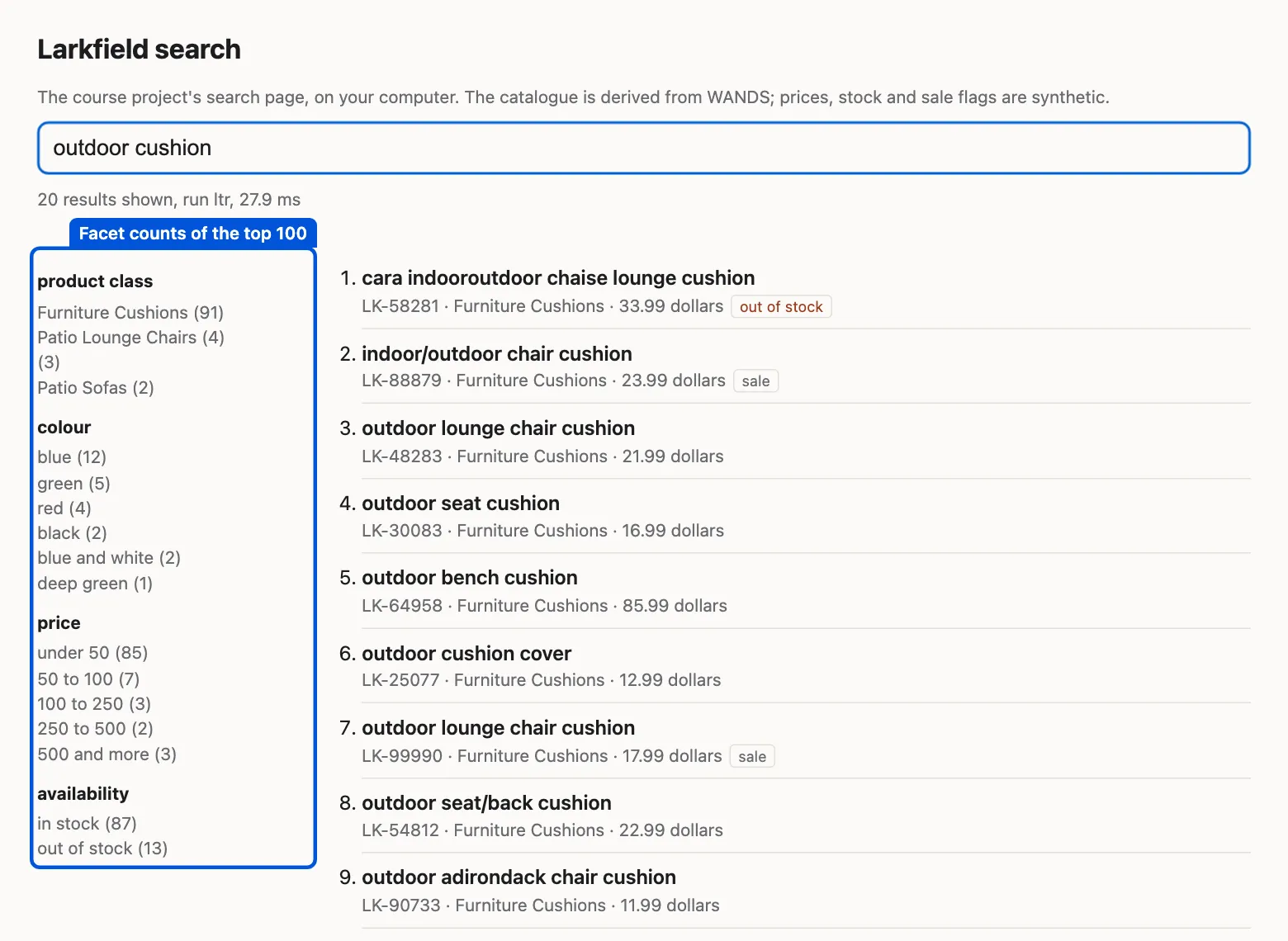
The page is small: it shows the counts but has no buttons to filter. The filters are in facets.apply, which you call from Python, as in the session at the start of this lesson. A shop would add a button for each value.
The code: count and filter with one test
Section titled “The code: count and filter with one test”Here is the colour part of facets.py:
def main_colour(colour): """The first colour of a value such as "blue/red": the facet counts it and the filter matches it.""" return str(colour).split("/")[0].strip()facets() counts main_colour of each result, and apply() keeps a product when main_colour equals the chosen value. Both use the same function, so a count and its filter always agree. A test checks it: for every colour value of the facet, the filter keeps exactly the count.
That test exists because the first version of this file broke the rule. It counted the first colour of values like “blue/red”, but it filtered with “the colour starts with blue”. So the facet said “blue (12)”, and the filter kept 16 products: it also kept “blue and white”, “blue shadow” and “blue , green”. A person who clicked “blue (12)” saw 16 results. That is not an empty page, but it is a broken promise, and people notice.
Facets and ranking work together
Section titled “Facets and ranking work together”Three things to know when you combine facets with a ranking.
A filter keeps the order
Section titled “A filter keeps the order”A filter removes products; it does not rank again. The best blue cushion is the first blue cushion of the full list. So a good ranking gives good filtered lists for free. A bad ranking stays bad after a filter, with fewer products.
The counts describe the top of the ranking
Section titled “The counts describe the top of the ranking”The project counts the top 100 results. That is a choice. With ltr, 91 of the top 100 for “outdoor cushion” are Furniture Cushions. The other 9 are patio chairs and sofas that mention cushions. If you counted every product that matches any word of the query, the class facet would also list many loosely related classes. Counting the top of a good ranking keeps the facets short and relevant. The cost: a product at rank 150 is in no count, so a filter cannot bring it back.
A facet is only as good as the data
Section titled “A facet is only as good as the data”A product with no colour is in no colour value. So a “blue” filter hides it, even when the product is blue. How common is that?
Text description of the chart
A bar chart with two bars. 64.8% of the 40,066 products have no colour value. 6.7% have no product class. In the top 100 results for “outdoor cushion”, 56 products have no colour and 3 have no class.
Almost two products in three have no colour. The colours come from the product attributes of WANDS, and many products have no colour attribute. For “outdoor cushion”, 56 of the top 100 have no colour. A person who clicks “blue (12)” never sees them. Some of them may be blue: the colour is often only in the title or the description.
So before you add a facet, measure how many products have a value. A facet that covers a third of the catalogue hides two thirds of it. The fixes are data work: extract the colour from the title, or ask the suppliers. A language model can extract attributes too, but check its answers on a sample, as in Judgments from a language model.
Filters or query understanding?
Section titled “Filters or query understanding?”In Detect what the query asks for, the project read “under 50 dollars” from the query text and filtered by price. A facet does the same job, but the person makes the choice. The two work well together:
- Detection guesses. It helps people who type the whole need in one line. When it guesses wrong, the person may not know why products are missing.
- A facet is explicit. The person sees the choice and can undo it. It needs a second step, so people who do not look at the left column never use it.
A good page does both, and shows the detected filter as a facet that is already selected. The person can then remove it with one click.
When to use facets, and what they cost
Section titled “When to use facets, and what they cost”Use them when the results are many and people narrow by clear properties: price, size, colour, brand, stock. Shops, job sites and libraries all use them.
Do not use them when results are few, or when the property is missing for most products. A facet with no value for 65% of products does more harm than good.
What they cost: counting 100 results is very cheap. Counting every match of a broad query, such as “chair”, is a pass over thousands of products for each search. Search servers keep special column data to make this fast. With multiple choices in one facet (“blue or green”), the rules get harder: values of one facet combine with “or”, and different facets with “and”.
Common mistake
A facet count that does not match its filter
Symptom: the panel says “blue (12)”. A person clicks it and sees 16 products. Or they see 9.
Cause: the count and the filter test the value in two different ways. In our first version, the count used the first colour of “blue/red”. The filter used “starts with blue”, which also matched “blue and white”.
Diagnosis: for a sample of queries, compare every facet count with the length of its filtered list. Any difference is a bug.
Fix: write one function that gives the value of a product (main_colour), and use it in both places. Add a test that compares the counts with the filters.
Consequence in AI work: when two parts of a system compute “the same” thing separately, they drift apart. Compute it once and share it, and test that the parts agree.
Try it yourself
Section titled “Try it yourself”Before you run it, predict: for “kids chair”, which price band has the most products in the top 100? Then run:
search facets "kids chair"The output, and what it shows
ltr: "kids chair" -> 100 resultsproduct class: Kids Chairs (93), (2), Teen Desk Chairs (2), Licensed Products (1), Bean Bags (1), Kids Desks (1)colour: pink (11), red (6), blue (5), brown (5), green (5), gray (4)price: under 50 (3), 50 to 100 (2), 100 to 250 (26), 250 to 500 (52), 500 and more (17)availability: in stock (94), out of stock (6)Most kids chairs cost 250 to 500 dollars. That is not what a real shop would sell: the prices are synthetic, made by our code. The price bands of the project are fixed for every query. For cushions, “under 50” holds 85 of 100 products, and the other bands are almost empty. Some shops compute the bands from the prices of the current results instead.
Knowledge check
Section titled “Knowledge check”Check your understanding
A shop builds its colour filter from the list of every colour in the catalogue. A person searches “outdoor cushion”, clicks “blue”, then “500 and more”. What happens, and how do you prevent it?
Show the answer
The page is empty. None of the 12 blue outdoor cushions costs 500 dollars or more, but a panel built from the catalogue still offers that band. Count the facets from the current results, and count again after each filter. Then every value shown has at least one product, and no click leads to nothing.
Does your answer have the main points of ours?
Sign in and enroll in the course to save your answers. Every check counts toward the certificate.
Check your understanding
After the filter “in stock”, does the first result change? Does NDCG@10 of the list have to stay the same?
Show the answer
The first result changes only if it was out of stock. Then the first in-stock product of the original order becomes first. The filter does not rank again. NDCG@10 can go up or down. It compares the shorter list with every judged product of the query, and the filter removed some of them.
Does your answer have the main points of ours?
Sign in and enroll in the course to save your answers. Every check counts toward the certificate.
Check your understanding
Omar wants a colour facet on every search page. What do you measure first, and what do you tell him?
Show the answer
Measure how many products have a colour. At Larkfield, 64.8% have none, and 56 of the top 100 for “outdoor cushion” have none. A colour filter hides all of them, even blue products whose colour is only in the title. Tell Omar that the facet needs data work first: extract colours from titles and descriptions, and check a sample by hand.
Does your answer have the main points of ours?
Sign in and enroll in the course to save your answers. Every check counts toward the certificate.
Recap
- A facet is a property people choose by. A facet count is how many current results have each value. A filter keeps the results with the chosen value.
- Count from the results, not from the catalogue, and count again after each filter: then no click leads to an empty page.
- The count and the filter must use the same test. Our first version did not (“blue (12)” kept 16 products); one shared function and a test fixed it.
- A filter keeps the order of the ranking. The counts describe the top 100, so a better ranking gives cleaner facets.
- A facet is only as good as the data: 64.8% of Larkfield’s products have no colour.
Facets help when there are results to narrow. Some searches still find nothing at all, and Hana has a request about sale items. Next, you add fallbacks for zero results and measure what business rules cost.