
Autonomy and approvals as policy
- Lesson 15
- 40 min
- Module 5: Govern tools and actions
Where we are
In the last lesson, we put the MCP servers behind a tool gateway that knows which tools each agent may call. But it refused a refund with approval_required, and nothing yet says whose approval counts: the app still trusts the role that a person types. In this lesson, we write Grace's refund rules as a policy file that code enforces outside the model and the app, and we test it like code. We start with a company's expense rules.
Lesson 15 of 21 · Governing AI Agents: Gateways, Registries and ControlsAutonomy and approvals as policy
1. Why agents need platform controls
2. Ask for capabilities, not models
3. Register every agent
4. The model gateway
5. Govern tools and actions
6. Usage, evidence and shadow AI
7. Build, buy and roll out
What you will be able to do
Decide outside the model and outside the app which actions need a person’s approval, and whose. The rules live in one policy file. The control plane signs an approval only for a person whose role allows it. The tool gateway refuses a write without that approval, and the policy has its own tests.
Before you startWhat to know and to have ready
What you need to know
- The tool gateway’s nine steps, and why it refused a refund with
approval_required, from A gateway for tools. - How the agents course’s workflow waits for a person’s approval before any write, from the agents course.
What you need on your computer
- The project as the last lesson left it (181 tests pass), with the estate running:
python -m estate up. - One terminal.
Tested on macOS (Apple silicon) with Python 3.12.13. The Windows and Linux commands are written, not run.
A company’s expense rules
Section titled “A company’s expense rules”A company’s handbook says: a team lead approves expenses up to 500 dollars, and the director approves anything above. But the handbook pays nobody. The expense system does. It reads the amount, finds the rule, and asks for the right signature.
Two details make the system trustworthy. First, it takes the signer’s role from the staff records, not from the form. An employee who writes “director” under her name is still an employee. Second, when finance changes a limit, it first tries a few amounts: 499, 500 and 501. A rule that sends 501 dollars to the wrong person is caught before any money moves.
The problem: the app trusts the role that a person types
Section titled “The problem: the app trusts the role that a person types”The agents course built a careful approval step. The workflow proposes, and nothing changes until a person approves. The app also knows the refund limits: up to 100 dollars any support agent, up to 500 a team lead, above that Grace. But see where that check happens. Ticket T-65273 has a double charge of 119 dollars:
RESOLVER_PROVIDER=gateway python -m resolver run T-65273 --variant agent_structured --model strong-reasoningRun T-65273-agent_structured-strong-reasoning-1 | single agent with one JSON step per call (for models without tool calling) | strong-reasoningOutcome: resolve (rule W7) | 2 model call(s), 1 tool call(s) | 4501 tokens in, 261 out | US$0.01161…Actions (nothing has happened yet): 1. request_refund LK-507862 119.00 CAD RFD-DOUBLE payment PAY-507862-2
Who may approve: team lead or above…Sam is a support agent. Sam tries to approve it as an agent, and then types a bigger role:
RESOLVER_PROVIDER=gateway python -m resolver approve T-65273-agent_structured-strong-reasoning-1 --as agentRESOLVER_PROVIDER=gateway python -m resolver approve T-65273-agent_structured-strong-reasoning-1 --as team_lead --name SamNot approved: An agent may not approve this: it needs a team lead (refund approval limits).request_refund LK-507862: done (operation b029a4020ded5cae, 1 call(s))Status: doneThe app checked the role that Sam typed, and the refund went out. The tool gateway was never asked, because the workflow still runs its tools inside the app. python -m sqlite3 state/usage.db "select count(*) from tool_calls where run_id like 'T-65273%'" prints (0,).
So the rule exists twice, and neither copy is strong. In the app, it trusts a typed role. In Grace’s head, nobody can test it. The model is no place for it either. A prompt that says “ask a team lead above 100 dollars” is a request to the model, not a control.
The idea: the rules as data, enforced outside the model
Section titled “The idea: the rules as data, enforced outside the model”Write the rules down once, as data that a program reads. That is policy as code: the policy is a file that is reviewed, versioned and tested like code. Code outside the model and outside the app enforces it. Larkfield’s policy is config/policy/approvals.yaml. Grace owns it, and Kwame reviews it:
version: 1roles: [support_agent, team_lead, support_lead] # from the lowest; a role may approve what the roles below it mayreads: allow # reads need no approval (the registration's tool list still applies)rules: - id: refund-up-to-100 match: {tool: orders.request_refund, amount_at_most: 100} approve_by: support_agent - id: refund-up-to-500 match: {tool: orders.request_refund, amount_at_most: 500} approve_by: team_lead - id: refund-over-500 match: {tool: orders.request_refund} approve_by: support_lead - id: labels-and-reships match: {tool: [orders.create_return_label, orders.reship_item]} approve_by: support_agent - id: ticket-notes match: {tool: orders.add_ticket_note} approve_by: none # a note changes nothing for the customer - id: refund-proposals match: {tool: support.propose_refund} approve_by: none # the MCP server only records a proposal; a person approves it theredefault: deny # a write that no rule names is refusedThe rules are read from the top, and the first rule that matches decides. That is why refund-over-500 needs no amount: any refund that reaches it is above 500. default: deny closes the gaps. A new write tool that nobody wrote a rule for is refused, not allowed.
Two programs read this file. The control plane checks it before it signs an approval. It takes the person’s role from config/people.yaml, never from the request: Sam is support_agent, Camille team_lead, Grace support_lead, and Omar approves nothing. The tool gateway checks it again at its step 7, before every write.
Autonomy: what the registration promises
Section titled “Autonomy: what the registration promises”Each registration has an autonomy field. suggests means the agent only drafts, as the help-desk assistant does. acts-with-approval means a person approves each write, as for the workflow. acts means it may write alone, and the registry refuses acts for a high-risk agent. In this project, the gateway does not read the field itself. The tool list and the policy carry it out: a suggests agent has no write tool, and an acts-with-approval agent’s writes meet the policy.
Worked example: three refunds, three approvers
Section titled “Worked example: three refunds, three approvers”python -m estate policy explain asks the policy about one action, and one person:
python -m estate policy explain --tool orders.request_refund --arguments '{"amount": 9.95}' --approver usr-sampython -m estate policy explain --tool orders.request_refund --arguments '{"amount": 100.01}' --approver usr-sampython -m estate policy explain --tool orders.request_refund --arguments '{"amount": 650}' --approver usr-camilleorders.request_refund: needs approval by support_agent or above (rule refund-up-to-100)Sam (support agent) may approve it (rule refund-up-to-100)orders.request_refund: needs approval by team_lead or above (rule refund-up-to-500)Sam may not approve this: it needs a team lead or above (rule refund-up-to-500)orders.request_refund: needs approval by support_lead or above (rule refund-over-500)Camille may not approve this: it needs a support lead or above (rule refund-over-500)Follow 100.01 dollars: rule 1 asks “at most 100?”, and the answer is no. Rule 2 asks “at most 500?”, and the answer is yes. So rule 2 decides: a team lead or above. Sam’s role is support agent, one rank too low. One cent over the line changes the approver, so the line itself needs a test. Two more actions:
python -m estate policy explain --tool orders.add_ticket_note --arguments '{"note": "Resolved"}'python -m estate policy explain --tool orders.cancel_order --arguments '{"order_id": "LK-640436"}'orders.add_ticket_note: no approval needed (rule ticket-notes)orders.cancel_order: refused (rule default)
Text description of the diagram
A refund of 119 dollars starts at the top. Rule refund-up-to-100 asks whether the amount is at most 100: no. Rule refund-up-to-500 asks whether it is at most 500: yes, so a team lead or above must approve. Then the control plane looks up the approver’s role in config/people.yaml. Camille is a team lead, so the grant is signed. Sam is a support agent, so the approval is refused. An amount of 100 or less would stop at the first rule. An amount above 500 would reach refund-over-500, which needs a support lead.
The workflow’s writes through the policy
Section titled “The workflow’s writes through the policy”Now move the workflow’s tools behind the tool gateway, so that every read and every approved write passes it. One setting does it, RESOLVER_TOOLS=gateway, next to Module 4’s RESOLVER_PROVIDER=gateway.
-
Copy the lesson’s files: the
estate policycommand, the workflow’s remote tools and two test files.Terminal window S=../nextia-learning-labs/C32/snapshots/end-of-m05cp $S/estate/cli/policy.py estate/cli/cp $S/resolver/platform.py $S/resolver/tools.py $S/resolver/__main__.py resolver/cp $S/tests/test_policy.py $S/tests/test_services.py tests/Terminal window $S = "..\nextia-learning-labs\C32\snapshots\end-of-m05"Copy-Item $S\estate\cli\policy.py estate\cli\Copy-Item $S\resolver\platform.py, $S\resolver\tools.py, $S\resolver\__main__.py resolver\Copy-Item $S\tests\test_policy.py, $S\tests\test_services.py tests\Terminal window S=../nextia-learning-labs/C32/snapshots/end-of-m05cp $S/estate/cli/policy.py estate/cli/cp $S/resolver/platform.py $S/resolver/tools.py $S/resolver/__main__.py resolver/cp $S/tests/test_policy.py $S/tests/test_services.py tests/ -
Run the tests:
python -m pytest -qsays186 passed, 1 deselected. -
Reset the practice database, because the refund of the last section changed the order’s payments:
python -m resolver reset. -
Set the two settings for this terminal. On macOS and Linux:
export RESOLVER_PROVIDER=gateway RESOLVER_TOOLS=gateway. In PowerShell:$env:RESOLVER_PROVIDER = "gateway", then$env:RESOLVER_TOOLS = "gateway". -
Run ticket T-90103 again:
python -m resolver run T-90103 --variant agent_structured --model strong-reasoning. It proposes the same reship and label as in the last lesson. Note the run ID on its last line:-3in the course’s run. -
Approve it the old way:
python -m resolver approve T-90103-agent_structured-strong-reasoning-3 --as agent. The answer isThrough the tool gateway, name the person who approves: --approver usr-camille (for example).
Through the tool gateway, the app must name the person, so that the platform can check them. Try three people: Omar, the workflow itself, and Sam.
python -m resolver approve T-90103-agent_structured-strong-reasoning-3 --as agent --approver usr-omarpython -m resolver approve T-90103-agent_structured-strong-reasoning-3 --as agent --approver support-workflowpython -m resolver approve T-90103-agent_structured-strong-reasoning-3 --as agent --approver usr-samNot approved by the platform: Omar may not approve this: it needs a support agent or above (rule labels-and-reships)Not approved by the platform: An agent cannot approve its own actions.Approval grant from the platform for usr-sam (rules: labels-and-reships, labels-and-reships).reship_item LK-640436: done (operation 221dccf204b80a63, 1 call(s))create_return_label LK-640436: done (operation 0f8c2e98df53719d, 1 call(s))Status: doneOmar is a product manager with no role in the policy. An agent may never approve its own actions, whatever the policy says. Sam got an approval grant: a short signed token, valid for 15 minutes. It names the agent, the person, the person’s role and a digest of each approved action. The digest covers the tool and its exact arguments. A grant for a 45.95-dollar refund does not cover 459.50: the test test_a_write_needs_a_grant_for_exactly_that_action checks it. The tool gateway checked the grant before each of the two writes.
In this practice estate, the app names the person with --approver. That is a shortcut. A real approval service first signs the person in, as the authentication course does, and takes the name from that sign-in.
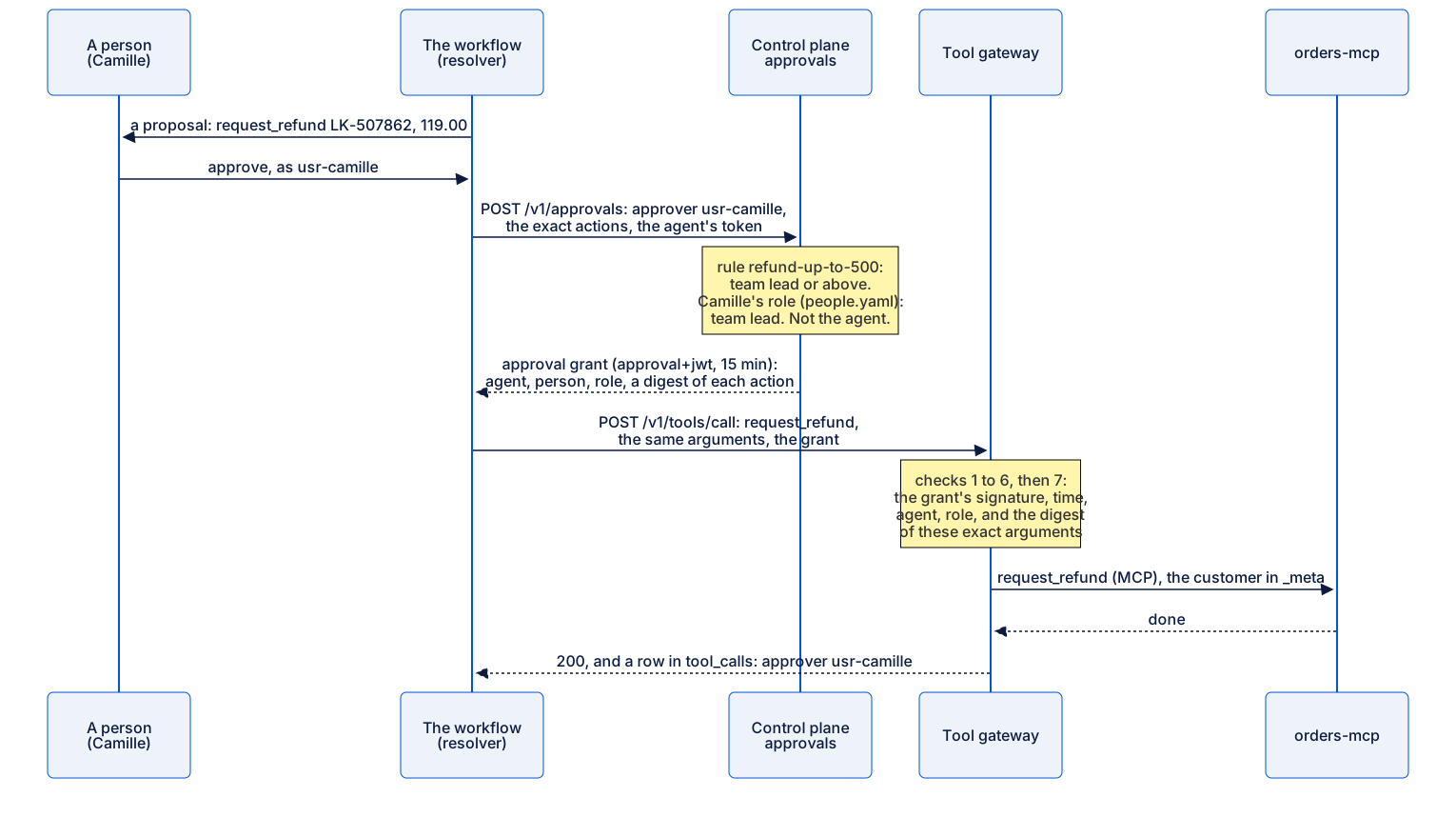
Text description of the diagram
The workflow shows Camille the proposal, and she approves. The workflow asks the control plane for a grant, naming Camille and the exact actions. The control plane finds the rule and takes Camille’s role from the staff records. It checks that she is not the agent, and signs a grant for 15 minutes. The workflow sends the refund to the tool gateway with the grant. The gateway checks the grant’s signature, time, agent and role, and that the digest matches these exact arguments. Then it calls the orders server, and records the call with Camille as the approver.
119 dollars: the app’s check and the platform’s check
Section titled “119 dollars: the app’s check and the platform’s check”Now replay the problem of this lesson through the platform:
python -m resolver run T-65273 --variant agent_structured --model strong-reasoningpython -m resolver approve T-65273-agent_structured-strong-reasoning-2 --as agent --approver usr-sampython -m resolver approve T-65273-agent_structured-strong-reasoning-2 --as team_lead --approver usr-sampython -m resolver approve T-65273-agent_structured-strong-reasoning-2 --as team_lead --approver usr-camilleNot approved: An agent may not approve this: it needs a team lead (refund approval limits).Not approved by the platform: Sam may not approve this: it needs a team lead or above (rule refund-up-to-500)Approval grant from the platform for usr-camille (rules: refund-up-to-500).request_refund LK-507862: done (operation b029a4020ded5cae, 1 call(s))Status: doneThe first refusal is the app’s own check. The second is the platform’s: Sam typed team_lead, and the app believed it, but the platform read Sam’s role from the staff records. Camille’s approval passed both. The audit trail and the gateway’s records keep each step:
python -m estate events support-workflowpython -m sqlite3 state/usage.db "select tool, kind, outcome, approver, rule from tool_calls where agent_id = 'support-workflow' order by id"The last four events (each line starts with its time, left out here: …), and the last six rows:
…  support-workflow   approval_refused     usr-omar    {"tool": "orders.reship_item", "why": "Omar may not approve this: it needs a support agent or above (rule labels-and-reships)"}…  support-workflow   approval_granted     usr-sam     {"actions": 2, "rules": ["labels-and-reships", "labels-and-reships"], "run_id": "T-90103-agent_structured-strong-reasoning-3"}…  support-workflow   approval_refused     usr-sam     {"tool": "orders.request_refund", "why": "Sam may not approve this: it needs a team lead or above (rule refund-up-to-500)"}…  support-workflow   approval_granted     usr-camille {"actions": 1, "rules": ["refund-up-to-500"], "run_id": "T-65273-agent_structured-strong-reasoning-2"}
('reship_item', 'write', 'ok', 'usr-sam', 'labels-and-reships')('create_return_label', 'write', 'ok', 'usr-sam', 'labels-and-reships')('add_ticket_note', 'write', 'ok', None, 'ticket-notes')('get_payments', 'read', 'ok', None, 'reads')('request_refund', 'write', 'ok', 'usr-camille', 'refund-up-to-500')('add_ticket_note', 'write', 'ok', None, 'ticket-notes')
Every write names its rule, and every approved write names its person. The add_ticket_note writes need nobody: the policy says so, in a rule with a reason.
Test the policy like code
Section titled “Test the policy like code”A policy is code, so it has tests. config/policy/approvals-tests.yaml holds 12 cases. Each case names an action, an approver if any, and what must happen. Here is the case at the line between agents and team leads:
- name: 100.01 dollars needs a team lead action: {tool: orders.request_refund, arguments: {order_id: LK-104233, amount: 100.01, reason_code: RFD-DAMAGE}} approver: usr-sam expect: {approved: false, needs: team_lead}Run them all:
python -m estate policy testpass a 9.95 fee refund needs any support agent orders.request_refund: needs approval by support_agent or above (rule refund-up-to-100)…pass 100.01 dollars needs a team lead orders.request_refund: needs approval by team_lead or above (rule refund-up-to-500); usr-sam: Sam may not approve this: it needs a team lead or above (rule refund-up-to-500)…pass reads need no approval orders.get_order: no approval needed (rule reads)12 passed, 0 failedThe cases sit on the lines: exactly 100, then 100.01. They also cover the people: a person who left, Omar, and Grace above 500. And they cover the gaps: a write that no rule names is refused. The policy engine can also match a data class (data_class in match), and tests/test_policy.py shows such a rule. Larkfield’s rules use only tools and amounts, because the tool calls in this project carry no data class yet.
Larkfield’s engine is about 120 lines of Python, written for this course so that you can read all of it. Products do the same job at a larger scale. Open Policy Agent (OPA) evaluates rules in its own language, Rego, for many services at once. Cedar is a policy language for permissions, with tools that check a policy before it runs. Choose one when many teams and services share policies. The idea stays the same: a file, a decision outside the model, and tests.
Common mistake
A limit changed without its tests
Symptom: someone raises the agents’ refund limit from 100 to 200 dollars in approvals.yaml, to save team leads some time. The policy test fails:
FAIL 100.01 dollars needs a team lead orders.request_refund: needs approval by support_agent or above (rule refund-up-to-100); usr-sam: Sam (support agent) may approve it (rule refund-up-to-100)11 passed, 1 failedBut the configuration still publishes, and the gateways take it at once:
Published version 3 (every replica).Told 4 of 4 gateway replicas to refresh now.Cause: estate config publish checks that the policy is well formed (estate policy check), not that it does what Grace decided. Only the tests know that.
Diagnose: python -m estate policy test names the case that fails, and git diff config/policy/approvals.yaml shows the change.
Recover: put the limit back, run python -m estate policy test until it passes, and publish again. Then make the tests a step before every publish, as you do for code: in the team’s CI, or in the script that publishes. If Grace really wants a new limit, she changes the rule and its test cases together, in one reviewed change.
Your turn: Grace’s new limits
Section titled “Your turn: Grace’s new limits”Grace decides that team leads should approve refunds up to 300 dollars, not 500. Above 300, she approves herself.
- Edit
config/policy/approvals.yaml: change the second rule to 300, and rename the two rules so that their IDs stay true. - Predict: which of the 12 test cases fails now? Write it down.
- Run
python -m estate policy testand check your prediction. - Fix the test cases in
config/policy/approvals-tests.yaml. Add a case on each side of the new line, and one for Grace in the band that moved. - Run the tests until they pass. Then publish:
python -m estate config publish --note "Grace: team leads approve refunds up to 300". - Ask the policy about the 119-dollar refund and Camille.
- Put both files back as they were, run the tests, and publish again with
--note "the course's approval policy again".
The course’s solution
The rule change:
11,12c11,12< - id: refund-up-to-500< match: {tool: orders.request_refund, amount_at_most: 500}---> - id: refund-up-to-300> match: {tool: orders.request_refund, amount_at_most: 300}14c14< - id: refund-over-500---> - id: refund-over-300One case fails, and it is the right one to fail:
FAIL Camille may approve 450 orders.request_refund: needs approval by support_lead or above (rule refund-over-300); usr-camille: Camille may not approve this: it needs a support lead or above (rule refund-over-300)11 passed, 1 failedThe new cases, in place of “Camille may approve 450”:
- name: Camille may approve 300 action: {tool: orders.request_refund, arguments: {order_id: LK-104233, amount: 300.0, reason_code: RFD-DOUBLE}} approver: usr-camille expect: {approved: true} - name: 300.01 needs Grace action: {tool: orders.request_refund, arguments: {order_id: LK-104233, amount: 300.01, reason_code: RFD-DOUBLE}} approver: usr-camille expect: {approved: false, needs: support_lead} - name: Grace may approve 450 action: {tool: orders.request_refund, arguments: {order_id: LK-104233, amount: 450.0, reason_code: RFD-DOUBLE}} approver: usr-grace expect: {approved: true}Now 14 passed, 0 failed. The 119-dollar refund is still Camille’s: orders.request_refund: needs approval by team_lead or above (rule refund-up-to-300), then Camille (team lead) may approve it (rule refund-up-to-300).
Look at what did not change: the app’s own limits in resolver/approval.py still say 500 for a team lead. For a 450-dollar refund, the app would ask for a team lead, and the platform would refuse Camille. That is safe, because the stricter copy wins, but the app’s message misleads the person. A rule in two places drifts. Keep the app’s copy only as a hint, and let the policy decide.
When to use it, and what it costs
Section titled “When to use it, and what it costs”Use policy as code for every action that moves money, goods or data, and for any rule that a person outside the engineering team owns. Grace can read a YAML rule, and review a change to it, without reading Python. Keep it out of the prompt: a model can be told a rule, but it cannot enforce one.
It costs a slower write. A person must approve, and a grant expires after 15 minutes. It costs a second place for the rule while apps still keep their own check, as the solution above shows. And it costs the tests: every rule change needs new cases on its lines. For reads, the policy says allow and adds nothing; the registration’s tool list still decides.
Knowledge check
Section titled “Knowledge check”Check your understanding
Sam approved the 119-dollar refund with --as team_lead. The app said yes and the platform said no. Why does the platform's answer win, and where does it come from?
Show the answer
The platform’s check runs outside the app. The control plane will not sign a grant, and without a grant the tool gateway refuses the write. The app believed the role that Sam typed. The control plane found the rule in config/policy/approvals.yaml: refund-up-to-500, a team lead or above. It took Sam’s role from config/people.yaml: support agent. A person cannot raise their own role by typing it. And the app cannot skip the gateway, because the gateway is the only path to the orders server.
Does your answer have the main points of ours?
Sign in and enroll in the course to save your answers. Every check counts toward the certificate.
Check your understanding
Predict: someone moves the rule refund-over-500 to the top of the rules list. Which approver does a 9.95-dollar refund need now, and which test case tells you?
Show the answer
A support lead, Grace. The first rule that matches decides, and refund-over-500 has no amount, so it matches every refund. Five cases fail: the two at 9.95 dollars, and the cases at 100, 100.01 and 450 (7 passed, 5 failed). The rules with an amount must come before the rule without one. This is why the tests check each band, not only that the file is valid: estate policy check would still say “The policy is valid.”
Does your answer have the main points of ours?
Sign in and enroll in the course to save your answers. Every check counts toward the certificate.
Check your understanding
Practical: add a test case that proves Camille may not approve a refund of 650 dollars, and one that proves that a reship needs a support agent. Run python -m estate policy test. What do your two result lines say?
Show the answer
The first case: action orders.request_refund with amount 650.0, approver usr-camille, expect approved: false and needs: support_lead. Its line ends “Camille may not approve this: it needs a support lead or above (rule refund-over-500)”. The second: action orders.reship_item with arguments order_id, sku and quantity, no approver, expect needs: support_agent. Its line is “orders.reship_item: needs approval by support_agent or above (rule labels-and-reships)”. The summary says 14 passed, 0 failed.
Does your answer have the main points of ours?
Sign in and enroll in the course to save your answers. Every check counts toward the certificate.
Recap
- The approval rules live in one file,
config/policy/approvals.yaml. The first rule that matches decides, and a write that no rule names is refused. - The control plane signs an approval grant only for a person whose role, from the staff records, allows the action. The tool gateway checks the grant, for these exact arguments, before every write.
- Sam’s typed
team_leadpassed the app and was refused by the platform. Camille’s approval passed both. - The policy has its own tests on its lines: 100 and 100.01. Publishing checks the form, not the meaning, so run the tests before every publish.
Your project now: estate policy, the workflow’s tools through the tool gateway, and 186 tests that pass. Every write now needs the right person’s approval. But approvals stop one wrong action at a time. When something goes wrong at scale, you must stop a whole kind of action at once, and in the right place. Next, you practise the kill switches, from one tool’s writes to the whole estate.