
The agent lifecycle
- Lesson 9
- 40 min
- Module 3: Register every agent
Where we are
In the last two lessons, we registered every agent and gave each one its own identity, and the gateway now refuses every call without them. But a registration is true on the day that someone writes it. Agents change, owners leave and review dates pass. In this lesson, we follow an agent through its whole life, from registration to retirement, the way the fleet register follows a van from its first inspection to the day it is sold.
Lesson 9 of 21 · Governing AI Agents: Gateways, Registries and ControlsThe agent lifecycle
1. Why agents need platform controls
2. Ask for capabilities, not models
3. Register every agent
4. The model gateway
5. Govern tools and actions
6. Usage, evidence and shadow AI
7. Build, buy and roll out
What you will be able to do
Keep each registration true for the agent’s whole life. Review it on time, change it as a new version, suspend it in an emergency, and retire it for good. Every step leaves an event in the audit trail. One command finds the agents that need a person, such as an overdue review or an owner who left.
Before you startWhat to know and to have ready
What you need to know
- The registration’s fields and its statuses, pending and active, from What a registration holds.
- Credentials, tokens and the gateway’s checks, from One identity per agent.
What you need on your computer
- The project
~/projects/ai-estate, the same as the snapshotend-of-m03, with its virtual environment active.python -m pytest -qends with135 passed, 1 deselected. - The estate running (
python -m estate up), with six registrations and the credentials of five apps, as at the end of the last lesson. If you start from the snapshot, its README lists the commands that make this state.
Tested on macOS (Apple silicon) with Python 3.12.13. The Windows (PowerShell) and Linux commands are written for you, but the course did not run them.
The life of a van
Section titled “The life of a van”Go back to the fleet register. A new van gets its card and its first inspection before its first trip. Every year, it is inspected again, and the date goes on the card. When the company fits a crane to the van, the card changes, and the van needs a new inspection before it lifts anything. When the brakes fail, the van is taken off the road until the repair. And when the van is sold, its card goes to the archive. Its number is never given to another van, so that an old fine or an old accident report never points at the wrong van.
Someone in the office also reads the register every week. They look for two things: an inspection that is overdue, and a van whose responsible person has left the company.
The problem: records that stop being true
Section titled “The problem: records that stop being true”Larkfield’s registry is new, and it already has a stale record. Kwame asks for every registration that needs attention, on the course’s “today”, 22 October 2026:
python -m estate review-due --today 2026-10-22release-judge review overdue since 2026-10-01 (21 days)1 item(s) need attentionPriya’s release judge should have been reviewed on 1 October. Nobody noticed, because nothing looked. The weekly digest shows the worse case: Lee left on 31 August, and the script ran every Monday after that. A registration that nobody reviews slowly becomes a story about an agent that no longer exists.
Use --today 2026-10-22 in this lesson, so that your output is the same as the course’s. Without it, the command uses your computer’s date, and more reviews may be overdue.
The idea: a lifecycle, with a check at each step
Section titled “The idea: a lifecycle, with a check at each step”The agent lifecycle is the set of statuses that a registration can have, and the steps between them. Each step is a command, and each command checks something before it changes the registry:

Text description of the diagram
- Register. A high-risk agent starts as pending: the form and the long form are checked. A low or medium agent starts as active: the form is checked.
- Review. A person approves and sets the next review date, within the tier’s interval. A pending agent becomes active.
- Change. A new version of the form. A low or medium agent stays active. A high-risk agent that changes its capabilities, tools, data classes, autonomy, risk tier or limits goes back to pending, until the next review.
- Suspend and resume. Active to suspended and back. A reason is required.
- Retire. From active or suspended to retired. A reason is required. The credentials are revoked, and the ID is never used again.
Two more rules connect the lifecycle to the platform. The token endpoint gives tokens only to an active agent, and to a draining one, a status for stopping work cleanly that Module 5 uses. The gateway passes only an active agent. So a status change in the registry is also a change in what the agent can do, on its next call.
Every step is also an event. An event is a row with the time, the agent, the action, the person and the details, such as the reason. The events are the registry’s audit trail. They answer “who suspended the document assistant, and why?” months later.
python -m estate review-due is the person who reads the register every week. It lists overdue reviews, reviews due in the next 30 days, owners who have left, and pins that end within 60 days. Here are the review dates of Larkfield’s six registrations:
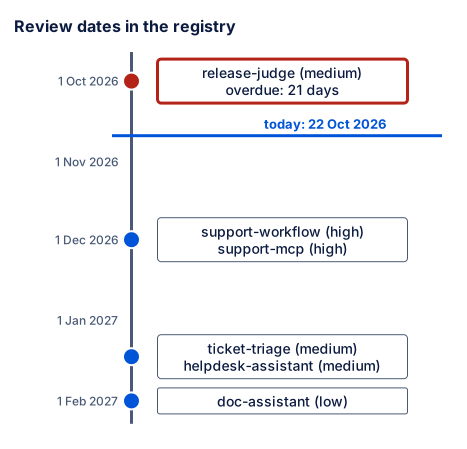
Text description of the diagram
A timeline from late September 2026 to early February 2027, with a line for today, 22 October 2026.
- 1 October 2026:
release-judge(medium). Overdue by 21 days. - 1 December 2026:
support-workflowandsupport-mcp(both high). - 15 January 2027:
ticket-triageandhelpdesk-assistant(both medium). - 1 February 2027:
doc-assistant(low).
The high-risk agents come back first, because their interval is the shortest: 3 months.
A tiny worked example: suspend and resume one agent
Section titled “A tiny worked example: suspend and resume one agent”A suspension is the emergency stop for one agent: the van goes off the road, and nothing else changes. Kwame practises it on the document assistant. Predict first: the assistant already has a valid token from before the suspension. Does that token still work?
-
Keep a token of the document assistant, from before the suspension:
Terminal window OLD=$(python -m estate token doc-assistant)Terminal window $OLD = python -m estate token doc-assistantTerminal window OLD=$(python -m estate token doc-assistant) -
Suspend the assistant, with a reason:
Terminal window python -m estate suspend doc-assistant --reason "drill: suspend one agent"doc-assistant is now suspended.Told 1 of 1 gateway replicas to refresh now.The command asked the gateway to fetch a new snapshot at once. It does not wait for the next poll.
-
Replay one question through the gateway:
Terminal window python -m apps.replay doc-assistant --units 1 --via gatewayThe platform refused a token for doc-assistant: {"error":{"code":"invalid_client","message":"doc-assistant cannot get a token: its registration is suspended."}}The app asked for a new token, and the control plane refused it.
-
Now use the old token, with the curl command of the last lesson:
-H "Authorization: Bearer $OLD"and the body with “Hello”.{"error":{"code":"agent_suspended","message":"doc-assistant is suspended: the gateway refuses its calls.","type":"gateway","check":"registration"}}The token is still valid: its signature and its time are fine. But the registration check refuses it.
-
Resume the assistant, and replay one question again:
Terminal window python -m estate resume doc-assistant --reason "drill over"python -m apps.replay doc-assistant --units 1 --via gatewaydoc-assistant is now active.Told 1 of 1 gateway replicas to refresh now.doc-assistant: 1 requests through the gateway | status {200: 1}answered by: chat-small (gpt-6-luna-2026-09-22) x1tokens: 779 in, 439 out | cost: US$0.0003 -
Read the audit trail of the document assistant:
Terminal window python -m estate events doc-assistant… doc-assistant register usr-kwame {"status": "active", "version": 1}… doc-assistant credentials_issued usr-kwame {"credential": "doc-assistant#1"}… doc-assistant suspended usr-kwame {"before": "active", "reason": "drill: suspend one agent"}… doc-assistant active usr-kwame {"before": "suspended", "reason": "drill over"}Each line starts with the time of the event, in UTC on the estate’s clock. The course leaves the times out here (
…), because yours differ.
The suspension worked in two places. The control plane refused a new token, and the gateway refused the token that was already out. That second check is why the token carries no permissions: the gateway asks the registry on every call. The suspension changed nothing for the other five agents. With the shared key az-key-1, the only stop was to stop two apps.
A practice registry
Section titled “A practice registry”The next steps retire an agent, and a retirement cannot be undone. So you practise them in a second, empty registry. ESTATE_STATE tells the estate where its state lives. A folder inside state/ is ignored by Git, and python -m estate reset deletes it.
-
Use the practice registry in this terminal:
Terminal window export ESTATE_STATE=state/practiceTerminal window $env:ESTATE_STATE = "state\practice"Terminal window export ESTATE_STATE=state/practice -
Check that it is empty:
python -m estate listprints0 registrations.
Your running services still use the real registry in state/. They started before you set the variable.
Review: the release judge
Section titled “Review: the release judge”-
Register the release judge in the practice registry, and list what needs attention:
Terminal window python -m estate register registrations/release-judge.yamlpython -m estate review-due --today 2026-10-22Registered release-judge (version 1): activerelease-judge review overdue since 2026-10-01 (21 days)1 item(s) need attention -
Review it. A medium-risk agent needs a review at least every 6 months, so choose 1 April 2027:
Terminal window python -m estate review release-judge --next 2027-04-01 --note "judge agreement checked: 99 of 101"Reviewed release-judge: active, next review by 2027-04-01.The note quotes the evidence of the review: the judge agreed with the code checks on 99 of 101 replies in Module 2.
-
Try a date that is too far away:
Terminal window python -m estate review release-judge --next 2027-10-01 --note "too late"review_date: a medium risk registration is reviewed at least every 6 monthsThe registry refused it, and kept 1 April 2027.
-
Run
python -m estate review-due --today 2026-10-22again. It prints0 item(s) need attention.
Change: a high-risk agent gets a new tool
Section titled “Change: a high-risk agent gets a new tool”Amira wants the workflow to use the support server’s propose_refund tool too. She changes a copy of the form, so the real file stays the same.
-
Register and review the workflow in the practice registry:
Terminal window python -m estate register registrations/support-workflow.yamlpython -m estate review support-workflow --next 2026-12-01 --note "first review" -
Make a folder
drafts, and copy the form into it asdrafts/support-workflow.yaml. In the copy, add one line at the end of thetoolslist:drafts/support-workflow.yaml (the end of the tools list) - orders.add_ticket_note- support.propose_refund -
Register the changed form:
Terminal window python -m estate register drafts/support-workflow.yamlRegistered support-workflow (version 2): pending until a review approves it (python -m estate review support-workflow) -
Review the change:
python -m estate review support-workflow --next 2026-12-01 --note "propose_refund: approvals stay with a person". -
Read the workflow’s events:
python -m estate events support-workflow.
… support-workflow register usr-kwame {"status": "pending", "version": 1}… support-workflow review usr-kwame {"approved": true, "next_review": "2026-12-01", "note": "first review", "status": "active"}… support-workflow change usr-kwame {"changed": ["tools"], "status": "pending", "version": 2}… support-workflow review usr-kwame {"approved": true, "next_review": "2026-12-01", "note": "propose_refund: approvals stay with a person", "status": "active"}A new tool on a high-risk agent sent it back to pending. Between the change and the review, the workflow could not get a token, and the gateway would have refused its calls. That is the crane on the van: a new inspection before it lifts anything. The event lists exactly what changed, ["tools"], so the reviewer knows what to look at. A change to a low or medium agent keeps it active, and its event records the change just the same.
Omar finds this slow: “One tool, and the workflow stops until Kwame looks?” Kwame’s answer: a review is one command, and a high-risk agent with a new write tool is exactly the case that deserves one. A team that changes often can plan the review with the change, so the pause is minutes.
Retire: the document assistant is replaced
Section titled “Retire: the document assistant is replaced”Mei replaces the document assistant with a new version. The old one is retired.
-
Register the assistant in the practice registry, and issue its credentials:
Terminal window python -m estate register registrations/doc-assistant.yamlpython -m estate credentials issue doc-assistant -
Retire it:
Terminal window python -m estate retire doc-assistant --reason "replaced by the new document assistant"doc-assistant is now retired. -
Try to get a token with its credentials:
Terminal window python -m estate token doc-assistantinvalid_client: Unknown client, wrong secret, or revoked credentials. -
Try to register the same form again:
Terminal window python -m estate register registrations/doc-assistant.yamlNot registered:- doc-assistant is retired: a retired ID is never used again; choose a new ID -
Show the registration, and read its events:
Terminal window python -m estate show doc-assistantpython -m estate events doc-assistantdoc-assistant | Document assistant | retired | version 1owner usr-mei (data) | risk low | autonomy suggests | data internalcapabilities: fast-smalltools: nonebudget US$3/month | 60 requests/min | 500,000 tokens/day | 2 model calls per runreview by 2027-02-01 | credentials: doc-assistant (revoked …)… doc-assistant register usr-kwame {"status": "active", "version": 1}… doc-assistant credentials_issued usr-kwame {"credential": "doc-assistant#1"}… doc-assistant retired usr-kwame {"before": "active", "reason": "replaced by the new document assistant"}… doc-assistant credentials_revoked usr-kwame {"credentials": ["doc-assistant#1"], "reason": "retired"}
What happens to the credentials and the data
Section titled “What happens to the credentials and the data”Retirement answers three questions, and the registry answers only some of them itself:
- Credentials: revoked at once, by the registry. The event
credentials_revokedshows it. Tokens issued before the retirement are refused by the gateway too: their credential ID,doc-assistant#1, is revoked for good. - The record: kept. The registration, its versions and its events stay in the registry, and
review-dueskips them. The ID is never given to another agent. A cost report of September still points to this assistant. It never points to a new agent with the same name. - The agent’s own data: the registry does not touch it. The long form’s
data_retentionsays what the agent keeps and for how long. For the workflow: “The workflow keeps its runs in work/runs.sqlite for 30 days.” Deleting that data, or keeping it for an audit, is the owner’s job. Write the decision in the retirement’s reason. The gateway’s usage records stay too, as evidence for Module 6.
Common mistake
Retired instead of suspended
Symptom: Tomás wants to stop the document assistant for one afternoon, and he types retire instead of suspend. In the evening, python -m estate resume doc-assistant --reason "undo" prints:
doc-assistant is retired: it cannot change any more.The app gets invalid_client for every token.
Cause: a retirement is final by design. Its credentials are revoked, and its ID is closed for good, so that old records never point at a new agent.
Diagnose: python -m estate show doc-assistant says retired, and python -m estate events doc-assistant shows who retired it, when and with which reason.
Recover: register the assistant under a new ID, with new credentials, and change the app’s credentials file. In the practice registry, copy the form to drafts/doc-assistant-2.yaml and change its first line to id: doc-assistant-2. Then register it and issue its credentials:
python -m estate register drafts/doc-assistant-2.yamlpython -m estate credentials issue doc-assistant-2Registered doc-assistant-2 (version 1): activeNew credentials for doc-assistant-2: client ID doc-assistant-2, credential doc-assistant-2#1; the secret is in state/practice/credentials/doc-assistant-2.json (shown nowhere else; keep it out of code and out of Git).Consequence in AI work: a stop for an afternoon is a suspension. Keep retirement for an agent that will not come back. Because the two commands are one word apart, Larkfield practises a retirement in a practice registry first, as you did here.
When to run the lifecycle, and what it costs
Section titled “When to run the lifecycle, and what it costs”Run review-due on a schedule, for example every Monday, and send its list to the owners. Review each high-risk agent at least every 3 months, and after every change of what it may do. Suspend first in an emergency; you can resume. Retire when an agent is replaced or no longer needed, and when its owner leaves and nobody takes it over.
The cost is people’s time: reviews, and someone who reads the list. A registry without reviews is cheaper, and it is wrong within months. The other cost is friction. A high-risk change pauses an agent until a person reviews it. A team that plans its reviews with its changes pays a few minutes. A team that does not plan pays with a stopped agent.
Your turn: Priya leaves
Section titled “Your turn: Priya leaves”Change one condition: an owner leaves. Priya, the owner of the release judge, leaves Larkfield on 30 October 2026. Stay in the practice registry. Predict first: what will review-due list on 2 November, and what must change in the registration?
-
In
config/people.yaml, addleft: 2026-10-30to Priya’s line. Keep a copy of the file first, for exampledrafts/people-backup.yaml. -
Run
python -m estate review-due --today 2026-11-02. -
Check the release judge’s form with
python -m estate check registrations/release-judge.yaml. -
Kwame takes over the judge until the evaluation team has a new lead. Copy the form to
drafts/release-judge.yaml. Change the owner tousr-kwame, and the review date to the one that you set in the review,2027-04-01. -
Register the copy, and run
review-duefor 2 November again. -
Put back
config/people.yamlfrom your copy, and clean up the practice:Terminal window cp drafts/people-backup.yaml config/people.yamlrm -rf drafts state/practiceunset ESTATE_STATEpython -m estate listTerminal window Copy-Item -Force drafts\people-backup.yaml config\people.yamlRemove-Item -Recurse drafts, state\practiceRemove-Item Env:ESTATE_STATEpython -m estate listTerminal window cp drafts/people-backup.yaml config/people.yamlrm -rf drafts state/practiceunset ESTATE_STATEpython -m estate listThe list shows the real registry again: 6 registrations, all active.
Check your work
Priya’s line in config/people.yaml:
usr-priya: {name: Priya, team: evaluation, title: data scientist, left: 2026-10-30}review-due on 2 November:
release-judge owner usr-priya left on 2026-10-30: find a new owner or retire itsupport-workflow review due on 2026-12-012 item(s) need attentionThe workflow’s review is due within 30 days, so it is on the list too. The check of the form:
- owner usr-priya: left the company on 2026-10-30; a registration needs an owner who is hereYour copy differs from the form in two lines:
4c4< owner: usr-priya---> owner: usr-kwame18c18< review_date: 2026-10-01---> review_date: 2027-04-01The new version, and the list after it:
Registered release-judge (version 2): activesupport-workflow review due on 2026-12-011 item(s) need attentionThe event of the change says {"changed": ["owner"], "status": "active", "version": 2}. Why change the review date in the copy? A new version replaces the whole form. With the old date, 1 October, the judge would be overdue again. The course team saw exactly that in its first try. Notice also what did not happen: the judge kept running when Priya left. The registry does not stop an agent when its owner leaves. It puts the agent on the list, and a person decides.
Knowledge check
Section titled “Knowledge check”Check your understanding
Module check. Read this description, then set the agent's risk tier, data classes, capabilities, tools, autonomy and limits, and justify each one. The help-desk assistant drafts replies for support agents from Larkfield's policies and the ticket, through the support MCP server. It reads tickets and searches the policies. The support agent reads the draft and sends the reply. Then compare your answer with registrations/helpdesk-assistant.yaml.
Show the answer
The registration in the estate:
- Risk tier
medium. It reads tickets, so it sees personal data. But it changes nothing, and a person reads every draft before a customer sees it. It is not high, because it cannot move money or goods. It is not low, because of the personal data. data_classes: [personal]. Tickets name customers. It never needs payment data.capabilities: [fast-small]. Short drafts need a fast, cheap model. It has no evaluation that would justify strong-reasoning.tools: [support.search_knowledge, support.get_ticket]. Only the two read tools.support.propose_refundis a write, and the assistant only drafts text, so it does not get it. Module 5 shows the tool gateway refuse that tool, even when the model asks for it.autonomy: suggests. The support agent sends the reply.- Limits: US$2 a month, 60 requests a minute, 300,000 tokens a day, 6 model calls per run. A run is one ticket, so 6 calls stop a loop early and leave room for normal work.
review_date: 2027-01-15. Within 6 months, as a medium tier requires.
A reviewer accepts other limits when you justify them from the traffic. A reviewer does not accept the write tool, autonomy: acts, or a missing data class.
Does your answer have the main points of ours?
Sign in and enroll in the course to save your answers. Every check counts toward the certificate.
Check your understanding
Predict: Kwame suspends the support workflow while it has a token that is valid for 7 more minutes. What happens to its next model call, and to its next token request? What changes if he retires it instead?
Show the answer
The gateway refuses the next model call with 403 agent_suspended, at the registration check. The token is valid, but the registration is not active. The next token request is refused with invalid_client, “its registration is suspended”. The other agents are not affected. If he retires it, both are refused too. But the credentials are also revoked, and the status can never go back to active. The ID support-workflow is closed for good, so the workflow would need a new ID and new credentials.
Does your answer have the main points of ours?
Sign in and enroll in the course to save your answers. Every check counts toward the certificate.
Check your understanding
Why does a change to a high-risk agent's tools send it back to pending, while a change to its purpose text does not?
Show the answer
Tools, capabilities, data classes, autonomy, the risk tier and the limits decide what the agent can do. A new write tool can move money, so a person must check it before the agent uses it. The purpose text describes the agent, but it gives it no new power. The registry still records that change as a new version, with an event that names the changed field. A reviewer sees it at the next review.
Does your answer have the main points of ours?
Sign in and enroll in the course to save your answers. Every check counts toward the certificate.
Recap
- The agent lifecycle has five steps: register, review, change, suspend and resume, and retire. A high-risk agent starts as pending, and a change to its permissions sends it back to pending.
- Every step checks something: the form, the review interval or a reason. Every step is also an event with the time, the person and the details: the audit trail.
- A suspension stops one agent at two places: no new token, and the gateway refuses the tokens already out. A retirement also revokes the credentials and closes the ID for good. The agent’s own data is the owner’s job, from the long form’s
data_retention. python -m estate review-duelists overdue reviews, owners who left and pins that end. On 22 October 2026, the release judge is 21 days overdue. When an owner leaves, the agent keeps running until a person gives it a new owner or retires it.
This module is done. Your project is the same as the snapshot end-of-m03. It has six registrations and five apps with their own credentials. Its gateway refuses every call without a valid token and an active registration. You can now say who each agent is, what it may do and who answers for it. But the gateway only checks who calls and which capability. It does not yet record what each call cost, stop a loop, or keep working when a part of it fails. Next, in Module 4, we build the whole path of the model gateway.
Next: One door for model calls