
One identity per agent
- Lesson 8
- 45 min
- Module 3: Register every agent
Where we are
In the last lesson, we registered six agents, each with an owner, a risk tier, data classes and a budget. But a registration is only a record. The apps still call the provider with shared or personal keys, and nothing ties a call to a registration. In this lesson, we give each agent its own identity and short-lived credentials, and we put a gateway in front of the provider that refuses every call without them, the way an office swaps one door code for a badge per person.
Lesson 8 of 21 · Governing AI Agents: Gateways, Registries and ControlsOne identity per agent
1. Why agents need platform controls
2. Ask for capabilities, not models
3. Register every agent
4. The model gateway
5. Govern tools and actions
6. Usage, evidence and shadow AI
7. Build, buy and roll out
What you will be able to do
Give each of Larkfield’s agents its own identity: a client ID and a secret. The agent trades them for an access token that lasts 10 minutes. Then send the apps’ calls through a model gateway. It holds the only provider key, and it refuses every call without a valid token and an active registration.
Before you startWhat to know and to have ready
What you need to know
- The registrations and their statuses, from What a registration holds. Your registry has 6 active registrations.
- Capabilities and the catalog’s mapping (fast-small → chat-small, strong-reasoning → chat-strong), from Map capabilities to models.
- Helpful, not required: client credentials, from Application flows: Three callers, three identities. The parts of a signed token, from Read a token: JWT, signatures and keys. Both are in Authentication, Permissions and Multi-Tenant Applications. This lesson explains what it needs from them.
What you need on your computer
- The project
~/projects/ai-estateafter the last lesson, with its virtual environment active, and the variableSset to the snapshotend-of-m03(step 1 below sets it again). - Ports 8320, 8321 and 8322 free: the simulator, the control plane and the gateway use them.
curl. It comes with macOS, Windows 10 and newer (ascurl.exe) and most Linux systems.
Tested on macOS (Apple silicon) with Python 3.12.13. The Windows (PowerShell) and Linux commands are written for you, but the course did not run them.
A door code and a badge
Section titled “A door code and a badge”Think of a small office with a door code, 4711. Everyone knows it: the staff, the cleaners, a contractor from last year. One day, the code appears on a note in the street. To lock out a stranger, the office must change the code and tell everyone the new one. And when the alarm log says “door opened at 03:12 with 4711”, nobody knows who opened it.
The office next door gives each person a badge. The badge has the person’s name on it. The door checks the badge against a list at reception, and the log says “Mei, 03:12”. When a contractor leaves, reception takes one name off the list, and nothing changes for anyone else. Visitors get a day badge that stops working in the evening, so a lost day badge is a small problem.
The problem: keys that belong to a team or a person
Section titled “The problem: keys that belong to a team or a person”Larkfield’s apps use door codes. The diagram’s left side shows the keys that you saw in Module 1:

Text description of the diagram
Before (keys in the apps): the triage service (triage-svc-01) and the support workflow (workflow-01) share az-key-1, the service team’s key. The document assistant (docs-01) uses az-key-2, the data team’s key. The release judge on priya-laptop uses az-key-3, Priya’s personal key. weekly_digest.py on build-runner-3 uses fw-7Q2K, a personal Fernway key. The provider sees a key, not an app.
After (one identity per agent): each of the five apps has its own client ID: ticket-triage, support-workflow, doc-assistant, release-judge and helpdesk-assistant. Each sends its calls to the model gateway. The gateway holds az-key-9, the only provider key, and calls Azure with it. The control plane signs tokens for 10 minutes, and gives the gateway the public key that checks them. The weekly digest has no registration, so the gateway refuses it with 401. Its direct path to Fernway stays open until the network blocks it, in Module 6.
Each of these keys causes a problem that you can name:
- A shared key cannot stop one app. Suppose the workflow loops and spends money. To stop it, Kwame must revoke
az-key-1. That stops the triage service too, and 822 tickets a day wait for a person. - A personal key leaves with the person. If Priya leaves, her key stops, or worse, it keeps working on an account that nobody watches. The release judge, which checks every release, depends on it.
- A key in an app cannot say “which app”. The bill says
az-key-1. It does not say whether the triage service or the workflow spent the money. - A key that an app holds can go anywhere.
fw-7Q2Kgoes to a provider without a contract, and nothing in between can refuse it.
Tomás disagrees: “One shared key per team is fine. The team knows its apps.” That works until the team must stop one app, or a person leaves, or the bill must be split between apps. Then the team has a door code.
The idea: an identity per agent, and short-lived tokens
Section titled “The idea: an identity per agent, and short-lived tokens”The fix has three parts, and each one copies the badge.
- An identity per agent. Each registered agent gets its own client ID, which is its registration ID, and a client secret, a random string that only the agent knows. The registry keeps only a hash of the secret, a fingerprint that cannot be turned back into the secret. This pair is the agent’s credentials.
- A short-lived token. The agent does not send its secret with every call. It trades the credentials for an access token at the token endpoint of the control plane, with the flow called client credentials. The control plane is the estate’s own service. It issues tokens, keeps the signing key and publishes the registry and the catalog to the gateways. The token is a JSON Web Token (JWT): readable JSON, signed by the control plane. It names the agent, the service that it is for (its audience), and when it expires: after 600 seconds. It also names the secret that got it, by its credential ID. That is the day badge.
- One door. The apps no longer call the provider. They call the model gateway, a service that speaks the same API as the provider. The gateway holds the only provider key. It checks every token with the control plane’s public key, and it looks up the agent’s registration before it sends anything on.
The token carries no team, no role and no permissions. It says only “this is ticket-triage, for the model gateway, until 14:10”. The gateway reads what ticket-triage may do from the registry, through a snapshot that it gets from the control plane every 2 seconds. So a change in the registry works at once, even for tokens that were already issued. This is the same token shape as the authentication course and the MCP course: RS256, typ: at+jwt, issuer, subject, audience and expiry.
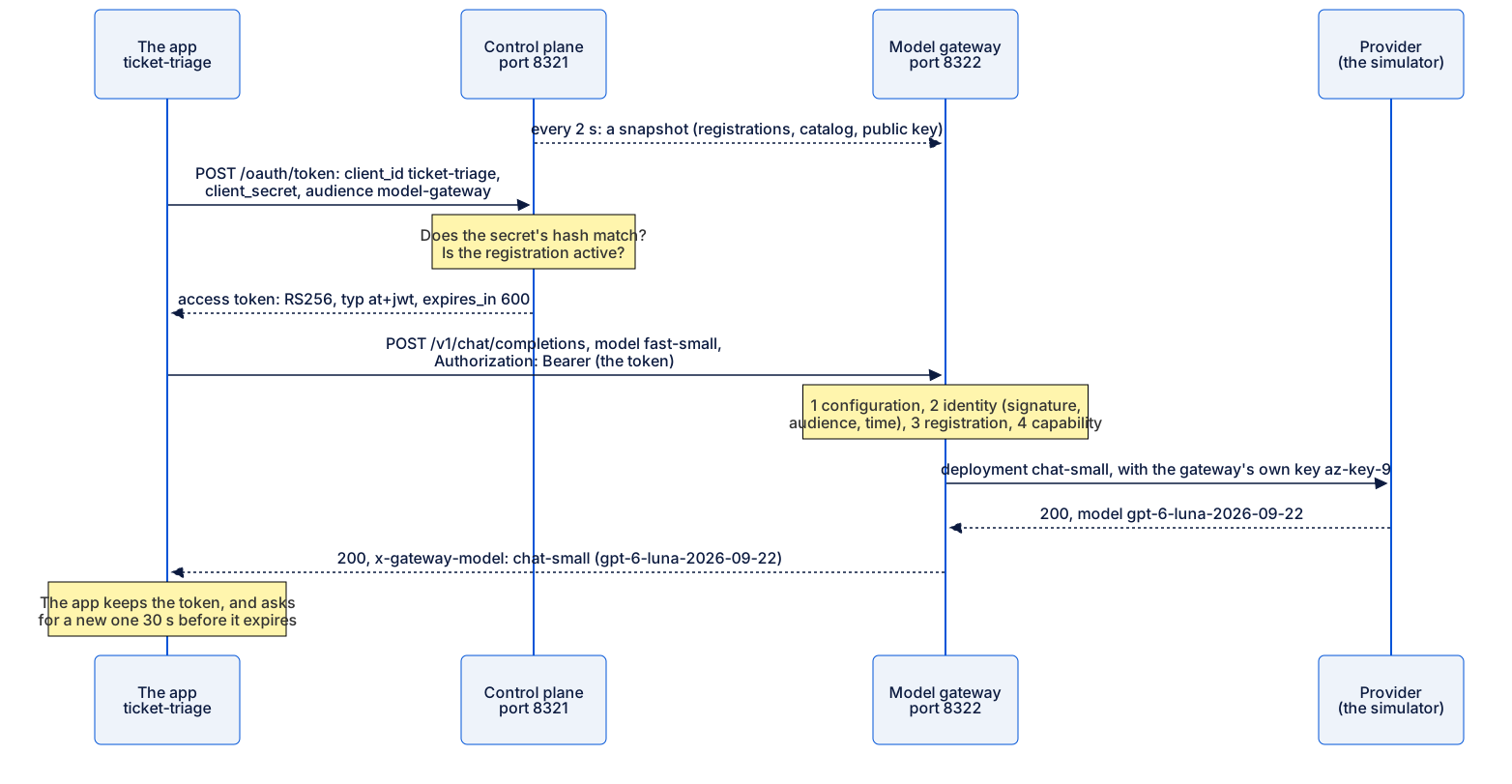
Text description of the diagram
- Every 2 seconds, the control plane gives the gateway a snapshot: the registrations, the catalog and the public key.
- The app sends
POST /oauth/tokento the control plane:client_idticket-triage, itsclient_secret, and the audiencemodel-gateway. - The control plane checks that the secret’s hash matches and that the registration is active. It answers with an access token: RS256,
typ: at+jwt,expires_in: 600. - The app sends
POST /v1/chat/completionsto the gateway, withmodel: fast-smalland the headerAuthorization: Bearerfollowed by the token. - The gateway checks, in order: its configuration, the identity (signature, audience, time), the registration and the capability.
- It sends the request for the deployment
chat-smallto the provider, with its own keyaz-key-9. - The provider answers 200, from the model
gpt-6-luna-2026-09-22. - The gateway answers the app with 200 and the header
x-gateway-model: chat-small (gpt-6-luna-2026-09-22). - The app keeps the token, and asks for a new one 30 seconds before it expires.
Larkfield: add identities and the first gateway
Section titled “Larkfield: add identities and the first gateway”You copy the identity code, the control plane, the gateway, the apps’ new client and this module’s tests. Then your project is the same as the snapshot end-of-m03.
-
Stop the estate if it runs:
Terminal window python -m estate down -
Copy this lesson’s files:
Terminal window S=../nextia-learning-labs/C32/snapshots/end-of-m03cp $S/estate/identity.py $S/estate/server.py $S/estate/configstore.py estate/cp $S/estate/cli/identity.py $S/estate/cli/config.py $S/estate/cli/core.py estate/cli/cp -R $S/gateway .cp $S/apps/client.py $S/apps/replay.py apps/cp $S/tests/conftest.py $S/tests/test_identity.py $S/tests/test_configstore.py tests/cp $S/tests/test_gateway_first.py $S/tests/test_replay.py $S/tests/test_registry.py tests/cp $S/README.md $S/.env.example .Terminal window $S = "..\nextia-learning-labs\C32\snapshots\end-of-m03"Copy-Item $S\estate\identity.py, $S\estate\server.py, $S\estate\configstore.py estate\Copy-Item -Force $S\estate\cli\identity.py, $S\estate\cli\config.py, $S\estate\cli\core.py estate\cli\Copy-Item -Recurse $S\gateway .Copy-Item -Force $S\apps\client.py, $S\apps\replay.py apps\Copy-Item -Force $S\tests\conftest.py, $S\tests\test_identity.py, $S\tests\test_configstore.py tests\Copy-Item -Force $S\tests\test_gateway_first.py, $S\tests\test_replay.py, $S\tests\test_registry.py tests\Copy-Item -Force $S\README.md, $S\.env.example .Terminal window S=../nextia-learning-labs/C32/snapshots/end-of-m03cp $S/estate/identity.py $S/estate/server.py $S/estate/configstore.py estate/cp $S/estate/cli/identity.py $S/estate/cli/config.py $S/estate/cli/core.py estate/cli/cp -R $S/gateway .cp $S/apps/client.py $S/apps/replay.py apps/cp $S/tests/conftest.py $S/tests/test_identity.py $S/tests/test_configstore.py tests/cp $S/tests/test_gateway_first.py $S/tests/test_replay.py $S/tests/test_registry.py tests/cp $S/README.md $S/.env.example . -
Run the tests:
Terminal window python -m pytest -qThe last line:
135 passed, 1 deselected in 16.61sYour time differs. The 31 new tests check the registry, the tokens, the configuration that the control plane publishes, and the gateway’s first checks.
-
Create the estate’s keys and its first configuration:
Terminal window python -m estate initPublished configuration version 1.State folder: /Users/you/projects/ai-estate/stateThe gateway's provider key is in state/secrets.json (only the gateway reads it).The signing key of the estate's tokens is in state/identity/ (only the control plane reads it).Two secrets now exist, and each one has one reader. The gateway reads the provider key. The control plane reads the key that signs tokens.
A tiny worked example: one agent’s credentials and token
Section titled “A tiny worked example: one agent’s credentials and token”Issue the triage service’s credentials, and look at its token.
-
Issue the credentials:
Terminal window python -m estate credentials issue ticket-triageNew credentials for ticket-triage: client ID ticket-triage, credential ticket-triage#1; the secret is in state/credentials/ticket-triage.json (shown nowhere else; keep it out of code and out of Git).The file has two fields,
client_idandclient_secret. The secret starts withest-. Git ignores the folderstate/. The registry calls this secret the credentialticket-triage#1; a new secret would be#2. -
Get a token with these credentials, and print its two readable parts:
Terminal window python -m estate token ticket-triage --claims{"header": {"alg": "RS256","kid": "0250ab693191b30a","typ": "at+jwt"},"claims": {"iss": "larkfield-estate","sub": "ticket-triage","aud": "model-gateway","iat": 1792721016,"nbf": 1792721016,"exp": 1792721616,"jti": "19a7b2e5d9da4f3c8f777a4070e5617c","client_id": "ticket-triage","cid": "ticket-triage#1","scope": "model:call"}}Your
kid, times andjtidiffer.
Read every value, as the gateway does:
| Field | Value | What it means |
|---|---|---|
alg |
RS256 |
Signed with the control plane’s private RSA key. The gateway checks it with the public key. |
kid |
0250ab693191b30a |
Which public key to use. It comes from a hash of the key, so a new key gets a new kid. |
typ |
at+jwt |
An access token, not another kind of JWT. The gateway refuses other types. |
iss |
larkfield-estate |
Who issued it: the estate’s control plane. |
sub |
ticket-triage |
Who calls: the registration ID. The gateway looks up this registration. |
aud |
model-gateway |
Which service it is for. The tool gateway refuses it. |
iat, nbf, exp |
exp − iat = 1792721616 − 1792721016 = 600 |
Issued at, not before, and expires: valid for 600 seconds, 10 minutes. |
jti |
a random ID | This token’s own ID, for the logs. |
scope |
model:call |
It allows model calls, nothing else. |
cid |
ticket-triage#1 |
Which credential (which secret) got the token. A revoked credential’s tokens are refused. |
Notice what is missing: no team, no capabilities, no budget. If a token carried “capabilities: fast-small”, a change to the registration would wait up to 10 minutes for old tokens to expire. Because the gateway reads them from the registry, a change works on the next call.
Start the platform and send calls through it
Section titled “Start the platform and send calls through it”-
Start the estate:
Terminal window python -m estate upThe output (your process numbers differ):
provsim up (process 90603) http://127.0.0.1:8320control up (process 90604) http://127.0.0.1:8321gateway up (process 90605) http://127.0.0.1:8322Three services now run: the provider simulator, the control plane (tokens, keys and configuration) and one gateway.
-
Check that they answer:
Terminal window python -m estate statusprovsim running {"ok":true,"recordings":5253,"speed":0.0,"egress":"open"}control running {"ok":true,"revision":10}gateway running {"replica":"a","config":"v1.r10","freshness":"fresh"}v1.r10means configuration version 1 with registry revision 10. Each change to the registry raises the revision.freshmeans that the gateway’s last poll of the control plane worked. -
Send five triage tickets through the gateway:
Terminal window python -m apps.replay ticket-triage --units 5 --via gatewayThe output, replayed:
ticket-triage: 10 requests through the gateway | status {200: 10}answered by: chat-small (gpt-6-luna-2026-09-22) x5, embed-small (text-embedding-3-small) x5tokens: 10,018 in, 2,025 out | cost: US$0.0020The same tickets, the same answers and the same cost as in Module 1. Only the route changed.
-
Send them again with
--verbose, and read the first two lines:Terminal window python -m apps.replay ticket-triage --units 5 --via gateway --verbose200 fast-small -> chat-small (gpt-6-luna-2026-09-22)200 embed -> embed-small (text-embedding-3-small)The app asked for the capability
fast-small. The gateway chosechat-small, and its header names the model version that answered.
Five requests, five places where they stop
Section titled “Five requests, five places where they stop”Now test the door. Each request below is wrong in one way. Before you send each one, predict which check stops it. Send a request without a token:
curl -s -i -X POST http://127.0.0.1:8322/v1/chat/completions -H 'Content-Type: application/json' -d '{"model": "fast-small"}'curl.exe -s -i -X POST http://127.0.0.1:8322/v1/chat/completions -H "Content-Type: application/json" -d '{\"model\": \"fast-small\"}'curl -s -i -X POST http://127.0.0.1:8322/v1/chat/completions -H 'Content-Type: application/json' -d '{"model": "fast-small"}'The answer, with three headers left out (date, server, content-length):
HTTP/1.1 401 Unauthorizedx-gateway-request-id: b4206dfc210244e9x-gateway-replica: ax-gateway-config: v1.r10content-type: application/json
{"error":{"code":"missing_token","message":"Send your access token: Authorization: Bearer <token>.","type":"gateway","check":"identity"}}
The answer names the check that refused it: "check": "identity". The other four requests use the same command with another header or body. Put a token in a variable first: on macOS and Linux, TOKEN=$(python -m estate token ticket-triage); in PowerShell, $TOKEN = python -m estate token ticket-triage. Then add -H "Authorization: Bearer $TOKEN" to the command.
| You send | The gateway answers |
|---|---|
The service team’s provider key, Bearer sim-az-service-team-0001 |
401 invalid_token: “The token is not a JWT.” |
A token for the tool gateway: python -m estate token ticket-triage --audience tool-gateway |
401 wrong_audience: “This token is not for the model-gateway.” |
The triage token, with "model": "strong-reasoning" and one message, “Hello” |
403 capability_not_allowed: “ticket-triage’s registration does not list strong-reasoning.” |
The triage token, with "model": "fast-small" and the message “Hello” |
422 no_recording, from the simulator |
The last one passed every check of the gateway. The gateway sent it to the provider with its own key, and the simulator had no recording of “Hello”. That 422 shows that the request really got through the door.

Text description of the diagram
The gateway runs five checks in a fixed order, and the first one that fails answers:
- Configuration: does the gateway have a snapshot? If not,
503 control_unavailable. - Identity: a valid token for the model gateway? No token gives
401 missing_token. A provider key, the team’s or the digest’s, gives401 invalid_token: “The token is not a JWT.” A token for the tool gateway gives401 wrong_audience. - Registration: is the agent registered and active? If not,
403 not_registeredoragent_suspended. - Capability: does the registration list it? The triage service asking for strong-reasoning gets
403 capability_not_allowed. - Route: the gateway sends the request to chat-small with its own key. A body that no course recorded (“Hello”) gets
422 no_recordingfrom the simulator. A recorded triage request gets 200, withx-gateway-model: chat-small (gpt-6-luna-2026-09-22).
The order matters. Identity comes before registration, because the gateway cannot look up a registration until it knows who calls. Capability comes after registration, because the registration lists the capabilities. The next module adds data classes, limits, guardrails and failure modes to the same path.
The old door is still open
Section titled “The old door is still open”Run the triage service the old way, without --via gateway:
python -m apps.replay ticket-triage --units 1ticket-triage: 2 requests straight to the provider | status {200: 2}answered by: chat-small (gpt-6-luna-2026-09-22) x1, embed-small (text-embedding-3-small) x1tokens: 1,954 in, 375 out | cost: US$0.0004It works, because the app still has az-key-1 in its code. python -m provsim bill shows the difference: the two direct requests are on az-key-1, and every other request is on az-key-9, the gateway’s key. A gateway governs only the calls that pass through it. Registration is enforced only when there is no way around it. Only the gateway may hold provider keys, and the network must block every other path to the providers. Find unregistered AI in Module 6 finds who still uses the old door, and closes it with a network rule.
Your turn: the support workflow and the unregistered script
Section titled “Your turn: the support workflow and the unregistered script”Change one condition: another agent, and then a script with no registration. Predict first: what happens when you replay the support workflow through the gateway now?
-
Replay two workflow tasks through the gateway:
python -m apps.replay support-workflow --units 2 --via gateway. -
Read the message. Then issue the workflow’s credentials, and replay the two tasks again.
-
Point the weekly digest at the gateway, and run it:
Terminal window FERNWAY_URL=http://127.0.0.1:8322/v1 python apps/digest/weekly_digest.pyTerminal window $env:FERNWAY_URL = "http://127.0.0.1:8322/v1"; python apps/digest/weekly_digest.py; Remove-Item Env:FERNWAY_URLTerminal window FERNWAY_URL=http://127.0.0.1:8322/v1 python apps/digest/weekly_digest.py -
Send the gateway the digest’s own key with curl, as in the table above:
Bearer sim-fw-personal-7Q2K9XW4and{"model": "fernway-swift"}. -
Issue the credentials of the last three apps, and replay three units of the document assistant and of the release judge through the gateway.
Terminal window for a in doc-assistant release-judge helpdesk-assistant; do python -m estate credentials issue $a; doneTerminal window foreach ($a in "doc-assistant", "release-judge", "helpdesk-assistant") { python -m estate credentials issue $a }Terminal window for a in doc-assistant release-judge helpdesk-assistant; do python -m estate credentials issue $a; done
Check your work
Before its credentials, the workflow cannot even ask for a token (your path differs):
No credentials for support-workflow (/Users/you/projects/ai-estate/state/credentials/support-workflow.json). Register it and run: python -m estate credentials issue support-workflowWith its credentials, replayed:
support-workflow: 6 requests through the gateway | status {200: 6}answered by: chat-strong (gpt-6.1-sol-2026-09-29) x6tokens: 14,776 in, 738 out | cost: US$0.0369The workflow asked for strong-reasoning, and its registration lists it, so the gateway sent it to chat-strong.
The digest, through the gateway, ends with a Python traceback whose last line is:
urllib.error.HTTPError: HTTP Error 401: UnauthorizedThe curl request shows why:
{"error":{"code":"invalid_token","message":"The token is not a JWT.","type":"gateway","check":"identity"}}The digest sends a personal provider key, not a token. It cannot get a token, because it has no registration, and it cannot register, because its owner left. So the gateway refuses it at the identity check, before any provider sees its customer messages. But without FERNWAY_URL, the digest still goes straight to Fernway. The refusal is real, and the gap is real too.
The last replays, replayed:
doc-assistant: 3 requests through the gateway | status {200: 3}answered by: chat-small (gpt-6-luna-2026-09-22) x3tokens: 2,385 in, 681 out | cost: US$0.0006release-judge: 3 requests through the gateway | status {200: 3}answered by: chat-strong (gpt-6.1-sol-2026-09-29) x3tokens: 4,559 in, 309 out | cost: US$0.0122Priya’s personal key is no longer in the release judge’s path. Module 5 uses the help-desk assistant’s credentials. The support MCP server gets none: it is called, and it calls no model.
Common mistake
A secret pasted into the code
Symptom: Amira wants the triage service to start without the file state/credentials/ticket-triage.json, so she pastes the client secret into apps/client.py. A week later, the secret is in the Git history, which forty people can read. Nothing fails, and no error appears.
Cause: a client secret is a long-lived credential, like the provider key that it replaces. In code, it travels with every copy of the repository.
Diagnose: search the code for the prefix of the estate’s secrets: grep -rn "est-" apps on macOS and Linux, or Select-String -Path apps\*.py -Pattern "est-" in PowerShell. In a clean project, it finds nothing. Module 6 adds a scanner that finds provider keys and secrets in code.
Recover: revoke the credentials, then issue new ones at once. Keep the old token for a test first: OLD=$(python -m estate token ticket-triage) (PowerShell: $OLD = python -m estate token ticket-triage).
python -m estate credentials revoke ticket-triage --reason "the secret was in Git"python -m estate credentials issue ticket-triagepython -m apps.replay ticket-triage --units 1 --via gatewayRevoked 1 credential(s) of ticket-triage. Their tokens are refused too, for good.Told 1 of 1 gateway replicas to refresh now.New credentials for ticket-triage: client ID ticket-triage, credential ticket-triage#2; the secret is in state/credentials/ticket-triage.json (shown nowhere else; keep it out of code and out of Git).Told 1 of 1 gateway replicas to refresh now.ticket-triage: 2 requests through the gateway | status {200: 2}answered by: chat-small (gpt-6-luna-2026-09-22) x1, embed-small (text-embedding-3-small) x1tokens: 1,954 in, 375 out | cost: US$0.0004The new secret works at once. Now send the old token with the curl command of this lesson, -H "Authorization: Bearer $OLD":
{"error":{"code":"token_revoked","message":"This token's credentials (ticket-triage#1) were revoked.","type":"gateway","check":"identity"}}The old token stays dead, although it has not expired yet. Then remove the secret from the code. Keep the new secret outside the code: in the credentials file here, or in a secret store or the platform’s workload identity in production.
This works because each secret is its own credential, with its own ID: ticket-triage#1, then ticket-triage#2. The token carries that ID in its claim cid, and the registry keeps every revocation for good. The gateway compares IDs, not times, so it is exact even within the same second. The course found a real bug here while it wrote this lesson, and fixed it. In the first version, new credentials replaced the revoked row in the registry, and the gateway forgot the revocation at its next poll. A token stolen before the revocation then worked again, until its own expiry. A revocation list must never be overwritten by the next secret.
Consequence in AI work: a leaked client secret is smaller than a leaked provider key. It works only for one registered agent, within its registration’s capabilities and limits, and the platform can revoke it without touching any other app. That is the point of one identity per agent, but only if the secret stays out of the code.
When to use one identity per agent, and what it costs
Section titled “When to use one identity per agent, and what it costs”Use it as soon as two apps share a provider account, or a person’s key runs a shared tool. The gains are the ones of the badge. You can stop one agent alone, a person who leaves takes no agent with them, and every call names its agent.
It costs three things. First, a control plane that issues tokens. If it is down, an app with a valid token keeps working for up to 10 minutes, but a restarted app cannot get a token. Module 4 measures that. Second, a secret per agent that someone must store, rotate and revoke. Third, a gateway on every call. That is the subject of the next module, including what happens when it fails.
The identity has limits too. It names the agent, not the person whom the agent serves. When the help-desk assistant reads a ticket for Sam, the token says helpdesk-assistant, not Sam. Delegating a person’s rights to an agent is a topic of the authentication course. And the support MCP server will see the tool gateway, not the agent. Module 5 shows what that means.
Knowledge check
Section titled “Knowledge check”Check your understanding
The workflow and the triage service share az-key-1. The workflow starts to loop. What can Kwame do today with the shared key, and what can he do once each app has its own identity behind the gateway?
Show the answer
With the shared key, he can only revoke az-key-1. That stops the triage service too, and 822 tickets a day would wait for a person. With one identity per agent, he suspends or revokes only support-workflow. Its next token request is refused, and the gateway refuses its calls, while the triage service’s own token keeps working. The provider key az-key-9 stays with the gateway, untouched.
Does your answer have the main points of ours?
Sign in and enroll in the course to save your answers. Every check counts toward the certificate.
Check your understanding
Predict: an attacker copies the triage service's access token from a log at 14:00. What can they do with it, and until when? What would be different with a stolen provider key?
Show the answer
They can call the model gateway as ticket-triage, only with the capabilities of its registration: fast-small and embed. The token works until it expires, 600 seconds after it was issued, about 14:10. The tool gateway refuses it, because its audience is model-gateway. Revoking the triage credentials kills it at once. A stolen provider key would work for any model, from anywhere, with no registration and no limits. It would work until someone changed it for every app that used it.
Does your answer have the main points of ours?
Sign in and enroll in the course to save your answers. Every check counts toward the certificate.
Check your understanding
The token carries no capabilities and no team. Why is that a good choice here? What does it cost?
Show the answer
The gateway reads the permissions from the registry’s snapshot, which it refreshes every 2 seconds. So a change, such as removing a capability or suspending the agent, works on the next call. With permissions in the token, it would wait until the old tokens expire. The cost: the gateway must have a recent snapshot, so it depends on the control plane for its configuration. It keeps the last snapshot when the control plane is down, which Module 4 measures.
Does your answer have the main points of ours?
Sign in and enroll in the course to save your answers. Every check counts toward the certificate.
Recap
- Each registered agent has its own identity: a client ID (its registration ID) and a client secret. The registry keeps only the secret’s hash.
- With client credentials, the agent trades them for an access token, a signed JWT (RS256,
typ: at+jwt). It names the agent (sub), the service (aud) and the expiry, 600 seconds later. It carries no permissions. - The model gateway holds the only provider key,
az-key-9. It checks configuration, identity, registration and capability, in this order, and the first failure answers with its code and its check. - A provider key, a token for the tool gateway, an unknown agent and a capability that the registration does not list are all refused. The weekly digest is refused at the identity check.
- The old path still works while an app has a provider key and the network lets it out.
Your project now: ~/projects/ai-estate, the same as the snapshot end-of-m03, with 135 tests that pass, three services, and credentials for five apps. You can now tie every gateway call to one registered agent. But registrations do not stay true: owners leave, reviews pass their date and agents are replaced. Next, we follow an agent through its whole life, and find the ones that nobody looks after.
Next: The agent lifecycle