
Data and identity flows
- Lesson 6
- 55 min
- Module 2: Design the end-to-end architecture
Lesson 6 of 19 · AI System Design and Cost EngineeringData and identity flows
1. Start with requirements
2. Design the end-to-end architecture
3. Estimate resources and cost
4. Optimize with measured trade-offs
5. Design for failure and growth
6. Communicate the proposal
What you will be able to do
Follow the tenant, the person’s role, the document version and the answer through every request and every background job of the design. A part that forgets them can mix two shops’ data without a single error message.
Before you startWhat to know and to have ready
What you need to know
- The eight parts of the design and the container diagram, from Service boundaries.
- Row-level security: the database refuses another tenant’s rows, from Tenant-safe queries in Authentication, Permissions and Multi-Tenant Applications.
- A job that saves who asked and for which tenant, from Job identity context in the same course.
- Access labels (
publicorstaff) on every chunk, from Permissions and isolation in RAG: Building AI That Uses Your Data. - A cache key that holds everything that changes the answer, from Keys and invalidation in Scaling APIs and AI Workloads.
What you need on your computer
- Your pack from the last lesson:
python -m pytest -qprints2 failed, 14 passed. - A way to see a Mermaid diagram. GitHub shows Mermaid blocks in Markdown files. mermaid.live draws a pasted block in the browser, with no account. In VS Code, a Mermaid preview extension also works.
A tag on every suitcase
Section titled “A tag on every suitcase”At the airport, you check in a suitcase. The desk puts a tag on it with your name, your flight and your destination. Then the suitcase travels alone, through belts, scanners and carts. None of the people on the way knows you. They read the tag.
The tag must travel the whole way. A bag without a tag stops at the first belt. A bag with the wrong tag goes to the wrong city, and nobody notices until you open it. And the airline keeps a record: which bag flew on which flight, so it can answer questions later.
The problem: the tenant gets lost on the way
Section titled “The problem: the tenant gets lost on the way”The container diagram shows which parts talk to each other. It does not show what each message carries. Here are two ways the shared assistant can lose its tag. Both are constructed cases, written to show the failure, not runs of the project.
The cache without the tenant. Tomás proposes a simple answer cache: the key is the question. At 10:00, a Larkfield agent asks “How many days do I have to return an item?” The assistant answers from Larkfield’s returns policy, with citations, and saves the answer. At 10:20, a Bramble Books customer asks the same words. The key matches, and the cache returns Larkfield’s answer, with Larkfield’s citations. It is fast: the scaling course measured a cache hit at about 0.014 s, with Valkey as the cache. There is no error and no log line that looks wrong. The quality target Q3, “no tenant ever sees another tenant’s document or answer”, is broken in silence.
The answer without its versions. Ines changes Bramble Books’ supplier terms: version 5 replaces version 4. A week later, a supplier disputes an answer that an agent gave before the change. The answer was saved with its text and its citations, but not with the version of each cited document. Ines cannot prove which terms the assistant read. That breaks Q5, “every answer kept 1 year with question, citations, document versions, tenant and user”.
Neither failure comes from a bad part. Each part did its job. The data lost its tag between two parts.
The idea: data and identity flows
Section titled “The idea: data and identity flows”The identity context of a request is the tag. It has three facts: who asks (the user), where (the tenant), and as what (the role, which sets the audience: staff or public). The help-desk tool cannot invent it. It comes from a checked token, and every part after that reads it from there.
A data and identity flow is the path of each piece of data through the design, with its tag. For every piece, it says where the piece starts and where it is kept. It also names its tenant key, its version and who may read it. You draw it once, as a diagram and a table, and check every arrow against four rules:
- Every request and every job carries the tenant, from a checked source: the token for a request, the job row for a job.
- Every stored row keeps its tenant, and the database refuses other tenants’ rows even when the code forgets a filter. That is row-level security, as in the authentication course.
- Every key that finds data includes the tenant and the audience: a cache key, a file path, a search filter.
- Every answer keeps the versions it used, so an old answer can still be explained after the documents change.
The name says what you draw: the data, and the identity that travels with it.
A tiny example: one question, every value
Section titled “A tiny example: one question, every value”Grace asks a question as a Larkfield agent. A Bramble Books customer asks the same words. Here is each step, with the value that the tag has at that step. The user IDs and version numbers are constructed for the example.
| Step | Grace (Larkfield agent) | The customer (Bramble Books website) |
|---|---|---|
| Token after sign-in | user usr-grace, tenant larkfield, role agent |
user cust-1093, tenant bramble, role customer |
| Audience from the role | staff |
public |
| Database session | SET app.tenant = 'larkfield' |
SET app.tenant = 'bramble' |
| Documents version (rises with each change) | 41 | 7 |
| Cache key | larkfield · staff · 41 · “how many days do i have to return an item” |
bramble · public · 7 · “how many days do i have to return an item” |
| Search filter | Larkfield’s chunks, staff and public | Bramble’s chunks, public only |
| Saved with the answer | tenant, user, question, citations, returns-policy v2 |
tenant, user, question, citations, returns-policy v4 |
The question is the same, but the two keys differ in three places, so the second request cannot reuse the first answer. The search filter repeats the rule, and row-level security repeats it a third time in the database. If one place forgets the tenant, the next one still holds. And each saved answer names the exact versions it read.

Text description of the diagram
A person signs in and gets a token with the user, the tenant and the role. The Assistant API reads the token. It sets the tenant for each database transaction, so row-level security applies. It puts the tenant in the cache key and in the job row. It sends the model provider only this tenant’s passages. The ingestion worker takes a job and sets the tenant from the job row, not from anything else. It writes files under the tenant’s own folder. Each answer is saved with the document versions it used, for the audit log. The phone version shows only the token, the database and the job.
Larkfield’s flows
Section titled “Larkfield’s flows”Kwame draws two pictures for the proposal. The first is the diagram above. The second is the request flow of the main journey, J1: an agent asks a question. It shows the same parts as the container diagram, in time order.
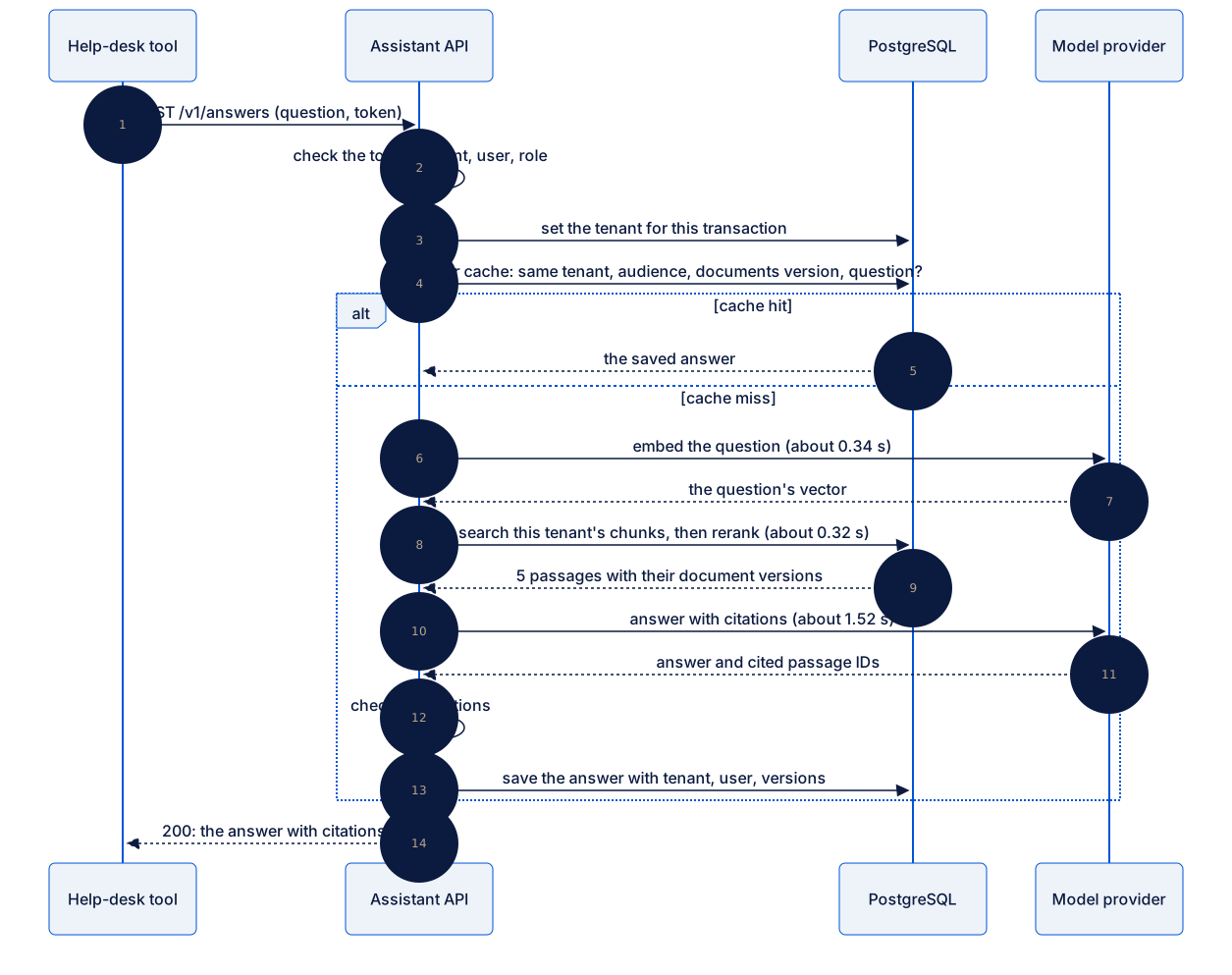
Text description of the diagram
The help-desk tool sends the question and the token. The API checks the token and sets the tenant for the transaction before any query. It looks in the answer cache with the tenant, the audience, the documents version and the question. On a hit, it returns the saved answer. On a miss, it embeds the question (about 0.34 s). It searches this tenant’s chunks and reranks them (about 0.32 s). Then it asks chat-small for an answer with citations (about 1.52 s). It checks that every citation points to a passage it sent, saves the answer with the tenant, the user and the versions, and replies. The times are measured medians; the reranker time is from the RAG course, on a laptop.
The diagram turns rules into steps. Step 3, the tenant for the transaction, comes before step 4, the first query, so no query runs without it. The passages in step 9 come back with their document versions, and step 13 saves them. The flow names one more check: the API checks that every citation points to a passage it actually sent. A citation to another tenant’s document is then impossible to save.
Then Kwame writes the table that goes under the diagram. Each kind of data gets one row:
| Data | Where | Tenant key | Version | Who may read it |
|---|---|---|---|---|
| Document file | File storage | folder tenant/<id>/ |
one file per version | the worker; staff of that tenant |
| Chunks and vectors | PostgreSQL | tenant_id + row-level security |
document_version |
the API for that tenant (public documents for customers) |
| Answer | PostgreSQL | tenant_id |
the document versions it cited | staff and owner of that tenant |
| Cache entry | PostgreSQL | in the key | documents version in the key | the API for that tenant and audience |
| Job | PostgreSQL | tenant_id |
the document version | the worker |
The table finds the gaps that the diagram hides. Every row needs a tenant key. If a cell is empty, a rule is missing. Mei checks the “Version” column against J3 and J4: old versions stay, and answers name the versions they used.
What does this safety cost? The authentication course measured row-level security on a request: 4.3 ms without it and 4.4 ms with it, about 0.1 ms. An answer takes about 2.18 s. The tenant rule costs less than a tenth of a percent of the time, so nobody needs to argue about it.
The background job carries its own tag
Section titled “The background job carries its own tag”The worker has no token: nobody signs in to a job. Take Ines’s upload of version 5 of Bramble Books’ returns policy. The upload request writes the tag into the job row, from the checked token: the tenant bramble and the document version 5. The worker reads the tenant from that row and sets it for its own transaction. It never takes the tenant from the file name or from the file’s text, because an editor controls both.
Versions follow the same path. The worker saves the chunks of version 5 and then, in one transaction, marks version 5 active and version 4 replaced. The documents version of Bramble Books rises, from 7 to 8 in the example. Every cache key with 7 stops matching, so no customer gets an answer from version 4 after the change. The old answers still name version 4, so Ines can explain them later. The module practice in Simplicity and evolution draws this job step by step.
Guided practice: write the two flow files
Section titled “Guided practice: write the two flow files”You write two Markdown files in architecture/. Each holds a Mermaid diagram as text. Mermaid draws a diagram from a few lines of text. So the diagram lives in Git next to the code, and changes in a pull request.
-
Create the file
architecture/data-and-identity-flow.md. Start it with a title and one sentence:# Data and identity flow: where the tenant travelsEvery request and every job carries the tenant. The database refuses a row of another tenant even when the code forgets a filter (row-level security, as in the authentication course). -
Below it, add a Mermaid block. Start with the first two arrows of the diagram above:
```mermaidflowchart LRU[Person signs in] -->|token: user, tenant, role| A[Assistant API]A -->|SET app.tenant for the transaction| DB[(PostgreSQL<br/>row-level security)]``` -
Add the other arrows inside the block. Copy them from the diagram above, from the cache key to the audit log. Paste the block at mermaid.live and check that the picture matches the diagram above.
-
Under the block, add the table of the five kinds of data, from Larkfield’s flows above.
-
Run the tests:
Terminal window python -m pytest -qFAILED tests/test_components.py::test_the_sequences_name_the_parts_of_the_diagram1 failed, 15 passed in 0.03sThe test of the tenant now passes. It checks that your file names the four places where the tenant travels:
cache key,job row,row-level securityandtenant/. -
Create
architecture/request-flow.mdwith the request flow of J1. Use a MermaidsequenceDiagramwith four participants: the help-desk tool, the Assistant API, PostgreSQL and the model provider. Write one arrow per step of the diagram above. -
Compare both files with the ones in the snapshot
end-of-m02. Run the tests again. They still print1 failed, 15 passed: the last failing test needs the ingestion sequence, which you draw in the module practice.
When to trace the flows, and what it costs
Section titled “When to trace the flows, and what it costs”Trace them whenever more than one tenant, or more than one audience, shares a part. That is every multi-tenant design, and every design with public and staff users. Trace them again when you add a store, a cache or a background job. Each one is a new place where the tag can fall off.
Do not trace every field. The tag (tenant, user, audience) and the version are the facts that cause silent failures. Other fields belong to the database design.
The cost is mostly people’s time: an hour of drawing, and a review with each store’s owner. In the running system, the cost is small: about 0.1 ms per request for row-level security, and a few more characters in each cache key. Larger costs come only if a store cannot hold the tenant rule. For example, a second store for vectors would need its own copy of the rule, tested on its own. That is one reason the design keeps all records in PostgreSQL.
Common mistakes
Section titled “Common mistakes”Common mistake
The job row is missing from the flow
Symptom: after an edit, the tenant test fails again:
E AssertionError: assert 'job row' in '# Data and identity flow: where the tenant travels\n\nEvery request and every job carries the tenant. The database re...\nMeasured: row-level security added about 0.1 ms to a request in the authentication course (4.3 ms off, 4.4 ms on).\n'FAILED tests/test_components.py::test_the_tenant_travels_with_every_flow - As...Cause: the arrow A -->|tenant in the job row| Q was deleted. The picture still looks complete, but the worker no longer has a source for the tenant. In a real system, that worker would take the tenant from somewhere else, such as the file name.
Fix: put the arrow back. The worker’s only source of the tenant is the job row, written from the checked token.
Common mistake
A cache key without the audience
Symptom: a customer on the website gets an answer that quotes the staff discount. Nothing in the logs looks wrong: it was a cache hit.
Cause: the cache key has the tenant, but not the audience. An agent asked the question first, with staff documents, and the customer’s request found that entry.
Fix: the cache key holds every input that changes the answer: tenant, audience, documents version and question. Write the key in the flow table, and add a test with a staff question and then the same public question.
Your turn: a document is deleted
Section titled “Your turn: a document is deleted”Change one condition. Ines deletes the old “gift cards” document of Bramble Books, because the shop stopped selling gift cards. Trace the deletion through the table of Larkfield’s flows. What must change in each place where the document lives? What must not change?
Show a possible answer
- File storage: the files of every version under
tenant/bramble/gift-cards/are deleted, or kept only as long as the retention rule says. - Chunks and vectors: the worker deletes them in one transaction, with the tenant set from the job, as for an upload. Search can no longer find them.
- Documents version: it rises, so every cached answer for Bramble Books stops matching. No customer gets a cached answer about gift cards.
- Saved answers: they do not change. They still name the gift-card document and its version, because J4 and Q5 keep answers for a year. The answer stays explainable, even though the source is gone.
- The job: it carries the tenant
brambleand the document, like an upload job.
The RAG course’s lesson Updates and deletions shows the deletion in code. The point here is the trace: a deletion is a flow too, and it must reach every store.
Knowledge check
Section titled “Knowledge check”Check your understanding
Why is it not enough for the API to filter every query by tenant, if the database also has row-level security? Or the other way round: why have both?
Show the answer
Each one covers a mistake that the other can miss. The filter in the code says what the request wants. Row-level security stops a query that forgot the filter, or a new query written on a busy day. Without the filter, the code depends on one database setting. Without row-level security, one forgotten WHERE mixes two shops. Together they cost about 0.1 ms per request, measured in the authentication course, against about 2.18 s per answer.
Does your answer have the main points of ours?
Sign in and enroll in the course to save your answers. Every check counts toward the certificate.
Check your understanding
Predict: Ines uploads version 5 of the returns policy. Ten seconds after the worker finishes, a customer asks a question that a customer asked yesterday. Does the customer get yesterday's cached answer? Explain with the cache key.
Show the answer
No. The worker raised Bramble Books’ documents version when it made version 5 active, for example from 7 to 8. Yesterday’s entry has 7 in its key; today’s request builds a key with 8. The key does not match, so the API searches again and answers from version 5. Yesterday’s saved answer still exists, with version 4 in its citations, for audits.
Does your answer have the main points of ours?
Sign in and enroll in the course to save your answers. Every check counts toward the certificate.
Check your understanding
Practical check: for one row of your flow table, explain where the tenant comes from, where it is stored, and what stops another tenant from reading it.
Show the answer
For example, the job: the tenant comes from the checked token of the upload request, never from the file name or the request body. The API stores it in the job row’s tenant_id, in the same transaction as the document version. The worker reads it from the row and sets app.tenant for its transaction, so row-level security applies to every query. Another tenant’s worker transaction cannot see the row, and the chunks it writes carry the same tenant_id.
Does your answer have the main points of ours?
Sign in and enroll in the course to save your answers. Every check counts toward the certificate.
Recap
- The identity context is the tag on every request: who asks, for which tenant, as what role. It comes from a checked token, or from the job row for background work.
- A data and identity flow traces each piece of data with its tag. It shows where the data lives, its tenant key, its version and its readers.
- Four rules: requests and jobs carry the tenant; rows keep it, with row-level security; keys include tenant and audience; answers keep their versions.
- A cache key without the tenant gives a fast, wrong answer to the wrong shop, with no error. The key holds tenant, audience, documents version and question.
- Row-level security costs about 0.1 ms per request, measured in the authentication course. An answer takes about 2.18 s.
- Your pack has
data-and-identity-flow.mdandrequest-flow.md. The tests print1 failed, 15 passeduntil the module practice.
Next, you decide whether these parts should be one application or several services.
Next: Simplicity and evolution